Monday, February 3, 2020
37 changes · master
Enhancements to existing features
This change lets stock operations skip automatic SMS notifications when another workflow, such as field service, handles communication separately. It helps avoid duplicate or unnecessary customer messages and also includes a small safeguard against a calculation error in stock accounting.
Original PR description
In stock, before sending an sms, we check if there aren't the key
'skip_sms' in the context. It is useful, for example, in FSM.
application.

TaskID: 2081191


--
I confirm I have signed the CLA and read the PR guidelines at www.odoo.com/submit-pr
Forum question pages now show social sharing options only after the question has been validated. This prevents users from sharing links that would otherwise lead to missing or inaccessible pages.
Original PR description
Before this commit:
when a user asks a question on a forum, share buttons are always showing even if
question is validated or not and hence it will lead to 404 error.

After this commit:
when a user asks a question on a forum, share buttons will only show after a
question is validated.

Task:
https://www.odoo.com/web#id=2064874&action=327&model=project.task&view_type=form&menu_id=4720

Pad:
https://pad.odoo.com/p/r.ce9674d408ec6564c8357037097e37df

--
I confirm I have signed the CLA and read the PR guidelines at www.odoo.com/submit-pr
This update removes an unused company-related field from the core base module. It helps keep the system cleaner and easier to maintain without changing expected business workflows.
Original PR description
Description of the issue/feature this PR addresses:

Current behavior before PR:

Desired behavior after PR is merged:


--
I confirm I have signed the CLA and read the PR guidelines at www.odoo.com/submit-pr
Resolved issues and error corrections
Product cards in the kanban view have been corrected so the product name and price appear next to the image instead of underneath it. This makes product lists easier to scan and restores the intended layout for users managing products.
Original PR description
The text is displayed below the product image instead of next to it.

See commit message for a beautiful ascii art


--
I confirm I have signed the CLA and read the PR guidelines at www.odoo.com/submit-pr
Features or functions removed from Odoo
An unused date field on partner records was removed because it was always empty and still required database indexing. This simplifies the partner data model and may slightly reduce unnecessary database overhead without affecting normal users.
Original PR description
Date field does not use anywhere and always is null but we build an index for it.

Close: #39585
--
I confirm I have signed the CLA and read the PR guidelines at www.odoo.com/submit-pr
Code cleanup and technical improvements
This change reorganizes and removes unnecessary styling rules used by the website editor. It helps keep the website editing code cleaner and easier to maintain, with no expected visible change for users.
Miscellaneous changes
**Todo:** - [x] alter translation file if merged in stable **Summary** When an error occurs during the evaluation of an automated action, add to the regular traceback dialog: - for all users: - the fact this is an automated action which is failing, along with its name and ID, - for non-admins: - an explanation to tell they can contact an administrator to disable or correct the automated action, - for admins: - a `disable action` button, writing `False` on the `active`
Original PR description
**Todo:** - [x] alter translation file if merged in stable **Summary** When an error occurs during the evaluation of an automated action, add to the regular traceback dialog: - for all users: - the…
The website editor now reliably completes reset actions after previewing snippet changes. This prevents some editing options from getting stuck or failing to apply, making page customization more dependable for users.
Original PR description
Some code was added to prevent notifying a 'reset' if there was no
'preview' before. Unfortunately, checking "if there was a 'preview'
before" cannot be done properly so some 'reset' were stopped while they
should not have. This commit simply removes the code which is in fact
not needed.
This fixes a layout issue where images and information on certain kanban cards appeared separated or misaligned. Users viewing project ratings, products, and live chat channels now see cleaner cards with the image and details aligned side by side, without changing the contact kanban layout.
Original PR description
in kanban view of rating,
image and information were not aligned before this commit
in this commit fixed this issue to align image and information side by side

task-2183676


--
I confirm I have signed the CLA and read the PR guidelines at www.odoo.com/submit-pr
Creating an invoice from a confirmed sales order with no products could previously fail when using a down payment option. This fix prevents that error, helping sales teams complete invoicing without interruption in this edge case.
Original PR description
PURPOSE:
Fix traceback when creating an invoice for sale order with an empty
product.

SPECIFICATIONS:
Currently create an SO without any products and confirm it.Then
create invoice select down payment option and write the amount then after
click on create invoice so  the traceback is generated.

Fixes the traceback by setting the value of sequence in dictionary
with and operator.

LINKS
PR #44479
Task 2181464
This change adjusts an automated test for mail history to better diagnose an intermittent issue. It helps the team determine whether messages are delayed or failing to appear, improving confidence in future fixes without changing user-facing behavior.
Original PR description
Follow up on 255f7219a9dfe560a8f5d7d26830523134b5c21d

The issue is still happening.

With the current commit, we will be able to know for sure if it happens because
we don't wait long enough, or because the messages are never appearing.
This fixes duplicate view definitions across several Odoo apps so the intended version is consistently used. It reduces the risk of confusing or inconsistent screens caused by one duplicate silently overriding another.
A duplicate setup entry for Sign test assets was removed to keep the module configuration clean. This reduces unnecessary duplication in internal testing setup without changing customer-facing behavior.
This update corrects dependency-related problems between Odoo modules that could cause installation or upgrade failures depending on load order. It improves reliability for website live chat/calendar setup and field service reporting customizations without changing end-user workflows.
The web interface code now uses the standard event-listener tool provided by the underlying Owl framework instead of Odoo's older custom version. This is an internal cleanup that keeps the codebase aligned with the platform and should not change how users interact with the system.
Original PR description
The hook is now available in owl directly, so the hook has been
removed from odoo's custom hooks. This commit adapts the code using
it.
**Todo:**
- [x] alter translation file if merged in stable
**Summary**
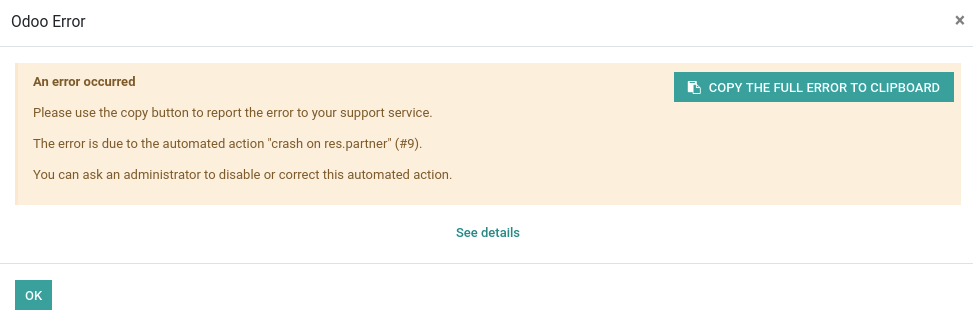
When an error occurs during the evaluation of an automated action, add to the regular traceback dialog:
- for all users:
- the fact this is an automated action which is failing, along with its name and ID,
- for non-admins:
- an explanation to tell they can contact an administrator to disable or correct the automated action,
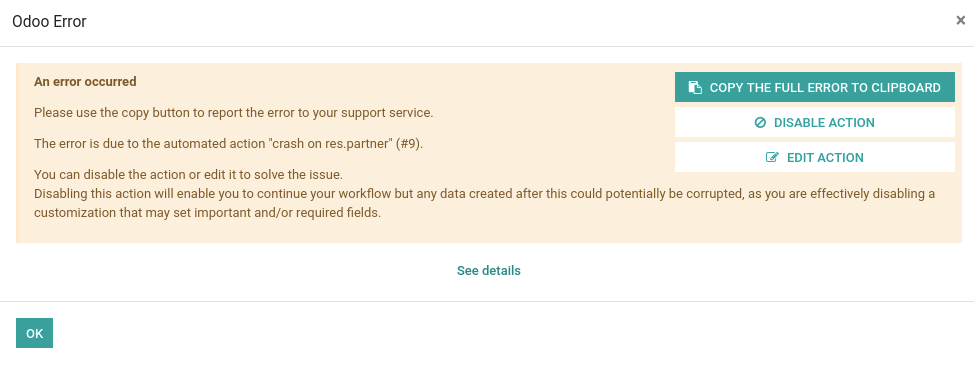
- for admins:
- a `disable action` button, writing `False` on the `active` field of the automated action,
- an `edit action` button, which redirects to the automated action form in order to edit it,
- an explanation about the consequences of disabling an automated action,
This takes the ideas of #41855, but:
- do not require a new wizard model nor a new in-database view (and can therefore potentially be merged in stable),
- put the action buttons inside the dialog alert content div, instead of next to the "OK" button,
- the user directly has the explanations of the consequences of disabling an automated action inside the first dialog, before hitting the scary button "disable action". In #41855, the user has to click on the button "Disable action" before knowing what it actually does, before having a second dialog with an explanation of the consequences.
Regular users:
Administrators:
One thing I am not a big fan of is the fact I had to edit
`addons/web/static/src/js/services/crash_manager.js`
to be able to pass kwargs to the `ErrorDialog` so one can override `web.CrashManager` and do stuff with what is passed to this kwargs (options), as I do here in `_add_postmortem_action` to pass the automated action name, id, ... and use it in the inherited template in `addons/base_automation/static/src/xml/crash_manager.xml`.
I am not happy with:
- the fact I had to do it,
- the naming "options" may be reserved for js specific stuff, need the advise of the JS framework team.
Forward-Port-Of: odoo/odoo#44465
Forward-Port-Of: odoo/odoo#42481time.clock is deprecated since python 3.3 and no longer exists in python 3.8 time.process_time was introduced in python 3.3 Replace "is" by "==" as this produces a SyntaxWarning in python 3.8 Fixes odoo/odoo#41313 Forward-Port-Of: odoo/odoo#44332
Original PR description
time.clock is deprecated since python 3.3 and no longer exists in python 3.8
time.process_time was introduced in python 3.3

Replace "is" by "==" as this produces a SyntaxWarning in python 3.8

Fixes odoo/odoo#41313

Forward-Port-Of: odoo/odoo#44332
Issue If month - 1 or month - 2 are in the previous year, the filter is incorrect. ex: Date = Jan. 2020, Filter = Dec. 2019 => last_year__last_month = 2018-12 instead 2019-12 Cause If date is 2020-01-20 Selecting December => adding param "last_month" Selecting 2019 => adding param "last_year" Applying "last_month" => date become 2019-12-01 Applying "last_year" => date become 2018-12-01 Solution Detect the right year to activ
Original PR description
Issue

    If month - 1 or month - 2 are in the previous year, the filter is
    incorrect.

    ex: Date = Jan. 2020, Filter = Dec. 2019
        => last_year__last_month = 2018-12 instead 2019-12

Cause

    If date is 2020-01-20

    Selecting December => adding param "last_month"
    Selecting 2019 => adding param "last_year"

    Applying "last_month" => date become 2019-12-01
    Applying "last_year" => date become 2018-12-01

Solution

    Detect the right year to activate by default
    when a month is selected and no year is selected.
    With that solution it is not possible to get records in Jan. 2020
    or in Dec. 2019 only for instance but the global functioning
    of date filters stays the same as before.

OPW-2169528

Co-authored-by: Jason Van Malder <jvm@odoo.com>

Forward-Port-Of: odoo/odoo#44092- In an e-commerce with automatic invoice setted; - Buy something as public user; - Pay the order; Before this commit, the client didn't receive the invoice confirmation email. opw-2176506 Forward-Port-Of: odoo/odoo#44449 Forward-Port-Of: odoo/odoo#44396
Original PR description
- In an e-commerce with automatic invoice setted;
- Buy something as public user;
- Pay the order;

Before this commit, the client  didn't receive the invoice confirmation
email.

opw-2176506

Forward-Port-Of: odoo/odoo#44449
Forward-Port-Of: odoo/odoo#44396
Archived or deleted products shouldn't be counted in the comparison
widget count anymore.

The current behavior did only reset the cookie (and the count) when
products were added/removed from the comparison, but didn't consider
the case when the products currently in the cookie weren't all existing/valid.

Fixes #44049


--
I confirm I have signed the CLA and read the PR guidelines at www.odoo.com/submit-pr

Forward-Port-Of: odoo/odoo#44309
Original PR description
Archived or deleted products shouldn't be counted in the comparison widget count anymore. The current behavior did only reset the cookie (and the count) when products were added/removed from the comparison, but didn't consider the case when the products currently in the cookie weren't all existing/valid. Fixes #44049 -- I confirm I have signed the CLA and read the PR guidelines at www.odoo.com/submit-pr Forward-Port-Of: odoo/odoo#44309
The following steps will reproduce the issue: 1. Activate invoicing in the pos config 2. Start a new session 3. Switch browser to offline mode (or stop the odoo server) 4. Make an order 5. Invoice the order during payment 6. Validate 7. Error shows (which is okay) 8. The problem is that the receipt screen is not shown after validation. The intended behavior is that the receipt screen will show with an additional Print Invoice button above the receipt. The problem is caused by wron
Original PR description
The following steps will reproduce the issue:

1. Activate invoicing in the pos config
2. Start a new session
3. Switch browser to offline mode (or stop the odoo server)
4. Make an order
5. Invoice the order during payment
6. Validate
7. Error shows (which is okay)
8. The problem is that the receipt screen is not shown after validation.
The intended behavior is that the receipt screen will show with
an additional Print Invoice button above the receipt.

The problem is caused by wrong signature of the thrown error
when the `_save_to_server` is called. The signature understood by
the error handlers is the one by `error` and not by `reason`.

See `_handleFailedPushForInvoice` which is the main consumer of the
error thrown by the `_save_to_server` call.


--
I confirm I have signed the CLA and read the PR guidelines at www.odoo.com/submit-pr

Forward-Port-Of: odoo/odoo#44355
Use the 'Volume' decimal precision on all `volume` fields.

Complement of commit c1a5221ba212ae4099c21beb56451447b03016b7

opw-2185374

Description of the issue/feature this PR addresses:

Current behavior before PR:

Desired behavior after PR is merged:


--
I confirm I have signed the CLA and read the PR guidelines at www.odoo.com/submit-pr

Forward-Port-Of: odoo/odoo#44446
Original PR description
Use the 'Volume' decimal precision on all `volume` fields. Complement of commit c1a5221ba212ae4099c21beb56451447b03016b7 opw-2185374 Description of the issue/feature this PR addresses: Current behavior before PR: Desired behavior after PR is merged: -- I confirm I have signed the CLA and read the PR guidelines at www.odoo.com/submit-pr Forward-Port-Of: odoo/odoo#44446
Linked to issue: https://github.com/odoo/odoo/issues/43745 At slide creation, as image_1920 was in readonly mode in form view when type is video, document or presentation, the field was not sent in value to the create. There is no reason to set this field readonly. If the user want to modify the thumbnail, that his responsibility. This commit remove the readonly flag for slide.image_1920 field to allow computed thumbnail to be saved at slide creation. Task ID: 2182638 Forward-Por
Original PR description
Linked to issue: https://github.com/odoo/odoo/issues/43745

At slide creation, as image_1920 was in readonly mode in form view when type is
video, document or presentation, the field was not sent in value to the create.

There is no reason to set this field readonly. If the user want to modify the
thumbnail, that his responsibility.

This commit remove the readonly flag for slide.image_1920 field to allow
computed thumbnail to be saved at slide creation.

Task ID: 2182638

Forward-Port-Of: odoo/odoo#44405
Some elements like the file input are not compatible with selection.
Since there is no reliable way of figuring out if the element is
compatible or not we will simply try catch it.

--
I confirm I have signed the CLA and read the PR guidelines at www.odoo.com/submit-pr

Forward-Port-Of: odoo/odoo#43637
Original PR description
Some elements like the file input are not compatible with selection. Since there is no reliable way of figuring out if the element is compatible or not we will simply try catch it. -- I confirm I have signed the CLA and read the PR guidelines at www.odoo.com/submit-pr Forward-Port-Of: odoo/odoo#43637
When the multi-location is enabled, in the stock picking form, when
the picking is unlocked, we can't modify move lines in the wizard,
due to a bad readonly attribute which doesn't take in account
'is_locked' field.

Forward-Port-Of: odoo/odoo#44416
Forward-Port-Of: odoo/odoo#44360
Original PR description
When the multi-location is enabled, in the stock picking form, when the picking is unlocked, we can't modify move lines in the wizard, due to a bad readonly attribute which doesn't take in account 'is_locked' field. Forward-Port-Of: odoo/odoo#44416 Forward-Port-Of: odoo/odoo#44360
Steps to reproduce:
- install pos
- install the hebrew language and set it as preferred language
- start a pos session with the virtual keyboard option activated
- try to search a product

Previous behavior:
the keyboard keys are reversed

Current behavior:
the keyboard keys are not reversed

opw-2171278

Forward-Port-Of: odoo/odoo#44307
Original PR description
Steps to reproduce: - install pos - install the hebrew language and set it as preferred language - start a pos session with the virtual keyboard option activated - try to search a product Previous behavior: the keyboard keys are reversed Current behavior: the keyboard keys are not reversed opw-2171278 Forward-Port-Of: odoo/odoo#44307
Subcontractor and active are in the same section. Would be great
to avoid that since they don't are related at all.

Task: 2187181

Forward-Port-Of: odoo/odoo#44361
Original PR description
Subcontractor and active are in the same section. Would be great to avoid that since they don't are related at all. Task: 2187181 Forward-Port-Of: odoo/odoo#44361
`AccessError` requires the argument `msg`. Therefore, even if this error
is catched, we need to provide one, otherwise a `TypeError` is raised.

opw-2183184

Description of the issue/feature this PR addresses:

Current behavior before PR:

Desired behavior after PR is merged:


--
I confirm I have signed the CLA and read the PR guidelines at www.odoo.com/submit-pr

Forward-Port-Of: odoo/odoo#44447
Original PR description
`AccessError` requires the argument `msg`. Therefore, even if this error is catched, we need to provide one, otherwise a `TypeError` is raised. opw-2183184 Description of the issue/feature this PR addresses: Current behavior before PR: Desired behavior after PR is merged: -- I confirm I have signed the CLA and read the PR guidelines at www.odoo.com/submit-pr Forward-Port-Of: odoo/odoo#44447
### Description of the issue/feature this PR addresses: Change the representation of the POS NUMBER in the document number, now use 5 digits instead of 4 digits. The law itself said that you can use 4 or 5 digits, but some customers complains that they want 5 (for eg. 00001) because some suppliers reject the invoice if only 4 digits (that is wrong, but suppliers do anything to avoid paying). We've check and AFIP online invoices use 5 digits always. So, to satisfy customers/suppliers and
Original PR description
### Description of the issue/feature this PR addresses:

Change the representation of the POS NUMBER in the document number, now use 5 digits instead of 4 digits.

The law itself said that you can use 4 or 5 digits, but some customers complains that they want 5 (for eg. 00001) because some suppliers reject the invoice if only 4 digits (that is wrong, but suppliers do anything to avoid paying).

We've check and AFIP online invoices use 5 digits always. So, to satisfy customers/suppliers and make code simpler, we think using 5 digits is a better option.

### Current behavior before PR:

Invoices validated that use documents will have a number using 4 padding for the POS Number:
0123-00000001

### Desired behavior after PR is merged:

Invoices validated that use documents will have a number using 5 padding for the POS Number:
00123-00000001


--
I confirm I have signed the CLA and read the PR guidelines at www.odoo.com/submit-pr

Forward-Port-Of: odoo/odoo#43879
To be able to flash the partition on which the IoT Box is executed, we must create a third partition and install an OS there to be able to boot on it and flash the partition of the IoT Box - Creation of the third partition - Raspbian download and checksum verification - Installation of Raspbian on the third partition - Download the IoT image on the Raspbian partition and check the checksum - Reboot on the Raspbian partition - Installation of the IoT imag
Original PR description
To be able to flash the partition on which the IoT Box is executed,
    we must create a third partition and install an OS there to be able
    to boot on it and flash the partition of the IoT Box

    - Creation of the third partition
    - Raspbian download and checksum verification
    - Installation of Raspbian on the third partition
    - Download the IoT image on the Raspbian partition and check the checksum
    - Reboot on the Raspbian partition
    - Installation of the IoT image on the second partition
    - Reboot on the IoT partition
    - Cleaning and deleting the third partition

    Task: 2161955

Forward-Port-Of: odoo/odoo#43591- When rendering a website page, exceptions might happens. If so, an error page is displayed, to do so we create a new psyscopg cursor to read the view in database and render it. But if the current (failed) transaction was holding a lock, the new cursor might have to wait for this lock to be released further down the line. However, this will only happen after the request is done (and in fact it won't happen). As a result, the current thread/worker is frozen u
Original PR description
- When rendering a website page, exceptions might happens.
    If so, an error page is displayed, to do so we create
    a new psyscopg cursor to read the view in database and render it.

    But if the current (failed) transaction was holding a lock, the new
    cursor might have to wait for this lock to be released further
    down the line. However, this will only happen after the
    request is done (and in fact it won't happen). As a result, the
    current thread/worker is frozen until its timeout is reached.

    So rolling back the transaction will release any potential lock
    and, since we are in a case where an exception was raised, the
    transaction shouldn't be committed in the first place.
--
I confirm I have signed the CLA and read the PR guidelines at www.odoo.com/submit-pr

Forward-Port-Of: odoo/odoo#43933
Forward-Port-Of: odoo/odoo#42880When a tag has a very long name, on a screen too narrow, the sidebar overflows outside of the screen and a horizontal scrollbar appears. By allowing the tags to wrap, the overflow does not occur any more, excepted if there is a very long word. In that case, we truncate it. Same goes in the short blog post template, excepted that the parent's width is already specified. Steps to reproduce it on a runbot: 1. Enable the side bar on the blog 2. Add two tags on any blog post: - `Donaud
Original PR description
When a tag has a very long name, on a screen too narrow, the sidebar overflows outside of the screen and a horizontal scrollbar appears.

By allowing the tags to wrap, the overflow does not occur any more, excepted if there is a very long word. In that case, we truncate it.

Same goes in the short blog post template, excepted that the parent's width is already specified.

Steps to reproduce it on a runbot:
1. Enable the side bar on the blog
2. Add two tags on any blog post:
   - `Donaudampfschifffahrtselektrizitätenhauptbetriebswerkbauunterbeamtengesellschaft`
   - `I know that this is such an extremely long name to call a simple blog post tag`

Forward-Port-Of: odoo/odoo#44206
…nvoice creation Steps to reproduce: - install sales, intrastat_sale, l10n_be_intrastat - go to sales > products > create a product with a country of origin - go to sales > quotations > create - add the product previously created to the quotation and save - add the optional column "Product Country" to the invoice view Previous behavior: the field intrastat_product_origin_country_id is not set on invoice creation Current behavior: the field is set and displayed properly opw-21
Original PR description
…nvoice creation

Steps to reproduce:
- install sales, intrastat_sale, l10n_be_intrastat
- go to sales > products > create a product with a country of origin
- go to sales > quotations > create
- add the product previously created to the quotation and save
- add the optional column "Product Country" to the invoice view

Previous behavior:
the field intrastat_product_origin_country_id is not set on
invoice creation

Current behavior:
the field is set and displayed properly

opw-2184291

Forward-Port-Of: odoo/enterprise#8110
invoice_id is replaced with mov_id from saas-12.4

show the error when l10n_es_real_estates module is installed and click on Mod 347 report
you can check more detailed error here https://pastebin.com/sKesCnUd

Forward-Port-Of: odoo/enterprise#8100
Original PR description
invoice_id is replaced with mov_id from saas-12.4 show the error when l10n_es_real_estates module is installed and click on Mod 347 report you can check more detailed error here https://pastebin.com/sKesCnUd Forward-Port-Of: odoo/enterprise#8100
Steps to reproduce the bug: - Let's consider a customer C with an invoice with due date = two weeks ago - Let's consider the current company CO with one followup level FL with due days = 7 and print a letter checked - C reached FL, the last followup level - Go to followup reports and select C - Click on actions > Process followups - A letter is printed and C has now no followup level to process - Re-select C and Click on actions > Process follow ups
Original PR description
Steps to reproduce the bug: - Let's consider a customer C with an invoice with due date = two weeks ago - Let's consider the current company CO with one followup level FL with due days = 7 and print…
Steps to reproduce the bug:

    - Let's consider a customer C with an invoice with due date = two weeks ago
    - Let's consider the current company CO with one followup level FL with due days = 7
    and print a letter checked
    - C reached FL, the last followup level
    - Go to followup reports and select C
    - Click on actions > Process followups
    - A letter is printed and C has now no followup level to process
    - Re-select C and Click on actions > Process follow ups
    - In function _execute_followup_partner in module account_reports_followup, no followup line is
       found(in function get_followup_level).
    - The next_action_date(followup_date) is updated with the current date (from function
    _execute_followup_partner)
    - Re-select C and Click on actions > Process follow ups
    - A followup line is found from function get_followup_level because current_date <=followup_date

Bug:

    So a letter was printed for C even if C had no followup level to process.

opw:2165363

Forward-Port-Of: odoo/enterprise#7862
Forward-Port-Of: odoo/enterprise#7810Steps to reproduce the bug: - Let's consider that Project and Planning Apps are installed - Let's consider that it's the 28/01/2019 - Select a project P and click on Planning - Create a slot S with 4 hours in P for just one day in the future - Go back to the overview of P Bug: The 4 hours of S was not in the forecasted column in the overview of P opw:2176769 Forward-Port-Of: odoo/enterprise#7980
Original PR description
Steps to reproduce the bug:

- Let's consider that Project and Planning Apps are installed
- Let's consider that it's the 28/01/2019
- Select a project P and click on Planning
- Create a slot S with 4 hours in P for just one day in the future
- Go back to the overview of P

Bug:

The 4 hours of S was not in the forecasted column in the overview of P

opw:2176769

Forward-Port-Of: odoo/enterprise#7980
**Problem fixed:** **For partner X** Invoice of 121€ -> 100€ + VAT 21€ in 2018. Pay 100€ in 2018 and 21€ in 2019. Invoice of 121€ --> 100€ + VAT 21€ in 2019. Pay 100€ in 2019 and 21 in 2020. **For partner Y** Invoice of 121€ -> 100€ + VAT 21€ in 2018. Pay 100€ in 2018 and 21€ in 2019. Generate 281.50 slip for partner X. Error is raised. This error is raised because the sql queries in method to compute "paid amount" didn't take account of partner ID. Thus, when you wanted 281.50
Original PR description
**Problem fixed:**

**For partner X**
Invoice of 121€ -> 100€ + VAT 21€ in 2018.
Pay 100€ in 2018 and 21€ in 2019.
Invoice of 121€ --> 100€ + VAT 21€ in 2019.
Pay 100€ in 2019 and 21 in 2020.

**For partner Y**
Invoice of 121€ -> 100€ + VAT 21€ in 2018.
Pay 100€ in 2018 and 21€ in 2019.

Generate 281.50 slip for partner X. Error is raised.
This error is raised because the sql queries in method
to compute "paid amount" didn't take account of partner ID.
Thus, when you wanted 281.50 slip for a specific partner,
we tried to get the currency of partner Y. But we didn't provide this
partner in recordset.

Forward-Port-Of: odoo/enterprise#8068
Steps to reproduce:
- install helpdesk
- go to any ticket and duplicate it
- save the duplicated record and move it to another stage

Previous behavior:
the sla status tags on the duplicated records are duplicated
twice and there is a traceback
TypeError: '<' not supported between instances of 'bool'
and 'datetime.datetime'

Current behavior:
no traceback and the sla are applied properly

opw-2184196

Forward-Port-Of: odoo/enterprise#8059
Original PR description
Steps to reproduce: - install helpdesk - go to any ticket and duplicate it - save the duplicated record and move it to another stage Previous behavior: the sla status tags on the duplicated records are duplicated twice and there is a traceback TypeError: '<' not supported between instances of 'bool' and 'datetime.datetime' Current behavior: no traceback and the sla are applied properly opw-2184196 Forward-Port-Of: odoo/enterprise#8059