Friday, March 27, 2020
8 changes · master
Enhancements to existing features
Users with elevated access can now switch back to normal user mode directly from the web interface. This makes temporary admin work safer and more convenient by reducing the chance of staying in powerful superuser mode longer than needed.
Original PR description
Description of the issue/feature this PR addresses: `web` module, Follow Up on https://github.com/odoo/odoo/issues/27402 Current behavior before PR: No Option to Leave `Superuser` mode and add Become normal user again Desired behavior after PR is merged: 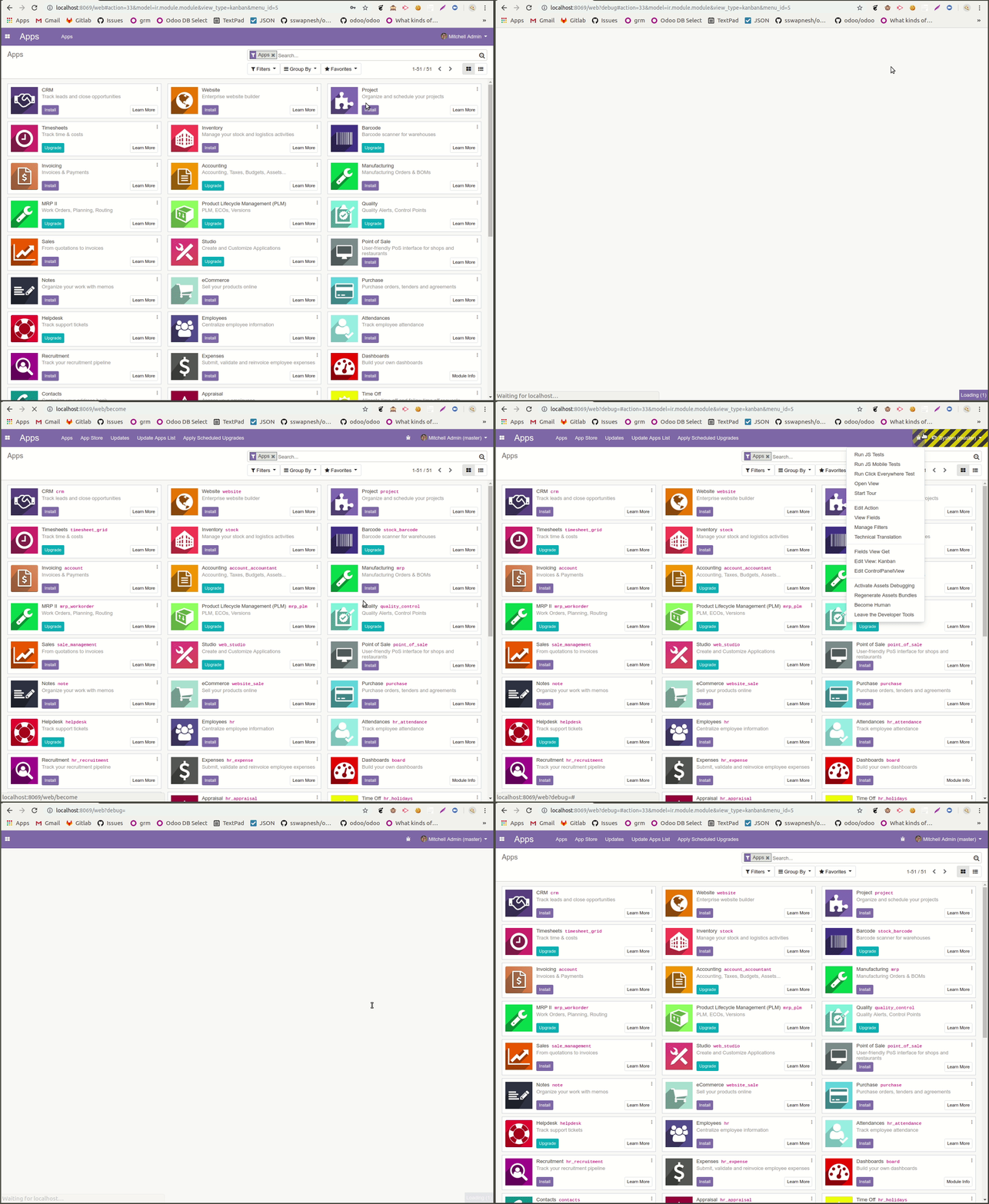 -- I confirm I have signed the CLA and read the PR guidelines at www.odoo.com/submit-pr
The accounting accrual wizard now shows users a preview of the journal entries it will create before they proceed. Accrual processing is also changed to avoid modifying already posted entries, creating separate journal entries instead for a clearer and more audit-friendly accounting flow.
Original PR description
Task [2168064](https://www.odoo.com/web?#id=2168064&action=333&active_id=967&model=project.task&view_type=form&cids=1&menu_id=4720)
[IMP] account: preview in accrual wizard
Show a preview of what will be done when using the accrual wizard

[IMP] account: accrual never change account on the fly
Before this commit, the account on the original line was replaced by the
accrual account. This could be problematic for hashed journals. Instead
of having 2 different behaviors for hashed/non hashed journals, we
decided to always create 2 journal entries, which is also more academic:
* We don't replace something on an entry that has been posted
* We don't end up with taxes on the accrual account
* Accountants are used to do it this way

--
I confirm I have signed the CLA and read the PR guidelines at www.odoo.com/submit-pr
Website guidance tours can now be assigned an order so they start predictably instead of randomly. This improves consistency for users following onboarding or feature walkthroughs, with initial sequencing added for project-related tours.
Original PR description
Before this commit, tours were activated in a non deterministic way and there was
no way to control the order.

Now there is a `sequence` key in the options dict (i.e. the second parameters of
`tour.register`) which will determine the tour sequence order, the lowest being
first and going upward. Unsequenced tours will behave as before with no particular
order.

Also added a sequence on a few tours.

Task 2191192

Enterprise: https://github.com/odoo/enterprise/pull/9472
Closes https://github.com/odoo/odoo/issues/33405
This update adds support for area units, filling a gap where Odoo already supported length and volume measurements. Businesses can now manage products, pricing, or operations that rely on square measurements more consistently.
Original PR description
We have leng (m), volume (m^3), but not area (m²).

@nim-odoo


--
I confirm I have signed the CLA and read the PR guidelines at www.odoo.com/submit-pr
This change lets businesses mark certain accounts so they are left out of tax closing entries. It helps produce more accurate tax closing results when some deductible or non-deductible amounts should not be included.
Original PR description
Description of the issue/feature this PR addresses: Some account should not taken into account during the tax closing entry (We should be able to exclude some account When there is dudictible vs non-deductibe part)

Current behavior before PR: All accounts are taken into account during the tax closing entry

Desired behavior after PR is merged: if an account is marked as 'is_tax_closing_entry', it is excluded from tax closing entry


--
I confirm I have signed the CLA and read the PR guidelines at www.odoo.com/submit-pr
Accounting teams can now exclude selected tax repartition lines from tax closing entries. This helps ensure tax closing calculations match specific reporting or compliance needs without manual workarounds.
Financial reports now show the Hierarchy and Subtotals option automatically when account groups exist for the selected company, instead of requiring manual setup per report. This makes reports clearer when grouping is available and avoids showing hierarchy controls when they cannot be used.
Original PR description
Task [2065440](https://www.odoo.com/web#id=2065440&action=333&active_id=967&model=project.task&view_type=form&menu_id=4720) PURPOSE ========= To have to choose financial report by financial report if…
Task [2065440](https://www.odoo.com/web#id=2065440&action=333&active_id=967&model=project.task&view_type=form&menu_id=4720)

PURPOSE
=========

To have to choose financial report by financial report if we want or not the Hierarchy and Subtotals option is casse pied.
We want a smarter way to display a hierarchy in financial reports, when it's needed..

SPECIFICATIONS
===============

* Remove "Enable the hierarchy option" (field hierarchy_option) from account.financial.html.reports http://tinyurl.com/yxr4xk4e

* Always display the Hierarchy and Subtotals option for financial reports if there are account groups  http://tinyurl.com/y4ybr25j
    * The only way to have a Hierarchy is to create account groups
    * If there isn't account groups for the selected company, hide the option (as we can't get hierarchy without account groups)

* Remove the "not so smart automatic Hierarchy and Subtotals structure" for the accounts which are not mapped to an account group
* Instead display a hierarchy when there are groups, otherwise display accounts without hierarchyMy Shifts now shows open shifts that match the user's default planning roles. If a user has no default planning roles, they will continue to see all open shifts, making shift discovery more relevant without reducing visibility for unconfigured users.
Original PR description
On "My Shifts", show the Open Shifts matching the default planning roles
of the current user, or all if they don't have a default planning roles.

TaskID: 2212344