Tuesday, March 16, 2021
25 changes · master
Enhancements to existing features
The campaign field previously labeled as website-related has been renamed to better reflect that campaigns can be created automatically from multiple sources, not just websites. This improves clarity for users and administrators without changing how UTM campaign filtering or behavior works.
Original PR description
This PR renames the field is_website into is_auto_campaign
for clarity purpose.

The is_website field always meant that the campaigns were created automatically
in some instances. Could be created automatically via a link to the website
or even by simply creating a marketing campaign in marketing_automation.

is_auto_campaign is a better name as it does not wrongly imply that only
the website can generate campaigns automatically, while also pointing
out the automatic generation mechanism.

The utm campaigns behaviour rests unchanged.

--
I confirm I have signed the CLA and read the PR guidelines at www.odoo.com/submit-pr
Salary contracts now store wage amounts that include holidays, making compensation figures easier to reuse consistently. This helps reduce recalculation needs and supports more reliable payroll-related reporting.
Features or functions removed from Odoo
Old website templates that have not been used since 2015 were removed. This reduces maintenance clutter without affecting current website functionality.
Original PR description
Usages of the kanban and kanban_contains templates were removed back
in 2015 (4feb82dd490a6e140dc4956cf8009f3484601d95).
Miscellaneous changes
Overwrite config flag is not working when passed thru command line (--i18n-overwrite). Probably previous Odoo version was expecting 'overwrite' flag in context but not in V14.0. Infact now _update_translations has got a named argument 'overwrite': ```python def _update_translations(self, filter_lang=None, overwrite=False): ``` Overwriting translations thru Odoo settings backend "Import Translations" is working fine because following another flow. -- I confirm I have signed the CLA an
Original PR description
Overwrite config flag is not working when passed thru command line (--i18n-overwrite).
Probably previous Odoo version was expecting 'overwrite' flag in context but not in V14.0.
Infact now _update_translations has got a named argument 'overwrite':

```python
def _update_translations(self, filter_lang=None, overwrite=False):
```
Overwriting translations thru Odoo settings backend "Import Translations" is working fine because following another flow.

--
I confirm I have signed the CLA and read the PR guidelines at www.odoo.com/submit-pr

Forward-Port-Of: odoo/odoo#67401
Before this commit, the first step of the tour pos_basic_order waited for something not precise enough, and that was true before anything was loaded After this commit, we wait both the the webClient and the Chrome to be loaded with a more specific selector Runbot issue fingerprint: bd10372b7db10c743f38312470ff528a74bfe9dcc0348a3e1f0bd47f55764378 Runbot issue id: 1357 Description of the issue/feature this PR addresses: Current behavior before PR: Desired behavior after PR is me
Original PR description
Before this commit, the first step of the tour pos_basic_order
waited for something not precise enough, and that was true
before anything was loaded

After this commit, we wait both the the webClient and the Chrome to be loaded
with a more specific selector

Runbot issue fingerprint: bd10372b7db10c743f38312470ff528a74bfe9dcc0348a3e1f0bd47f55764378
Runbot issue id: 1357

Description of the issue/feature this PR addresses:

Current behavior before PR:

Desired behavior after PR is merged:


--
I confirm I have signed the CLA and read the PR guidelines at www.odoo.com/submit-pr

Forward-Port-Of: odoo/odoo#67875
[FIX] web: display remove buttons in embedded list --- Since the quick edit behaviour has added, embedded lists can be edited and display the "add a line" buttons in a readonly form but not display the remove buttons This commit fixes that inconsistency. [FIX] web: quick edit when add a line on m2m --- Before this commit, clicking on the "add a line" button on a many2many list field directly opened the dialog without switching the form into edit mode. This is incorrect, the form ne
Original PR description
[FIX] web: display remove buttons in embedded list
---
Since the quick edit behaviour has added, embedded lists
can be edited and display the "add a line" buttons  in a
readonly form but not display the remove buttons
This commit fixes that inconsistency.

[FIX] web: quick edit when add a line on m2m
---
Before this commit, clicking on the "add a line" button on a
many2many list field directly opened the dialog without
switching the form into edit mode.
This is incorrect, the form needs to switch into edit mode otherwise
the selected records are saved and cannot be discarded.

Forward-Port-Of: odoo/odoo#67595
Before this commit, when ribbon was at the right corner of a product card, this ribbon hid the buttons in list view. 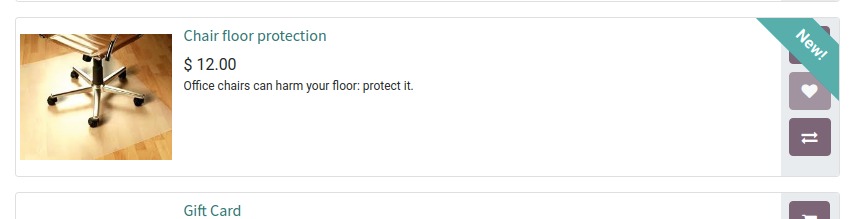 After this commit, in list view, we place the ribbon on the left to avoid this bug. There was no better solution to fix this in stable. task-2466120 Description of the issue/feature this
Original PR description
Before this commit, when ribbon was at the right corner of a product card, this ribbon hid the buttons in list view.  After this commit, in list view, we place the ribbon on the left to avoid this bug. There was no better solution to fix this in stable. task-2466120 Description of the issue/feature this PR addresses: Current behavior before PR: Desired behavior after PR is merged: -- I confirm I have signed the CLA and read the PR guidelines at www.odoo.com/submit-pr Forward-Port-Of: odoo/odoo#66618
[FIX] web: refit the forum UI biography

Fixing forum's biography pop-up width & overflow.

task-2276974

--
I confirm I have signed the CLA and read the PR guidelines at www.odoo.com/submit-pr

Forward-Port-Of: odoo/odoo#66049
Original PR description
[FIX] web: refit the forum UI biography Fixing forum's biography pop-up width & overflow. task-2276974 -- I confirm I have signed the CLA and read the PR guidelines at www.odoo.com/submit-pr Forward-Port-Of: odoo/odoo#66049
[FIX] stock: fix `_get_matching_bom` The`picking_type_id` of the stock.rule wasn't take in account in the search of BoM because the `_get_matching_bom` with a empty `self`. fix it by call on the current rule. [FIX] stock: fix replenishement with archived RR If some RR is archived and where the a forecasted demand on the warehouse location, it Replenishement will crash will due to the SQL constraint. It happens because the archived RR aren't take in account in `_get_orderpoint_actio
Original PR description
[FIX] stock: fix `_get_matching_bom`

The`picking_type_id` of the stock.rule wasn't take in account in
the search of BoM because the `_get_matching_bom` with a empty `self`.
fix it by call on the current rule.

[FIX] stock: fix replenishement with archived RR

If some RR is archived and where the a forecasted demand on the
warehouse location, it Replenishement will crash will due to the
SQL constraint. It happens because the archived RR aren't take in
account in `_get_orderpoint_action` and the method will try to
create a orderpoint with same product + location which
lead to trigger the SQL constraint `product_location_check`.

Also avoid filtered in for loop to improve performance and use the
read_group instead.

task-2439019

Forward-Port-Of: odoo/odoo#67263
### Description of the issue/feature this PR addresses: Notas de Venta documents (AFIP codes 5, 10, 16 and 55) can not be used. ### Current behavior before PR: Notas de Venta documents can be activated but they do not appear when selecting the document type in the bill form view. ### Desired behavior after PR is merged: Notas de Venta documents can be activated and they now appear when selecting the document type in the bill form view. If we validate them we will have a valid docu
Original PR description
### Description of the issue/feature this PR addresses: Notas de Venta documents (AFIP codes 5, 10, 16 and 55) can not be used. ### Current behavior before PR: Notas de Venta documents can be…
### Description of the issue/feature this PR addresses:

Notas de Venta documents (AFIP codes 5, 10, 16 and 55) can not be used.

### Current behavior before PR:

Notas de Venta documents can be activated but they do not appear when selecting the document type in the bill form view.

### Desired behavior after PR is merged:

Notas de Venta documents can be activated and they now appear when selecting the document type in the bill form view. If we validate them we will have a valid document that has proper document code prefix.

IMPORTANT: This documents are used to register vendor bills, this one will not be active for generate customer invoices because the way and the conditions yo generate this type of documents is different are not supported by the moment.

NOTE: Also notice a problem with the csv escape characters when try to display on a editor or github, Fixed by adding the proper escape for documents of type COMPROBANTES COMPRA/CONSIGNACION

--
I confirm I have signed the CLA and read the PR guidelines at www.odoo.com/submit-pr

Forward-Port-Of: odoo/odoo#67793
Forward-Port-Of: odoo/odoo#67593
link tracker tries to get title from HTML, but the url may be not an html page or too big html to process. It's a waste of bandwidth, but may alos lead to a Server Memory Limit error. As a solution, make HEAD request and don't proceed to GET request if it's not an html page or it's too big STEPS: - Have a standard database with link_tracker and mass_mailing. - Create a new mass mail MM - Add a link to a large file in MM Mail Body - Click "SEND" - Go to Settings / Technical / Auto
Original PR description
link tracker tries to get title from HTML, but the url may be not an html page
or too big html to process. It's a waste of bandwidth, but may alos lead to a
Server Memory Limit error.

As a solution, make HEAD request and don't proceed to GET request if it's not an
html page or it's too big

STEPS:

- Have a standard database with link_tracker and mass_mailing.
- Create a new mass mail MM
- Add a link to a large file in MM Mail Body
- Click "SEND"
- Go to Settings / Technical / Automation / Scheduled Actions
- Open the "Process Mass Mailing Queue" or "Email Marketing: Process queue"
- Click "RUN MANUALLY"

---

opw-2457640

Description of the issue/feature this PR addresses:

Current behavior before PR:

Desired behavior after PR is merged:


--
I confirm I have signed the CLA and read the PR guidelines at www.odoo.com/submit-pr

Forward-Port-Of: odoo/odoo#67785
Forward-Port-Of: odoo/odoo#67736
When syncing Odoo with Google Calendar, if one Odoo event has an attendee with an email address that contains some uppercases, it will lead to undesirable behavior. To reproduce the error: (Need contacts) 1. Create an event - In attendees, adds a new partner PA - The email must be valid and the local-part must contain at least one uppercase (e.g. demoUP@example.com) 2. Sync with Google 3. On Google Calendar, update the event (e.g., add a description) 4. Refresh Odoo Cale
Original PR description
When syncing Odoo with Google Calendar, if one Odoo event has an attendee with an email address that contains some uppercases, it will lead to undesirable behavior. To reproduce the error: (Need…
When syncing Odoo with Google Calendar, if one Odoo event has an
attendee with an email address that contains some uppercases, it will
lead to undesirable behavior.

To reproduce the error:
(Need contacts)
1. Create an event
    - In attendees, adds a new partner PA
        - The email must be valid and the local-part must contain at
least one uppercase (e.g. demoUP@example.com)
2. Sync with Google
3. On Google Calendar, update the event (e.g., add a description)
4. Refresh Odoo Calendar

Error: The event is updated, but the attendee has been removed.

The error comes from both Google and Odoo.

Google Calendar is not case sensitive: if a user creates a meeting on
Google Calendar and adds an email address with uppercases, the latter
will be converted with lowercases. (On step 3, on Google Calendar, we
can notice that PA's email address does not contain any uppercase)

On Odoo side, when syncing the event, the module checks the attendees.
To do so, it uses email addresses from Odoo (with uppercases) and Google
(without uppercases):
https://github.com/odoo/odoo/blob/12cb76bdfe7a5affb7580485473be71cfa37658a/addons/google_calendar/models/calendar.py#L105-L114
`email` comes from Google and `attendees_by_emails` from Odoo.
Therefore, it will consider the email as a new attendee and will run
`find_or_create` to get the associated partner. However, this method
uses the normalized email address to find the partner:
https://github.com/odoo/odoo/blob/12cb76bdfe7a5affb7580485473be71cfa37658a/addons/mail/models/res_partner.py#L50-L63
Thus, `find_or_create` returns PA and adds the latter to the attendees
and partners (even if PA already exists in partners and attendees).
After that, the module checks if some attendees must be removed:
https://github.com/odoo/odoo/blob/12cb76bdfe7a5affb7580485473be71cfa37658a/addons/google_calendar/models/calendar.py#L115-L120
Again, `odoo_attendee` comes from Odoo and `email` comes from Google.
Therefore, it will remove PA from attendees and partners.
This explains why:
- PA has disappeared
- No partner has been created for the email address without uppercase

This fix suggests to normalize the Odoo email addresses each they are
compared with the Google ones.

OPW-2464863

Forward-Port-Of: odoo/odoo#67826Description of the issue/feature this PR addresses: Target Branch 12.0: https://github.com/odoo/odoo/pull/66673 -- I confirm I have signed the CLA and read the PR guidelines at www.odoo.com/submit-pr Forward-Port-Of: odoo/odoo#67371
Original PR description
Description of the issue/feature this PR addresses:

Target Branch 12.0: https://github.com/odoo/odoo/pull/66673

--
I confirm I have signed the CLA and read the PR guidelines at www.odoo.com/submit-pr

Forward-Port-Of: odoo/odoo#67371
Don't show image button since it is only usable by internal users and
forum users might be public users.

This is a forward-port of saas-12.3 with a5b82e286 and as said in this
commit, currently to add an image only drag and drop is working.

opw-2470720

Forward-Port-Of: odoo/odoo#67893
Original PR description
Don't show image button since it is only usable by internal users and forum users might be public users. This is a forward-port of saas-12.3 with a5b82e286 and as said in this commit, currently to add an image only drag and drop is working. opw-2470720 Forward-Port-Of: odoo/odoo#67893
odoo/odoo#48362 updated the systems to not show the "Statistics" section when it's empty, but left an @invisible in leading to not never showing the section at all (which technically does avoid showing an empty section).

Remove the `invisible` attribute, since the section is now added by `digest` it should never be hidden. This doesn't fix existing views tho.

Forward-Port-Of: odoo/odoo#67867
Original PR description
odoo/odoo#48362 updated the systems to not show the "Statistics" section when it's empty, but left an @invisible in leading to not never showing the section at all (which technically does avoid showing an empty section). Remove the `invisible` attribute, since the section is now added by `digest` it should never be hidden. This doesn't fix existing views tho. Forward-Port-Of: odoo/odoo#67867
Allow creating a journal entry in the past after having changed the
sequence number reset on newer sequences.

opw-[2445559](https://www.odoo.com/web#cids=1&id=2445559&model=project.task)


--
I confirm I have signed the CLA and read the PR guidelines at www.odoo.com/submit-pr

Forward-Port-Of: odoo/odoo#65008
Original PR description
Allow creating a journal entry in the past after having changed the sequence number reset on newer sequences. opw-[2445559](https://www.odoo.com/web#cids=1&id=2445559&model=project.task) -- I confirm I have signed the CLA and read the PR guidelines at www.odoo.com/submit-pr Forward-Port-Of: odoo/odoo#65008
Forward-Port-Of: odoo/odoo#67925
Forward-Port-Of: odoo/odoo#67663
Original PR description
Forward-Port-Of: odoo/odoo#67925 Forward-Port-Of: odoo/odoo#67663
When adding a variant product, if the option "Variant Grid Entry" is enabled, it will reset the delivery date of each purchase order line. To reproduce the error: (Use demo data) 1. In Settings, enable "Variant Grid Entry" 2. Create an RfQ 3. Add the field "Delivery Date" to purchase order line view 4. Add a basic product (e.g. "[FURN_6666] Acoustic Bloc Screens") - Keep its delivery date in mind 5. Add a variant product (e.g. "[E-COM12] Conference Chair (CONFIG)") Error: The d
Original PR description
When adding a variant product, if the option "Variant Grid Entry" is enabled, it will reset the delivery date of each purchase order line. To reproduce the error: (Use demo data) 1. In Settings,…
When adding a variant product, if the option "Variant Grid Entry" is
enabled, it will reset the delivery date of each purchase order line.

To reproduce the error:
(Use demo data)
1. In Settings, enable "Variant Grid Entry"
2. Create an RfQ
3. Add the field "Delivery Date" to purchase order line view
4. Add a basic product (e.g. "[FURN_6666] Acoustic Bloc Screens")
    - Keep its delivery date in mind
5. Add a variant product (e.g. "[E-COM12] Conference Chair (CONFIG)")

Error: The delivery date of the first purchase order line has changed
for no reason. Moreover, suppose that in step 4, the user defines a
specific date: the latter will still be changed after the variant
product is added.

When adding a product, the delivery date of the purchase order and its
lines are recomputed. However, an override of `onchange` ensures that
the new delivery date of the lines will be ignored if the `onchange`
concerns the field `order_line`. Here is the problem: when using the
Variant Grid Entry, the `onchange` concerns the field `grid`. As a
result, the new delivery dates are kept. This explains the creation of
`_must_delete_date_planned` in this fix.

However, when returing the result of an `onchange` linked to `grid`, the
result contains the existing lines (on client side) and the new ones
(from the Variant Grid Entry). If the field `date_planned` of the new
lines is deleted, the client will raise an error when it tries to render
these dates (it has no information about their value). Since existing
lines are of the form `(0, <client_id>, <values>)`, this fix only
deletes `date_planned` field for lines with <client_id> defined.

OPW-2454164

Forward-Port-Of: odoo/odoo#67916Issue - Install "Sales" - Switch to "German" language - Go to Sales -> Products -> Products - Try to filter on "Public Price" is equal to "2,3" Not possible to add decimal point at the end (only in middle of number). Cause In case the 'decimal point' in DB params is not a dot '.', the filter input will be considered as 'text' instead of 'number'. In case of the 'number' type; HTML do already a pre and post processing, including managing decimal point (who, for exam
Original PR description
Issue - Install "Sales" - Switch to "German" language - Go to Sales -> Products -> Products - Try to filter on "Public Price" is equal to "2,3" Not possible to add decimal point at the end (only in…
Issue

	- Install "Sales"
	- Switch to "German" language
	- Go to Sales -> Products -> Products
	- Try to filter on "Public Price" is equal to "2,3"

	Not possible to add decimal point at the end (only in middle of number).

Cause

	In case the 'decimal point' in DB params is not a dot '.',
	the filter input will be considered as 'text' instead of
	'number'.

	In case of the 'number' type; HTML do already a pre and post
	processing, including managing decimal point (who, for example,
	is not included in ev.target.value if last char is a '.').
	Unfortunalty, the library is not well working with other
	language and not supported on every browser, therefore,
	must use own logic.

	In case of a 'text' type, the value will be send to 'parseFloat'
	,then `parseNumber` will replace decimal_point by dot (also one the
	issues since needed to display decimal_point according user language),
	and `Number` will remove the decimal_point in case of '123,' -> '123',
	and therefore we will not be able to write decimals ( apart of adding
	the decimal point after writing the whole number...)

Solution

	If user input is well parsed, store parsed value in condition.value and
	set condition.displayedValue to the input value (and so without updating
	input value). Else, replace input value with previous value (who should
	be the condition.DisplayedValue).


opw-2463441

Forward-Port-Of: odoo/odoo#67767
To find the main element which scrolls in the page, we rely on its
height being as tall as the body one. The code which checks that was
making a comparison between a rounded value and floating value without
care of the rounding errors that might induce, especially on zoomed
pages.

Fixes https://github.com/odoo/odoo/issues/63306

Forward-Port-Of: odoo/odoo#67961
Original PR description
To find the main element which scrolls in the page, we rely on its height being as tall as the body one. The code which checks that was making a comparison between a rounded value and floating value without care of the rounding errors that might induce, especially on zoomed pages. Fixes https://github.com/odoo/odoo/issues/63306 Forward-Port-Of: odoo/odoo#67961
With a lot of lines in aged receivable, when unfold all is pressed, the `search_read` was loading the `display_name` of every `account.move` in the result query (to populate the `move_id` field with `[id, display_name]` tuples).

As these names are not used to generate the report, we can safely avoid loading them, which will generate the report faster, and avoid potential `MemoryErrors` when too many items are loaded.

OPW-2467527

Forward-Port-Of: odoo/enterprise#16951
Original PR description
With a lot of lines in aged receivable, when unfold all is pressed, the `search_read` was loading the `display_name` of every `account.move` in the result query (to populate the `move_id` field with `[id, display_name]` tuples). As these names are not used to generate the report, we can safely avoid loading them, which will generate the report faster, and avoid potential `MemoryErrors` when too many items are loaded. OPW-2467527 Forward-Port-Of: odoo/enterprise#16951
currency_id must be always set on account_move_line. If not, currency_id and amount_currency are resetting to the company's currency.

Forward-Port-Of: odoo/enterprise#16765
Original PR description
currency_id must be always set on account_move_line. If not, currency_id and amount_currency are resetting to the company's currency. Forward-Port-Of: odoo/enterprise#16765
Before this commit, a link existed to go to the documentation for
Planning. However, this documentation will be removed soon.

That's why this commit hides this link to the documentation of the
planning app.

Forward-Port-Of: odoo/enterprise#17017
Original PR description
Before this commit, a link existed to go to the documentation for Planning. However, this documentation will be removed soon. That's why this commit hides this link to the documentation of the planning app. Forward-Port-Of: odoo/enterprise#17017
Forward-Port-Of: odoo/enterprise#17063
Original PR description
Forward-Port-Of: odoo/enterprise#17063