Thursday, July 22, 2021
10 changes · master
Enhancements to existing features
Common action buttons across Odoo now include keyboard shortcuts, making frequent tasks faster to complete. This improves day-to-day productivity, especially in accounting and related workflows, by reducing reliance on mouse clicks in forms and pop-up dialogs.
Original PR description
Define `data-hotkey` on most used action buttons.

TaskID: 2588233

--
I confirm I have signed the CLA and read the PR guidelines at www.odoo.com/submit-pr
The task analysis report now offers clearer measures, labels, filters, and grouping options so teams can better understand project task performance. Users can analyze ratings, assignment and closure times, deadlines, customers, sales orders, tags, and team ownership more easily.
Original PR description
Purpose of the commit is to improve the task analysis report
of the project app.

So in this commit, done the below changes:
- removed the # of tasks measure
- added the following measures: Rating Value (/5), Working Hours to Assign, Working Hours to Close
- removed the # from the labels of the following measures: Days to Deadline, Working Days to Assign,Working Days to Close
- renamed 'task title' into 'task'
- added a search on tag_ids and sale_order_id
- added the following filters:
   -My Projects + My Team's Projects
   -My Tasks + My Team's Tasks (rename 'Unassigned' into 'Unassigned Tasks')
   -Starred
   -Tasks Late + Tasks in Overtime
- added the following group bys: task, customer, kanban state, assignment date, creation date, deadline, last stage update

TaskID: 2508645
Project and field service task forms now keep key project and tag details visible and have cleaner button ordering. Calendar year-view popovers now show event times correctly, making schedules easier to read.
Original PR description
project:
project_id and tag_ids should be always visible in fsm mode too. also re-sequence the task form view buttons and added class for the proper xpath.
web:
Currently, the time in popover of the year view does not appear with the title due to record.allday is undefined instead of false

So in this commit, check if record.allday is not exist then display the time in front of the title instead of after the title.

TaskID: 2502339
Pricelist entries now prevent invalid date ranges, such as an end date that is the same as or earlier than the start date. This helps businesses avoid pricing rules that could behave unexpectedly or be applied incorrectly.
Original PR description
Description of the issue/feature this PR addresses: date range validation for pricelist item records in pricelist Current behavior before PR: It is possible to enter invalid date ranges (start and…
Description of the issue/feature this PR addresses: date range validation for pricelist item records in pricelist Current behavior before PR: It is possible to enter invalid date ranges (start and end date) for pricelist items in pricelists. 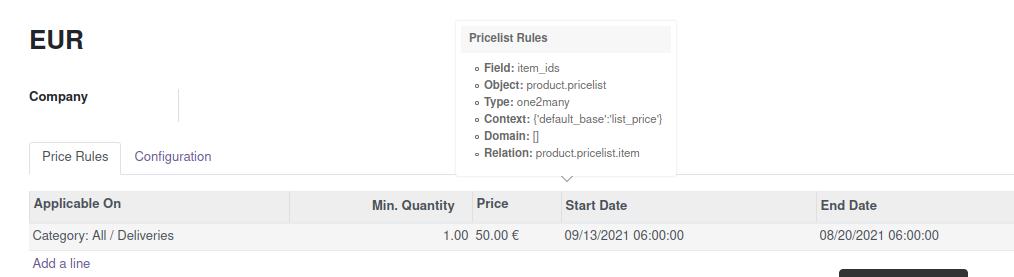 Desired behavior after PR is merged: It is not possible to enter invalid date ranges for pricelist items in pricelists. Valid date ranges: - end date is set - start date is set - end date is greater than start_date 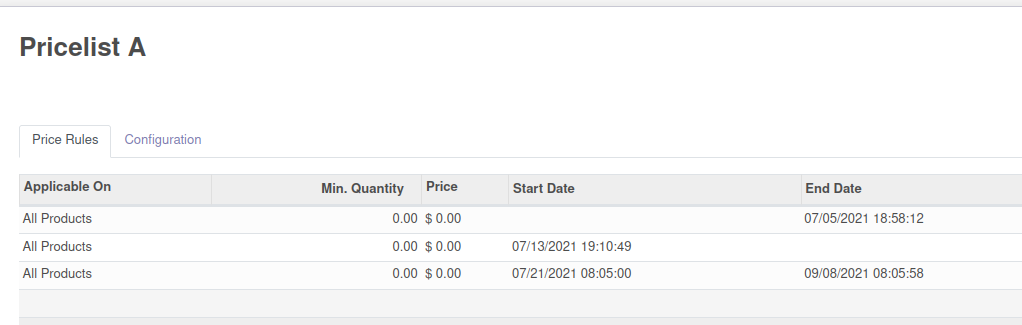 Invalid date ranges: - start date is greater than end date - start date and end date are the same 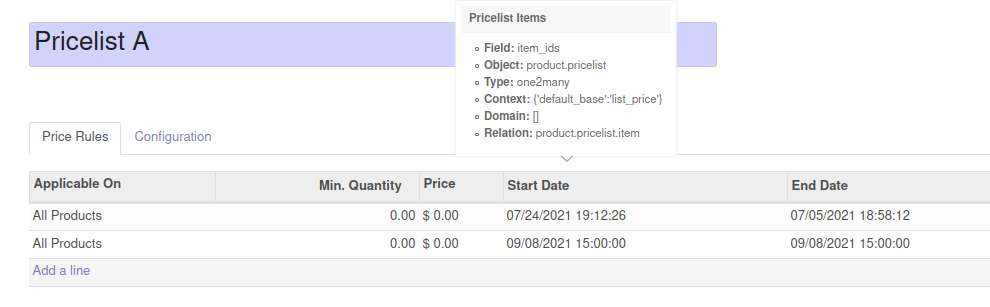 Validation message example: 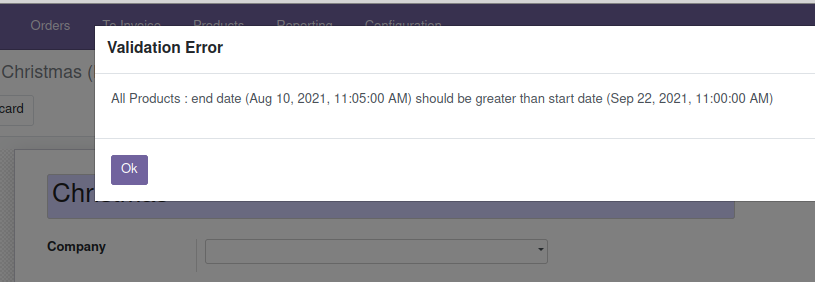 -- I confirm I have signed the CLA and read the PR guidelines at www.odoo.com/submit-pr
Users can now edit fields shown with the remaining days display while in edit mode, using the usual date or date-time picker. In read-only mode, the field continues to show easy labels such as today, yesterday, or the time difference, making dates both clear to read and easier to update.
Original PR description
PURPOSE
remaining_days widget is not editable and it just shows information based on value like, Today, Yesterday, Tommorrow etc, when we change mode to edit it should have date/datetime picker so that user can change value of the widget.

SPEC
remaining_days widget will display date/datetime picker in edit mode and in readonly mode it will display delta between the value of the field and today.

TASK 2507961


--
I confirm I have signed the CLA and read the PR guidelines at www.odoo.com/submit-pr
This update improves the Field Service app experience across task forms, kanban boards, maps, calendars, and lists. Teams get clearer task details, better scheduling visibility, cleaner popovers, and more consistent displays for assignments, tags, hours, and worksheets.
Original PR description
Purpose of the commit is to do the generic improvment So in this commit done the below changes: 1) Form view: - move the 'planned date' field below the 'parent task' one - switch the overlapping…
Common action buttons across many Odoo business apps now support keyboard shortcuts. This makes frequent workflows faster and easier to navigate, especially in forms and pop-up windows where users repeatedly add, save, or cancel actions.
Original PR description
Resolved issues and error corrections
Kanban boards now behave correctly when filters are active, including when cards are moved between columns or search criteria change. This prevents misleading column progress bars and refreshes emptied filtered columns, giving users a more accurate view of their work.
Original PR description
Task 2454209

Description of the issue/feature this PR addresses:

Current behavior before PR:

Desired behavior after PR is merged:


--
I confirm I have signed the CLA and read the PR guidelines at www.odoo.com/submit-pr
Purpose of the commit is to do the generic improvment

So in this commit done the below changes:
1) Form view:
 - move the 'planned date' field below the 'parent task' one
 - switch the overlapping tasks and recurring tasks warning from place
 - overlapping tasks warning: indicate 'task' instead of 'tasks' when the nb=1
 - reorder the stat buttons

2) Kanban view:
 - display tags below the partner
 - the remaining hours tag should have the same design and visibility conditions than project tasks
 - update the quickcreate
   - change the name placeholder to: "e.g. Boiler replacement"
   - use the avatar widget for the user_id field
 - the start hour should be formatted as 10:00 PM instead of 22:00 PM
 - display the project below the name of the task

3) Map view:
 - added the worksheet template
 - move the date below the phone
 - Map popover added the project and assigned to field below the name

4) Calendar view:
 - display non working days (according to the company calendar) and global time off in grey
 - the city, zip and phone fields should only be visible if set
 - Calendar popover
   - add the worksheet template field below the name; only visible if set
   - remove the city and the zip fields and display the full address of the customer below his name instead
   - add the tags field below the phone one; only visible if set
 - Calendar popover
   - add the project and assigned to field below the name
   - use the avatar widget for the 'assigned to' field
 - open the day mode by default in the 'my tasks' menus
 - year mode: display the start hour in front of the name
 - display the avatar of the user in the right side panel

5) List view:
 - use the time widget for the 'hours spent' field
 - move the company field to the right of the user_id one
 - add the 'initially planned hours' field to the right of the 'end date' one
 - remove the deadline field
 - add the following fields on the right of the 'hours spent' one: remaining hours, remaining hours on SO, sub-tasks hours spent, total hours, progress
 - add the following fields to the right of the tags field: kanban state, stage
 - the sub-tasks hours spent and total hours fields should only be visible if the 'sub-tasks' feature is enabled in the settings of Project
 - add the priority field on the left of the name
   - display it in the same style as the products list view
 - the project and customer fields should be optional
 - the following fields should be displayed by default: project, assigned to, worksheet template, customer, start date, end date, next activity, tags, company
 - the following fields should be hidden by default: priority, initially planned hours, hours spent, remaining hours, remaining hours on SO, sub-tasks hours spent, total hours, progress, kanban state, stage
 - sort tasks by start date (from least to most recent)

6) Gantt view:
 - Gantt view popover
   - add the worksheet template field above the partner one; only visible if set
   - rename 'stop date' into 'end date'
   - add the project and assigned to fields at the top
 - indicate 'x other tasks for this employee at the same time' in red, below the tags field when applicable
 - open the day mode by default in the 'my tasks' menus

7) Activities view:
 - the list view and filters displayed when scheduling an activity should be
   the ones from field service instead of project

8) Graph/pivot views:
 - the list view opened when clicking on an element of the graph/pivot views should indicate 'Tasks' instead of 'Project Tasks'
 - group by project instead of project > stage in the 'to invoice' menu
 - Enable the sample data for the pivot/graph view of the worksheer template.

9) REPORTING:
 - remove the following measures: # days to deadline, # of tasks
 - remove the # in the following labels: working days to assign, working days to close
 - pivot view: group by project > assigned to

10) CONFIGURATION:
 - in settings
   - change the description of the 'time and material' feature to: "Keep track of the products used for your tasks, and invoice your time and material to your customers"
   - change the description of the 'extra quotations' feature to: "Create new quotations directly from your tasks"
 - project form view: add a 'worksheet template' label
 - project kanban view: use the same design as in the project app
 - project kanban view: display the name of the default worksheet template in muted, below the name
 - worksheets
   - change 'template name' into 'name'
   - display the 'create' button in form view
   - rename the action into 'Worksheet Templates'
   - remove the graph and pivot view from worksheet template menu

11) MISC:
 - add products: add a burger menu on hover with a button to edit the product
 - the 'worksheets' feature should be enabled by default when Studio is installed
 - my tasks > tasks menu: add a group by start date > day by default

TaskID: 2502339
Define `data-hotkey` on most used action buttons.

TaskID: 2588233
Report download errors are now shown in a helpful dialog instead of displaying a technical traceback. This lets users follow a redirect to fix missing company information, such as Belgian VAT details, and retry the export with less disruption.
Original PR description
Try to download a report file but knowing that the controller will raise an Exception

in the case of l10n_be: Tax Report
Remove the VAT number on the Belgian Company and export the report as xml

Before this commit, the error was not well handled, i.e. a traceback was shown

After this commit, a Redirect dialog is shown, giving the possibility to the user to go
on the company's list view and change some company's fields.

Description of the issue/feature this PR addresses:

Current behavior before PR:

Desired behavior after PR is merged:


--
I confirm I have signed the CLA and read the PR guidelines at www.odoo.com/submit-pr
This fix restores the progress message shown while users upload media in the web editor. Users can once again see upload status clearly, reducing confusion during image or file uploads.
Original PR description
In odoo/odoo#72675 the new services were made available in the frontend,
and calls to the legacy notification services were redirected to the new
notification service. However, some of the behaviour of the legacy
notification service was not replicated in the new one, like the ability
to pass an HTML element to use inside the notification.

While html content can be passed, it is cloned, meaning that the DOM of
the element cannot be manipulated by the caller, which is what was being
done to show progress during media upload.

Although the upload progress toast looks like a notification, it's
hardly a standard notification and adds a lot of behaviour, because
manipulating DOM directly when it is managed by owl cannot be done
safely, it has been decided to simply make it its own widget separate
from the notification service, which can manipulate its own DOM freely.

task-2607393