Thursday, August 5, 2021
19 changes · master
Resolved issues and error corrections
The project overview now checks directly whether a project has timesheets instead of calculating total timesheet time first. This reduces unnecessary processing and should make the project kanban view load more efficiently when timesheets are present.
Original PR description
Before this commit, we use the `total_timesheet_time` field in the kanban
view of `project.project` to know if there are some timesheets into each
project. The problem is this field is computed and its compute method
take more execution time than just use `timesheet_ids` field to allow if
a project has at least one timesheet.

This commit replaces the using of `total_timesheet_time` field by the
`timesheet_ids` field in project kanban view to check if the project
has at least one timesheet.

--
I confirm I have signed the CLA and read the PR guidelines at www.odoo.com/submit-pr
The mail menu unread counter now excludes channels that are not pinned, preventing hidden or inactive conversations from inflating the displayed unread count. This helps users see a more accurate notification number for the conversations they actively keep in their menu.
Original PR description
Follow up of a795a2f7d8fd57120db5cafdc9f1929e118b0626
Adyen payment notifications will now always receive the expected confirmation response, even if Odoo encounters a validation issue while processing them. This avoids exposing internal error details in Adyen's backend and keeps payment notification handling cleaner and more consistent.
Original PR description
Before this commit, when the webhook was processing a notification,
if there was a validation error, the webhook was sending the whole
traceback to Adyen. Since this was still a response code 200, this
didn't cause any problem, but we could see the response received in
the Adyen backend.

So we will now catch any validation error and send `'[accepted]'` in the
response.
This fix ensures that when an Italian SdI Coop electronic invoice is sent successfully, the system reports the success correctly. This helps prevent follow-up processes or user feedback from treating a successful send as uncertain or failed.
Original PR description
…d return {'success': True}

Description of the issue/feature this PR addresses:

Current behavior before PR:

Desired behavior after PR is merged:


--
I confirm I have signed the CLA and read the PR guidelines at www.odoo.com/submit-prPoint of Sale users now see an error message when they select a loyalty reward for a free product that is not available in the POS. This prevents silent failures and helps staff understand why the reward cannot be applied.
Original PR description
This PR addresses multiple small changes for the POS according the task 2492631 which are:

- Added an `ErrorPopup` when selecting a free product which is not loaded in the POS as a reward.
- ~~Properly load the rewards and rules of the corresponding (only one) Loyalty Programs~~ (fixed in 0fbdbd082209f8f408c1a88f969a4fab26fd1589)


Related community PR: https://github.com/odoo/odoo/pull/72793
Miscellaneous changes
Due to the following PR: https://github.com/odoo/odoo/pull/70092 the download icon wasn't present in the document viewer. We had to do this to avoid crash in mobile apps (Android and iOS). But even if there are multiple other ways to download file, some of our users are used to use pdf js download button that was previously hidden. So in this commit, we restore it on desktop as we can now correctly handle the error on Android tablets and hide this button on iOS tablets. Note that p
Original PR description
Due to the following PR: https://github.com/odoo/odoo/pull/70092 the download icon wasn't present in the document viewer. We had to do this to avoid crash in mobile apps (Android and iOS). But even…
Due to the following PR: https://github.com/odoo/odoo/pull/70092
the download icon wasn't present in the document viewer.
We had to do this to avoid crash in mobile apps (Android and iOS).

But even if there are multiple other ways to download file, some
of our users are used to use pdf js download button that was previously
hidden.

So in this commit, we restore it on desktop as we can now correctly
handle the error on Android tablets and hide this button on iOS tablets.

Note that pdfjs button is not needed on mobile as we doesnt' have
attachements preview on small screens. Another button is available
when you open the file.

Steps to reproduce:
- Go to Accounting
- Customer Invoices
- After printing it once, the download icon wasn't present in pdfjs preview

Description of the issue/feature this PR addresses:

Current behavior before PR:

Desired behavior after PR is merged:


--
I confirm I have signed the CLA and read the PR guidelines at www.odoo.com/submit-pr

Forward-Port-Of: odoo/odoo#74624
Forward-Port-Of: odoo/odoo#74606
Issue: When making a return for a transfer, the precision_rounding was taken from the UoM of the product given in the transfer, but the quantity was taken in the UoM of the product defined on its form Steps to reproduce : 1) Create a UoM "Hundreds", rounding precision 1 (has to be different than "Dozen"), Bigger than the reference Unit of Measure, ratio 100 2) Create a test product with "Dozen" as UoM 3) Inventory > Operations > Transfers > Create 4) Add test product, Demand=2, Unit o
Original PR description
Issue: When making a return for a transfer, the precision_rounding was taken from the UoM of the product given in the transfer, but the quantity was taken in the UoM of the product defined on its…
Issue: When making a return for a transfer, the precision_rounding was taken from the UoM of the product given in the transfer, but the quantity was taken in the UoM of the product defined on its form

Steps to reproduce :
 1) Create a UoM "Hundreds", rounding precision 1 (has to be different than "Dozen"), Bigger than the reference Unit of Measure, ratio 100
 2) Create a test product with "Dozen" as UoM
 3) Inventory > Operations > Transfers > Create
 4) Add test product, Demand=2, Unit of Measure=Hundreds
 5) Validate
 6) Create a Return for that transfer
 7) Quantity is set to 17 Dozen instead of 16.67

 Why is that a bug:
 The quantity to return is `quantity = stock_move.product_qty` (in UoM of the product form) but the rounding is made with rounding precision `stock_move.product_uom.rounding` (in UoM of the line of the transfer) which can be different in case of manual transfer creation for example

opw-2543304

Forward-Port-Of: odoo/odoo#74496
Forward-Port-Of: odoo/odoo#74435
--
I confirm I have signed the CLA and read the PR guidelines at www.odoo.com/submit-pr

Forward-Port-Of: odoo/odoo#71847
Original PR description
-- I confirm I have signed the CLA and read the PR guidelines at www.odoo.com/submit-pr Forward-Port-Of: odoo/odoo#71847
When using several certification together, there was an issue
when we tried to modify the quantity of an orderline.
The "this" context was lost and we were unable to call the function
anymore.

In order to fix that, we bind the context when calling the function.

--
I confirm I have signed the CLA and read the PR guidelines at www.odoo.com/submit-pr

Forward-Port-Of: odoo/odoo#74162
Original PR description
When using several certification together, there was an issue when we tried to modify the quantity of an orderline. The "this" context was lost and we were unable to call the function anymore. In order to fix that, we bind the context when calling the function. -- I confirm I have signed the CLA and read the PR guidelines at www.odoo.com/submit-pr Forward-Port-Of: odoo/odoo#74162
When a purchase order is generated via the scheduler with a reordering rule, the gst_treatment is not retrieved

opw-2540090

Forward-Port-Of: odoo/odoo#74645
Forward-Port-Of: odoo/odoo#74569
Original PR description
When a purchase order is generated via the scheduler with a reordering rule, the gst_treatment is not retrieved opw-2540090 Forward-Port-Of: odoo/odoo#74645 Forward-Port-Of: odoo/odoo#74569
**Description of the issue/feature this PR addresses:** - create a pos config with a printer - connect the printer - open a new pos session with an user with only group 'group_pos_user' - click on the printer --> An error is raise If you a user with only group 'group_pos_user' it is not possible to print the sale details. Because during the compute_all of the taxe, account.account.tag need read access. This PR allow 'group_pos_user' to print the sale details. Current behavior before
Original PR description
**Description of the issue/feature this PR addresses:** - create a pos config with a printer - connect the printer - open a new pos session with an user with only group 'group_pos_user' - click on the printer --> An error is raise If you a user with only group 'group_pos_user' it is not possible to print the sale details. Because during the compute_all of the taxe, account.account.tag need read access. This PR allow 'group_pos_user' to print the sale details. Current behavior before PR: 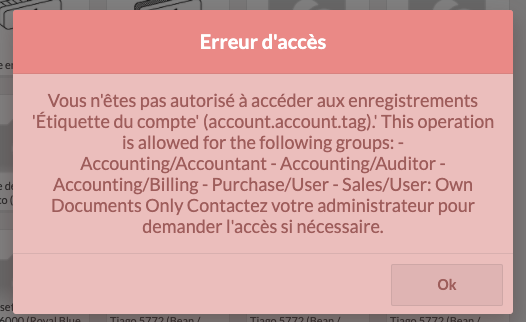 @pimodoo @caburj -- I confirm I have signed the CLA and read the PR guidelines at www.odoo.com/submit-pr Forward-Port-Of: odoo/odoo#74320
Description of the issue/feature this PR addresses:

Current behavior before PR:

Desired behavior after PR is merged:


--
I confirm I have signed the CLA and read the PR guidelines at www.odoo.com/submit-pr

Forward-Port-Of: odoo/odoo#74705
Original PR description
Description of the issue/feature this PR addresses: Current behavior before PR: Desired behavior after PR is merged: -- I confirm I have signed the CLA and read the PR guidelines at www.odoo.com/submit-pr Forward-Port-Of: odoo/odoo#74705
Before this commit, the popover would be displayed on top of the clicked element if that element was a menu in a dropdown. Indeed, there was not enough room for the popover to be shown correctly, as the available space was the dropdown itself. Note that if there was more than 2 menus in the dropdown, it would work correctly as it would create enough space for the popover to be shown bellow or above the menu. Step to reproduce: - Create a menu and a submenu - Click on the menu, it op
Original PR description
Before this commit, the popover would be displayed on top of the clicked
element if that element was a menu in a dropdown.
Indeed, there was not enough room for the popover to be shown correctly, as the
available space was the dropdown itself.

Note that if there was more than 2 menus in the dropdown, it would work
correctly as it would create enough space for the popover to be shown bellow or
above the menu.

Step to reproduce:
- Create a menu and a submenu
- Click on the menu, it opens a dropdown with the submenu inside it
- Click on the submenu, the popover position is wrong

Forward-Port-Of: odoo/odoo#74747
Description of the issue/feature this PR addresses:

Current behavior before PR:

Desired behavior after PR is merged:


--
I confirm I have signed the CLA and read the PR guidelines at www.odoo.com/submit-pr

Forward-Port-Of: odoo/odoo#74640
Original PR description
Description of the issue/feature this PR addresses: Current behavior before PR: Desired behavior after PR is merged: -- I confirm I have signed the CLA and read the PR guidelines at www.odoo.com/submit-pr Forward-Port-Of: odoo/odoo#74640
This pull request does not include enough information about changed files or commits to identify a specific business impact. It appears to be a work-in-progress item, so the expected user-facing change is not yet clear.
Fix traceback introduced by:
https://github.com/odoo/enterprise/commit/60fee9884649af097ba496dbeb532912d4a50c7c

opw-2616467

Forward-Port-Of: odoo/enterprise#20079
Forward-Port-Of: odoo/enterprise#20069
Original PR description
Fix traceback introduced by: https://github.com/odoo/enterprise/commit/60fee9884649af097ba496dbeb532912d4a50c7c opw-2616467 Forward-Port-Of: odoo/enterprise#20079 Forward-Port-Of: odoo/enterprise#20069
All accounting reports did not have the proper styles and indentation when exported to PDF

Task 2613444

Forward-Port-Of: odoo/enterprise#20074
Original PR description
All accounting reports did not have the proper styles and indentation when exported to PDF Task 2613444 Forward-Port-Of: odoo/enterprise#20074
When using several certification together, there was an issue
when we tried to modify the quantity of an orderline.
The "this" context was lost and we were unable to call the function
anymore.

In order to fix that, we bind the context when calling the function.

Forward-Port-Of: odoo/enterprise#19811
Original PR description
When using several certification together, there was an issue when we tried to modify the quantity of an orderline. The "this" context was lost and we were unable to call the function anymore. In order to fix that, we bind the context when calling the function. Forward-Port-Of: odoo/enterprise#19811
Related issue: [Odoo issue](https://www.odoo.com/web#action=333&active_id=70&cids=1&id=2532514&menu_id=4720&model=project.task&view_type=form) (see messages, not description) Before coming up with this, I did refresh stats (`VACUUM`) on the database concerned here in order to rule out the possibility of poor statistics being behind the inefficient query plan. When the user tries to open up product template form view, the following query is generated by the orm if the Quality module (`quali
Original PR description
Related issue: [Odoo issue](https://www.odoo.com/web#action=333&active_id=70&cids=1&id=2532514&menu_id=4720&model=project.task&view_type=form) (see messages, not description) Before coming up with…
Related issue: [Odoo issue](https://www.odoo.com/web#action=333&active_id=70&cids=1&id=2532514&menu_id=4720&model=project.task&view_type=form) (see messages, not description)
Before coming up with this, I did refresh stats (`VACUUM`) on the database concerned here in order to rule out the possibility of poor statistics being behind the inefficient query plan.
When the user tries to open up product template form view, the following query is generated by the orm if the Quality module (`quality_control` to be specific) is installed:
```
SELECT COUNT(1) FROM "quality_point" WHERE (
(("quality_point"."active" = TRUE) AND ("quality_point"."company_id" = 1))
AND (
("quality_point"."id" NOT IN (SELECT "quality_point_id" FROM "product_product_quality_point_rel" WHERE "quality_point_id" IS NOT NULL)) OR
("quality_point"."id" IN (SELECT "quality_point_id" FROM "product_product_quality_point_rel" WHERE "product_product_id" IN (12383)))
)
)
AND ("quality_point"."company_id" IS NULL OR ("quality_point"."company_id" in (1)))
```
This query causes Odoo to **hang indefinitely**. I managed to dissect it and find which piece of it exactly makes Odoo hang, here it is:
`("quality_point"."id" NOT IN (SELECT "quality_point_id" FROM "product_product_quality_point_rel" WHERE "quality_point_id" IS NOT NULL))`
and I found it by manually running in psql the following (this will also become the test-query that I'll be running every time I make any changes):
```
SELECT COUNT(1) FROM "quality_point"
WHERE ("quality_point"."id" NOT IN
(SELECT "quality_point_id" FROM "product_product_quality_point_rel" WHERE "quality_point_id" IS NOT NULL));
```
I believe the problem lies with the use of `NOT IN`. According to this [thread](https://wiki.postgresql.org/wiki/Don%27t_Do_This#Why_not.3F_3), `NOT IN` becomes highly inefficient upon reaching certain threshold (ie in case of big enough tables, record-wise). So, to confirm this, I run the following two queries (notice the difference in `LIMIT`):
`SELECT id FROM "quality_point" WHERE ("quality_point"."id" NOT IN (SELECT quality_point_id FROM "product_product_quality_point_rel" LIMIT(2097153)));`
`SELECT id FROM "quality_point" WHERE ("quality_point"."id" NOT IN (SELECT quality_point_id FROM "product_product_quality_point_rel" LIMIT(2097152)));`
and here are explain plans corresponding to these queries:
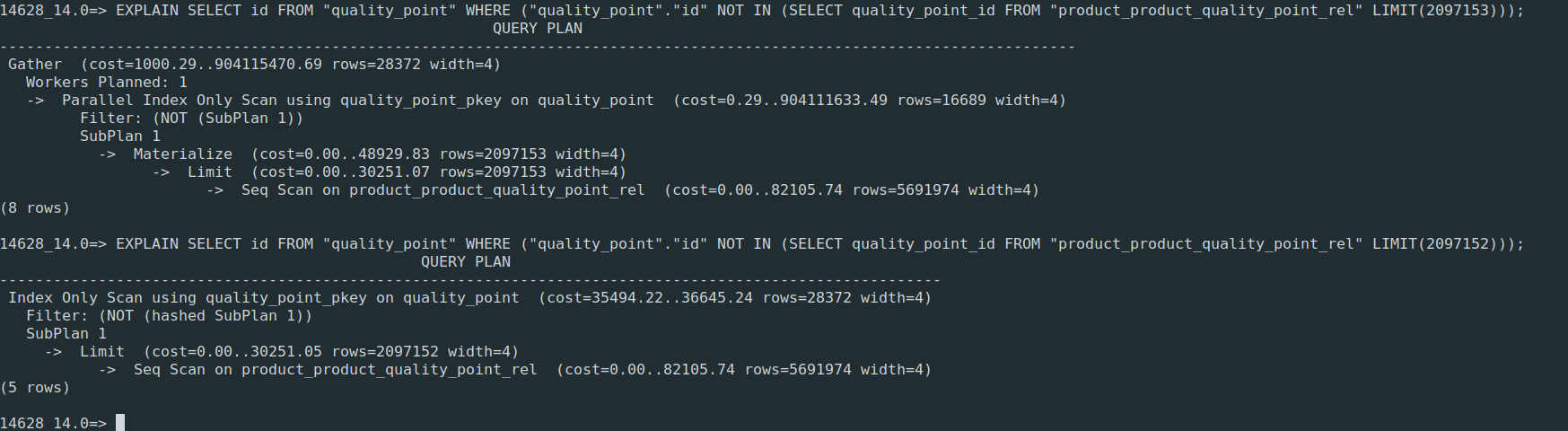
The first query **hangs**, while the second **doesn't**. Explain plan changes when fetching >2097152 records from `product_product_quality_point_rel` (in the case of this particular database). New plan makes the query extremely inefficient, to the point that it's never finished (and therefore makes it impossible to open product template form views for the customer).
So in order to prevent the first query from hanging, I rewrote it to use `NOT EXISTS` instead of `NOT IN`, as suggested [here](https://wiki.postgresql.org/wiki/Don%27t_Do_This#Why_not.3F_3):
`SELECT id FROM "quality_point" WHERE NOT EXISTS (SELECT quality_point_id FROM "product_product_quality_point_rel" WHERE quality_point_id = "quality_point"."id" LIMIT(2097153));`
and bingo, it worked. Now the only thing left was to make Odoo generate a query without the use of `NOT IN`. Initially I thought about modifying `orm/expression.py` to make it prefer using `NOT EXISTS` instead of `NOT IN`, but due to the complexity of orm and me lacking in knowledge, I opted for "tricking" Odoo into generating a different query while still achieving the same result, hence this pr. After this change in `quality.py`, this is how the query looks like:
```
SELECT count(1) FROM "quality_point" WHERE (
(("quality_point"."active" = true) AND ("quality_point"."company_id" = 1))
AND (
("quality_point"."id" in (SELECT "quality_point_id" FROM "product_product_quality_point_rel" WHERE "product_product_id" IN (NULL))) OR
("quality_point"."id" in (SELECT "quality_point_id" FROM "product_product_quality_point_rel" WHERE "product_product_id" IN (12383)))
)
)
AND ("quality_point"."company_id" IS NULL OR ("quality_point"."company_id" in (1)))
```
It doesn't utilize `NOT EXISTS`, but also there is no `NOT IN` anymore and Odoo no longer hangs waiting for this query to finish, so I guess it'll do as well.
Forward-Port-Of: odoo/enterprise#19228