Thursday, July 14, 2022
33 changes · master
Enhancements to existing features
Administrators adding a language from My Preferences or a user profile now see a guided language setup wizard instead of a technical language list. This makes the action clearer and reduces the chance of confusion when enabling new languages.
Original PR description
Step to  reproduce:
- Go to 'My Preference' or User profile as admin
- Click on the world icon to add a language

Old Behaviour:
- Open the technical view of languages

New Behaviour:
- Open a wizard to add a a language

taskid-2774319


--
I confirm I have signed the CLA and read the PR guidelines at www.odoo.com/submit-pr
Odoo now starts several background notification services without waiting for an extra web client readiness signal. This reduces unnecessary startup coordination and makes the bus-based notification infrastructure more reliable for calendar, mail, and related services.
Original PR description
*: calendar, iap_mail.

Now that the bus service is a wowl service, we don't need to wait for
the webclient to be ready before using it. Indeed, the services now
have the bus service as a dependency which means it will always be ready
in time.
The VoIP module now uses the same event naming expected by Odoo's newer interface framework. This reduces reliance on temporary compatibility code and helps prepare VoIP features for future interface updates.
Original PR description
so that it matches the name used by Owl without having to rely on a
compatibility layer. It will be important to adapt some code to WOWL.
The IoT-related services were updated to work with Odoo's newer service environment. This prepares delivery and point-of-sale IoT features for upcoming websocket-based real-time communication improvements, with limited immediate business impact.
Original PR description
In order to ease the PR introducing the websockets in Odoo, the bus service
has to be updated to be a wowl service. This PR takes care of it.

task-2053917

community : https://github.com/odoo/odoo/pull/95824
Resolved issues and error corrections
Survey result badges now appear on the right on standard screens, restoring the intended layout while keeping the mobile-friendly column design. On very small screens, badges stay left-aligned so the results remain readable and easy to navigate.
Original PR description
Before the change added in odoo/odoo#87990 the badges on the result
view were aligned on the right. However, this broke the mobile design.
This was changed to a bootstrap column view but the alignment was lost
in the process.

It is brought back using a text-right alignment, making sure the center
remains clean and the view open and clear enough. However, for very
small screens they are displayed aligned on the left. The column display
is kept.

Task-2908045

--
I confirm I have signed the CLA and read the PR guidelines at www.odoo.com/submit-pr
Miscellaneous changes
Adding a @depend decorator on product_id in the stock_move_line model can trigger a search on stock.move.line.product_id When the number of StockMoveLine reach a million, a simple `SELECT id FROM stock_move_line WHERE product_id = XXX` can take 200ms. When a transfer contains a few hundred StockMoveLine (ex: when dealing with serial numbers), the process of validating it will take a few minutes. Indexing product_id will change the process time back to a few seconds. OPW-2893131 Forward-Po
Original PR description
Adding a @depend decorator on product_id in the stock_move_line model can trigger a search on stock.move.line.product_id
When the number of StockMoveLine reach a million, a simple `SELECT id FROM stock_move_line WHERE product_id = XXX` can take 200ms.
When a transfer contains a few hundred StockMoveLine (ex: when dealing with serial numbers), the process of validating it will take a few minutes.
Indexing product_id will change the process time back to a few seconds.

OPW-2893131

Forward-Port-Of: odoo/odoo#95887
The website theme selector now displays with the intended spacing and styling again. This fixes a visual regression that could make choosing a website theme look inconsistent or less polished.
Original PR description
Since 4f984568e139d8da448018af12ef79005e317cf6, the css theme is not
correctly applied to the website theme selector.

The order in which the css rules were applied without the
'.o_legacy_kanban_view' selector removed a margin from the
kanban_record element.
The database manager forms have been adjusted to display correctly with the newer page layout framework. This helps keep database creation and management screens visually consistent and easier to use after platform updates.
Original PR description
Adapt forms for BS5

--
I confirm I have signed the CLA and read the PR guidelines at www.odoo.com/submit-pr
This fixes a display issue in the Mail app where dropdown menus could appear misaligned after a framework upgrade. Users should see follower and messaging menu options open in the expected position, improving day-to-day usability.
Original PR description
[FIX] mail: dropdown menu not at the right position
Since Bootstrap 5 migration, when we use the OWL `dropdown` component
it must have the class `o-dropdown-menu` and not `dropdown-menu`.

This commit replaces this class and also clean some CSS.

--
I confirm I have signed the CLA and read the PR guidelines at www.odoo.com/submit-pr
This update fixes English grammar in the gift card area. It improves the clarity and professionalism of user-facing text without changing business processes or functionality.
Original PR description
en_US police 👮
This fixes an issue in Odoo Discuss where using the arrow key to edit the most recent message did not work correctly. The change helps users quickly correct their last message without extra clicks, improving day-to-day messaging reliability.
Original PR description
task-2918507
The Expenses Analysis view no longer shows the expense dashboard, keeping the analysis area focused on reporting rather than dashboard actions. This reduces confusion for users reviewing expense data and makes the screen behave as intended.
Original PR description
The expense dashboard was displayed on the Expenses Analysis whilst it
shouldn't have.
This update fixes a grammar issue in the Time Off area to make the wording clearer and more professional. It does not change any business process or functionality, but improves the quality of text users see.
Original PR description
en_US police strikes again 👮♂️
A compatibility issue could prevent some account-related mailed notifications from starting correctly after an underlying messaging service change. This fix updates the affected notification handling so those alerts continue to work reliably.
Original PR description
Some legacy services are still relying on the bus_service as a dependency.
However, this service is now a wowl service which means those services
won't start.
This fix adjusts the layout of buttons on social media kanban cards so they no longer sit too close to the card border. It provides a cleaner, more polished visual presentation for users managing social media records.
Original PR description
Before this commit, the button on the kanban record didn't have a space
between the border of the button and the border of the kanban record.
The Aged Payable report now displays outgoing payment amounts as positive values in standard black text instead of negative red figures. This makes the report easier to read and avoids implying an issue where the negative presentation was only a formatting problem.
Original PR description
In the Aged Payable, amounts are all in red and in negative. It is kind of pointless, we are in a report that specifically reports OUT payments, so all amounts should be in black, and in positive

Signed-off-by: Ruben Gomes <rugo@odoo.com>
This fixes the visual state of indeterminate checkboxes in Odoo Studio after the Bootstrap 5 migration. Users will now see the correct checkbox styling, reducing confusion when configuring or reviewing Studio options.
Original PR description
Since BS5 migration, the style of checkbox don't use a pseudo-element
input (`::before` and `::after`) to render the checkbox customized but
the input it-self.

In the rush of the migration, the following CSS rule was wrongly
adapted:
```css
  .custom-checkbox {
    ...
    &.o_web_studio_checkbox_inactive > input + label:after {
      background-image: url("/web_studio/static/src/img/ui/checkbox_indeterminate.svg");
    }
  }
```Updated a tooltip in the VoIP user settings to make its meaning clearer. This small wording fix helps users better understand the option without changing how the feature works.
The Aged Payable report now displays outgoing payment amounts as positive values in standard black text instead of negative red amounts. This makes the report easier to read and better aligned with its purpose of showing payable amounts.
Original PR description
In the Aged Payable, amounts are all in red and in negative. It is kind of pointless, we are in a report that specifically reports OUT payments, so all amounts should be in black, and in positive

Signed-off-by: Ruben Gomes <rugo@odoo.com>
Stpes to reproduce the bug: - Create a storable product “P1”: - tracking: Serial number - BOM: 1 unit of C1 - Create the MO 1: - produce 1 unit of P1: - Create the SN1 - Create the MO 2: - produce 1 unit of P1: - Create the SN2 - Create an Unbuild order: - Select the MO1 Problem: You have the possibility to select any Serial number linked to the product “P1”, whereas only SNs created in this MO can be selected opw-2834529 -- I
Original PR description
Stpes to reproduce the bug:
- Create a storable product “P1”:
    - tracking: Serial number
    - BOM: 1 unit of C1

- Create the MO 1:
    - produce 1 unit of P1:
        - Create the SN1

- Create the MO 2:
    - produce 1 unit of P1:
        - Create the SN2

- Create an Unbuild order:
   - Select the MO1

Problem:
You have the possibility to select any Serial number linked to the product “P1”, whereas only SNs created in this MO can be selected

opw-2834529


--
I confirm I have signed the CLA and read the PR guidelines at www.odoo.com/submit-pr

Forward-Port-Of: odoo/odoo#95758
Forward-Port-Of: odoo/odoo#94673Steps to reproduce the bug: - Create a storable product “P1” - Tracking: by serial number - BOM: - Component: C1 - Create a storable product “P2” - BOM: - Component: P1 - Create a MO to produce one unit of P1: - serial number: SN1 - Confirm and mark as done - Unbuild the manufactured product - Manufacture the same product using the same serial number again - Create a new MO to produce one unit of “P2”: - Component P1 → select SN1
Original PR description
Steps to reproduce the bug: - Create a storable product “P1” - Tracking: by serial number - BOM: - Component: C1 - Create a storable product “P2” - BOM: - Component: P1 - Create a MO to produce one…
Steps to reproduce the bug:
- Create a storable product “P1”
    - Tracking: by serial number
    - BOM:
        - Component: C1

- Create a storable product “P2”
    - BOM:
        - Component: P1

- Create a MO to produce one unit of P1:
    - serial number: SN1
    - Confirm and mark as done

- Unbuild the manufactured product
- Manufacture the same product using the same serial number again

- Create a new MO to produce one unit of “P2”:
    - Component P1 → select SN1
    - Try to confirm and validate the MO

Problem:
Get User Error: The serial number “SN1” used for component “P1” has already been consumed

We do a search in the `stock.move.line` to find if the SN has already been used in a previous MO, but there is no specific condition to get only those used in an MO so the unbuild order is in the same condition and therefore the SN is considered as it has already been used

opw-2883450


--
I confirm I have signed the CLA and read the PR guidelines at www.odoo.com/submit-pr

Forward-Port-Of: odoo/odoo#95728
Forward-Port-Of: odoo/odoo#94997For zero percent taxes, when the repartition lines are defined as 0% of the 0% tax, the DatiReipilogo elements are not generated. This is because of the recent addition of a filter to the calling of the _prepare_edi_tax_details inside of the function that generates the values for the template. The filter specifies that the tax data retrieved relates to repartition lines with a percentage > 0. This excludes taxes that are 0% of a 0% tax (which would be the same as a repartition line of 1
Original PR description
For zero percent taxes, when the repartition lines are defined as 0% of
the 0% tax, the DatiReipilogo elements are not generated.

This is because of the recent addition of a filter to the calling of the
_prepare_edi_tax_details inside of the function that generates the
values for the template. The filter specifies that the tax data
retrieved relates to repartition lines with a percentage > 0. This
excludes taxes that are 0% of a 0% tax (which would be the same as a
repartition line of 100% of a 0% tax).

The solution is to change the > to >= so that these 0% tax repartition
lines are included.

A test is created with an invoice with two 0% taxes. One tax has a 100%
tax repartition line, and one has a 0% tax repartition line. With the
fix, there should be DatiReipilogo for both taxes in the xml.

Forward-Port-Of: odoo/odoo#95868
Forward-Port-Of: odoo/odoo#95816
Issue:

 sale order mobile view cannot show product_forecast_report.

Cause:

 move_ids field is missing in the view.

Solution:

 Add move_ids back to the view.

X-original-commit: b03e900

Forward-Port-Of: odoo/odoo#95486
Original PR description
Issue: sale order mobile view cannot show product_forecast_report. Cause: move_ids field is missing in the view. Solution: Add move_ids back to the view. X-original-commit: b03e900 Forward-Port-Of: odoo/odoo#95486
When creating an invoice from a repair order, the account mapping of the fiscal position doesn't apply even though the tax one does Steps to reproduce: 1. Install Repair and Accounting 2. Go to Accounting > Configuration > Invoicing > Fiscal Positions and create a new fiscal position with: - Name: 'FP test' - Tax Mapping from 'Tax 15.00%' to a new tax 'Tax 10.00%' - Account Mapping from '400000 Product Sales' to '450000 Other Income' 3. Go to Sales > Products and cre
Original PR description
When creating an invoice from a repair order, the account mapping of the fiscal position doesn't apply even though the tax one does Steps to reproduce: 1. Install Repair and Accounting 2. Go to…
When creating an invoice from a repair order, the account mapping of the
fiscal position doesn't apply even though the tax one does

Steps to reproduce:
1. Install Repair and Accounting
2. Go to Accounting > Configuration > Invoicing > Fiscal Positions and
   create a new fiscal position with:
   - Name: 'FP test'
   - Tax Mapping from 'Tax 15.00%' to a new tax 'Tax 10.00%'
   - Account Mapping from '400000 Product Sales' to '450000 Other
     Income'
3. Go to Sales > Products and create a new product 'Product A' with:
   - Product Type: 'Consumable'
   - Customer Taxes: 'Tax 15.00%'
   - Income Account: '400000 Product Sales'
4. Create another product 'Product B' with same values except type which
   is 'Service'
5. Go to Repairs and create a new repair order with:
   - Any Product to Repair
   - Any Customer (once set, edit the customer's fiscal position to 'FP
     test')
   - Invoice Method: 'Before Repair'
   - Parts: add a line of type 'Add' with product 'Product A'
   - Operations: add a line with product 'Product A'
6. Confirm the order, create an invoice and open it: the account mapping
   of the fiscal position didn't apply (it should be '450000 Other
   Income')

Solution:
Apply the fiscal position mapping on the income account of the product

opw-2902056

Forward-Port-Of: odoo/odoo#95976
Forward-Port-Of: odoo/odoo#95826The two modules both implemented the cart update warnings box incorrectly, and differently (though in part because of later changes): - `aria-hidden` has meant `display: none` for a while, so the dismiss button would never show up - the class is alert-dismiss*i*ble, not alert-dismiss*a*ble - unnecessarily complicated dom manipulation on updating the warning - wishlist would go and update the cart badge by hand, unnecessarily Extracted the warnings stuff to its own helper, with a fi
Original PR description
The two modules both implemented the cart update warnings box incorrectly, and differently (though in part because of later changes): - `aria-hidden` has meant `display: none` for a while, so the…
The two modules both implemented the cart update warnings box
incorrectly, and differently (though in part because of later
changes):

- `aria-hidden` has meant `display: none` for a while, so the dismiss
  button would never show up
- the class is alert-dismiss*i*ble, not alert-dismiss*a*ble
- unnecessarily complicated dom manipulation on updating the warning
- wishlist would go and update the cart badge by hand, unnecessarily

Extracted the warnings stuff to its own helper, with a fixed DOM, and
a slightly modified structure so it's possible to update the message
without having to rewrite the entire box content.

Also modified wishlist to update the cart badge via the existing
helper, this way both modules just call

    updateCartNavBar(data);
    showWarning(data.warning);

the same way in the same order, and everything is clear.

Also simplified `updateCartNavBar` a bit:

- removed the iteration as it seems unnecessary
- removed the visibility change on the list item as it also seems
  unnecessary

Forward-Port-Of: odoo/odoo#95939
Forward-Port-Of: odoo/odoo#95637Since e7f94c7947698e0432dfef2020b3f6eb85168992, a resume explanation is computed by concatenating the field description of the aggregated advantages. However, if the field description is not loaded in the cache yet, the user could receive an `AccessError` when reading the `field_description`. This commit adds a `sudo()` on this read so that the name is always read correctly. Forward-Port-Of: odoo/enterprise#29438
Original PR description
Since e7f94c7947698e0432dfef2020b3f6eb85168992, a resume explanation is computed by concatenating the field description of the aggregated advantages.
However, if the field description is not loaded in the cache yet, the user could receive an `AccessError` when reading the `field_description`.

This commit adds a `sudo()` on this read so that the name is always read correctly.

Forward-Port-Of: odoo/enterprise#29438
Currently, you cannot create a map view for any module (e.g.: fleet). You get a stack-trace instead. Step to reproduce the issue: 1) Install the fleet and studio module 2) Go to Fleet then activate Studio 3) Go to Views > Map > Activate View You get a stack trace. Solution: During the migration to the OWL framework [1], a small mistake was done inside the dialog when creating a new map view. The `bodyTemplate` was wrongly instanciated. Furthermore, the default value for the field ha
Original PR description
Currently, you cannot create a map view for any module (e.g.: fleet). You get
a stack-trace instead.

Step to reproduce the issue:
1) Install the fleet and studio module
2) Go to Fleet then activate Studio
3) Go to Views > Map > Activate View
You get a stack trace.

Solution: During the migration to the OWL framework [1], a small mistake was
done inside the dialog when creating a new map view. The `bodyTemplate` was
wrongly instanciated. Furthermore, the default value for the field has been
set to mimic the behavior in 14.0.

[1]: https://github.com/odoo/enterprise/commit/6563c16c2b2786efdbf175ae8254e242c10a9be7#diff-3770e56f0cadfcf93d145fc410c499aa257d19ac8d12655ba35407b117eb757b

opw-2881912

Forward-Port-Of: odoo/enterprise#29487
Forward-Port-Of: odoo/enterprise#28482
SUNAT has two ways of reporting an error when posting or cancelling an invoice: - either with a SOAP fault, when the document could not be processed - or through the <ResponseCode> XML node in the CDR. see section 4.1 of the [SUNAT programmer’s manual](https://cpe.sunat.gob.pe/sites/default/files/inline-files/manual_programador.pdf) and [this doc](https://fe-primer.greenter.dev/docs/webservices/#cdr) At the moment, we only handle the errors raised via SOAP faults. As a result, when SUNA
Original PR description
SUNAT has two ways of reporting an error when posting or cancelling an invoice:
- either with a SOAP fault, when the document could not be processed
- or through the <ResponseCode> XML node in the CDR.

see section 4.1 of the [SUNAT programmer’s manual](https://cpe.sunat.gob.pe/sites/default/files/inline-files/manual_programador.pdf)
and [this doc](https://fe-primer.greenter.dev/docs/webservices/#cdr)

At the moment, we only handle the errors raised via SOAP faults. As a result, when SUNAT reports an error via the ResponseCode node of the CDR, we ignore the error.

This PR fixes the behaviour so that errors raised via the ResponseCode in the CDR are correctly interpreted as errors by Odoo.

opw-2725105

Forward-Port-Of: odoo/enterprise#29454
Forward-Port-Of: odoo/enterprise#27529
Before this commit, it was possible to trigger a traceback when displaying the salesman dashboard. You needed to create several subscription and cancel some of them. As you would have several logs for the same subscription_id, ``` subscription_ids = self.env['sale.subscription'].browse(map(lambda s: s['subscription_id'][0], subscription_log_ids)) ``` would trigger later this exception: ``` File "/data/build/enterprise/sale_subscription_dashboard/controllers/salesman_dashboard.p
Original PR description
Before this commit, it was possible to trigger a traceback when displaying the salesman dashboard. You needed to create several subscription and cancel some of them. As you would have several logs…
Before this commit, it was possible to trigger a traceback when displaying the
salesman dashboard. You needed to create several subscription and cancel some
of them.

As you would have several logs for the same subscription_id,

```
subscription_ids = self.env['sale.subscription'].browse(map(lambda s: s['subscription_id'][0], subscription_log_ids))
```

would trigger later this exception:

```
 File "/data/build/enterprise/sale_subscription_dashboard/controllers/salesman_dashboard.py", line 57, in get_values_salesman
    return {'salespersons_statistics': request.env['sale.subscription'].get_salespersons_statistics(salesman_ids, start_date, end_date)}
  File "/data/build/enterprise/sale_subscription_dashboard/models/sale_subscription.py", line 316, in get_salespersons_statistics
    results[user_id['id']] = self._get_salesperson_kpi(user_id['id'], start_date, end_date)
  File "/data/build/enterprise/sale_subscription_dashboard/models/sale_subscription.py", line 45, in _get_salesperson_kpi
    mrr_res = self._get_salesperson_mrr(user_id, start_date, end_date)
  File "/data/build/enterprise/sale_subscription_dashboard/models/sale_subscription.py", line 96, in _get_salesperson_mrr
    'subscription': log['subscription_id'][1], 'code': subscription_id.code,
  File "/data/build/odoo/odoo/fields.py", line 1049, in __get__
    record.ensure_one()
  File "/data/build/odoo/odoo/models.py", line 5195, in ensure_one
    raise ValueError("Expected singleton: %s" % self)
Exception

```

And the recordset would contain several time the same id.

Forward-Port-Of: odoo/enterprise#29425
Forward-Port-Of: odoo/enterprise#27922Fixes some problems/inconsistencies on the account reports : * On large screens, the width of the sheet breaks with a large number of columns. The width is bigger than the screen and it is impossible to scroll. * First row should not move on scroll. Task-id: 2831149 Signed-off-by: Ruben Gomes <rugo@odoo.com> Forward-Port-Of: odoo/enterprise#27129
Original PR description
Fixes some problems/inconsistencies on the account reports :
* On large screens, the width of the sheet breaks with a large number of columns. The width is bigger than the screen and it is impossible to scroll.
* First row should not move on scroll.

Task-id: 2831149

Signed-off-by: Ruben Gomes <rugo@odoo.com>

Forward-Port-Of: odoo/enterprise#27129
Previous to this PR: on occasions, users are getting this XSD validation error, which is generating support tickets: 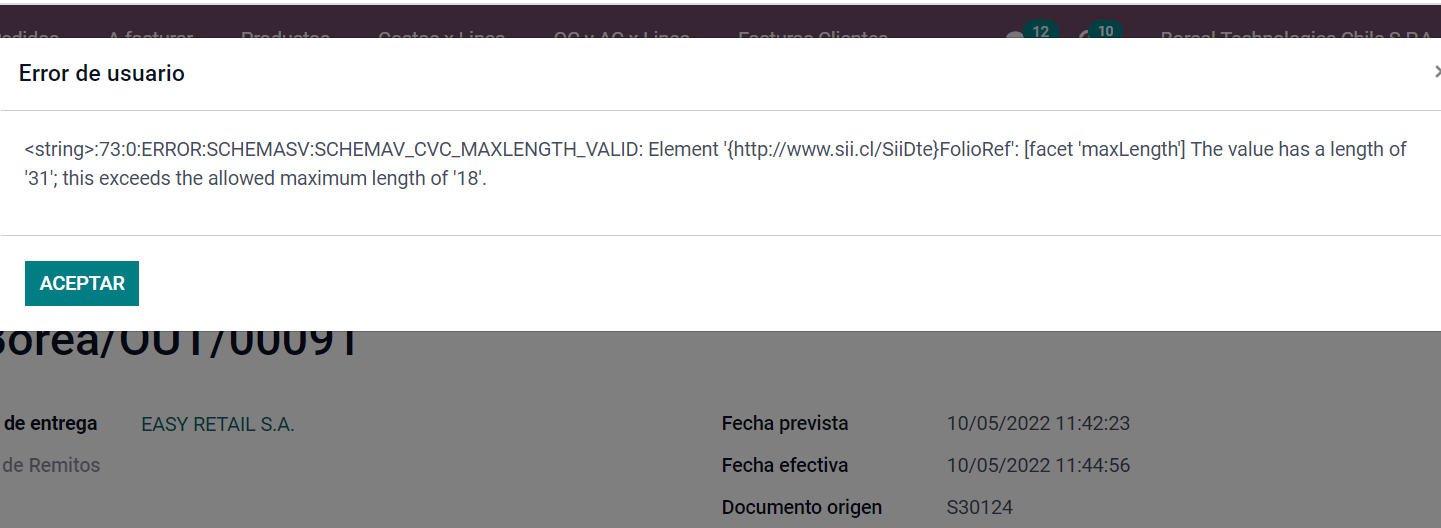 After this PR: instead of truncating in the XML template, with this we limit the length of the field to the maximum allowed by regulations: Forward-Port-Of: odoo/enterprise#29364 Forward-Port-Of: odoo/enterprise#27268
Original PR description
Previous to this PR: on occasions, users are getting this XSD validation error, which is generating support tickets:  After this PR: instead of truncating in the XML template, with this we limit the length of the field to the maximum allowed by regulations: Forward-Port-Of: odoo/enterprise#29364 Forward-Port-Of: odoo/enterprise#27268
Steps to reproduce:

  - Add a mapbox token
  - Go to field service
  - Switch to the map view
  - Remove the 'Start Date: Day' filter
  -> The route should be displayed between sites

Cause of the issue:

  When switching the map view to owl, the mapbox token was not passed
  correctly

Solution:

  Use the token from `metaData`

opw-2899122

Forward-Port-Of: odoo/enterprise#29272
Original PR description
Steps to reproduce: - Add a mapbox token - Go to field service - Switch to the map view - Remove the 'Start Date: Day' filter -> The route should be displayed between sites Cause of the issue: When switching the map view to owl, the mapbox token was not passed correctly Solution: Use the token from `metaData` opw-2899122 Forward-Port-Of: odoo/enterprise#29272
Steps to reproduce: - create a product with the uom 'cm' - create a sale order with the product and confirm it as well as the delivery - archive the uom 'cm' - in barcode/operations/Delivery Orders: take off the filter and select the order (status: done) Issue: Traceback error Cause: The id of the uom needed in: https://github.com/odoo/enterprise/blob/f634d56cc3752dc14c161bf5ea16949df0bf414e/stock_barcode/static/src/models/barcode_picking_model.js#L366 is not in the cache and it th
Original PR description
Steps to reproduce: - create a product with the uom 'cm' - create a sale order with the product and confirm it as well as the delivery - archive the uom 'cm' - in barcode/operations/Delivery Orders:…
Steps to reproduce:
- create a product with the uom 'cm'
- create a sale order with the product and confirm it as well as the delivery
- archive the uom 'cm'
- in barcode/operations/Delivery Orders: take off the filter and select the order (status: done)

Issue:
Traceback error

Cause:
The id of the uom needed in:
https://github.com/odoo/enterprise/blob/f634d56cc3752dc14c161bf5ea16949df0bf414e/stock_barcode/static/src/models/barcode_picking_model.js#L366
is not in the cache and it throws an error:
https://github.com/odoo/enterprise/blob/1c1e6cab3bc59fc0aa0b334150962e2bcb8958a0/stock_barcode/static/src/lazy_barcode_cache.js#L80-L81

Solution:
During the call rpc to  create the data in
https://github.com/odoo/enterprise/blob/aee41aa9335a8a73e79f828fd1644c31c287098c/stock_barcode/static/src/components/main.js#L50-L55
to set the cache in
https://github.com/odoo/enterprise/blob/f634d56cc3752dc14c161bf5ea16949df0bf414e/stock_barcode/static/src/models/barcode_model.js#L18
Make sure we retrieve all UoM's and the one used (in case it would have been archived).

By doing this, we keep a certain consistency with
https://github.com/odoo/enterprise/blob/a0a979e3056b83a75207dbde4d17fa5b6fda15f0/stock_barcode/models/stock_picking.py#L97-L99

opw-2888477

Forward-Port-Of: odoo/enterprise#29420