Wednesday, January 4, 2023
6 changes · master
Resolved issues and error corrections
PDF reports now handle page headers and footers correctly when printing batches that include right-to-left languages such as Arabic alongside left-to-right languages. This prevents corrupted or unreadable documents in large batch prints, improving reliability for sales, purchasing, and stock-related paperwork.
Original PR description
When selecting at least 10 SO with RTL language on the customer, the printing behavior (the PDF produced) is inconsistent. By inconsistent, we mean some pages are completely filled with buggy headers…
When selecting at least 10 SO with RTL language on the customer, the printing behavior
(the PDF produced) is inconsistent. By inconsistent, we mean some pages are completely
filled with buggy headers making the whole PDF corrupted (on a business point of view).

Step to reproduce the issue:

The customer/vendor on the PO, SO, RFQ has language set to Arabic
The user creating the document has language set to English (US)
Printing out 10+ documents
The resulting PDF document is inconsistent and contains headers issues (as previously stated).
Solution: The problem is that the headers/footers doesn't take into account the language
of the company (RTL or not). In fact, all the headers/footers of a batch print are contained into
a single HTML file (apparently, at the time, wkhtmltopdf did not support multiple headers/footers).
A Javascript script is used to select the appropriate header/footer for each page of the PDF. The issue
is that the CSS file used for these headers/footers is always a LTR CSS file. Moreover, with this design, it
is impossible to combine headers/footers in RTL and LTR into a single PDF file with multiple pages. The complete
solution would be to create a single header/footer file per page in the PDF report (wkhtmltopdf now supports this),
that way we can specify the language (RTL or LTR) for each of the page and have the perfect behavior. However,
this change cannot be applied into a stable version (requires changes in signature of methods, etc.), consequently,
the full solution will only be kept for master.

Enterprise PR: https://github.com/odoo/enterprise/pull/26289
Original PR on stable version: https://github.com/odoo/odoo/pull/88883

opw-2734671
Fixes an issue where edits made in the domain selector's debug text area were lost after clicking away. This helps users safely adjust advanced filter rules without having to re-enter their changes.
Original PR description
Before this commit, focusing out the debug textarea of the
domain selector was reseting the value.
Now, the value is kept and can be modified.
Checkboxes in the web interface now keep their proper shape and spacing when shown next to long labels, such as in settings forms. This makes forms look cleaner and easier to read without changing how users interact with them.
Original PR description
In some circumstances, like in settings forms,
when followed by a long label, the checkboxes are ugly.
https://viji.nimbusweb.me/share/7255794/gxdomzrk540o2uar9mg3

With this fix, they will always be round,
and not in contact with their label.

Description of the issue/feature this PR addresses:

Current behavior before PR:

Desired behavior after PR is merged:


--
I confirm I have signed the CLA and read the PR guidelines at www.odoo.com/submit-pr
The expense dashboard has its global filters restored after they were removed by mistake in an earlier change. This helps users filter dashboard information as intended in the current version.
Original PR description
Partial revert of #109033 (for some reason, `robodoo r-` did not kill the staging and the PR got merged)

The global filters were removed in 16.0 because the pivot "9" does not exists in this dashboard.
But it exists in master.
See #104125


---
I confirm I have signed the CLA and read the PR guidelines at www.odoo.com/submit-pr
Accounting reports no longer show an unnecessary leading comma when cash basis is the only remaining filter option. This small correction makes the report controls look cleaner and avoids confusion for users who disable most filters.
Original PR description
When deactivating most of the filters in the accounting reports, the cash basis appeared as the only option and started with a comma. This PR fixes this minor issue by correcting the condition of this comma.

task-3101548
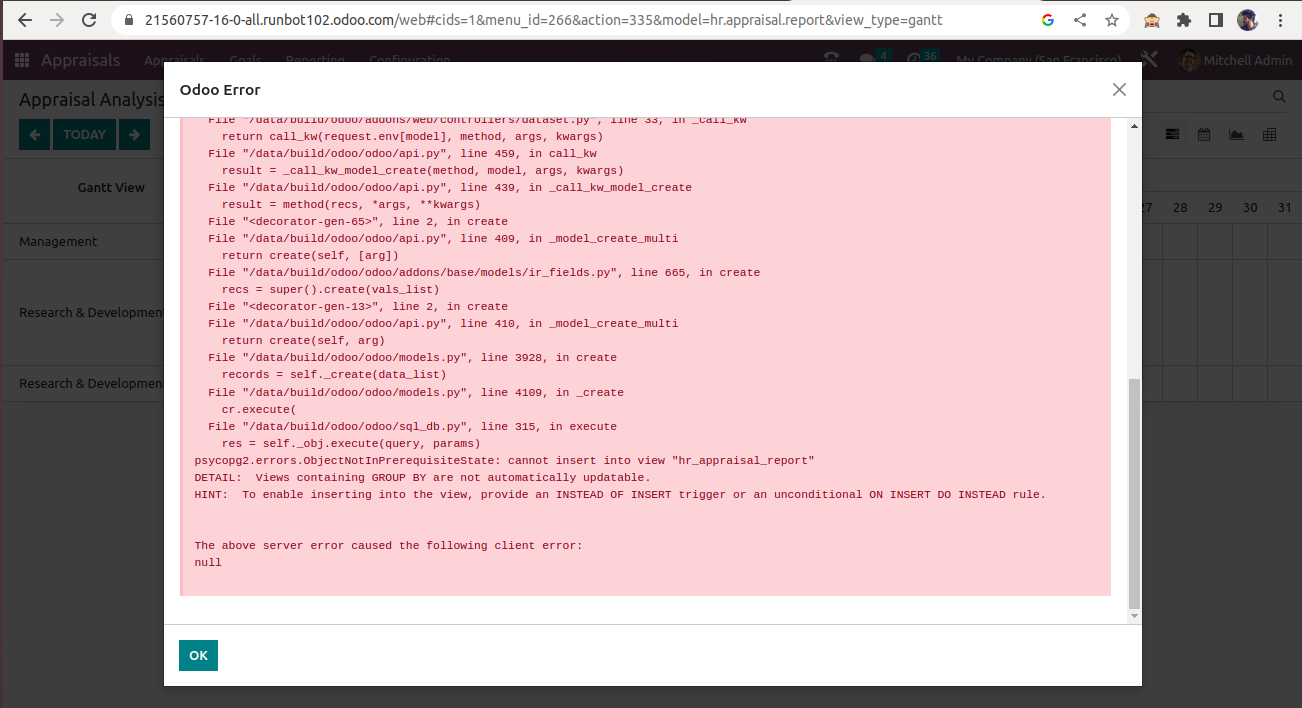
Appraisal report records now open in a proper read-only form instead of the generic default form. This prevents users from seeing a create option that could trigger an error, making navigation from the Gantt view smoother and more reliable.
Original PR description
currently for the model hr.appraisal.report no form view is defined and thus on clicking records from the gantt view, the record is opened with default form view, with create button. And when user clicks this create button exception is raised. to avoid, this adding form view for hr.appraisal.report model