Wednesday, January 4, 2023
11 changes · master
Enhancements to existing features
This update streamlines internal code used by automated actions and data recycling. It removes duplicate or unused elements, making the system easier to maintain without changing expected business behavior.
Original PR description
optimize the code and remove duplicated/unused variable


---
I confirm I have signed the CLA and read the PR guidelines at www.odoo.com/submit-pr
Users now see an empty loading screen immediately when changing apps, rather than waiting on the previous view. This makes navigation feel more responsive, especially on mobile and from the home menu.
Original PR description
The goal is to provide a better feedback to the user, especially in
mobile mode/home menu.

Task 2900847

Description of the issue/feature this PR addresses:

Current behavior before PR:

Desired behavior after PR is merged:


--
I confirm I have signed the CLA and read the PR guidelines at www.odoo.com/submit-pr
Email templates are now easier to find and edit from the settings area, with clearer template lists and forms. Users also get guidance for updating related email header and footer views, while digest emails better match company branding colors.
Original PR description
Allow our users to modify mail template more easily;
* make the list accessible from the settings
* give them a link to update relevant views to update header/footer
* make the list and form of templates more readable

taskID 2944770
This update removes obsolete styling code for autocomplete on mobile screens, because those fields now open in a modal instead. It simplifies maintenance without changing the user experience.
Original PR description
Autocomplete is not used on mobile since we open the kanban view in a modal for all x2many fields.

This code was copied from enterprise to have the responsiveness in community.

Related PR: https://github.com/odoo/enterprise/pull/28946

Description of the issue/feature this PR addresses:

Current behavior before PR:

Desired behavior after PR is merged:


---
I confirm I have signed the CLA and read the PR guidelines at www.odoo.com/submit-pr
The French localization content has been converted to follow Odoo's standard translation process: source localization terms are kept in English and translated into French through translation files. This improves consistency and makes future updates easier to manage across French and Canadian French deployments.
Original PR description
The French localisation was written in french which was wrong, all the localisation have to be written in english and then translated back to the native language thanks to PO files.

Thanks to this PR, all the french localisation has been translated.

Task-id: 3112366

---
I confirm I have signed the CLA and read the PR guidelines at www.odoo.com/submit-pr
Managers can now filter employee lists to show everyone who reports under them, including indirect reports through the management chain. This makes it easier to review teams beyond direct reports and supports more accurate people management views.
Original PR description
Before this commit, in the search view, it is not possible to filter the employees to only have those ones who is a subordinate of the current user. That is, if Pierre is the current employee/user and he is the manager of Paul and Paul is the manager of Jacques. Pierre could want to see his subordinates in his view of so Paul and Jacques instead of just Paul.

This commit adds a new boolean field called `is_subordinate` in `hr.employee` and `hr.employee.public` models. This field will be True if the employee is a subordinate of the current user.

task-3061362
The timesheet team filter now shows only employees the current user directly manages or approves, reducing unrelated entries. Timesheet approvers with broad access can also validate timesheets for employees who have no assigned manager or approver, helping prevent approval bottlenecks.
Original PR description
Before this commit, the "My Team" filter is showing all the users
that are part of a project from wich the user is manager or timesheets
of employees for which he is the responsible.
Also, a user who has the "User: All Timesheet" access right set,
should be able to validate timesheet of other users that do not have
a timesheet approver and a parent set.

This commit updates the filter condition to only see the timesheets
linked an employee for which the current user is his timesheet manager
or his manager. It also changes the validation process for the
Timesheets approver, he can now validate the timesheets linked to an
employee for which the current is the manager or the timesheet approver
or that employee has no manager and no timesheet approver.

task-3061362

Co-authored-by: Xavier Bol <xbo@odoo.com>
The helpdesk ticket form now places the description field in its own page within the ticket details area, without requiring the timesheet feature to be installed. This makes ticket information more consistently available for teams using Helpdesk on its own or with timesheets.
Original PR description
purpose of this commit is to move the description field into the notebook without installing the hr_timesheet.

task-2992368
French accounting report labels are now maintained in English first and translated back into French through standard translation files. This improves consistency across localisations and makes future updates easier to manage.
Original PR description
The French localisation was written in french which was wrong, all the localisation have to be written in english and then translated back to the native language thanks to PO files.

Thanks to this PR, all the french localisation has been translated.

Task-id: 3112366
Unused mobile styling related to autocomplete fields was removed because those fields now open in a modal view instead. This keeps the web enterprise interface code cleaner without changing how users work on mobile.
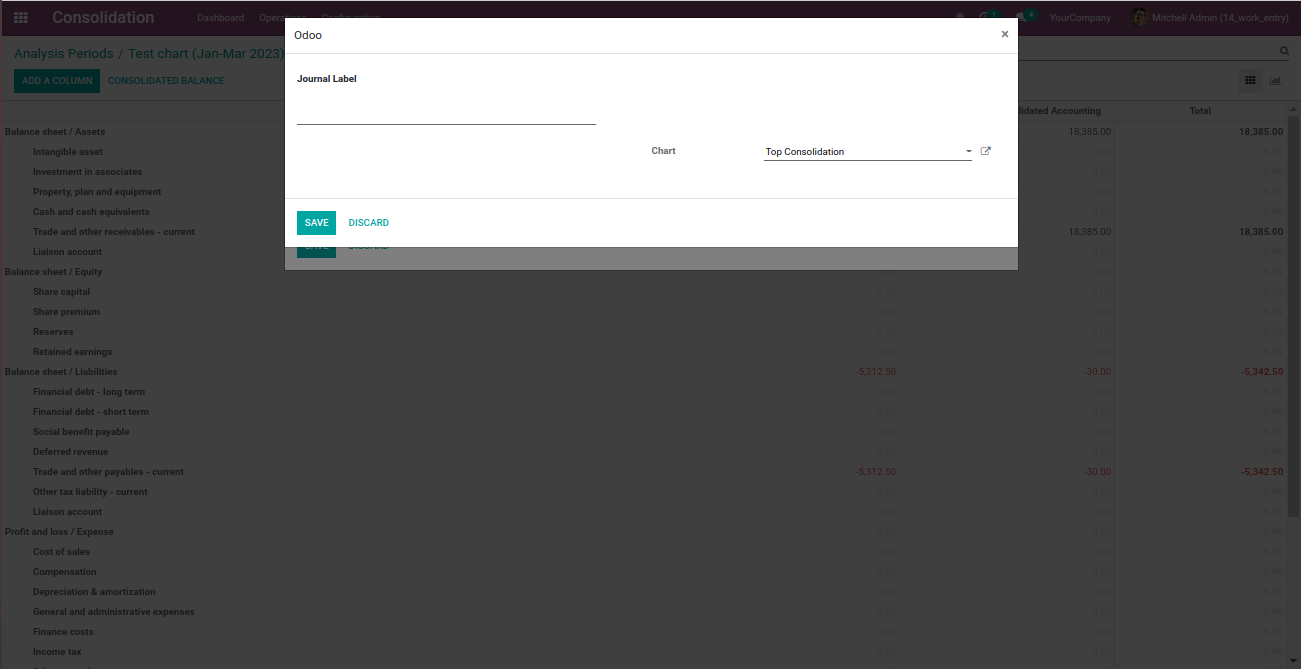
The consolidation column setup form has been adjusted so visible fields are aligned more clearly. This makes the configuration screen easier to read and use when adding or editing columns.
Original PR description
install account_consolidation module and navigate to Consolidation -> Configuration -> Periods, open any existing record or create new record and click on the smart button named Edit. from the next screen click on Add a Column button, in the opening form view, the two fields will be visible and other fields are invisible. as other fields are invisible and when the two fields align in two groups at different level. moving the field to first group for better ui.