Monday, March 13, 2023
53 changes · master
Enhancements to existing features
This update removes unnecessary styling from the Google Calendar and Microsoft Calendar integrations. The result is a cleaner, more consistent appearance without changing calendar functionality.
Original PR description
---
I confirm I have signed the CLA and read the PR guidelines at www.odoo.com/submit-pr
UK tax names and VAT report line labels were updated to align with the latest naming format and UK government VAT return guidance. This improves clarity for UK accounting users and makes Northern Ireland-only EU tax treatments clearer by marking them inactive by default.
Original PR description
Update some minor l10n_uk details: ***Update tax names*** Tax names are changed to be in accordance with the new "taxonomy" format as described in the task with task-id 3052677 By default, the taxes from the tax template would be instantiated as per the below screenshot: 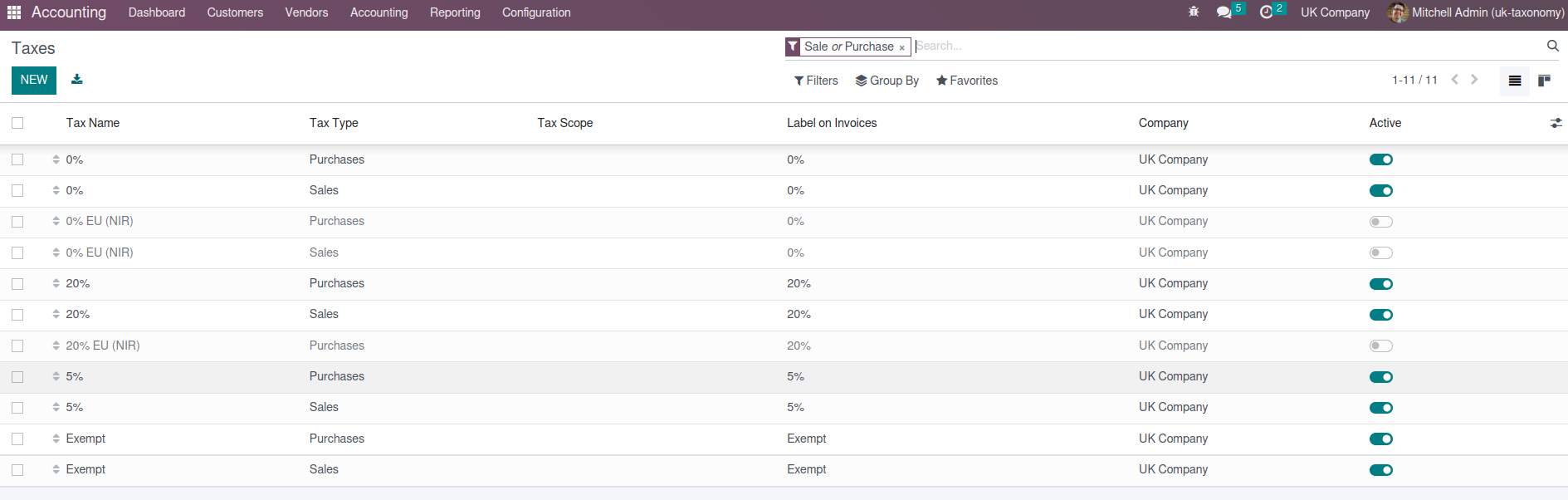 ***Update UK report lines*** Report lines are updated to match those described in the UK government documentation (see below) https://www.gov.uk/guidance/how-to-fill-in-and-submit-your-vat-return-vat-notice-70012
This update reorganizes how several mail and communication components store their internal data. It helps make chat, call, and notification features easier to maintain and more reliable over time, without introducing a major visible change for users.
Original PR description
Task-2734101
The mail app’s message composer suggestion system was simplified by removing an unnecessary internal component. This should make the feature easier to maintain without changing how users work with suggestions.
Original PR description
Task-2793280
The mail composer suggestion interface was cleaned up by removing an internal dependency that tracked model names or records. This helps keep the messaging code easier to maintain without changing the visible user experience.
Original PR description
Task-2793280
The mail composer suggestion interface now uses a clearer title field when showing suggested contacts or items. This makes suggestions easier to understand for users while keeping the change limited to the mail experience.
Original PR description
Task-2793280
This update improves how message composer suggestions are managed in the Mail app. It helps make suggestion selection more reliable and easier to maintain, supporting a smoother messaging experience for users.
Original PR description
Task-2793280
The mail composer now handles suggestion clicks through a clearer view-level action. This improves maintainability of the messaging experience and helps keep user interactions in the composer consistent.
Original PR description
Task-2579306
The mail attachment viewer now includes a clearer action when users click the header area. This improves the attachment preview experience and makes interactions in messages feel more consistent.
Original PR description
Task-2579306
The mail app now has a clearer built-in way to close the attachment viewer. This makes viewing shared files feel smoother and more consistent for users working with messages and documents.
Original PR description
Task-2579306
The mail attachment viewer now has a clearer close action, making it easier for users to exit previews. This improves the overall usability of viewing attachments in messages without changing core business workflows.
Original PR description
Task-2579306
The mail attachment viewer now has a clearer way to handle moving to the previous attachment. This makes attachment browsing more consistent and easier to maintain, supporting a smoother user experience in message attachments.
Original PR description
Task-2579306
This update improves the mail app's internal handling of autocomplete inputs, helping chat-related features identify and manage message entry areas more reliably. It supports smoother maintenance and future enhancements with minimal direct impact on end users.
Original PR description
Also add AutocompleteInputView/chatWindowOwnerAsNewMessage,
so that there's at least one identifying field.

Task-2817076
The mail messaging area was adjusted to remove an older transition mechanism as preparation for a newer underlying interface framework. This is an internal improvement that helps keep Discuss and messaging components maintainable without changing day-to-day user workflows.
Original PR description
In preparation to using OWL v2 in discuss code

Task-2695905
Sales order and quotation list views have been reorganized so shared layout details are handled consistently across Sales, Inventory-related sales, and Website Sales. Website-specific columns are now hidden when the multi-website option is not enabled, reducing clutter for businesses that do not use that feature.
Original PR description
task-3213457


---
I confirm I have signed the CLA and read the PR guidelines at www.odoo.com/submit-pr
Budget records now show the cancelled status only when a budget is actually cancelled. This keeps the status bar clearer and reduces confusion for users reviewing budget progress.
Original PR description
before this commit, cancelled state was showing in the second position in the statusbar after the draft and it was always visible in the statusbar.

after this commit, the cancelled state will be moved to last position and only will show when the record is in the cancelled state.
Resolved issues and error corrections
A small issue in the Planning app was fixed by using the correct source for a date range helper. This helps prevent related planning timeline behavior from breaking due to an incorrect internal dependency.
Original PR description
Before this commit:
computeRange was imported from a wrong source "@web/core/l10n/dates".

In this commit:
computeRange is now imported from gantt_model as it should be.
Code cleanup and technical improvements
The stock traceability report has been modernized behind the scenes using Odoo's newer web interface framework. This should help keep the report easier to maintain and aligned with current platform standards, without changing its business purpose.
Original PR description
This commit is to convert the "stock_report_generic" client action into owl.

TaskID: 3175084

Description of the issue/feature this PR addresses:

Current behavior before PR:

Desired behavior after PR is merged:


---
I confirm I have signed the CLA and read the PR guidelines at www.odoo.com/submit-pr
Miscellaneous changes
Since [1] when the search box autocomplete was introduced, the URL parameters are implicitly included into the RPC that fetches the autocompletion results. Those parameters were not correctly unescaped before being sent to the RPC call. Because of this, a timestamp such as "2023-01-01 23:00:00" was sent as "2023-01-01+23%3A00%3A00" to the server. If that string reached the SQL layer, the "+" was interpreted as defining a timezone. This commit unescapes the URL parameters before using them i
Original PR description
Since [1] when the search box autocomplete was introduced, the URL parameters are implicitly included into the RPC that fetches the autocompletion results. Those parameters were not correctly…
Fixes an issue where adding property fields to article items in a Knowledge kanban could cause the embedded article view to fail. The required field data is now loaded so users can return to the main article without seeing an error placeholder.
Original PR description
To display the property fields, we need to load in the view the field storing the definition of the property field. Currently, we forgot to load that field for the kanban view showing the article items of the active article. As a result, the view can not properly load the property fields and the embedded view ends up crashing. This commit will fix that issue by simply loading the required field in the kanban view.

Steps to reproduce the error:
1. Open an article
2. Use the /kanban command
3. Create a new article item
4. Add new property fields
5. Go back on the main article

=> The embedded view shows the error placeholder.
=> The following error occurred in onWillStart: "parent is undefined"

Related: https://github.com/odoo/enterprise/pull/37004 task-3218435
Knowledge property field inputs now always show an underline, making it clearer to users that they can be edited. The fields also better use the available panel width, improving readability and consistency in the Knowledge interface.
Original PR description
For the property fields of Knowledge, we would like to always underline the property field inputs to indicate that they are editable. Currently, some inputs get an underline only when the user focuses or hovers the element. This PR will ensure that the underline will always be visible. It will also add some css tweaks to ensure that all inputs take the full width of the panel.

Related: https://github.com/odoo/enterprise/pull/37299
task-3221040
The live chat website code was reorganized to separate part of its internal logic into its own file. This does not change the customer-facing chat experience, but it makes the feature easier to maintain and improve over time.
Original PR description
Task-2212347
The live chat timer logic was moved into its own internal file, making the feature easier to maintain without changing how users experience live chat. This helps reduce complexity for future updates across live chat-related modules.
Original PR description
Task-2212347
The live chat code has been reorganized by moving a shared conversation component into its own file. This is an internal cleanup that makes the feature easier to maintain without changing how users experience live chat.
Original PR description
Task-2212347
The live chat message code was moved into its own file to make the system easier to maintain. This internal cleanup should not change how users interact with live chat, but it helps future development and reliability.
Original PR description
-public_livechat.js

Task-2212347
The live chat timer code was moved into its own separate file without changing the feature itself. This makes the live chat code easier to maintain and reduces the risk of future changes causing problems.
Original PR description
Task-2212347
The live chat message logic was reorganized into its own file, making the codebase easier to maintain without changing how users interact with live chat. This helps future development and reduces the risk of issues when updating live chat features.
Original PR description
Task-2212347
This update reorganizes part of the live chat typing indicator code so it can be maintained separately from the public live chat script. The change is internal and should make future live chat maintenance easier without changing the user experience.
Original PR description
-public_livechat.js

Task-2212347
The live chat feature has been reorganized internally by moving part of its conversation handling into a separate component. This makes the code easier to maintain and reuse without introducing a noticeable change for end users.
Original PR description
Task-2212347
Since [1] when the search box autocomplete was introduced, the URL parameters are implicitly included into the RPC that fetches the autocompletion results.
Those parameters were not correctly unescaped before being sent to the RPC call.
Because of this, a timestamp such as "2023-01-01 23:00:00" was sent as "2023-01-01+23%3A00%3A00" to the server. If that string reached the SQL layer, the "+" was interpreted as defining a timezone.

This commit unescapes the URL parameters before using them in the RPC. Note that javascript's `decodeURIComponent` does not handle the '+' encoding of spaces inside URL parameters.

For testing purpose, the following updates were needed to make it possible to select the `<option>` within the Archive month `<select>`:
- because the `option`s are in a tree, the tool was adapted to take all `option`s into consideration instead of only the direct children of the `select`.
- because the `option` text is dynamically created from the date of the test execution, the tool was adapted to allow targeting an `option` based on its index by specifying the tour step's `run` as `'text index N'`, `N` being the index of the `option`.

Steps to reproduce:
- Enable the sidebar of the `/blog` page.
- Select a month in the sidebar.
- Type something in the search box.

=> Did show an error popup while obtaining the autocompletion records.

[1]: https://github.com/odoo/odoo/commit/7559626c54e34b41e1549e28276a650accec6986

task-3213916

Forward-Port-Of: odoo/odoo#114615
Forward-Port-Of: odoo/odoo#114229
The `date` widget, when used with a datetime value, doesn't offset the value relative to the session timezone. This can lead to strange issue like this following one date1 = 12/03/2023 05:34:12 date2 = 12/03/2023 18:34:12 in the deliveryslip report, the datetime are casted as date, they become date1 = 12/03/2023 date2 = 13/03/2023 opw: 3199862 Description of the issue/feature this PR addresses: Current behavior before PR: Desired behavior after PR is merged: --- I
Original PR description
The `date` widget, when used with a datetime value, doesn't offset the value relative to the session timezone. This can lead to strange issue like this following one

date1 = 12/03/2023 05:34:12
date2 = 12/03/2023 18:34:12
in the deliveryslip report, the datetime are casted as date, they become

date1 = 12/03/2023
date2 = 13/03/2023

opw: 3199862

Description of the issue/feature this PR addresses:

Current behavior before PR:

Desired behavior after PR is merged:


---
I confirm I have signed the CLA and read the PR guidelines at www.odoo.com/submit-pr

Forward-Port-Of: odoo/odoo#114939
In Serbia we have two language codes and those are the main one sr_RS which is Cyrillic and sr@latin which is Latin, ok ... Now, when those two codes are provided to the /web/webclient/locale/string:lang route and processed on the line 36 [here](https://github.com/odoo/odoo/blob/16.0/addons/web/controllers/webclient.py#L36) those codes will be transformed into following string values respectfully: sr and sr@latin. Then on the line 42 [here](https://github.com/odoo/odoo/blob/16.0/addons/web/c
Original PR description
In Serbia we have two language codes and those are the main one sr_RS which is Cyrillic and sr@latin which is Latin, ok ... Now, when those two codes are provided to the…
In Serbia we have two language codes and those are the main one sr_RS which is Cyrillic and sr@latin which is Latin, ok ...

Now, when those two codes are provided to the /web/webclient/locale/string:lang route and processed on the line 36 [here](https://github.com/odoo/odoo/blob/16.0/addons/web/controllers/webclient.py#L36) those codes will be transformed into following string values respectfully: sr and sr@latin.
Then on the line 42 [here](https://github.com/odoo/odoo/blob/16.0/addons/web/controllers/webclient.py#L42) the system will try to load moment locale files from the file system with following file paths respectfully:

1. web/static/lib/moment/locale/sr.js
    Even though this file do exist on the file system, it is settings for sr@latin instead of sr_RS
    The correct moment locale settings file for sr_RS is: web/static/lib/moment/locale/sr-cyrl.js

2. web/static/lib/moment/locale/[sr@latin.js](mailto:sr@latin.js)
    Unfortunately file with this name does not exist on the file system, but it exists under different name:
    web/static/lib/moment/locale/sr.js

So, in this PR I'm solving this crazy mismatch issue between Odoo and Moment library by introducing a simple map to provide proper code values, so the system can read and return appropriate moment locale settings files.


---
I confirm I have signed the CLA and read the PR guidelines at www.odoo.com/submit-pr

Forward-Port-Of: odoo/odoo#113490- Create 3 products with different costing methods: AVCO, FIFO, Standard -Create a PO for the 3 items (same quantity and unit price in every line) -Receive - Create Vendor Bill - Check Journal items. You will notice that the AVCO product is marked as partially matched. Please keep in mind that this only happens when the 3 costings are used and the unit price is the same. It happes because `_get_all_related_aml` returns all the `account.move.line` for the journal entry and invoice. But no
Original PR description
- Create 3 products with different costing methods: AVCO, FIFO, Standard -Create a PO for the 3 items (same quantity and unit price in every line) -Receive
- Create Vendor Bill
- Check Journal items.

You will notice that the AVCO product is marked as partially matched. Please keep in mind that this only happens when the 3 costings are used and the unit price is the same.

It happes because `_get_all_related_aml` returns all the `account.move.line` for the journal entry and invoice. But not only for the current product. So if they share the same price unit then it could reconcile lines for different products.

Description of the issue/feature this PR addresses:

Current behavior before PR:

Desired behavior after PR is merged:


---
I confirm I have signed the CLA and read the PR guidelines at www.odoo.com/submit-pr

Forward-Port-Of: odoo/odoo#114767
This commit fixes the same problem as the commit #113284 The previous commits partially fixed the solution, but the target can still disappear between the moment where the `popover_service` adds the popover and the moment where the setup of `PopoverController` is called. The solution of this commit is the last defence against the undefined target, #113284 will be kept as it prevent some owl computation if the target is undefined at this state. Forward-Port-Of: odoo/odoo#114783 Forward-Por
Original PR description
This commit fixes the same problem as the commit #113284

The previous commits partially fixed the solution, but the target can still disappear between the moment where the `popover_service` adds the popover and the moment where the setup of `PopoverController` is called.

The solution of this commit is the last defence against the undefined target, #113284 will be kept as it prevent some owl computation if the target is undefined at this state.

Forward-Port-Of: odoo/odoo#114783
Forward-Port-Of: odoo/odoo#114745
## Current behaviour Down payments are taking into account in the project profitability in the section "Other Cost". When invoicing fully an SO, the total sum in profitability is the sum of the invoiced amount on the SO + the down payment. ## Expected behaviour Down payments should not be present in the project profitability, to avoid incorrect sums. ## Steps to reproduce - Install Sales, Accounting, Timesheets - Activate Analytics in the Settings - Set a Service Product that is invoi
Original PR description
## Current behaviour Down payments are taking into account in the project profitability in the section "Other Cost". When invoicing fully an SO, the total sum in profitability is the sum of the…
## Current behaviour
Down payments are taking into account in the project profitability in the section "Other Cost". When invoicing fully an SO, the total sum in profitability is the sum of the invoiced amount on the SO + the down payment.

## Expected behaviour
Down payments should not be present in the project profitability, to avoid incorrect sums.

## Steps to reproduce
- Install Sales, Accounting, Timesheets
- Activate Analytics in the Settings
- Set a Service Product that is invoiced based on fixed price
- Make sure that it generates a Project + Task
- Create a Quotation, confirm the SO with that product
- Create a down payment for 50% of the SO
- Confirm that invoice
- Create another invoice for the SO for the rest of the SO and confirm it
- Go to the project's profitability tab for the SO, you can see that we have the value of the SO + the amount of the down payment, leading to an incorrect sum, in the section Invoiced.

## Reason for the problem
When taking the invoices for the profitability of the project, since a down payment is another `sale.order.line`, we handle it in the method `_get_revenues_items_from_invoices`, and there we are taking into account the down payments.

## Fix
Elaborate the domain used to fetch the invoices in `_get_revenues_items_from_invoices_domain` to not take those that are down payments.

## Affected versions
- 16.0
- saas-16.1
- master
---
opw-3195016

---
I confirm I have signed the CLA and read the PR guidelines at www.odoo.com/submit-pr

Forward-Port-Of: odoo/odoo#113478
When the invoice is a New record and thus, not yet stored inside the database, the totals like amount_untaxed/amount_tax/amount_total are set to 0.0 because line_ids is empty. About the lines, balance/amount_currency are also set to 0.0. This means we can not rely to any of these fields in any case when computing the values for a New record. To reproduce, configure the early payment discount computation to "Always upon invoice", create a new invoice and set the demo terms 30 Net 2/7. For a
Original PR description
When the invoice is a New record and thus, not yet stored inside the database, the totals like amount_untaxed/amount_tax/amount_total are set to 0.0 because line_ids is empty.
About the lines, balance/amount_currency are also set to 0.0.
This means we can not rely to any of these fields in any case when computing the values for a New record.

To reproduce, configure the early payment discount computation to "Always upon invoice", create a new invoice and set the demo terms 30 Net 2/7.
For a customer invoice, the tax amount will not be correct until the save.
For a vendor bill, the tax amount will be erased by the quick edit mode and the correct value will never be set.

---
I confirm I have signed the CLA and read the PR guidelines at www.odoo.com/submit-pr

Forward-Port-Of: odoo/odoo#113872
To compute the analytic amounts, we used the user company currency to know the precision to use to round, for the comparison.
We should instead use the line's company for the amounts, and the decimal precision for the distribution.

Description of the issue/feature this PR addresses:

Current behavior before PR:

Desired behavior after PR is merged:


---
I confirm I have signed the CLA and read the PR guidelines at www.odoo.com/submit-pr

Forward-Port-Of: odoo/odoo#111242
Original PR description
To compute the analytic amounts, we used the user company currency to know the precision to use to round, for the comparison. We should instead use the line's company for the amounts, and the decimal precision for the distribution. Description of the issue/feature this PR addresses: Current behavior before PR: Desired behavior after PR is merged: --- I confirm I have signed the CLA and read the PR guidelines at www.odoo.com/submit-pr Forward-Port-Of: odoo/odoo#111242
Before this commit: ===================== KeyError 'selection_values' that occur in base_import/_handle_fallback_values() while importing a data file. If any field(s) is many2one or many2many and we tried to import the value of that field(s) that is not created in the database. In that case when we set the 'Prevent Import' option. It will raise an error like KeyError: 'selection_values'. After this commit: ===================== Solved the issue when there is a many2one or many2many
Original PR description
Before this commit:
=====================
KeyError 'selection_values' that occur in base_import/_handle_fallback_values()
while importing a data file. If any field(s) is many2one or many2many and we
tried to import the value of that field(s) that is not created in the database.
In that case when we set the 'Prevent Import' option.
It will raise an error like KeyError: 'selection_values'.

After this commit:
=====================
Solved the issue when there is a many2one or many2many field(s) and the import
value of that field(s) which is not available in the database. also, the method
is only for the 'selection' field and 'boolean' field so the code works when
there is a selection field and their selection_values only.

see - https://tinyurl.com/2mmh7mtb

sentry - 3958065223


---
I confirm I have signed the CLA and read the PR guidelines at www.odoo.com/submit-pr

Forward-Port-Of: odoo/odoo#114316
Steps to reproduce the bug: - Create a PO: - Add a product - Add a note or section - Go To Alternatives: - Click on “Create Alternative” - Add another vendor - Try to validate Problem: An error is triggered: “The operation cannot be completed: Description (name) is mandatory” The “display_type” and “name” fields must be copied in the vals to create a `purchase.order.line` opw-3164863 Forward-Port-Of: odoo/odoo#113798 Forward-Port-Of: odoo/odoo#1131
Original PR description
Steps to reproduce the bug:
- Create a PO:
    - Add a product
    - Add a note or section
- Go To Alternatives:
    - Click on “Create Alternative”
         - Add another vendor
         - Try to validate

Problem:
An error is triggered: “The operation cannot be completed: Description (name) is mandatory”

The “display_type” and “name” fields must be copied in the vals to create a `purchase.order.line`

opw-3164863

Forward-Port-Of: odoo/odoo#113798
Forward-Port-Of: odoo/odoo#113170When trying to invoice undelivered quantities the error message was somewhat misleading: it indicates as a possible solution a Stock app feature even when Stock is not installed. After this commit the message will be more appropriated depending of the state of apps installed. opw - 3206001 --- I confirm I have signed the CLA and read the PR guidelines at www.odoo.com/submit-pr Forward-Port-Of: odoo/odoo#114990 Forward-Port-Of: odoo/odoo#114754
Original PR description
When trying to invoice undelivered quantities the error message was somewhat misleading: it indicates as a possible solution a Stock app feature even when Stock is not installed.
After this commit the message will be more appropriated depending of the state of apps installed.

opw - 3206001


---
I confirm I have signed the CLA and read the PR guidelines at www.odoo.com/submit-pr

Forward-Port-Of: odoo/odoo#114990
Forward-Port-Of: odoo/odoo#114754
Steps to reproduce: - select a different company from the main one - under settings/discuss enable External Email Servers - set up an alias domain - create an SO and send it by email (you can catch the sent email using mailhog) - reply to that email (you can use the support-tools [1] and set In-Reply-To: "previous message_id") Bug: the reply_to field of incoming message defaults to the first company Fix: set the reply_to field to the company asociated to the record opw-3060214 [
Original PR description
Steps to reproduce:
- select a different company from the main one
- under settings/discuss enable External Email Servers
- set up an alias domain
- create an SO and send it by email (you can catch the sent email using mailhog)
- reply to that email (you can use the support-tools [1] and set In-Reply-To: "previous message_id")

Bug:
the reply_to field of incoming message defaults to the first company

Fix:
set the reply_to field to the company asociated to the record

opw-3060214
[1]: https://github.com/odoo/support-tools/tree/master/scripts/mail

Forward-Port-Of: odoo/odoo#114714
Forward-Port-Of: odoo/odoo#108823
Steps to reproduce: - Install Project, Timesheets. - Create a new porject with allocated hours set to 40 hours (5 days). - Taking into account that our company have a 8-hour/day work schedule (40 hours/week). - We go then to the timesheet app and we add a line for the project created with 8 hours as hours spent. - Now we got to the timesheet configuration and we change the uom to days. - We go back to the timesheet app and we see the result, we can also try to add just 1 day. Issue:
Original PR description
Steps to reproduce:

- Install Project, Timesheets.
- Create a new porject with allocated hours set to 40 hours (5 days).
- Taking into account that our company have a 8-hour/day work schedule (40 hours/week).
- We go then to the timesheet app and we add a line for the project created with 8 hours as hours spent.
- Now we got to the timesheet configuration and we change the uom to days.
- We go back to the timesheet app and we see the result, we can also try to add just 1 day.

Issue:

The days are not properly computed, only when we are in hours are being computed properly. But when we change the uom to days, the computation that we see in the list will still be wrong.

Solution:

We really take into account which uom are we working with so we compute the time properly depending on the uom.

Forward bot up to master.

opw-3138053

Forward-Port-Of: odoo/odoo#111865
Prior to this commit, the event handlers that prevents the default behaviours of a click was bound onto the $editable after the wysiwyg editor had started. This meant that during a very short period, the element could have the class ".editor_enabled" but would not prevent clicks on the document from triggering a default behaviour. This issue is not as important in versions prior to 16.0, because most of the clicks on link would trigger navigation within the page, canceling edit mode.
Original PR description
Prior to this commit, the event handlers that prevents the default behaviours of a click was bound onto the $editable after the wysiwyg editor had started. This meant that during a very short period,…
Prior to this commit, the event handlers that prevents the default
behaviours of a click was bound onto the $editable after the wysiwyg
editor had started.

This meant that during a very short period, the element could have the
class ".editor_enabled" but would not prevent clicks on the document
from triggering a default behaviour.

This issue is not as important in versions prior to 16.0, because most
of the clicks on link would trigger navigation within the page,
canceling edit mode. If a traceback had appeared, it would be removed
quickly after, as the page was unloaded.

However, in 16.0, if the iframe leaves its current page, it can crash
the editor which now resides outside the page we are currently
editing.

Furthermore, the test introduced in [1] highlights the problem, as it
clicks on a link directly after checking if .editor_enabled is added to
the body within the iframe. This created a race condition, which means
the test crashed often.

This commit fixes the issue by using the click handler of the
website_preview to prevent the default behaviour while in edit mode.

runbot-18660

Forward-Port-Of: odoo/odoo#114470
Reproduce:
* edit the view `account.view_account_move_line_filter` and remove the `<searchpanel/>`
* open the view (Accounting > Accounting > Journal Items)

The preview is positionned below the list view, without content, and the floating button to open/close the preview is in the middle of the screen.

Forward-Port-Of: odoo/enterprise#37922
Original PR description
Reproduce: * edit the view `account.view_account_move_line_filter` and remove the `<searchpanel/>` * open the view (Accounting > Accounting > Journal Items) The preview is positionned below the list view, without content, and the floating button to open/close the preview is in the middle of the screen. Forward-Port-Of: odoo/enterprise#37922
To reproduce the issue:
       - Install helpdesk_stock_account model
       - Create Team and actived Refunds
       - Create Ticket and click on refund action

Why issue occurred-
The sale_line_id field is in the helpdesk_sale_timesheet module and this module is not depends
in helpdesk_stock_account.

In this commit, We used to sale_order_id field instead of sale_line_id.

task-3125408

Forward-Port-Of: odoo/enterprise#36439
Original PR description
To reproduce the issue:
- Install helpdesk_stock_account model
- Create Team and actived Refunds
- Create Ticket and click on refund action
Why issue occurred-
The sale_line_id field is in the helpdesk_sale_timesheet module and this module is not depends
in helpdesk_stock_account.
In this commit, We used to sale_order_id field instead of sale_line_id.
task-3125408
Forward-Port-Of: odoo/enterprise#36439When checking if the BS is balanced with a script, it seems that the equity part of the BS was wrong, all the sign were reverse. By doing the negative of the account the BS is now balanced task-id: 3041738 Forward-Port-Of: odoo/enterprise#37823
Original PR description
When checking if the BS is balanced with a script, it seems that the equity part of the BS was wrong, all the sign were reverse. By doing the negative of the account the BS is now balanced

task-id: 3041738

Forward-Port-Of: odoo/enterprise#37823
## Current behaviour When we set the allocation percentage on a planning shift, the allocation hours is the reset to the full-time quantity for the time period. (aka an implicit 100% allocation percentage) ## Expected behaviour If we set the allocation percentage to 0, the allocation hours should be 0 too. ## Steps to reproduce - Install Planning - Take a shift, set the allocation percentage to 0 - Observe that the allocation hours are the same as with 100% ## Reason for the probl
Original PR description
## Current behaviour
When we set the allocation percentage on a planning shift, the allocation hours is the reset to the full-time quantity for the time period. (aka an implicit 100% allocation percentage)

## Expected behaviour
If we set the allocation percentage to 0, the
allocation hours should be 0 too.

## Steps to reproduce
- Install Planning
- Take a shift, set the allocation percentage to 0
- Observe that the allocation hours are the same as with 100%

## Reason for the problem
In the compute for the allocation hours, there was a fallback to 1 when calculating the ratio from the percentage.

## Fix
Remove the fallback, it should be safe, because the ratio is never used in a division.

## Affected versions
- 14.0
- saas-15.2
- 16.0
- saas-16.1
- master
---
opw-3188631

Forward-Port-Of: odoo/enterprise#38059
Forward-Port-Of: odoo/enterprise#37948
In the social marketing app, when customers create new publications, odoo get a link to the image from the social network, and when It comes from facebook and instagram, those are temporary links.

This commit implements simple solution for this issue: just update image all urls everytime user clicks Synchronize button

opw-2993385

Forward-Port-Of: odoo/enterprise#35242
Original PR description
In the social marketing app, when customers create new publications, odoo get a link to the image from the social network, and when It comes from facebook and instagram, those are temporary links. This commit implements simple solution for this issue: just update image all urls everytime user clicks Synchronize button opw-2993385 Forward-Port-Of: odoo/enterprise#35242
Currently we can only print Invoices. So, when we try to print the follow-up Reports containing Bank statements for Customers in Accounting, it will raise Error as the reports contains documents other than Invoices. Ex. Bank Statements. 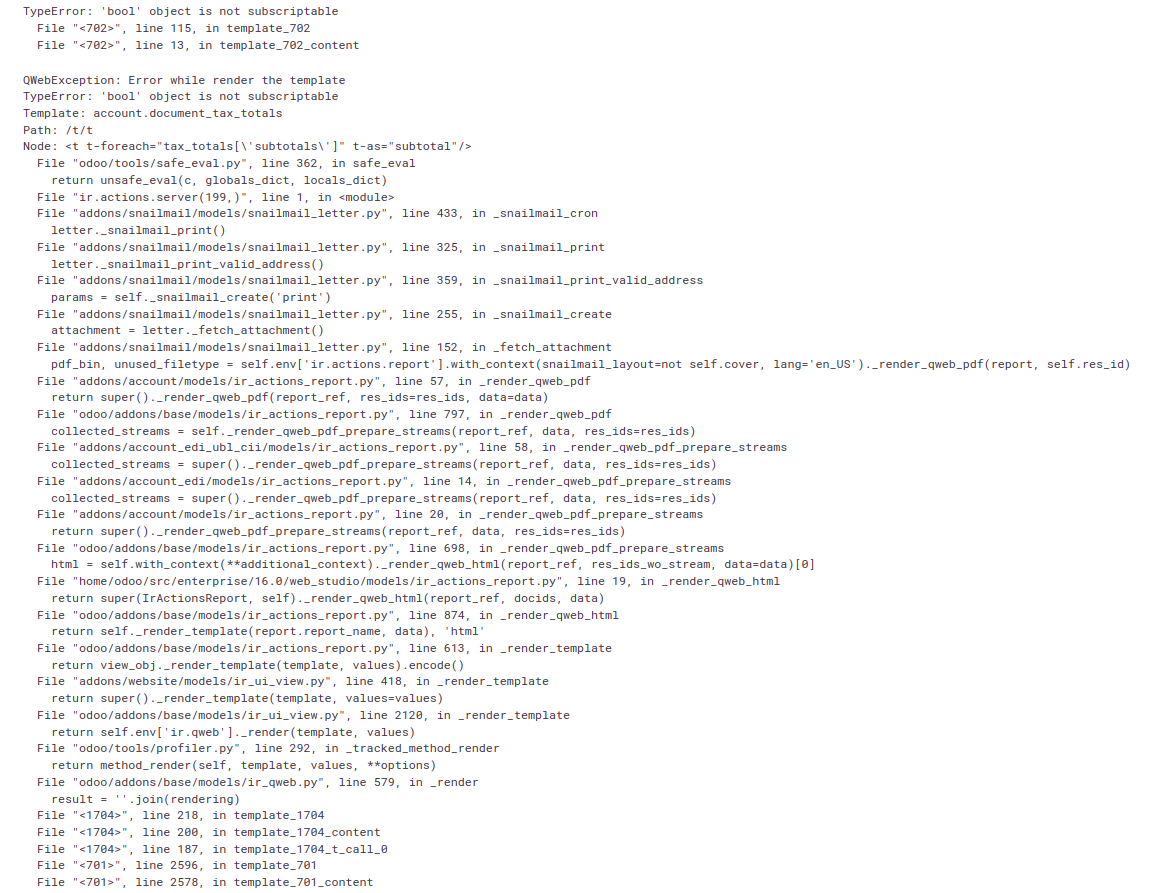 So, to resolve this we filter out Invoices from the Follow-up reports for printing. sentry-3928914484 Forward-Port-Of: odoo/enterprise#378
Original PR description
Currently we can only print Invoices. So, when we try to print the follow-up Reports containing Bank statements for Customers in Accounting, it will raise Error as the reports contains documents other than Invoices. Ex. Bank Statements.  So, to resolve this we filter out Invoices from the Follow-up reports for printing. sentry-3928914484 Forward-Port-Of: odoo/enterprise#37851
To apply the highlight rule, the class shoud be present on the same level as o_field_widget class, which was not the case.

Task-3188750

Forward-Port-Of: odoo/enterprise#37491
Original PR description
To apply the highlight rule, the class shoud be present on the same level as o_field_widget class, which was not the case. Task-3188750 Forward-Port-Of: odoo/enterprise#37491
Steps to reproduce: - Create a Marking Automation Campaign - Create an event with an initial mailing - Create a child activity when email is opened by recipient - Send mailing - Open mailing in recipient mailbox - Go back to Odoo and refresh page - Go to Campaign participants - Click on participant who opened email Issue: "Opened" indicator isn't active. Cause: Using a python condition inside the `t-att-class`. Solution: Replace `in` python opera
Original PR description
Steps to reproduce:

  - Create a Marking Automation Campaign
  - Create an event with an initial mailing
  - Create a child activity when email is opened by recipient
  - Send mailing
  - Open mailing in recipient mailbox
  - Go back to Odoo and refresh page
  - Go to Campaign participants
  - Click on participant who opened email

Issue:

  "Opened" indicator isn't active.

Cause:

  Using a python condition inside the `t-att-class`.

Solution:

  Replace `in` python operator by `.includes()` javascript function.

opw-3117429

Forward-Port-Of: odoo/enterprise#37568
When we create a model with Studio with the option 'Pipeline stages' enabled, the statusbar stages are not clickable, preventing the user from changing it Steps to reproduce: 1. Install Studio and any other app (e.g. Contacts) 2. Open Contacts and toggle Studio 3. Click on the `New Model` button in the top right 4. Give a name and click on `CONFIGURE MODEL` 5. Enable `Pipeline stages` and click on `CREATE MODEL` 6. Refresh the page and close Studio 7. Open the newly created model and c
Original PR description
When we create a model with Studio with the option 'Pipeline stages' enabled, the statusbar stages are not clickable, preventing the user from changing it Steps to reproduce: 1. Install Studio and…
When we create a model with Studio with the option 'Pipeline stages' enabled, the statusbar stages are not clickable, preventing the user from changing it

Steps to reproduce:
1. Install Studio and any other app (e.g. Contacts)
2. Open Contacts and toggle Studio
3. Click on the `New Model` button in the top right
4. Give a name and click on `CONFIGURE MODEL`
5. Enable `Pipeline stages` and click on `CREATE MODEL`
6. Refresh the page and close Studio
7. Open the newly created model and create a new record
8. In the form view, the stages are shown in the statusbar but it's not possible to change the record stage by clicking on one of them

Solution:
Add the option `'clickable': '1'` to the stage field created

Problem:
`clickable='1'` doesn't work as we look in the field options and not it's attributes to decide whether the field is disabled or not https://github.com/odoo/odoo/blob/9239065a2ef0845e35805a86caf156867d9d9683/addons/web/static/src/views/fields/statusbar/statusbar_field.js#L186

opw-3168643

Forward-Port-Of: odoo/enterprise#37009
This commit fixes a bug where on a remote DB when you click on multiple articles in the sidebar, multiple of them would appear as *selected*. This means that they would be appear as highlighted even though they are not open. Before this commit we were only removing the styling from the previous article. Now we are selecting all the articles that are active and their emojis and removing their style before highlightng the opened article. This disables the previously mentioned behavior.
Original PR description
This commit fixes a bug where on a remote DB when you click on multiple
articles in the sidebar, multiple of them would appear as *selected*.

This means that they would be appear as highlighted even though they are not open.

Before this commit we were only removing the styling from the previous article.
Now we are selecting all the articles that are active and their emojis and
removing their style before highlightng the opened article.
This disables the previously mentioned behavior.

task-3094192

Forward-Port-Of: odoo/enterprise#37439
The report was being computed with the 'normal' date scope. Because of that, if an account configured to include its initial balance was used on some move line eligible by this report (because of a +44 on this line in Belgium, for example), it was always included, even if it was out of the selected date range. This was wrong; this report needs to apply its date bounds in a strict manner. Also, the audit caret option was not working well: it called the Partner VAT Listing without any tag domai
Original PR description
The report was being computed with the 'normal' date scope. Because of that, if an account configured to include its initial balance was used on some move line eligible by this report (because of a +44 on this line in Belgium, for example), it was always included, even if it was out of the selected date range. This was wrong; this report needs to apply its date bounds in a strict manner.

Also, the audit caret option was not working well: it called the Partner VAT Listing without any tag domain, and basically always showed all the move lines of the selected partner within the period. This commit decouples both reports and adds a specific audit function to the Belgian EC Sales List, applying the right domain depending on the tax tags related to the report line.

Forward-Port-Of: odoo/enterprise#38001
Forward-Port-Of: odoo/enterprise#37975