Monday, March 13, 2023
37 changes · master
Enhancements to existing features
This update removes unnecessary styling from the Google Calendar and Microsoft Calendar integrations. The result is a cleaner, more consistent appearance without changing calendar functionality.
Original PR description
---
I confirm I have signed the CLA and read the PR guidelines at www.odoo.com/submit-pr
UK tax names and VAT report line labels were updated to align with the latest naming format and UK government VAT return guidance. This improves clarity for UK accounting users and makes Northern Ireland-only EU tax treatments clearer by marking them inactive by default.
Original PR description
Update some minor l10n_uk details: ***Update tax names*** Tax names are changed to be in accordance with the new "taxonomy" format as described in the task with task-id 3052677 By default, the taxes from the tax template would be instantiated as per the below screenshot: 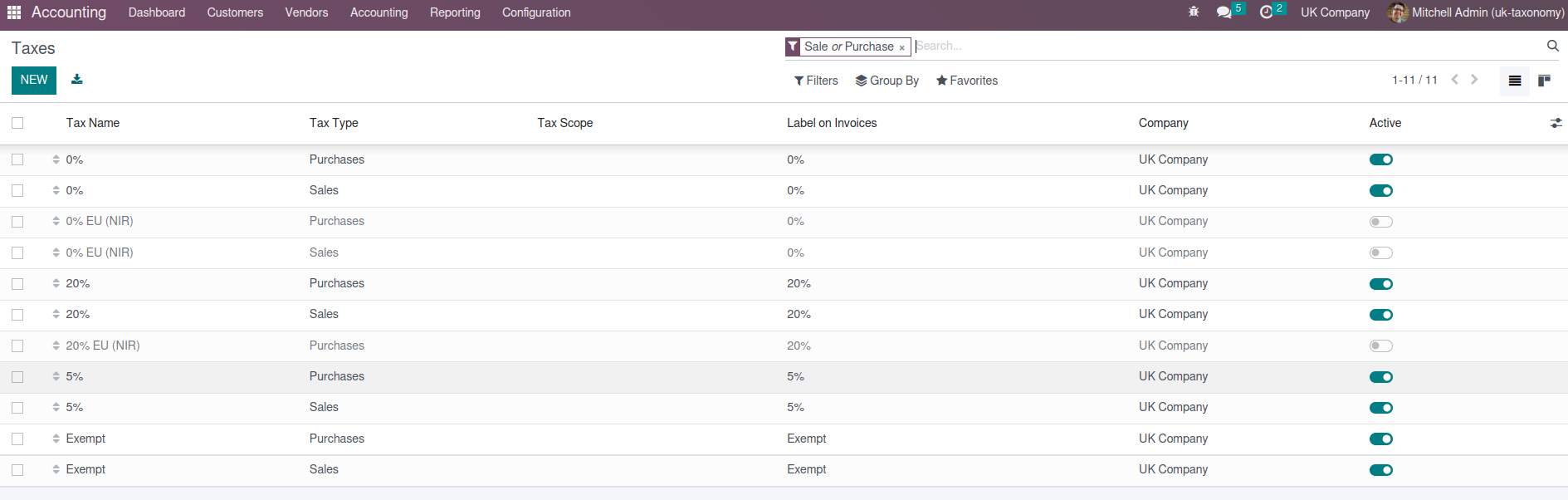 ***Update UK report lines*** Report lines are updated to match those described in the UK government documentation (see below) https://www.gov.uk/guidance/how-to-fill-in-and-submit-your-vat-return-vat-notice-70012
This update reorganizes how several mail and communication components store their internal data. It helps make chat, call, and notification features easier to maintain and more reliable over time, without introducing a major visible change for users.
Original PR description
Task-2734101
The mail chat window now uses a dedicated autocomplete input experience for suggestions. This makes selecting suggested recipients or entries in chat more consistent and easier to maintain, improving the reliability of chat interactions for users.
Original PR description
Just with chat window.

Task-2817076
The mail app now has a clearer way to request and handle browser notification permissions. This helps users receive message alerts more reliably while keeping the permission flow consistent.
Original PR description
…ermission

Task-2579306
The mail app’s message composer suggestion system was simplified by removing an unnecessary internal component. This should make the feature easier to maintain without changing how users work with suggestions.
Original PR description
Task-2793280
The mail app now has a dedicated follower list menu that makes follower actions, including adding followers, easier to manage from the chatter area. This improves consistency and usability for users collaborating on records.
Original PR description
Task-2579306
The mail composer suggestion interface was cleaned up by removing an internal dependency that tracked model names or records. This helps keep the messaging code easier to maintain without changing the visible user experience.
Original PR description
Task-2793280
The mail composer suggestion interface now uses a clearer title field when showing suggested contacts or items. This makes suggestions easier to understand for users while keeping the change limited to the mail experience.
Original PR description
Task-2793280
This update improves how message composer suggestions are managed in the Mail app. It helps make suggestion selection more reliable and easier to maintain, supporting a smoother messaging experience for users.
Original PR description
Task-2793280
The mail composer now handles suggestion clicks through a clearer view-level action. This improves maintainability of the messaging experience and helps keep user interactions in the composer consistent.
Original PR description
Task-2579306
Users can now rotate attachments directly in the mail attachment viewer. This makes it easier to review documents or images that were uploaded with the wrong orientation, reducing friction during everyday collaboration.
Original PR description
Task-2579306
The mail app’s attachment viewer now supports moving back to the previous attachment, making it easier for users to browse shared files. This improves day-to-day document review in conversations by reducing friction when switching between attachments.
Original PR description
Task-2579306
The mail app now includes a refreshed attachment viewer foundation, making it easier to preview and navigate files shared in conversations. This improves the user experience around message attachments and prepares the feature for further enhancements.
Original PR description
Task-2579306
Users can now print attachments directly from the mail attachment viewer, making it easier to handle documents without downloading or opening them elsewhere. This streamlines document review and sharing workflows in Odoo messaging.
Original PR description
Task-2579306
The mail attachment viewer now handles image loading more explicitly, helping images display more reliably when users preview attachments. This improves the viewing experience in discussions and messages without changing users' workflows.
Original PR description
Task-2579306
The mail attachment viewer now includes dedicated handling for clicking video attachments. This makes viewing shared videos in messages smoother and more intuitive for users.
Original PR description
Task-2579306
The mail app now has a dedicated way to handle image clicks in the attachment viewer. This makes viewing attached images smoother and more consistent for users working with messages and documents.
Original PR description
Task-2579306
The mail attachment viewer now includes a clearer action when users click the header area. This improves the attachment preview experience and makes interactions in messages feel more consistent.
Original PR description
Task-2579306
The mail attachment viewer now supports moving to the next attachment more directly. This makes reviewing multiple files in a message smoother and reduces friction for users handling shared documents.
Original PR description
Task-2579306
The mail app now has a clearer way to handle download clicks from the attachment viewer. This helps keep attachment viewing and downloading behavior more consistent for users.
Original PR description
Task-2579306
The mail app now has a clearer built-in way to close the attachment viewer. This makes viewing shared files feel smoother and more consistent for users working with messages and documents.
Original PR description
Task-2579306
Users can now rotate attachments directly in the mail attachment viewer. This makes it easier to review images or documents that were uploaded in the wrong orientation without leaving the preview.
Original PR description
Task-2579306
The mail attachment viewer now has a clearer close action, making it easier for users to exit previews. This improves the overall usability of viewing attachments in messages without changing core business workflows.
Original PR description
Task-2579306
The mail app’s attachment viewer now has improved click handling and closing behavior, making it easier for users to view and dismiss attachments. This helps create a smoother experience when working with files shared in messages.
Original PR description
Task-2579306
Users can now print attachments directly from the mail attachment viewer. This makes reviewing and sharing documents faster by avoiding extra download or preview steps before printing.
Original PR description
Task-2579306
The mail attachment viewer now has a clearer way to handle moving to the previous attachment. This makes attachment browsing more consistent and easier to maintain, supporting a smoother user experience in message attachments.
Original PR description
Task-2579306
This update improves the mail app's internal handling of autocomplete inputs, helping chat-related features identify and manage message entry areas more reliably. It supports smoother maintenance and future enhancements with minimal direct impact on end users.
Original PR description
Also add AutocompleteInputView/chatWindowOwnerAsNewMessage,
so that there's at least one identifying field.

Task-2817076
This update introduces a reusable autocomplete input view in the Mail app and connects it to chat windows. It should make future autocomplete behavior easier to maintain while keeping messaging interactions consistent for users.
Original PR description
Task-2817076
The mail app now uses a shared autocomplete input for places where users add people or start messages. This helps make recipient selection more consistent across chat windows and mobile discussion screens, reducing confusion and supporting a smoother messaging experience.
Original PR description
Task-2817076
The messaging area now has a more consistent autocomplete experience when adding or finding items in the Discuss sidebar. This helps users navigate conversations more smoothly and supports cleaner behavior in chat-related workflows.
Original PR description
Task-2817076
The mail messaging area was adjusted to remove an older transition mechanism as preparation for a newer underlying interface framework. This is an internal improvement that helps keep Discuss and messaging components maintainable without changing day-to-day user workflows.
Original PR description
In preparation to using OWL v2 in discuss code

Task-2695905
Recurring tasks are now easier to configure with a simpler repeat pattern and clearer controls. New task occurrences are created as soon as the previous task is marked done, helping teams plan field service and project work earlier instead of waiting for a scheduled date.
Original PR description
*=hr_timesheet,project,sale_project,sale_timesheet Currently, the configuration of the recurrence is quite complete and allows a lot of flexibility, but it is costly in terms of implementation as it…
*=hr_timesheet,project,sale_project,sale_timesheet

Currently, the configuration of the recurrence is quite complete
and allows a lot of flexibility, but it is costly
in terms of implementation as it requires a lot of fields.
The goal of this task is thus to simplify this implementation.

In addition, a lot of people are complaining
that tasks are only generated when the recurrence date is reached,
as it doesn't allow to anticipate the planning of field service tasks.
In this task, we are thus going to immediately generate a new task
once the previous one is marked as done.

Concretely, we:
- describe a recurrence in terms of
"once every n day/week/month/year for ever/until a date"
and delete all fields that don't fit into it.

- remove the cron. The new occurrence is created when
marking the last task as done, and copied from the latter.
Deleting the last task deletes the recurrence.
The recurrence fields stay useful, as they form a delta t
that will be added to deadline/planned dates fields to get the new
values.

- use an boolean icon button to activate recurrence,
and place it at the end of deadline field's line.
The recurrence fields appear on the next line.

- delete in the form: the div explaining when the next tasks will be
created and the header to choose how to save the changes in the
recurrence.

task-3084945


---
I confirm I have signed the CLA and read the PR guidelines at www.odoo.com/submit-pr
Sales order and quotation list views have been reorganized so shared layout details are handled consistently across Sales, Inventory-related sales, and Website Sales. Website-specific columns are now hidden when the multi-website option is not enabled, reducing clutter for businesses that do not use that feature.
Original PR description
task-3213457


---
I confirm I have signed the CLA and read the PR guidelines at www.odoo.com/submit-pr
Recurring task behavior was streamlined across field service, projects, and subscription-linked sales. This makes the related workflows easier to maintain and prepares the enterprise modules to align with matching community changes.
Original PR description
*=industry_fsm,project_enterprise,project_sale_subscription

All changes here are made to allow community related commit.

Related: https://github.com/odoo/odoo/pull/112764
task-3084945
Amazon-related quotations and sales orders now use a unified list view, making it easier for users to review and manage sales documents in one consistent place. This improves day-to-day navigation and reduces confusion between similar screens.
Original PR description
task-3213457
Budget records now show the cancelled status only when a budget is actually cancelled. This keeps the status bar clearer and reduces confusion for users reviewing budget progress.
Original PR description
before this commit, cancelled state was showing in the second position in the statusbar after the draft and it was always visible in the statusbar.

after this commit, the cancelled state will be moved to last position and only will show when the record is in the cancelled state.