Wednesday, April 5, 2023
44 changes · master
Enhancements to existing features
This update improves how Odoo detects circular links in core records, helping avoid situations where checks can get stuck. It makes the underlying validation more reliable without changing day-to-day user workflows.
Original PR description
use RECURSIVE CTE to check recursion
avoid potential dead loop for check_recursion in test_105_res_partner_recursion

Description of the issue/feature this PR addresses:

Current behavior before PR:

Desired behavior after PR is merged:


---
I confirm I have signed the CLA and read the PR guidelines at www.odoo.com/submit-pr
Onboarding step validation now returns clearer results, so other parts of Odoo can decide what action to take next. This also adds a safer way to validate onboarding steps by reference and improves test coverage for the updated behavior.
Original PR description
The purpose of this commit is to return meaningful responses when
validating steps and leave the caller to decide what to do with them.

We also introduce a public action enabling the validation of a step
from its xmlid and handle the different cases including the missing
step.

Note: these features are currently used in appointment (See Ent PR).

Additionally, returning the newly validated `onboarding_steps` from
`onboarding_step.action_set_just_done` makes more sense than returning
the `onboarding_progress_steps` records.

Tests are updated to make sure of this.

Task-3074112
This change adds automated coverage to verify that helpdesk ticket totals and open ticket counts are calculated correctly for the selected customer. It helps reduce the risk of incorrect customer ticket information appearing in helpdesk workflows.
Original PR description
This commit add test case to check ticket count and open ticket
count according to partner set on ticket.

task-3049634
The Knowledge app now shows the Rename and Open buttons in embedded list and kanban views without a prominent background. This makes article embeds look more consistent in dark mode and reduces visual distraction for users.
Original PR description
This commit removes the background of the buttons `Rename` and `Open` that are specific to the embedded List and Kanban views for article items. This way in dark mode the buttons doesn't stand out as much as before and have a style similar to the buttons presents inside the embedded view by default (filter, groupby, favorites).

task-3191812
Resolved issues and error corrections
Odoo Studio now keeps special view styling classes when editing kanban views, including dashboard-style layouts. This prevents visual issues in the editor so business users see a more accurate representation of the final view.
Original PR description
Have a kanban with special classes, in particular o_kanban_dashboard and other related classes.

Before this commit, those classes were not present in the DOM, resulting in style bugs.

After this commit, those classes are present in the DOM.
Code cleanup and technical improvements
This update replaces older shared JavaScript helper functions with standard browser capabilities across several Odoo areas. It is an internal cleanup that helps keep the codebase easier to maintain without changing how users work with the system.
Miscellaneous changes
This commit is a security reinforcement. Before this commit: ir.action.act_url was able to handle and redirect to protocols like file:, javascript:, date: ... This is unnecessary in the context of this action. It could potentially be abused by a poorly written custom module It also would not isolate the landing page in case of a new tabs. It means that chrome would still consider the tab to be from the previous domain in case no url was passed and js was executed. This would allow the n
Original PR description
This commit is a security reinforcement. Before this commit: ir.action.act_url was able to handle and redirect to protocols like file:, javascript:, date: ... This is unnecessary in the context of…
This commit is a security reinforcement.

Before this commit:

ir.action.act_url was able to handle and redirect to protocols like file:, javascript:, date: ... This is unnecessary in the context of this action. It could potentially be abused by a poorly written custom module

It also would not isolate the landing page in case of a new tabs. It means that chrome would still consider the tab to be from the previous domain in case no url was passed and js was executed. This would allow the newly open tab to still make query's to the referrer using the referrer's cookie. While not stricly necessary if we already prevent url that start with "javascript:", it is a nice to have.

After this commit:

New tabs are not able to access referrer informations or execute javascript interacting with the referrer. Also, it is now impossible to redirect to protocols other than http and https directly from the ir.action.act_url

Test update:

All new tabs are required to have the "noreferrer" argument

Tested an example of an unsupported protocol.

Forward-Port-Of: odoo/odoo#117412
Forward-Port-Of: odoo/odoo#117205
Original PR description
Replace _.find, _.last, _.first, _.extend, _.some, _.every

Taskid 3246238
Removing the "Oks" from the "Archive" modals to
clarify what confirming the action will do.

Also fixing a wording error in the form controller archive modal.

Task-3241064

Forward-Port-Of: odoo/odoo#117487
Forward-Port-Of: odoo/odoo#116691
Original PR description
Removing the "Oks" from the "Archive" modals to clarify what confirming the action will do. Also fixing a wording error in the form controller archive modal. Task-3241064 Forward-Port-Of: odoo/odoo#117487 Forward-Port-Of: odoo/odoo#116691
Current behaviour: --- Cannot add a Work Order to a Manufacturing Order if the analytic account linked to the MO doesn't have an associated company. Expected behaviour: --- Should be able to add a WO to a MO even if the linked analytic account doesn't have an associated company. Steps to reproduce: --- 1. Activate analytic accounts 2. Activate work orders 3. Create an analytic account without company associated 4. Create a Manufacturing Order 5. In miscellaneous, link the ana
Original PR description
Current behaviour: --- Cannot add a Work Order to a Manufacturing Order if the analytic account linked to the MO doesn't have an associated company. Expected behaviour: --- Should be able to add a WO…
Current behaviour:
---
Cannot add a Work Order to a Manufacturing Order
if the analytic account linked to the MO doesn't
have an associated company.

Expected behaviour:
---
Should be able to add a WO to a MO even
if the linked analytic account doesn't have
an associated company.

Steps to reproduce:
---
1. Activate analytic accounts
2. Activate work orders
3. Create an analytic account without company associated
4. Create a Manufacturing Order
5. In miscellaneous, link the analytic account
6. Try to add a WO line
7. Error log

Reason for the problem:
---
When trying to add a WO line, if the MO has been linked to an analytic account, it checks for the currency in the company in the analytic account, which was not existent, since the company didn't exist.

Fix:
---
When trying to access currency, if the company in the analytic account doesn't exist, it defaults to the company in the WO.


opw-3210708

---
I confirm I have signed the CLA and read the PR guidelines at www.odoo.com/submit-pr

Forward-Port-Of: odoo/odoo#117410
Forward-Port-Of: odoo/odoo#116693
Before this commit, having an accrual plan with no level before a certain amount of time would result in a crash because no relevant level is found.
This commit avoid that error.

Forward-Port-Of: odoo/odoo#117635
Original PR description
Before this commit, having an accrual plan with no level before a certain amount of time would result in a crash because no relevant level is found. This commit avoid that error. Forward-Port-Of: odoo/odoo#117635
**Steps to reproduce the bug:** - Go to the warehouse settings: - enable “3 steps for manufacturing” - Create a storable product “P1” with 2 BoM - Create an orderpoint: - Preferred route: Manufacturing - Product: “P1” - BoM: select the second BoM - To order: 1 - Click on the “Order once” button **Problem:** The manufacturing order is created with the first BoM instead of the second. As we are in 3 steps, the “run_pull” function is triggered first, with value
Original PR description
**Steps to reproduce the bug:**
- Go to the warehouse settings:
    - enable “3 steps for manufacturing”
- Create a storable product “P1” with 2 BoM
- Create an orderpoint:
    - Preferred route: Manufacturing
    - Product: “P1”
    - BoM: select the second BoM
    - To order: 1

- Click on the “Order once” button

**Problem:**
The manufacturing order is created with the first BoM instead of the second.

As we are in 3 steps, the “run_pull” function is triggered first, with values prepared from the orderpoint so the bom is well set:
https://github.com/odoo/odoo/blob/16.0/addons/stock/models/stock_orderpoint.py#L515-L523

Then the “run_manufacture” function is triggered but with vals prepared from the move, not from the orderpoint, so we lose the BoM information that the user has selected:
https://github.com/odoo/odoo/blob/16.0/addons/stock/models/stock_move.py#L1334-L1340


opw-3217945

Forward-Port-Of: odoo/odoo#117666
Forward-Port-Of: odoo/odoo#116685duration_percent field is a stored integer. In postgresql, integer are 4 Bytes long, which create a range of -2147483648 to +2147483647. With a small `duration_expected`, and a big `duration`, we can easily break these limits. This min(max()) limits the range of `duration_percent` between -999999 and 999999. `duration_percent` is only used in some views as an additional field, ex: ) limits the range of `duration_percent` between -999999 and 999999.
`duration_percent` is only used in some views as an additional field, ex:

So the impact should be minimal
---
## How to Reproduce:
https://watch.screencastify.com/v/FHPD1qRVYRirO3QgLzCt
- Create a product P1:
- bom: B1
- component: any (bolt / screw)
- operations:
- worcenter: Assembly Line 1
- default duration: 00:01 minutes
- Create Manufacturing for 1 unit of P1 => PLAN
- On Manufacturing > Work Centers Overview > Assembly Line 1: click on the work order of your MO
- Wait 1 years
- ...
- Ok, just change date_start on the workorder.time_ids to 1 year in the past
- Click on 'Mark as Done'
==> Traceback appear
---
OPW-3253333
---
I confirm I have signed the CLA and read the PR guidelines at www.odoo.com/submit-pr
Forward-Port-Of: odoo/odoo#117590The loading of products and partners in background is too slow for the moment. For configurations with a lot of products or partners, the loading is slowing the whole behaviour of the PoS while it is not really necessary to load 20K products. This PR removes the loading of partners and products in background and add a button on the ProductScreen for user to load more products when a search term is put in the search bar. This load will load 30 items at a time. --- I confirm I have signed the
Original PR description
The loading of products and partners in background is too slow for the moment. For configurations with a lot of products or partners, the loading is slowing the whole behaviour of the PoS while it is not really necessary to load 20K products. This PR removes the loading of partners and products in background and add a button on the ProductScreen for user to load more products when a search term is put in the search bar. This load will load 30 items at a time.

---
I confirm I have signed the CLA and read the PR guidelines at www.odoo.com/submit-pr

Forward-Port-Of: odoo/odoo#117400
Forward-Port-Of: odoo/odoo#115849
Adding the if condition to handle starred argument passed to cr.execute

Adding two test to test that case

Forward-Port-Of: odoo/odoo#117572
Original PR description
Adding the if condition to handle starred argument passed to cr.execute Adding two test to test that case Forward-Port-Of: odoo/odoo#117572
Steps to reproduce the bug: - Create a Storable product “C1” tracked by Lot: - Update the Qty to 10 - Create a Storable product “P1”: - Add a BoM: - add 1 unit of “C1” as component - Enable 3 steps for the manufacturing operation in warehouse settings - Create a Mo to produce 1 unit of “P1”: - Confirm the MO - Click on related transfer: - Select the “Pick component” - check that the qty is reserved correctly - Try to validate it
Original PR description
Steps to reproduce the bug: - Create a Storable product “C1” tracked by Lot: - Update the Qty to 10 - Create a Storable product “P1”: - Add a BoM: - add 1 unit of “C1” as component - Enable 3 steps…
Steps to reproduce the bug:
- Create a Storable product “C1” tracked by Lot:
    - Update the Qty to 10

- Create a Storable product “P1”:
    - Add a BoM:
        - add 1 unit of  “C1” as component

- Enable 3 steps for the manufacturing operation in warehouse settings

- Create a Mo to produce 1 unit of “P1”:
    - Confirm the MO
    - Click on related transfer:
        - Select the “Pick component”
        - check that the qty is reserved correctly
        - Try to validate it without setting Qty done
        - The immediate transfer is triggered, validate it

Problem:
The backorder's wizard triggers when it shouldn't

To know if we should create a backorder, we check if the qty reserved is equal to the qty done, and as the qty done was not set correctly during the validation of the immediate transfer, the two quantities are not identical, therefore the widget is trigger:

https://github.com/odoo/odoo/blob/15.0/addons/stock/models/stock_picking.py#L1128-L1132


opw-3240264

Forward-Port-Of: odoo/odoo#117467
Forward-Port-Of: odoo/odoo#116196Incorporate Andy Quijada (ajqn9094) as Vauxoo's contributor. I confirm I have signed the CLA and read the PR guidelines at www.odoo.com/submit-pr Forward-Port-Of: odoo/odoo#117550
Original PR description
Incorporate Andy Quijada (ajqn9094) as Vauxoo's contributor.

I confirm I have signed the CLA and read the PR guidelines at www.odoo.com/submit-pr

Forward-Port-Of: odoo/odoo#117550
Issue: When activating the multicurrency in PE, the default exchange rate accounts are placed in the opposite fields (gain account should be an income account and loss account should be an expense), currently they're the other way around. Fix: Change the default account so Odoo created the journal entries for exchange rate differences the correct way. Task Latam: https://latam-localizations.odoo.com/web#id=967&menu_id=88&cids=1&action=188&model=project.task&view_type=form Referenc
Original PR description
Issue:

When activating the multicurrency in PE, the default exchange rate accounts are placed in the opposite fields (gain account should be an income account and loss account should be an expense), currently they're the other way around.

Fix:

Change the default account so Odoo created the journal entries for exchange rate differences the correct way.

Task Latam: https://latam-localizations.odoo.com/web#id=967&menu_id=88&cids=1&action=188&model=project.task&view_type=form

Reference:

https://www.noticierocontable.com/diferencia-de-cambio-venta/ https://www.noticierocontable.com/asiento-contable-perdida-diferencia-cambio/

Replace: #115361

---
I confirm I have signed the CLA and read the PR guidelines at www.odoo.com/submit-pr

Forward-Port-Of: odoo/odoo#117699
before this commit, in the list view of fleet (fleet.vehicle), services (fleet.vehicle.log.services) and odometer(fleet.vehicle.odometer) the vehicle_id and model_id field with many2one_avatar is not showing the image of vehicle and model. * open fleet -> fleet -> fleet * switch to list view * model field will be with empty image * similarly in services and odometer menus after this commit, the vehicle_id and model_id field will show the images in the respective list vi
Original PR description
before this commit, in the list view of fleet (fleet.vehicle), services (fleet.vehicle.log.services) and odometer(fleet.vehicle.odometer) the vehicle_id and model_id field with many2one_avatar is not showing the image of vehicle and model. * open fleet -> fleet -> fleet * switch to list view * model field will be with empty image * similarly in services and odometer menus after this commit, the vehicle_id and model_id field will show the images in the respective list views. 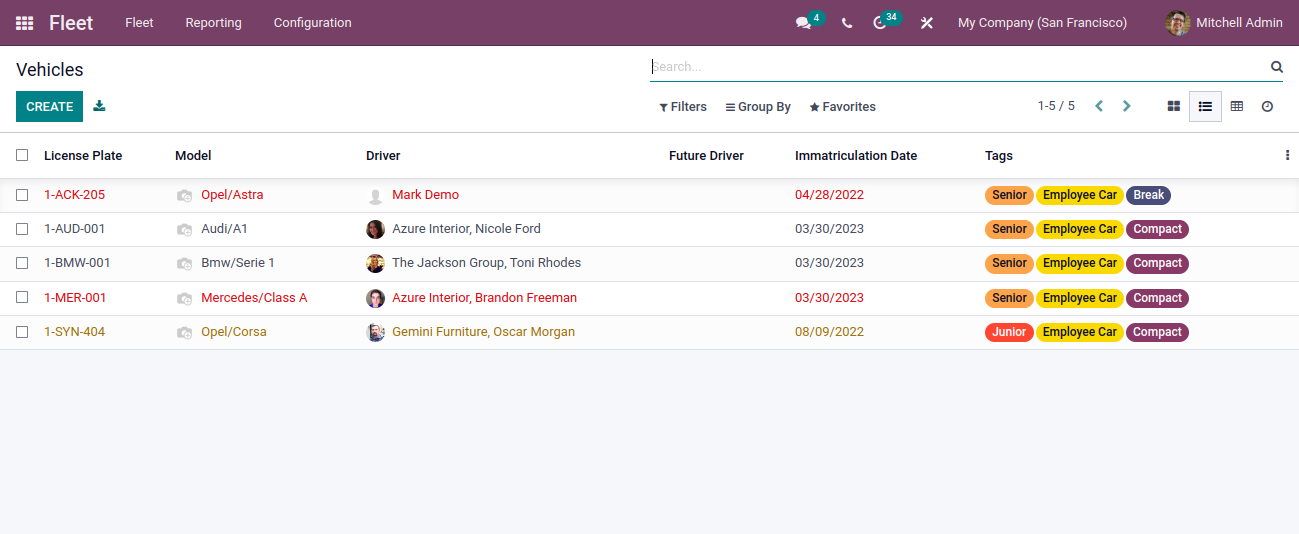 close: https://github.com/odoo/odoo/issues/91276 --- I confirm I have signed the CLA and read the PR guidelines at www.odoo.com/submit-pr Forward-Port-Of: odoo/odoo#117585 Forward-Port-Of: odoo/odoo#117262
An error appears when we try to change the product in transfer line via product /search Steps to reproduce the issue: 1.Create 2 products: Test 1 (UoM is Cm) and Test 2 (UoM is g) 2.create a delivery order and add Test 1 then test 2 3. UoM error due to the UoM not being updated at the time of change. The error was happening because when updating the product directly in the line , the stock_move item already has a UoM and the if statement makes it impossible to change so the error
Original PR description
An error appears when we try to change the product in transfer line via product /search

Steps to reproduce the issue:

 1.Create 2 products: Test 1 (UoM is Cm) and Test 2 (UoM is g)
 2.create a delivery order and add Test 1 then test 2
 3. UoM error due to the UoM not being updated at the time of change.

The error was happening because when updating the product directly in the line , the stock_move item already has a UoM and the if statement makes it impossible to change so the error appears

opw-3231298

Forward-Port-Of: odoo/odoo#116678
Before this PR, the field tax_ids had no tooltip. Since v16 we now allow the use of all taxes in the expenses module now. But, there is not much mention that price-excluded taxes will be used as price-included taxes. In the release notes it just mentions that all taxes are usable, but there is no mention of anything else. This seems a bit confusing. Adding the tooltip will help users. Also adding fresh exported .pot task-id: 3252757 --- I confirm I have signed the CLA and read the PR
Original PR description
Before this PR, the field tax_ids had no tooltip.
Since v16 we now allow the use of all taxes in the expenses module now. But, there is not much mention that price-excluded taxes will be used as price-included taxes.
In the release notes it just mentions that all taxes are usable, but there is no mention of anything else. This seems a bit confusing. Adding the tooltip will help users.

Also adding fresh exported .pot

task-id: 3252757

---
I confirm I have signed the CLA and read the PR guidelines at www.odoo.com/submit-pr

Forward-Port-Of: odoo/odoo#117190
Forward-Port-Of: odoo/odoo#117008
Steps to reproduce the bug: - Go to the website edit mode. - Choose the 'vertical' template header. - Select 'off-canvas' in the 'mobile menu' option of the navbar. - Bug: On mobile view, the menu links are not clickable. This is caused by the addition of the "order-first" class to the navbar by commit [1], which causes the menu to be placed behind the backdrop in mobile view when off-canvas is activated. This only happens with Firefox, and there is likely a difference in how Chrome and
Original PR description
Steps to reproduce the bug:

- Go to the website edit mode.
- Choose the 'vertical' template header.
- Select 'off-canvas' in the 'mobile menu' option of the navbar.
- Bug: On mobile view, the menu links are not clickable.

This is caused by the addition of the "order-first" class to the navbar by commit [1], which causes the menu to be placed behind the backdrop in mobile view when off-canvas is activated. This only happens with Firefox, and there is likely a difference in how Chrome and Firefox handle the "order" property based on the positioning of elements.

[1]: https://github.com/odoo/odoo/commit/2a000e33c5a44ddf0a777b43d8266cc413d8e4e2

opw-3009202

Forward-Port-Of: odoo/odoo#117463
Current behavior:
In the pos order report the margin is not shown for products with no cost.

Steps to reproduce:
- Create a product with no cost
- Open a pos session, add the product to the order, and validate it
- Go to the pos order report and check the margin for the product
- The margin is not shown

opw-3232131
---
I confirm I have signed the CLA and read the PR guidelines at www.odoo.com/submit-pr

Forward-Port-Of: odoo/odoo#117328
Forward-Port-Of: odoo/odoo#116818
Original PR description
Current behavior: In the pos order report the margin is not shown for products with no cost. Steps to reproduce: - Create a product with no cost - Open a pos session, add the product to the order, and validate it - Go to the pos order report and check the margin for the product - The margin is not shown opw-3232131 --- I confirm I have signed the CLA and read the PR guidelines at www.odoo.com/submit-pr Forward-Port-Of: odoo/odoo#117328 Forward-Port-Of: odoo/odoo#116818
While we run cron `Data Merge: Find Duplicate Records` then it raises a traceback
because `data_merge. model` has no method `_message_compute_subject`

This thread method is called in various steps when trying to post or notify a
message. With this PR we ensure notifying non-thread models is still working
as intended by being defensive when calling this method.

sentry-3947126655
Task-3254379

Forward-Port-Of: odoo/odoo#117636
Forward-Port-Of: odoo/odoo#113460
Original PR description
While we run cron `Data Merge: Find Duplicate Records` then it raises a traceback because `data_merge. model` has no method `_message_compute_subject` This thread method is called in various steps when trying to post or notify a message. With this PR we ensure notifying non-thread models is still working as intended by being defensive when calling this method. sentry-3947126655 Task-3254379 Forward-Port-Of: odoo/odoo#117636 Forward-Port-Of: odoo/odoo#113460
Steps to reproduce: - Activate Analytic Account - Create a Service Product - create project on order - Create a quotation with the product - Confirm the quotation - Go on the project -> analytic account is "order # - partner_name" - On the quotation - Create Invoice Issue 1: - The invoice has "order #" has the analytic account and not the "order # - partner_name" Issue 2: - if you create an invoice and wants to select the analytic account you cannot search it by the partner name, o
Original PR description
Steps to reproduce: - Activate Analytic Account - Create a Service Product - create project on order - Create a quotation with the product - Confirm the quotation - Go on the project -> analytic…
Steps to reproduce:
- Activate Analytic Account
- Create a Service Product - create project on order
- Create a quotation with the product
- Confirm the quotation
- Go on the project -> analytic account is "order # - partner_name"
- On the quotation - Create Invoice

Issue 1:
- The invoice has "order #" has the analytic account and not the "order # - partner_name"

Issue 2:
- if you create an invoice and wants to select the analytic account you cannot search it by the partner name, only by the "order #"

Cause:
When confirming the quotation, we create an analytic account. The default name of the analytic account is the order name: https://github.com/odoo/odoo/blob/bba5b6a440544151cc610bbc6848adfbadb38bfb/addons/sale/models/sale_order.py#L1416

Why is the analytic account displayed correctly on the project? Because we use the `get_name` is triggered:
https://github.com/odoo/odoo/blob/bff34e0e8a8b2d211ef90ffea4f43c514e8cad28/addons/analytic/models/analytic_account.py#L115-L123

In the analytic distribution view, we only render the name of the analytic account as it is defined primarly.

Solution:
Define name at the creation of the analytic account as "order # - partner_name".
And in the name_get, prevent the append if the partner_name is already in the display_name

opw-3165655

Forward-Port-Of: odoo/odoo#113737
When opening the Time Off App, the JS performs an rpc to call `hr_leave_type.get_days_all_request`. Inside this method there are some gets on non-stored computed fields. This triggers a recomputation of said fields in `_compute_leaves`. `_compute_leaves` uses `_get_employees_days_per_allocation`. When there is an hr.leave.type with request_unit = 'hour', you may get lots of validated allocations by employee. When this is the case, `_get_employees_days_per_allocation` gets quite slow, especial
Original PR description
When opening the Time Off App, the JS performs an rpc to call `hr_leave_type.get_days_all_request`. Inside this method there are some gets on non-stored computed fields. This triggers a recomputation…
When opening the Time Off App, the JS performs an rpc to call `hr_leave_type.get_days_all_request`. Inside this method there are some gets on non-stored computed fields. This triggers a recomputation of said fields in `_compute_leaves`. `_compute_leaves` uses `_get_employees_days_per_allocation`.

When there is an hr.leave.type with request_unit = 'hour', you may get lots of validated allocations by employee. When this is the case, `_get_employees_days_per_allocation` gets quite slow, especially the last part about 'Future available leaves'.

This commit optimizes this part of `_get_employees_days_per_allocation`. In it the allocations are grouped by employee and Intervals instances are of the form (start, stop, records). This means that for a given employee_id, all the records of one Intervals will have the same start and stop values. This allows us to move the call to `_get_work_days_data_batch` outside of the
`for future_allocation_interval in future_allocation_intervals._items` loop. Because `_get_work_days_data_batch` is quite expensive, moving it out grealty speeds up the `_get_employees_days_per_allocation method.`

#### speedup

Testing database with 1 hr.leave.type with request_unit = hours and 1 employee_id. Timing
of `_get_employees_days_per_allocation` increasing the number of allocations.

| Allocations | Before PR | After PR |
|:---------------:|:--------------:|:-----------:|
| 1 | 157ms | 157ms |
| 10 | 1.49s | 157ms |
| 30 | 4.41s | 158ms |
| 50 | 7.39s | 162ms |
| 200 | 29.4s | 170ms |

This is a best-case speedup. The average speedup will roughly be equal to the average number of allocations
by intervals by holiday_status_id by employee_id.

---
I confirm I have signed the CLA and read the PR guidelines at www.odoo.com/submit-pr

Forward-Port-Of: odoo/odoo#116217
When we use a 12 hour time format (without the `%p`), the time set is always in the morning regardless of the period used (AM or PM). Using `preparse` and `postformat` in the locale to change the symbols used for numbers prevents the user from changing the date in the datepicker because the date will be unparsable Steps to reproduce: 1. Install Calendar 2. Go to Settings > Translations > Languages and open 'English (US)' 3. Set the time format to `%I:%M:%S` 4. Open Calendar and create a
Original PR description
When we use a 12 hour time format (without the `%p`), the time set is always in the morning regardless of the period used (AM or PM). Using `preparse` and `postformat` in the locale to change the…
When we use a 12 hour time format (without the `%p`), the time set is always in the morning regardless of the period used (AM or PM).
Using `preparse` and `postformat` in the locale to change the symbols used for numbers prevents the user from changing the date in the datepicker because the date will be unparsable

Steps to reproduce:
1. Install Calendar
2. Go to Settings > Translations > Languages and open 'English (US)'
3. Set the time format to `%I:%M:%S`
4. Open Calendar and create a new meeting in the morning
5. Edit the meeting, set the time period to 'PM' and save
6. The time of the meeting doesn't change

Solution:
Get the time from the event passed when we close the bootstrap DateTimePicker and convert it to luxon.
The period displayed when we open the datepicker is always 'AM'. This is a limitation with the bootstrap DateTimePicker that uses the value from the element[^1] (which is already formatted with the 12 hour format, without the period info). Hence, the time is always in the morning

Problem:
The value of the element is used to set the date but this value is already formatted with the 12 hour format (without the period info) so it's always in the morning

opw-3150033

[^1]:https://github.com/odoo/odoo/blob/16.0/addons/web/static/lib/tempusdominus/tempusdominus.js#L395

Forward-Port-Of: odoo/odoo#117141
**Description of the issue/feature this PR addresses:**
Before this commit, in large database, openning a sale.order can take 3s. Because in module `sale_purchase_stock`, `_get_purchase_orders` use a On2many field : `stock_move_ids`, with inverse field `group_id`.

Now it takes 200 ms.

@amoyaux


---
I confirm I have signed the CLA and read the PR guidelines at www.odoo.com/submit-pr

Forward-Port-Of: odoo/odoo#110128
Original PR description
**Description of the issue/feature this PR addresses:** Before this commit, in large database, openning a sale.order can take 3s. Because in module `sale_purchase_stock`, `_get_purchase_orders` use a On2many field : `stock_move_ids`, with inverse field `group_id`. Now it takes 200 ms. @amoyaux --- I confirm I have signed the CLA and read the PR guidelines at www.odoo.com/submit-pr Forward-Port-Of: odoo/odoo#110128
English translation added via source. Dutch and French via Transifex.

[task-3193776](https://www.odoo.com/web#id=3193776&cids=1&menu_id=4720&action=4043&model=project.task&view_type=form)

Related to https://github.com/odoo/enterprise/pull/37578

---
I confirm I have signed the CLA and read the PR guidelines at www.odoo.com/submit-pr

Forward-Port-Of: odoo/odoo#117638
Forward-Port-Of: odoo/odoo#113780
Original PR description
English translation added via source. Dutch and French via Transifex. [task-3193776](https://www.odoo.com/web#id=3193776&cids=1&menu_id=4720&action=4043&model=project.task&view_type=form) Related to https://github.com/odoo/enterprise/pull/37578 --- I confirm I have signed the CLA and read the PR guidelines at www.odoo.com/submit-pr Forward-Port-Of: odoo/odoo#117638 Forward-Port-Of: odoo/odoo#113780
Remove an option used by the phone widget in the res_user view.

task - 3246848

Forward-Port-Of: odoo/odoo#116727
Original PR description
Remove an option used by the phone widget in the res_user view. task - 3246848 Forward-Port-Of: odoo/odoo#116727
**Steps to reproduce the bug:** - install the `purchase_requisition` module - Create a storable product “P1”: - UoM: unit - cost: 10 - Create a PO: - Add 1 unit of “P1”: - Change the UoM from unit to Dozen - the unit price will be updated from 10 to 120 - Save the PO - Create a Po alternative **Problem:** The “Unit of measure” is correctly copied, but the unit price is wrongly computed “10” instead of 120 When creating the PO alternative, we copy
Original PR description
**Steps to reproduce the bug:** - install the `purchase_requisition` module - Create a storable product “P1”: - UoM: unit - cost: 10 - Create a PO: - Add 1 unit of “P1”: - Change the UoM from unit to…
**Steps to reproduce the bug:**
- install the `purchase_requisition` module
- Create a storable product “P1”:
    - UoM: unit
    - cost: 10
- Create a PO:
    - Add 1 unit of “P1”:
        - Change the UoM from unit to Dozen
        - the unit price will be updated from 10 to 120
     - Save the PO
- Create a Po alternative

**Problem:**
The “Unit of measure” is correctly copied, but the unit price is wrongly computed “10” instead of 120

When creating the PO alternative, we copy the uom of the original lines in the vals:

https://github.com/odoo/odoo/blob/4c2163d2b195a0c829d4e24a7afc3347e7c3401a/addons/purchase_requisition/wizard/purchase_requisition_create_alternative.py#L84

then, The line is created with the correct UoM, but we force the call to `onchange_product_id`

https://github.com/odoo/odoo/blob/c677f45dcb050ce7e6f755b71e56c9b9120bf613/addons/purchase/models/purchase.py#L1371-L1372

So `_product_id_change` will be called:

https://github.com/odoo/odoo/blob/c677f45dcb050ce7e6f755b71e56c9b9120bf613/addons/purchase/models/purchase.py#L1163

And the product UoM “Unit” will be set in the `purchase.order.line`:

https://github.com/odoo/odoo/blob/c677f45dcb050ce7e6f755b71e56c9b9120bf613/addons/purchase/models/purchase.py#L1171

Therefore, the unit price will be calculated with Unit instead of dozen:

https://github.com/odoo/odoo/blob/c677f45dcb050ce7e6f755b71e56c9b9120bf613/addons/purchase/models/purchase.py#L1225

**Solution:**
We have to ensure that the values only created by onchanges and not
provided during the alternative PO creation are still created via the
`onchange_product_id`. Therefore we avoid the incorrect uom reassignment
during the calculation of the unit price when creation is from an alt
PO creation with uom included.

Forward-Port-Of: odoo/odoo#114859
Forward-Port-Of: odoo/odoo#113881When only Invoicing app is installed, trying to switch from a CoA with reconcile model result in the following error: You are not allowed to delete 'Preset to create journal entries during a invoices and payments matching' (account.reconcile.model) records. ``` This operation is allowed for the following groups: - Technical/Show Full Accounting Features Contact your administrator to request access if necessary. ``` As we already checked that user doing that operation is an adm
Original PR description
When only Invoicing app is installed, trying to switch from a CoA with reconcile model result in the following error:

You are not allowed to delete 'Preset to create journal entries during a invoices and payments matching' (account.reconcile.model) records.

```
This operation is allowed for the following groups:
    - Technical/Show Full Accounting Features

Contact your administrator to request access if necessary.
```

As we already checked that user doing that operation is an admin., we do remove the preceding CoA a superuser (like it was done precedingly in saas~16.1).

To reproduce:

- Install a database without demo data and choose "Germany" as country
- Install "Invoicing" app
  (this automatically install SKR 03 chart of account)
- Go to Settings / Invoicing, switch chart template to SKR 04 and Save
  (raise the error above)

---
I confirm I have signed the CLA and read the PR guidelines at www.odoo.com/submit-pr

Forward-Port-Of: odoo/odoo#117630Before this commit: if there wasn't any mail group, and you add a "Discussion Group" component to the website it will raise an error. The problem is that the `'website.prompt` wasn't loaded. The solution is to add the `website.xml` file path to `web.assets_backend` in the website manifest. opw-3184203 --- I confirm I have signed the CLA and read the PR guidelines at www.odoo.com/submit-pr Forward-Port-Of: odoo/odoo#114476
Original PR description
Before this commit: if there wasn't any mail group, and you add a "Discussion Group" component to the website it will raise an error. The problem is that the `'website.prompt` wasn't loaded.

The solution is to add the `website.xml` file path to `web.assets_backend` in the website manifest.

opw-3184203

---
I confirm I have signed the CLA and read the PR guidelines at www.odoo.com/submit-pr

Forward-Port-Of: odoo/odoo#114476
The analytic distribution json field may contain a deleted analytic account. This causes 2 issues: - When retrieving plans - the analytic account ids are used to force additional plans (maybe applied by a model) - causing a record does not exist error - Opening and closing the popup is required to 'clean' the distribution. this is not ideal as a draft invoice will not display the deleted account, but it is still in the json. With this fix, the analytic accounts existence is checked, and the
Original PR description
The analytic distribution json field may contain a deleted analytic account. This causes 2 issues:
- When retrieving plans - the analytic account ids are used to force additional plans (maybe applied by a model) - causing a record does not exist error
- Opening and closing the popup is required to 'clean' the distribution. this is not ideal as a draft invoice will not display the deleted account, but it is still in the json.

With this fix, the analytic accounts existence is checked, and the distribution json is saved without the deleted account.

Forward-Port-Of: odoo/odoo#117762
This commit fixes the components destructuration for the AttendeeCalendarYearRenderer extends.

---
I confirm I have signed the CLA and read the PR guidelines at www.odoo.com/submit-pr

Forward-Port-Of: odoo/odoo#117784
Original PR description
This commit fixes the components destructuration for the AttendeeCalendarYearRenderer extends. --- I confirm I have signed the CLA and read the PR guidelines at www.odoo.com/submit-pr Forward-Port-Of: odoo/odoo#117784
This commit updates the default follow-up email message to improve its readability and clarity. The new message has been proposed by ACD.

Task-Id: 3221292

Forward-Port-Of: odoo/enterprise#38017
Original PR description
This commit updates the default follow-up email message to improve its readability and clarity. The new message has been proposed by ACD. Task-Id: 3221292 Forward-Port-Of: odoo/enterprise#38017
Issue:
  When the French (BE) language is selected, the worksheet stat button's text is overflow.

 Steps to reproduce:
   - Install industry_fsm_report module
   - Setting > Translations >Languages > Select the French (BE) / Français (BE) > Active
      > Switch to French (BE) / Français (BE)
  - Open the FSM App
  - Create the FSM Task and add  the worksheet

task-3051761

Forward-Port-Of: odoo/enterprise#33914
Original PR description
Issue:
When the French (BE) language is selected, the worksheet stat button's text is overflow.
Steps to reproduce:
- Install industry_fsm_report module
- Setting > Translations >Languages > Select the French (BE) / Français (BE) > Active
> Switch to French (BE) / Français (BE)
- Open the FSM App
- Create the FSM Task and add the worksheet
task-3051761
Forward-Port-Of: odoo/enterprise#33914purpose: From the signature request, when we open related user, we should not see "Create Employee" checkbox. This commit removes the checkbox from the view. task - 3246848 Forward-Port-Of: odoo/enterprise#38719
Original PR description
purpose: From the signature request, when we open related user, we should not see "Create Employee" checkbox.

This commit removes the checkbox from the view.

task - 3246848

Forward-Port-Of: odoo/enterprise#38719
Typo error

opw:3180853

Forward-Port-Of: odoo/enterprise#37345
Forward-Port-Of: odoo/enterprise#37171
Original PR description
Typo error opw:3180853 Forward-Port-Of: odoo/enterprise#37345 Forward-Port-Of: odoo/enterprise#37171
English translations and nl_BE, fr_BE UI translations added via source.
Dutch and French via Transifex.

[task-3193776](https://www.odoo.com/web#id=3193776&cids=1&menu_id=4720&action=4043&model=project.task&view_type=form)

Related to https://github.com/odoo/odoo/pull/113780

Forward-Port-Of: odoo/enterprise#39299
Forward-Port-Of: odoo/enterprise#37578
Original PR description
English translations and nl_BE, fr_BE UI translations added via source. Dutch and French via Transifex. [task-3193776](https://www.odoo.com/web#id=3193776&cids=1&menu_id=4720&action=4043&model=project.task&view_type=form) Related to https://github.com/odoo/odoo/pull/113780 Forward-Port-Of: odoo/enterprise#39299 Forward-Port-Of: odoo/enterprise#37578
This commit fixes a bug where all the *Add* buttons are visible (Add Icon, Add Cover, Add Properties) when the article is readonly, meaning that anyone can click on these even though no changes would be saved.

Now these buttons are hidden if the article is readonly or if it is locked.

task-3253216

Forward-Port-Of: odoo/enterprise#39112
Original PR description
This commit fixes a bug where all the *Add* buttons are visible (Add Icon, Add Cover, Add Properties) when the article is readonly, meaning that anyone can click on these even though no changes would be saved. Now these buttons are hidden if the article is readonly or if it is locked. task-3253216 Forward-Port-Of: odoo/enterprise#39112
Current behavior: When a rental product is sold in pos, the serial number is not set as the picked up serial number. And the serial number couldn't be selected when returning the product. Steps to reproduce: - Install pos and rental - Create a rental product with a serial number - Create an order with this product - Open a pos session and settle the order you just created - Validate the order - Go back in the rental app, and try to return the product. - You cannot select the serial nu
Original PR description
Current behavior:
When a rental product is sold in pos, the serial number is not set as the picked up serial number. And the serial number couldn't be selected when returning the product.

Steps to reproduce:
- Install pos and rental
- Create a rental product with a serial number
- Create an order with this product
- Open a pos session and settle the order you just created
- Validate the order
- Go back in the rental app, and try to return the product.
- You cannot select the serial number of the product, and so cannot return it.

opw-3132234

Forward-Port-Of: odoo/enterprise#38896
Forward-Port-Of: odoo/enterprise#37294
task - 3244272

Forward-Port-Of: odoo/enterprise#38554
Original PR description
task - 3244272 Forward-Port-Of: odoo/enterprise#38554
steps:
helpdesk > configuration > sla policies

issue:
stage_id was not set done in place of solved in the helpdesk demo data

cause:
demo data was not updated in the helpdesk according to the improvement

fix:
updated demo data for stage done in placed of solved

task-3111378

Forward-Port-Of: odoo/enterprise#36036
Original PR description
steps: helpdesk > configuration > sla policies issue: stage_id was not set done in place of solved in the helpdesk demo data cause: demo data was not updated in the helpdesk according to the improvement fix: updated demo data for stage done in placed of solved task-3111378 Forward-Port-Of: odoo/enterprise#36036
When generating a simulation link a couple of fields (time_credit_type_id and standard_contract_id) weren't correctly copied from the previous contract. This commit fixes that. Also, in the case of working schedule change, the standard_calendar_id was incorrectly set as the previous contract's calendar, instead of the 'full time resource calendar', which is wrong in the case of two consecutive working schedule changes. task-2985141 Forward-Port-Of: odoo/enterprise#39149 Forward-Port-Of: o
Original PR description
When generating a simulation link a couple of fields (time_credit_type_id and standard_contract_id) weren't correctly copied from the previous contract. This commit fixes that.

Also, in the case of working schedule change, the standard_calendar_id was incorrectly set as the previous contract's calendar, instead of the 'full time resource calendar', which is wrong in the case of two consecutive working schedule changes.

task-2985141

Forward-Port-Of: odoo/enterprise#39149
Forward-Port-Of: odoo/enterprise#38883