Friday, April 7, 2023
18 changes · master
Enhancements to existing features
Kanban views now avoid loading tooltip details until a user actually opens a tooltip. This reduces unnecessary background data reads, helping grouped kanban pages load more efficiently without changing the user experience.
Original PR description
Description of the issue/feature this PR addresses:

Current behavior before PR:

Desired behavior after PR is merged:


---
I confirm I have signed the CLA and read the PR guidelines at www.odoo.com/submit-pr
Odoo now combines similar related-record search conditions into a single database lookup. This reduces duplicated work in the database and can make affected searches faster without changing user-visible results.
Original PR description
Rational -------- Given the following domain: ['|', ('company_id.name', 'like', 'BE'), ('company_id.city', 'like', 'Brussels')] The ORM would generate the following SQL query: SELECT p.id FROM…
Rational
--------

Given the following domain:

    ['|',
        ('company_id.name', 'like', 'BE'),
        ('company_id.city', 'like', 'Brussels')]

The ORM would generate the following SQL query:

    SELECT p.id FROM res_partner AS p
    WHERE p.company_id IN (
        SELECT c.id FROM res_company AS c WHERE name like 'BE'
    ) OR p.company_id IN (
        SELECT c.id FROM res_company AS c WHERE city like 'Brussels'
    )

Which is sub-optiomal as the WHERE clause of the two subqueries could be regrouped inside of a single query like so:

    SELECT p.id FROM res_partner AS p
    WHERE p.company_id IN (
        SELECT c.id FROM res_company AS c WHERE (
            name like 'BE' OR city like 'Brussels'
        )
    )

Postgres-wise, it is faster to execute the latter query than the former one. This commit is about optimizing the ORM so that it generates queries where the WHERE clause of compatible subqueries are grouped together.

Technical solution
------------------

The solution explored by this work is to replace the regular relational field accesses (over a dotted path) by a new `any` operator that look as follow:

    (relational_field, 'any', domain)

For instance, the above `('company_id.name', 'like', 'BE')` leaf becomes `('company_id', 'any', [('name', 'like', 'BE')]` using `any`.

Having a domain as right-hand-side allow for the combination of the domains of same compatible relations:

    [('company_id', 'any', ['|',
        ('name', 'like', 'BE'),
        ('city', 'like', 'Brussels')])

Having a combined domains allow for generating optimized SQL queries with minimal changes to the expression parsing algorithm which can only translate a single leaf at a time to SQL. With the new `any` operator, it is still a single leaf but the right-hand-side contains the optimized domain, thus the combined SQL WHERE clause is immediately generated.

Misc
----

About `test_logic`, the new query is equivalent to the former one. We verified it using a truth-table.

task-id-3234671Task boards now only show column creation options where they make sense, preventing users from adding columns that disappear after refresh. Example task stages are also improved so completed-style stages can be folded by default, making project boards clearer and less confusing.
Original PR description
[IMP] project: Improve UX Before this commit: - project tasks view: when we group by company, milestone, customer, worksheet template or any m2o field, the KanbanColumnQuickCreate is displayed for…
[IMP] project: Improve UX
Before this commit:
- project tasks view: when we group by company, milestone, customer,
worksheet template or any m2o field, the KanbanColumnQuickCreate is
displayed for that field, we can add a new one or apply examples,
but thoses examples are stages.
That doesn't make any sens to add them in a project or milestone context,
then if you add a new column manually or via the apply examples, it will
disappear once refreshing the page.
To summarize, stage is the only valid group by that can have the
KanbanColumnQuickCreate.

- all tasks view: same problem as the previous point + quick creating
is also not valid for group by stage as we are in all tasks context that
are linked to different project and the examples are mainly applied for a specific
project, if you try to add manually or via the examples and refresh they are going
to disappear as they are not linked to any project.

- my tasks view, same problem for previous point + quick creating when grouping
by personal stage is valid but apply examples  button is displayed to show stages and if
used, it will not add anything, so it should be hidden.

- Project Kanban examples stages are all created as not folded.
Some users don't know that 'folded in kanban' option is available on the stages,
and that tasks in a folded stage are considered as done.

After this commit:
- project tasks: KanbanColumnQuickCreate and applying examples are only available
when grouping by stage.

- all tasks: KanbanColumnQuickCreate is not available.

- my tasks: KanbanColumnQuickCreate is only available when grouping by personal stages.
applying examples is not available.

- some example stages are folded..

task-3092925
This update removes a repeated setup instruction in the Website Profile module. It is a small internal cleanup that helps keep the codebase simpler without changing user-facing behavior.
Original PR description
before this commit, the controllers directory is
imported twice in the init file.

after this commit, the duplicated import is
removed.

---
I confirm I have signed the CLA and read the PR guidelines at www.odoo.com/submit-pr
This update improves how Odoo's web interface loads field information used by filters, selectors, and views. It should make these shared interface components easier to maintain and more consistent, with limited direct impact on day-to-day users.
Project burndown chart legends now follow the intended stage order, making progress trends easier to understand. When creating tasks from a stage-grouped view, users now only see projects that use that stage, reducing mistakes and confusion.
Original PR description
Before this commit: - The burndown chart displayed the stage in order of the data fetching which wasn't logical especial for a chart that supposed to represent the evolution of the tasks in the…
Before this commit:

- The burndown chart displayed the stage in order of the data fetching which wasn't logical especial for a chart that supposed to represent the evolution of the tasks in the project
- When sorting all/my tasks by stage, It was possible to select any project in any quickcreate of the stages which didn't make much sense

After this commit:

The burndown chart legend is now ordered according to the stage sequence (previously was ordered randomly by comming data)
Modified the burndownChartModel, simply makes a RPC to get the stages and sequences then sort the legend elements (one by stage) with it
Display only the projects which uses the stage in the dropdown menu of the task kanban quickcreate (when grouping by stage)

When sorting by all/my tasks by stage, the quickcreate now only display the projects which contains the stage selected
done by adding a domain in the quickcreate form
(shoutout to LTU and AUON who actually found the fix)

Task-3067445

---
I confirm I have signed the CLA and read the PR guidelines at www.odoo.com/submit-pr
The project onboarding guide is now covered by automated testing so changes that could break the user walkthrough are detected earlier. This helps keep the onboarding experience reliable for users learning the project workflow.
Original PR description
This will improve the testing of the onboarding tour
 - earlier when we change the class and don't update the class in the tour it goes unnoticed
 - to prevent failure of the tour we called onboarding tour from python to test the flow
 - Because it helps users to understand the flow so we can let the tour fail

task-3235684
Users can now open a menu to see who reacted to a message and which reactions were used. This makes message feedback easier to understand, including on mobile through a long press.
Original PR description
This commit adds a menu to see reaction on a message.
It can be accessed from message options or from long press in mobile.

Task-2641441
The activity popover in Mail now makes assignees easier to identify by always showing their name and using their avatar instead of a generic icon. Time information is emphasized in bold, helping users scan activity details more quickly.
Original PR description
1. always show the name of the assignee. 2. replace the icon with avatar 3. bold the time info. task-3142628 before: 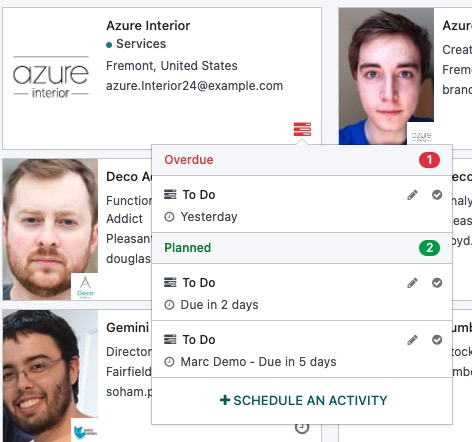 after: 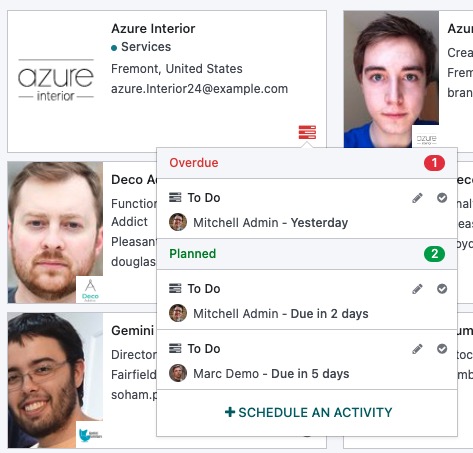 --- I confirm I have signed the CLA and read the PR guidelines at www.odoo.com/submit-pr
Users can now create a task directly from documents in the default Project workspace when the document is not already linked to a task or project. This streamlines turning project-related files into actionable work, matching similar behavior already available in the Internal workspace.
Original PR description
This PR adds a "Create a task" action for the default "Project" workspace. This action, similar to the one in the "Internal" workspace, allows creating a task from a document that is not already linked to a task or a project.

Task-2721462
The Planning app now makes the Resources column in role configuration easier to scan. User resources show their avatar, while material resources show a wrench icon, helping planners quickly distinguish resource types.
Original PR description
Before this commit:
When displaying Configuration -> Roles in Planning app, the Resources column only displays the name of the resource

After this commit:
Now if the resource is a user it'll also display it's icon, if it's a material it'll display the wrench icon

---

Need a custom modification from web _Many2XAutocomplete_
When the resource is a 'material' not a 'user' i need to be able to display an `fa wrench` icon in place of the employee image in the option dropdown. I need another ORM call than a simple *name_search*. Thus the creation of the function _createPromise_ that will allow me to fetch the **resource.resource** 'resource_type'

see https://github.com/odoo/odoo/pull/115943

Task-3072858

---
Documents Spreadsheet and Web Studio were updated to work with Odoo's newer shared field handling service. This keeps these tools aligned with the core platform change and helps maintain reliable spreadsheet filters and Studio view editing.
This change updates website links across several Odoo Enterprise areas so they use secure HTTPS addresses instead of older HTTP links. It improves trust and consistency when users or customers open documentation, templates, localization references, or timesheet-related links.
Original PR description
update url to https
The field service onboarding tour is now better tested so changes to the guided flow are caught earlier. This helps keep the user onboarding experience reliable, especially when running without demo data.
Original PR description
This will improve the testing of the onboarding tour
 - earlier when we change the class and don't update the class in the tour it goes unnoticed
 - to prevent failure of the tour we called onboarding tour from python to test the flow
 - Because it helps users to understand the flow so we can let the tour fail

task-3235684
Grouped kanban views were updated to use a newer shared header component, reducing unnecessary data loading behind the scenes. This keeps social and Studio kanban displays aligned with the latest platform behavior while preserving the user experience.
Planning shifts are now shared and displayed more consistently for employees who do not have user accounts, reducing mismatches between what the back office publishes and what employees can see. The separate Publish action has been removed because Publish & Send covers the same publishing need while also notifying employees by email.
Original PR description
In this commit we change the way that we share the planning slots to non-user employees and the way that we read those slots from the front-end.
Prior to this commit, there could be asynchronisities between the back-end and the front-end planning
which could lead to slots being visible to some employees and not to others.

Also in this commit, we removed the "Publish" button and its functionality from all the view of the planning app. The button was removed as it's functionality was nearly identical to the "Publish & Send" button, which in addition to publishing shifts, also sends an email notification.

task-3117580
Helpdesk screens and reports have been refined to make ticket creation, analysis, and mobile dashboard use clearer and easier. These updates improve labels, defaults, visibility of filters, and mobile navigation so support teams can work with less friction.
Original PR description
In this PR following improvements have been made:

- add placeholder for the ticket description: Add details about this ticket...
- rename 'subject' into 'ticket title' in ticket kanban view quickcreate
- unstack the data by default in tickets analysis
- remove the group by team in sla status analysis
- add scrollbar to mobile ticket overview dashboard
- invisible my teams filter according auto assignment is disable on team

Task-3052920
Web Studio was adjusted to align with an updated table configuration API. This helps keep customization tools compatible with the wider platform changes, reducing the risk of disruption for users managing apps through Studio.
Original PR description
Cf odoo/odoo#117444