Wednesday, April 19, 2023
38 changes · master
Enhancements to existing features
The HR Job Positions screen now includes a visual ribbon to make a job position's status easier to spot at a glance. This helps HR users quickly distinguish records without opening or inspecting extra details.
Original PR description
task-3246004
Messages that only contain a direct image link now show the image preview without repeating the link text. This makes conversations easier to scan and reduces visual clutter in Odoo Discuss and mail threads.
Original PR description
This PR hide the message body when the link preview is an image and the message
only contains the link to the image.
Description of the issue/feature this PR addresses: This PR aims to address the issue of incorrect translation for the TIN/VAT field in the Chilean localization on the website. Current behavior before PR: When working with Chilean localization, the TIN/IVA field is currently displayed with the incorrect translation name of "NIF" in the VAT field. Desired behavior after PR is merged: After merging this PR, the TIN/IVA field in the Chilean localization should display the correct tra
Original PR description
Description of the issue/feature this PR addresses:

This PR aims to address the issue of incorrect translation for the TIN/VAT field in the Chilean localization on the website.

Current behavior before PR:

When working with Chilean localization, the TIN/IVA field is currently displayed with the incorrect translation name of "NIF" in the VAT field.

Desired behavior after PR is merged:

After merging this PR, the TIN/IVA field in the Chilean localization should display the correct translation name of "RUT".


---
I confirm I have signed the CLA and read the PR guidelines at www.odoo.com/submit-pr
The campaign form now hides the social engagement stat button when there are no engagements to show. This keeps the page cleaner and helps users focus only on meaningful campaign information.
Original PR description
Purpose
=======
Remove the social engagement stat button from the
utm campaign form when it is equal to 0 as it has
no point in that case.

Task-3240966
Resolved issues and error corrections
Link preview images in chat messages now stay within the chat window instead of spilling outside it. This makes shared links easier to view and keeps the chat layout clean and professional.
Original PR description
Before this PR, a link preview image would overflow out of the chat window. This because the max-width on the image is bigger than the space dedicated to the image inside the chat window. This PR set the max-width to 100% inside a chat window, so the image cover the space nicely. Before: 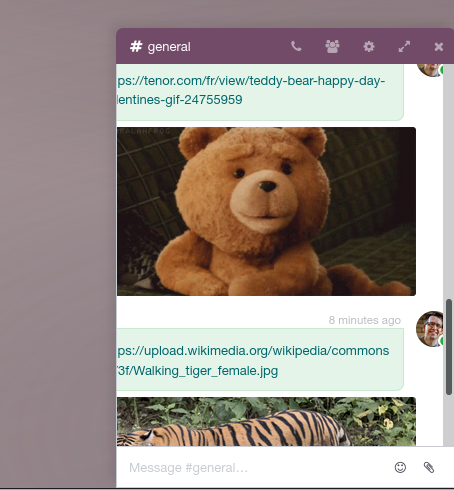 After: 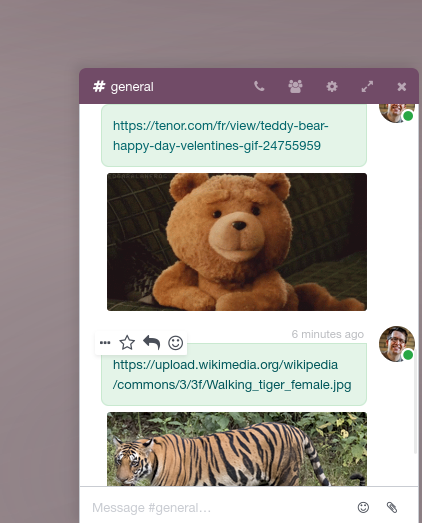
Code cleanup and technical improvements
This update converts the remaining Odoo JavaScript modules to a newer standard format. It supports future simplification of the platform's startup code and helps keep the web experience maintainable without changing day-to-day user workflows.
Original PR description
This commit converts odoo modules that haven't been converted with commit https://github.com/odoo/odoo/pull/117305/commits/e10b45c69e72f09128e49eb46e42834b1ef515d7. The goal is to deprecate odoo.define in favor of native module and then simplify boot.js by removing the regexp that finds module dependencies.

task id: 3162300
Miscellaneous changes
Description of the issue/feature this PR addresses: Currently, the boxed and striped document layouts still pass in the default background image when set to Blank. This image is mostly hidden, but displays artifacts when printing or changing background color in program like Paint. This fix removes the background image from these layouts when "Layout Background" is set to "Blank". In v15, Odoo changed the way that Document Layouts can be configured by allowing the Geometric background image
Original PR description
Description of the issue/feature this PR addresses: Currently, the boxed and striped document layouts still pass in the default background image when set to Blank. This image is mostly hidden, but…
Description of the issue/feature this PR addresses:
Currently, the boxed and striped document layouts still pass in the default background image when set to Blank. This image is mostly hidden, but displays artifacts when printing or changing background color in program like Paint. This fix removes the background image from these layouts when "Layout Background" is set to "Blank".

In v15, Odoo changed the way that Document Layouts can be configured by allowing the Geometric background image to be set on any of the base layouts. A conditional was added to the standard and bold layouts to check the selection for the "Layout Background" setting, and to set an empty string for Blank. This conditional is missing for boxed and striped, causing the artifacting issue. This fix adds in that conditional, which removes the artifacting.

Current behavior before PR:
Boxed and striped layouts have background artifacts when Layout Background is set to Blank.

Desired behavior after PR is merged:
All 4 standard layouts have consistent behavior and no artifacts when Layout Background is set to Blank.

opw-3232991

---
I confirm I have signed the CLA and read the PR guidelines at www.odoo.com/submit-pr

Forward-Port-Of: odoo/odoo#118595
Forward-Port-Of: odoo/odoo#117863
Mobile chat windows now use the full screen height, making conversations easier to view and use on phones. Desktop behavior remains unchanged, and mobile users will no longer see desktop-only folding controls.
Original PR description
Before this commit, chat window take at most 95% of global height. This is ok in desktop, 5% room allow clicking on systray menu. In mobile, however, the intend is for chat window to take whole height.

This commit makes chat window take whole height in mobile, while preserving the max-height 95% of global height in desktop.

Also fix an issue where chat window were foldable in mobile, when this feature is desktop-only.
This fix adjusts the spacing at the end of incoming message bubbles in the Discuss chat window. It makes chat conversations look cleaner and more consistent, improving readability without changing functionality.
Original PR description
Before/after
<img width="341" alt="before" src="https://user-images.githubusercontent.com/6569390/233110098-e4922f80-7799-4e21-b39c-888c66899f09.png"> <img width="338" alt="after" src="https://user-images.githubusercontent.com/6569390/233110151-3175ec49-aa70-48a0-9b99-20ffafa18c5c.png">
The invoice extraction process now includes a dedicated total tax amount value again under a clearer name. This helps the extraction server validate invoice data more reliably, reducing the risk of incorrect tax information being accepted.
Original PR description
`global_taxes_amount` was removed in 76f04a7. This commit introduces `total_tax_amount`, which is the same, but with a new name.

This is reintroduced mainly to improve validation in the extract server.
The Helpdesk settings tooltip for email aliases was updated to reflect that alias domains are now configured separately from custom email servers. This prevents users from following outdated guidance when setting up incoming helpdesk emails.
Original PR description
Description of the issue/feature this PR addresses:

the 'alias domain' has been splited from the 'custom email servers' feature in the general settings. As a consequence, our tip is now not correct.
Changed it to not be misleading anymore.

---
I confirm I have signed the CLA and read the PR guidelines at www.odoo.com/submit-pr
Users can now preview a document without losing the records they had already selected. This makes bulk document work smoother by avoiding the need to reselect items after checking a preview.
When an offer template is archived, it is now removed from the related job position. This keeps job position records cleaner and avoids users seeing or relying on inactive contract templates.
Original PR description
Currently, if we archived the offer template(Contract Template), the contract template is not removed from the Job Position.In this commit we remove it.

task-3246004
When a mega menu "Sub Menus" are configured as "On Hover", it becomes very difficult to edit its content. This commit changes the behavior of the "On Hover" while the page is being edited: - it disables the hide on exit (`mouseleave`) - it prevents the show on hover if another dropdown is already opened - it hides the menu when the page is clicked outside of the opened menu This PR also deactivates the snippet selection when clicking on the "empty content" pseudo-block. task-282537
Original PR description
When a mega menu "Sub Menus" are configured as "On Hover", it becomes
very difficult to edit its content.

This commit changes the behavior of the "On Hover" while the page is
being edited:
- it disables the hide on exit (`mouseleave`)
- it prevents the show on hover if another dropdown is already opened
- it hides the menu when the page is clicked outside of the opened menu

This PR also deactivates the snippet selection when clicking on the "empty content" pseudo-block.

task-2825376

Forward-Port-Of: odoo/odoo#118894
Forward-Port-Of: odoo/odoo#110258
__Steps to reproduce the issue:__ 1. Add a product to the cart 2. Proceed to checkout 3. Open website editor and click on the Edit button in the top right corner 4. At the far right of the page, hold the mouse button and move the mouse 5. Traceback: `Uncaught Javascript Error > Cannot read properties of null (reading 'childNodes')` __Description of the fix:__ `startTd` can be `null`, so an error occurs if the method `descendants` is called. This is checked 12 lines above before that met
Original PR description
__Steps to reproduce the issue:__
1. Add a product to the cart
2. Proceed to checkout
3. Open website editor and click on the Edit button in the top right corner
4. At the far right of the page, hold the mouse button and move the mouse
5. Traceback: `Uncaught Javascript Error > Cannot read properties of null (reading 'childNodes')`

__Description of the fix:__
`startTd` can be `null`, so an error occurs if the method `descendants` is called. This is checked 12 lines above before that method is called, but it not the case at this line. This commit just adds that check.

opw-3273233

Forward-Port-Of: odoo/odoo#118513
Before/after 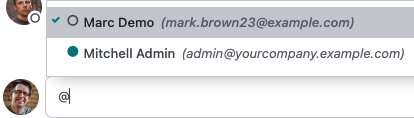 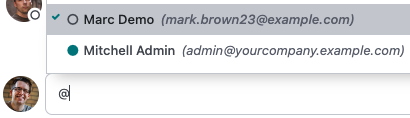 Forward-Port-Of: odoo/odoo#118953
Original PR description
Before/after   Forward-Port-Of: odoo/odoo#118953
Making a test post_install using `@tagged` should always remove the at_install tag. The main reason for that is that runbot split config select if an at_install or post_install tests should be executed is using negation: `--test-tags -post_install`. The reason for that is that giving a positive tag will replace the "standard" tag and non standard tag could be executed if giving `--test-tags at_install` (without negation) Since runbot tests in parallel builds, one of them using `--test-tags
Original PR description
Making a test post_install using `@tagged` should always remove the at_install tag.

The main reason for that is that runbot split config select if an at_install or post_install tests should be executed is using negation: `--test-tags -post_install`. The reason for that is that giving a positive tag will replace the "standard" tag and non standard tag could be executed if giving `--test-tags at_install` (without negation)

Since runbot tests in parallel builds, one of them using `--test-tags -post_install` and the other `--test-tags -at_install`, a test that is both post install and at install wont be executed at all.

Also, a tests with both tags will be executed twice in a normal flow, usually not intended.

The correct way to make a test post_install is to use

`@tagged('post_install', '-at_install')`

Forward-Port-Of: odoo/odoo#118772
Forward-Port-Of: odoo/odoo#118042PR https://github.com/odoo/odoo/pull/106414 made it so the `product.label.layout` expecting `stock.move` ids rather than `stock.move.line` ids. Unfortunately it missed updating this for the batch picking case => when printing the labels for a batch picking, only 1 label was printed per product rather than the qty done. Note that this issue does not occur when the batch is Done + has lots/SNs assigned in it Description of the issue/feature this PR addresses: Current behavior before PR:
Original PR description
PR https://github.com/odoo/odoo/pull/106414 made it so the `product.label.layout` expecting `stock.move` ids rather than `stock.move.line` ids. Unfortunately it missed updating this for the batch picking case => when printing the labels for a batch picking, only 1 label was printed per product rather than the qty done.

Note that this issue does not occur when the batch is Done + has lots/SNs assigned in it

Description of the issue/feature this PR addresses:

Current behavior before PR:

Desired behavior after PR is merged:


---
I confirm I have signed the CLA and read the PR guidelines at www.odoo.com/submit-pr

Forward-Port-Of: odoo/odoo#118915
**Current behavior before PR:**

clicking on the pictogram, the pictogram is not being displayed on the note.

**Desired behavior after PR is merged:**

pictogram is being displayed on the note.

Task - 3249342

Forward-Port-Of: odoo/odoo#117092
Original PR description
**Current behavior before PR:** clicking on the pictogram, the pictogram is not being displayed on the note. **Desired behavior after PR is merged:** pictogram is being displayed on the note. Task - 3249342 Forward-Port-Of: odoo/odoo#117092
Before this, uninstalling the `payment` module (or any of its dependencies) is broken: as payment.provider has a dependency on ir.module.module.state, marking the modules causes a lookup of the payment provides to update, but the table was removed by `_module_data_uninstall`, so the lookup blows up. This is a consequence of odoo/odoo#111651 which improved and optimised triggers but dropped the in-place cleanup of the triggers tree. Thus while the columns & tables get removed from the datab
Original PR description
Before this, uninstalling the `payment` module (or any of its dependencies) is broken: as payment.provider has a dependency on ir.module.module.state, marking the modules causes a lookup of the…
Before this, uninstalling the `payment` module (or any of its dependencies) is broken: as payment.provider has a dependency on ir.module.module.state, marking the modules causes a lookup of the payment provides to update, but the table was removed by `_module_data_uninstall`, so the lookup blows up.

This is a consequence of odoo/odoo#111651 which improved and optimised triggers but dropped the in-place cleanup of the triggers tree.

Thus while the columns & tables get removed from the database the in-memory structures (registry, models, fields, ..., as well as the trigger and dependency caches) are not so the python side will happily try to look up stuff which has been nuked if accessed at the wrong moment (which is any moment between the start of
`_module_data_uninstall` and the creation of a new registry, really).

As `_module_data_uninstall` is nothing but a giant pile of dodgy state anyway, making modules as uninstalled before it executes doesn't seem like a huge deal. It may cause unnecessary extra recomputation for the few models which depend on modules, but that doesn't seem like a major issue, at worst it makes uninstallation a touch slower but they're not a huge performance concern at the moment (they're more of a correctness one).

Forward-Port-Of: odoo/odoo#118900
before this commit, on duplicating a contact tag will duplicate the assigned partners also. suppose if we have a partner A with tag B assigned, and then we duplicate tag B and create new tag C, the newly created tag is automatically getting assigned to partner A. after this commit, the copy is set to False for partner_ids field in tag and then the partners wont be copied on duplicating a tag close: https://github.com/odoo/odoo/issues/109906 --- I confirm I have signed the
Original PR description
before this commit, on duplicating a contact tag
will duplicate the assigned partners also.

suppose if we have a partner A with tag B assigned, and then we duplicate tag B and create new tag C,
the newly created tag is automatically getting
assigned to partner A.

after this commit, the copy is set to False for
partner_ids field in tag and then the partners
wont be copied on duplicating a tag

close: https://github.com/odoo/odoo/issues/109906


---
I confirm I have signed the CLA and read the PR guidelines at www.odoo.com/submit-pr

Forward-Port-Of: odoo/odoo#116810
Forward-Port-Of: odoo/odoo#116632
"ERROR: Unknown Unsplash URL!" is generated when we try to add premium Unsplash images. This is because when we add the unsplash image, it accepts the image whose URL starts with "https://images.unsplash.com/" but the premium image URL starts with "https://plus.unsplash.com/". Traceback on sentry: 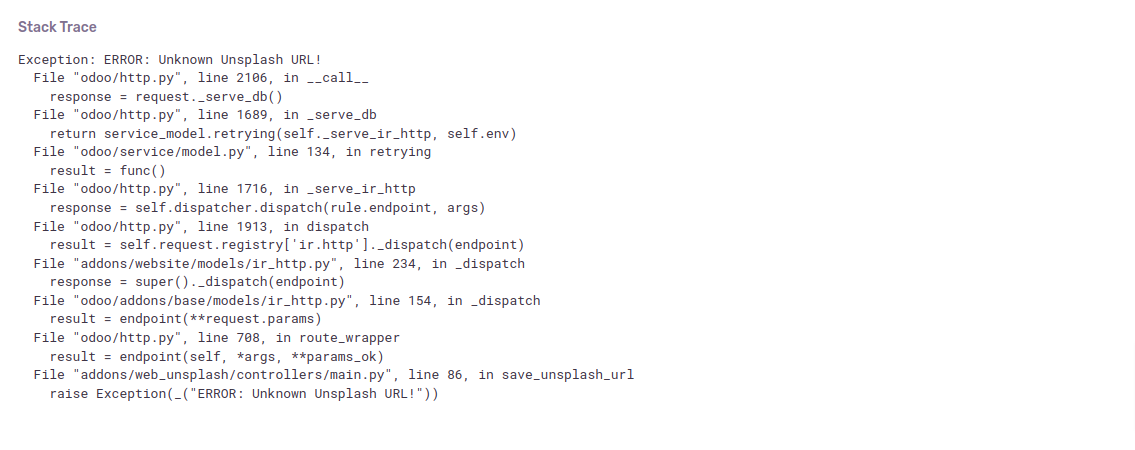 This commit solves the above issue by checking that the premium splash image l
Original PR description
"ERROR: Unknown Unsplash URL!" is generated when we try to add premium Unsplash images. This is because when we add the unsplash image, it accepts the image whose URL starts with "https://images.unsplash.com/" but the premium image URL starts with "https://plus.unsplash.com/". Traceback on sentry:  This commit solves the above issue by checking that the premium splash image link starts with the correct format. sentry-4075507166 Forward-Port-Of: odoo/odoo#118181 Forward-Port-Of: odoo/odoo#118147
The issue is when we create a new PO with notes/sections and these notes/sections are showed on purchase reporting and only the products were supposed to appear there. This issue happens because the SQL query wasn't applying any filter to the lines. The solution is apply a filter by display_type. Steps to reproduce: 1) Go to Purchase App -> Purchase Orders -> Create a new PO with notes/sections 2) Go to Reporting -> View as pivot 3) You'll be able to see the section/notes you just create
Original PR description
The issue is when we create a new PO with notes/sections and these notes/sections are showed on purchase reporting and only the products were supposed to appear there.

This issue happens because the SQL query wasn't applying any filter to the lines. The solution is apply a filter by display_type.

Steps to reproduce:
1) Go to Purchase App -> Purchase Orders -> Create a new PO with notes/sections 2) Go to Reporting -> View as pivot
3) You'll be able to see the section/notes you just created

OPW: 3245933

Forward-Port-Of: odoo/odoo#118823
Forward-Port-Of: odoo/odoo#118020
Issue: ------ It is possible to create recurring events that are in the same DST period. Unfortunately, the basic event is sometimes duplicated Cause: ------ The cause comes from the Daylight Saving Time (DST). With the base event, we create a recurrence. This recurrence will create all the events of the recurrence. To achieve this, with the basic event, we create all the ranges. Then, we compare these ranges to remove those which already have events. Logically, we must reconcile
Original PR description
Issue: ------ It is possible to create recurring events that are in the same DST period. Unfortunately, the basic event is sometimes duplicated Cause: ------ The cause comes from the Daylight Saving…
Issue:
------
It is possible to create recurring events
that are in the same DST period.
Unfortunately, the basic event is sometimes duplicated

Cause:
------
The cause comes from the Daylight Saving Time (DST).

With the base event, we create a recurrence.
This recurrence will create all the events
of the recurrence.
To achieve this, with the basic event, we create all the ranges. Then, we compare these ranges to remove those which already have events.
Logically, we must reconcile the first range with the base event. Sometimes the range of the base event and the first range calculated to generate the occurrences do not match.

The consequence is the creation of a new event.
The cause of this problem is that we go back too far to find the starting date of the period from which we will generate the ranges.

For example, in the case of a recurrence with a frequency of `MONTHLY`, we will take the first date of the month.
And if we are in the month when the DST changes,
we will have the problem.

Solution:
---------
The solution is not to go back
if we encounter a difference in the DSTs
between the starting date of the base event
and the starting date for generating the ranges.

opw-3143680

Forward-Port-Of: odoo/odoo#119016
Forward-Port-Of: odoo/odoo#117320
Steps:
    - Install hr_holidays module
    - Got to employee app and create  employee (Test)
    - Open Test emp and Click time-off stat button
    - Click Allocation Request
    - Test employee not set in  Allocation Request but current  employee

Issue:

 If we allocate leave from a particular employee but set the  current login user  employee

Forward-Port-Of: odoo/odoo#112691
Original PR description
Steps:
- Install hr_holidays module
- Got to employee app and create employee (Test)
- Open Test emp and Click time-off stat button
- Click Allocation Request
- Test employee not set in Allocation Request but current employee
Issue:
If we allocate leave from a particular employee but set the current login user employee
Forward-Port-Of: odoo/odoo#112691Create a product category [FIFO] with: - Costing Method: First In First Out (FIFO) - Inventory Valuation: Automated Create a product [PROD] having: - Product category: [FIFO] - Product Type: Storable Product - Invoicing Policy: Delivered quantities - Can be expensed: True - Re-Invoice Expenses: At cost Create a sales order with [PROD] Confirm, Deliver Open the created STJ journal entry: - Reset to draft - Add analytic account on a line - Post again To the sale order is added
Original PR description
Create a product category [FIFO] with: - Costing Method: First In First Out (FIFO) - Inventory Valuation: Automated Create a product [PROD] having: - Product category: [FIFO] - Product Type: Storable…
Create a product category [FIFO] with:
- Costing Method: First In First Out (FIFO)
- Inventory Valuation: Automated

Create a product [PROD] having:
- Product category: [FIFO]
- Product Type: Storable Product
- Invoicing Policy: Delivered quantities
- Can be expensed: True
- Re-Invoice Expenses: At cost

Create a sales order with [PROD]
Confirm, Deliver
Open the created STJ journal entry:
- Reset to draft
- Add analytic account on a line
- Post again

To the sale order is added a reinvoice line with negative quantity.
This should not occur with cogs lines

To the sale order is added a reinvoice line with negative quantity. This should not occur with cogs lines
We already skip 'cogs' line when collecting line for reinvoicing
https://github.com/odoo/odoo/blob/2b795ee59ef063b5b7298382008ebd61c51de36e/addons/sale_stock/models/account_move.py#L114

opw-3199428

Description of the issue/feature this PR addresses:

Current behavior before PR:

Desired behavior after PR is merged:


---
I confirm I have signed the CLA and read the PR guidelines at www.odoo.com/submit-pr

Forward-Port-Of: odoo/odoo#117955
## Current behaviour When a pricelist discount with a % is present for the /shop, but doesn't apply for the product, for some base prices that are not easily representable as floats, the comparison between the base price and the post-pricelist price may be different, when they are not, due to floating point inaccuracy. ## Expected behaviour Even if floats are not accurate, if the price is essentially the same, it shouldn't be counted as a discount. ## Steps to reproduce - Install eComme
Original PR description
## Current behaviour When a pricelist discount with a % is present for the /shop, but doesn't apply for the product, for some base prices that are not easily representable as floats, the comparison…
## Current behaviour
When a pricelist discount with a % is present for the /shop, but doesn't apply for the product, for some base prices that are not easily representable as floats, the comparison between the base price and the post-pricelist price may be different, when they are not, due to floating point inaccuracy.

## Expected behaviour
Even if floats are not accurate, if the price is essentially the same, it shouldn't be counted as a discount.

## Steps to reproduce
- Install eCommerce and Sales
- Settings > Activate all pricelist settings for discount and check the "Comparison Price"
- For a product set the base price to `4,152.48`
- Create a price list that shows the discount of 25% that *doesn't* apply for the product we set, set it selectable for the e-commerce.
- Go to the /shop, set the pricelist and look for your product, see that the base price and discounted price are the same, but one is strikedthrough as if there is a discount.

## Reason for the problem
Floating point inacuracy when computing the base price of the product, and we compare with the "reduced" price, they are different (4,152.48 vs 4,152.480000xx), so when we compare them, they are different, when they shouldn't be.

## Fix
Use `compare_amount(...) != 0` of the currency to safely compare the 2
prices.

## Affected versions
- 16.0
- saas-16.1 (couldn't reproduce, but the line is present, so possibly faulty)
- saas-16.2 (couldn't reproduce, but the line is present, so possibly faulty)
- master (couldn't reproduce, but the line is present, so possibly faulty)
---
opw-3246461

---
I confirm I have signed the CLA and read the PR guidelines at www.odoo.com/submit-pr

Forward-Port-Of: odoo/odoo#118882
Forward-Port-Of: odoo/odoo#118816
- Enable Cash Rounding in settings. - Create the cash rounding as - Rounding precision: 5.00 - Rounding Strategy: Add a rounding line - Profit Account: Any - Loss Account: Any - Rounding Method: Half-up - Enable "Lock Posted Entries with Hash" on Customer Invoices Journal. - Create a draft invoice and set the cash rounding on it. - Confirm Error will raise You cannot edit the following fields: Account, Label, Partner. The following entries are already hashed This occurs
Original PR description
- Enable Cash Rounding in settings.
- Create the cash rounding as
  - Rounding precision: 5.00
  - Rounding Strategy: Add a rounding line
  - Profit Account: Any
  - Loss Account: Any
  - Rounding Method: Half-up
- Enable "Lock Posted Entries with Hash" on Customer Invoices Journal.
- Create a draft invoice and set the cash rounding on it.
- Confirm

Error will raise
You cannot edit the following fields: Account, Label, Partner. The following entries are already hashed

This occurs because cash rounding is recomputed during post, after hash was written

opw-3235377

Description of the issue/feature this PR addresses:

Current behavior before PR:

Desired behavior after PR is merged:


---
I confirm I have signed the CLA and read the PR guidelines at www.odoo.com/submit-pr

Forward-Port-Of: odoo/odoo#116382
If applied, this commit will solve the tuple index out of range error when the 'Percent' value is not set in the Due Terms and the user tries to add 'Fixed' value in more than one line. To reproduce this issue, follow the steps. - Open Accounting -> Configuration -> invoicing -> payment terms. - Open any payment term, and change the value from 'Percent' to 'Fixed' in Due Terms. - Add another line with a value as 'Fixed'. see - https://tinyurl.com/22e2yj2a sentry - 4072967091 Forward
Original PR description
If applied, this commit will solve the tuple index out of range error when the 'Percent' value is not set in the Due Terms and the user tries to add 'Fixed' value in more than one line.

To reproduce this issue, follow the steps.
- Open Accounting -> Configuration -> invoicing -> payment terms.
- Open any payment term, and change the value from 'Percent' to 'Fixed' in Due Terms.
- Add another line with a value as 'Fixed'.

see - https://tinyurl.com/22e2yj2a

sentry - 4072967091

Forward-Port-Of: odoo/odoo#118612
`hr_org_chart` provides the field `is_subordinate`[^1]. the view `timesheet_view_search` uses it[^2]. We need to add this dependency. `hr_org_chart` is auto_install = True but some customers still uninstall it which prevents their database from upgrading. [^1]: https://github.com/odoo/odoo/blob/e7761a778556427f4a3972baddbec3101a63f778/addons/hr_org_chart/models/hr_employee.py#L12#L20 [^2]: https://github.com/odoo/enterprise/blob/b105b6ab6c3a00b83f2aef9038407d94e2e6a9fb/timesheet_grid/vie
Original PR description
`hr_org_chart` provides the field `is_subordinate`[^1]. the view `timesheet_view_search` uses it[^2].
We need to add this dependency.

`hr_org_chart` is auto_install = True but some customers still uninstall it which prevents their database from upgrading.

[^1]: https://github.com/odoo/odoo/blob/e7761a778556427f4a3972baddbec3101a63f778/addons/hr_org_chart/models/hr_employee.py#L12#L20
[^2]: https://github.com/odoo/enterprise/blob/b105b6ab6c3a00b83f2aef9038407d94e2e6a9fb/timesheet_grid/views/hr_timesheet_views.xml#L337

Forward-Port-Of: odoo/enterprise#39989
When creating a new db, followup emails would
automatically be sent, sometimes without the db owner knowledge.

We want to let the user to be the one to choose.

Task-3263367

Forward-Port-Of: odoo/enterprise#39980
Original PR description
When creating a new db, followup emails would automatically be sent, sometimes without the db owner knowledge. We want to let the user to be the one to choose. Task-3263367 Forward-Port-Of: odoo/enterprise#39980
When disposing/selling an asset, there is a special case in the _get_depreciation method of account_move that checks if we are confronted with the disposal/sale move. This special case is entered based on a comparison between an account_move_line 'debit' or 'credit' field, and the 'original value' field of the asset. Both of those fields are floats but are compared using a simple equality instead of float_compare. In some rare occasion, that could result in a false negative for that check. U
Original PR description
When disposing/selling an asset, there is a special case in the _get_depreciation method of account_move that checks if we are confronted with the disposal/sale move. This special case is entered based on a comparison between an account_move_line 'debit' or 'credit' field, and the 'original value' field of the asset.
Both of those fields are floats but are compared using a simple equality instead of float_compare. In some rare occasion, that could result in a false negative for that check.

Using float_compare instead of '=' fixes that issue.

This issue was originally detected in Odoo 16 but the same logic is used since Odoo 13 hence the fix in Odoo 14.

Forward-Port-Of: odoo/enterprise#39949
Forward-Port-Of: odoo/enterprise#39668
In 16.1 we upgraded the pdf.js version
to 2.16.105 with commit https://github.com/odoo/odoo/commit/55d9f318fb27a0ac7328816e8acf2499771761f1

That version does not handle proxy object
Link of issue: https://github.com/mozilla/pdf.js/issues/15449

Solution:
Make sure we have a raw object with `toRaw` (included in owl)

opw-3263531

Forward-Port-Of: odoo/enterprise#39632
Original PR description
In 16.1 we upgraded the pdf.js version to 2.16.105 with commit https://github.com/odoo/odoo/commit/55d9f318fb27a0ac7328816e8acf2499771761f1 That version does not handle proxy object Link of issue: https://github.com/mozilla/pdf.js/issues/15449 Solution: Make sure we have a raw object with `toRaw` (included in owl) opw-3263531 Forward-Port-Of: odoo/enterprise#39632
The OSS Sales XML export is currently failing validation by the Belgian tax authorities.

This is due to several issues:
1. The file included the `CorrectionsInfo` node that is always empty and not even required.
2. The `VatRateType` node was missing a required `type` attribute.
3. The `VatRateType` node is required to have 2 decimal places.

opw-3271788

Forward-Port-Of: odoo/enterprise#39969
Forward-Port-Of: odoo/enterprise#39937
Original PR description
The OSS Sales XML export is currently failing validation by the Belgian tax authorities. This is due to several issues: 1. The file included the `CorrectionsInfo` node that is always empty and not even required. 2. The `VatRateType` node was missing a required `type` attribute. 3. The `VatRateType` node is required to have 2 decimal places. opw-3271788 Forward-Port-Of: odoo/enterprise#39969 Forward-Port-Of: odoo/enterprise#39937
Before this commit, the favorite widget was used to toggle the favorite state for the current user. But the inverse method seems not called when using the widget. Anyway, a user can add an article in favorte even if the user has no write access to the article. This is why we need to use the action_toggle_favorite action button instead of a favorite widget on the field. After this commit, the favorite toggle buttons in the list view properly save the change. Task-3274933 Forward-Port-Of
Original PR description
Before this commit, the favorite widget was used to toggle the favorite state for the current user. But the inverse method seems not called when using the widget.

Anyway, a user can add an article in favorte even if the user has no write access to the article. This is why we need to use the action_toggle_favorite action button instead of a favorite widget on the field.

After this commit, the favorite toggle buttons in the list view properly save the change.

Task-3274933

Forward-Port-Of: odoo/enterprise#39770
Set currency source as central bank of Egypt
Click get rates

Error
Requests without a known User Agent are silently rejected

opw-3255709

Forward-Port-Of: odoo/enterprise#39743
Forward-Port-Of: odoo/enterprise#39514
Original PR description
Set currency source as central bank of Egypt Click get rates Error Requests without a known User Agent are silently rejected opw-3255709 Forward-Port-Of: odoo/enterprise#39743 Forward-Port-Of: odoo/enterprise#39514
Companion of https://github.com/odoo/odoo/pull/118191

Forward-Port-Of: odoo/enterprise#39871
Forward-Port-Of: odoo/enterprise#39843
Original PR description
Companion of https://github.com/odoo/odoo/pull/118191 Forward-Port-Of: odoo/enterprise#39871 Forward-Port-Of: odoo/enterprise#39843
PURPOSE This is a performance commit aiming to solve issues when the "tree panel" on the side of the opened article tries to load a large amount of articles at once. We introduce a "pager" that will only load the first 50 articles in a sub-tree. A "sub-tree" is the root articles, all the articles of parent A, all the articles of parent B, etc. (Side-note: rest of this commit message assumes the limit to be 50). The user can then click on a "Load more" link to load the next 50 in that
Original PR description
PURPOSE This is a performance commit aiming to solve issues when the "tree panel" on the side of the opened article tries to load a large amount of articles at once. We introduce a "pager" that will…
PURPOSE

This is a performance commit aiming to solve issues when the "tree panel" on the side of the opened article tries to load a large amount of articles at once.

We introduce a "pager" that will only load the first 50 articles in a sub-tree. A "sub-tree" is the root articles, all the articles of parent A, all the articles of parent B, etc.

(Side-note: rest of this commit message assumes the limit to be 50).

The user can then click on a "Load more" link to load the next 50 in that sub-tree.

TECHNICALITIES

* Main thinking *

As the template rendering receives ALL articles that are going to be shown in a single query, we cannot limit the initial query to "50". As our limit should affect each individual sub-tree and not the entirety of displayed articles.

However, during testing, we notice that fetching a large amount of articles is not the performance bottleneck. The bottleneck resides in rendering the HTML of all these articles and then sending a very large data blob to the server.

By limiting the rendering at the template level, even if probably not as performant as reducing the amount of records fetched from the database, we drastically reduce the tree loading time.

To give some figures, loading the root articles containing about 1.000 items took a little bit over 10 seconds in local testing. Only rendering the first 50 takes this number down to a few hundreds milliseconds.

When the user clicks on "load more", we then only load exactly 50 records, as we are loading a subset of this specific sub-tree.

* Active article special use case *

As we want to always show the active article *and its ancestors*, even if it's not within the first 50 articles of its own sub-tree, we need to include some rather complicated code.

Indeed, we need to know if the active article, or any of its ancestor, is present in the sub-tree we are rendering. If it's the case, and if it's not in the first 50, then we "force" its rendering by manually including it as a 51th element at the bottom of our result.

Upon clicking on "Load more", this "extra article" is removed as it could be within the next 50, if not, we apply the same logic again.

We need to apply this additional active article for both:
- The first rendering where we have all articles at once
- The sub-sequent renderings of the "next 50 articles" (where values are computed on controller side)

* Example + Limitation *

There is one (small) limitation to the "active article special use case".

Consider 53 root articles.
"Root Article 52" has 53 children.
The active article is "Child Article 53".

Upon first loading
- As "Root Article 52" is not within the first 50 and its an ancestor of our active article, we force it to show after the first 50.
- As "Child Article 53" is not within the first 50 of its sub-tree and its our active article, we force it to show after the first 50 children of "Root Article 52".

Now if the user first clicks on "Load more" to load more *children" articles. It will show all children articles, so far so good.

But if the user then clicks on "Load more" to load more *root* articles. It will show all root articles BUT reset what we "loaded more" on children. This is because the sub-tree of children articles is re-evaluated when loading more root articles, and we "loose" what was loaded before.

If these actions are taken the other way around, then everything works fine.

* Misc *

This technique is used for both the backend and the "frontend" (portal page). Some if/else are included to ensure compatibility between the backend framework and the publicWidget methods.

LINKS

Task-3169282

Forward-Port-Of: odoo/enterprise#39585
Forward-Port-Of: odoo/enterprise#36692