Thursday, April 18, 2024
18 changes · master
Resolved issues and error corrections
The German profit and loss report now calculates interim operating results using the correct formula. This helps businesses relying on German financial reports see accurate subtotal figures for review and compliance.
Original PR description
Fixed formula to compute correct results,
document referred: https://de.wikipedia.org/wiki/Betriebsergebnis

task- 2072849
Asset sale and disposal entries now derecognize fixed assets in line with IFRS/IAS 16 instead of posting remaining value incorrectly to depreciation expense. This improves financial statement accuracy and helps businesses stay compliant when removing assets from their books.
Original PR description
(master) account_asset: Sell or Disposal adheres to IFRS/IAS 16 - Derecognition of Assets = Impacted versions: - master Current behavior: - - Configure an Asset Model like the following <img…
(master) account_asset: Sell or Disposal adheres to IFRS/IAS 16 - Derecognition of Assets = Impacted versions: - master Current behavior: - - Configure an Asset Model like the following <img width="1043" alt="Screen Shot 2019-08-14 at 5 55 22 AM" src="https://user-images.githubusercontent.com/7598010/63016041-38bfbc80-be58-11e9-9c3d-532892f500e9.png"> - Configure Account for Fixed Asset as the following <img width="1043" alt="Screen Shot 2019-08-14 at 5 57 13 AM" src="https://user-images.githubusercontent.com/7598010/63016168-8b997400-be58-11e9-9fd0-25c7339f7bed.png"> - Create a new Vendor Bill and Validate it. <img width="1073" alt="Screen Shot 2019-08-14 at 5 59 39 AM" src="https://user-images.githubusercontent.com/7598010/63016237-c6031100-be58-11e9-8c73-c389ca1b1ae8.png"> - Let us check on the newly created Asset in the button upper right. <img width="1073" alt="Screen Shot 2019-08-14 at 6 01 15 AM" src="https://user-images.githubusercontent.com/7598010/63016314-f64aaf80-be58-11e9-9b83-b7ef10cb3f19.png"> - Confirm it and the run depreciation for the already past depreciations. <img width="1073" alt="Screen Shot 2019-08-14 at 6 03 15 AM" src="https://user-images.githubusercontent.com/7598010/63016450-50e40b80-be59-11e9-926d-b0f1df4812d7.png"> - Hit Sell or Dispose button and set a date on the wizard. <img width="975" alt="Screen Shot 2019-08-14 at 6 05 05 AM" src="https://user-images.githubusercontent.com/7598010/63016517-8557c780-be59-11e9-8d75-82829aec0904.png"> - Let us check on the newlyJournal Entry created for the disposal of this asset. <img width="1068" alt="Screen Shot 2019-08-14 at 6 05 52 AM" src="https://user-images.githubusercontent.com/7598010/63016594-b59f6600-be59-11e9-8c9f-7f6c959f2924.png"> Issue - **Here is the actual issue**. Sell or Dispose button creates a Journal Entry where the remaining value of the asset is sent to Depreciation Expense versus Cumulated Depreciation Regarding [IFRS/IAS 16](http://eifrs.ifrs.org/eifrs//bnstandards/en//2019/IAS16.pdf) -Derecognition - Paragraph 68 & 71 <img width="771" alt="Screen Shot 2019-08-14 at 6 15 39 AM" src="https://user-images.githubusercontent.com/7598010/63017096-006dad80-be5b-11e9-8542-d053d4adc976.png"> <img width="771" alt="Screen Shot 2019-08-14 at 6 16 00 AM" src="https://user-images.githubusercontent.com/7598010/63017101-04013480-be5b-11e9-82a9-5ec5e2a5a130.png"> This supported by the fact that for [IFRS® Taxonomy Illustrated](https://www.ifrs.org/issued-standards/ifrs-taxonomy/ifrs-taxonomy-illustrated/#illustrated2019) For `[822100] Notes - Property, plant and equipment` report it must properly identify the parties where impairment, retirement or sell of assets have occurred 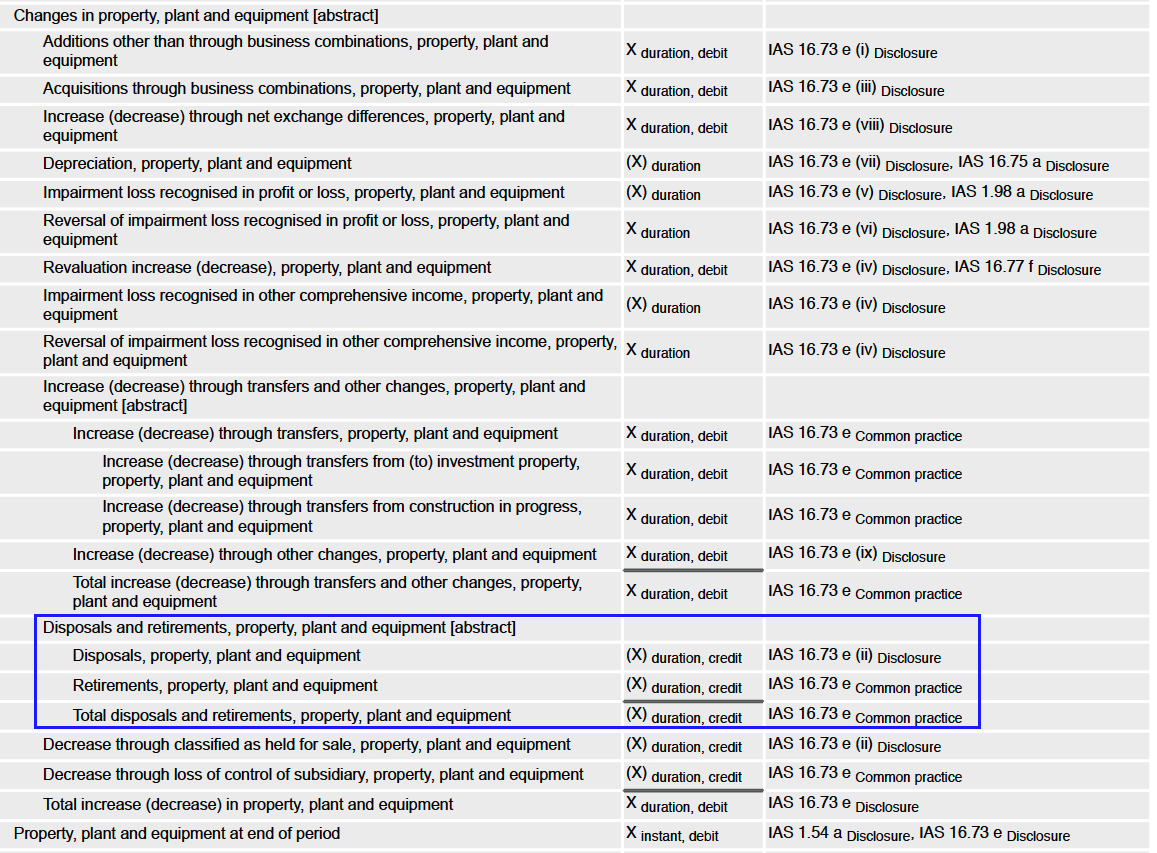 Furthermore in `[520000] Statement of cash flows, indirect method` report it must be properly identified in the regarding adjustment other than the Depreciations. 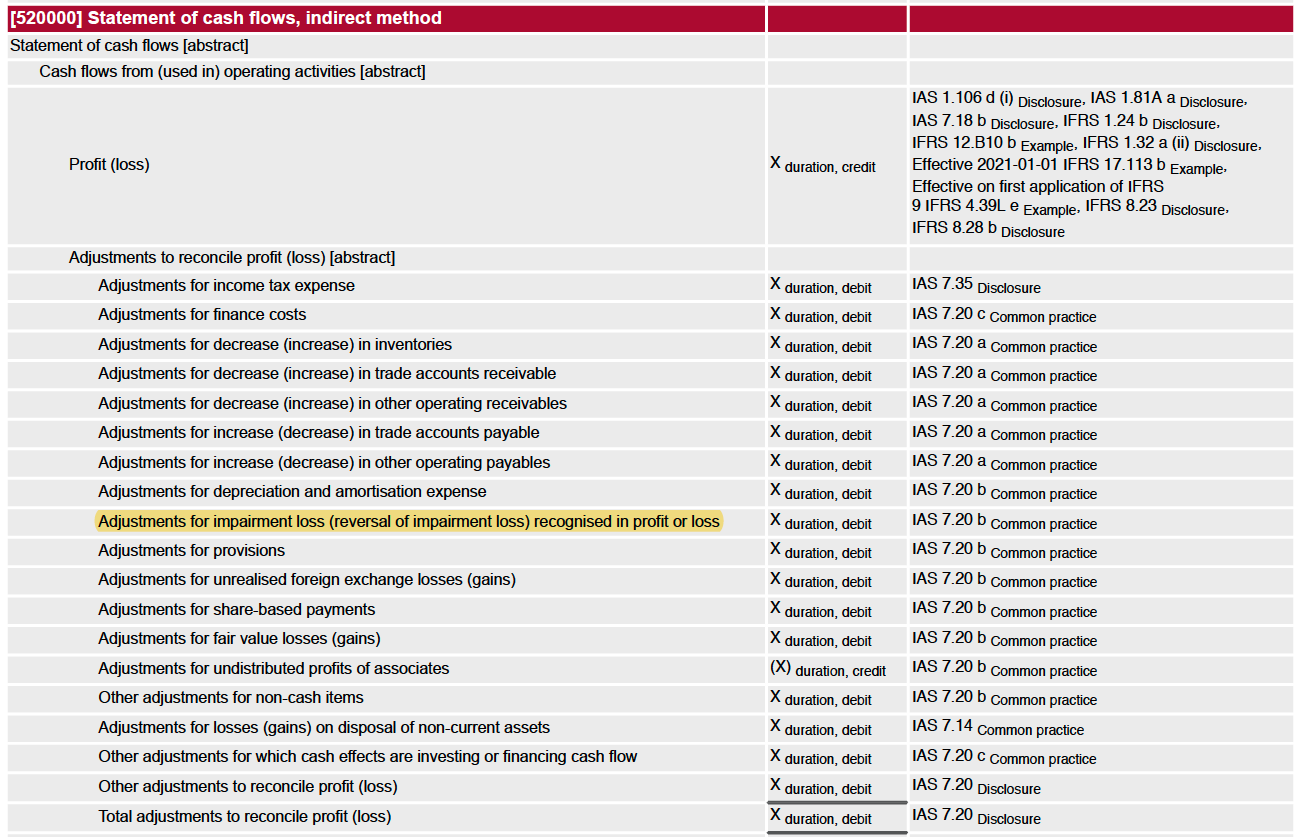 Expected behavior: - With the new approach we should have some settings like this one. <img width="1072" alt="Screen Shot 2019-08-14 at 6 34 03 AM" src="https://user-images.githubusercontent.com/7598010/63018067-9571a600-be5d-11e9-8010-b6a81fd9af0f.png"> Notice there is a new field for the Disposal of the Asset. - Execute all the previous step to accomplish a new Asset until the step where you can sell or dispose it. <img width="1072" alt="Screen Shot 2019-08-14 at 6 40 24 AM" src="https://user-images.githubusercontent.com/7598010/63018438-745d8500-be5e-11e9-807c-a159e6b5653a.png"> - Hit the Sell or Dispose button. We can see that -- The whole value of the asset has been derecognized -- The Cumulated Depreciation has been reverted. -- The Remaining Value of the asset has been recorded as Impairment Expense <img width="1072" alt="Screen Shot 2019-08-14 at 6 41 11 AM" src="https://user-images.githubusercontent.com/7598010/63018459-86d7be80-be5e-11e9-9919-7bb2d14370f5.png"> In this way we could afford to properly: - Have Adjusted Assets for Balance Sheet report. - Have a PP&E report. - Have a Cash Flow Indirect method the right way. - Have an Income Statement where the Impairment is set aside from the Depreciation Expenses.
When an invoice or journal item is cancelled, any linked asset that is still in draft is now deleted instead of remaining as an inactive or confusing record. Assets already in progress or completed are archived, keeping asset records aligned with invoice changes and reducing cleanup work.
Original PR description
(master) account_asset: When Cancelling an invoice with Draft assets. Assets standstill = [FIX] account_asset: Delete draft assets if originating journal items get cancelled. Archive the ones that…
(master) account_asset: When Cancelling an invoice with Draft assets. Assets standstill
=
[FIX] account_asset: Delete draft assets if originating journal items get cancelled. Archive the ones that are running or done.


Impacted versions:
-

master

Current behavior:
-

- Configure an Asset Model like the following
<img width="1060" alt="Screen Shot 2019-08-15 at 10 45 59 PM" src="https://user-images.githubusercontent.com/7598010/63142201-7fbfc600-bfae-11e9-8246-96516c0971ad.png">


- Configure Account for Fixed Asset as the following
<img width="1043" alt="Screen Shot 2019-08-14 at 5 57 13 AM" src="https://user-images.githubusercontent.com/7598010/63016168-8b997400-be58-11e9-9fd0-25c7339f7bed.png">

- Create a new Vendor Bill and Validate it.
<img width="1073" alt="Screen Shot 2019-08-14 at 5 59 39 AM" src="https://user-images.githubusercontent.com/7598010/63016237-c6031100-be58-11e9-8c73-c389ca1b1ae8.png">

- We can inspect that a new asset in draft state is created in the upper right button in the invoice.
<img width="833" alt="Screen Shot 2019-08-15 at 10 50 41 PM" src="https://user-images.githubusercontent.com/7598010/63142386-3754d800-bfaf-11e9-8556-f810df18225a.png">

- No depreciation board is yet set on the asset.
<img width="1086" alt="Screen Shot 2019-08-15 at 10 51 02 PM" src="https://user-images.githubusercontent.com/7598010/63142392-420f6d00-bfaf-11e9-9267-fe4658accb66.png">

- For whatever the reason. You have to amend the invoice so you cancel it to amend it. In cancel state we are able to see that my invoice is still linked to an asset.
<img width="1086" alt="Screen Shot 2019-08-15 at 10 54 05 PM" src="https://user-images.githubusercontent.com/7598010/63142484-9f0b2300-bfaf-11e9-993e-84f55bc3bc36.png">

- Though when checking on the linked asset there is none. It have been deactivated.

<img width="1086" alt="Screen Shot 2019-08-15 at 10 57 19 PM" src="https://user-images.githubusercontent.com/7598010/63142617-18a31100-bfb0-11e9-99da-3189a3fdde3a.png">

<img width="1086" alt="Screen Shot 2019-08-15 at 10 56 12 PM" src="https://user-images.githubusercontent.com/7598010/63142584-fa3d1580-bfaf-11e9-9d4c-163ff8a1eb57.png">

- So far so good. Let us know `Reset to Draft` our cancelled invoice and reuse. Make some changes. Let it be that Price of the asset was wrong. and try to validate our fixed invoice.
<img width="1086" alt="Screen Shot 2019-08-15 at 11 00 48 PM" src="https://user-images.githubusercontent.com/7598010/63142717-8c451e00-bfb0-11e9-8772-3dc371e14a0d.png">

- In trying to do something on the Archived Asset we are now greeted with this Warning.
<img width="1086" alt="Screen Shot 2019-08-15 at 11 02 12 PM" src="https://user-images.githubusercontent.com/7598010/63142796-e1812f80-bfb0-11e9-8046-9585f7ab5a14.png">

Now we are locked with a draft invoice linked to an archived asset with no way to make something on the archived asset.

Expected Behavior
=
At invoice cancelation, get rid of the Draft Assets.

Actions Performed
=

- Drafts assets are now Deleted
- Other assets just get Archived just the way it was before but using existing method `action_archive()` (more on this activity in coming issues)
- `sudo()` method on `search()` for assets has been left to allow actually searching if user has no read privileges.
- `sudo()` method on `unlink()` & `action_archive()` methods is not deployed because user entitled to do should be granted such as privileges and not the superuser.
Portal users can now add attachments when posting messages in the subscription portal. This fixes an access problem that previously blocked customers from sharing files through subscription chatter.
Original PR description
Before this -
Was unable to attach the attachments in subscription portal chatter.
Access was denied for ir.attachment when logged in by - portal user.

In method _message_post_after_hook of mail, ir.attachments are accessed, but for subcription as token was not passed in mail.thread
record was coming without sudo().

In this -
Account uuid is passed as access token and in uuid is set as mail _mail_post_token_field.

task-37264
Subscriptions using the "Invoice & try to charge" option will now still create an invoice even when the automatic payment attempt fails. This ensures customers are billed correctly and keeps this option distinct from only invoicing after successful payment.
Original PR description
When creating a subscription and selecting a subscription template on which
the payment mode is set to "Invoice & try to charge", there is no invoice
created if the automatic payment failed. However, an invoice should be
created despite the failed payment as there is another option for the
payment mode which is "Invoice only on successful payment".

opw:2007288
This fix ensures delivery order locations are handled correctly for field service project tasks. It helps prevent inventory or delivery records from using the wrong location, reducing operational errors when products are delivered for on-site work.
The payroll dashboard now keeps large panels from taking over the page by capping their size and allowing scrolling. It also improves batch status visibility, prevents long batch names from breaking the layout, and limits bank account warnings to employees with active contracts.
Original PR description
When you have a lot of payslip batches for example, each panel in the payroll dashboard will occupy a lot of space. After this commit, a maximal space is
defined and information will still be accessible through scrolling in the panel

task-2985067
This fix ensures package dimensions are converted to the measurement unit expected by each shipping carrier connector before rates or shipments are sent. It helps avoid incorrect shipping calculations and reduces the need for users to manually enter dimensions in a different unit than shown.
Original PR description
Description of the issue/feature this PR addresses:

Current behavior before PR:

There is no conversion of the size between the package type for the connector and the shipping method.
So the user need to put the size in the uom chosen in the connector in the package type even its write its mm.

Desired behavior after PR is merged:

We need to convert the dimensions of the package type according to what the user has chosen in the connector.

--
I confirm I have signed the CLA and read the PR guidelines at www.odoo.com/submit-pr
Subscription invoices now correctly adjust prices when a customer's fiscal position replaces an included tax with a different tax. This prevents customers from being charged an amount that still contains the original tax, improving invoice accuracy.
Original PR description
…ed from sub

Steps to reproduce the bug:

1. Create a tax included in price T1
2. Create a customer with a fiscal position that should replace the current tax T1 by a 0% tax T2
3. Create a subscription product with this tax
4. Create a subscription and invoice it

Bug:

The invoice generated from a subscription has the T2 on its line but it did not deduct the included tax T1 from the unit price

opw:2637567

X-original-commit: 163f9009d2eacfd8968d4565c2f026f3ff813ae6
This fix reduces the amount of historical work entry data created when generating entries for older contracts, helping avoid timeouts on real databases. It also prevents empty work entries from being created when leave falls outside scheduled working time, avoiding related errors.
Original PR description
…neration Purpose ======= When generating the work entries the first time for older contracts, we try to generate the work entries for several months/years, instead of only the current month for…
…neration

Purpose
=======

When generating the work entries the first time for older contracts,
we try to generate the work entries for several months/years, instead of
only the current month for example.

The reason if that the date_generated_from and date_generated_to fields
are there to avoid having gap on the generated work entries.

If they were generated from January to March, and we try to generate
them in July, then we generate the work entries for April, Mai, June,
and July, so that if we remove work entries on a given day, we don't
try to re-generate them afterward.

If we move the cursors to the start date when they are equal, instead of
generating 138300 records for 100 employees who have a contract starting
on the 1rst of January 2018, to generate work entries till the 31nd of
August 2020, then generate 7900 records.

This represents 17.5 times less records to create, and it allows to use
generate the records on real database for the first time without risking
to face a timeout.

TaskID: 2321853
Recurring planning shifts now generate correctly when they have an end date, and users can turn off repetition when needed. Updates to recurring slots now apply consistently across the whole series, making schedule management more reliable.
The search panel now only remembers a user's last selected item when that behavior is explicitly enabled. This keeps Documents able to reopen the last workspace or folder while avoiding confusing saved selections in other areas such as rentals or employees.
Original PR description
PURPOSE
Currently in searchpanel, everytime when we clicked on the select="one" field,
it will store the current clicked searchpanel key to the local storage with
value. so every next time user will see the last visited and clicked environment
of that view.
It is feasible for Documents to remember the last visited workspace/folder of
each user. That allowed us to preset this last visited workspace the next time
the user opens the kanban of Documents. But it is sometimes confusing for the
user in the case of Rental orders or Employees or many other kanban views.

SPEC
for that reason, we have provided on boolean attribute "store_last_active" for
select="one" fields. if any of the users willing to visit the last visited
selection environment then set "store_last_active" attribute value to true.
if the attribute is true then only the selected value of the searchpanel key would
be store in the local_storage.

Task : 2264358
Odoo Studio now prevents users from dragging a notebook section into another notebook, avoiding broken or confusing form layouts. The change also improves how view edits are saved when changes affect different parts of a form, making customizations more reliable.
Original PR description
PURPOSE

previously, We can drag the notebook inside the notebook

The purpose of this commit is to restrict notebook to be drag and drop inside a notebook

Task 2199980
Signed documents now preserve foreign-language characters correctly when exported or printed. Text entered during signing is converted into an image so characters display as intended instead of appearing as black squares.
Original PR description
Task: https://www.odoo.com/web?#id=2031628&action=327&model=project.task&view_type=form&menu_id=4720
Fixed an issue where renewing a fixed-term subscription could set the wrong end date after the renewal quote was confirmed. This helps ensure subscription periods remain accurate for billing, service delivery, and customer records.
Original PR description
Task:https://www.odoo.com/web#id=2168496&action=327&model=project.task&view_type=form&menu_id=4720
Barcode scans of packages now carry the package owner into the resulting stock move lines. This prevents ownership information from being lost during delivery orders and inventory adjustments, improving traceability and reducing manual corrections.
Original PR description
**Task**
https://www.odoo.com/web#id=2093527&action=327&model=project.task&view_type=form&menu_id=4720
**Pad**
https://pad.odoo.com/p/r.b40a8db685597150634a1567320a03e3
**Description**
previouly while scanning a package via barcode, owner_id wasn't
being included in the move lines. fixed that in both delivery
orders and inventory adjustments.
The Cost Analysis button in manufacturing now opens correctly instead of causing an internal server error. This helps users access production cost information reliably when reviewing manufacturing orders.
Original PR description
Purpose of this task is,
It generates internal server error when state button Cost Analysis is clicked

So, I fixed the path and now it's working.

Task ID: 1970083
Pad link: https://pad.odoo.com/p/r.b0056af8be53da2eb024bf04c5433bb8
Payroll calculations now use the full unrounded amount when calculating payslip line totals. This prevents small rounding differences from becoming significant when multiplied by large quantities, such as overtime minutes, improving pay accuracy.
Original PR description
When a payslip line is computed, the amount is rounded
to two digits.
It might lead to a non negligable difference if multiplied
by a large quantity.
e.g. consider the following python salary rule which pays
overtime for 3453 minutes:
```
result_qty = 3453
result_rate=100
result= contract.wage / 30 / 8 / 60
```
The resulting amount is 0.347777 for a wage of 5000.
But it's rounded to 0.35 when the payslip line is created.
The total line amount computed to be 1510.69 instead of
1498.70.

Note that the non rounded number is used to compute other
salary rules.

With this commit the total amount is computed without the rounding.
The paylsip line amount is still rounded, but the total
is be correct. The "wrong" number is no longer the total, but
the amount. This is less confusing.

See odoo/odoo#32192 for the original feedback.