Friday, November 8, 2024
21 changes · saas-17.4
Enhancements to existing features
This change adds automated test coverage to verify that the chatter popout window works correctly across multiple records. It helps ensure attachment viewing and chatter controls remain reliable during future updates.
Original PR description
This is an extension of this PR: https://github.com/odoo/odoo/pull/184742 It adds a unit test which checks the popout window through multiple records. It also checks that both attachment view and chatter popout controls are working fine.

task-4275364


---
I confirm I have signed the CLA and read the PR guidelines at www.odoo.com/submit-pr
Resolved issues and error corrections
This change updates manufacturing tests so they no longer try to set a purchasing unit field when that field is hidden. It prevents automated test failures and supports smoother validation of manufacturing workflows without changing business functionality.
Original PR description
`uom_po_id` is invisible in the product view in 2 scenarios. the uom group is not activated or the product cannot be bought. As we are setting the default value anyway in those tests, it's better to not give a particular value to avoid error about writing into invisible field

runbot error : 65999

Description of the issue/feature this PR addresses:

Current behavior before PR:

Desired behavior after PR is merged:


---
I confirm I have signed the CLA and read the PR guidelines at www.odoo.com/submit-pr
Miscellaneous changes
The lang switching wasn't working properly. The lang bundle was not reloaded when the lang was changed. This commit fixes the issue by adding lang attribute on html element.

opw-4246677

Forward-Port-Of: odoo/odoo#186647
Original PR description
The lang switching wasn't working properly. The lang bundle was not reloaded when the lang was changed. This commit fixes the issue by adding lang attribute on html element. opw-4246677 Forward-Port-Of: odoo/odoo#186647
A no-longer-supported test setting was removed from a maintenance scheduling test. This helps keep automated checks reliable for the maintenance app without changing what users see or do.
Original PR description
`isCheck` is no longer supported in saas-17.4, removing it
previous commit introducing it: odoo/odoo@14bc358bef7f6f26f9596d4a1c1ed101f8648cbb

runbot-error-107508
The Sale order list now shows Delivery Status colors that correctly reflect whether deliveries are late, due today, or on time. This makes it easier for users to quickly identify orders needing attention and aligns the display with the help text.
Original PR description
[FIX] sale_stock: correct delivery color
The issue:
In the Sale order list view, the help message for Delivery Status states:
- Red: Late
- Orange: To process today
- Green: On time

However, in practice, the `delivery_status` color does not reflect the delivery timing.

Steps to reproduce
- Enable `delivery_status` in the `sale_order` list view.

https://github.com/odoo/odoo/commit/470b756297f308f7b2a81f9d45c60d6d9655c647 introduced `delivery_status`for `sale_order` with tag colors based on delivery timing. However, https://github.com/odoo/odoo/commit/ab53ea9db8dc2ab9791d9d813b727a748c5ff8c6 modified the color computation for `delivery_status` to no longer depend on delivery timing.

opw-4280651
Inside `_stock_account_get_anglo_saxon_price_unit` we are retrieving the posted cogs linked to the account.moves. To do that, currently we are retrieving every cogs and then calling `filtered` on the result. This can lead to a huge number of cogs to fetch in large databases. As this filtered call can easily be turned into a search_domain, we replace it by a search call. That way the number of cogs retrieved is way smaller. This has the effect of greatly reducing the memory footprint of the me
Original PR description
Inside `_stock_account_get_anglo_saxon_price_unit` we are retrieving the posted cogs linked to the account.moves. To do that, currently we are retrieving every cogs and then calling `filtered` on the result.

This can lead to a huge number of cogs to fetch in large databases. As this filtered call can easily be turned into a search_domain, we replace it by a search call. That way the number of cogs retrieved is way smaller. This has the effect of greatly reducing the memory footprint of the method, as fetching all the fields on a large number of cogs quickly filled up the memory prior to this commit.

#### Benchmark

In a customer database with 5M account.move.lines, the peak memory consumption of the method when posting
an invoice of 5 000 lines goes `1.5 GB -> 250 MB` according to memray

---
I confirm I have signed the CLA and read the PR guidelines at www.odoo.com/submit-pr

Forward-Port-Of: odoo/odoo#186443
**Current behavior:** Manually adjusting a FIFO/AVCO product's cost creates a journal items with non-zero quantity, despite there not being a logical quantity associated with this entry. **Expected behavior:** AMLs generated for this move have 0 quantity. **Steps to reproduce:** *Having accounting, purchase_stock* 1. Create a storable product with `average` costing 2. Create a purchase order for some of the product with some arbitrary price unit, receive the product 3. In
Original PR description
**Current behavior:** Manually adjusting a FIFO/AVCO product's cost creates a journal items with non-zero quantity, despite there not being a logical quantity associated with this entry. **Expected…
**Current behavior:**
Manually adjusting a FIFO/AVCO product's cost creates a journal
items with non-zero quantity, despite there not being a logical
quantity associated with this entry.

**Expected behavior:**
AMLs generated for this move have 0 quantity.

**Steps to reproduce:**
*Having accounting, purchase_stock*
1. Create a storable product with `average` costing

2. Create a purchase order for some of the product with some
     arbitrary price unit, receive the product

3. In the product form, change the cost to a smaller value

4. In the journal items pivot view, select the `quantity` field
     from the 'Measures' dropdown in the top left, expand the
     stock valuation journal on the left axis, observe that the
     change in cost has created 2 balancing AMLs, each with
     quantity == 1

**Cause of the issue:**
This case was not handled and quantity is always set to 1 if
falsy.

**Fix:**
Create the AMLs created in the cost change handle with
quantity=0. While it does risk being overwritten to 1 if the
`display_type` of the line changes, the diff is minimal and
use-case is non-critical- which makes it the best solution here.

opw-4090620

Forward-Port-Of: odoo/odoo#186304
Forward-Port-Of: odoo/odoo#180998Currently when checking if an account.move has downpayments we need to call `filtered` on `self.invoice_line_ids.sale_line_ids`. This can be pretty heavy, especially in `_stock_account_get_anglo_saxon_price_unit` as this method will be called for each account.move.line linked to the invoice being posted. This commit introduces a small method `_get_anglo_saxon_price_ctx` that can be overriden to add data to the context that will be used in `_stock_account_get_anglo_saxon_price_unit`. This i
Original PR description
Currently when checking if an account.move has downpayments we need to call `filtered` on `self.invoice_line_ids.sale_line_ids`. This can be pretty heavy, especially in
`_stock_account_get_anglo_saxon_price_unit` as this method will be called for each account.move.line linked to the invoice being posted.

This commit introduces a small method `_get_anglo_saxon_price_ctx` that can be overriden to add data to the context
that will be used in `_stock_account_get_anglo_saxon_price_unit`. This is done in `sale_stock` to avoid the computation of downpayments for each account.move.line.

#### Benchmark
Customer database posting an invoice with 5000 lines and 1190 linked sale.orders, products in FIFO.
Timing of `_stock_account_get_anglo_saxon_price_unit`: 10min -> 2min30.


---
I confirm I have signed the CLA and read the PR guidelines at www.odoo.com/submit-pr

Forward-Port-Of: odoo/odoo#186486
Forward-Port-Of: odoo/odoo#184254
Since the unique name constraint only works for the active language, it's possible to have more than one tax with the same name in another language.

If that's the case, a `ValueError: Expected singleton` error will occur while retrieving the fields in `unique_tax_name_key`.

Found in upg-2077316.

Forward-Port-Of: odoo/odoo#183111
Original PR description
Since the unique name constraint only works for the active language, it's possible to have more than one tax with the same name in another language. If that's the case, a `ValueError: Expected singleton` error will occur while retrieving the fields in `unique_tax_name_key`. Found in upg-2077316. Forward-Port-Of: odoo/odoo#183111
test_duration_expected_when_done was undeterministically failing, if the test ran at specific times, the difference in minutes between button_start and button_finish functions was rounded incorrectly. having time frozen should solve this behavior. build error in question: [Runbot error](https://runbot.odoo.com/web#id=76232&menu_id=424&cids=1&action=573&model=runbot.build.error&view_type=form) --- I confirm I have signed the CLA and read the PR guidelines at www.odoo.com/submit-pr F
Original PR description
test_duration_expected_when_done was undeterministically failing, if the test ran at specific times, the difference in minutes between button_start and button_finish functions was rounded incorrectly. having time frozen should solve this behavior.

build error in question: [Runbot error](https://runbot.odoo.com/web#id=76232&menu_id=424&cids=1&action=573&model=runbot.build.error&view_type=form)


---
I confirm I have signed the CLA and read the PR guidelines at www.odoo.com/submit-pr

Forward-Port-Of: odoo/odoo#185026
When a user disconnects from a device, the server assumes he is disconnected until another device/browser says otherwise. However, this can lead to small flickers. This PR fixes the issue by debouncing the update of the im status field of the persona model. This way, there is no flickering. Steps to reproduce the issue: - Open two browser windows with mitchell admin in the discuss app (incognito + regular windows). - Go to the chat with your self, where the im status can be seen. - Re
Original PR description
When a user disconnects from a device, the server assumes he is
disconnected until another device/browser says otherwise. However,
this can lead to small flickers. This PR fixes the issue by debouncing
the update of the im status field of the persona model. This way, there
is no flickering.

Steps to reproduce the issue:
- Open two browser windows with mitchell admin in the discuss app
(incognito + regular windows).
- Go to the chat with your self, where the im status can be seen.
- Reload one tab several times: you can sometimes see a flicker from
online to offline.

task-4236550

Forward-Port-Of: odoo/odoo#186312
Forward-Port-Of: odoo/odoo#184825
before this commit, for obfuscating data in the res.partner model, the display_name field is used, which is non stored field and thus in the log, an error/warning is shown as follows while running obfuscate command odoo.cli.obfuscate: Invalid fields: res_partner.display_name the invalid warning is raised as the field is not a stored field and thus removing it from the obfuscation even though, the res.partner name field is obfuscated, the same data is remaining in the complete_name
Original PR description
before this commit, for obfuscating data in the
res.partner model, the display_name field is used, which is non stored field and thus in the log,
an error/warning is shown as follows while
running obfuscate command

odoo.cli.obfuscate: Invalid fields: res_partner.display_name

the invalid warning is raised as the field is not
a stored field and thus removing it from the
obfuscation

even though, the res.partner name field is obfuscated, the same data is remaining in the complete_name
field, so adding this field to obfuscating field list

after this commit, the log will not show the
invalid field warning and complete name also
will be obfuscated

---
I confirm I have signed the CLA and read the PR guidelines at www.odoo.com/submit-pr

Forward-Port-Of: odoo/odoo#186583
**Steps to reproduce the bug:** - Create two storable products, “P1” and “P2”. - Set “P1” to be tracked by Serial Number - Update P1 with SN1. - Create a repair order: - Set P1 with SN1. - Save. - Edit and update the product to P2. - Save. - Print the order. **Problem:** The “lot_id” is not cleared and appears in the report because the “lot_id” field becomes invisible and read-only under the same condition. Since it is read-only and not force-saved, the value of “lot_id” is no
Original PR description
**Steps to reproduce the bug:**
- Create two storable products, “P1” and “P2”.
- Set “P1” to be tracked by Serial Number
- Update P1 with SN1.
- Create a repair order:
   - Set P1 with SN1.
   - Save.
- Edit and update the product to P2.
- Save.
- Print the order.

**Problem:**
The “lot_id” is not cleared and appears in the report because the “lot_id” field becomes invisible and read-only under the same condition. Since it is read-only and not force-saved, the value of “lot_id” is not considered in the write of the repair order, even though the `onchange` sets the “lot_id” field to False:

https://github.com/odoo/odoo/blob/16.0/addons/repair/models/repair.py#L208-L212

**opw-4281176**

Forward-Port-Of: odoo/odoo#186180
Forward-Port-Of: odoo/odoo#185552
The problem can be reproduced in two ways - by finding a view that integrates a many2one on `ir.model.fields` used without no_create - manually add the field via studio on any view. I found a view with the problem: `marketing_campaign_view_form` which uses the field `unique_field_id` which is defined as such: ```py unique_field_id = fields.Many2one( ir.model.fields', string='Unique Field', compute='_compute_unique_field_id', readonly=False, store=True) ``` To ge
Original PR description
The problem can be reproduced in two ways - by finding a view that integrates a many2one on `ir.model.fields` used without no_create - manually add the field via studio on any view. I found a view…
The problem can be reproduced in two ways
- by finding a view that integrates a many2one on `ir.model.fields` used without no_create
- manually add the field via studio on any view.

I found a view with the problem: `marketing_campaign_view_form` which uses the field `unique_field_id` which is defined as such:
```py
    unique_field_id = fields.Many2one(
        ir.model.fields', string='Unique Field',
        compute='_compute_unique_field_id', readonly=False, store=True)
```

To get there:
- Install `marketing_automation`.
- Open the app
- You arrive in the campaigns view
- Create a new record
- Write the name of a field that doesn't exist, like `dkfjl`.
- A dropdown asks you to “Create `dkfjl`”.
- Click on it
- Crash

```
  File “/home/achraf/src/160/odoo/odoo/addons/base/models/ir_model.py”, line 916, in create
    if not vals.get('model'):
AssertionError: missing model name for {'field_description': 'dfasf'}
```

This commit removes the assertion to use `model` returned by `super().create`
so that the web client catches the error and proposes to create the
record with not one field name but all the required fields

opw-4116187

Forward-Port-Of: odoo/odoo#186598
Forward-Port-Of: odoo/odoo#186295Steps: - Create a loyalty program with reward_type product - add a tag in product_tag field which is linked to multiple products Issue: - Description is not updated Cause: - The compute_reward_description is not called when tag is updated Fix: - added product_tag in depends for the _compute_reward_description opw-4039914 --- I confirm I have signed the CLA and read the PR guidelines at www.odoo.com/submit-pr Forward-Port-Of: odoo/odoo#174135
Original PR description
Steps:

- Create a loyalty program with reward_type product
- add a tag in product_tag field which is linked to multiple products

Issue:

- Description is not updated

Cause:

- The compute_reward_description is not called when tag is updated

Fix:

- added product_tag in depends for the _compute_reward_description

opw-4039914

---
I confirm I have signed the CLA and read the PR guidelines at www.odoo.com/submit-pr

Forward-Port-Of: odoo/odoo#174135
Issue: When multiple companies are set up, if you are working in a company with a different l10n_sa configuration and attempt to send an EDI document for another company, the retrieved API URL may be incorrect depending on the other company's configuration. Steps to reproduce: 1. Create Company A and set `l10n_sa_api_mode` to production. 2. Create Company B and set `l10n_sa_api_mode` to sandbox. 3. Navigate to Company B (keeping Company A selected). 4. Create an invoice for Company A or
Original PR description
Issue:
When multiple companies are set up, if you are working in a company with a different l10n_sa configuration and attempt to send an EDI document for another company, the retrieved API URL may be incorrect depending on the other company's configuration.

Steps to reproduce:
1. Create Company A and set `l10n_sa_api_mode` to production.
2. Create Company B and set `l10n_sa_api_mode` to sandbox.
3. Navigate to Company B (keeping Company A selected).
4. Create an invoice for Company A or attempt to send the EDI.

The API URL retrieved will be for Company B, while it should be for Company A.

New behavior:
The API URL is now correctly retrieved using the company linked to the journal. Additionally, we now follow the same access as in lines 440 and 539 to fetch the SA environment.

opw-4253449

Forward-Port-Of: odoo/odoo#186266
Description of the issue/feature this PR addresses: Link to task: [#4218972](https://www.odoo.com/web#model=project.task&id=4218972) This change fixes english and arabic labels & translations in the l10n_sa_invoice module Current behavior before PR: Some labels are inaccurate or do not match the saudi arabia ZATCA invoice template. Desired behavior after PR is merged: Labels are more accurate and match the saudi arabia ZATCA invoice template. --- I confirm I have signed the CL
Original PR description
Description of the issue/feature this PR addresses:
Link to task: [#4218972](https://www.odoo.com/web#model=project.task&id=4218972)
This change fixes english and arabic labels & translations in the l10n_sa_invoice module

Current behavior before PR:
Some labels are inaccurate or do not match the saudi arabia ZATCA invoice template.

Desired behavior after PR is merged:
Labels are more accurate and match the saudi arabia ZATCA invoice template.


---
I confirm I have signed the CLA and read the PR guidelines at www.odoo.com/submit-pr

Forward-Port-Of: odoo/odoo#186096
Forward-Port-Of: odoo/odoo#184060
Steps to reproduce: - In edit mode, drop a "Text-Image" snippet. - In the text column, add 4 columns with the powerbox (type "/" then "columns"). - In each column, add an image. => The two outer columns image have the same size, which is bigger than the inner ones. This happens because in commit [1], in order for the columns to be well aligned with the rest of the content, the left padding of the first column and the right padding of the last one have been forced to 0px. This resulted in
Original PR description
Steps to reproduce: - In edit mode, drop a "Text-Image" snippet. - In the text column, add 4 columns with the powerbox (type "/" then "columns"). - In each column, add an image. => The two outer…
Steps to reproduce:
- In edit mode, drop a "Text-Image" snippet.
- In the text column, add 4 columns with the powerbox (type "/" then "columns").
- In each column, add an image.
 => The two outer columns image have the same size, which is bigger than the inner ones.

This happens because in commit [1], in order for the columns to be well aligned with the rest of the content, the left padding of the first column and the right padding of the last one have been forced to 0px. This resulted in the columns content having different sizes depending on their position.

Moreover, this was not a good solution because if we added more columns (by duplicating them) such that they go on multiple lines, the last one of the first line would not be correctly aligned to the content, because it is not the last column so it would keep its right padding. This would also result in the columns being shifted compared to the first line.

This commit fixes that by removing the rules added by commit [1], as the columns were already aligned without them. The row margins are then set so they compensate the grid item padding, for the case when we are in grid mode, to avoid overflow. Note that if the padding is under 15px, the columns are not aligned anymore, but this is the compromise to have identical columns.

[1]: https://github.com/odoo/odoo/commit/fb55f688f6be2211ebeea4ba431a06230c40fb6b

opw-4172256

Forward-Port-Of: odoo/odoo#186613
Forward-Port-Of: odoo/odoo#182951
This PR corrects incorrect documentation links in
the Helpdesk Team form view.

Steps to reproduce:
1) Install the Helpdesk module.
2) Open any Helpdesk Team or create a new one.
3) Check the documentation links in the following sections:
   - E-learning
   - Visibility
   - Email Alias
   - Community Forum
4) Notice the incorrect or broken links.

**Note**: We do not need to update the .pot file.

task-4266660

Forward-Port-Of: odoo/enterprise#72248
Original PR description
This PR corrects incorrect documentation links in the Helpdesk Team form view. Steps to reproduce: 1) Install the Helpdesk module. 2) Open any Helpdesk Team or create a new one. 3) Check the documentation links in the following sections: - E-learning - Visibility - Email Alias - Community Forum 4) Notice the incorrect or broken links. **Note**: We do not need to update the .pot file. task-4266660 Forward-Port-Of: odoo/enterprise#72248
When the value to store into a generic id was zero (which can typically happen when doing a non-relational groupby), None was stored into the generic id instead. On groupby lines, this lead the unfold of that line to behave weirdly and not show the proper results.

The reason was that, in Python, doing 0 == False gives True. So, when doing 0 in (False, None), we ended up with a True result.

Forward-Port-Of: odoo/enterprise#72808
Original PR description
When the value to store into a generic id was zero (which can typically happen when doing a non-relational groupby), None was stored into the generic id instead. On groupby lines, this lead the unfold of that line to behave weirdly and not show the proper results. The reason was that, in Python, doing 0 == False gives True. So, when doing 0 in (False, None), we ended up with a True result. Forward-Port-Of: odoo/enterprise#72808
This issue is coming from importing a CSV File in the 'account.bank.statement.line' model was caught by a sentry. Because if the CSV file does not have two columns, which are 'debit' and 'credit', that time getting error is 'amount' is not in the list. step to reproduce- - Install the Accounting. - Go to Dashboard > click on import statement button of Bank card - Upload the statement ([bank statement](https://drive.google.com/file/d/1s_a3Ym27QKRDh63BwPb-3P4g4kjmbH2l/view?usp=drive_link))
Original PR description
This issue is coming from importing a CSV File in the 'account.bank.statement.line' model was caught by a sentry. Because if the CSV file does not have two columns, which are 'debit' and 'credit', that time getting error is 'amount' is not in the list. step to reproduce- - Install the Accounting. - Go to Dashboard > click on import statement button of Bank card - Upload the statement ([bank statement](https://drive.google.com/file/d/1s_a3Ym27QKRDh63BwPb-3P4g4kjmbH2l/view?usp=drive_link)) - After, click on Test button - Error will be generated. 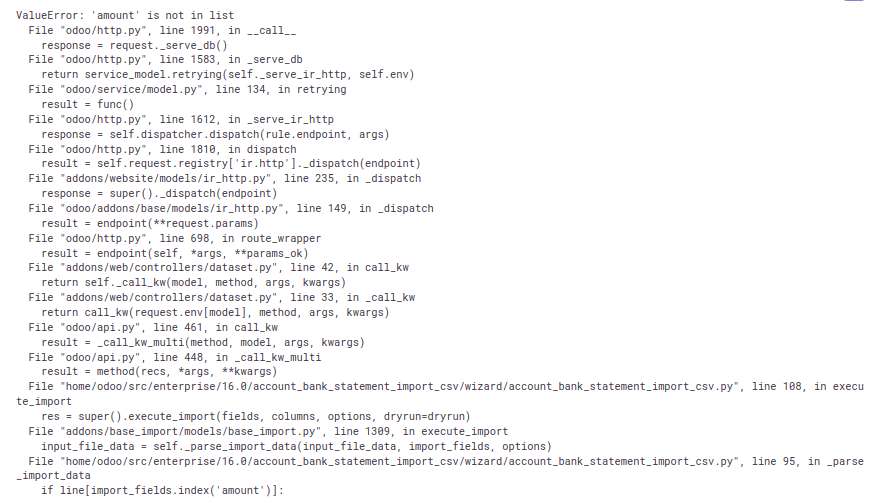 Sentry: -3931578971 Forward-Port-Of: odoo/enterprise#37315