Daily updates from Odoo
Friday, November 8, 2024
18 changes
1 change
Resolved issues and error corrections
The spreadsheet document tests were adjusted to match a recent change in how chart trend lines are calculated. This prevents unreliable test failures for an unrealistic chart setup and helps keep spreadsheet chart functionality stable.
Original PR description
Since o-spreadsheet/commit/9909fa98d data points are normalized to compute the trend line.

Those 2 tests were computing a 2nd order polynomial trend line based on 2 data points only, which doesn't really makes sense.

With only 2 points, the normalized labels become [0, 1]. The matrix is of the form

x1	x2
x1^2	x2^2

it gives

0	1
0	1

with [0, 1] as the labels.

This matrix is not invertible since the two lines are the same and the determinant is 0.
10 changes
Resolved issues and error corrections
This fix corrects misleading location labels and help text shown when configuring stock and repair operation types. It makes the wording more consistent and avoids confusion for users working with repairs, inventory transfers, or manufacturing flows.
Original PR description
Followup to task: 4028900 Fixes the following issues: - The label of "Default Component Destination Location" was applied to all operation types, not just `repair_operation`. This resulted in…
Followup to task: 4028900

Fixes the following issues:
- The label of "Default Component Destination Location" was applied to all operation types, not just `repair_operation`. This resulted in confusing labeling for all the other operation types when Repair was installed
- The "help" of `default_location_src_id` and `default_location_dest_id` referred to stock pickings, but these fields are also used for MRP and Repair. So the help has been updated to be more generic to avoid confusion
- Task: 4034713 removed the "Default" from the label of the default location fields for picking types, therefore we remove them from the repair ones for consistency
- cleaned up the inheritance of the picking type form view in repair so that the `default_location_src_id` field isn't in the same view twice (or have inconsistent attributes)
- reordered the Repair default locations to follow a more logic ordering


---
I confirm I have signed the CLA and read the PR guidelines at www.odoo.com/submit-pr
The loyalty card point update wizard now automatically shows the card's existing point balance. This helps users adjust loyalty points with the correct starting value and reduces the chance of manual errors.
Original PR description
Issue:
-The old balance field in loyalty card point update wizard is not set by default

Fix:
-Added `card_id` in form view
This update improves automated checks for website shop features so they run faster and fail less often. It fixes several test flow issues around product search, autocomplete, gift cards, loyalty, and delivery, helping maintain stability without changing customer-facing behavior.
Original PR description
Description of the issue/feature this PR addresses:

Current behavior before PR:

Desired behavior after PR is merged:


---
I confirm I have signed the CLA and read the PR guidelines at www.odoo.com/submit-pr
This update fixes a typo in the Expenses app. It is a minor cleanup that improves text clarity without changing business workflows or functionality.
Original PR description
Description of the issue/feature this PR addresses:

Current behavior before PR:

Desired behavior after PR is merged:


---
I confirm I have signed the CLA and read the PR guidelines at www.odoo.com/submit-pr
This change fixes the setup of an automated Mail discussion walkthrough so it starts after other functional tours and opens at the correct place. This helps ensure the tour reliably shows the expected in-app guidance during testing and validation.
Original PR description
In this commit, we fix the sequence and the url of discuss_channel_tour tour with the aim to start in last position after all the functional and with the aim to see the baball  on the app.

task~4309858

Description of the issue/feature this PR addresses:

Current behavior before PR:

Desired behavior after PR is merged:


---
I confirm I have signed the CLA and read the PR guidelines at www.odoo.com/submit-pr
This update fixes an automated test so it works correctly when only the Community edition is installed. It helps keep quality checks reliable and avoids false failures during validation, with no expected impact on users.
Original PR description
Fixes a test to work without enterprise installed.

Runbot Error 105489
This fixes how import batch size limits are passed to the file handling component. It ensures the configured size is understood correctly, helping imports respect the intended limits and avoid incorrect batching behavior.
Original PR description
This commit fixes the parameters send to the BinaryFileManager. There was a typo `maxBatchSize` and not `maxSizePerBatch` also has the unit on the web interface is in mega we should multiply the unit by 1024 ^ 2 to have the correct value.

---
I confirm I have signed the CLA and read the PR guidelines at www.odoo.com/submit-pr
This fixes an automated Studio walkthrough so it properly handles the export confirmation window. The change helps keep quality checks reliable without changing how business users work in Studio.
Original PR description
At the end of the tour, when we want to export all modifications, it opens a modal from v18.0. But, as it is not allowed to do action on element that's below a modal, the tour fails.
In this commit, we click on export button to test the export feature and then close the modal before continuing the tour.
This fix updates spreadsheet chart tests so they match the latest trend line calculation behavior. It helps keep automated checks reliable after a calculation change, with no expected impact on everyday users.
Original PR description
Since o-spreadsheet/commit/9909fa98d data points are normalized to compute the trend line.

Those 2 tests were computing a 2nd order polynomial trend line based on 2 data points only, which doesn't really makes sense.

With only 2 points, the normalized labels become [0, 1]. The matrix is of the form

x1	x2
x1^2	x2^2

it gives

0	1
0	1

with [0, 1] as the labels.

This matrix is not invertible since the two lines are the same and the determinant is 0.
The map view now removes an unnecessary gap between each group title and its list of records. This makes grouped map results easier to scan and gives the interface a cleaner, more polished appearance.
Original PR description
Before this commit:
There is an excessive gap between the group title and the list of records.

After this commit:
The excessive space between the group title and the list of records has been removed.

Task-4295965
7 changes
Resolved issues and error corrections
This update resolves an issue where users were receiving an error when modifying the unit amount field on non-timesheet analytic account lines with large numbers (over 6 digits). The change now correctly validates the unit amount field only for timesheet lines, preventing this error and improving data entry reliability.
Original PR description
Before this commit, when the user alters the unit_amount field of an analytic account line which is not a timesheet and the amount has more than 6 digits then the user will get a user error saying he cannot encode a number with more than 6 digits for the unit amount field.

This commit makes sure the check made on the unit amount is only made when the analytic line altered is a timesheet.

closes odoo/odoo#174964
This update ensures that the 'Extra Quotations' setting in the project management interface takes up the full screen width, regardless of the screen size. Previously, this setting was limited in its display space, which has now been corrected for a more consistent and user-friendly experience.
Original PR description
Before this commit, the `Extra Quotations` setting displayed in the form view of `project.project` model does not take the maximal width available on larger screen.

This commit makes sure the width of that setting takes all available space as the other settings.

task-4294845
This update resolves an issue preventing users from applying sign actions to documents. The fix ensures that users with appropriate access to both the document and the sign process can successfully initiate the signing workflow. Additionally, new testing has been added to prevent duplicate attachment creation.
Original PR description
[FIX] documents{_sign}: fix access error applying sign action How to reproduce: - Install documents_sign and log as admin - In documents, create an action (Workspace: Finance, Create: PDF to Sign) -…
[FIX] documents{_sign}: fix access error applying sign action

How to reproduce:
- Install documents_sign and log as admin
- In documents, create an action (Workspace: Finance, Create: PDF to Sign)
- Then upload a pdf in the workspace Finance
- Log as Marc Demo
- In documents, select the PDF uploaded as admin
- Click on the action created

You get the error: "Sorry, you are not allowed to access this document." while the expected behavior is that users who have access to the document and to Sign should be able to use the action. We solve that in this commit.

We also add a test checking that applying an action to sign a pdf document not owned by the user that perform the action, doesn't duplicate the attachment if the attachment is owned by the document (res_id and res_model pointing to the document; the ownership is transferred to the sign.template created) and duplicate it otherwise.

Technical note: the error was caused by the trick used in the override of sign_template.create in documents_sign which was setting the res_model to False and res_id to 0 for attachment linked to document to allow the super method to link that attachment to the created sign_template (by releasing the ownership of the attachment from the document). But as ir_attachment prevents to link an attachment with res_id = 0 to a record if it is not done by the owner of that
attachment, there was an error. We remove that tricks by defining a method that determine if sign_template can take the ownership of the attachment or not which we override in document_sign and make it return True when the attachment is owned by a document.

Task-4000988

Forward-Port-Of: odoo/enterprise#65206This update resolves an issue where completion certificate reports displayed dates based on the user's local timezone, leading to potential inconsistencies. The fix ensures all dates are recorded in UTC, guaranteeing accurate and reliable reporting regardless of user location. This improves data integrity and simplifies certificate generation.
Original PR description
**Version:**
- 17.0

**Steps to reproduce:**
1. In the Sign app, send a request for a signature.
2. Complete the signature and submit the request.
3. Observe the completion certificate that is generated.


**Issue:**
The log_date in the completion certificate report is displayed based on the user's timezone, causing inconsistencies.


**Solution:**
replaced `t-field` with `t-out` to retain the log_date in UTC, ensuring consistency regardless of the user's time zone.

task-4014378

---
I confirm I have signed the CLA and read the PR guidelines at www.odoo.com/submit-pr
This update corrects a bug in the account reports module where zero values were incorrectly interpreted as True, leading to inaccurate data when performing group-by operations. The fix ensures that zero values are handled correctly, preventing unexpected behavior and improving the reliability of report data. This resolves a potential issue with data discrepancies.
Original PR description
When the value to store into a generic id was zero (which can typically happen when doing a non-relational groupby), None was stored into the generic id instead. On groupby lines, this lead the unfold of that line to behave weirdly and not show the proper results.

The reason was that, in Python, doing 0 == False gives True. So, when doing 0 in (False, None), we ended up with a True result.

Forward-Port-Of: odoo/enterprise#72808
This update corrects a bug in the bank statement import process. The issue occurred when the CSV file didn't include the required 'debit' and 'credit' columns, leading to an error. This fix ensures the import function now handles CSV files with the correct format, preventing import failures.
Original PR description
This issue is coming from importing a CSV File in the 'account.bank.statement.line' model was caught by a sentry. Because if the CSV file does not have two columns, which are 'debit' and 'credit', that time getting error is 'amount' is not in the list. step to reproduce- - Install the Accounting. - Go to Dashboard > click on import statement button of Bank card - Upload the statement ([bank statement](https://drive.google.com/file/d/1s_a3Ym27QKRDh63BwPb-3P4g4kjmbH2l/view?usp=drive_link)) - After, click on Test button - Error will be generated. 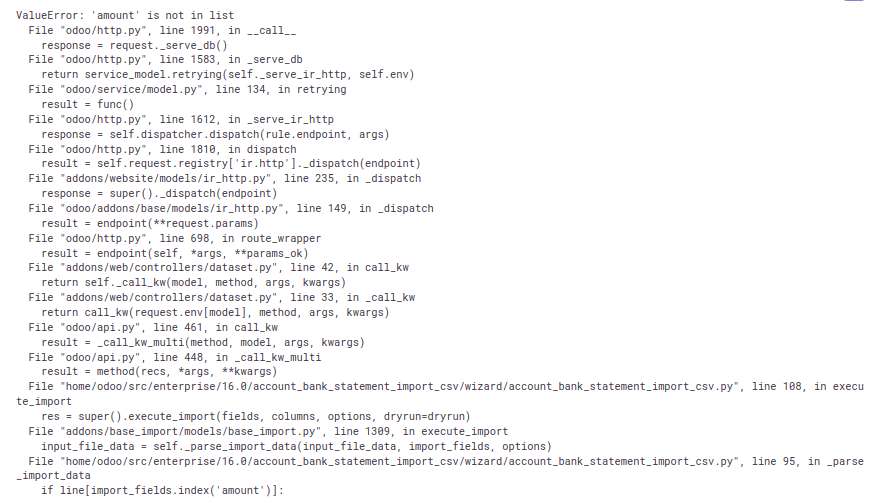 Sentry: -3931578971 Forward-Port-Of: odoo/enterprise#37315
This pull request reverts a previous change that was causing issues with the mail-chatter dropzone feature in the documents module. The change was rolled back to restore the previous, stable behavior. This ensures consistent functionality for users.
Original PR description
This reverts commit fd46e62809544702193e636ec388103eea11f788.

Task-4314619