Monday, January 15, 2018
2 changes · master
New functionality added to Odoo
Adds support for Mexico's External Trade Complement on export invoices, including required customs, address, Incoterm, certificate, and tariff information. This helps businesses generate compliant CFDI 3.3 invoices when exporting goods that require the A1 customs process.
Original PR description
Complement External Trade Mexican localization ============================================== This module adds the External Trade Complement to CFDI version 3.3, in which was added the customs…
Complement External Trade Mexican localization
==============================================
This module adds the External Trade Complement to CFDI version 3.3, in which was added the customs information of the products, it specifies the emitter and receiver address, and also datas related to export laws.
This [complement](http://www.sat.gob.mx/informacion_fiscal/factura_electronica/paginas/complemento_comercio_exterior.aspx) is required for all invoices where goods are exported and the code of pedimento is "A1"
The following fields were added in order to comply with complement structure defined by the SAT.
In the invoice:
- Incoterm: it is used for the attribute incoterm from the External Trade node, which is required, and must contain a value that the SAT provides for the catalog of incoterms. [link](http://www.sat.gob.mx/informacion_fiscal/factura_electronica/Documents/c_INCOTERM.xls)
- Is Certificate Source ?: This field defines whether the document to be generated functions as a Certificate of Origin or not. If it is active, it will be necessary to place the certificate of origin number on the invoice.
- Number of Certificate Source: Used to record the folio of the certificate of origin or the fiscal leaf of the CFDI with which the issuance of the certificate of origin was paid. If "Is Certificate Source?" Is selected, this attribute becomes required, and is enabled in the view to be able to place its value.
Note: Even though the stock module already loads the same data from the SAT's catalog, the stock.incoterm object is not used because this module does not depend on stock.

In the product:
- Tariff Fraction: This field is used to store the tariff fraction that corresponds to the product to be sold, it must have a valid value within the catalog provided by the SAT in "c_FraccionArancelaria". [link](http://www.sat.gob.mx/informacion_fiscal/factura_electronica/Documents/c_FraccionArancelaria.xls)
- UMT Customs: Field used to specify the key of the applicable unit of measure for the quantity expressed in the goods at customs. This unit of measure must correspond to the assigned Tariff Fraction in the product, as indicated in the SAT catalog.
Note: The weight field was added in the product view, because it is necessary to calculate values of complement

In Unit of measurement
- Customs Code: Code of the corresponding unit of measurement in the SAT's catalog. [Link](http://www.sat.gob.mx/informacion_fiscal/factura_electronica/Documents/c_UnidadMedidaAduana.xls)
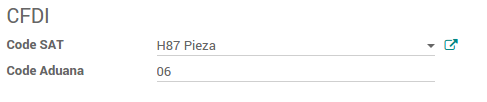
In the invoice lines:
- Qty UMT: It is the quantity expressed in the unit of measure of customs of the product.
It will be used for the attribute "CantidadAduana" in each of the merchandise to sell, when the Code Customs of the product UMT is different to 99.
This field is automatically filled in the invoice lines in the following cases:
1.- The product has the same value for UMT customs and UoM.
In this case, Qty UMT is set to the same value of the quantity of products on the line.
2.- The code of the unit of measurement in UMT of the product is equal to 06 (kilo).
In this case, Qty UMT will be equal to the weight defined in the product multiplied by the quantity of products being sold.
In case none of the previous cases is fulfilled, this value must be defined by the user, in each one of the lines.

- Unit Value UMT: Represents the unit price of the merchandise in the Customs UMT. It is used to set the attribute "ValorUnitarioAduana" in each of the CFDI merchandise. It is transparent to the user.
In the partner:
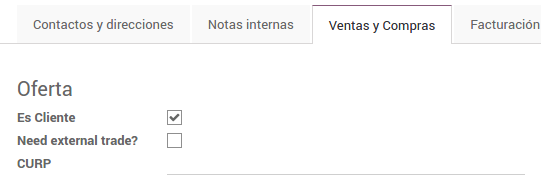
- CURP: It is used to store the unique Key of the Register of Population (CURP) of the issuer of the CFDI. When it is a natural person, it must contain 18 characters.
- Need external trade? Field used to indicate if the customer needs their invoices with external complement. If the field is equal to True, then the add-on is added to the CFDIs for this client.
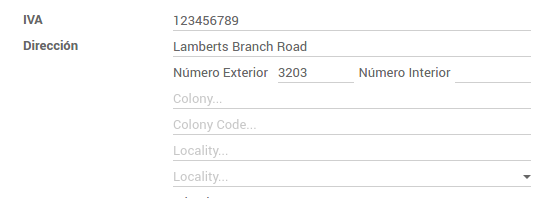
- Locality: Field used to indicate the locality of the emitter and receiver in the CFDI
- Colony Code: This field is used to store the emitter's code of the colony. It must be a value from the ones provided by the SAT's catalog.[ link
](http://www.sat.gob.mx/informacion_fiscal/factura_electronica/Documents/c_Colonia.xls)
In the Company
- Number of Reliable Exporter: Identification of the exporter according to the Article 22 of Annex 1 of the Free Trade Agreement with the European Association and to the Decision of the European Community, used to establish the attribute "NumeroExportadorConfiable" if the country of the customer belongs to the Union European
Note: The external trade group was added, in order to display some of these fields you must activate this group in the user.

In addition, the following models were added:
- Locality: model used to stored the localities from Mexico provided by the [SAT's catalog](http://www.sat.gob.mx/informacion_fiscal/factura_electronica/Documents/c_Localidad.xls). Its fields are name, state, country and code.
In this version, the Foreign Trade Plug-in does not support the Type of Proof Transfer ('T'). For this reason, the nodes "Propietario" and "MotivodeTraslado" are not specified in the Foreign Trade Template. On the other hand, the optional node "DescripcionesEspecificas" will not be added for this version, since it needs fields that depend on the stock module. They will be added in a later version.
Dummy: https://github.com/Vauxoo/enterprise-mx/pull/138This update adds automated checks to ensure Mexican electronic invoices with payment complements are generated correctly when an invoice is paid in multiple installments. It helps reduce the risk of compliance issues by verifying the expected payment details and official certification data remain accurate.
Original PR description
- Add expected_payment.xml file to validate payment complement
structure

- Add test which creates an invoice from the previous day and it's paid
in two parts, generating two CFDIs with payment complement

- Replace only the node "TimbreFiscalDigital" from the expected XML, so
complementary, nodes don't get overwriten, e.g. the the node "Pagos".

- If the CFDI contains the payment complement, the attributes
"FechaPago" and "IdDocumento" should be set on the expected XML taking
the values from the generated XML, so they could match