Daily updates from Odoo
Thursday, August 8, 2019
20 changes
New functionality added to Odoo
Odoo will now show Argentina’s tax identification label as “CUIT” instead of the generic “Tax ID” in reports and related company or partner details. Argentine addresses will also display the full state name and use a more familiar local ordering, making documents clearer for users in Argentina.
Original PR description
### Description of the issue/feature this PR addresses:

* CUIT ( Código Único de Identificación Tributaria). This is the name of the Tax Identification in order to user in reports and other places in Odoo.
* The address for the company and partner was showing the state code (defined by ISO) but this one are not the ones know fot the common use. In order to avoid errors use the state name instad of the state code.

### Current behavior before PR:

* The reports were showing Tax ID
* Reports only have a letter for the State code that was not easy to understand by the user.

### Desired behavior after PR is merged:

* Now will use CUIT
* Reports are showing the state name

--
I confirm I have signed the CLA and read the PR guidelines at www.odoo.com/submit-pr
Discuss now includes a History mailbox that keeps messages after users mark them as read, making it easier to revisit past conversations without cluttering the main inbox. This improves message organization for users whose notification handling is managed inside Odoo.
Original PR description
Bring back history !
Odoo now supports tracking deferred expenses alongside assets and deferred revenue, with invoice actions to create and link them more easily. This helps finance teams spread expense recognition over time while keeping standard asset reports focused on fixed assets only.
Original PR description
Allow creating a new type of asset: a deferred expense.

- Auto install account_asset, account_deferred_revenue.
- Add button in the invoice to link the deferred expenses.
- Add an asset_type in the account_asset: expense.
- Change the behavior of the action "Turn as an asset". It will now only open the wizard to create
  an asset with its asset_type set to 'purchase' instead of inferring it from the move_line.
- Add two action: "Turn as a deferred revenue" and "Turn as a deferred expense".
  They act like "Turn as an asset".
- Show only the asset (not the deferred revenue nor deferred expenses)
  in the asset report.

opw-2006605
Users can now find Mexican electronic invoices and payments using the official UUID from the XML attachment. The system also helps prevent duplicate invoice payments by detecting repeated XML UUIDs on invoices.
Original PR description
Adds the option to search by the uuid of the attachment
from invoice (account.move)

Adds a constraint to validate if a XML UUID is duplicated
from invoice (account.move) in order to avoid paying the same invoice
more than 1 time.

The UUID is a important field for MX where all companies are using to
looking for a particular invoice or payment
Enhancements to existing features
Manual stock transfers now default to immediate processing, helping users record inventory movements faster and making onboarding simpler. Businesses that prefer the previous planned-transfer workflow can restore it through a configuration setting.
Original PR description
Immediate transfer (no reservation, auto-confirmation, etc) should be the default mode when creating manually a picking. The rationale is that "the user wants to quickly encode stuff" and "it's…
Immediate transfer (no reservation, auto-confirmation, etc) should be
the default mode when creating manually a picking. The rationale is that
"the user wants to quickly encode stuff" and "it's better for the
onboarding".

As the default mode was already changed back to "planned transfer" because
users complained, this time we adapted the code so that the default mode
could be changed in python.

- re-order the imports of stock_picking.py.
- made all links to the picking from the picking type go through
  _get_action (it wasn't the case for ready).
- adapt the context in the xml so that they are parse-able by
  literal_eval.
- remove three actions that weren't used anymore.
- the user can create an ir config "stock.no_default_immediate_tranfer"
  fill it with anything to get back the planned mode.

task-2043846

Description of the issue/feature this PR addresses:

Current behavior before PR:

Desired behavior after PR is merged:


--
I confirm I have signed the CLA and read the PR guidelines at www.odoo.com/submit-pr
Inventory adjustment screens are easier to review and manage with clearer columns, optional display settings, a refresh action for on-hand quantities, and a filter to spot quantity differences. Duplicating a completed inventory now starts clean instead of copying old lines, reducing the risk of accidental incorrect counts.
Original PR description
Some changes for the Inventory Adjustement:
- Made some visual changes (more notable is some columns can be hide);
- Add a button to refresh On Hand quantity;
- The field `prefill_counted_quantity` is now a *selection* (not a boolean anymore);
- Can filter inventory lines on `difference_qty`;
- Fix issue on inventory lines with duplicate inventory.

Task #2043851
Records with exception activities are now easier to spot in list and kanban views thanks to a dedicated visual indicator and search filter. This helps teams quickly identify items needing attention across apps such as Accounting, CRM, HR, Fleet, Events, Manufacturing, Maintenance, Notes, and Contacts.
Original PR description
Description of the issue/feature this PR addresses:
<b> Task:</b> https://www.odoo.com/web?#id=1889379&action=333&active_id=131&model=project.task&view_type=form&menu_id=4720
<b> Pad:</b> https://pad.odoo.com/p/r.493858ed67f383dd21b6334fde8c6050
Current behavior before PR:

Desired behavior after PR is merged:


--
I confirm I have signed the CLA and read the PR guidelines at www.odoo.com/submit-pr
Sales order screens and related workflows were streamlined to reduce confusion and make common actions clearer. Updates include clearer shipping cost changes, simpler coupon handling, improved down payment entry, and less clutter around printing, locking, and field labels.
Original PR description
Back to Basics: Sales Order Drift

Various improvements in the UX of the Sales application, notably regarding
delivery and coupon. Other views/field labels/helper text changes as well.

Task 2033229
The product matrix in Sales has been updated to improve how product template information is presented. This should make it easier for sales users to work with product variants and related options from the product screen.
Original PR description
--
I confirm I have signed the CLA and read the PR guidelines at www.odoo.com/submit-pr
This update improves the rental workflow with clearer labels, better filters, more helpful icons, and cleaner signed-document messages. It also makes rental pricing work with pricelists, adds monthly rental pricing options, and renames the module to avoid conflicts with another rental add-on.
Original PR description
Various UX improvements the the rental module:
- labels, helper texts,view tweaks, etc.
- make rental pricings pricelist-aware

Renaming from sale_rental to sale_renting to avoid conflict with an OCA module of the same name.

Task 2007220
Calendar screens in Manufacturing PLM and Quality Control were adapted to the redesigned calendar view. This keeps scheduling and activity planning consistent with the newer interface, reducing friction for teams using these modules.
Original PR description
* Task: https://www.odoo.com/web#id=1919926&action=327&model=project.task&view_type=form&menu_id=4720
* Pad: https://pad.odoo.com/p/r.d207f05e4960d92d908271af8256ece3
Bpost delivery orders can now be cancelled without triggering an error. Users can regenerate the shipping label right after cancellation, reducing manual work and helping shipments continue smoothly.
Original PR description
Before this fix, we could only see an error when we tried to cancel a order with Bpost.
It's now possible to cancel an order while using Bpost and to regenerate it right after it.

Task-Id: 2008352
Lists and kanban boards now show a clearer visual indicator when an activity has an exception. This helps users notice items needing attention faster across several business apps, reducing the risk of missed follow-ups.
Original PR description
<b>Task:</b> https://www.odoo.com/web?#id=1889379&action=333&active_id=131&model=project.task&view_type=form&menu_id=4720
<b>Pad:</b> https://pad.odoo.com/p/r.493858ed67f383dd21b6334fde8c6050
Mobile users now get a more consistent and easier record-selection experience when choosing related records, using a tailored selection panel instead of device-native dialogs. This improves usability across workflows such as approvals, helpdesk, appraisals, subscriptions, signing, inventory barcode operations, and settings.
Resolved issues and error corrections
Invoice list views now show the customer or vendor name again, making it easier for users to identify and manage invoices at a glance. The change also cleans up related labels and view definitions to reduce confusion and improve maintainability.
Original PR description
The customers were removed from the invoice list view in
https://github.com/odoo/odoo/commit/317802d69e6236a43b2249b38d2f352813644f20

This was probably because the name of the variables
invoice_vendor_display_name was missleading as it was only for vendors
beofre but also for customers now. So this commit also renames related
variables.

Also, simplify the xml for header of all invoice types. To remove copy
pasta.

Description of the issue/feature this PR addresses:

Current behavior before PR:

Desired behavior after PR is merged:


--
I confirm I have signed the CLA and read the PR guidelines at www.odoo.com/submit-pr
Mexican electronic invoicing screens, reports, and email templates were updated to use the current invoice statuses: draft, posted, and cancelled. This prevents outdated status names from appearing after accounting workflow changes, reducing confusion for users and keeping tests aligned with the new behavior.
Original PR description
With the accounting-pocalypse, now the states open and paid not exists on the invoice. Improved the views and test to these states. 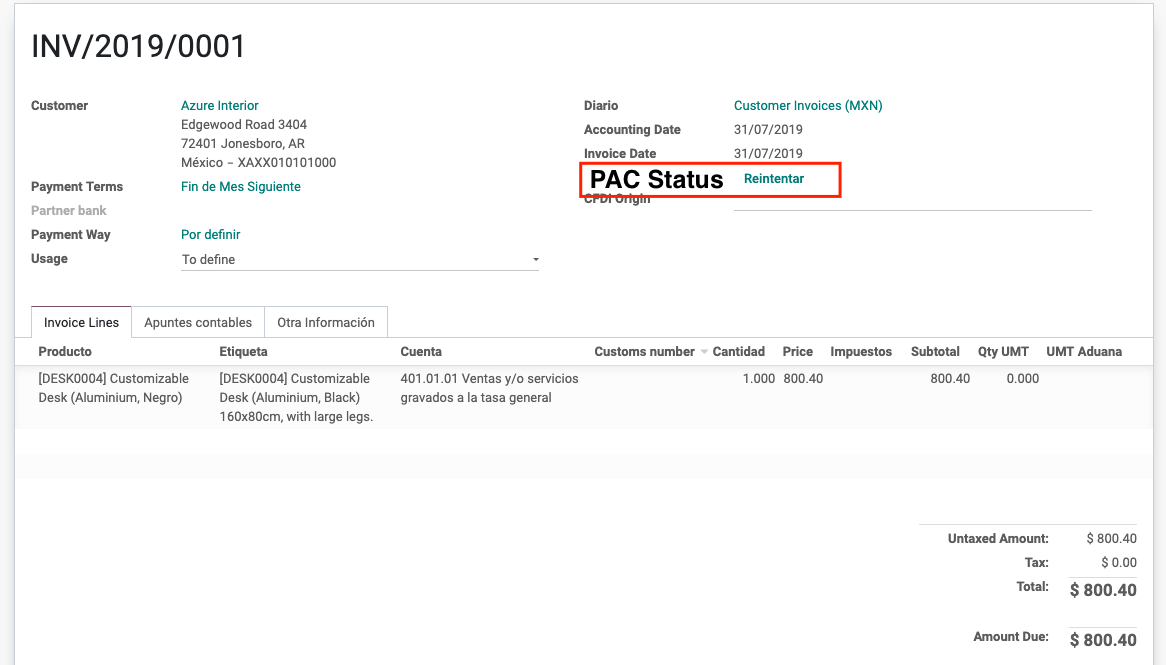
The manufacturing cost structure report has been fixed to correctly reflect valuation layer data. This helps businesses see more accurate production costing information after inventory valuation changes.
This update makes invoice scanning more reliable by fixing crashes, restoring missing extract buttons, and showing clearer messaging when the OCR service is under maintenance. It also improves tax matching and can create a vendor automatically when a valid VAT number is detected, reducing manual work for accounting teams.
Original PR description
This PR includes the following changes :

- fixes bugs introduced by accounting-pocalypse
- fixes bugs left in v12 where the extract buttons are not appearing
- creation of vendor (if it doesn't already exist) if a valid VAT number is detected
- improves the tax selection when taxes are found on invoice lines
- new error message when OCR server is under maintenance
- code clean up
Features or functions removed from Odoo
The point of sale customer display can no longer be customized from the backend to show custom advertising or similar content. This removes a confusing and frequently broken feature, making the customer display setup simpler and more reliable.
Original PR description
This commit removes feature allowing to customise the customer display which uses
to add an ad on the customer display.
Task-1944247

--
I confirm I have signed the CLA and read the PR guidelines at www.odoo.com/submit-pr
Code cleanup and technical improvements
The Mexican electronic invoicing setup now stores the issuer's tax regime on the company rather than on fiscal positions. This helps ensure CFDI documents include the required issuer tax regime and reduces signing errors caused by missing information.
Original PR description
It is used to fill MX XML CFDI field: "Comprobante.Emisor.RegimenFiscal"
It is moved to company since that it is a field just for "Emisor", "Emisor" is the company.
It is moved from "fiscal_position" because of, see the following discussion:
 - https://github.com/odoo/enterprise/pull/4763

It changes reduce the following error signing a MX XML CFDI:
 - (":5:0:ERROR:SCHEMASV:SCHEMAV_CVC_COMPLEX_TYPE_4: Element '{http://www.sat.gob.mx/cfd/3}Emisor': The attribute 'RegimenFiscal' is required but missing.")