Friday, May 22, 2020
17 changes · master
Enhancements to existing features
Image cropping now happens directly on the page instead of in a separate pop-up window. This makes editing feel smoother, less disruptive, and lets users see the result in context while they work.
Original PR description
task-2192755
Users can now archive old partner bank accounts when bank details change, instead of keeping obsolete records active. This helps keep partner financial information cleaner while preserving historical data.
Original PR description
Description of the issue/feature this PR addresses:
If partner change bank account, it is impossible to archive him.

@nim-odoo


--
I confirm I have signed the CLA and read the PR guidelines at www.odoo.com/submit-pr
Resolved issues and error corrections
Swiss invoice payment slips can now include the bank-provided customer ID required for ISR-B payment references. This helps companies using shared bank ISR subscription numbers generate valid references and avoid payment reconciliation issues.
Original PR description
## Description of the issue/feature this PR addresses: In a scenario of ISR-B. The ISR Subscription number is not owned by the invoice emitter but owned by a bank and shared with other invoice…
## Description of the issue/feature this PR addresses:
In a scenario of ISR-B. The ISR Subscription number is not
owned by the invoice emitter but owned by a bank and shared
with other invoice mitters.
The invoice emitter is a client of that bank and has a customer
identification number provided by the bank.
This ID number is usually 6 characters long but
may vary. It is integrated as part of the reference.
Thus with 6 char for the ID, the ref still has 20 chars.
e.g. 150001123456789012345678901
150001 is the customer ID
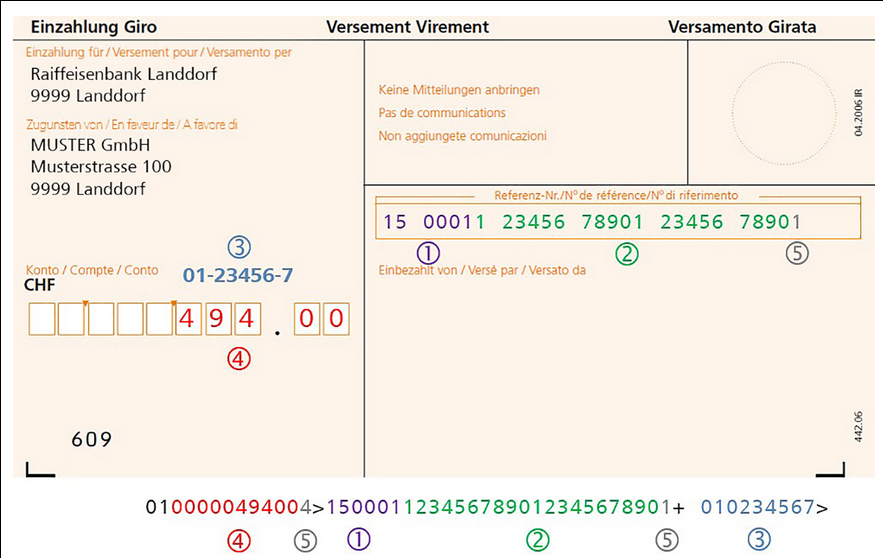
(source https://www.raiffeisen.ch/rch/fr/clients-entreprises/trafic-paiements-et-liquidites/debiteurs/bulletin-de-versement-orange.html )
Here is the translation from FR to EN:
1. ISR Customer ID number | The number identify you as the invoice emitter and must be set in the configuration of your accounting software. The length depends on settings of your software and is in general 6 digits. The number is in general placed at the start of the reference.
2. Invoice number (the length vary in relation with the length of the ISR ID) | You can use this part of the reference (as 20 digits in the example) to be able to identify the debtors. Your invoicing software gives you the structure of invoice numbers (for instance by appending clients numbers and invoice numbers). Unused positions are filled with zeros.
3. ISR Subscribtion number (in this example the Raiffeisen Bank of Landdorf) | The Raiffeisen Bank is identified with this number. In the optical line of the below part of the payment slip, the payment slip must contain 9 digits. The central part can contain up to 6 digits and be completed with zeros if necessary. In our example with a zero before (01-052142-5).
4. Amount (10 digits) plus fixed values | The amount is displayed with 10 digits. The unused positions are indicated by zeros.
5. Control digit | The control digit is generated automatically by your accounting software.
More reference here: https://www.credit-suisse.com/media/assets/private-banking/docs/ch/unternehmen/kmugrossunternehmen/besr-technische-dokumentation-en.pdf
(Here they call it BESR (german) but the doc is in english)
ISR-B (through bank) is based on ISR (direct)
:warning: In case of ISR the ISR Customer ID number is not used.
Examples are provided in the code for better understanding.
## Current behavior before PR:
There has been a mix in the implementation between the Subscription number and the Customer ID
The generated reference is currently using Subscription number as Customer ID and Customer ID doesn't exist.
## Desired behavior after PR is merged:
Have a field to register ISR-B Customer ID number
And construct the reference like this:
```
0100000494004> 150001123456789012345678901+ 010234567
|/\________/| \____/\__________________/| \_______/
1 2 3 4 5 6 7
(1) 01 | currency
(2) 0000049400 | amount 494.00
(3) 4 | control digit for amount
(4) 150001 | id number of the customer (size may vary, usually 6 chars)
(5) 12345678901234567890 | reference
(6) 1: control digit for identification number and reference
(7) 010234567: subscription number (01-23456-7)
```
--
I confirm I have signed the CLA and read the PR guidelines at www.odoo.com/submit-prMiscellaneous changes
Description of the issue/feature this PR addresses:

Current behavior before PR:

Desired behavior after PR is merged:


--
I confirm I have signed the CLA and read the PR guidelines at www.odoo.com/submit-pr

Forward-Port-Of: odoo/odoo#51593
Original PR description
Description of the issue/feature this PR addresses: Current behavior before PR: Desired behavior after PR is merged: -- I confirm I have signed the CLA and read the PR guidelines at www.odoo.com/submit-pr Forward-Port-Of: odoo/odoo#51593
Swiss bank account details are now displayed and filled more reliably, making postal account numbers easier for Swiss users to recognize. The update also fixes related invoice/bank account test issues to reduce errors in Swiss payment processing.
Original PR description
## Description of the issue/feature this PR addresses: rework onchange on acc_number to set postal account First we want to always display the pretty form of a postal account. The swiss users will…
## Description of the issue/feature this PR addresses:

rework onchange on acc_number to set postal account

First we want to always display the pretty form of a postal account.
The swiss users will identifiy it more easily.

We always want to auto fill the field l10n_ch_postal when possible from
acc_number.

I changed the logic for validation to reflect more what was done in `base_iban`.

## Which includes only 2 cases of filling acc_number:

1. a 9 position postal account number (prettified or not)
2. an IBAN from PostFinance which include clearing 09000


## Current behavior before PR:

With l10n_ch acc_number is always copied to l10n_ch_postal field.
Some IBAN could be translated as postal account while it's not a valid conversion.

Desired behavior after PR is merged:

Less annoying onchange on res.partner.bank. (Provides some test cases for valid use cases)

## Bonus:

- computed fields fixed (CacheMiss) by always setting a value.
- ISR test fixed, partner_id mandatory on bank account and field name change for invoice_bank_partner_id

--
I confirm I have signed the CLA and read the PR guidelines at www.odoo.com/submit-pr
This fixes an issue where newly created users with default access rights could not open the Expenses area from the dashboard if they did not yet have an employee record. After the change, those users can access the expense section as expected, reducing setup friction for administrators and employees.
Original PR description
Currently, when a user created with default access rights,
but doesn't have employee then they can not access expanse
with dashboard header.

After this commit, created user can also access expense.

Task-Id: 2262636
PR  #51677

Description of the issue/feature this PR addresses:

Current behavior before PR:

Desired behavior after PR is merged:


--
I confirm I have signed the CLA and read the PR guidelines at www.odoo.com/submit-pr
…form_view_bom_button` The button `action_open_product_lot` is added by the view `product_product_form_view_bom_button`. Both the current view and the view `product_product_form_view_bom_button` inherited from the view `product.product_normal_form_view`, without any priority specified. In order to make sure the button `action_open_product_lot` is in the view when the view `product_product_form_view_bom_button` is loaded, you either need to directly inherits from the view holding that
Original PR description
…form_view_bom_button` The button `action_open_product_lot` is added by the view `product_product_form_view_bom_button`. Both the current view and the view `product_product_form_view_bom_button`…
…form_view_bom_button`

The button `action_open_product_lot` is added by the view `product_product_form_view_bom_button`.
Both the current view and the view `product_product_form_view_bom_button` inherited
from the view `product.product_normal_form_view`,
without any priority specified.

In order to make sure the button `action_open_product_lot` is in the view
when the view `product_product_form_view_bom_button` is loaded,
you either need to directly inherits from the view holding that button
`product_form_view_procurement_button`
either you need to increase the priority of the current view
so `product_product_form_view_bom_button` is loaded in priority.

Same thing for the view `product_template_form_view_bom_button`

Upgrade Request 47960

```
ValueError: Element '<xpath expr="//button[@name='action_open_product_lot']">' cannot be located in parent view

Error context:
View `product.product.procurement`
[view_id: 783, xml_id: mrp.product_product_form_view_bom_button, model: product.product, parent_id: 319]
```

Forward-Port-Of: odoo/odoo#51652
The `@api.model` decorator prevent the call to the method.

opw-2262445

Description of the issue/feature this PR addresses:

Current behavior before PR:

Desired behavior after PR is merged:


--
I confirm I have signed the CLA and read the PR guidelines at www.odoo.com/submit-pr

Forward-Port-Of: odoo/odoo#51668
Original PR description
The `@api.model` decorator prevent the call to the method. opw-2262445 Description of the issue/feature this PR addresses: Current behavior before PR: Desired behavior after PR is merged: -- I confirm I have signed the CLA and read the PR guidelines at www.odoo.com/submit-pr Forward-Port-Of: odoo/odoo#51668
Create a promotion program with conditions: - Minimum purchase in currency (ex 100$ tax excluded) - Auto apply - On current order - Unlimited use And reward: - Free product - 1 Quantity Go to website shop. Fill an order with amount above the minimum required by the program. The promo will apply and add the free product. Increasing the order amount will eventually make the free product quantity increase, eventually overcoming the reward product quantity. Fixing by calculating
Original PR description
Create a promotion program with conditions:
- Minimum purchase in currency (ex 100$ tax excluded)
- Auto apply
- On current order
- Unlimited use

And reward:
- Free product
- 1 Quantity

Go to website shop. Fill an order with amount above the minimum
required by the program. The promo will apply and add the free
product.
Increasing the order amount will eventually make the free product
quantity increase, eventually overcoming the reward product
quantity.

Fixing by calculating the reward quantity using both minimum quantity
and minimum amount and using as cap the to reward product quantity
currently in cart

opw-2246138


--
I confirm I have signed the CLA and read the PR guidelines at www.odoo.com/submit-pr

Forward-Port-Of: odoo/odoo#51469
Forward-Port-Of: odoo/odoo#51452
- Go to Expenses > My Expenses - Create a new Expense and save it (check the Product and the associated Account) - Create a report - Submit it to manager - Refuse it - Return to the expense and edit it - Change the Product. If the product is associated to another Account, the Account will also changed - Save the expense The Product has been modified but not the Account which has been reverted to its previous value. Just setting the readonly attribute of Account (account_id) to False i
Original PR description
- Go to Expenses > My Expenses - Create a new Expense and save it (check the Product and the associated Account) - Create a report - Submit it to manager - Refuse it - Return to the expense and edit…
- Go to Expenses > My Expenses
- Create a new Expense and save it (check the Product and the associated Account)
- Create a report
- Submit it to manager
- Refuse it
- Return to the expense and edit it
- Change the Product. If the product is associated to another Account, the Account will also changed
- Save the expense
The Product has been modified but not the Account which has been reverted to its previous value.

Just setting the readonly attribute of Account (account_id) to False in refused state is not enough.
As the modification of Account is explicitely blocked in the overridden write method,
it seems more appropriate to not allowing Account to change when it is refused.

Reverting commit: fe74b0c89a761bb8ba8c759c38f575701d133ec7

opw-2242949

Description of the issue/feature this PR addresses:

Current behavior before PR:

Desired behavior after PR is merged:


--
I confirm I have signed the CLA and read the PR guidelines at www.odoo.com/submit-pr

Forward-Port-Of: odoo/odoo#51688
Forward-Port-Of: odoo/odoo#51667
Description of the issue/feature this PR addresses:

Current behavior before PR:

Desired behavior after PR is merged:


--
I confirm I have signed the CLA and read the PR guidelines at www.odoo.com/submit-pr

Forward-Port-Of: odoo/odoo#51664
Forward-Port-Of: odoo/odoo#51588
Original PR description
Description of the issue/feature this PR addresses: Current behavior before PR: Desired behavior after PR is merged: -- I confirm I have signed the CLA and read the PR guidelines at www.odoo.com/submit-pr Forward-Port-Of: odoo/odoo#51664 Forward-Port-Of: odoo/odoo#51588
- Confirm a Sale Order with a Customer Reference ('client_order_ref'
field) set;
- Validate the Delivery Order;
- Print the Delivery Slip report;

The display area of the Customer Reference field is not correct on
the printed pdf report

opw-2260756


--
I confirm I have signed the CLA and read the PR guidelines at www.odoo.com/submit-pr

Forward-Port-Of: odoo/odoo#51675
Original PR description
- Confirm a Sale Order with a Customer Reference ('client_order_ref'
field) set;
- Validate the Delivery Order;
- Print the Delivery Slip report;
The display area of the Customer Reference field is not correct on
the printed pdf report
opw-2260756
--
I confirm I have signed the CLA and read the PR guidelines at www.odoo.com/submit-pr
Forward-Port-Of: odoo/odoo#51675Before this commit, when a SysTray dropdown is open the user can scroll the element behind the dropdown. After this commit, we disable the scroll until we close the dropdown. Steps to reproduce: * Open Odoo on "Mobile" * Open the Activity SysTray * Scroll the "NavBar" menu (=> Bug) Note this fix is also applied in Desktop, as for me the "NavBar" shouldn't never scroll on Desktop. Task ID: 2231956 Task ID: 2234042 -- I confirm I have signed the CLA and read the PR guidelines
Original PR description
Before this commit, when a SysTray dropdown is open the user can scroll
the element behind the dropdown.

After this commit, we disable the scroll until we close the dropdown.

Steps to reproduce:
* Open Odoo on "Mobile"
* Open the Activity SysTray
* Scroll the "NavBar" menu (=> Bug)

Note this fix is also applied in Desktop, as for me the "NavBar"
shouldn't never scroll on Desktop.

Task ID: 2231956
Task ID: 2234042

--
I confirm I have signed the CLA and read the PR guidelines at www.odoo.com/submit-pr

Forward-Port-Of: odoo/odoo#50310
fixes #45425


--
I confirm I have signed the CLA and read the PR guidelines at www.odoo.com/submit-pr

Forward-Port-Of: odoo/odoo#47205
Original PR description
fixes #45425 -- I confirm I have signed the CLA and read the PR guidelines at www.odoo.com/submit-pr Forward-Port-Of: odoo/odoo#47205
Create a promotion program with conditions: - Minimum purchase in currency (ex 100$ tax excluded) - Auto apply - On current order - Unlimited use And reward: - Free product - 1 Quantity Go to website shop. Fill an order with amount above the minimum required by the program. The promo will apply and add the free product. Increasing the order amount will eventually make the free product quantity increase, eventually overcoming the reward product quantity. Fixing by calculating
Original PR description
Create a promotion program with conditions:
- Minimum purchase in currency (ex 100$ tax excluded)
- Auto apply
- On current order
- Unlimited use

And reward:
- Free product
- 1 Quantity

Go to website shop. Fill an order with amount above the minimum
required by the program. The promo will apply and add the free
product.
Increasing the order amount will eventually make the free product
quantity increase, eventually overcoming the reward product
quantity.

Fixing by calculating the reward quantity using both minimum quantity
and minimum amount and using as cap the to reward product quantity
currently in cart

opw-2246138

Forward-Port-Of: odoo/enterprise#10646
Forward-Port-Of: odoo/enterprise#10527
Forward-Port-Of: odoo/enterprise#10705
Forward-Port-Of: odoo/enterprise#10701
Original PR description
Forward-Port-Of: odoo/enterprise#10705 Forward-Port-Of: odoo/enterprise#10701
- Go to Planning - Go to Configuration > Roles - Create a new role ("TEST_ROLE") - Go to Configuration > Shift Templates - Create a new shift template with the following data: * Role: "TEST_ROLE" * Start hour: 06:00 * Duration (hours): 8:06 - Go to My Planning > Calendar and switch to gantt view - Add a new shift - In the wizard select the Planning Template created for "TEST_ROLE". The options must look like "6:00 AM - 2:06 PM TEST_ROLE" Once the Planning Template selected, t
Original PR description
- Go to Planning
- Go to Configuration > Roles
- Create a new role ("TEST_ROLE")
- Go to Configuration > Shift Templates
- Create a new shift template with the following data:
  * Role: "TEST_ROLE"
  * Start hour: 06:00
  * Duration (hours): 8:06
- Go to My Planning > Calendar and switch to gantt view
- Add a new shift
- In the wizard select the Planning Template created for "TEST_ROLE".
  The options must look like "6:00 AM - 2:06 PM TEST_ROLE"
Once the Planning Template selected, the Start date and End date are automatically set,
but there are offset by one minute compared to the time configured in the template for the End date.

opw-2253554

Forward-Port-Of: odoo/enterprise#10681