Thursday, November 5, 2020
10 changes · master
New functionality added to Odoo
Helpdesk tickets can now be converted into CRM leads when customer inquiries were routed to support by mistake. Customer contact details, including phone numbers, are carried between leads and tickets so teams keep the right context and avoid re-entering information.
Original PR description
PURPOSE Some business inquiries end up in the Helpdesk pipeline by mistake. There is no direct way to convert those tickets into leads. SPECIFICATIONS: PARTNER PHONE ON TICKET This commit adds phone…
PURPOSE

Some business inquiries end up in the Helpdesk pipeline by mistake. There
is no direct way to convert those tickets into leads.

SPECIFICATIONS: PARTNER PHONE ON TICKET

This commit adds phone field to helpdesk ticket. It is a stored editable
based on partner phone field. If a partner is set it populates the phone
field.

When converting a lead to a ticket, more information is propagated. Notably
partner_name and partner_phone are now synchronized with lead specific values.

Default ticket creation message is also changed by an "origin link" one.
It allows to know ticket comes from a lead.

SPECIFICATIONS: LEAD/TICKET CONVERT

In Helpdesk

  * Add a Phone field below the Customer Email one on helpdesk
    tickets;
  * Improve Lead 2 Ticket convert to propagate phone;

In CRM / Helpdesk

  * Add a 'Convert to Lead' button in non-primary on Helpdesk tickets;
  * Only visible if:
    * the user has at least the Helpdek user access right level;
    * the CRM app is installed;
    * the 'Leads' feature is active;

  * Open a modal with the following fields when clicking on the button:
    * Customer (should be prefilled with the info from the ticket)
    * Sales Team
    * Salesperson
    * Note : Salesperson and team are computed same way as lead2opportunity modal

  * If the user confirms, convert the ticket into a lead: populate the
    title, description and customer info (name, email, phone, mobile)
    based on the ticket;
    * If user has sales rights: redirect to lead;
    * Otherwise: stay on ticket now archived;

  * Change the icon in front of the button to fa-life-ring
  * Put the 'Lead / Tickets' module in autoinstall when CRM + Helpdesk are
    installed

Add tests

LINKS

Task ID-2083049
COM PR odoo/odoo#49129
ENT PR odoo/enterprise#9715
UPG PR odoo/upgrade#1883Enhancements to existing features
German accounting reports now better support ELSTER tax filing requirements, including company tax numbers, quarterly reporting, and improved XML export generation. This helps German businesses produce more compatible tax submissions with less manual adjustment.
Original PR description
- added base_address_extend dependency to ln10_de
- added code to DE account.tax.report.lines records
- generic Kz generation (based on code)
- support for quarter period
- added tax nr for de companies
- better xml generation

TASK ID: 1968167
Resolved issues and error corrections
Belgian payroll contract history now calculates monthly wage and yearly cost reference amounts correctly. This prevents employees from showing incorrect zero values in payroll reference data, improving the reliability of HR payroll reporting.
Original PR description
* Prior to this commit:

    There were an issue in the compute function of both reference_monthly_wage
    and reference_yearly_cost. This has been identified with the demo data
    freshly installed on the employee Laurie Poiret which had 0 for both fields.

* After this commit:

Both reference_monthly_wage and reference_yearly_cost are correctly computed.Miscellaneous changes
Steps to reproduce the bug:

- Create an asset A with an acquisition date D
- Export A in xls file F
- Import F

Bug:

Impossible to import D because the field acquisition_date was in readonly

opw:2374351

Forward-Port-Of: odoo/enterprise#14605
Original PR description
Steps to reproduce the bug: - Create an asset A with an acquisition date D - Export A in xls file F - Import F Bug: Impossible to import D because the field acquisition_date was in readonly opw:2374351 Forward-Port-Of: odoo/enterprise#14605
When hitting the button "Journal Items" of an accounting report with no "from date" boundary, such as the balance sheet, a "from date" was nevertheless added to the domain, therefore filtering out move lines older than the arbitrary date from set. For instance, in the balance sheet, when opening the journal items of an account, all entries up to the end date must be displayed, no date from should be set. How to reproduce on runbot: 1. Open the balance sheet, 2. In the date filter
Original PR description
When hitting the button "Journal Items" of an accounting report with no "from date" boundary, such as the balance sheet, a "from date" was nevertheless added to the domain, therefore filtering out…
When hitting the button "Journal Items" of an accounting report
with no "from date" boundary, such as the balance sheet,
a "from date" was nevertheless added to the domain,
therefore filtering out move lines older than the arbitrary date from set.
For instance, in the balance sheet,
when opening the journal items of an account,
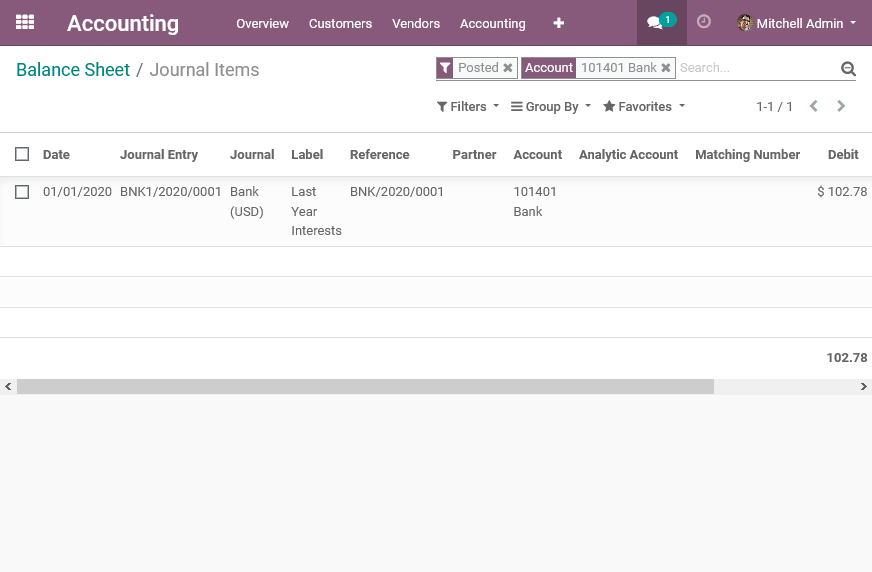
all entries up to the end date must be displayed,
no date from should be set.
How to reproduce on runbot:
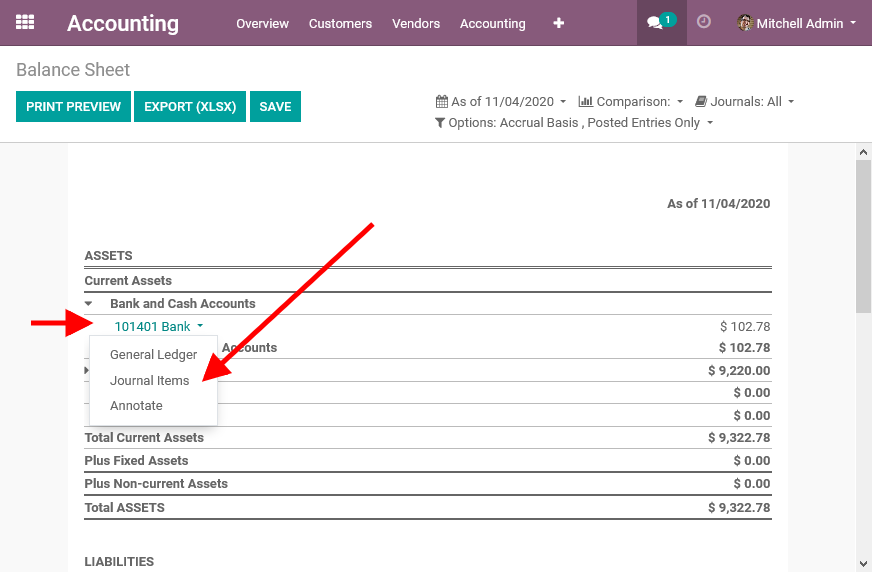
1. Open the balance sheet,
2. In the date filter, set "End of last month",
3. Unfold "Bank And Cash accounts",
then click on the first account and then click on "Journal Items"
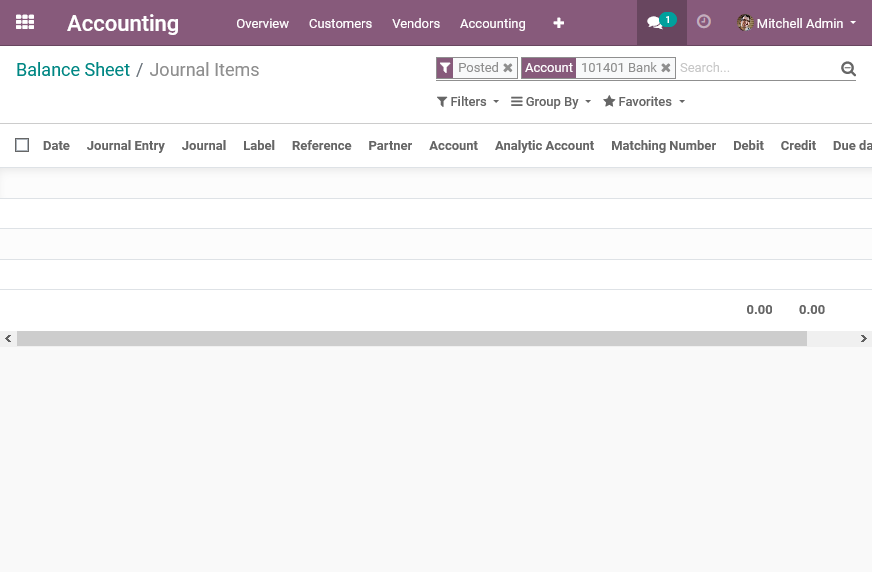
4. Observe there is no journal items shown,
while the line in the report had data.
Balance sheet report:
Before revision:
After revision:
In `_query_get`, the method used to get the report amounts,
we can see account with `include_initial_balance` are taken into account
when `strict_range` is not enforced:
```python
if context.get('date_from'):
if not context.get('strict_range'):
domain += ['|', (date_field, '>=', context['date_from']), ('account_id.user_type_id.include_initial_balance', '=', True)]
elif context.get('initial_bal'):
domain += [(date_field, '<', context['date_from'])]
else:
domain += [(date_field, '>=', context['date_from'])]
```
Hence, it should be the case also when opening the journal items of an account
in such kind of reports.
The helper method `_get_options_date_domain`
from rev. 8cb9de9e6acb9bf17b29f813f277d987e0547f4b
seems actually the helper to call to handle this case.
opw-2337621
Forward-Port-Of: odoo/enterprise#14598Issue - Install "Accounting" & "Studio" modules - Go to "Accounting" and switch studio editor - Go to "Reports" tab and select "Invoices" report - Click on pager to switch page Pager not working. Cause Since the framework is converting to "OWL", we must create a connection layer between the old and new framework. "on_attach_callback" parent call is missing. Solution Call "on_attach_callback" on reportEditorManager in the report editor action. opw-2362257 For
Original PR description
Issue

	- Install "Accounting" & "Studio" modules
	- Go to "Accounting" and switch studio editor
	- Go to "Reports" tab and select "Invoices" report
	- Click on pager to switch page

	Pager not working.

Cause

	Since the framework is converting to "OWL", we must
	create a connection layer between the old and new framework.
	"on_attach_callback" parent call is missing.

Solution

	Call "on_attach_callback" on reportEditorManager in the
	report editor action.

opw-2362257

Forward-Port-Of: odoo/enterprise#14356
Steps to reproduce the bug: - Go to Data Cleaning > Configuration > Field Cleaning - Click Contact and then Clean - Change the number of rows per page enough to get multiple pages - Select a row - Click "Select all #" ("All # selected" is now displayed) - Validate Bug: Even if it says that all rows are selected, only the visible ones are validated. Inspired by: https://github.com/odoo/odoo/blob/052324cca4ec8682f065a4158e86fc113b0242e0/addons/web/static/src/js/views/list/list_control
Original PR description
Steps to reproduce the bug:
- Go to Data Cleaning > Configuration > Field Cleaning
- Click Contact and then Clean
- Change the number of rows per page enough to get multiple pages
- Select a row
- Click "Select all #" ("All # selected" is now displayed)
- Validate

Bug:
Even if it says that all rows are selected, only the visible ones are validated.

Inspired by: https://github.com/odoo/odoo/blob/052324cca4ec8682f065a4158e86fc113b0242e0/addons/web/static/src/js/views/list/list_controller.js#L578-L587

opw:2369158

Forward-Port-Of: odoo/enterprise#14594Two fixes about package in `stock_barcode`: - Enable to scan newly created package to assign it to a barcode line; - Don't propagate reusable package as `result_package_id` in chained move. Community PR: https://github.com/odoo/odoo/pull/57474 Forward-Port-Of: odoo/enterprise#13146
Original PR description
Two fixes about package in `stock_barcode`:
- Enable to scan newly created package to assign it to a barcode line;
- Don't propagate reusable package as `result_package_id` in chained move.

Community PR: https://github.com/odoo/odoo/pull/57474

Forward-Port-Of: odoo/enterprise#13146
Configure card payment provider (stripe, Authorize, etc) in test mode Allow the customer to decide if saving payment info Go to web shop, fill cart and checkout Select provider and check "save payment method" After payment the card info is not saved: the related check variable is overridden in the process. Note: this occur only when using the provider site. S2S payment via Odoo follows a different flow Community PR: https://github.com/odoo/odoo/pull/60373 opw-2335237 Forward-Po
Original PR description
Configure card payment provider (stripe, Authorize, etc) in test mode
Allow the customer to decide if saving payment info
Go to web shop, fill cart and checkout
Select provider and check "save payment method"

After payment the card info is not saved:
the related check variable is overridden in the process.

Note: this occur only when using the provider site.
S2S payment via Odoo follows a different flow

Community PR: https://github.com/odoo/odoo/pull/60373

opw-2335237

Forward-Port-Of: odoo/enterprise#14463
…tat Report (ICP)

Before this commit, the Intrastat Report (ICP) take only in count the
country of the invoicing address and not the invoice Intrastat country
field (delivery country) if the Intrastat module was installed.

Note that, if the intrastat module is not installed, the report will
only take into account the invoicing address.

opw-2349760

Forward-Port-Of: odoo/enterprise#14454
Forward-Port-Of: odoo/enterprise#14363
Original PR description
…tat Report (ICP) Before this commit, the Intrastat Report (ICP) take only in count the country of the invoicing address and not the invoice Intrastat country field (delivery country) if the Intrastat module was installed. Note that, if the intrastat module is not installed, the report will only take into account the invoicing address. opw-2349760 Forward-Port-Of: odoo/enterprise#14454 Forward-Port-Of: odoo/enterprise#14363