Tuesday, January 12, 2021
30 changes · master
Enhancements to existing features
Barcode images in many printed reports are now embedded directly instead of being fetched one by one from the server. This reduces server load and lowers the risk of report printing failures when handling large batches of records.
Original PR description
When printing barcodes for a large amount of records, wkhtmltopdf will
make the same amount of http requests to the server in order to retrieve
barcodes. This can lead to performance issues or wkhtml to crash.

An already existing qweb widget is now used, where possible, to include
barcodes images as inline base64.

With this commit, the web widget is a bit improved to accept attributes
for the genrated image tag. Each option dictionary key starting with
`img_` will be converted into a tag attribute with the corresponding
value.

e.g.: `'img_alt': 'Barcode'` will result in `<img alt="Barcode"...`

Also, the `quiet` reportlab option is also avalaible in the widget
options.

Finally, if the `symbology` option is not given, the widget will try to
guess the right symbology based on barcode length and defaulting to
`Code128`. This will avoid to use some logic in templates.
This update improves the website editor by making website form fields easier to configure. Business users can set default values, add field descriptions, and use improved date/time controls, helping create clearer and more useful online forms.
Inventory valuation accounting entries are now created and posted in batches instead of one at a time. This significantly reduces the time needed to process large inventory adjustments for automatically valued products, improving operational efficiency during stock corrections.
Original PR description
## Context 5300 layers having a negative `remaining_value` (as well as negative `remaining_qty`) on fifo automated products ## Test Validate an inventory adjustment to set quantities to 0. Please find below the metrics | | Before the patch | After the patch | |---|---|---| |100 products | 2000 sec | 90 sec | |1 product | 132 sec | 25 sec | On following flamegraphs, we can see the account move creation (bloc **1**) decreases significantly while the `_run_fifo_vacuum` (bloc **2**) takes more time inside the complete transaction as the batch is done *per*-product ### Before the patch : 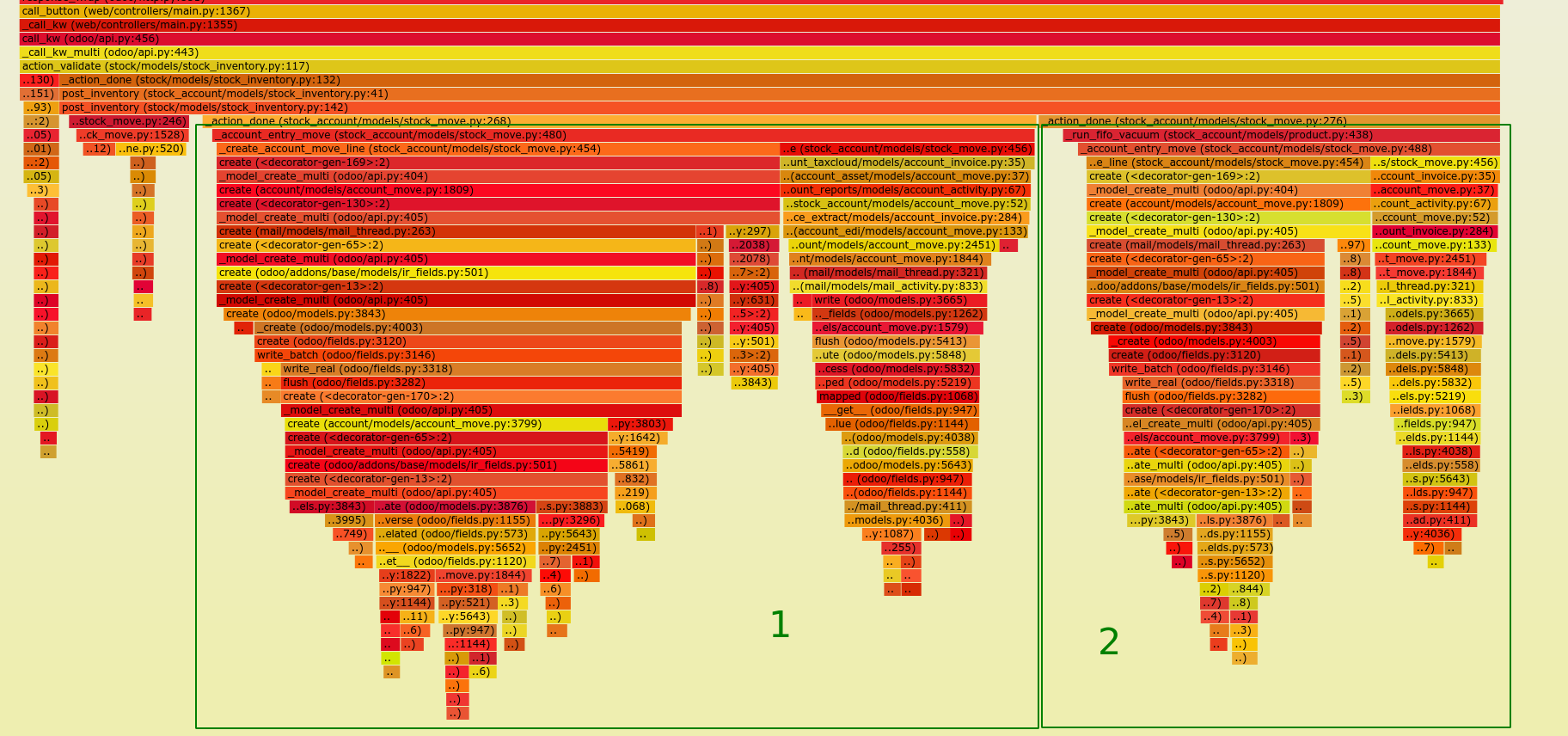 ### After the patch : 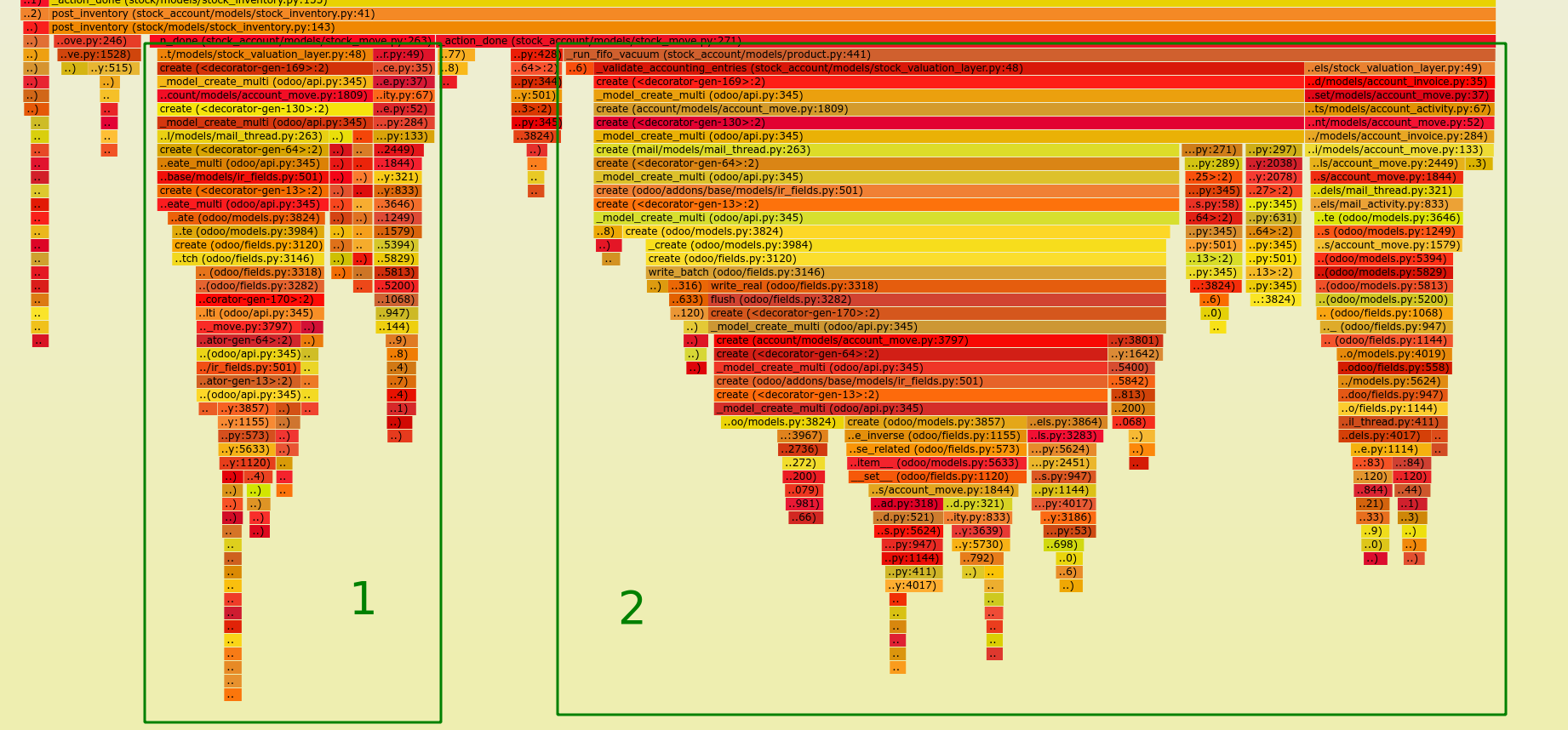
Event registration badges now generate barcodes directly in the report instead of making many separate barcode requests. This improves performance and reliability when printing badges for large events.
Original PR description
Use the qweb barcode widget to print event registration badges.
When using the `/report/barcode/` route with a lot of records,
performances issues could arrise as whktmltopdf will make a lot of
requests to get the barcodes.
Resolved issues and error corrections
This fix prevents expected promise rejections in the web client from being incorrectly reported as browser console errors, especially in Firefox. It makes error handling more consistent across browsers and reduces misleading noise during troubleshooting without changing user-facing workflows.
Miscellaneous changes
Description of the issue/feature this PR addresses:

Current behavior before PR:

Desired behavior after PR is merged:


--
I confirm I have signed the CLA and read the PR guidelines at www.odoo.com/submit-pr

Forward-Port-Of: odoo/odoo#62370
Original PR description
Description of the issue/feature this PR addresses: Current behavior before PR: Desired behavior after PR is merged: -- I confirm I have signed the CLA and read the PR guidelines at www.odoo.com/submit-pr Forward-Port-Of: odoo/odoo#62370
This update corrects how coupon program methods are handled so they work properly with multiple records. It helps avoid incorrect behavior in sales coupon processing while keeping the change internal and low risk.
Original PR description
Description of the issue/feature this PR addresses:
In those methods self is recordset.

@rco-odoo


--
I confirm I have signed the CLA and read the PR guidelines at www.odoo.com/submit-pr
The task editing popup no longer shows a worksheet template design button that did not work from that location. Users can still edit worksheet templates through the normal Configuration > Worksheet Templates menu, reducing confusion while preserving the capability.
Original PR description
### Purpose

- When editing a task it was possible to edit a worksheet template. Once clicked, there was a button to edit the template with studio ("Design Worksheet Template"), unfortunately, that was not working.

- The button is not there anymore. Nevertheless, the template can still be edited with studio by going in Configuration > Worksheet Templates > Select template and click on "Design Worksheet Template".Description of the issue/feature this PR addresses: Current behavior before PR: Desired behavior after PR is merged: -- I confirm I have signed the CLA and read the PR guidelines at www.odoo.com/submit-pr Forward-Port-Of: odoo/odoo#62653
Original PR description
Description of the issue/feature this PR addresses:

Current behavior before PR:

Desired behavior after PR is merged:


--
I confirm I have signed the CLA and read the PR guidelines at www.odoo.com/submit-pr

Forward-Port-Of: odoo/odoo#62653
Previously, when double clicking and image, video, icon, or document in the web-editor and replacing it with a different media type, it would lose its custom classes. This means among other things, that it would lose margins and paddings from bootstrap classes, or in the case of the three columns snippet, that the new media would not be properly rounded in its top corner, or not show up at all in the case of the video. The only exception was when changing any media type to an icon, but in
Original PR description
Previously, when double clicking and image, video, icon, or document in
the web-editor and replacing it with a different media type, it would
lose its custom classes. This means among other things, that it would
lose margins and paddings from bootstrap classes, or in the case of the
three columns snippet, that the new media would not be properly rounded
in its top corner, or not show up at all in the case of the video. The
only exception was when changing any media type to an icon, but in that
case it would also keep some of the media-specific classes that are
supposed to be removed (eg img-fluid or media_iframe_video).

This commit fixes that as well as some _clear behaviour that didn't
remove all classes that had to be removed, eg some fa-classes would
linger depending on their order, and the o_image class from documents
would always remain

Linked to: #60432 #60443
task-2282542

Forward-Port-Of: odoo/odoo#60450
Corporate signature for Bizi Software SRL

Description of the issue/feature this PR addresses:

Current behavior before PR:

Desired behavior after PR is merged:

--
I confirm I have signed the CLA and read the PR guidelines at www.odoo.com/submit-pr

Forward-Port-Of: odoo/odoo#64355
Original PR description
Corporate signature for Bizi Software SRL Description of the issue/feature this PR addresses: Current behavior before PR: Desired behavior after PR is merged: -- I confirm I have signed the CLA and read the PR guidelines at www.odoo.com/submit-pr Forward-Port-Of: odoo/odoo#64355
Steps to reproduce the bug:

- Let's consider a partner P linked to an employee E and a vehicle V
- Let's change the mobility card of E with 12345

Bug:

The mobility card on V was not changed.

opw:2431316

Forward-Port-Of: odoo/odoo#64330
Original PR description
Steps to reproduce the bug: - Let's consider a partner P linked to an employee E and a vehicle V - Let's change the mobility card of E with 12345 Bug: The mobility card on V was not changed. opw:2431316 Forward-Port-Of: odoo/odoo#64330
Steps to reproduce the bug: - Let's make a bancontact payment with Stripe on mobile from the web shop - Stripe redirects you to Odoo - Your phone asks on which browser you wanted to redirected to Odoo - Choose one Bug: An internal error was raised. When you clicked on a browser (the same you were using or a new one, whatever) Odoo will resend a request to Stripe. But this request will have wrong data in it. Stripe will answer with: Stripe: entering form_feedback with post d
Original PR description
Steps to reproduce the bug:

- Let's make a bancontact payment with Stripe on mobile from the web shop
- Stripe redirects you to Odoo
- Your phone asks on which browser you wanted to redirected to Odoo
- Choose one

Bug:

An internal error was raised.

When you clicked on a browser (the same you were using or a new one, whatever)
Odoo will resend a request to Stripe. But this request will have wrong data in it.

Stripe will answer with:

Stripe: entering form_feedback with post data {'error': {'code': 'resource_missing',
'doc_url': 'https://stripe.com/docs/error-codes/resource-missing',
'message': "No such payment_intent: 'py_1I6c4UKhH8RhRq18TJs2CP0z'",
'param': 'intent',
'type': 'invalid_request_error'},
'reference': 'S00002-1'}

opw:2422031

Forward-Port-Of: odoo/odoo#64365Previously, when opening a colorpicker in safari, the crash manager would open with the message "An unknown CORS error occured [...]". This is actually odoo's default message when an error has no file, line or column, which is usually the case for security reasons on CORS error. This is however not a true CORS error, but a "ResizeObserver loop completed with undelivered notifications" error, which also does not report file, line and col for the error. This error is caused by the fact th
Original PR description
Previously, when opening a colorpicker in safari, the crash manager would open with the message "An unknown CORS error occured [...]". This is actually odoo's default message when an error has no…
Previously, when opening a colorpicker in safari, the crash manager
would open with the message "An unknown CORS error occured [...]". This
is actually odoo's default message when an error has no file, line or
column, which is usually the case for security reasons on CORS error.
This is however not a true CORS error, but a "ResizeObserver loop
completed with undelivered notifications" error, which also does not
report file, line and col for the error.

This error is caused by the fact that in webkit, the baseline of an
empty input is considered to be at the bottom of the input element,
rather than at the baseline of the text of the input once it has some
content. (see https://bugs.webkit.org/show_bug.cgi?id=142968 )

In the case of the colorpicker, it uses a ResizeObserver to update its
UI, including updating the content of its inputs. This will cause the
first _updateUI to fill the empty inputs, which changes the layout of
the widget content and changes its size. Changing the size of an element
inside of a handler of a ResizeObserver on that same element will cause
an error and not call the callback again, so as to prevent infinite
loop.

This commit fixes that by filling the inputs before attaching the
ResizeObserver, so that it has its final size from the get-go, and
_updateUI will no longer change the layout/size, causing this error.

opw-2419296

Forward-Port-Of: odoo/odoo#64244
Forward-Port-Of: odoo/odoo#64377
Original PR description
Forward-Port-Of: odoo/odoo#64377
The design was not properly adapted to the last changes before the 14.0
release and still contained some invalid properties. Now the list inputs
match the design of the normal inputs.

Forward-Port-Of: odoo/odoo#64390
Original PR description
The design was not properly adapted to the last changes before the 14.0 release and still contained some invalid properties. Now the list inputs match the design of the normal inputs. Forward-Port-Of: odoo/odoo#64390
Description of the issue/feature this PR addresses:

Current behavior before PR:

Desired behavior after PR is merged:


--
I confirm I have signed the CLA and read the PR guidelines at www.odoo.com/submit-pr

Forward-Port-Of: odoo/odoo#64368
Original PR description
Description of the issue/feature this PR addresses: Current behavior before PR: Desired behavior after PR is merged: -- I confirm I have signed the CLA and read the PR guidelines at www.odoo.com/submit-pr Forward-Port-Of: odoo/odoo#64368
Previously, when changing the background-color of an icon in the
s_process_steps snippet, the line that goes through the snippet would
disappear from that block. This was caused by our font-application code
attempting to remove extraneous DOM nodes when changing a font color or
backrgound-color, but not considering elements with a ::before or
::after pseudoelement has having content, and subsequently removing
them.

opw-2423785

Forward-Port-Of: odoo/odoo#64321
Original PR description
Previously, when changing the background-color of an icon in the s_process_steps snippet, the line that goes through the snippet would disappear from that block. This was caused by our font-application code attempting to remove extraneous DOM nodes when changing a font color or backrgound-color, but not considering elements with a ::before or ::after pseudoelement has having content, and subsequently removing them. opw-2423785 Forward-Port-Of: odoo/odoo#64321
When adding a product to the order, the total will be updated but the orderline will not be displayed To reproduce the error: 1. Go to Point Of Sale 2. New Session 3. Click on a product so it will be added to the order Err: The order's total is correctly updated but the line is not displayed. When displaying an orderline, the system wants to use the product's unit name (`t-esc="props.line.get_unit().name"`). To do so, it uses one specific variable of the current product, `pos`:
Original PR description
When adding a product to the order, the total will be updated but the
orderline will not be displayed

To reproduce the error:
1. Go to Point Of Sale
2. New Session
3. Click on a product so it will be added to the order

Err: The order's total is correctly updated but the line is not
displayed.

When displaying an orderline, the system wants to use the product's unit
name (`t-esc="props.line.get_unit().name"`). To do so, it uses one
specific variable of the current product, `pos`:
https://github.com/odoo/odoo/blob/abff1ca94bcc829250b63fd9677890988b796819/addons/point_of_sale/static/src/js/models.js#L1518-L1528
When using the standard Point of Sale, this variable is added on products
loading (L446) :
https://github.com/odoo/odoo/blob/abff1ca94bcc829250b63fd9677890988b796819/addons/point_of_sale/static/src/js/models.js#L438-L448
However, this variable is not set when using the pos_cache module.

OPW-2431221

Forward-Port-Of: odoo/odoo#64380
…PEC mail

Related ticket : 2425845

Description of the issue/feature this PR addresses:

Current behavior before PR:

Desired behavior after PR is merged:


--
I confirm I have signed the CLA and read the PR guidelines at www.odoo.com/submit-pr

Forward-Port-Of: odoo/odoo#64048
Original PR description
…PEC mail Related ticket : 2425845 Description of the issue/feature this PR addresses: Current behavior before PR: Desired behavior after PR is merged: -- I confirm I have signed the CLA and read the PR guidelines at www.odoo.com/submit-pr Forward-Port-Of: odoo/odoo#64048
If we change ``active_model`` in context, we have to reset active_id(s), otherwise we read a random records which may not exist. STEPS: 1. Activate Developer mode 2. Go to Settings > Technical > Automation > Automated Actions 3. Define a new Automated Action with the following settings: - Model: Lead/Opportunity - Action To Do: Execute Python Code - Trigger: Based on Form Modification - Trigger Fields: Customer (crm.lead) - Python Code: ``` raise Warning(records) ``` 4. Go to Con
Original PR description
If we change ``active_model`` in context, we have to reset active_id(s), otherwise we read a random records which may not exist. STEPS: 1. Activate Developer mode 2. Go to Settings > Technical >…
If we change ``active_model`` in context, we have to reset active_id(s),
otherwise we read a random records which may not exist.

STEPS:
1. Activate Developer mode
2. Go to Settings > Technical > Automation > Automated Actions
3. Define a new Automated Action with the following settings:
- Model: Lead/Opportunity
- Action To Do: Execute Python Code
- Trigger: Based on Form Modification
- Trigger Fields: Customer (crm.lead)
- Python Code:
```
raise Warning(records)
```
4. Go to Contacts, create a new contact and save it.
5. Click on the "Opportunities" Smart Button on the top left of the contact record.
6. Click "Create".

BEFORE: ``records`` in context read crm.lead, while id is for res.partner
record

AFTER: ``records`` is None

---

opw-2424392

Description of the issue/feature this PR addresses:

Current behavior before PR:

Desired behavior after PR is merged:


--
I confirm I have signed the CLA and read the PR guidelines at www.odoo.com/submit-pr

Forward-Port-Of: odoo/odoo#64399
Forward-Port-Of: odoo/odoo#64223
Steps to reproduce the bug: - Create a user with only access rights, Inventory = Administrator, Purchase = user - Enable feature Purchase order approval in Purchase > Settings - Agreement Type = Exclusive, lines of Agreement, Quantity of Agreement - Login as a new created user and navigate to a menu Purchase > Purchase agreement and create a new Purchase agreement, confirm it - From the button create two PO (having a total > 5000) - Cancel one of the PO first and try to approve another
Original PR description
Steps to reproduce the bug:

- Create a user with only access rights, Inventory = Administrator, Purchase = user
- Enable feature Purchase order approval in Purchase > Settings
- Agreement Type = Exclusive, lines of Agreement, Quantity of Agreement
- Login as a new created user and navigate to a menu Purchase > Purchase agreement and
create a new Purchase agreement, confirm it
- From the button create two PO (having a total > 5000)
- Cancel one of the PO first and try to approve another one

Bug:

A UserError was riased: You have to cancel or validate every RFQ before closing the purchase requisition.

opw:2368999

Forward-Port-Of: odoo/odoo#64388
Consider a constraint method with two fields: a normal field, and a
field with an inverse method.  When calling write() with both fields,
the constraint method should be invoked once.

Forward-Port-Of: odoo/odoo#64411
Forward-Port-Of: odoo/odoo#64387
Original PR description
Consider a constraint method with two fields: a normal field, and a field with an inverse method. When calling write() with both fields, the constraint method should be invoked once. Forward-Port-Of: odoo/odoo#64411 Forward-Port-Of: odoo/odoo#64387
Reproduction step:
   - Create Sale Oder(Add optional product)
   - Customer Preview(portal)
   - Add to cart

TaskID: 2431351

Forward-Port-Of: odoo/odoo#64317
Original PR description
Reproduction step: - Create Sale Oder(Add optional product) - Customer Preview(portal) - Add to cart TaskID: 2431351 Forward-Port-Of: odoo/odoo#64317
This is mandatory for PA customers, and required by several enterprise customers as well.

Related Ticket: 2425845

Description of the issue/feature this PR addresses:

Current behavior before PR:

Desired behavior after PR is merged:


--
I confirm I have signed the CLA and read the PR guidelines at www.odoo.com/submit-pr

Forward-Port-Of: odoo/odoo#64056
Original PR description
This is mandatory for PA customers, and required by several enterprise customers as well. Related Ticket: 2425845 Description of the issue/feature this PR addresses: Current behavior before PR: Desired behavior after PR is merged: -- I confirm I have signed the CLA and read the PR guidelines at www.odoo.com/submit-pr Forward-Port-Of: odoo/odoo#64056
Before this commit, the dropdown menu remained open after clicking on the "Request a Document" button in the Activity Menu. This was specially problematic on small-screens where this menu overlapped with the request document's dialog. This commit fixes it by closing the dropdown menu once the request document's button is clicked, matching what has been done for the activity action's button in commit odoo/odoo@2ba725df615cfc6f57111fe7099736e25645abc3 Task ID: 2210401 Forward-Port-Of:
Original PR description
Before this commit, the dropdown menu remained open after clicking on
the "Request a Document" button in the Activity Menu. This was specially
problematic on small-screens where this menu overlapped with the request
document's dialog.

This commit fixes it by closing the dropdown menu once the request
document's button is clicked, matching what has been done for the
activity action's button in commit odoo/odoo@2ba725df615cfc6f57111fe7099736e25645abc3

Task ID: 2210401

Forward-Port-Of: odoo/enterprise#15702
Forward-Port-Of: odoo/enterprise#15698
Original PR description
Forward-Port-Of: odoo/enterprise#15698
Forward-Port-Of: odoo/enterprise#15691
Original PR description
Forward-Port-Of: odoo/enterprise#15691
Some addenda will need the information not only from the move but also
from the cfdi (the uuid for example).

opw-2412080

Forward-Port-Of: odoo/enterprise#15667
Original PR description
Some addenda will need the information not only from the move but also from the cfdi (the uuid for example). opw-2412080 Forward-Port-Of: odoo/enterprise#15667
* install project and documents
* open menu ``Documents > Configuration > Settings``
* under **Files Centralization** activate Project
* Login in with a user that doesn't have Document access right
* Go to the project > Task and add an attachment

BEFORE: error
AFTER: file is attached

---

opw-2427768

Forward-Port-Of: odoo/enterprise#15677
Original PR description
* install project and documents * open menu ``Documents > Configuration > Settings`` * under **Files Centralization** activate Project * Login in with a user that doesn't have Document access right * Go to the project > Task and add an attachment BEFORE: error AFTER: file is attached --- opw-2427768 Forward-Port-Of: odoo/enterprise#15677