Tuesday, January 19, 2021
21 changes · master
Enhancements to existing features
Calendar email reminders are now scheduled to run at the exact reminder time instead of being checked in a recurring 30-minute batch. This improves reminder accuracy and avoids unnecessary background work when no reminders are due.
Original PR description
The calendar reminders are emails or web notifications sent moments
before an event start. The mechanism to send web notifications is
controlled by the browser, it fetches all the future notifications and
uses `setTimeout()` to delay them. The mechanism to send emails was
controlled by a cron, every 30 minutes the cron would look for the
coming events and send the mail reminder.

The cron was running every 30 minutes even if there was no event. The
best precision was 30 minutes.

The new mechanism use cron triggers, every time one add email reminders,
triggers are created to call the cron at the precise moment the alarm is
set. The cron no longer send emails for events in the coming 30 minutes
as those will be triggered too.

---

**[REF] calendar: remove cron activation code**

There is code that automatically enable or disable the cron whether it
exists alarms. As alarms are automatically added, the cron is actually
always enabled.

Task: 2416741
Website editors can now provide different images for different language versions of a page. This helps localized websites show more relevant visuals for each audience without duplicating pages or workarounds.
Original PR description
TASK: https://www.odoo.com/web#view_type=form&id=33372&active_id=33372&model=project.task&menu_id=


--
I confirm I have signed the CLA and read the PR guidelines at www.odoo.com/submit-pr
The status pill showing that a calendar is synced with Google or Microsoft now uses Odoo's standard enterprise theme color. This creates a more consistent look across calendar integrations without changing functionality.
Original PR description
Description of the issue/feature this PR addresses: Change the color of "synced with microsoft/google" pill button to match
Odoo default theme.

Current behavior before PR: Pill button color set to badge-success.

Desired behavior after PR is merged: Pill button color set to $o-enterprise-primary-color.


--
I confirm I have signed the CLA and read the PR guidelines at www.odoo.com/submit-pr
Expenses can now be entered in one currency and reimbursed in the company currency, with automatic conversion and the exchange rate shown when currencies differ. The expense form is also clearer by showing only the fields relevant to the selected product and user role.
Original PR description
[REF] Improve experience of Expense app

After the changes the field untaxed_amount has not been used any more, so it was removed. In order to make the expense form more intuitive,
 it was necessary to distinguish between whether the product with non-zero-cost was selected on not. According to the latter, different field should be shown.
 Now the expense can be submitted in different currency and it can be reimbursed in company’s currency. In case the latter two currencies differ from each other,
 the conversion is done automatically and the rate is also displayed.

Task - 2366775
When receipt scanning detects an amount, it is now placed directly in the expense total field. This reduces manual entry for employees and helps keep submitted expenses more accurate.
Original PR description
When OCR captures the ammount, it is assigned to Total.

Task - 2366775
Miscellaneous changes
Steps: - As admin, go to "Contact us" or any other page on the website (1) - Go to Pages > Page Properties > Publish - Change the visibility to Signed In - Save - As demo, go to (1) Bug: The user "demo" is signed in but is returned a 403 Forbidden Explanation: When landing on a page with visibility: 'connected', the only way to see the page is to have a group matching the groups of the page as seen here: https://github.com/odoo/odoo/blob/28b748a559e1ffb5fb7c3631bf77adba121b2ebf/od
Original PR description
Steps:
- As admin, go to "Contact us" or any other page on the website (1)
- Go to Pages > Page Properties > Publish
- Change the visibility to Signed In
- Save
- As demo, go to (1)

Bug:
The user "demo" is signed in but is returned a 403 Forbidden

Explanation:
When landing on a page with visibility: 'connected', the only way to see
the page is to have a group matching the groups of the page as seen
here: https://github.com/odoo/odoo/blob/28b748a559e1ffb5fb7c3631bf77adba121b2ebf/odoo/addons/base/models/ir_ui_view.py#L625-L626
This fix lets any connected users see the page.

opw:2431700

Forward-Port-Of: odoo/odoo#64596
Steps: - Go to Point of Sale > Shop > Settings - Activate "Advanced Cash Control" - Start a new Shop session - Once in the POS go offline - Create some orders - Close the POS UI in the top-right corner - Go back online - Close the session and post the entries - Start a new session - Create an order - Close the POS UI - Close the session and post the entries - Go to Orders > Sessions - Click the rescue session - Click "Continue Selling" Bug: The user is redirected to the POS da
Original PR description
Steps: - Go to Point of Sale > Shop > Settings - Activate "Advanced Cash Control" - Start a new Shop session - Once in the POS go offline - Create some orders - Close the POS UI in the top-right…
Steps:
- Go to Point of Sale > Shop > Settings
- Activate "Advanced Cash Control"
- Start a new Shop session
- Once in the POS go offline
- Create some orders
- Close the POS UI in the top-right corner
- Go back online
- Close the session and post the entries
- Start a new session
- Create an order
- Close the POS UI
- Close the session and post the entries
- Go to Orders > Sessions
- Click the rescue session
- Click "Continue Selling"

Bug:
The user is redirected to the POS dashboard instead of opening the UI.

Explanation:
First, you cannot "Continue Selling" in a rescue session as seen here:
https://github.com/odoo/odoo/blob/b826c96ad39fc887a735c6ca839e3796aa18dac5/addons/point_of_sale/controllers/main.py#L17-L22
This commit removes the button from the UI in this case.

Then, after it has been created, the rescue session should be open and
not in the 'opening_control' state as seen here:
https://github.com/odoo/odoo/blob/9a8ebcc7cb05572681444ddb2511ccea4cee5565/addons/point_of_sale/models/pos_order.py#L98-L99
This is not the case anymore since https://github.com/odoo/odoo/commit/d21420d87ad8a269a0f30b3d9c0a3cee8c46cb14

opw:2427972

Forward-Port-Of: odoo/odoo#64632
Prevent duplicate SN through python constraint (requires SN to be attempted to be created) instead of assigning existing one (and causing a duplication). Steps to reproduce: - create a SN tracked product + activate "storage locations" - assign a SN to tracked product - create a planned receipt for the tracked product and assign same SN (i.e. same name). Warning will pop up about repeat SN, but it is still possible to validate the picking and create a duplicate SN. Bug was discov
Original PR description
Prevent duplicate SN through python constraint (requires SN to be
attempted to be created) instead of assigning existing one (and
causing a duplication). Steps to reproduce:

- create a SN tracked product + activate "storage locations"
- assign a SN to tracked product
- create a planned receipt for the tracked product and assign same SN
  (i.e. same name).

Warning will pop up about repeat SN, but it is still possible to
validate the picking and create a duplicate SN.

Bug was discovered while working on related task: 1924758

Description of the issue/feature this PR addresses:

Current behavior before PR:

Desired behavior after PR is merged:


--
I confirm I have signed the CLA and read the PR guidelines at www.odoo.com/submit-pr

Forward-Port-Of: odoo/odoo#61801
Description of the issue/feature this PR addresses:

Current behavior before PR:

Desired behavior after PR is merged:


--
I confirm I have signed the CLA and read the PR guidelines at www.odoo.com/submit-pr

Forward-Port-Of: odoo/odoo#64697
Original PR description
Description of the issue/feature this PR addresses: Current behavior before PR: Desired behavior after PR is merged: -- I confirm I have signed the CLA and read the PR guidelines at www.odoo.com/submit-pr Forward-Port-Of: odoo/odoo#64697
Description of the issue/feature this PR addresses:

Current behavior before PR:

Desired behavior after PR is merged:


--
I confirm I have signed the CLA and read the PR guidelines at www.odoo.com/submit-pr

Forward-Port-Of: odoo/odoo#64703
Forward-Port-Of: odoo/odoo#64694
Original PR description
Description of the issue/feature this PR addresses: Current behavior before PR: Desired behavior after PR is merged: -- I confirm I have signed the CLA and read the PR guidelines at www.odoo.com/submit-pr Forward-Port-Of: odoo/odoo#64703 Forward-Port-Of: odoo/odoo#64694
find is O(n) and findFromIdentifyingData is O(1)

task-2440693

Forward-Port-Of: odoo/odoo#64712
Original PR description
find is O(n) and findFromIdentifyingData is O(1) task-2440693 Forward-Port-Of: odoo/odoo#64712
Steps to reproduce the bug:

- Let's consider two pricelist PL and
- Create a new order O
- Add a line L
- Set PL as pricelist

Bug:

The button Update pricelist didn't appear

Closes #64269

opw:2429987

Forward-Port-Of: odoo/odoo#64696
Original PR description
Steps to reproduce the bug: - Let's consider two pricelist PL and - Create a new order O - Add a line L - Set PL as pricelist Bug: The button Update pricelist didn't appear Closes #64269 opw:2429987 Forward-Port-Of: odoo/odoo#64696
We were using 'onExit' instead of 'mouseExit' as the value of the
data-attribute 'display' in the .js code of the s_popup.

task-2312878

Description of the issue/feature this PR addresses:

Current behavior before PR:

Desired behavior after PR is merged:


--
I confirm I have signed the CLA and read the PR guidelines at www.odoo.com/submit-pr

Forward-Port-Of: odoo/odoo#64485
Original PR description
We were using 'onExit' instead of 'mouseExit' as the value of the data-attribute 'display' in the .js code of the s_popup. task-2312878 Description of the issue/feature this PR addresses: Current behavior before PR: Desired behavior after PR is merged: -- I confirm I have signed the CLA and read the PR guidelines at www.odoo.com/submit-pr Forward-Port-Of: odoo/odoo#64485
This test at least ensures that a SCSS edition through the editor can
properly be done and indirectly tests that the assets order is correct
(in prevision of a future asset refactoring).

Forward-Port-Of: odoo/odoo#64754
Original PR description
This test at least ensures that a SCSS edition through the editor can properly be done and indirectly tests that the assets order is correct (in prevision of a future asset refactoring). Forward-Port-Of: odoo/odoo#64754
Before this commit the dimensions of the tour tip text obtained from the text content was forced onto the complete active tooltip, sometimes hiding a part of the text because the complete tooltip had additional borders that prevent the text from using the same space as during the measurement. After this commit the dimensions of the tour tip text is computed by taking the measure on the full tip by temporarily switching it to the text display during initialization. task-2391201 Des
Original PR description
Before this commit the dimensions of the tour tip text obtained from
the text content was forced onto the complete active tooltip, sometimes
hiding a part of the text because the complete tooltip had additional
borders that prevent the text from using the same space as during the
measurement.

After this commit the dimensions of the tour tip text is computed by
taking the measure on the full tip by temporarily switching it to the
text display during initialization.

task-2391201

Description of the issue/feature this PR addresses:

Current behavior before PR:

Desired behavior after PR is merged:


--
I confirm I have signed the CLA and read the PR guidelines at www.odoo.com/submit-pr

Forward-Port-Of: odoo/odoo#64718
Forward-Port-Of: odoo/odoo#62142
- Install stock, quality_control and purchase - Go to Inventory > Configuration > Settings and enable: * Lots & Serial Numbers * Storage Locations * Multi-Step Routes - Go to Inventory > Configuration > Warehouses and configure Warehouse by setting "Receive goods in input, then quality and then stock (3 steps)" as "Incoming Shipments" - Create 2 storable Products tracked by Lots (i.e. Product X and Product Y) - Go to Quality > Quality Control > Control Points and create Quality Co
Original PR description
- Install stock, quality_control and purchase - Go to Inventory > Configuration > Settings and enable: * Lots & Serial Numbers * Storage Locations * Multi-Step Routes - Go to Inventory >…
- Install stock, quality_control and purchase
- Go to Inventory > Configuration > Settings and enable:
  * Lots & Serial Numbers
  * Storage Locations
  * Multi-Step Routes
- Go to Inventory > Configuration > Warehouses and configure Warehouse
by setting "Receive goods in input, then quality and then stock (3 steps)"
as "Incoming Shipments"
- Create 2 storable Products tracked by Lots (i.e. Product X and Product Y)
- Go to Quality > Quality Control > Control Points and create Quality Control
Points for Product X and Product Y with:
  * Operation: Internal Transfers
  * Type: Measure
- Go to Purchase and create a PO with Product X and Product Y
- Confirm order and validate reception for Product X only
- Create a Backorder for Product Y
- Go to Inventory and open Internal Transfers page
- Open Transfer to "WH/Quality Control" created from PO
- Launch Quality Checks
The measure check will be asked for Product X, but also for Product Y,
which will not be possible to perform as it has not been received yet.

The Quality Checks are created when PO is confirmed, based on ordered
Products.
As some Products can be missing at reception, the Quality Check for these
Products should be ignored.

opw-2409735

Forward-Port-Of: odoo/enterprise#15820
Forward-Port-Of: odoo/enterprise#15790
This PR fix a bug found in the creation of the acknowledgment and the claim / accept DTE response. The RUTRecep / RutReceptor should be the VAT of the company while the RUTEmisor / RutEmisor should be the VAT of the partner. The current behavioral: Given a company with VAT 76086428-5 and a partner with VAT 76882486-K. The company creates an invoice and it sends the DTE to the partner. The acknowledgment response is created as: ``` ... <ResultadoDTE> <TipoDTE>33<
Original PR description
This PR fix a bug found in the creation of the acknowledgment and the claim / accept DTE response. The RUTRecep / RutReceptor should be the VAT of the company while the RUTEmisor / RutEmisor should…
This PR fix a bug found in the creation of the acknowledgment and the claim / accept DTE response. The RUTRecep / RutReceptor should be the VAT of the company while the RUTEmisor / RutEmisor should be the VAT of the partner.
The current behavioral:
Given a company with VAT 76086428-5 and a partner with VAT 76882486-K. The company creates an invoice and it sends the DTE to the partner.
The acknowledgment response is created as:
```
...
<ResultadoDTE>
<TipoDTE>33</TipoDTE>
<Folio>301</Folio>
<FchEmis>2020-06-09</FchEmis>
<RUTEmisor>76882486-K</RUTEmisor>
<RUTRecep>76086428-5</RUTRecep>
<MntTotal>617292</MntTotal>
<CodEnvio>1909160922</CodEnvio>
<EstadoDTE>0</EstadoDTE>
<EstadoDTEGlosa>ACEPTADO OK</EstadoDTEGlosa>
</ResultadoDTE>
...
```
As you can see in the following diagram -> [](https://www.sii.cl/factura_electronica/factura_mercado/diagrama_resp_libros.zip)
The RUTEmisor must be the partner that sends the DTE (the company) and the RUTReceptor must be the receiving partner of the DTE.
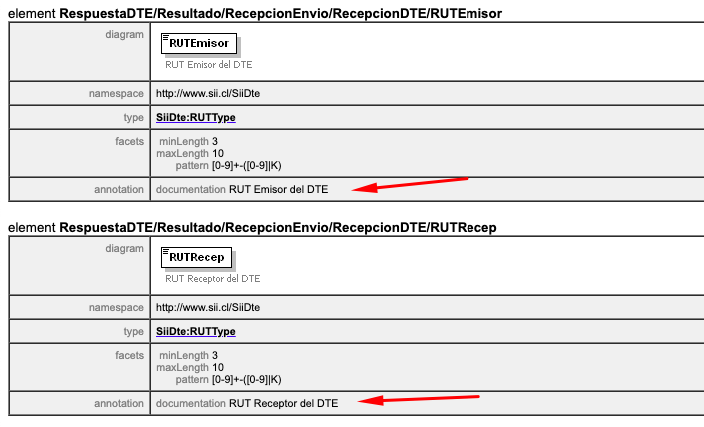
The expected behavioral should be:
```
...
<ResultadoDTE>
<TipoDTE>33</TipoDTE>
<Folio>301</Folio>
<FchEmis>2020-06-09</FchEmis>
<RUTEmisor>76086428-5</RUTEmisor>
<RUTRecep>76882486-K</RUTRecep>
<MntTotal>617292</MntTotal>
<CodEnvio>1909160922</CodEnvio>
<EstadoDTE>0</EstadoDTE>
<EstadoDTEGlosa>ACEPTADO OK</EstadoDTEGlosa>
</ResultadoDTE>
...
```
Forward-Port-Of: odoo/enterprise#15578Add some missing document types to the list when we are computing de date to be printed in the txt files Forward-Port-Of: odoo/enterprise#15076
Original PR description
Add some missing document types to the list when we are computing de
date to be printed in the txt files

Forward-Port-Of: odoo/enterprise#15076
TaskID: 2440085

Forward-Port-Of: odoo/enterprise#15810
Forward-Port-Of: odoo/enterprise#15803
Original PR description
TaskID: 2440085 Forward-Port-Of: odoo/enterprise#15810 Forward-Port-Of: odoo/enterprise#15803
Prior to this commit: - The SOL was displayed on the ticket of any team with the 'Reinvoicing Timesheet activated on Team' option activated. As this field is a compute non stored field which's value may in some case not be determined, this can be confusing for the user to see it, edit it (although it is not saved). After this commit: - The SOL will not be displayed as long as we are sure that we can provide the desired behavior which is to set all 'not edited' timesheets
Original PR description
Prior to this commit:

- The SOL was displayed on the ticket of any team with the
  'Reinvoicing Timesheet activated on Team' option activated.
  As this field is a compute non stored field which's value
  may in some case not be determined, this can be confusing for
  the user to see it, edit it (although it is not saved).

After this commit:

- The SOL will not be displayed as long as we are sure that we can
  provide the desired behavior which is to set all 'not edited' timesheets SOL.
  Thus it will be visible only when at least one timesheet has been entered.

Forward-Port-Of: odoo/enterprise#15808
Avois double display of the field

Forward-Port-Of: odoo/enterprise#15754
Original PR description
Avois double display of the field Forward-Port-Of: odoo/enterprise#15754