Thursday, March 25, 2021
19 changes · master
New functionality added to Odoo
Argentina electronic invoicing now supports the required FCE transmission option for MiPyME invoices when they are validated with AFIP. Businesses can set a default transmission option, helping invoices comply with updated AFIP requirements and reducing manual validation issues.
Original PR description
task 458
---

Thanks to new changes in AFIP we need to sent FCE Trasmission option
information for invoice validation when the type of document is mipyme.

We add a new system parameter that let the user to define their default
transmission option and we update it the logic to sent the selected FCE
Transmission option to the AFIP when validating the document.
Enhancements to existing features
Planning Gantt searches now show matching employees, roles, projects, or tasks even when no shift has been scheduled for them. This makes it easier for planners to find relevant records and allocate work without missing unscheduled items.
Original PR description
Currently, when there is no shift allocated for a particular
employee/role/project/task, the corresponding line is not available
in gantt view when searched.

After this commit an empty line is displayed for the records
searched, that have no shift allocated to them.

**TaskID: 2276719**
Resolved issues and error corrections
Field service sales now shows an error message in a way that can be properly translated. This helps users in different languages receive clear guidance when a product quantity cannot be updated.
Original PR description
Before this commit, we give a variable containing the error message
throw by the `_setValue` method. The problem is `_t` method need an explicit
string to translate the error message.

This commit replaces the variable by an explicit error message.

Related PR: #16088
Miscellaneous changes
This test account has been disabled. Their support informed us users
should use their regular account instead.

opw-2480469

Forward-Port-Of: odoo/enterprise#17116
Forward-Port-Of: odoo/enterprise#17048
Original PR description
This test account has been disabled. Their support informed us users should use their regular account instead. opw-2480469 Forward-Port-Of: odoo/enterprise#17116 Forward-Port-Of: odoo/enterprise#17048
Project task screens in Field Service were adjusted to align with broader project changes, including support for multiple assignees instead of a single responsible person. Related reporting views were also updated so task creation and project references continue to work smoothly after the underlying project interface changes.
Original PR description
Purpose of the commit is to do the generic improvement for the refactoring of project.

So in this commit, transform the user_id field into a many2many and
change its label to 'Assignees' (keep the avatar widget)

TaskID: 2451287
The icons for many localization modules were refreshed with newer artwork. This improves visual consistency across country-specific Odoo apps and makes the app list look more polished.
Original PR description
Purpose of the task is to update all l10n modules icon with new icon that i have
found in task attachment.

So in this commit, Updated all l10n modules icon with new icon.

Links
PR #16054
TaskID: 2442631
Field service projects can now bill work using employee-specific rates, so timesheets from different workers generate the right sales order lines automatically. This reduces manual workarounds, improves invoicing accuracy, and clarifies how task sales order changes affect related timesheets.
Original PR description
Purpose ====== Currently, the user can configure his field service project to be billed at an employee rate but it just won't work. The rates configured for each employee on the project are not taken…
Purpose
======

Currently, the user can configure his field service project to be billed at an employee rate but it just won't work. The rates configured for each employee on the project are not taken into account when the task is marked as done. As a consequence, the only workaround to support this kind of use-case is to create 1 task per employee with a different rate (or to add service products on the task). Those solutions are far from being ideal. We should give more flexibility.

## Details

 - Add employee rate for fsm projects, now the employee mappings list is visible for fsm projects and when the user adds an employee mapping, then the pricing type of this project is computed to set it on employee rate. Moreover, in the employee mapping for fsm projects, an employee is not linked to a SOL like a basic project, he is linked to a service product.
 - Generate SOLs in SO of the task for employee rate when the user marks as done the task. For this generation, for each employee who timesheet on the task and in the employee mappings defined in the project, we take the product and the price unit  on the mapping for these employees and we generate a SOL for each product and price unit. That is, if 2 employees are in the mapping with the same product but the price unit is different than 2 SOLs are generated on the SO for this case.
 - Add a reutrn value on the _fsm_ensure_sale_order to return the SO as expected in the commentary of this method.
 - Move the timesheet_product_id of employee mappings (`project.sale.line.employee.map` model) from sale_timesheet to industry_fsm_sale, because this field is only used for fsm projects.
 - Update the materials product count for the stat button of products in the task to not count the service products based on the employee rate.
 - Determine the correct SOL for each timesheet in a fsm task when the user changes the SOL of this fsm task which the pricing type of the project is employee rate.
 - When the user wants to create a task on a existing project when a service product is added in a SO, the list of available projects in project_id field of product.template is filtered to have only the projects that satisfy this condition:
     - allow_billable=True
     - pricing_type='task_rate'
     - allow_timesheets in [service_policy == 'delivered_timesheet' or '', True]

    Thus, the fsm project with the pricing type is equal to 'employee_rate' does not satisfy this condition.
    This condition has been changed to get this condition and then accept fsm projects with any pricing type:
     - allow_billable=True
     - pricing_type='task_rate' or is_fsm=True
     - allow_timesheets in [service_policy == 'delivered_timesheet' or '', True]

task-2376382

Community PR: odoo/odoo#66157
Upgrade PR: odoo/upgrade#2160The general settings area has been reorganized to make it clearer and easier for users to understand. Integration options are now separated into their own tab, helping new users find relevant settings more quickly during onboarding.
Original PR description
Before 'general setting' is not easily understandable by the user.
The user often gets lost. This is especially damaging through onboarding as some
new users like to discover the software by scrolling through
the general settings.

In this commit, the general setting is well organized and easily understandable
by the user, as we converted the 'Integration' portion in separate tab,
reorganized the structure and also added a button to open button link for action
open_default_user on res.users form.

task - 2374990

--
I confirm I have signed the CLA and read the PR guidelines at www.odoo.com/submit-pr
The Planning app now lets managers define how long employees have to remove themselves from assigned shifts. This gives businesses more control over staffing changes and helps reduce last-minute schedule disruption.
Original PR description
### Summary

Implements a custom delay for unassignment option in the planning app. This feature allows managers to define a deadline for employees to unassign themselves from a shift.

task-2427891
Invoice extraction results are now updated through webhooks as soon as they are ready, instead of relying mainly on a scheduled check every 30 minutes. This should make extracted invoice data available sooner, while the scheduled job remains as a backup if the instant update fails.
Original PR description
Previously, we were only using a cron that ran every 30 minutes to
automatically update the extraction requests.

The client will now send a webhook URL as part of the request that
the extraction server will call once the results are ready.

The cron still remain with a much lower frequency. It acts as a
backup in case something went wrong during the webhook call.

Task: 2416741
Online Appointment emails now use clearer wording so recipients can more easily understand who booked the appointment, who the service provider is, and what appointment details apply. Internal users who click the email action are sent directly to the internal event form instead of the public website page, making follow-up faster for staff.
Original PR description
PURPOSE

Improve the wording of the Online Appointment emails to clarify
  -> Who booked this appointment
  -> Who is "company representative/Service provider"
  -> Display appointment details when event is linked to an appointment;

SPECIFICATIONS

Allow redirection of internal users to backend directly when clicking
on emails CTA instead of frontend which is used by customers.

See community PR for more details about mail templates update.

LINKS

Task ID-2199620
COM PR odoo/odoo#64925
ENT PR odoo/enterprise#15914
UPG PR #2282
When creating an electronic credit note from an Argentine electronic invoice, the system now stops the credit note from being created if the tax authority validation fails. Users receive the actual validation error instead of a confusing message about a deleted record, making it easier to correct the issue and try again.
Original PR description
task 334
---
This fixes the automatic email shown when a subscription payment fails so the message no longer creates repeated quote sections or extra “read more/read less” links. Business users get a cleaner chatter view and clearer communication around failed payments.
Original PR description
The current automatic mail sent when a payment fails was triggering multiple quotes due to a structure error, leaving multiple "read more/read less" anchors in the chatter view. This commit fixes this problem by adding a parent element enclosing the signature quote and preventing the rest of the text having 'data-o-mail-quote' attributes, being hidden by the 'read more' button. task-2381080 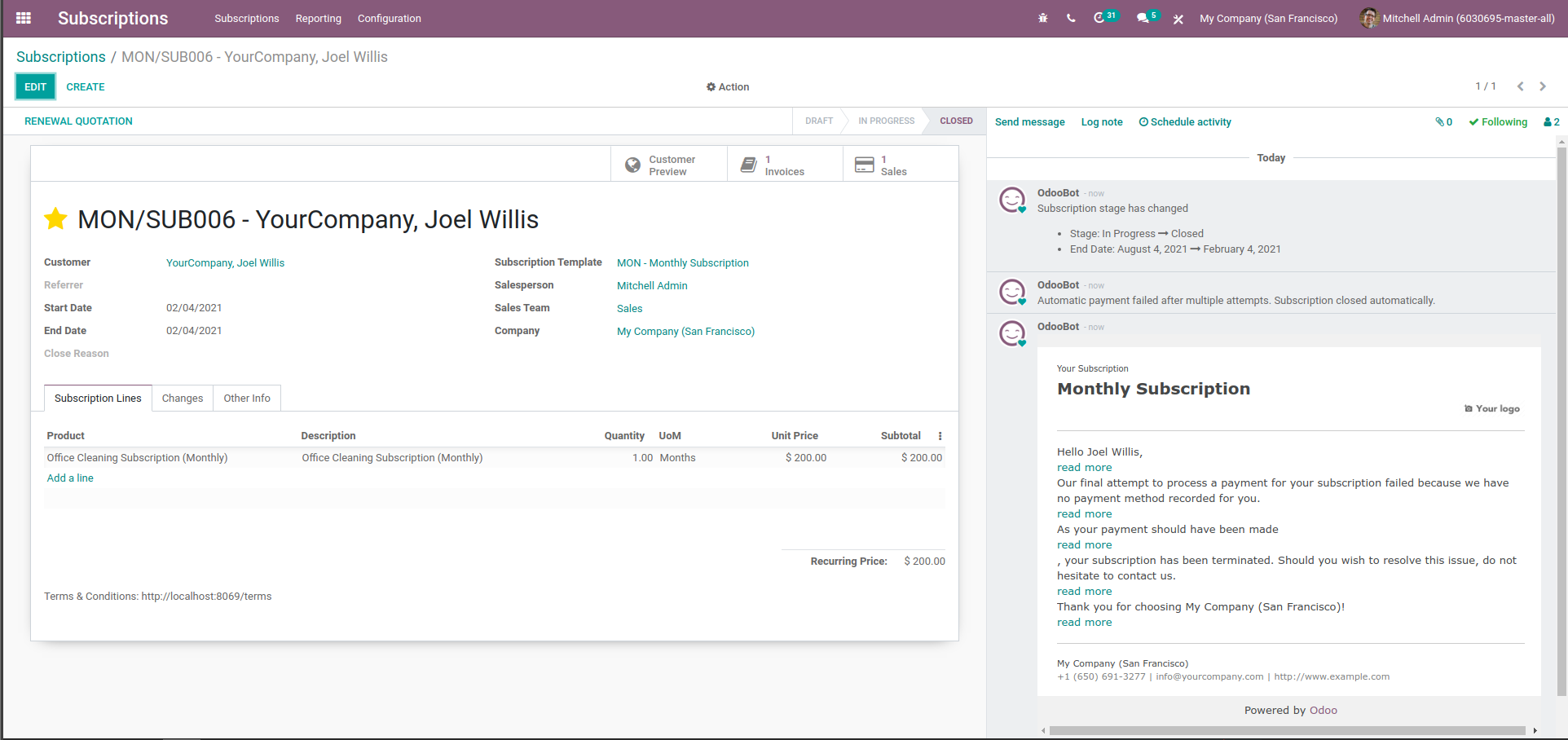
Before changes when we press 'F' key along
with 'Ctrl' the timer will automatically starts.
However after some changes the issue has been fixed and
timer does not start when we press Ctrl+F

TaskID: 2462166

Forward-Port-Of: odoo/enterprise#16996
Original PR description
Before changes when we press 'F' key along with 'Ctrl' the timer will automatically starts. However after some changes the issue has been fixed and timer does not start when we press Ctrl+F TaskID: 2462166 Forward-Port-Of: odoo/enterprise#16996
Purpose
======

See the comments directly in the code.

Otherwise: https://www.socialsecurity.be/site_fr/employer/general/techlib.htm#glossary

TaskID: 2479911

Forward-Port-Of: odoo/enterprise#17128
Original PR description
Purpose ====== See the comments directly in the code. Otherwise: https://www.socialsecurity.be/site_fr/employer/general/techlib.htm#glossary TaskID: 2479911 Forward-Port-Of: odoo/enterprise#17128
Steps to reproduce: go to Helpdesk > Configuration > SLA Policies > set '32 hours' Observed behavior: 32 hours is converted into 1 day and 8 hours. The issue is that these fields represent working hours, not "regular" hours. From this commit, If 1 day = 8 working hours of a particular company then, 32 hours should be converted into 4 days TaskID: 2413881 -- I confirm I have signed the CLA and read the PR guidelines at www.odoo.com/submit-pr Forward-Port-Of: odoo/enterpri
Original PR description
Steps to reproduce:

go to Helpdesk > Configuration > SLA Policies > set '32 hours'

Observed behavior:

32 hours is converted into 1 day and 8 hours.

The issue is that these fields represent working hours, not "regular" hours.

From this commit,
If 1 day = 8 working hours of a particular company then, 32 hours should be
converted into 4 days

TaskID: 2413881

--
I confirm I have signed the CLA and read the PR guidelines at www.odoo.com/submit-pr

Forward-Port-Of: odoo/enterprise#15706
Forward-Port-Of: odoo/enterprise#15324
`res` can be undefined when pressing `down` on the last item of the list for instance

Forward-Port-Of: odoo/enterprise#16479
Original PR description
`res` can be undefined when pressing `down` on the last item of the list for instance Forward-Port-Of: odoo/enterprise#16479
In case of a multi-company environment, a partner can have accounts in several
companies. We should filter to take into account only those related to the
current company when checking account type.

opw-2462747

Forward-Port-Of: odoo/enterprise#17278
Forward-Port-Of: odoo/enterprise#17269
Original PR description
In case of a multi-company environment, a partner can have accounts in several companies. We should filter to take into account only those related to the current company when checking account type. opw-2462747 Forward-Port-Of: odoo/enterprise#17278 Forward-Port-Of: odoo/enterprise#17269
To reproduce:
- create a new template on the sign app
- add a field with a responsible A
- delete the role A from Configuration/Roles
-  try to access the template (JS Traceback)

FIX:
    add a deletion restriction for the sign.item.role
as it should not be deleted if it's related to a sign.field

opw-2457018
opw-2485898

Forward-Port-Of: odoo/enterprise#17132
Original PR description
To reproduce:
- create a new template on the sign app
- add a field with a responsible A
- delete the role A from Configuration/Roles
- try to access the template (JS Traceback)
FIX:
add a deletion restriction for the sign.item.role
as it should not be deleted if it's related to a sign.field
opw-2457018
opw-2485898
Forward-Port-Of: odoo/enterprise#17132