Monday, August 9, 2021
17 changes · master
New functionality added to Odoo
Online shoppers now see stock availability based on what is actually available to sell, improving consistency with sales operations. The shop also supports clearer availability messages, ordering rules, and email notifications when wishlist products come back in stock.
Original PR description
This PR is changing the way product stock is managed in the website shop : free_qty is used instead of current virtual_quantity.

Also, allow_to_order and custom inventory availability messages are introduced on the product to better handle what is displayed to the user when he is ordering.


--
I confirm I have signed the CLA and read the PR guidelines at www.odoo.com/submit-pr
Businesses can now create direct links for coupons and promotions that customers can use to apply offers to their online orders. If an offer cannot be applied right away, the customer sees the reason and the website remembers the offer to try again when the cart changes.
Original PR description
Coupons and promotion programs can now be shared by creating a link that can
directly be used by the customer.

Using the link, the system will try to apply the coupon/promotion to the
customer's order.
If this can't be done, the error will be shown to the user, for instance
"A minimum amount of 1000$ is required to get the free ipad".
That coupon/promotion will then be stored in session and the system will try
automatically reapply it when something is added to the cart.

task-2489749

Co-authored-by: Romain Derie <rde@odoo.com>
Co-authored-by: Jeremy Kersten <jke@odoo.com>
Co-authored-by: Tom De Caluwé <tdc@odoo.com>
Enhancements to existing features
This update improves Odoo's internal testing tools so browser-based tests can wait for setup steps that take time to complete. It helps make automated tests more reliable, especially for live chat pages, without changing day-to-day user workflows.
Original PR description
depends on https://github.com/odoo/odoo/pull/74756
Resolved issues and error corrections
Subscriptions with a fixed end date now keep that original end date when automated invoicing runs after the contract has ended. This prevents invoices from being assigned to the wrong year and keeps subscription reporting aligned with the agreed contract dates.
Original PR description
- Create a subscription S with an end date 31.12.2020 (with recurring_rule_boundary == fixed)
- Let's consider we are the 01.01.2021 (the cron Sale Subscription: generate recurring invoices and payments is applied)

Bug:

The end date of S was changed into 01.01.2021 instead of keeping 31.12.2020
So the year end invoicing was 2021 instead of 2020.

PS: When the subscription is fixed, we only change the date end if we close it before the expected end.

opw:2449986
Features or functions removed from Odoo
This change removes leftover website configuration logic tied to a field that no longer exists. It has no expected impact on day-to-day users, but helps keep the website module cleaner and easier to maintain.
Original PR description
The field was removed with 15aae7ea340c4
Miscellaneous changes
At the moment, it is possible to archive a journal for which some
entries are still waiting to be auto-posted in the future.
Add a constrains to avoid make sure that it is no longer possible,
since it shouldn't.

Task id #2585454

--
I confirm I have signed the CLA and read the PR guidelines at www.odoo.com/submit-pr

Forward-Port-Of: odoo/odoo#74636
Forward-Port-Of: odoo/odoo#74536
Original PR description
At the moment, it is possible to archive a journal for which some entries are still waiting to be auto-posted in the future. Add a constrains to avoid make sure that it is no longer possible, since it shouldn't. Task id #2585454 -- I confirm I have signed the CLA and read the PR guidelines at www.odoo.com/submit-pr Forward-Port-Of: odoo/odoo#74636 Forward-Port-Of: odoo/odoo#74536
Many-to-many avatar fields now display clearly in kanban and list views, showing a small group of avatars with a count for additional people. This makes records involving multiple users or employees easier to scan while preserving quick access to chats from visible avatars.
Original PR description
Purpose The aim of the current task is to adapt the design of this new widget to the list and kanban views. SPECIFICATION Kanban when there is only one record set in the m2m field, display it like a…
Purpose
The aim of the current task is to adapt the design of this new widget to the
list and kanban views.

SPECIFICATION

Kanban
when there is only one record set in the m2m field, display it like a
many2one_avatar widget when there are two or three records set in the m2m
field, display the avatars next to each other when there are more than three
records set in the m2m field, display the first two avatars, then a grey circle
with +X in it (where X is the number of records beyond the first two), when
hovering the +X avatar, open a tooltip with the list of the remaining records
the display order of the records is the same as the order in the m2m field
the avatars behave like in the other avatar widgets (i.e. darkens on hover and
clicking on it opens the chat) except the +X avatar that does not darken or has
a cursor:pointer; on hover and is not clickable

List
same specs as for the kanban view, with the difference that the widget displays
up to five records instead of three when the widget is editable display it like
the current formview version of the many2many_avatar_user widget (i.e. tags
with avatars)

task-2563591


--
I confirm I have signed the CLA and read the PR guidelines at www.odoo.com/submit-pr
The "View Bookmark" button is used to set URL parameter to be able
to jump to bookmark by copy pasting the generated link.

As there is no way to copy this, this feature is useless in our case.

Description of the issue/feature this PR addresses:

Current behavior before PR:

Desired behavior after PR is merged:


--
I confirm I have signed the CLA and read the PR guidelines at www.odoo.com/submit-pr

Forward-Port-Of: odoo/odoo#74817
Original PR description
The "View Bookmark" button is used to set URL parameter to be able to jump to bookmark by copy pasting the generated link. As there is no way to copy this, this feature is useless in our case. Description of the issue/feature this PR addresses: Current behavior before PR: Desired behavior after PR is merged: -- I confirm I have signed the CLA and read the PR guidelines at www.odoo.com/submit-pr Forward-Port-Of: odoo/odoo#74817
Accounting->Reporting->Invoice Analysis
Open Pivot view
Click on 'Flip Axis'
Remove field from rows. Add field 'Sales Team'
Add filter Invoice Date>Q2
Remove field from rows.

Traceback will occur

opw-2511057

Description of the issue/feature this PR addresses:

Current behavior before PR:

Desired behavior after PR is merged:


--
I confirm I have signed the CLA and read the PR guidelines at www.odoo.com/submit-pr

Forward-Port-Of: odoo/odoo#70450
Original PR description
Accounting->Reporting->Invoice Analysis Open Pivot view Click on 'Flip Axis' Remove field from rows. Add field 'Sales Team' Add filter Invoice Date>Q2 Remove field from rows. Traceback will occur opw-2511057 Description of the issue/feature this PR addresses: Current behavior before PR: Desired behavior after PR is merged: -- I confirm I have signed the CLA and read the PR guidelines at www.odoo.com/submit-pr Forward-Port-Of: odoo/odoo#70450
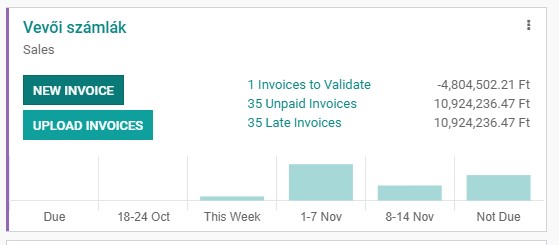
Problem: The journal dashboard show wrong values for the late invoices. Details: The filter for the "Late" invoices is this: ```xml <filter name="late" string="Overdue" domain="['&', ('invoice_date_due', '<', time.strftime('%%Y-%%m-%%d')), ('state', '=', 'posted'), ('invoice_payment_state', '=', 'not_paid')]" help="Overdue invoices, maturity date passed"/> ``` But the SQL query in the background of the journal dashboard filters for a different date field: ```sql
Original PR description
Problem: The journal dashboard show wrong values for the late invoices. Details: The filter for the "Late" invoices is this: ```xml <filter name="late" string="Overdue" domain="['&',…
Problem: The journal dashboard show wrong values for the late invoices.
Details:
The filter for the "Late" invoices is this:
```xml
<filter name="late" string="Overdue" domain="['&', ('invoice_date_due', '<', time.strftime('%%Y-%%m-%%d')), ('state', '=', 'posted'), ('invoice_payment_state', '=', 'not_paid')]" help="Overdue invoices, maturity date passed"/>
```
But the SQL query in the background of the journal dashboard filters for a different date field:
```sql
SELECT
(CASE WHEN type IN ('out_refund', 'in_refund') THEN -1 ELSE 1 END) * amount_residual AS amount_total,
currency_id AS currency,
type,
invoice_date,
company_id
FROM account_move move
WHERE journal_id = %s
AND date <= %s
AND state = 'posted'
AND invoice_payment_state = 'not_paid'
AND type IN ('out_invoice', 'out_refund', 'in_invoice', 'in_refund', 'out_receipt', 'in_receipt');
```
Solution:
Need to change the date field in the SQL code.
Journal dashboard before:
After:
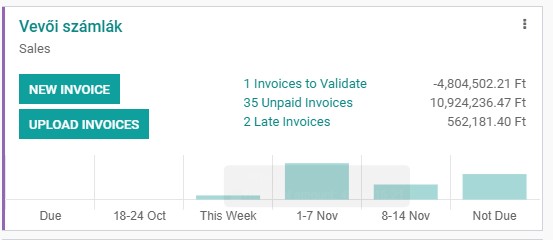
Hint: the late counter is not in the default dashboard, but i put it there with a modification:
```xml
<xpath expr="//t[@id='account.JournalBodySalePurchase']/div[2]" position="inside">
<t t-if="journal_type == 'sale'">
<div class="row">
<div class="col-7">
<a type="object" name="open_action" context="{'search_default_late': '1'}">
<span title="Late Invoices"><t t-esc="dashboard.number_late"/> Late Invoices</span>
</a>
</div>
<div class="col-5 text-right">
<span><t t-esc="dashboard.sum_late"/></span>
</div>
</div>
</t>
</xpath>
```
--
I confirm I have signed the CLA and read the PR guidelines at www.odoo.com/submit-pr
Forward-Port-Of: odoo/odoo#60956If we have a reconciliation model having a rule using a regex, we are extracting the balance from the label, but we should not raise an error in case the regex is matching an incorrect float value, and just set a zero balance instead. Description of the issue/feature this PR addresses: opw-2614726 Current behavior before PR: Desired behavior after PR is merged: -- I confirm I have signed the CLA and read the PR guidelines at www.odoo.com/submit-pr Forward-Port-Of: odoo/odo
Original PR description
If we have a reconciliation model having a rule using a regex, we are extracting
the balance from the label, but we should not raise an error in case the regex
is matching an incorrect float value, and just set a zero balance instead.

Description of the issue/feature this PR addresses:
opw-2614726

Current behavior before PR:

Desired behavior after PR is merged:


--
I confirm I have signed the CLA and read the PR guidelines at www.odoo.com/submit-pr

Forward-Port-Of: odoo/odoo#74835
When getting the remaining days before the deadline of an activity, the module applies the TZ offset on the deadline date. This leads to incorrect data. To reproduce the error: (Need crm) 1. Configure your computer: - TZ: America/Anchorage (UTC-8) 2. Log in DB 3. Ensure user's profile has the correct TZ 4. Create a lead 5. Schedule an activity A: - To Do - Due Date: tomorrow 6. CRM > Sales > My Activities Error: The deadline of A is "Today" instead of "Tomorrow"
Original PR description
When getting the remaining days before the deadline of an activity, the module applies the TZ offset on the deadline date. This leads to incorrect data. To reproduce the error: (Need crm) 1.…
When getting the remaining days before the deadline of an activity, the
module applies the TZ offset on the deadline date. This leads to
incorrect data.

To reproduce the error:
(Need crm)
1. Configure your computer:
    - TZ: America/Anchorage (UTC-8)
2. Log in DB
3. Ensure user's profile has the correct TZ
4. Create a lead
5. Schedule an activity A:
    - To Do
    - Due Date: tomorrow
6. CRM > Sales > My Activities

Error: The deadline of A is "Today" instead of "Tomorrow"

To get the days difference, the module computes the current date in
user's TZ. Then, it takes the deadline value and applies the offset
between UTC and user's TZ to this deadline value. Eventually, it
compares the two dates.

Here is the problem: the deadline is a date, not a datetime. As a
result, when applying the offset, if the user's TZ is a "negative" one
(UTC-...), it will change the date to the previous day.

For instance, suppose current date is 2021/08/06. In above use case, the
deadline is 2021/08/07. When comparing the dates, the deadline
(2021/08/07 00:00:00) becomes 2021/08/06 16:00:00 (because we are
UTC-8), thus the module will display "Today".

We shouldn't add any offset on a date field.

OPW-2448835

Forward-Port-Of: odoo/odoo#74820Previous fix commit 5e34a02 was too aggressive in when it would delete the move_finished_ids. In certain use cases it would result in no move_finished_ids and a corrupted MO: Steps to reproduce: 1. Create a new MO 2. Save the MO (do NOT confirm) 3. Update the qty to product_qty (qty to produce) 4. Confirm + Mark As Done End result: "qty to produce must be positive" error whenever MO was attempted to be completed and MO can never be completed. To fix this, we split out when the mo
Original PR description
Previous fix commit 5e34a02 was too aggressive in when it would delete the move_finished_ids. In certain use cases it would result in no move_finished_ids and a corrupted MO: Steps to reproduce: 1.…
Previous fix commit 5e34a02 was too aggressive in when it would delete
the move_finished_ids. In certain use cases it would result in no
move_finished_ids and a corrupted MO:

Steps to reproduce:
1. Create a new MO
2. Save the MO (do NOT confirm)
3. Update the qty to product_qty (qty to produce)
4. Confirm + Mark As Done

End result: "qty to produce must be positive" error whenever MO was
attempted to be completed and MO can never be completed.

To fix this, we split out when the move_finish_ids. They should all
be deleted ONLY when the product to produce is changed. Unfortunately to
cover all cases, we must always wipe the moves whenever the product is
changed (e.g. when changing the product twice with the original product
being the final saved value, we have no way of knowing to keep the
original move_finished_ids due to onchange only being able to check
against the last saved value, not last selected value).

Additional test + test update done to support preventing this
catastrophe in the future.

Part of Task: 2618962

Description of the issue/feature this PR addresses:

Current behavior before PR:

Desired behavior after PR is merged:


--
I confirm I have signed the CLA and read the PR guidelines at www.odoo.com/submit-pr

Forward-Port-Of: odoo/odoo#74843
Forward-Port-Of: odoo/odoo#74831
How to reproduce the problem: - Install the repair App - Repairs -> Create (a Repair Order) (and activate the debug mode) - Change the Location Field to something else (than the usual default WH/Stock) - Open Developer Tools -> Set Defaults - For Defaults, choose "Location = [the changed Location]", "All Users" -> Save Default - Create a new Repair Order: the Location is not set to the default we set earlier through the Developer Tools Cause of the problem : an Onchange method was overr
Original PR description
How to reproduce the problem:
- Install the repair App
- Repairs -> Create (a Repair Order) (and activate the debug mode)
- Change the Location Field to something else (than the usual default WH/Stock)
- Open Developer Tools -> Set Defaults
- For Defaults, choose "Location = [the changed Location]", "All Users" -> Save Default
- Create a new Repair Order: the Location is not set to the default we set earlier through the Developer Tools

Cause of the problem : an Onchange method was overriding the default Location

Solution : it will now check, in the onchange, if the change is necessary, before overriding the default.

opw-2545876

Forward-Port-Of: odoo/odoo#74847
Step to reproduce:
	- Create a job position
	- Create an application with 'Default Car'
	- Generate link and apply in another window

Actual behavior:

	An error is raised: "Sorry, the selected car has been selected by someone else. Please refresh and try again."

Correct behavior:

	Don't list already assigned cars in 'Default Car' when generating a link

opw-2491852

Forward-Port-Of: odoo/enterprise#20116
Original PR description
Step to reproduce: - Create a job position - Create an application with 'Default Car' - Generate link and apply in another window Actual behavior: An error is raised: "Sorry, the selected car has been selected by someone else. Please refresh and try again." Correct behavior: Don't list already assigned cars in 'Default Car' when generating a link opw-2491852 Forward-Port-Of: odoo/enterprise#20116
“Umsatz” is calculated based on the tax line balance & base amount. But 100% of this amount is set on each line. So if a same tax is set on lines with different accounts, the full amount is set once per account, instead of splitting the total between lines. Also “BU-Schlüssel” is missing on some lines. Vendor Bill example : Product Account Price Tax Product 1 3400 Wareneingang 19% Vorsteuer 10 19% Vorsteuer Product 2 3400 Wareneingang 19% Vo
Original PR description
“Umsatz” is calculated based on the tax line balance & base amount. But 100% of this amount is set on each line. So if a same tax is set on lines with different accounts, the full amount is set once…
“Umsatz” is calculated based on the tax line balance & base amount.
But 100% of this amount is set on each line. So if a same tax is set on lines with
different accounts, the full amount is set once per account, instead of splitting
the total between lines.
Also “BU-Schlüssel” is missing on some lines.
Vendor Bill example :

Product     Account                            Price   Tax
Product 1   3400 Wareneingang 19% Vorsteuer    10      19% Vorsteuer
Product 2   3400 Wareneingang 19% Vorsteuer    30      19% Vorsteuer
Product 3   3980 Bestand Waren 19% Vorsteuer   50      19% Vorsteuer
                                         ---------------------------
                                         Total 97.6 (tax incl)
ERRONEOUS DATEV CSV :
Umsatz (ohne Soll/Haben-Kz)   Konto      BU-Schlüssel
107,1                         34000000
107,1                         39800000   19

RIGHT DATEV CSV :
Umsatz (ohne Soll/Haben-Kz)   Konto      BU-Schlüssel
47,6                          34000000   19
59.5                          39800000   19

This fix splits the total amount based on the move's aml's balances.

Task: 2608222

Forward-Port-Of: odoo/enterprise#20014
Forward-Port-Of: odoo/enterprise#19934Before this commit, the buttons were only hidden in the primary toolbar but were still present in the secondary one (toolbar) on mobile. So in this commit, we simply enforce this rule to hide it in all cases. Forward-Port-Of: odoo/enterprise#20126
Original PR description
Before this commit, the buttons were only hidden in the primary
toolbar but were still present in the secondary one (toolbar)
on mobile.

So in this commit, we simply enforce this rule to hide it in all
cases.

Forward-Port-Of: odoo/enterprise#20126