Search
Navigate
Branch
Monday, May 23, 2022
12 changes
New functionality added to Odoo
Users can now use a new spreadsheet formula to retrieve exchange rates between two currencies. This makes financial analysis and reporting easier by bringing currency conversion data directly into documents spreadsheets.
Website shoppers can now choose a DHL pickup location during checkout instead of only using a standard delivery address. Businesses using DHL can enable this option on their delivery carriers with a DHL Location Finder API key, giving customers more delivery flexibility.
Original PR description
Before this commit, no delivery points were available for any delivery provider. This commits add the possibility for the website user to choose a pickup location for its packages when he is at the…
Before this commit, no delivery points were available for any delivery provider. This commits add the possibility for the website user to choose a pickup location for its packages when he is at the `/shop/payment` endpoint. Since there is already a complete endpoint for creating a new address (`/shop/address`), there is no need for a controller. __API CALL__ The api used to retrieve the locations is the `Location Finder - Unified` API and it does need a specific api key that can be claimed https://developer.dhl.com/api-reference/location-finder with a DHL account number. The parameters for the API call are the defaults for `radius` and for `limit`, however I find it convenient to explicitly give them. There are 2 provider types with DHL called Parcel and Express. Basically, if the word 'express' is in the name of the DHL product, it belongs to the Express type, else it is Parcel. __BACKEND ODOO__ When the module is installed, a new page is added to the Delivery DHL carriers. It only has one checkbox to activate or deactivate the DHL location finder. When it is activated, an API Key is required. 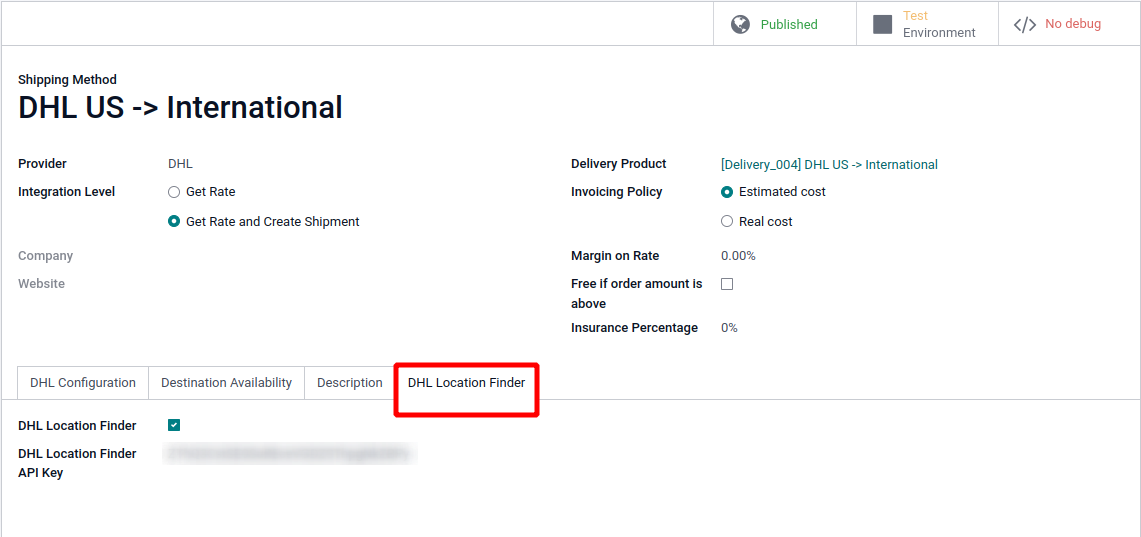 __FRONTEND WEBSITE__ Once on the `/shop/payment`, when the user can choose a delivery method, there is a link under the DHL providers with location finder enabled. Clicking on this link opens up a modal with the available pickup locations. A location can be selected there, and the data of the new address will be sent to the '/shop/address' endpoint, which will update the Shipping Address. There is a map icon next to each pickup location. When clicked, it leads to google map with an itinerary from the current location to the new pickup location. Also, to avoid conversions between meters and and other units of measure, the distance is given in `X min walk` which is the time required in minutes, by foot. 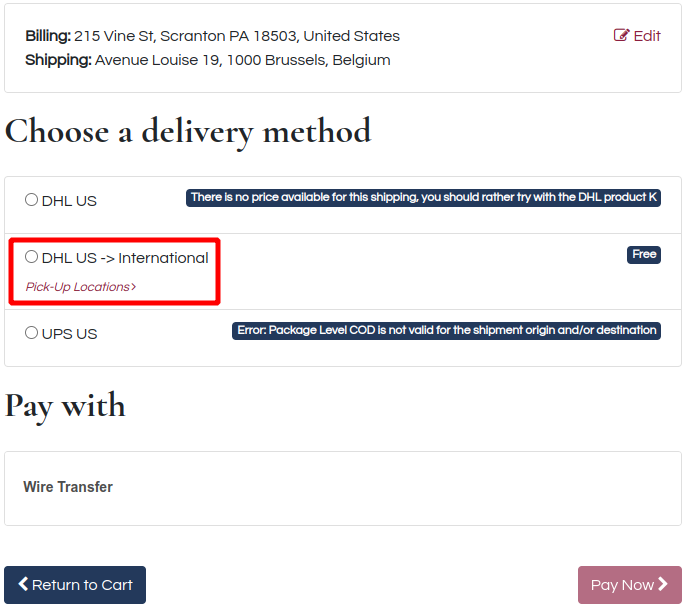 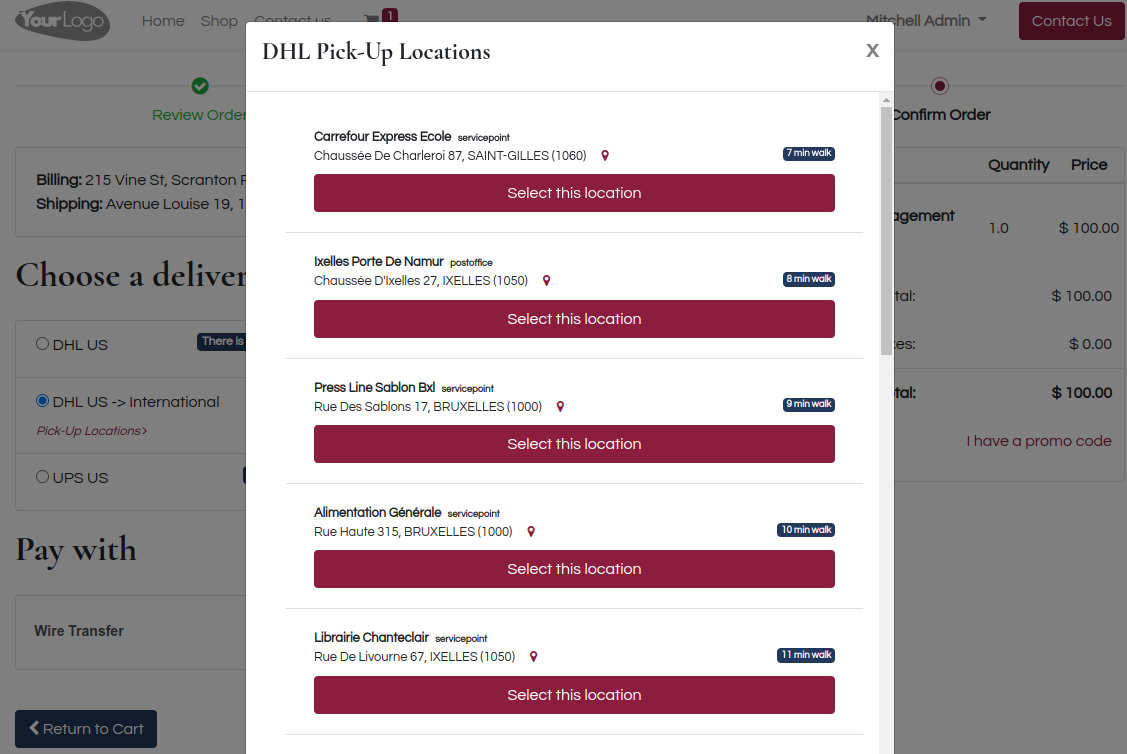
Enhancements to existing features
Helpdesk pages and forms have been made easier to edit and use, including customer rating and ticket submission pages. The update also improves analytic account handling for timesheets and refreshes several team and ticket interface details, helping support teams manage work more smoothly.
Original PR description
The purpose of the commit is to do generic improvement in the helpdesk.

so in this commit did the below changes:
 - submit page of rating and ticket should be editable
 - helpdesk analytic account improvement
 - several UI improvements for team and ticket.

task-2772369
Resolved issues and error corrections
Error messages shown when a spreadsheet link cannot be retrieved are now properly translated. This gives users clearer, localized feedback and improves consistency for international teams using Documents spreadsheets.
Original PR description
Task 2860257
Miscellaneous changes
**Before this commit:**

In documents, when you upload a document, if you want to create new record
like contact, owner or workspace in the right panel, you write it and click on
"create", but the field is not loaded and you don't find it in the list also.

**After this commit:**

Records are created after clicking on create, added to list and will be
selected.

**Task**-2487738

Forward-Port-Of: odoo/enterprise#18764
Original PR description
**Before this commit:** In documents, when you upload a document, if you want to create new record like contact, owner or workspace in the right panel, you write it and click on "create", but the field is not loaded and you don't find it in the list also. **After this commit:** Records are created after clicking on create, added to list and will be selected. **Task**-2487738 Forward-Port-Of: odoo/enterprise#18764
The document inspector no longer lets users create new owners or workspaces directly from those fields. This keeps document ownership and workspace selection controlled through the proper setup flows, reducing accidental or inconsistent records.
Original PR description
PURPOSE

Disable quick create on owner_id and folder_id from inspector.

SPECIFICATION
Current:
User is able to quick create user_id and folder_id from inspector.

To be:
Disable quick create on owner_id and folder_id from inspector.


Task Id: 2629462
This update adjusts internal tests for the Documents activity menu so they remain compatible with an upcoming change to the Discuss app environment. It helps ensure future platform updates can be introduced smoothly without disrupting validation of the Documents systray menu.
Original PR description
This PR prepares the ground for the one introducing the new environment in the discuss app.
Indeed, the start helper won't be able to handle widget anymore. To solve this issues,
we're now adding the activityMenu widget to the systrayMenu.Items array, this will be
mapped by the createWebClient helper to component and added to the new systray item
registry.

task-2582313

community: https://github.com/odoo/odoo/pull/91953
This update refreshes the spreadsheet component used in Documents with several usability fixes and chart improvements. Users should see more reliable cell selection across sheets, smoother drag-and-drop behavior, better chart rendering, and small interface refinements.
Original PR description
### Contains the following commits: https://github.com/odoo/o-spreadsheet/commit/7b7dba95 [FIX] edition: do not reset selection when range selecting on different sheet…
### Contains the following commits:

https://github.com/odoo/o-spreadsheet/commit/7b7dba95 [FIX] edition: do not reset selection when range selecting on different sheet
https://github.com/odoo/o-spreadsheet/commit/b52aa4b6 [FIX] Selection: Use correct sheet properties for default selection
https://github.com/odoo/o-spreadsheet/commit/f08233a5 [IMP] top_bar: cursor pointer on border dropdown hover
https://github.com/odoo/o-spreadsheet/commit/b12f3a4d [FIX] chart: render chart with new background
https://github.com/odoo/o-spreadsheet/commit/3afac761 [FIX] charts: time charts with empty labels
https://github.com/odoo/o-spreadsheet/commit/619bf687 [FIX] drag&drop: Use the correct delay to edgeScroll
https://github.com/odoo/o-spreadsheet/commit/badd7557 [IMP] charts: scale chart on time/number labels
https://github.com/odoo/o-spreadsheet/commit/8fc5fbee [IMP] chartJS: replace chartJS.min by chartJS.bundle.min
https://github.com/odoo/o-spreadsheet/commit/b9e70286 [FIX] menu: block right click on menu
Follow up of https://github.com/odoo/enterprise/pull/25785
The AttachmentViewer element can sometimes be undefined

Steps to reproduce:

- Create an invoice fro a client C, confirm and register the payment
- Create a matching bank statement
- Confirm, reconcile and validate
- Go to the accounting dashboard
- Click on the matching bank statement
- Go back to the dashboard
- Click again on the same statement
-> A traceback appears

opw-2857051

Forward-Port-Of: odoo/enterprise#27643
Original PR description
Follow up of https://github.com/odoo/enterprise/pull/25785 The AttachmentViewer element can sometimes be undefined Steps to reproduce: - Create an invoice fro a client C, confirm and register the payment - Create a matching bank statement - Confirm, reconcile and validate - Go to the accounting dashboard - Click on the matching bank statement - Go back to the dashboard - Click again on the same statement -> A traceback appears opw-2857051 Forward-Port-Of: odoo/enterprise#27643
#### The issue At the moment, the tests in test_edi_iap.py, test_edi_digiflow.py and test_edi_sunat.py, fail because of an error response from the OSE. If we solve this first error, we get a second (unrelated) error response. This PR aims to fix both, so it makes sense to consider them one at a time below. #### First error ``` 3014|El codigo de leyenda no debe repetirse en el comprobante. - Detalle: xxx.xxx.xxx ticket : 20220000000000101174262 error: Leyenda : 1000: 3014 (nodo: 'cbc:N
Original PR description
#### The issue At the moment, the tests in test_edi_iap.py, test_edi_digiflow.py and test_edi_sunat.py, fail because of an error response from the OSE. If we solve this first error, we get a second…
#### The issue
At the moment, the tests in test_edi_iap.py, test_edi_digiflow.py and test_edi_sunat.py, fail because of an error response from the OSE. If we solve this first error, we get a second (unrelated) error response. This PR aims to fix both, so it makes sense to consider them one at a time below.

#### First error
```
3014|El codigo de leyenda no debe repetirse en el comprobante. - Detalle: xxx.xxx.xxx
ticket : 20220000000000101174262 error: Leyenda : 1000: 3014
(nodo: 'cbc:Note/languageLocaleID' valor: "1000")
```
This error says that there are two `<cbc:Note>` nodes in the XML which have the `languageLocaleID` attribute set to the same value.

If we inspect the generated XML, we find the following:
```
<cbc:Note languageLocaleID="1000">Monto en letras</cbc:Note>
<cbc:Note languageLocaleID="1000">NUEVE MIL CUATROCIENTOS CUARENTA Y 00/100 GOLD</cbc:Note>
```
Those two nodes with `languageLocaleID="1000"` seem to provoke the error.

The first `<cbc:Note>` node with `languageLocaleID="1000"` is generated because we set the `l10n_pe_edi_legend` field to `1000` in the test invoice.

The second `<cbc:Note>` node with `languageLocaleID="1000"` is now generated on every invoice because of commit
https://github.com/odoo/enterprise/commit/567f476ae7d82bdda84c84f8b73cd17775e24df7

That commit might have broken things and needs further investigation.

To restore the UTs to a passing state, a quick fix (which I propose in this PR) would be to not set the `l10n_pe_edi_legend` field in the test invoice. In this way, there will be only one `<cbc:Note>` node with `languageLocaleID="1000"` in the XML.

#### Second error
If we fix this first error, we get another error response from the OSE:
```
2108|Presentacion fuera de fecha Detalle: ' ticket: 20220000000000101176322 error: Documento fuera de fecha[2017-01-01]
```
This means that the invoice is too old. Indeed, the invoice date is 01 Jan 2017.

This PR proposes to fix this by changing the invoice date to the current day in the invoices which we send to the OSE.

Forward-Port-Of: odoo/enterprise#27487
Forward-Port-Of: odoo/enterprise#23465
This PR aims to add more information on social media disconnection in the logs.

OPW-2643535

Forward-Port-Of: odoo/enterprise#27505
Forward-Port-Of: odoo/enterprise#27331
Original PR description
This PR aims to add more information on social media disconnection in the logs. OPW-2643535 Forward-Port-Of: odoo/enterprise#27505 Forward-Port-Of: odoo/enterprise#27331
community PR: https://github.com/odoo/odoo/pull/88803

Forward-Port-Of: odoo/enterprise#27430
Forward-Port-Of: odoo/enterprise#26831
Original PR description
community PR: https://github.com/odoo/odoo/pull/88803 Forward-Port-Of: odoo/enterprise#27430 Forward-Port-Of: odoo/enterprise#26831