Daily updates from Odoo
Navigate
Branch
Thursday, June 23, 2022
18 changes
New functionality added to Odoo
Business users can now pull accounting values such as credits, debits, balances, fiscal year dates, and account groups directly into Odoo spreadsheets. This makes financial reporting more flexible by allowing spreadsheet formulas to target specific accounts, date ranges, and companies without manual data extraction.
Original PR description
This commit introduces accounting specific formulas to
documents_spreadsheet.

Namely:
- `ACC.CREDIT`: returns the sum of credit for a given account
- `ACC.DEBIT`: returns the sum of debit for a given account
- `ACC.BALANCE`: returns the sum of balance for a given account

All functions can target specific accounts over specific date ranges
by providing a code prefix of the former and a date desciption of the
later.

They can also target specific companies.

Task 2782382
Enhancements to existing features
Odoo settings were adjusted so Settings users can open and save configuration screens more reliably without needing broader app administrator rights. Settings pages now load only when relevant, improving performance and reducing unnecessary access issues across several business apps.
Original PR description
- verify settings access for "Settings" user (base.group_system)
- Improve loading performance through the use of conditional groups inheritance
- Do not imply application administration groups for "Settings" users
- Fix wrong view inheritance (views hooked on content defined in siblings, not in parent(s))

Community PR: https://github.com/odoo/odoo/pull/91909
Task - 2858427
OnSIP login details for VoIP users are now stored with each user's personal settings rather than directly on the user record. This improves how the information is organized and maintained, with related performance tests updated to reflect the change.
Original PR description
\* = appointment_hr, test_discuss_full_enterprise
In line with task-2821508.
Appraisal skill reports now open with a default grouping, making it easier for managers and HR teams to scan results without manually organizing the view first. This is a small usability improvement that helps users understand report data more quickly.
Original PR description
Add a default group by on the reporting views.

TaskID: 2884672
Adds a dashboard alert for company vehicles that are assigned to a driver but do not have an active contract. This helps payroll and fleet teams spot missing contract information sooner and reduce payroll or compliance follow-up.
Original PR description
Adds a Dashboard alert for vehicles assigned to a driver but without
running contract.

TaskID: 2856135
The demo spreadsheet in Documents now includes a thumbnail image, making sample content easier to recognize and browse. This is a small usability improvement for users exploring or demonstrating the Documents spreadsheet experience.
Warehouse users can now scan GS1 barcodes from the main barcode screen to open products, packages, or locations directly. They can also scan GS1 codes on the picking list to quickly filter and find the right operation, reducing manual search time.
Original PR description
In this commit, we add support for gs1 in 2 places:
1. on the main page: now you can scan a gs1 barcode to open products,
packages, and locations
2. on the picking kanban page: now you can filter pickings by scanning a
gs1 code.

task-2648993
The Belgian payroll setup now uses a configurable payroll rule parameter for the laptop benefit in kind amount. This makes future amount updates easier and more consistent without changing individual salary or employee records.
Original PR description
Use a rule parameter to configure the amount for the Laptop Benefit In Kind.

TaskID: 2867236
Code cleanup and technical improvements
Spreadsheet-related side panels now fetch model display names only when a user opens the parts of the interface that need them. This reduces unnecessary loading and keeps special access workarounds limited to the Documents Spreadsheet area, supporting future modular changes with lower risk.
Original PR description
Currently, the model display name (ir.model) is loaded as soon as the the
datasource is loaded.
It's an issue because:
- it's only needed in some parts of the UI (side panels). Hence loading it if
  the user never opens those side panel is a waste of resources
- reading on ir.model is actually not possible by default (ACLs are restricted).
  We have custom hacky overrides to allow it (see 0e5603b). Recently, we moved
  data sources in a new module `spreadsheet` (see 45612ba) but overrides were
  left in the `documents_spreadsheet`. It's actually currently not a real
  issue because `spreadsheet` is installed iff `documents_spreadsheet` is
  also installed. However, it soon won't be true anymore.
  We don't want to move the overrides to the `spreadsheet` module because
  it will be installed on much more databases. We want to keep those hacks
  with the minimum scope as possible
Odoo-specific spreadsheet formulas are now prefixed with “ODOO” so users can more easily tell them apart from standard spreadsheet functions. This makes formulas clearer to read and helps reduce confusion when working with document spreadsheets, lists, pivots, and filters.
Original PR description
In order to easily distinguish odoo functions with spreadsheet functions,
we prefix the odoo functions with the keyword "ODOO"

Task-id 2824568
Miscellaneous changes
This commit fixes an invalid description in all the eCommerce
renting modules.

Forward-Port-Of: odoo/enterprise#28793
Original PR description
This commit fixes an invalid description in all the eCommerce renting modules. Forward-Port-Of: odoo/enterprise#28793
A longer currency symbol (e.g. US$ or CHF) causes the right side of the NET amount to be cut off for floating point values >= 1000.00. The values in the "is_net" block fit fine in a col-md-4 so we can steal one column there. opw-2890531 Before: 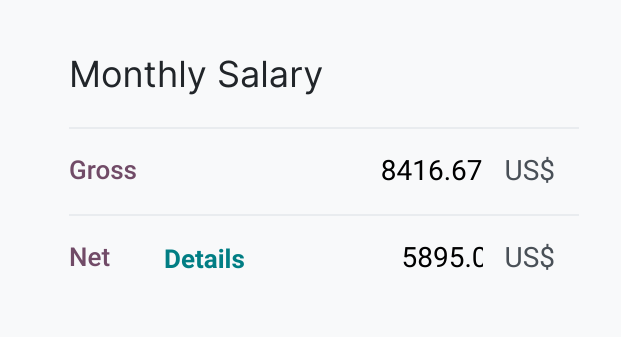 After:  causes the right side of the NET amount to be cut off for floating point values >= 1000.00. The values in the "is_net" block fit fine in a col-md-4 so we can steal one column there. opw-2890531 Before:  After: 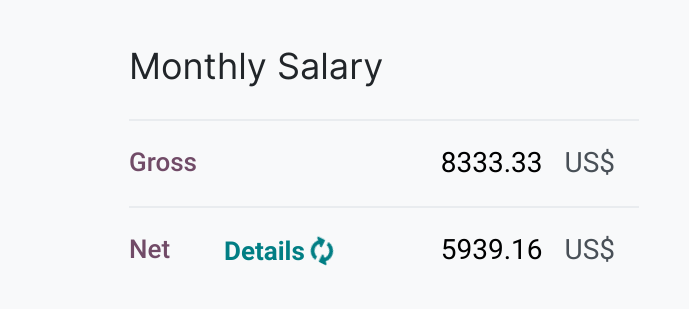 Forward-Port-Of: odoo/enterprise#28745 Forward-Port-Of: odoo/enterprise#28717
Before this commit, we always padded to 8 digits the `konto` and 9 digits the `gegentokonto`.

Now, we pad the `gegentokonto` to the maximum of the length of both system parameters (default to 9 if a parameter is missing).
`konto` is padded to the same length minus 1.

We also take care of the fact that the length shouldn't be outside 5 and 9.

task-2869757

Forward-Port-Of: odoo/enterprise#28641
Forward-Port-Of: odoo/enterprise#27985
Original PR description
Before this commit, we always padded to 8 digits the `konto` and 9 digits the `gegentokonto`. Now, we pad the `gegentokonto` to the maximum of the length of both system parameters (default to 9 if a parameter is missing). `konto` is padded to the same length minus 1. We also take care of the fact that the length shouldn't be outside 5 and 9. task-2869757 Forward-Port-Of: odoo/enterprise#28641 Forward-Port-Of: odoo/enterprise#27985
Steps to reproduce: - Install mrp_workorder module - Create a BOM: - Select product `[CONS_89957] Bolt` - Add `[CONS_25630] Screw` as component - Add operation of worksheet type `text and set a very long text - Create a manufacturing order and select `[CONS_89957] Bolt` as bill of material, then confirm - Go to `Work Orders` tab and click on the tablet icon (tablet mode should open) - Scroll down to display rest of description Issue: When scrolli
Original PR description
Steps to reproduce:

  - Install mrp_workorder module
  - Create a BOM:
    - Select product `[CONS_89957] Bolt`
    - Add `[CONS_25630] Screw` as component
    - Add operation of worksheet type `text and set a very long text
  - Create a manufacturing order and select `[CONS_89957] Bolt` as
    bill of material, then confirm
  - Go to `Work Orders` tab and click on the tablet icon (tablet mode
    should open)
  - Scroll down to display rest of description

Issue:

  When scrolling down, the background is white and since the text is
  also white, the text is invisible.

Cause:

  `min-height` set to `100%` on parent div.

Solution:

  Set `overscroll` to `auto`.

opw-2752693

Forward-Port-Of: odoo/enterprise#28714Now the way to handle allowed companies is using the `with_company()` method, so changing to use it and removing the `allowed_company_ids` context, in the methods: `_get_order` (`sale_amazon`) and `_create_order_from_data` (`sale_amazon_spapi`). -- I confirm I have signed the CLA and read the PR guidelines at [www.odoo.com/submit-pr](http://www.odoo.com/submit-pr) ### OPW 2886209 Follow up of: - https://github.com/odoo/enterprise/pull/28508 Forward-Port-Of: odoo/enterprise#28757 Forw
Original PR description
Now the way to handle allowed companies is using the `with_company()` method, so changing to use it and removing the `allowed_company_ids` context, in the methods: `_get_order` (`sale_amazon`) and `_create_order_from_data` (`sale_amazon_spapi`).

--
I confirm I have signed the CLA and read the PR guidelines at [www.odoo.com/submit-pr](http://www.odoo.com/submit-pr)

### OPW 2886209

Follow up of:
- https://github.com/odoo/enterprise/pull/28508

Forward-Port-Of: odoo/enterprise#28757
Forward-Port-Of: odoo/enterprise#28701
Steps to reproduce: - Install `sale_renting` module - Create a product X with 2 variants and set it as `Can be Rented` ( ensure `Can be Sold` is not set) - Go to Rental and create new Rental Order - Set a customer and select X as product (a wizard should open). Issue: Warning message : `This product has no valid combination`. Not possible to select variant. Cause: We use the `_is_add_to_cart_possible` methode of product template to know if a product has v
Original PR description
Steps to reproduce:

  - Install `sale_renting` module
  - Create a product X with 2 variants and set it as `Can be Rented` (
    ensure `Can be Sold` is not set)
  - Go to Rental and create new Rental Order
  - Set a customer and select X as product (a wizard should open).

Issue:

  Warning message : `This product has no valid combination`.
  Not possible to select variant.

Cause:

  We use the `_is_add_to_cart_possible` methode of product template
  to know if a product has variants or not.
  `_is_add_to_cart_possible` is only in `sales` module and only
  check for the field `sale_ok`.

Solution:

  Override `_is_add_to_cart_possible` in sale_renting to check
  if `rent_ok` on product. If so, allow displaying variants.

opw-2879711

Forward-Port-Of: odoo/enterprise#28755
Forward-Port-Of: odoo/enterprise#28480Sometimes the tax wouldn't be adjusted because of rounding problems, e.g., when the rounding error is computed to 0.0100000000XXXX and the threshold is 0.01. Forward-Port-Of: odoo/enterprise#28738 Forward-Port-Of: odoo/enterprise#27841
Original PR description
Sometimes the tax wouldn't be adjusted because of rounding problems,
e.g., when the rounding error is computed to 0.0100000000XXXX and the
threshold is 0.01.

Forward-Port-Of: odoo/enterprise#28738
Forward-Port-Of: odoo/enterprise#27841
**PURPOSE**

When user locks a document, it will only visible to other users. They can't
archive it or modify it. But the split icon is still available.

**SPECIFICATION**

When a file is locked, other users will not be able to access the split function.

**Task**-2625482

Forward-Port-Of: odoo/enterprise#28628
Forward-Port-Of: odoo/enterprise#21892
Original PR description
**PURPOSE** When user locks a document, it will only visible to other users. They can't archive it or modify it. But the split icon is still available. **SPECIFICATION** When a file is locked, other users will not be able to access the split function. **Task**-2625482 Forward-Port-Of: odoo/enterprise#28628 Forward-Port-Of: odoo/enterprise#21892