Daily updates from Odoo
Navigate
Branch
Wednesday, October 26, 2022
27 changes
Enhancements to existing features
This update adds validation warnings for several interface components so teams can more easily detect when components are used incorrectly. It improves internal quality and maintainability by making expected inputs clearer and helping prevent future errors before they affect users.
Original PR description
*: mrp_workorder, spreadsheet_edition, voip, web_enterprise, web_gantt,
    web_studio

This commit adds a warning if the props validation is not set for a
component.

The props validation is important to tell how a component should be
used, by looking at its code, it's a good documentation of the component.
It's also critical, to test if the component is correctly used, if all
the obligatory props are passed and that there are of the correct type.

For more information, see: https://github.com/odoo/owl/blob/master/doc/reference/props.md#props-validationThe VoIP interface was updated to use a more modern internal communication approach across call panels, tabs, contact views, and phone fields. This should make the calling experience easier to maintain and more reliable without changing core business workflows.
Original PR description
Task-3042783.
Resolved issues and error corrections
The invoice document extraction screen was updated to keep its visual selection boxes aligned with PDFs after a PDF viewer upgrade. This prevents display issues during invoice processing and keeps the feature working reliably with the newer viewer.
Original PR description
See odoo/odoo#100067 for background.

See individual commit(s?) for fix(es?)
The asset form's bill tab now shows a simpler list when adding a bill, removing irrelevant fields that could confuse users. It also limits choices to vendor bills and vendor credit notes, helping users select the right documents faster and avoid mistakes.
Original PR description
Fixes two issues in the "bill" tab on the asset form:
- The list view opened with "add a line" have many irrelevant fields shown, so we will make a new one without these.
- The same "add a line" would show all types of moves, while only the Vendor Bills and Vendor Credit Notes are relevant in this context.
Confirmed subscriptions will no longer recalculate line item prices when their billing recurrence is changed to a shorter period. This helps prevent unexpected price changes on already confirmed subscription orders.
Original PR description
This fix stop confirmed subscription to recompute the unit price of sale order lines.

This would occur when the recurrence was changed and the new recurrence was smaller than the old one.

(qty_invoiced would be 0 as we check for last recurrence -> recompute)
Features or functions removed from Odoo
This change removes an unused reference in Belgian payroll accounting tests to a class that no longer exists. It helps keep internal test checks clean and prevents avoidable maintenance issues, with no expected impact on everyday users.
Original PR description
Cf odoo/odoo#98138

Had missed this (dead) import of one of the classes being removed.
Code cleanup and technical improvements
This update standardizes the internal naming of unit-of-measure fields across multiple Odoo Enterprise apps. It should not change day-to-day workflows, but it improves consistency for future maintenance and integrations involving products, purchases, accounting, shipping, and approvals.
Original PR description
task: 2648449
Miscellaneous changes
With Avatax configured Have a Partner P, with shipping address P1 and P2 (in different tax positions) Create SO1: - Partner P - Shipping partner P1 - Fiscal position: Avatax - Order line will have taxes computed by Avalara according to P1 Create SO2: - Partner P - Shipping partner P2 - Fiscal position: Avatax - Order line will have taxes computed by Avalara according to P2 Confirm orders Now in list view select SO1 and SO2, hit action>invoice and create invoice Issue: Orders
Original PR description
With Avatax configured
Have a Partner P, with shipping address P1 and P2 (in different tax positions)
Create SO1:
- Partner P
- Shipping partner P1
- Fiscal position: Avatax
- Order line will have taxes computed by Avalara according to P1

Create SO2:
- Partner P
- Shipping partner P2
- Fiscal position: Avatax
- Order line will have taxes computed by Avalara according to P2 Confirm orders

Now in list view select SO1 and SO2, hit action>invoice and create invoice

Issue: Orders will be merged in a single invoice, with P1 or P2 as shipping address. Eventually taxes will be recomputed based on the invoice shipping address, discarding old taxes.

opw-3003082

Forward-Port-Of: odoo/enterprise#32508
Before this commit:
- The Cell data-path value is "cellPath" as a string instead of the real value of cellPath variable.

After this commit:
- The Cell data-path value is the value of cellPath variable, data-path="0.grid.1.1" as an example.

Forward-Port-Of: odoo/enterprise#33234
Original PR description
Before this commit: - The Cell data-path value is "cellPath" as a string instead of the real value of cellPath variable. After this commit: - The Cell data-path value is the value of cellPath variable, data-path="0.grid.1.1" as an example. Forward-Port-Of: odoo/enterprise#33234
**ISSUE** Alert in the Deduplication Rules form in data cleaning app is not aligned well. 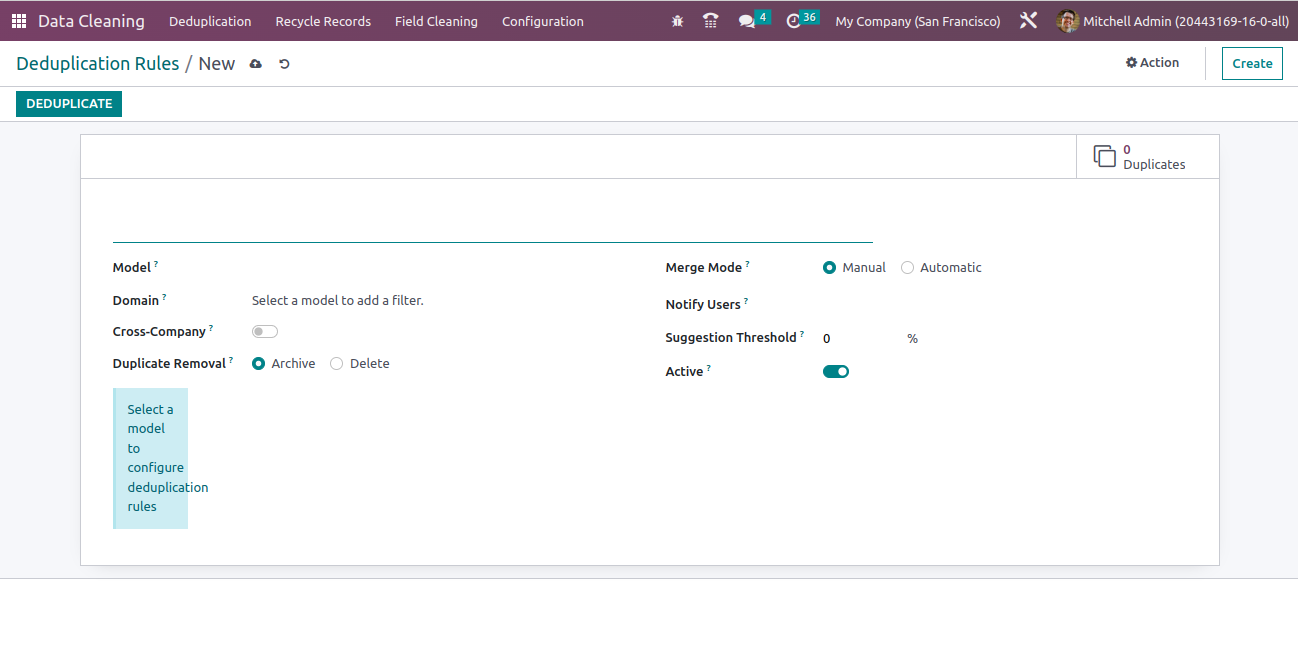 **After the PR.** 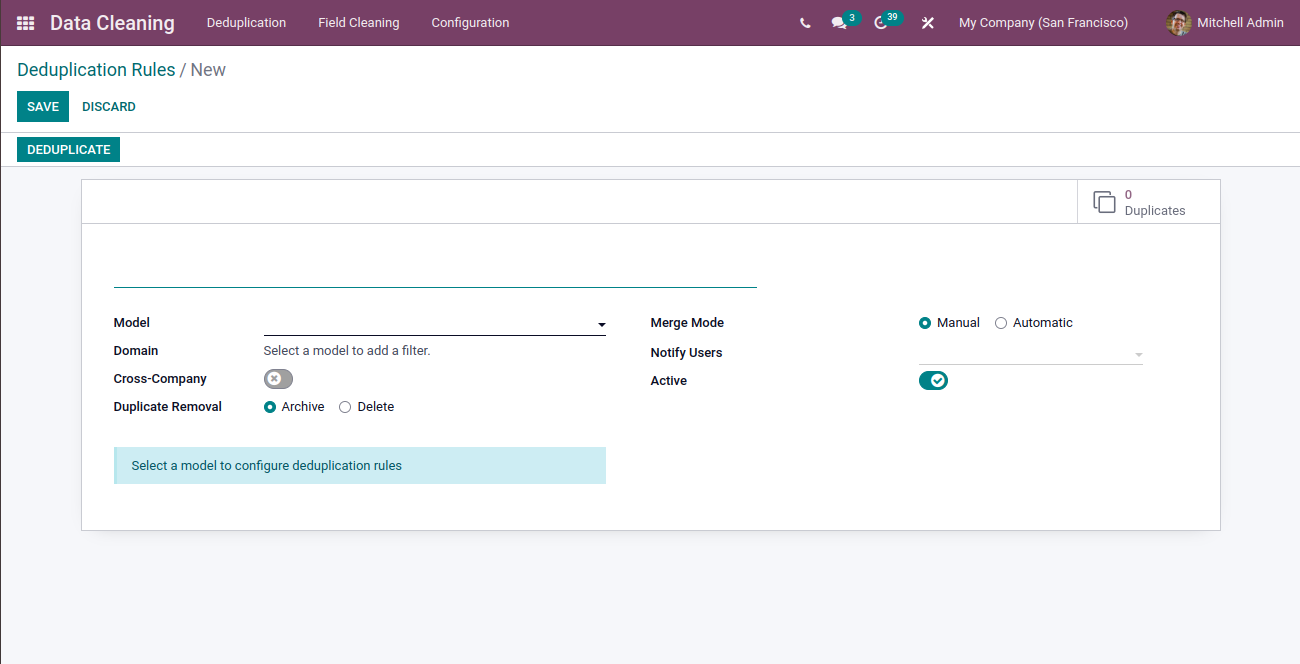 Forward-Port-Of: odoo/enterprise#33102
Original PR description
**ISSUE** Alert in the Deduplication Rules form in data cleaning app is not aligned well.  **After the PR.**  Forward-Port-Of: odoo/enterprise#33102
Steps to reproduce: - create a shipping method with easypost - have credentials with interlink express - create a sale order with two products and confirm it - in delivery, put the quantity done for the first product - Put in pack | put the qty done for the second product - put in pack - validate Issue: None type is not subscriptable Cause: With some carriers, such as Interlink Express, they put the labels information in the first shipment object. Solution: Iterate through `post
Original PR description
Steps to reproduce:
- create a shipping method with easypost
- have credentials with interlink express
- create a sale order with two products and confirm it
- in delivery, put the quantity done for the first product - Put in pack | put the qty done for the second product - put in pack
- validate

Issue:
None type is not subscriptable

Cause:
With some carriers, such as Interlink Express, they put the labels information in the first shipment object.

Solution:
Iterate through `postage_label` only if it exists. It won't impact the flow. The only difference is that for Interlink Express there will only be one pdf (with multiple labels) in the chatter instead instead of multiple pdf's (with one label) such as for other carriers.

opw-2890269

Forward-Port-Of: odoo/enterprise#33199
Forward-Port-Of: odoo/enterprise#32241
In the behaviors of Knowledge, we retrieve the root node of the article content by using the wysiwyg instance given to the props of the behavior component. However, this object is not instantiated when the article is opened in readonly mode. As a result, an error can be raised if the behavior accesses a property of the wysiwyg instance in readonly mode. To fix the issue, we will add some safe checks in the existing behaviors and we will also pass the root HTML node of the article content to t
Original PR description
In the behaviors of Knowledge, we retrieve the root node of the article content by using the wysiwyg instance given to the props of the behavior component. However, this object is not instantiated when the article is opened in readonly mode. As a result, an error can be raised if the behavior accesses a property of the wysiwyg instance in readonly mode.

To fix the issue, we will add some safe checks in the existing behaviors and we will also pass the root HTML node of the article content to the props of the behavior components. The component can then safely use that reference to do any computation involving the article content (e.g: fetching the heading of the article, etc).

Step to reproduce the error:
- Open an article
- Add a table of content with the /toc command
- Lock the article
- Reload the page

=> An error is raised indicating that the wysiwyg editor instance is undefined.

task-3044528

Forward-Port-Of: odoo/enterprise#33232
When using the statements stat button in the payment form, the last statement line is now selected by default, in the reconciliation widget.

Forward-Port-Of: odoo/enterprise#32673
Original PR description
When using the statements stat button in the payment form, the last statement line is now selected by default, in the reconciliation widget. Forward-Port-Of: odoo/enterprise#32673
The aim of this commit is to allow the generation of a form 325 test xml without burning the real sequence. Without this, any xml generation for a test will require a technical intervention to reset the sequence in order to create the valid xml later on. Before this commit: Creating an xml for a test 325 form will burn a real sequence number. After this commit: Creating an xml for a test will get a correct sequence number without burning any real sequence number. task: 2820482
Original PR description
The aim of this commit is to allow the generation of a form 325 test xml
without burning the real sequence.

Without this, any xml generation for a test will require a technical
intervention to reset the sequence in order to create the valid xml
later on.

Before this commit:
Creating an xml for a test 325 form will burn a real sequence number.

After this commit:
Creating an xml for a test will get a correct sequence number without
burning any real sequence number.

task: 2820482
PR-enterprise:

Forward-Port-Of: odoo/enterprise#33226
Forward-Port-Of: odoo/enterprise#28326
Purpose
=======

A bar appears when editing and hovering an article, we do not want the bar inside knowledge.

Specs
=====

We overridden the *scss* style for the editor when inside the knowledge module:
the bar has been removed completely.

task-3035035

Forward-Port-Of: odoo/enterprise#33106
Original PR description
Purpose ======= A bar appears when editing and hovering an article, we do not want the bar inside knowledge. Specs ===== We overridden the *scss* style for the editor when inside the knowledge module: the bar has been removed completely. task-3035035 Forward-Port-Of: odoo/enterprise#33106
It was omitted when doing the conversion to OWL, but the previewer in the journal items list should remember its position during a session.

Forward-Port-Of: odoo/enterprise#32639
Original PR description
It was omitted when doing the conversion to OWL, but the previewer in the journal items list should remember its position during a session. Forward-Port-Of: odoo/enterprise#32639
Before this commit, the kanban state of the ticket was showing color name instead of legend state in ticket list view.

So in this commit, load the legends field to display the legend values to the kanban_state.

task-2925187

Forward-Port-Of: odoo/enterprise#33219
Forward-Port-Of: odoo/enterprise#29811
Original PR description
Before this commit, the kanban state of the ticket was showing color name instead of legend state in ticket list view. So in this commit, load the legends field to display the legend values to the kanban_state. task-2925187 Forward-Port-Of: odoo/enterprise#33219 Forward-Port-Of: odoo/enterprise#29811
Forward-Port-Of: odoo/enterprise#32429
Original PR description
Forward-Port-Of: odoo/enterprise#32429
Currently, when we import a bank statement, its name/reference is always set to false because the number was never provided as it was a leftover from when we used sequences in bank statements, which is not the case anymore since odoo/odoo@4fb0933986534e31337aa1dce3478a67deea72de

This commit fixes this by removing references to the sequences which are no longer used, and using the filename as the name/reference of the bank statement.

Forward-Port-Of: odoo/enterprise#33169
Original PR description
Currently, when we import a bank statement, its name/reference is always set to false because the number was never provided as it was a leftover from when we used sequences in bank statements, which is not the case anymore since odoo/odoo@4fb0933986534e31337aa1dce3478a67deea72de This commit fixes this by removing references to the sequences which are no longer used, and using the filename as the name/reference of the bank statement. Forward-Port-Of: odoo/enterprise#33169
Some parts of the account reports were not dark mode compatible, for example:
- white lines
- poor contrast

This commit fixes all that and makes account reports all pretty in dark mode.

Forward-Port-Of: odoo/enterprise#33129
Original PR description
Some parts of the account reports were not dark mode compatible, for example: - white lines - poor contrast This commit fixes all that and makes account reports all pretty in dark mode. Forward-Port-Of: odoo/enterprise#33129
Currently on clicking the license on the settings is redirecting to the license from branch 13, even thought license is same, better to redirect to the licence from same branch.

Forward-Port-Of: odoo/enterprise#33098
Original PR description
Currently on clicking the license on the settings is redirecting to the license from branch 13, even thought license is same, better to redirect to the licence from same branch. Forward-Port-Of: odoo/enterprise#33098
When uploading a custom background image for the menu, the image is duplicated to fit the screen size. Step to reproduce the issue: 1) Install Studio 2) Go to the Home and go activate Studio 3) Go to Customizations > Change Background > Upload an image You will see that the image is duplicated into the background Solution: During the OWL migration [1], the class for custom background which prevents the background to be repeated and to cover the entire screen has been forgotten. [
Original PR description
When uploading a custom background image for the menu, the image is duplicated
to fit the screen size.

Step to reproduce the issue:
1) Install Studio
2) Go to the Home and go activate Studio
3) Go to Customizations > Change Background > Upload an image
You will see that the image is duplicated into the background

Solution: During the OWL migration [1], the class for custom background which
prevents the background to be repeated and to cover the entire screen has been
forgotten.

[1]: https://github.com/odoo/enterprise/commit/6563c16c2b2786efdbf175ae8254e242c10a9be7

opw-2819344

Forward-Port-Of: odoo/enterprise#33177
Forward-Port-Of: odoo/enterprise#28467
Change CSS rules for the sign frame to make it more responsive

task-id : 2993103

Forward-Port-Of: odoo/enterprise#31929
Original PR description
Change CSS rules for the sign frame to make it more responsive task-id : 2993103 Forward-Port-Of: odoo/enterprise#31929
This commit fixes the account_accountant demo tour.
Some attributes in the html have changed and the reconciliation widget was refactored.
Fix the broken account_tour_upload_bill view.
Fix the test of account_accountant_tour (missing import in __init__)

https://github.com/odoo/odoo/pull/103549

Forward-Port-Of: odoo/enterprise#32824
Original PR description
This commit fixes the account_accountant demo tour. Some attributes in the html have changed and the reconciliation widget was refactored. Fix the broken account_tour_upload_bill view. Fix the test of account_accountant_tour (missing import in __init__) https://github.com/odoo/odoo/pull/103549 Forward-Port-Of: odoo/enterprise#32824
Issues reported in: https://github.com/odoo/odoo/issues/103896

The lazy_name_get is not working for consolidation since V14.0, the previous fix done (see: https://github.com/odoo/enterprise/pull/32455) was using lazy_name_get, so a traceback was popping when trying to search a conso account. Removing the lazy_get_search fix the issue.

Fixes #103896

Forward-Port-Of: odoo/enterprise#33141
Original PR description
Issues reported in: https://github.com/odoo/odoo/issues/103896 The lazy_name_get is not working for consolidation since V14.0, the previous fix done (see: https://github.com/odoo/enterprise/pull/32455) was using lazy_name_get, so a traceback was popping when trying to search a conso account. Removing the lazy_get_search fix the issue. Fixes #103896 Forward-Port-Of: odoo/enterprise#33141
repeat_until should be set to False when repeat_type is != 'until'

Task-3041205

Forward-Port-Of: odoo/enterprise#33156
Original PR description
repeat_until should be set to False when repeat_type is != 'until' Task-3041205 Forward-Port-Of: odoo/enterprise#33156
This aims to gives to the iframe the information about whether or not the dark mode is enabled for the current user.
This way, we can also display the odoofin institution list in dark mode.

Forward-Port-Of: odoo/enterprise#32943
Original PR description
This aims to gives to the iframe the information about whether or not the dark mode is enabled for the current user. This way, we can also display the odoofin institution list in dark mode. Forward-Port-Of: odoo/enterprise#32943