Wednesday, November 30, 2022
47 changes · master
Enhancements to existing features
Users can now select a continuous range of records in list views using Shift with the mouse or keyboard. This reduces repetitive manual checkbox selection and improves efficiency when working with many records, while also fixing related keyboard focus behavior in Safari.
Original PR description
Before, in the list view, the user could not select a record range easily. He had to check/uncheck manually each checkbox in the range. Now, the user can select a range of records in list view by hitting its first record and and its last record while holding SHIFT for the second. It's also possible to do it with the keyboard: - pressing < SPACE > to select a record and <SHIFT+SPACE> to select a range of records. - pressing <SHIFT+ARROW> to extend to current checkbox 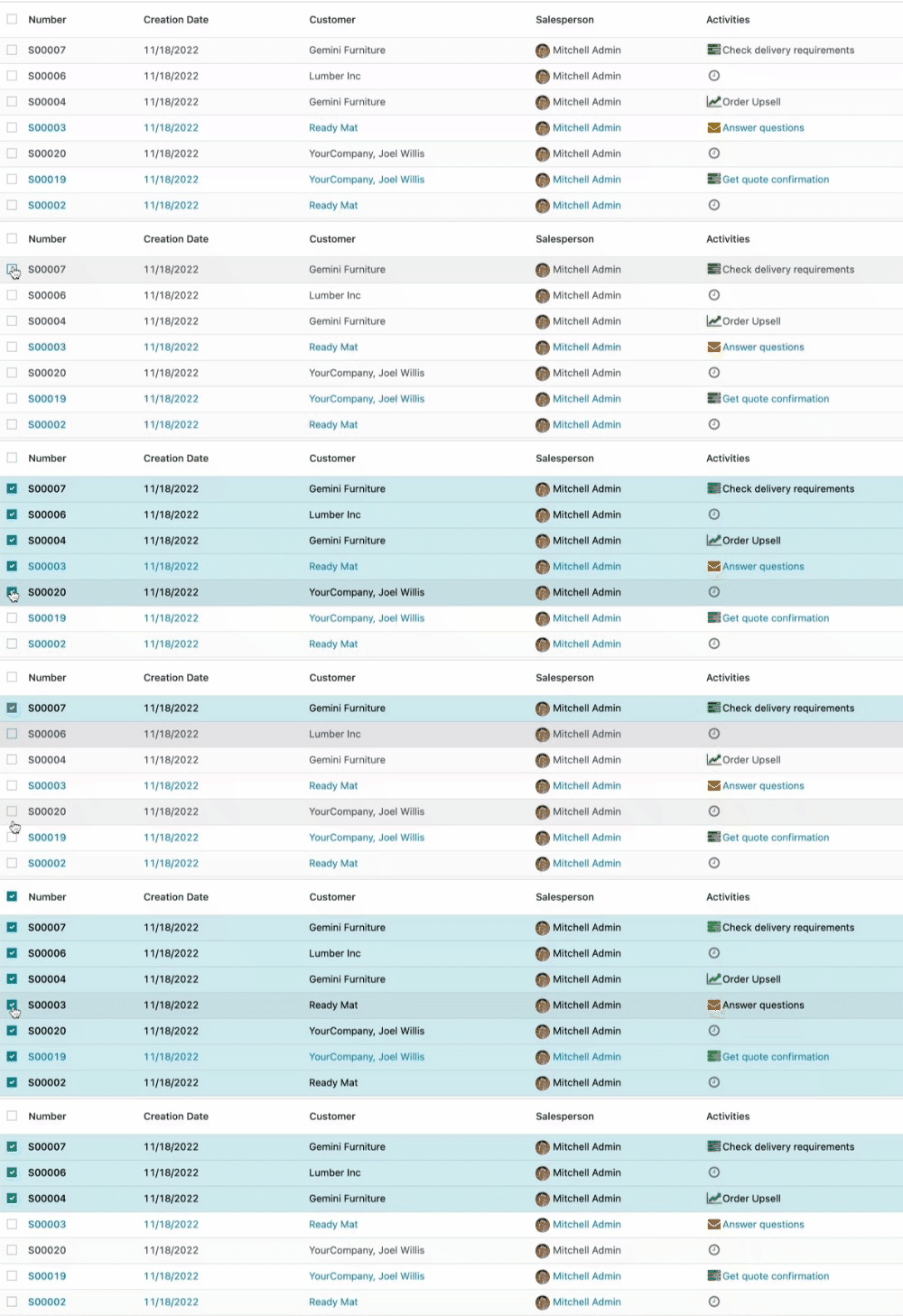 task-2039894
Timesheet users now see clearer labels, smarter sale order line choices, and helpful placeholders when work is non-billable. Managers and teams also get new filters in the Timesheet/Attendance report, making it easier to review activity by team or department.
Original PR description
*_* = hr_timesheet_attendance, sale_management, sale_project, sale_timesheet

Purpose of this PR to improve generic UX of timesheet app.

So in this PR done following changes:
- hide the SOL field if there is no project set or if the project is non billable.
- add the `My Team` and `My Department` filters in Timesheet/Attendance
report.
- add the placeholders for SOL field in timesheets,project.task.
- update the test to avoid searching the contract if hr_contract module is
installed before this hr_timesheet module.
- indicate the unit price of the SOL if the same service is present multiple
times in the SO.
- move nane_get method of SOL from sale_project to sale_management
so it we don't need to overide name_get in sale_planning to do same thing.

task-2893556
This update makes timesheet approval clearer and faster by using “approver” wording, adding validation actions in more views, and improving reminder emails. It also simplifies timesheet reporting by removing the suspicious durations filter and makes billing fields clearer by hiding or labeling sales order line information when it is not relevant.
Original PR description
*_* = helpdesk_sale_timesheet, sale_timesheet_enterprise Purpose of this PR to improve generic UX of timesheet app. So in this PR done following changes: - send the email reminder of manager to…
*_* = helpdesk_sale_timesheet, sale_timesheet_enterprise

Purpose of this PR to improve generic UX of timesheet app.

So in this PR done following changes:
- send the email reminder of  manager to approver as well and rename email
template as `timesheet: approver reminder` and change string of related field
from manager to approver.
- remove the 'suspicious durations' filter from timesheet and
timesheet_analysis_report.
- hide the SOL field if there is no project set or if the project is non billable.
- show the validate button in the list view of all validate menus.
- added the placeholders for the SOL field in timesheets,helpdesk.ticket.
- take employees contract into account for remainder mail's working_hours of
employees.
- remove with_price_unit from context and display price unit in display_name
without that context.
- add a 'validate' button in pivot view in validate > all timesheets menu. The
draft timesheets will be shown in all timesheet menu by default which are need
to validated.

task-2893556
Employees can now see daily and total overtime directly in the My Timesheet grid, including both extra hours worked and missing expected hours. This helps employees and managers quickly spot incomplete timesheets and better track potentially billable or payable time.
Original PR description
…grid view This commit adds overtime information to the grid view in the "My Timesheet" page of the Timesheets app. Specifically it adds the daily and total overtime in the total row of the grid. The…
…grid view

This commit adds overtime information to the grid view in the "My Timesheet" page of the Timesheets app.
Specifically it adds the daily and total overtime in the total row of the grid. The overtime is calculated given the work hours specified in the employee record of each employee and the hours that have been timesheeted.
The overtime can be positive (when the user has worked more hours or when the user has worked on a day not specified in their employee record) or negative (when the user has timesheeted less hours than what is specified in their employee record). When the overtime is zero, it is not printed.
The overtime information is added on present or past dates and the total overtime information is computed for dates prior and including the present date.

It is very important to the company and its employees that they encode all of their timesheets. They need to see at a glance the overtime that they have done (that might be paid by the company) or the time that is missing (missing time means the company might lose money on time it could have invoiced).
The improvement that this task introduces ensures that all employees can easily keep track what they have yet to timesheet as well as whether they have been productive enough at a glance, from their defualt view in the Timesheet app.

In order to implement this improvement, the "Float Time Grid" component needed to be extended in order to include the overtime information. This meant that we created a new component: the "Overtime" grid component. For that, overtime_grid_component.js file needed to be created for the new component as well as the overtimeGridComponent.xml file for the QWeb template.
To get the work hours information (which is essential to the overtime computation) we made an rpc call to the hr_employee model inside of the timesheet_time_grid_model.js
Additionally, for the (total) overtime computation, the timesheet_timer_grid_rendered.js file was modified to include the necessary methods. One to caclulate the daily overtime, one to calculate the total overtime, and one to check whether to overtime should be computed (used by the other two methods mentioned).
For the sake of cohesion, we wanted the overtime to always be under the total time in the total grid row. For that, we created a new class in timesheet_grid.scss to accept the \n character when printing the overtime.
We also modified the timesheet_grid.xml file, in order to change the grid table template to include the prop of our new component - the overtime value.
Finally, we modified the hr_timesheet_view.xml to again include the new overtime grid component in the "My Timesheets" page's grid view and we modified the manifest file to include the new component.

task-2878635
Resolved issues and error corrections
This change ensures important code quality checks continue to run across the full codebase, even as the project moves to a newer linting setup. It helps prevent basic JavaScript issues from slipping through in areas that may otherwise be skipped by the new tooling.
Original PR description
There is an eslint test that verify a bunch of basic rules, more functional than about the code style.
As we are going toward a new linting system with the runbot that respect the eslint ignore file, we do still need those basic rules to be tested against the whole code base.

We use eslint config files inheritance to avoid configuration duplication.
Code cleanup and technical improvements
This update reorganizes mail-related files to make future maintenance easier while restoring and improving several messaging interactions. Users should see smoother mail behavior, including better follow controls, automatic loading of older messages while scrolling, and more reliable emoji picker navigation.
Miscellaneous changes
This change appears to make a small maintenance update in the messaging area of Odoo. Based on the limited information provided, it is unlikely to affect day-to-day business workflows.
Description of the issue/feature this PR addresses: Although currently no unit case error is shown, the error will be shown when there is any scaffold module has a computed field reference line.product_qty. The issue exist because self.product_2.id is using product_uom_unit, but the order line is using product_uom_hour. When reference line.product_qty, it will try to recompute and calculate the correct product_qty. However product_uom_hour and product_uom_unit has a different category. Theref
The internal lint test configuration was updated to match the version used by the development tooling. This helps prevent false failures in automated checks, reducing unnecessary disruption for development teams.
Original PR description
There are chances this file will be changed in the near futur.
However, it needs to be the same ecmascript version as the tooling or the runbot starts to get red when it shouldn't, annoying some teams.
A Portuguese tax report line that appeared in the wrong language has been corrected to English. The Portuguese localization now also includes automatic multilingual support, making it easier for users to translate the chart of accounts when needed.
Original PR description
This commit fixes a non-English line of the Portuguese tax report. Moreover, it also adds `l10n_multilang` as a dependency of the module such that the CoA can automatically be translated to Portuguese if the user chooses to without installing it manually.
The project task warning bar now stays hidden when there is no planning overlap to report. This avoids confusing users with an empty or unnecessary alert and keeps task views cleaner.
Original PR description
Before this commit:
- The warning alert bar was usually displayed even when planning_overlap field is empty.
- planning_overlap is an Html field. In python, it was set to an empty string instead of False
when no overlap warning to display.
At the same time, in xml, it was compared to False instead of to an empty string,
that's why the bar was usually displayed as the condition is usually verified.

After this commit:
- planning_overlap was set to False when no warning to display.

task-3079231
This update makes the Documents list view easier to maintain alongside shared Odoo web components. It prevents future template changes in the core web interface from being blocked by overly narrow customization rules, reducing upgrade and integration friction.
Original PR description
The current xpath in the `ListRenderer.RecordRow` inheritance is too specific, which prevents the modification of the inherited template in `/web`.

This commit replaces the specific xpaths in `ListRenderer.RecordRow` with more generic ones.
Original PR description
Description of the issue/feature this PR addresses: Although currently no unit case error is shown, the error will be shown when there is any scaffold module has a computed field reference…
Description of the issue/feature this PR addresses:

Although currently no unit case error is shown, the error will be shown when there is any scaffold module has a computed field reference line.product_qty. The issue exist because self.product_2.id is using product_uom_unit, but the order line is using product_uom_hour. When reference line.product_qty, it will try to recompute and calculate the correct product_qty. However product_uom_hour and product_uom_unit has a different category. Therefore the error is shown under https://github.com/odoo/odoo/blob/14.0/addons/uom/models/uom_uom.py#L157

My example is, _inherit = "sale.order.line"
```python
next_serial_count = fields.Integer('Number of SN', compute="_compute_next_serial_count", readonly=False, store=True)
@api.depends('product_qty')
    def _compute_next_serial_count(self):
        for line in self:
            line.next_serial_count = line.product_qty
```

Current behavior before PR:
Error will be shown when there is a computed field referencing product_qty.

Desired behavior after PR is merged:
Shouldn't show the error.


---
I confirm I have signed the CLA and read the PR guidelines at www.odoo.com/submit-pr

Forward-Port-Of: odoo/odoo#106161
Forward-Port-Of: odoo/odoo#105740This reverts commit 3ebe1185a497718a4d2a303d363a1a923dd9effe. The code ECC200DataMatrix already exist in reportlab (that is already a dependance). Some differences: - ECC200DataMatrix only supports a Type 12 (44x44) C40 encoded data matrix. (214 alphanumeric characters and 14 to 27% of error correcting rate) - pylibdmtx support more type and add a default to 24x24. So it means a (52 characters and 20 to 35% error correcting rate). It's also smaller to display. We consider the gain too sm
Original PR description
This reverts commit 3ebe1185a497718a4d2a303d363a1a923dd9effe.

The code ECC200DataMatrix already exist in reportlab (that is already a dependance). Some differences:
- ECC200DataMatrix only supports a Type 12 (44x44) C40 encoded data matrix. (214 alphanumeric characters and 14 to 27% of error correcting rate)
- pylibdmtx support more type and add a default to 24x24. So it means a (52 characters and 20 to 35% error correcting rate). It's also smaller to display.

We consider the gain too small compare to maintain an extra lib.

*If you want to test 001234560000000018 is a valid sscc for package

Description of the issue/feature this PR addresses:

Current behavior before PR:

Desired behavior after PR is merged:


---
I confirm I have signed the CLA and read the PR guidelines at www.odoo.com/submit-pr

Forward-Port-Of: odoo/odoo#106457
Forward-Port-Of: odoo/odoo#103746
Current behavior: When splitting the order in a pos_restaurant session, the order was not correctly saved in the backend. It resulted in an order that still had all the product of the original order and another order with the correctly splitted products. Steps to reproduce: - Start a pos_restaurant session. - Go to table A and add 3 products to the table. - Go back to the floor screen - Go back to the table A - Split the order in 2 - Click on payment, and go back to the product screen
Original PR description
Current behavior:
When splitting the order in a pos_restaurant session, the order was not correctly saved in the backend. It resulted in an order that still had all the product of the original order and another order with the correctly splitted products.

Steps to reproduce:
- Start a pos_restaurant session.
- Go to table A and add 3 products to the table.
- Go back to the floor screen
- Go back to the table A
- Split the order in 2
- Click on payment, and go back to the product screen without paying
- Click on the ticket button, and click on the order that was splitted, it still contains all the products from the original order.

opw-3061569
---
I confirm I have signed the CLA and read the PR guidelines at www.odoo.com/submit-pr

Forward-Port-Of: odoo/odoo#106716
Forward-Port-Of: odoo/odoo#106358
The Belgian tax report was only available in French. Now the tax report is available in English by default and there are official translations in Dutch and French. Resources: NL: https://financien.belgium.be/sites/default/files/downloads/165-625-formulier-2022.pdf FR: https://finances.belgium.be/sites/default/files/downloads/165-625-formulaire-2022.pdf [task-3074748](https://www.odoo.com/web#id=3074748&cids=1&menu_id=4720&action=4043&model=project.task&view_type=form) --- I confirm
Original PR description
The Belgian tax report was only available in French. Now the tax report is available in English by default and there are official translations in Dutch and French.

Resources:
NL: https://financien.belgium.be/sites/default/files/downloads/165-625-formulier-2022.pdf
FR: https://finances.belgium.be/sites/default/files/downloads/165-625-formulaire-2022.pdf

[task-3074748](https://www.odoo.com/web#id=3074748&cids=1&menu_id=4720&action=4043&model=project.task&view_type=form)

---
I confirm I have signed the CLA and read the PR guidelines at www.odoo.com/submit-pr

Forward-Port-Of: odoo/odoo#106258
Description of the issue/feature this PR addresses: The user could make the mistake to put a large number in the `Guests` number in the order of POS and this is not validated, this MR is adding a validation error in order to limit the number of `Guests`. Current behavior before PR: Error in the confirmation page in POS related to the number of guests is so large to save in the field in DB. `psycopg2.errors.NumericValueOutOfRange: integer out of range` Desired behavior after PR is
Original PR description
Description of the issue/feature this PR addresses: The user could make the mistake to put a large number in the `Guests` number in the order of POS and this is not validated, this MR is adding a validation error in order to limit the number of `Guests`. Current behavior before PR: Error in the confirmation page in POS related to the number of guests is so large to save in the field in DB. `psycopg2.errors.NumericValueOutOfRange: integer out of range` Desired behavior after PR is merged: Validation error with a friendly message to the user at the time of put the number of guests large: 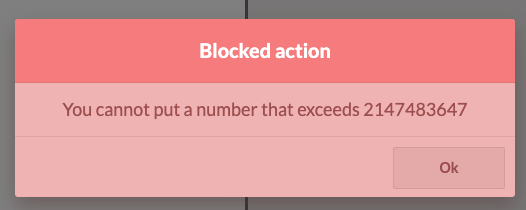 Fix https://github.com/odoo/odoo/issues/105389 --- I confirm I have signed the CLA and read the PR guidelines at www.odoo.com/submit-pr Forward-Port-Of: odoo/odoo#106523 Forward-Port-Of: odoo/odoo#105393
Current behavior: If you create an empty Db and just create one coupon program for the PoS , the `enter_code` button is not displayed. This happens because the condition to show the button was looking for program type `coupon` instead of `coupons`. Steps to reproduce: - Create an empty Db (Important) - Install PoS and PoS Loyalty - Create a coupon program for the PoS - Open the PoS, the `enter_code` button is not displayed opw-3078726 --- I confirm I have signed the CLA and read the
Original PR description
Current behavior:
If you create an empty Db and just create one coupon program for the PoS , the `enter_code` button is not displayed. This happens because the condition to show the button was looking for program type `coupon` instead of `coupons`.

Steps to reproduce:
- Create an empty Db (Important)
- Install PoS and PoS Loyalty
- Create a coupon program for the PoS
- Open the PoS, the `enter_code` button is not displayed

opw-3078726
---
I confirm I have signed the CLA and read the PR guidelines at www.odoo.com/submit-pr

Forward-Port-Of: odoo/odoo#106585
fix typo for coupons in loyalty and pos_loyalty modules


---
I confirm I have signed the CLA and read the PR guidelines at www.odoo.com/submit-pr

Forward-Port-Of: odoo/odoo#106779
Original PR description
fix typo for coupons in loyalty and pos_loyalty modules --- I confirm I have signed the CLA and read the PR guidelines at www.odoo.com/submit-pr Forward-Port-Of: odoo/odoo#106779
fix typo in base and hr_recruitment_skills


---
I confirm I have signed the CLA and read the PR guidelines at www.odoo.com/submit-pr

Forward-Port-Of: odoo/odoo#106798
Original PR description
fix typo in base and hr_recruitment_skills --- I confirm I have signed the CLA and read the PR guidelines at www.odoo.com/submit-pr Forward-Port-Of: odoo/odoo#106798
Current behavior: In the PoS if you apply a coupon on an order that contains 2 products with different taxes, it will create 2 discount lines on the order. If you change the pricelist, the discount lines won't have the correct values. Steps to reproduce: - Create 2 different products with different taxes. - Create a pricelist with a discount on the 2 products. - Create a coupon that apply a 100% discount on the order. - Start a PoS session - Add the 2 products to the order and apply the
Original PR description
Current behavior:
In the PoS if you apply a coupon on an order that contains 2 products with different taxes, it will create 2 discount lines on the order. If you change the pricelist, the discount lines won't have the correct values.

Steps to reproduce:
- Create 2 different products with different taxes.
- Create a pricelist with a discount on the 2 products.
- Create a coupon that apply a 100% discount on the order.
- Start a PoS session
- Add the 2 products to the order and apply the coupon.
- The order total is now 0€.
- Change the pricelist to the one with the discount.
- The order total is different than 0€.

opw-3049098

Description of the issue/feature this PR addresses:

Current behavior before PR:

Desired behavior after PR is merged:


---
I confirm I have signed the CLA and read the PR guidelines at www.odoo.com/submit-pr

Forward-Port-Of: odoo/odoo#106612
Forward-Port-Of: odoo/odoo#106067
fixes following bugs:

- removed trash icon
- missing borders of remaining hours in project sharing kanban view
- Added progress bar css path in project manifest
- aligned 'hours spent on sub-tasks' field

Related PR: https://github.com/odoo/enterprise/pull/33447
task-3014420

Forward-Port-Of: odoo/odoo#104601
Original PR description
fixes following bugs: - removed trash icon - missing borders of remaining hours in project sharing kanban view - Added progress bar css path in project manifest - aligned 'hours spent on sub-tasks' field Related PR: https://github.com/odoo/enterprise/pull/33447 task-3014420 Forward-Port-Of: odoo/odoo#104601
Purpose: Make the command palette easier to discover - indeed, unless you know about CTRL+K, it's difficult to know you can use that elsewhere than the home screen. Solution: Add CTRL+K next to the Shortcut menu in the user menu. TackID: 3074492 Description of the issue/feature this PR addresses: Current behavior before PR: Desired behavior after PR is merged: --- I confirm I have signed the CLA and read the PR guidelines at www.odoo.com/submit-pr Forward-Port-Of: odo
Original PR description
Purpose:
Make the command palette easier to discover - indeed, unless you know about CTRL+K, it's difficult to know you can use that elsewhere than the home screen.

Solution:
Add CTRL+K next to the Shortcut menu in the user menu.

TackID: 3074492

Description of the issue/feature this PR addresses:

Current behavior before PR:

Desired behavior after PR is merged:


---
I confirm I have signed the CLA and read the PR guidelines at www.odoo.com/submit-pr

Forward-Port-Of: odoo/odoo#106594
## Steps to reproduce
1. navigate to Settings -> CRM -> Lead Enrichment section
2. change the Lead Enrichment option to "Enrich leads on demand only"
3. click Save button
4. wait for system to save and refresh.

You should see that the change you made was not saved.

opw-3063639

Forward-Port-Of: odoo/odoo#106666
Original PR description
## Steps to reproduce 1. navigate to Settings -> CRM -> Lead Enrichment section 2. change the Lead Enrichment option to "Enrich leads on demand only" 3. click Save button 4. wait for system to save and refresh. You should see that the change you made was not saved. opw-3063639 Forward-Port-Of: odoo/odoo#106666
Steps to reproduce the bug: - Install `delivery_dhl` - Create a storable product “P1”: - make sure the weight of the product is equal to 0 - create a transfert: - Type: delivery orders - Add the product “P1” - Go to the “Additional info” tab and select “DHL” in the carrier field - Mark as Todo - Validate Problem: A traceback is triggered, because in order to set the shipment details, a package should be created, so the `_get_packages_from_picking` function
Original PR description
Steps to reproduce the bug: - Install `delivery_dhl` - Create a storable product “P1”: - make sure the weight of the product is equal to 0 - create a transfert: - Type: delivery orders - Add the…
Steps to reproduce the bug:
- Install `delivery_dhl`
- Create a storable product “P1”:
    - make sure the weight of the product is equal to 0
- create a transfert:
    - Type: delivery orders
    - Add the product “P1”
    - Go to the “Additional info” tab and select “DHL” in the carrier field
    - Mark as Todo
    - Validate


Problem:
A traceback is triggered, because in order to set the shipment details, a package should be created, so the `_get_packages_from_picking` function is called:
https://github.com/odoo/enterprise/blob/aed802ee17dba5ebe12b42594503732a2662be68/delivery_dhl/models/dhl_request.py#L166

But as the total weight of the products is equal to 0, the package is not created:

https://github.com/odoo/odoo/blob/6b0ab28791f4a29254d294f8a116545d4c124e8b/addons/delivery/models/delivery_carrier.py#L324-L325

then, the result is used without checking if the package has been created:
https://github.com/odoo/enterprise/blob/aed802ee17dba5ebe12b42594503732a2662be68/delivery_dhl/models/dhl_request.py#L185

Solution:
If the total products weight is equal to 0, raise a UserError

opw-3076826
opw-3075562

Forward-Port-Of: odoo/odoo#106809With this commit datetime of stock move are correctly converted in date with the current timezone. @qdp-odoo - Create a PO, receive product at on **23**/05/2022 at 00h30 UTC+2 (= **22**/05/2022 - 22h30 UTC) - Lauch the wizard with accrual_entry_date = **22**/05/2022 --> Issue the PO is considered received, but it is false. -- I confirm I have signed the CLA and read the PR guidelines at www.odoo.com/submit-pr Forward-Port-Of: odoo/odoo#100507 Forward-Port-Of: odoo/odoo#90282
Original PR description
With this commit datetime of stock move are correctly converted in date with the current timezone.

@qdp-odoo

- Create a PO, receive product at on **23**/05/2022 at 00h30 UTC+2 (= **22**/05/2022 - 22h30 UTC)
- Lauch the wizard with accrual_entry_date = **22**/05/2022

--> Issue the PO is considered received, but it is false.


--
I confirm I have signed the CLA and read the PR guidelines at www.odoo.com/submit-pr

Forward-Port-Of: odoo/odoo#100507
Forward-Port-Of: odoo/odoo#90282
Release notes: https://github.com/odoo/owl/releases/tag/v2.0.2

- fix: compiler: do not look up ComponentNode in the context
- fix: t-model takes precedence over t-on-input
- fix: reactivity: fix issues with reactive objects in proto chain

Forward-Port-Of: odoo/odoo#106783
Original PR description
Release notes: https://github.com/odoo/owl/releases/tag/v2.0.2 - fix: compiler: do not look up ComponentNode in the context - fix: t-model takes precedence over t-on-input - fix: reactivity: fix issues with reactive objects in proto chain Forward-Port-Of: odoo/odoo#106783
Since odoo/odoo@69c3d5aa25655173ed66a52570559322c650c7df the readonly and required modifiers were no longer passed for non-editable views. Which means: - kanban: never passed, - tree: passed only when `editable="1"` or `multi_edit="1"`, - form: always passed. The rationale behind that is that a view which is considered as readonly doesn't need to know if its field are readonly or required, as by definition, if the view is readonly, the user shouldn't be able to modify anything in the view.
Original PR description
Since odoo/odoo@69c3d5aa25655173ed66a52570559322c650c7df the readonly and required modifiers were no longer passed for non-editable views. Which means: - kanban: never passed, - tree: passed only…
Since odoo/odoo@69c3d5aa25655173ed66a52570559322c650c7df the readonly and required modifiers were no longer passed for non-editable views. Which means:
- kanban: never passed,
- tree: passed only when `editable="1"` or `multi_edit="1"`,
- form: always passed.

The rationale behind that is that a view which is considered as readonly doesn't need to know if its field are readonly or required, as by definition, if the view is readonly, the user shouldn't be able to modify anything in the view.
This was to make the views sent to the web client more light-weight, not sending unused information, and save KB of transfers.

However, some widgets, used in the kanban and non-editable tree, allow to modify fields, even in readonly considered views, and therefore need to know these readonly/required modifiers from the field definition in the Python model.

e.g. the `widget="color"`, odoo/odoo#103478

Ideally, these readonly/required modifiers should be transferred only when the widget requires it, to avoid transferring the readonly/required modifiers
when they are not useful in kanban/tree views
(which is 99% of the time).
However, this would require a bigger refactoring,
which is considered too risky compared to the added value for a stable release.

task-3013110

Forward-Port-Of: odoo/odoo#106766
The comment became outdated:
- For 14.0 and above: mentioned the "Customize dialog" which does not exist anymore.
- For 16.0 and above: mentioned "Bootstrap 4" instead of "Bootstrap 5".

Related to opw-3056683

Forward-Port-Of: odoo/odoo#106794
Original PR description
The comment became outdated: - For 14.0 and above: mentioned the "Customize dialog" which does not exist anymore. - For 16.0 and above: mentioned "Bootstrap 4" instead of "Bootstrap 5". Related to opw-3056683 Forward-Port-Of: odoo/odoo#106794
# Current behaviour Changing the package quantity may change the package type, leading to an incoherent product quantities in the SOL. (For ex: 20 uom in 2 packages of 20) # Expected behaviour When setting the package quantity, don't change the package type. If the user wants to change the package type they can do it by manually setting it or changing the product_uom. # Steps to reproduce - Install Sale and Inventory - Activate Packages in settings - Create 2 package types for a produ
Original PR description
# Current behaviour Changing the package quantity may change the package type, leading to an incoherent product quantities in the SOL. (For ex: 20 uom in 2 packages of 20) # Expected behaviour When…
# Current behaviour
Changing the package quantity may change the package type, leading to an incoherent product quantities in the SOL. (For ex: 20 uom in 2 packages of 20)

# Expected behaviour
When setting the package quantity, don't change the package type. If the user wants to change the package type they can do it by manually setting it or changing the product_uom.

# Steps to reproduce
- Install Sale and Inventory
- Activate Packages in settings
- Create 2 package types for a product of choice, one of 10, another of 20
- Create a new SO with that product
- Set the quantity to 10 (a new package_qty=1 and packaging type of 10 should appear)
- Save
- Edit package_qty to 2
- Observe that we have 20 units of the product, 2 packages of 20, instead of 2 packages of 10

# Reason for the problem
When setting the `product_packaging_qty`, the `product_uom_qty` compute is triggered. When `product_uom_qty` changes, it triggers `product_packaging_id`'s compute. When `product_packaging_id` is computed, it doesn't trigger `product_package_qty`, because it is protected, since we are writing to it.

# Fix
When we are writing the `product_packaging_qty` and the `product_uom_qty` we remove the compute for `product_packaging_id`.

# Affected versions
- saas-15.2
- saas-15.3
- 16.0
- master
---
opw-3010703
---
I confirm I have signed the CLA and read the PR guidelines at www.odoo.com/submit-pr

Forward-Port-Of: odoo/odoo#106811
Forward-Port-Of: odoo/odoo#103669
Steps to reproduce: - Settings > manage languages > english > Set time format to `%H:%M:%S %p` > Save - Install Planning app > go to list view > Try modifying a time manually (without using the widget which pops up). Issue: When trying to save the new time, an error pops up: `Can't include meridiem when specifying 24-hour format`. While parsing the new date, the `luxon` library throws this error to prevent wrong hour values, such as `17 AM`. Fix: Prevent the user from inputting bo
Original PR description
Steps to reproduce:

- Settings > manage languages > english > Set time format to `%H:%M:%S %p` > Save
- Install Planning app > go to list view > Try modifying a time manually (without using the widget which pops up).

Issue:
When trying to save the new time, an error pops up: `Can't include meridiem when specifying 24-hour format`.

While parsing the new date, the `luxon` library throws this error to prevent wrong hour values, such as `17 AM`.

Fix:
Prevent the user from inputting both `%H` and `%p` in the same time format and display a warning notification.

opw-3038797

Forward-Port-Of: odoo/odoo#106846
Before this PR, posting a message containing an attachment with a long name in the chatter would result in the chatter overflowing the main window. This is due to the fact that flex items cannot be smaller than their content. This PR fixes the issue by adding the `overflow-auto` class to the chatter container in order to override the default `min-width: auto` of flex items thus allowing them to be smaller. Current behavior before PR:  Desired behavior after PR is merged:  Forward-Port-Of: odoo/odoo#106892
In the 2022 Tax report, box 16: 'Total de la TVA brute due (lignes 08 à 5B)'.
The formula is missing tags P1, P2, I1 to I6.

opw-3036679

Forward-Port-Of: odoo/odoo#106831
Original PR description
In the 2022 Tax report, box 16: 'Total de la TVA brute due (lignes 08 à 5B)'. The formula is missing tags P1, P2, I1 to I6. opw-3036679 Forward-Port-Of: odoo/odoo#106831
Date field returns a boolean value and not a None value if it's not set. An attrs is based on that and it doesn't work.
With this fix, the attrs is comparing with False and not None.

opw-3076273

Forward-Port-Of: odoo/enterprise#34532
Original PR description
Date field returns a boolean value and not a None value if it's not set. An attrs is based on that and it doesn't work. With this fix, the attrs is comparing with False and not None. opw-3076273 Forward-Port-Of: odoo/enterprise#34532
A `UnboundLocalError` traceback that occurs in
`_get_payment_report_lines` was caught by Sentry.

The fix simply consists in defining the variable `foreign_currency` before its use in the case where we are in the `if`.

https://github.com/odoo/enterprise/blob/45c67defa3cb853f73dfbc25d70cb285f1825dfe/account_reports/models/account_bank_reconciliation_report.py#L501-L507

opw-3086624

Forward-Port-Of: odoo/enterprise#34528
Original PR description
A `UnboundLocalError` traceback that occurs in `_get_payment_report_lines` was caught by Sentry. The fix simply consists in defining the variable `foreign_currency` before its use in the case where we are in the `if`. https://github.com/odoo/enterprise/blob/45c67defa3cb853f73dfbc25d70cb285f1825dfe/account_reports/models/account_bank_reconciliation_report.py#L501-L507 opw-3086624 Forward-Port-Of: odoo/enterprise#34528
This commit fixes two bugs: Bug 1: When displaying a value of type `integer`, the value is incorrectly rounded to 1 decimal, when in fact it should be rounded to 0 decimal. Solution: set the rounding to 0 digits in `format_value()` when the figure_type is integer. Bug 2: When displaying a value of type `integer` that is greater than 0.1 but less than 0.5, the `is_zero` property of the `column_data` data structure generated by `_build_static_line_columns()` at https://github.com/odoo/ent
Original PR description
This commit fixes two bugs:

Bug 1: When displaying a value of type `integer`, the value is incorrectly rounded to 1 decimal, when in fact it should be rounded to 0 decimal.

Solution: set the rounding to 0 digits in `format_value()` when the figure_type is integer.

Bug 2: When displaying a value of type `integer` that is greater than 0.1 but less than 0.5, the `is_zero` property of the `column_data` data structure generated by `_build_static_line_columns()` at https://github.com/odoo/enterprise/blob/16.0/account_reports/models/account_report.py#L1976 is incorrectly set to False, when it should be set to True.

Solution: pass the `figure_type` parameter to `is_zero()`.

Forward-Port-Of: odoo/enterprise#34448
Add a check on the record field value before apply a convert to UTC, because sometimes the value is set to False. Like on an unschedule task the field 'planned_date_begin', 'planned_date_end' on project.task[1] Steps to reproduce: - Open Field service - Open 'planning > by user' menu - Open Map view > traceback Links: [1] https://github.com/odoo/enterprise/commit/1dc77a5abf07d0f04faa2c3ef170df215beb3cd0#diff-704869db1927697901172243f066f9a3404bd0b30d7894ff9aabf0391ada1dc6R76-R81 Fo
Original PR description
Add a check on the record field value before apply a convert to UTC, because sometimes the value is set to False.

Like on an unschedule task the field 'planned_date_begin', 'planned_date_end' on project.task[1]

Steps to reproduce:
- Open Field service
- Open 'planning > by user' menu
- Open Map view > traceback

Links:
[1] https://github.com/odoo/enterprise/commit/1dc77a5abf07d0f04faa2c3ef170df215beb3cd0#diff-704869db1927697901172243f066f9a3404bd0b30d7894ff9aabf0391ada1dc6R76-R81

Forward-Port-Of: odoo/enterprise#34390
The filtering logic was previously fixed in [commit 1] but was broken in [commit 2]. For report containing a "searchKey" (ex: General ledger where searchKey is in fact the accountCode), the search bar only looked at the searchKey and never went through the "else" statement to search on the name. It is now corrected by searching first on the code and then on the name. For other report that don't have a "searchKey", a search on the displayName is done. Another problem was that the total rows
Original PR description
The filtering logic was previously fixed in [commit 1] but was broken in [commit 2]. For report containing a "searchKey" (ex: General ledger where searchKey is in fact the accountCode), the search…
The filtering logic was previously fixed in [commit 1] but was broken in [commit 2].

For report containing a "searchKey" (ex: General ledger where searchKey is in fact the accountCode), the search bar only looked at the searchKey and never went through the "else" statement to search on the name. It is now corrected by searching first on the code and then on the name. For other report that don't have a "searchKey", a search on the displayName is done.

Another problem was that the total rows were displayed in the search because a total row has a displayName looking like "total 123 accountName". When it's the case, the accountName variable was "123 accountName", now the total rows are skipped to avoid processing them in the search.

This search method is now the same as v15.0, and it also restores the logic of the export and print functionality.

In addition, a tour has been added to verify that the search works when searching for a code or name.

Co-authored-by: Tom De Caluwé <decaluwe.t@gmail.com>

[commit 1]: https://github.com/odoo/enterprise/commit/e7e113e5a26b357da5c01caf9a278c5dfada0366
[commit 2]: https://github.com/odoo/enterprise/commit/f435654f70f3d6a1fec7fa696945f2c0eb9a7056

Forward-Port-Of: odoo/enterprise#32875
The line reporting the unaffected result from the previous years was not taking into account the amounts allocated directly from the current year earnings account, and only considered allocations directly made from the income/expense accounts. This was wrong, since we want to support both these cases. Because of that, when doing the allocation this way, the result from previous years was reported twice: once in the "previous years' profit or loss" line, and once under "legal reserves", becaus
Original PR description
The line reporting the unaffected result from the previous years was not taking into account the amounts allocated directly from the current year earnings account, and only considered allocations directly made from the income/expense accounts. This was wrong, since we want to support both these cases.

Because of that, when doing the allocation this way, the result from previous years was reported twice: once in the "previous years' profit or loss" line, and once under "legal reserves", because of the account the allocation was made to.

In the meantime, we improve the name of this line, so that it betters reflect what it actually computes.

OPW 2731621

Forward-Port-Of: odoo/enterprise#34413
Forward-Port-Of: odoo/enterprise#34008
In order to prevent users to create too many invoices on a subscription and increase the next invoice date too fast, this commit blocks invoice creation if there is already a draft invoice on a subscription.

[OPW-3083825](https://odoo.com/web#id=3083825&model=project.task)

Forward-Port-Of: odoo/enterprise#34479
Original PR description
In order to prevent users to create too many invoices on a subscription and increase the next invoice date too fast, this commit blocks invoice creation if there is already a draft invoice on a subscription. [OPW-3083825](https://odoo.com/web#id=3083825&model=project.task) Forward-Port-Of: odoo/enterprise#34479
## Steps to reproduce
* create an analytic plan `P`, and its sub-plan `C`.
* add an analytic account `A` to plan `C`.
* create an invoice and add an invoice line. Add account `A` to the line's analytic accounts.
* confirm the invoice
* go to the Profit and Loss report
* click the `Analytic Group By` button and, under `Plans`, select sub-plan `C`

You should see that the P&L report doesn't show the distribution made in the sub plan.

opw-3048035

Forward-Port-Of: odoo/enterprise#34438
Original PR description
## Steps to reproduce * create an analytic plan `P`, and its sub-plan `C`. * add an analytic account `A` to plan `C`. * create an invoice and add an invoice line. Add account `A` to the line's analytic accounts. * confirm the invoice * go to the Profit and Loss report * click the `Analytic Group By` button and, under `Plans`, select sub-plan `C` You should see that the P&L report doesn't show the distribution made in the sub plan. opw-3048035 Forward-Port-Of: odoo/enterprise#34438
Set up a reconciliation model with type 'Button to generate counterpart entry'
Open Reconciliation Widget
Switch to Manual Operations tab

No button is present

This occur after a1eaf200d0ca8b67df38413fe76689d4fcda9bc2 where logic relative to analytic tags was removed along with the line setting the reconcileModels in the view

opw-3071218

Forward-Port-Of: odoo/enterprise#34285
Original PR description
Set up a reconciliation model with type 'Button to generate counterpart entry' Open Reconciliation Widget Switch to Manual Operations tab No button is present This occur after a1eaf200d0ca8b67df38413fe76689d4fcda9bc2 where logic relative to analytic tags was removed along with the line setting the reconcileModels in the view opw-3071218 Forward-Port-Of: odoo/enterprise#34285
Issue 1:
Before this commit, the duration days weren't aligned properly in shift view.
So in this commit, resolved alignment of duration days by adding class oe_inline.

Issue 2:
The purpose of the commit is to fix the attribute when remaning_hours is replaced with the portal_remaining_hours.

Related Community PR: https://github.com/odoo/odoo/pull/104601
task-3014420

Forward-Port-Of: odoo/enterprise#33447
Original PR description
Issue 1: Before this commit, the duration days weren't aligned properly in shift view. So in this commit, resolved alignment of duration days by adding class oe_inline. Issue 2: The purpose of the commit is to fix the attribute when remaning_hours is replaced with the portal_remaining_hours. Related Community PR: https://github.com/odoo/odoo/pull/104601 task-3014420 Forward-Port-Of: odoo/enterprise#33447
The 16.0 revamp of the report left the 'Communication' colmun of the General Ledger always empty. This commit restores 15.0's behavior.

OPW 3077373

Forward-Port-Of: odoo/enterprise#34452
Original PR description
The 16.0 revamp of the report left the 'Communication' colmun of the General Ledger always empty. This commit restores 15.0's behavior. OPW 3077373 Forward-Port-Of: odoo/enterprise#34452
The previous override of the kanban conroller (08c2b654e4f) overidde the controller components instead of adding the two new ones

Forward-Port-Of: odoo/enterprise#34486
Original PR description
The previous override of the kanban conroller (08c2b654e4f) overidde the controller components instead of adding the two new ones Forward-Port-Of: odoo/enterprise#34486
Fix an issue with the balance column that have the values not in bold. This make no sense as both the debit and credit are in bold.

To this aim, add the 'number' class to the column to ensure the report consistency on this point.

Task id #3069557

Forward-Port-Of: odoo/enterprise#33962
Original PR description
Fix an issue with the balance column that have the values not in bold. This make no sense as both the debit and credit are in bold. To this aim, add the 'number' class to the column to ensure the report consistency on this point. Task id #3069557 Forward-Port-Of: odoo/enterprise#33962
Use case: 1. In Settings, enable "Multi-Locations" 2. Create two storable products P_compo, P_finished 3. Update the on-hand quantity of P_compo: - 2 x P_compo at WH/Stock/Shelf 1 4. Create a bill of materials BM: - Product: P_finished - Compo: 1 x P_compo - Operations: add a new one 5. Create and confirm a MO: - Bill of materials: BM - Qty: 2 6. Check the availability - It reserves two P_compo from WH/Stock/Shelf 1 7. Set the producing qty to 1 8. Vali
Original PR description
Use case:
1. In Settings, enable "Multi-Locations"
2. Create two storable products P_compo, P_finished
3. Update the on-hand quantity of P_compo:
    - 2 x P_compo at WH/Stock/Shelf 1
4. Create a bill of materials BM:
    - Product: P_finished
    - Compo: 1 x P_compo
    - Operations: add a new one
5. Create and confirm a MO:
    - Bill of materials: BM
    - Qty: 2
6. Check the availability
    - It reserves two P_compo from WH/Stock/Shelf 1
7. Set the producing qty to 1
8. Validate & Backorder
    - The producing qty of the backorder is already set to 1
9. Open the detailed operations related to P_compo
    - There should be one line:
        - Qty reserved: 1
        - Qty done: 1
        - Source location: WH/Stock/Shelf 1

OPW-3020189

Forward-Port-Of: odoo/enterprise#34400
Forward-Port-Of: odoo/enterprise#34179Instead of using dmtx which depends on dmtx-utils/pylibdmtx, we now use the built in reportlab's ECC200 which has no dependencies to make people's lives easier. Forward-Port-Of: odoo/enterprise#34354 Forward-Port-Of: odoo/enterprise#33151
Original PR description
Instead of using dmtx which depends on dmtx-utils/pylibdmtx, we now use the built in reportlab's ECC200 which has no dependencies to make people's lives easier.

Forward-Port-Of: odoo/enterprise#34354
Forward-Port-Of: odoo/enterprise#33151