Wednesday, November 30, 2022
5 changes · master
Enhancements to existing features
Users can now select a continuous range of records in list views using Shift with the mouse or keyboard. This reduces repetitive manual checkbox selection and improves efficiency when working with many records, while also fixing related keyboard focus behavior in Safari.
Original PR description
Before, in the list view, the user could not select a record range easily. He had to check/uncheck manually each checkbox in the range. Now, the user can select a range of records in list view by hitting its first record and and its last record while holding SHIFT for the second. It's also possible to do it with the keyboard: - pressing < SPACE > to select a record and <SHIFT+SPACE> to select a range of records. - pressing <SHIFT+ARROW> to extend to current checkbox 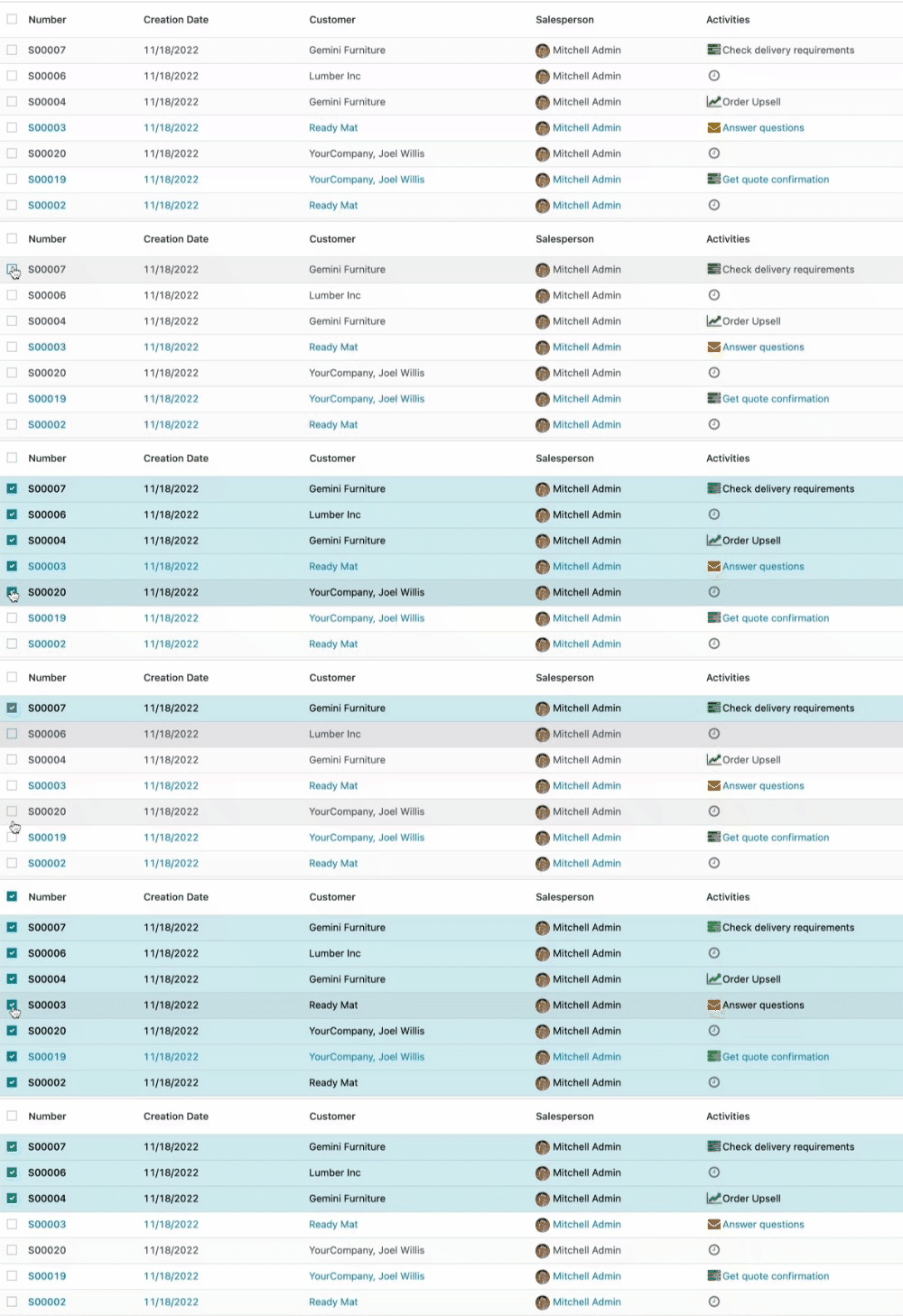 task-2039894
Timesheet users now see clearer labels, smarter sale order line choices, and helpful placeholders when work is non-billable. Managers and teams also get new filters in the Timesheet/Attendance report, making it easier to review activity by team or department.
Original PR description
*_* = hr_timesheet_attendance, sale_management, sale_project, sale_timesheet

Purpose of this PR to improve generic UX of timesheet app.

So in this PR done following changes:
- hide the SOL field if there is no project set or if the project is non billable.
- add the `My Team` and `My Department` filters in Timesheet/Attendance
report.
- add the placeholders for SOL field in timesheets,project.task.
- update the test to avoid searching the contract if hr_contract module is
installed before this hr_timesheet module.
- indicate the unit price of the SOL if the same service is present multiple
times in the SO.
- move nane_get method of SOL from sale_project to sale_management
so it we don't need to overide name_get in sale_planning to do same thing.

task-2893556
This update makes timesheet approval clearer and faster by using “approver” wording, adding validation actions in more views, and improving reminder emails. It also simplifies timesheet reporting by removing the suspicious durations filter and makes billing fields clearer by hiding or labeling sales order line information when it is not relevant.
Original PR description
*_* = helpdesk_sale_timesheet, sale_timesheet_enterprise Purpose of this PR to improve generic UX of timesheet app. So in this PR done following changes: - send the email reminder of manager to…
*_* = helpdesk_sale_timesheet, sale_timesheet_enterprise

Purpose of this PR to improve generic UX of timesheet app.

So in this PR done following changes:
- send the email reminder of  manager to approver as well and rename email
template as `timesheet: approver reminder` and change string of related field
from manager to approver.
- remove the 'suspicious durations' filter from timesheet and
timesheet_analysis_report.
- hide the SOL field if there is no project set or if the project is non billable.
- show the validate button in the list view of all validate menus.
- added the placeholders for the SOL field in timesheets,helpdesk.ticket.
- take employees contract into account for remainder mail's working_hours of
employees.
- remove with_price_unit from context and display price unit in display_name
without that context.
- add a 'validate' button in pivot view in validate > all timesheets menu. The
draft timesheets will be shown in all timesheet menu by default which are need
to validated.

task-2893556
Employees can now see daily and total overtime directly in the My Timesheet grid, including both extra hours worked and missing expected hours. This helps employees and managers quickly spot incomplete timesheets and better track potentially billable or payable time.
Original PR description
…grid view This commit adds overtime information to the grid view in the "My Timesheet" page of the Timesheets app. Specifically it adds the daily and total overtime in the total row of the grid. The…
…grid view

This commit adds overtime information to the grid view in the "My Timesheet" page of the Timesheets app.
Specifically it adds the daily and total overtime in the total row of the grid. The overtime is calculated given the work hours specified in the employee record of each employee and the hours that have been timesheeted.
The overtime can be positive (when the user has worked more hours or when the user has worked on a day not specified in their employee record) or negative (when the user has timesheeted less hours than what is specified in their employee record). When the overtime is zero, it is not printed.
The overtime information is added on present or past dates and the total overtime information is computed for dates prior and including the present date.

It is very important to the company and its employees that they encode all of their timesheets. They need to see at a glance the overtime that they have done (that might be paid by the company) or the time that is missing (missing time means the company might lose money on time it could have invoiced).
The improvement that this task introduces ensures that all employees can easily keep track what they have yet to timesheet as well as whether they have been productive enough at a glance, from their defualt view in the Timesheet app.

In order to implement this improvement, the "Float Time Grid" component needed to be extended in order to include the overtime information. This meant that we created a new component: the "Overtime" grid component. For that, overtime_grid_component.js file needed to be created for the new component as well as the overtimeGridComponent.xml file for the QWeb template.
To get the work hours information (which is essential to the overtime computation) we made an rpc call to the hr_employee model inside of the timesheet_time_grid_model.js
Additionally, for the (total) overtime computation, the timesheet_timer_grid_rendered.js file was modified to include the necessary methods. One to caclulate the daily overtime, one to calculate the total overtime, and one to check whether to overtime should be computed (used by the other two methods mentioned).
For the sake of cohesion, we wanted the overtime to always be under the total time in the total grid row. For that, we created a new class in timesheet_grid.scss to accept the \n character when printing the overtime.
We also modified the timesheet_grid.xml file, in order to change the grid table template to include the prop of our new component - the overtime value.
Finally, we modified the hr_timesheet_view.xml to again include the new overtime grid component in the "My Timesheets" page's grid view and we modified the manifest file to include the new component.

task-2878635
Code cleanup and technical improvements
This update reorganizes mail-related files to make future maintenance easier while restoring and improving several messaging interactions. Users should see smoother mail behavior, including better follow controls, automatic loading of older messages while scrolling, and more reliable emoji picker navigation.