Daily updates from Odoo
Navigate
Branch
Wednesday, December 7, 2022
20 changes
New functionality added to Odoo
Users can now switch child Knowledge articles into items shown in kanban or list views, and convert items back into articles. This adds more flexibility for organizing Knowledge content without recreating information.
Original PR description
This commit enables the users to convert any children article to an item,
which can be seen inside of a kanban or list view, or any item to an article.

task-3012915
Enhancements to existing features
Odoo removes an internal update-tracking field that was added to every data model but no longer provided value. This reduces the system registry size and is expected to improve loading performance without changing normal user workflows.
Original PR description
The main goal of this commit is to reduce the size of the registry by removing the (almost) useless __last_update field.

Statistics # of fields with all modules installed: before 30184 fields, 1299x last_update (4.30%)

Before this commit, the computed field __last_update was added on every model. The idea behind this field was to have a computed field that had either the write_date or the create_date if the write_date was empty. However, the write_date is always written, even on creation, making it useless to have the computed field __last_update

After this update, we completely remove from BaseModel:
* __last_update
* CONCURRENCY_CHECK_FIELD that was always defined as "__last_update"
* _compute_concurrency_field that was the compute function for __last_update

task-id: 3062140 (part of 3062137 improve registry load time)
When users plan an existing shift from a schedule grouped by role or project, the search now automatically focuses on the selected group. This makes it easier to find the right shifts and reduces irrelevant results.
Original PR description
Before this commit, when grouping the schedule by Role or Project and using the "plan existing" button,
the search displayed every shift available, it didn't matter in which row group the button was used
This commit applies a default filter according to the row group in which the button is clicked,
to have a more coherent user experience.

Task-3071000
The Master Production Schedule now has clearer editable cells, better demand highlighting, and easier access to product movement and replenishment information. Users can also add bills of materials from the product wizard and use familiar filters and favorites, making planning faster and less error-prone.
Original PR description
In this commit -
1) Remove the box border from input boxes of mps.
2) Added alert-info for actual demand boxes for whole cell.
3) Added graph view button just besides the product, so that
   any one can see the product moves easily.
4) Allow to add bom of product in add product wizard so that
   components can also be added automatically.
   (currently at level 1)
5) Added Filter and Fovourites menu in mps view.
   This view is rendered by client action. Currently customised
   Rows menu was added by replacing the search menu buttons (
   Filters and Favourites etc). So to add them, moved the Rows
   menu just besides the buttons.

TaskID - 2351645
A reporting-related function has been moved from the general accounting area into the accounting reports module where it is actually used. This keeps the product structure cleaner and should have no visible impact on day-to-day users.
Original PR description
currently this function is defined in account module and only triggered from account_reports module, so moving code to account_reports module.

Related: https://github.com/odoo/odoo/pull/107345
Inventory users can now type a barcode manually when a label cannot be scanned, such as when it is damaged, unavailable, or difficult to read. This helps keep warehouse and picking workflows moving without relying only on scanner input.
Original PR description
Before this commit:
==================
Currently user cannot enter barcode manually if barcode is not scanned properly
for some reasons like product is absent, damaged or hard to scan.

After this commit:
==================
It is possible to enter manually barcode as well as user can scan the barcode.

task - 2964007
Resolved issues and error corrections
Italian localization reports now use English as the source language, with Italian translations maintained separately. This improves consistency for future updates and helps keep report wording easier to manage across languages.
Original PR description
Ideally, we develop in English any localization (then translate to the domestic language, in this case Italian) All the module has been translated in english and then a .po file has been create to translate back in Italian

Task-id: 3082347
The Belgian reporting module now uses English as its base language instead of containing unintended French text. Official French, Dutch, and German translations were added or refreshed, making reports clearer for users in supported languages.
Original PR description
Translates the module previously erroneously written partially in French to English.
Added/updated `fr`, `nl` and `de` official translations.

Task: 3084223
Pricing rules linked to archived products are now hidden from the pricelist form. This prevents users from seeing obsolete or inactive product pricing entries, reducing confusion when managing price lists.
Original PR description
In pricelist form view, pricing rules are now invisible if referring to an archived product.

task-2920563
Code cleanup and technical improvements
The stock forecast screen has been updated so it opens as a normal in-app page instead of being squeezed into a small embedded frame. This makes the forecast easier to view and use for inventory planning in the latest version.
Original PR description
Description of the issue/feature this PR addresses:
Refactor report_stock_forecasted from legacy report to owl client action

Current behavior before PR:
Since conversion to owl, report_stock_forecasted is badly displayed in a small iframe

Desired behavior after PR is merged:
Fully functional stock_forecast in master/16.1
Miscellaneous changes
button_box in the l10n_de_pos_dsfinvk_export_view_form is not aligned well in the form view. before: 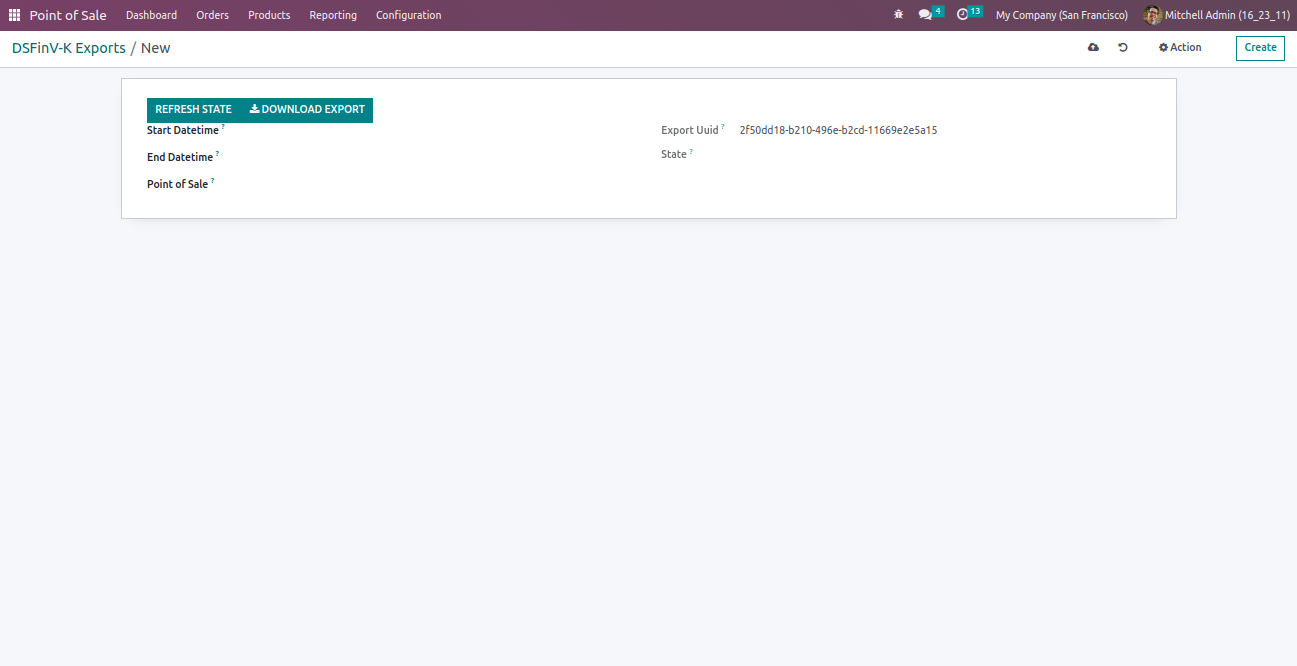 after: 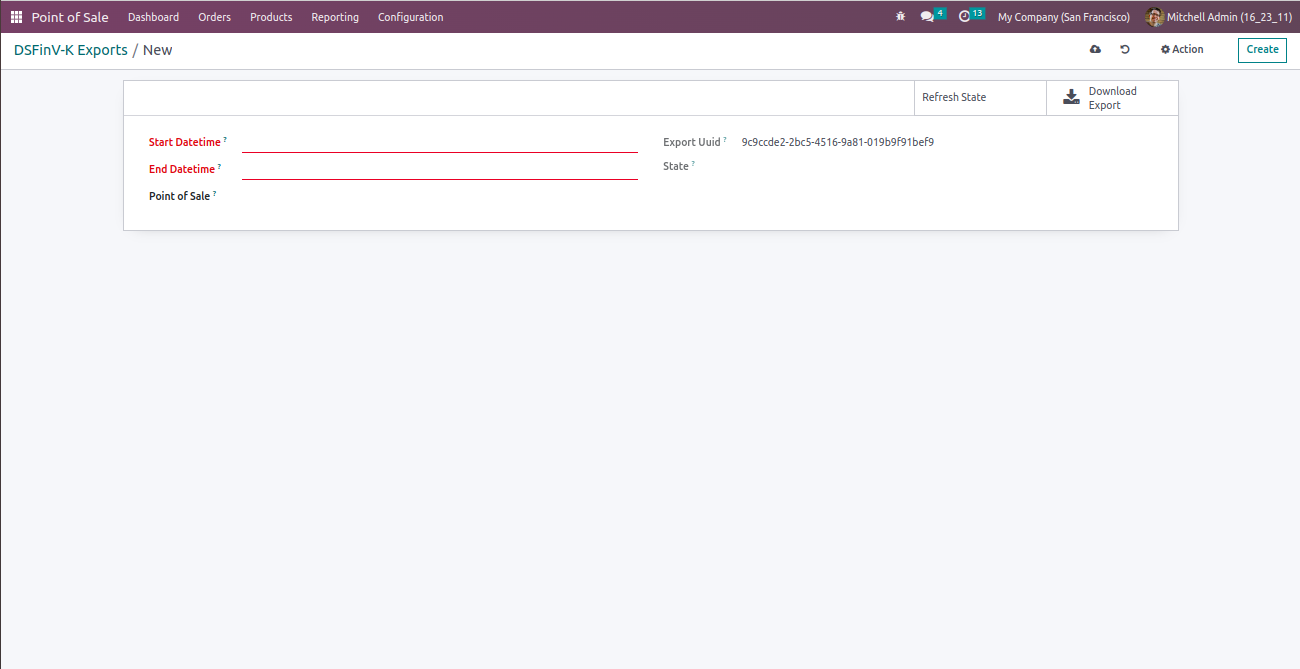 Forward-Port-Of: odoo/enterprise#34361
Original PR description
button_box in the l10n_de_pos_dsfinvk_export_view_form is not aligned well in the form view. before:  after:  Forward-Port-Of: odoo/enterprise#34361
The importing tool for Winbooks data was broken in 16, as this version introduces Analytics Plans, which is also a mandatory field on Analytic Accounts, and creating analytic accounts without plans would throw an error.

The currency was also wrongly set to False, which was another cause for error.

The importing tool now works, and can also import analytic plans.

opw-3032499

Forward-Port-Of: odoo/enterprise#33949
Original PR description
The importing tool for Winbooks data was broken in 16, as this version introduces Analytics Plans, which is also a mandatory field on Analytic Accounts, and creating analytic accounts without plans would throw an error. The currency was also wrongly set to False, which was another cause for error. The importing tool now works, and can also import analytic plans. opw-3032499 Forward-Port-Of: odoo/enterprise#33949
Complement to 3029f86ff3797147eef3a00534bb3aa4ea7dcd23

Forward-Port-Of: odoo/enterprise#34729
Original PR description
Complement to 3029f86ff3797147eef3a00534bb3aa4ea7dcd23 Forward-Port-Of: odoo/enterprise#34729
test_production_with_employee sometimes trigger a timeout in the test. It happens because the timeout is 20s but the execution time of the test itself is around 20s. If the machine is a bit slower it will return the timeout error.

Forward-Port-Of: odoo/enterprise#34724
Original PR description
test_production_with_employee sometimes trigger a timeout in the test. It happens because the timeout is 20s but the execution time of the test itself is around 20s. If the machine is a bit slower it will return the timeout error. Forward-Port-Of: odoo/enterprise#34724
Fix the below points:
------------------------
       - project_id, task_id, stops button should be display in new line on mobile view
       - alignment fa-play buttons in grid row
       - hotkeys should be aligned with the start button

Forward-Port-Of: odoo/enterprise#34054
Original PR description
Fix the below points:
------------------------
- project_id, task_id, stops button should be display in new line on mobile view
- alignment fa-play buttons in grid row
- hotkeys should be aligned with the start button
Forward-Port-Of: odoo/enterprise#34054This parameter isn't used, it can safely be removed. Forward-Port-Of: odoo/enterprise#34651
Original PR description
This parameter isn't used, it can safely be removed.

Forward-Port-Of: odoo/enterprise#34651
the module has been already removed by this commit: https://github.com/odoo/enterprise/commit/d29be173dc7d8e685ecb6013732eebd078ab7526 . the folder again get generated from translation/transifex in: https://github.com/odoo/enterprise/commit/f9533c6c5d157d273d4d01b17ee8b3957eb5ead1

Forward-Port-Of: odoo/enterprise#34638
Original PR description
the module has been already removed by this commit: https://github.com/odoo/enterprise/commit/d29be173dc7d8e685ecb6013732eebd078ab7526 . the folder again get generated from translation/transifex in: https://github.com/odoo/enterprise/commit/f9533c6c5d157d273d4d01b17ee8b3957eb5ead1 Forward-Port-Of: odoo/enterprise#34638
With the new version of IoT we have to specify
if the driver works for Linux or Windows in the file name

Forward-Port-Of: odoo/enterprise#34661
Original PR description
With the new version of IoT we have to specify if the driver works for Linux or Windows in the file name Forward-Port-Of: odoo/enterprise#34661
The demo data of the deferred revenues with multi company was broken since it search for the first fixed of all companies. Also the account type for the depreciation id was wrong, it is now corrected.

This pr is related to this one: https://github.com/odoo/odoo/pull/106148

Task-id: 3075466

Forward-Port-Of: odoo/enterprise#34180
Original PR description
The demo data of the deferred revenues with multi company was broken since it search for the first fixed of all companies. Also the account type for the depreciation id was wrong, it is now corrected. This pr is related to this one: https://github.com/odoo/odoo/pull/106148 Task-id: 3075466 Forward-Port-Of: odoo/enterprise#34180
Before this commit, the cash flow report was only using account moves
that were done on the bank and cash journals. That behavior was not
correct because the cash flow report should use all moves made with
bank and cash accounts, whatever the journal.

So if an account move is done in a general journal (not bank or cash)
but uses a bank or cash account, it should be use on the report.

Forward-Port-Of: odoo/enterprise#33402
Original PR description
Before this commit, the cash flow report was only using account moves that were done on the bank and cash journals. That behavior was not correct because the cash flow report should use all moves made with bank and cash accounts, whatever the journal. So if an account move is done in a general journal (not bank or cash) but uses a bank or cash account, it should be use on the report. Forward-Port-Of: odoo/enterprise#33402