Wednesday, December 21, 2022
37 changes · master
Enhancements to existing features
This work updates how payment terms are managed and applied in accounting documents, including invoices, discounts, configuration, and reports. It matters because payment schedules and early payment discounts affect customer billing, cash collection, and financial reporting accuracy.
Original PR description
WIP

---
I confirm I have signed the CLA and read the PR guidelines at www.odoo.com/submit-pr
The recruitment app's technical files have been reorganized into clearer, more focused sections. This does not change day-to-day hiring workflows, but it should make future updates easier and safer for the team maintaining the system.
Original PR description
Before this commit, recruitment models and views were mostly set inside 'hr_recruitment.py' and 'hr_recruitment_views.xml' respectively. In order to navigate easily, models are separated into distinctive files.
Wire transfer payment instructions can now be refreshed after bank account details are added or changed. This helps businesses avoid showing incomplete payment messages to customers when bank information was not available during initial setup.
Original PR description
Before this commit (in the case the `custom_mode` is set to `wire_transfer`) the model tries to find existing bank accounts to compute a pending message with the necessary information. When bank accounts are not already setup we end with an incomplete message.

After this commit we can at any point recompute the pending message and it will be updated with the current bank information.

Task - 2511080


---
I confirm I have signed the CLA and read the PR guidelines at www.odoo.com/submit-pr
Project tasks are now ordered more usefully by priority and deadline, helping teams see urgent work sooner. Shared project pages also show the actual project name, and recurring task dates include the weekday for clearer scheduling.
Original PR description
Description of the feature this PR addresses:

- project sharing: display the name of the project in the action instead of 'project sharing'
- project.task: sort records by priority > deadline > sequence > id
- project.task form view > recurrence notebook: indicate the day of the week in the list of date

Task-3034635

---
I confirm I have signed the CLA and read the PR guidelines at www.odoo.com/submit-pr
Subscription contracts now include a dedicated first contract date, making it easier to see when a customer relationship originally began. This improves reporting on contract age without overloading existing order date fields that already have other meanings.
Original PR description
Before this commit, it was not possible to easily known when a contract first
started. Each renew has his own start_date but it is important to see easily
how old is a contract in reports.

There are several date fields on the sale order and we decided to create a new one
instead of reusing date_order. date_order has already two meaning depending on the
state of the order: create_date for quotations and order_date for confirmed orders.
We think that giving a third meaning to the same field would be confusing.

taskid: 3071690
Resolved issues and error corrections
This update corrects a work-in-progress issue affecting payment terms in accounting workflows. It helps ensure accounting reconciliation and related localization tests behave more reliably, reducing the risk of payment term errors in day-to-day finance operations.
Original PR description
WIP
Miscellaneous changes
---
I confirm I have signed the CLA and read the PR guidelines at www.odoo.com/submit-pr

Forward-Port-Of: odoo/odoo#108333
Forward-Port-Of: odoo/odoo#107734
Original PR description
--- I confirm I have signed the CLA and read the PR guidelines at www.odoo.com/submit-pr Forward-Port-Of: odoo/odoo#108333 Forward-Port-Of: odoo/odoo#107734
- When clicking on a project setting we get a crash for an incorrect CSS selector.
    `Caused by: SyntaxError: Element.querySelectorAll: 'footer:not(field footer' is not a valid selector`

---
I confirm I have signed the CLA and read the PR guidelines at www.odoo.com/submit-pr

Forward-Port-Of: odoo/odoo#108346
Original PR description
- When clicking on a project setting we get a crash for an incorrect CSS selector.
`Caused by: SyntaxError: Element.querySelectorAll: 'footer:not(field footer' is not a valid selector`
---
I confirm I have signed the CLA and read the PR guidelines at www.odoo.com/submit-pr
Forward-Port-Of: odoo/odoo#108346Previously, when restoring service metadata after clearing it, we would use the patch function instead of an Object.assign. This is probably a relic of a previous version of the code that used patchWithCleanup, but in this context it is completely wrong, as we are giving something other than a string as the patch name and no object at all as the patch value. Forward-Port-Of: odoo/odoo#108082
Original PR description
Previously, when restoring service metadata after clearing it, we would use the patch function instead of an Object.assign. This is probably a relic of a previous version of the code that used patchWithCleanup, but in this context it is completely wrong, as we are giving something other than a string as the patch name and no object at all as the patch value.

Forward-Port-Of: odoo/odoo#108082
Prior to this commit, the steps block options could not support a column that was more than nine out of twelve (bootstrap columns) wide. Steps to reproduce the bug: - Drop a block step on a page - Set a width of 10 columns on the first step - Set a width <= 2 columns on the second step => the connector is not well displayed. task-3033126 Before: 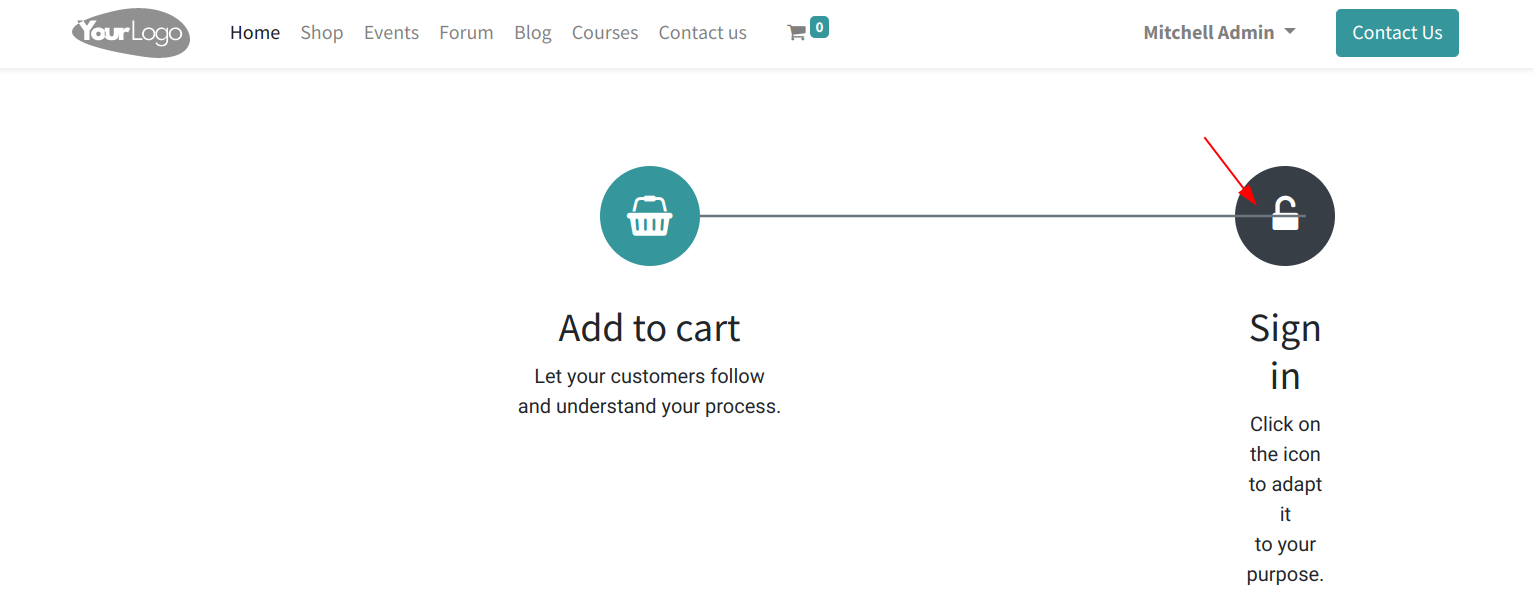 After:  wide. Steps to reproduce the bug: - Drop a block step on a page - Set a width of 10 columns on the first step - Set a width <= 2 columns on the second step => the connector is not well displayed. task-3033126 Before:  After: 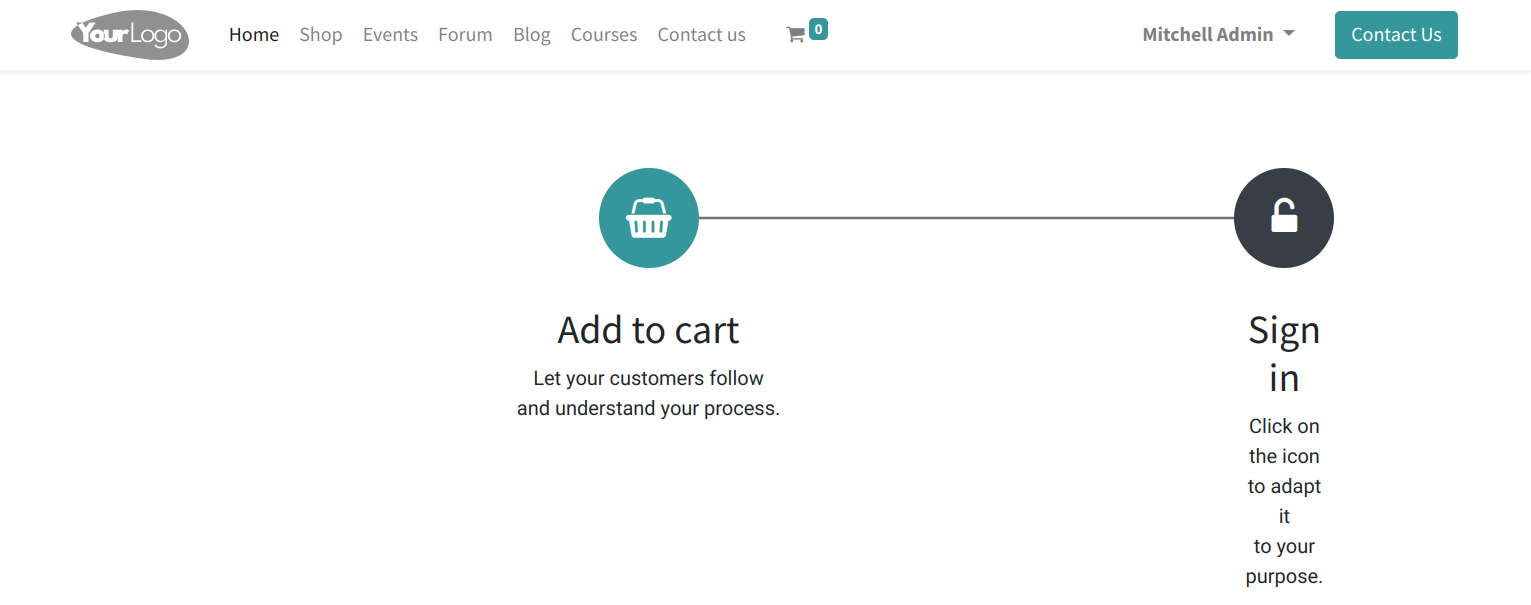 Forward-Port-Of: odoo/odoo#103527
It made the regex much slower in case of non-match, due to backtracking.

Forward-Port-Of: odoo/odoo#106435
Original PR description
It made the regex much slower in case of non-match, due to backtracking. Forward-Port-Of: odoo/odoo#106435
- Commit [1] introduced a "custom" type of button as the only type of button whose background color we are allowed to change. But the option to change any button's background color exists in mass_mailing so we end up with the same option in two different places. This removes that previously existing default option. - If a custom button had a gradient background, clicking in it removed that gradient. That is because that opened the link tools, which updated the DOM before having fetched the cust
Original PR description
- Commit [1] introduced a "custom" type of button as the only type of button whose background color we are allowed to change. But the option to change any button's background color exists in mass_mailing so we end up with the same option in two different places. This removes that previously existing default option.
- If a custom button had a gradient background, clicking in it removed that gradient. That is because that opened the link tools, which updated the DOM before having fetched the custom colors.
- This prevents the removal of styles on non-custom buttons, which the user may have applied to them back when it was possible to apply styles to non-custom buttons.

[1]: https://github.com/odoo/odoo/commit/a010c91b5ee119cf54ed1a68a6ea06b2bc5f3978

task-3096806

---
I confirm I have signed the CLA and read the PR guidelines at www.odoo.com/submit-pr

Forward-Port-Of: odoo/odoo#108281
**Issue:** - Install crm (to have a form view with phone field). - Click crm icon. - Open list view. - Create a new record. - Enter title and phone number. - Click sms button from the right of phone number field. - On the wizard (dialog), enter a message and send. - The wizard is closed but (BUG) the form view returns to the state where a new record is being created. **Solution:** The record containing the new sms message is properly created, however the form view is reloaded
Original PR description
**Issue:**

- Install crm (to have a form view with phone field).
- Click crm icon.
- Open list view.
- Create a new record.
- Enter title and phone number.
- Click sms button from the right of phone number field.
- On the wizard (dialog), enter a message and send.
- The wizard is closed but (BUG) the form view returns to the state where
  a new record is being created.

**Solution:**

The record containing the new sms message is properly created, however
the form view is reloaded with undefined `resId`, thus the form reloaded
as if it is "new".

The simplest fix is to specify in the `model.load` call the `resId` of
the newly created record.


---
I confirm I have signed the CLA and read the PR guidelines at www.odoo.com/submit-pr

Forward-Port-Of: odoo/odoo#108408
Steps to reproduce the bugs: - In edit mode, choose the "contact" header template. - Drag and drop a table of content snippet on the page. - Save the page. - Click on the table of content links. - Bug => the links are not activated correctly. The reason of the bug was that the scrollspy offset (calculated against the header height) was not updating when the header height changed. We did make a new call to scrollspy at the right time but that had no effect because w
Original PR description
Steps to reproduce the bugs:
    - In edit mode, choose the "contact" header template.
    - Drag and drop a table of content snippet on the page.
    - Save the page.
    - Click on the table of content links.
    - Bug => the links are not activated correctly.

The reason of the bug was that the scrollspy offset (calculated against the header height) was not updating when the header height changed.

We did make a new call to scrollspy at the right time but that had no effect because we first had to destroy the existing scrollSpy to be able to make a new call that works.

opw-2951315

Forward-Port-Of: odoo/odoo#108118
Forward-Port-Of: odoo/odoo#104092Steps to reproduce: 1- install any payment acquirer (e.g. stripe) 2- configure the payment acquirer and link it to a journal 3- try to delete the journal 4- the journal can be deleted which will create an internal server error when this payment acquirer is used Bug: There is no restriction on deleting `account.journal` linked to payment acquirers Fix: add a restriction that forces the user to remove the journal from the payment acquirers first OPW-3089006 Forward-Port-Of: od
Original PR description
Steps to reproduce:

1- install any payment acquirer (e.g. stripe)
2- configure the payment acquirer and link it to a journal 3- try to delete the journal
4- the journal can be deleted which will create an internal server error when this payment acquirer is used

Bug:

There is no restriction on deleting `account.journal` linked to payment acquirers

Fix:

add a restriction that forces the user to remove the journal from the payment acquirers first

OPW-3089006

Forward-Port-Of: odoo/odoo#108337
Forward-Port-Of: odoo/odoo#107842
Before this commit, the warning message was below the buttons. Steps to reproduce: - Accounting -> Configuration -> Payment Providers - Select one of them (e.g. Stripe) - Change the state to 'Test Mode' - Try to save Task-ID: 3106197 Related PR: https://github.com/odoo/odoo/pull/107227 Description of the issue/feature this PR addresses: Current behavior before PR: Desired behavior after PR is merged: --- I confirm I have signed the CLA and read the PR guidelines a
Original PR description
Before this commit, the warning message was below the buttons.

Steps to reproduce:
- Accounting -> Configuration -> Payment Providers
- Select one of them (e.g. Stripe)
- Change the state to 'Test Mode'
- Try to save

Task-ID: 3106197

Related PR: https://github.com/odoo/odoo/pull/107227

Description of the issue/feature this PR addresses:

Current behavior before PR:

Desired behavior after PR is merged:


---
I confirm I have signed the CLA and read the PR guidelines at www.odoo.com/submit-pr

Forward-Port-Of: odoo/odoo#108355
Commit [1] refreshed the design of the KEA theme but unfortunately introduced the wrong path to a shape on the s_picture snippet. This used to cause a traceback but [2] fixed it. However, it is still worth correcting the path so that shapes automatically chain under the s_image snippet of that theme. To do so, a simple check is added when the option computes the next shape, and looks for the broken path, if it finds it, it corrects it. Steps to reproduce: - Use the KEA theme - Dro
Original PR description
Commit [1] refreshed the design of the KEA theme but unfortunately
introduced the wrong path to a shape on the s_picture snippet.

This used to cause a traceback but [2] fixed it. However, it is still
worth correcting the path so that shapes automatically chain under the
s_image snippet of that theme.

To do so, a simple check is added when the option computes the next
shape, and looks for the broken path, if it finds it, it corrects it.

Steps to reproduce:
- Use the KEA theme
- Drop the "Picture" snippet
- Drop the text snippet under it
- Enable the background shape option for the text snippet
- A traceback appears.

[1]: https://github.com/odoo/design-themes/commit/88b81d41dadbfaad5d0b36ba2f1c595e309438ba
[2]: https://github.com/odoo/odoo/commit/e985f8ef7a358c5aae9245267e18e65ea8383400

opw-3082292

Forward-Port-Of: odoo/odoo#107224
Description of the issue/feature this PR addresses:

Current behavior before PR:

Desired behavior after PR is merged:


---
I confirm I have signed the CLA and read the PR guidelines at www.odoo.com/submit-pr

Forward-Port-Of: odoo/odoo#106771
Original PR description
Description of the issue/feature this PR addresses: Current behavior before PR: Desired behavior after PR is merged: --- I confirm I have signed the CLA and read the PR guidelines at www.odoo.com/submit-pr Forward-Port-Of: odoo/odoo#106771
**Current behavior before PR:**

On changing style of a list item to normal it wrapped the content in a `<p>`which
results in extra spacing to next list item.

**Desired behavior after PR is merged:**

Now the content is not wrapped in a `<p>`.

Task-2990517

Forward-Port-Of: odoo/odoo#102537
Original PR description
**Current behavior before PR:** On changing style of a list item to normal it wrapped the content in a `<p>`which results in extra spacing to next list item. **Desired behavior after PR is merged:** Now the content is not wrapped in a `<p>`. Task-2990517 Forward-Port-Of: odoo/odoo#102537
When checking if a line in traceability report is unfoldable, `_get_move_lines` is a costly operation and should be executed last when all other conditions are satisfied. Without this change, when opening Traceability report for a LOT used in around 1.3k orders, it takes roughly more than 2mins to render. ```python3 1 0 0.01 @profile def _lines(self, line_id=None, model_id=False, model=False, level=0, move_lines=[], **kw): 1
Original PR description
When checking if a line in traceability report is unfoldable, `_get_move_lines` is a costly operation and should be executed last when all other conditions are satisfied. Without this change, when…
When checking if a line in traceability report is unfoldable, `_get_move_lines` is a costly operation and should be executed last when all other conditions are satisfied.

Without this change, when opening Traceability report for a LOT used in around 1.3k orders, it takes roughly more than 2mins to render.

```python3
1         0         0.01          @profile
                                  def _lines(self, line_id=None, model_id=False, model=False, level=0, move_lines=[], **kw):
1         0         0.0               final_vals = []
1         0         0.01              lines = move_lines or []
1         0         0.0               if model and line_id:
                                          move_line = self.env[model].browse(model_id)
                                          move_lines, is_used = self._get_linked_move_lines(move_line)
                                          if move_lines:
                                              lines = move_lines
                                          else:
                                              # Traceability in case of consumed in.
                                              lines = self._get_move_lines(move_line, line_id=line_id)
1385      0         11.19             for line in lines:
1383      0         3.59                  unfoldable = False
1383      14495     162562.31             if line.consume_line_ids or ( line.lot_id and self._get_move_lines(line) and model != "stock.production.lot"):
1         0         0.0                       unfoldable = True

1383      23        1607.97               final_vals += self._make_dict_move(level, parent_id=line_id, move_line=line, unfoldable=unfoldable)
1         0         0.0               return final_vals

Total:
1         14518     164185.09

```

With this change, as we check other conditions first before checking with `_get_move_lines`, the performance is improve significantly (render in seconds)

```python3
1         0         0.01          @profile
                                  def _lines(self, line_id=None, model_id=False, model=False, level=0, move_lines=[], **kw):
1         0         0.0               final_vals = []
1         0         0.03              lines = move_lines or []
1         0         0.0               if model and line_id:
                                          move_line = self.env[model].browse(model_id]
                                          move_lines, is_used = self._get_linked_move_lines(move_line)
                                          if move_lines:
                                              lines = move_lines
                                          else:
                                              # Traceability in case of consumed in.
                                              lines = self._get_move_lines(move_line, line_id=line_id)
1385      0         8.79              for line in lines:
1383      0         3.35                  unfoldable = False
1383      4         230.8                 if line.consume_line_ids or (model != "stock.production.lot" and line.lot_id and self._get_move_lines(line)):
1         0         0.0                       unfoldable = True

1383      31        1433.17               final_vals += self._make_dict_move(level, parent_id=line_id, move_line=line, unfoldable=unfoldable)
1         0         0.0               return final_vals

Total:
1         35        1676.15
```


---
I confirm I have signed the CLA and read the PR guidelines at www.odoo.com/submit-pr

Forward-Port-Of: odoo/odoo#107884
Forward-Port-Of: odoo/odoo#107677Current behavior: When a global discount is applied, it is considered as a regular orderline when computing the order discounts. Because of this if you applied a coupon and a global discount, the pos would add a discount of infinity value. Steps to reproduce: - Create a promotion with a discount of 10% - Create a product with no taxes - Enable the global discount feature, and make sure the Discount product has a tax set on it. - Create a new order, add the product, apply the promotion, a
Original PR description
Current behavior:
When a global discount is applied, it is considered as a regular orderline when computing the order discounts. Because of this if you applied a coupon and a global discount, the pos would add a discount of infinity value.

Steps to reproduce:
- Create a promotion with a discount of 10%
- Create a product with no taxes
- Enable the global discount feature, and make sure the Discount product has a tax set on it.
- Create a new order, add the product, apply the promotion, and apply the global discount.
- The order will have a discount of infinity value.

opw-3094784
---
I confirm I have signed the CLA and read the PR guidelines at www.odoo.com/submit-pr

Forward-Port-Of: odoo/odoo#108304
Forward-Port-Of: odoo/odoo#107833
The delivery slip of a picking with an operation type where 'Move Entire Packages' is enabled doesn't print the delivery address Steps to reproduce: 1. Go to Settings > Inventory > Operations and enable 'Packages' 2. Go to Inventory > Configuration > Warehouse Management > Operations Type 3. Open operation type 'Delivery Orders' and enable 'Move Entire Packages' 4. Create a new transfer with operation type 'Delivery Orders', add a delivery address and a move and save 5. Mark as todo, put
Original PR description
The delivery slip of a picking with an operation type where 'Move Entire Packages' is enabled doesn't print the delivery address

Steps to reproduce:
1. Go to Settings > Inventory > Operations and enable 'Packages'
2. Go to Inventory > Configuration > Warehouse Management > Operations Type
3. Open operation type 'Delivery Orders' and enable 'Move Entire Packages'
4. Create a new transfer with operation type 'Delivery Orders', add a delivery address and a move and save
5. Mark as todo, put in pack and validate

Solution:
Always use the partner of the `move_lines` in the delivery address

Problem:
The delivery slip always uses the partner of `move_ids_without_package` but there might not be any if the picking uses packages

opw-3091139

Forward-Port-Of: odoo/odoo#108423
Forward-Port-Of: odoo/odoo#107814
Luxembourg added new fields and modified some rules for VAT reports: monthly, simplified, and annual.
- Add new fields
- Adjust formulas

task-2993792


---
I confirm I have signed the CLA and read the PR guidelines at www.odoo.com/submit-pr

Forward-Port-Of: odoo/odoo#108329
Forward-Port-Of: odoo/odoo#104833
Original PR description
Luxembourg added new fields and modified some rules for VAT reports: monthly, simplified, and annual. - Add new fields - Adjust formulas task-2993792 --- I confirm I have signed the CLA and read the PR guidelines at www.odoo.com/submit-pr Forward-Port-Of: odoo/odoo#108329 Forward-Port-Of: odoo/odoo#104833
To reproduce the issue: - Go to website > Add language > Add blocks to your homepage and translate it. - Make translations on the "Contact us" page (or a new custom page). - Install a new app > The translation of the homepage is lost (only on homepage). Explanation: After [1], The `_load_module_terms()` method was updated on website module to copy translations from base to specific views when module translation is loaded. And since [2], the translated field's column is either NUL
Original PR description
To reproduce the issue: - Go to website > Add language > Add blocks to your homepage and translate it. - Make translations on the "Contact us" page (or a new custom page). - Install a new app > The…
To reproduce the issue:

- Go to website > Add language > Add blocks to your homepage and
translate it.
- Make translations on the "Contact us" page (or a new custom page).
- Install a new app > The translation of the homepage is lost (only on
homepage).

Explanation:

After [1], The `_load_module_terms()` method was updated on website
module to copy translations from base to specific views when module
translation is loaded. And since [2], the translated field's column is
either NULL or a JSON dict mapping language codes to text (the field's
value in the corresponding language).

To explain what happens exactly when new app is installed, let's suppose
we want to load module translation for the config {'en_US', 'fr_BE'} in
the following situations:

S1 (e.g. "Contact us" page):
-=-=-=-=-=-=--=-=-=-=-=-=-=-=

```
generic_arch_db = {
'en_US': '<div>Generic (EN)</div>',
'fr_BE': '<div>Generic (FR)</div>'
}

specific_arch_db = {
'en_US': '<div>Specific (EN)</div>',
'fr_BE': '<div>Specific (FR)</div>'
}
```

`_load_module_terms()` will copy translations for 'fr_BE' from generic
to specific `arch_db` (using generic translation dictionary).

result:

```
new_specific_arch_db = {
'en_US': '<div>Specific (EN)</div>',
'fr_BE': '<div>Updated Specific (FR)</div>'
}
```

S2 (new custom page):
-=-=-=-=-=-=--=-=-=-=-=-

```
generic_arch_db = NULL

specific_arch_db = {
'en_US': '<div>Specific (EN)</div>',
'fr_BE': '<div>Specific (FR)</div>'
}
```

result:

Nothing to do here (only specific version), the specific translation
will not be updated.

S3 (e.g. website homepage):
-=-=-=-=-=-=--=-=-=-=-=-=-=-=-

The generic view has no translated `arch_db` (only the 'en_US' version):

```
generic_arch_db = {'en_US': '<div>Generic (EN)</div>'}

specific_arch_db = {
'en_US': '<div>Specific (EN)</div>',
'fr_BE': '<div>Specific (FR)</div>'
}
```

`_load_module_terms()` will copy generic translations only for languages
available on "generic_arch_db" and the 'fr_BE' version will be lost.

result:

`new_specific_arch_db = {'en_US': '<div>Specific (EN)</div>'}`

The goal of this commit is to prevent this behaviour by keeping the
specific translated `arch_db` even when the generic value has no content
for the translation language.

Remark: This behaviour occurred while loading module translations,
as a consequence, the specific translations are also lost when the
website module is updated.

[1]: https://github.com/odoo/odoo/commit/94db81d8d28c4cbc7b51ae1688c9362042ee3619
[2]: https://github.com/odoo/odoo/commit/ef00294e7189359c47638c4a71626f1937395edb

opw-3083480

Forward-Port-Of: odoo/odoo#107822Before this commit: -project_update description sales section show only service type SOL, So, in this commit fix domain for sales section of description. task-2992368 Description of the issue/feature this PR addresses: Current behavior before PR: Desired behavior after PR is merged: --- I confirm I have signed the CLA and read the PR guidelines at www.odoo.com/submit-pr Forward-Port-Of: odoo/odoo#103488
Original PR description
Before this commit:
-project_update description sales section show only service type SOL,
So, in this commit fix domain for sales section of description.

task-2992368

Description of the issue/feature this PR addresses:

Current behavior before PR:

Desired behavior after PR is merged:


---
I confirm I have signed the CLA and read the PR guidelines at www.odoo.com/submit-pr

Forward-Port-Of: odoo/odoo#103488
Issue1: Currently, the translation alert is displayed inside the form view of the task in the project-sharing view. So in this commit hide the translation alert on sharing a view of the task. Issue2: Currently, the form sheet of the note is not displayed in full screen due to the max-width set as 1320px inside the o_form_sheet. So in this commit set the max-width as 100% to display the sheet view in the whole sheet area. Issue3: Currently, when the alias name is too long then it was g
Original PR description
Issue1:
Currently, the translation alert is displayed inside the form view of the task in the project-sharing view.
So in this commit hide the translation alert on sharing a view of the task.

Issue2:
Currently, the form sheet of the note is not displayed in full screen due to the max-width set as 1320px inside the o_form_sheet.
So in this commit set the max-width as 100% to display the sheet view in the whole sheet area.

Issue3:
Currently, when the alias name is too long then it was going to display in the new line and UI is broken in the project kanban card.
So in this commit, if alias_name is too long then truncate the text and display the ellipsis for the name in the project kanban card.

Issue4:
Currently, the remaining hour's border is not displayed in the project kanban view.
so in this commit, added the border class to display the colored border on the project kanban view.

task-3052597

Forward-Port-Of: odoo/odoo#106808
When cancelling a quotation using the portal, the state will remain on
sent but the message given with it will be displayed on the chatter.

This bug is caused by the framework trying to display a cancellation
wizard.

opw-3084216

---
I confirm I have signed the CLA and read the PR guidelines at www.odoo.com/submit-pr

Forward-Port-Of: odoo/odoo#107327
Original PR description
When cancelling a quotation using the portal, the state will remain on sent but the message given with it will be displayed on the chatter. This bug is caused by the framework trying to display a cancellation wizard. opw-3084216 --- I confirm I have signed the CLA and read the PR guidelines at www.odoo.com/submit-pr Forward-Port-Of: odoo/odoo#107327
Because of the multi-company record rule on data_merge_record, each search on `env['data_merge.record']` (without sudo) will call `_search_company_id`. That's because data_merge.record.company_id is a non-stored computed field. This method fetches all records (`active_test=False`) on the data_merge_record table then calls filtered on the resulting recordset. This induces two performance bottlenecks. One, a filtered on a potentially huge amount of records (data_merge_record can grow quite big) ca
Original PR description
Because of the multi-company record rule on data_merge_record, each search on `env['data_merge.record']` (without sudo) will call `_search_company_id`. That's because data_merge.record.company_id is…
Because of the multi-company record rule on data_merge_record, each search on `env['data_merge.record']` (without sudo) will call `_search_company_id`. That's because data_merge.record.company_id is a non-stored computed field. This method fetches all records (`active_test=False`) on the data_merge_record table then calls filtered on the resulting recordset. This induces two performance bottlenecks. One, a filtered on a potentially huge amount of records (data_merge_record can grow quite big) can lead to slowdowns. Two, since company_id is a computed field, accessing this field inside the filtered lambda function means to recompute the field value. So, if we are filtering 300K records on company_id, the corresponding compute function will be called 300 times.

Optimizing that in stable is not really straightforward, as the easiest solution (done in master odoo/enterprise#33768) would be to store the company_id field. Here we avoid calling the compute function of company_id and instead we "manually" build a subquery by combining custom SQL and Query objects constructed with the _search method. Injecting the resulting Query in a domain of the form `[('id', 'in', Query)]` leads to significant speedups in large databases.

#### speedup

N.B: This benchmark was done before the merge of odoo/enterprise#33678. The benchmark being a bit long
to carry out, I left the old version here. From a few tests that I made, the post-merged version performs the same
or worse than the pre-merged one used for benchmarking. The Before PR/After PR speedup gains should therefore
be the same or better than what's written hereunder.

Because of the way the subquery is generated, the overall performances depends
on the number of records, the number of distinct res_model_names and the number of res_model with a company_id field.

##### Number of records
Customer database with 348 513 data_merge_records, 8 distinct res_model_names, 5 res_model_names w/o company_id field, 3 res_model_names w company_id field.

Opening Data Cleaning App: search_panel_select_range/web_read_group timing
| Number of records | Before PR | After PR    |
|:------------------------:|:---------------:|:--------------:|
|10 000      | 1.8s/3s   |  125ms/1.8s |
|25 000      | 7s/10s    |  125ms/2s   |
|50 000      | 10s/20s   |  400ms/6s   |
|100 000     | 30s/1m    |  500ms/7.5s |
|200 000     | 1m25/2m48 |  600ms/12s  |
|348 513     | 3m40/7m30 |  1.8s/16s   |

For the next two sections, only the After PR timings are shown. This is to showcase the impact of the number of res_model with/without company on the request timings. The Before PR execution time is the same as above for 200 000 records.

##### Number of res_models without company_id

Testing database with 200 000 data_merge_records, 8 distinct res_model_names, 4 res_model_names w/o company_id field, 4 res_model_names w company_id field. The number of data_merge_records is kept constant (160 000 w company field records + uniform distribution for the remaining 40 000 records without company_id).

|Number of model w/o company | After PR   |
|:-----------------------------------------:|:-------------:|
|1            | 400ms/4.5s |
|2            | 400ms/4.7s |
|3            | 400ms/5.2s |
|4            | 400ms/5.6s |

##### Number of res_models with company_id

The number of data_merge_records is kept constant (160 000 without company field records + uniform distribution for the remaining 40 000 records with company_id).

|Number of model w company | After PR    |
|:--------------------------------------:|:--------------:|
|1           | 200ms/2.5s  |
|2           | 280ms/3.2s  |
|3           | 325ms/4.1s  |
|4           | 350ms/5.25s  |


opw-2968536

Forward-Port-Of: odoo/enterprise#35145
Forward-Port-Of: odoo/enterprise#33773Before this commit, in the project sharing list view, the color code of the 'remaining hours' field was always displayed as a warning when the remaining hours are less than 100%. So in this commit, the color code of the 'remaining hours' field is displayed as a warning, if the remaining hours are between 80% to 100% else display as normal. task-3049636 Forward-Port-Of: odoo/enterprise#33456
Original PR description
Before this commit, in the project sharing list view, the color code of the
'remaining hours' field was always displayed as a warning when the remaining hours
are less than 100%.

So in this commit, the color code of the 'remaining hours' field is displayed
as a warning, if the remaining hours are between 80% to 100% else display as normal.

task-3049636

Forward-Port-Of: odoo/enterprise#33456
Steps: - go to Accounting > Reporting > Budget Analysis - add a group by "Budgetary Position" on the rows - insert the pivot in a new spreadsheet => the custom (nested) group is not displayed The default group "Budgets" defined in the search bar (`searchParams`) is used to load the spreadsheet instead of the final groups https://github.com/odoo/odoo/blob/aefbd7d942f12ab32fed8331b9941d778b1c22a4/addons/web/static/src/views/pivot/pivot_model.js#L691 opw 3105399 Forward-Port-Of: o
Original PR description
Steps:

- go to Accounting > Reporting > Budget Analysis
- add a group by "Budgetary Position" on the rows
- insert the pivot in a new spreadsheet

=> the custom (nested) group is not displayed

The default group "Budgets" defined in the search bar (`searchParams`) is used to load the spreadsheet instead of the final groups

https://github.com/odoo/odoo/blob/aefbd7d942f12ab32fed8331b9941d778b1c22a4/addons/web/static/src/views/pivot/pivot_model.js#L691

opw 3105399

Forward-Port-Of: odoo/enterprise#35118
Luxembourg added new fields and modified some rules for VAT reports: monthly, simplified, and annual.
This commit only impacts monthly and yearly simplified reports. The annual report will be updated in a separate PR.

task-2993792

Forward-Port-Of: odoo/enterprise#35109
Forward-Port-Of: odoo/enterprise#33558
Original PR description
Luxembourg added new fields and modified some rules for VAT reports: monthly, simplified, and annual. This commit only impacts monthly and yearly simplified reports. The annual report will be updated in a separate PR. task-2993792 Forward-Port-Of: odoo/enterprise#35109 Forward-Port-Of: odoo/enterprise#33558
open any contract, from action button, click Index Contract(s), in the opening wizard, if display_warning field value is tree, the displayed alert and the first field in the form is getting overlapped. before: 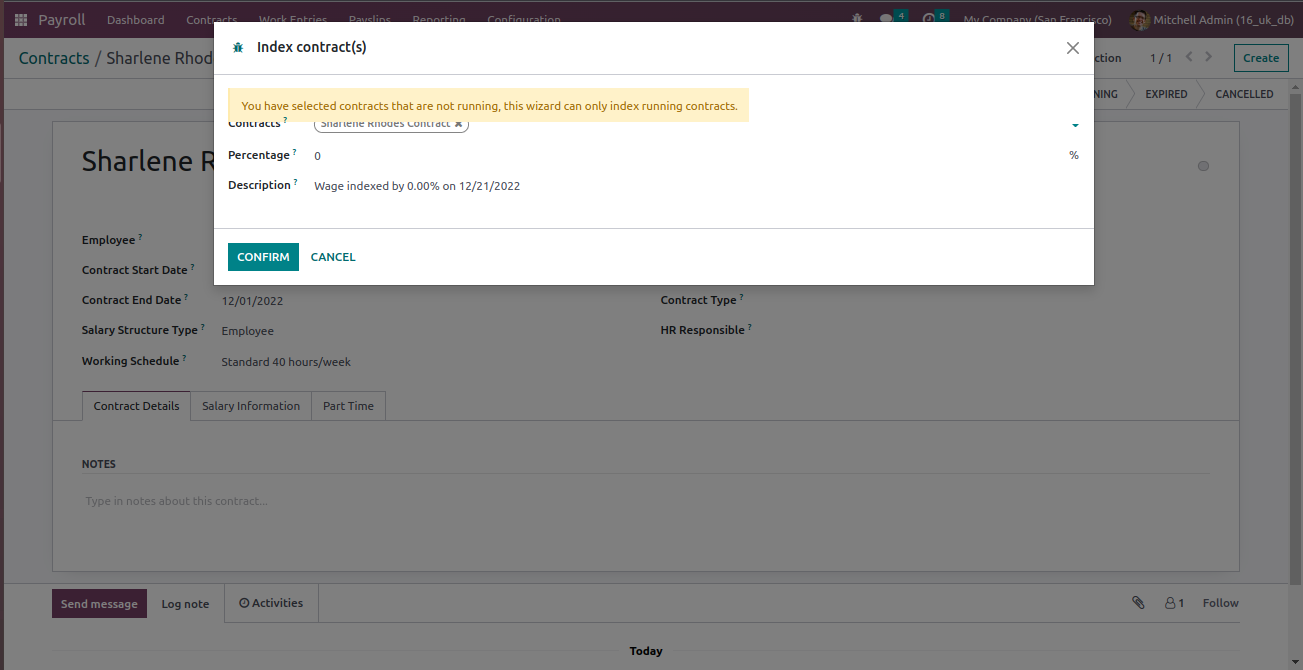 after: , in the opening wizard, if display_warning field value is tree, the displayed alert and the first field in the form is getting overlapped. before:  after: 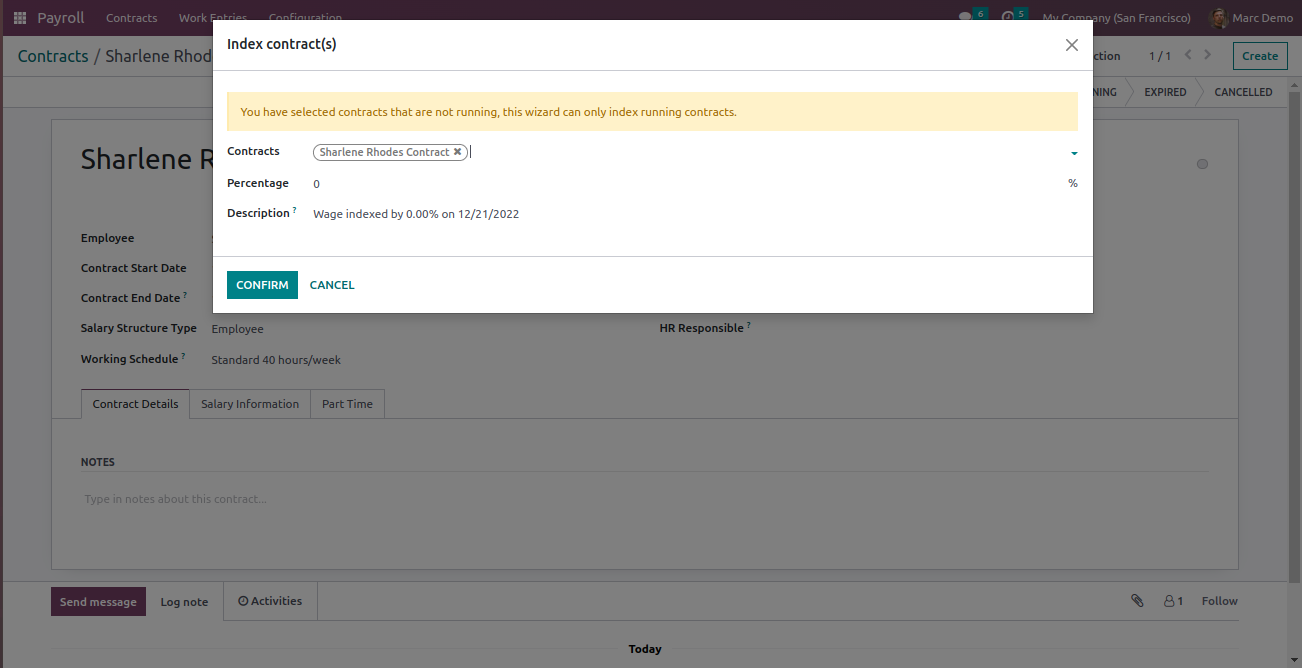 Forward-Port-Of: odoo/enterprise#35129
Currently width of amount_python_compute field is 300% so scrollbar is appeared. In this commit I have
changed 100% instead of 300%.

Steps to reproduce:
  - Installed hr_payroll
  - Go to Salary Structures
  - Open the Salary Rules

Forward-Port-Of: odoo/enterprise#35133
Original PR description
Currently width of amount_python_compute field is 300% so scrollbar is appeared. In this commit I have changed 100% instead of 300%. Steps to reproduce: - Installed hr_payroll - Go to Salary Structures - Open the Salary Rules Forward-Port-Of: odoo/enterprise#35133
Via odoo, post an image on instagram. Traceback, 'ir.http' object has no attribute '_placeholder_path'. Fine tunning of 99a8c96, the code in social_instagram was using the API of an early iteration of `ir.binary`. The API was later modified but the code inside of social_instagram wasn't updated accordingly. The final `ir.binary` API exposes some methods: `get_stream_for` for common documents and `get_image_stream_for` for images. The two methods take an attachment or a record with a binary
Original PR description
Via odoo, post an image on instagram. Traceback, 'ir.http' object has no attribute '_placeholder_path'. Fine tunning of 99a8c96, the code in social_instagram was using the API of an early iteration…
Via odoo, post an image on instagram. Traceback, 'ir.http' object has no attribute '_placeholder_path'.

Fine tunning of 99a8c96, the code in social_instagram was using the API of an early iteration of `ir.binary`. The API was later modified but the code inside of social_instagram wasn't updated accordingly.

The final `ir.binary` API exposes some methods: `get_stream_for` for common documents and `get_image_stream_for` for images. The two methods take an attachment or a record with a binary field. They both return a `odoo.http.Stream` object that hold all (and only) the information needed to create a HTTP response used to stream the file.

In an early (unpublished) iteration, `get_stream_for` was capable of doing both common and image documents stuff, hence the `placeholder` parameter. The last (published) iteration splitted the method in two and the `placeholder` parameter became optional: it uses what was `request.env['ir.http']._placeholder_path()` by default.

opw-3094682

Forward-Port-Of: odoo/enterprise#34913
Before this commit, the modified tests sometimes failed on runbot. This is because we quickly toggled twice the home menu, and expected the underlying view to be displayed right after the second toggle. However, the toggle function of the home_menu service waits for an extra tick at each toggle for the url to be updated, and the toggle operation is done in a mutex to prevent overlapping toggles. As a consequence, in the faulty tests, it sometimes had to wait a bit before toggling the second t
Original PR description
Before this commit, the modified tests sometimes failed on runbot. This is because we quickly toggled twice the home menu, and expected the underlying view to be displayed right after the second toggle.

However, the toggle function of the home_menu service waits for an extra tick at each toggle for the url to be updated, and the toggle operation is done in a mutex to prevent overlapping toggles. As a consequence, in the faulty tests, it sometimes had to wait a bit before toggling the second time, and thus the home menu was still displayed when we expected the underlying view to be back.

Fixing runbot errors 7120 and 4848

Forward-Port-Of: odoo/enterprise#35131
**Steps to reproduce the bug:** - Enable “Workorders” in the mrp settings - Create a storable product “P1”: - tracked: by serial number - BoM: - Operation: - OP1 - Components: - C1: tracked by serial number and consumed in “OP1” - C2: tracked by serial number and consumed in “OP1” - update the quantity of C1 and C2 with 3 serial number “SN1”, “SN2”, “SN2” - Create a MO to produce 3 unit of “P1” - Start the workorder - the S
Original PR description
**Steps to reproduce the bug:** - Enable “Workorders” in the mrp settings - Create a storable product “P1”: - tracked: by serial number - BoM: - Operation: - OP1 - Components: - C1: tracked by serial…
**Steps to reproduce the bug:**
- Enable “Workorders” in the mrp settings
- Create a storable product “P1”:
    - tracked: by serial number
    - BoM:
       - Operation:
            - OP1
        - Components:
            - C1: tracked by serial number and consumed in “OP1”
            - C2: tracked by serial number and consumed in “OP1”
- update the quantity of C1 and C2 with 3 serial number “SN1”, “SN2”,
“SN2”
- Create a MO to produce 3 unit of “P1”
- Start the workorder
- the Serial number “SN1” is automatlicaly set
- finish the first production, validate and record the production
- The MO gets split (Backorder) and the next one is started
- The Component consumption step proposes (prefills the SN field with
the last one “SN3” instead of “SN2”
- Finish the second production and start the last one
-  the “SN3” is prefilled a 2nd time while it has already been used

**Problem:**
When the backorder is created and confirmed, the workorder is also confirmed:
https://github.com/odoo/odoo/blob/7632110aa87da2a84e33506174f6dbb34284da6a/addons/mrp/models/mrp_production.py#L1212

A quality check is then created with the correct SN:
https://github.com/odoo/enterprise/blob/b85075efb624deaa3e9ea14cb94bc8a675ce3965/mrp_workorder/models/mrp_workorder.py#L725

https://github.com/odoo/enterprise/blob/15.0/mrp_workorder/models/mrp_workorder.py#L439


But another `qualit.check` with the latest Serial number “SN3” is set as `current_quality_check_id` which is wrong

https://github.com/odoo/enterprise/blob/76817ab5f4a5c40e9a7fc05c8dc3e2b775d7e81a/mrp_workorder/models/mrp_workorder.py#L514


opw-2976491

Forward-Port-Of: odoo/enterprise#34854
Forward-Port-Of: odoo/enterprise#34475Steps to reproduce: - Go to the Appraisal app and create an appraisal for an employee. - Change your timezone from users and from the browser to match, i.e the west coast of the US. - Create a meeting with this employe at a specific date and time. (that will be a different day for a certain timezone), like for example if we create a meeting for 19:00 in the west coast of the US for the 19, it will be the 20th in Europe. - Now check the smart button date. Issue: The smart button wil
Original PR description
Steps to reproduce:

- Go to the Appraisal app and create an appraisal for an employee.
- Change your timezone from users and from the browser to match, i.e the west coast of the US.
- Create a meeting with this employe at a specific date and time. (that will be a different day for a certain timezone), like for example if we create a meeting for 19:00 in the west coast of the US for the 19, it will be the 20th in Europe.
- Now check the smart button date.

Issue:

The smart button will not match the date that we have in the calendar as it will always be computed in UTC.

Solution:

Add the timezone of the user to the date that we are computing so we get the proper date for each user timezone.

opw-3075283

Forward-Port-Of: odoo/enterprise#35107