Thursday, January 5, 2023
19 changes · master
New functionality added to Odoo
Adds Kazakhstan-specific Balance Sheet and Profit and Loss reports based on local regulatory requirements. This helps businesses operating in Kazakhstan prepare standard financial statements more easily and consistently within Odoo.
Original PR description
Adds the Balance Sheet and Profit and Loss reports according to:
https://adilet.zan.kz/rus/docs/V1700015384

task-2693102
Enhancements to existing features
SEPA Direct Debit payments are now restricted to Euro by default, matching the official requirements for this payment method. This helps prevent users from setting up direct debit payments in unsupported currencies and reduces payment processing issues.
Original PR description
Before this commit, all currencies were accepted in Odoo even though SDD forces all payments to be in Euro. This commit limits the available / supported currency list to this only currency.

task-2926016

See also:
- https://github.com/odoo/odoo/pull/101018
- https://github.com/odoo/documentation/pull/2788
- https://github.com/odoo/upgrade/pull/4069
Resolved issues and error corrections
This fix makes input fields use a transparent background consistently, preventing unwanted white blocks from appearing when users hover over table rows. It aligns the Enterprise interface with the related Community change for a more polished and consistent visual experience.
Original PR description
Input in enterprise have a transparent background while  in community the background is white. This background is visible while hovering on the table.

This commit sets the background variable to transparent for the inputs  in community and remove the variable override in enterprise.

Task-3094005

Community PR: https://github.com/odoo/odoo/pull/107385
Code cleanup and technical improvements
The Point of Sale IoT module was updated to stay aligned with recent Point of Sale interface restructuring. This helps preserve existing IoT-related POS controls and debugging tools after internal changes, with no expected functional change for users.
Original PR description
This PR adapts the code in pos_iot to the refactoring in the community PR: https://github.com/odoo/odoo/pull/108891
Miscellaneous changes
What is the current behavior that you observe? If we change the quantity then the "should be paid" field is set to "exception". But if we change the price it stays "yes". What would be your expected behavior in this case? According to the documentation, "if you edit a draft bill to increase the billed quantity, change the price, or add other products, the Should Be Paid status is set to Exception." cf. https://www.odoo.com/documentation/master/applications/inventory_and_mrp/purchase/man
Original PR description
What is the current behavior that you observe?

If we change the quantity then the "should be paid" field is set to "exception". But if we change the price it stays "yes".

What would be your expected behavior in this case?

According to the documentation, "if you edit a draft bill to increase the billed quantity, change the price, or add other products, the Should Be Paid status is set to Exception." cf. https://www.odoo.com/documentation/master/applications/inventory_and_mrp/purchase/manage_deals/control_bills.html#determine-when-to-pay-with-3-way-matching

opw-3090755

Forward-Port-Of: odoo/enterprise#35070
Forward-Port-Of: odoo/enterprise#35041
This update adds missing Spanish translations in the Mexican reporting area, making the interface clearer and more complete for Spanish-speaking users. It helps improve localization consistency across related accounting reports without changing core business workflows.
Original PR description
When looking at the PO file of l10n_mx_reports, I noticed that some translation were missing, since i'm doing the translation of the community module in this PR : https://github.com/odoo/odoo/pull/108725. I've decided to add the missing entries.

task-id: 3089239
The map view styling was adjusted to better align with Bootstrap standards used across Odoo. This helps keep the interface consistent and easier to maintain, with a minor visible impact for users of the map feature.
Original PR description
Task ID: 2072145
Kanban card dropdown menus are now defined separately from the main card layout across multiple Odoo apps. This makes the interface structure more consistent and easier to maintain, helping reduce future customization and upgrade issues.
Original PR description
This commit separate the templates, one for the card and another one for
the menu (the ellipsis dropdown).

The new template, called 'kanban-menu', will only contain the dropdown.
Note that, this behaviour is the same as the one used for the kanban
tooltips.

task-id: 3096776
Bank statement imports now support Excel file formats in addition to CSV, QIF, and CAMT. This makes it easier for businesses to upload statements received from banks in XLS or XLSX format without converting them first.
Original PR description
When importing bank statement in xls and xlsx format, it currently doesn't work. This PR aims at allowing the import of bank statement files in xls and xlsx format. It is so far possible by default for CSV, QIF and CAMT. Most of the code is simply copied from the account_bank_statement_import_csv module, with minor adjustments to fit the xls and xlsx file support and no collision between the 2 modules (csv and xlsx)

task id : 3086543


---
I confirm I have signed the CLA and read the PR guidelines at www.odoo.com/submit-pr
This fix adds a missing identifier to a Helpdesk company access rule so it can be managed consistently. An upgrade step prevents duplicate rules from being created, reducing the risk of configuration clutter or unexpected access behavior after updates.
Original PR description
The record rule Team: multi-company is missing id in the security file therefore we add the id to the record for consistency. Since adding such attribute will create a new record rule, an upgrade script was added to prevent having a duplicated record rule

opw-3096957
This fixes internal report tests that failed after German accounting labels were translated into English. It helps keep the German SKR03 localization reliable while supporting the standard practice of developing modules in English first.
Original PR description
Ideally, we develop in English any localization (then translate to the domestic language, in this case German) All the module has been translated in english in this PR: https://github.com/odoo/enterprise/pull/34313

By translating the skr03 module this test was broken. Since it search on the name in german that is now in english.

task-id: 3059115
This change reverses a prior update that moved several features to a newer location-detection service. It helps keep appointment scheduling and document signing behavior aligned with the current stable approach while avoiding issues from the reverted update.
Original PR description
This reverts commit bc80577c6a95b07effc5bf9fe6c78cdedf96ba88 #27399
Steps to reproduce:
- Open the Bank Reconciliation in list view
- Create a new line
- Create a new Statement
- Save the statement you just created => The form view does not close
If you close the form view, the statement has been created but is not filled in the field

To fix it, we just remove the footer, as the normal form view does it well.

task-3116961

Forward-Port-Of: odoo/enterprise#35370
Original PR description
Steps to reproduce: - Open the Bank Reconciliation in list view - Create a new line - Create a new Statement - Save the statement you just created => The form view does not close If you close the form view, the statement has been created but is not filled in the field To fix it, we just remove the footer, as the normal form view does it well. task-3116961 Forward-Port-Of: odoo/enterprise#35370
Reproduction: 1. Change to "My Belgium company" 2. Change the product form (acoustic bloc screen) on inventory tab, add any country to the field "Origin of goods" 3. Create a sales order, select a customer within Europe but not the same country as the sender (Bloem GmbH), select the acoustic bloc as a product, click in add shipping, select DHL EU --> International 4. Get rate, confirm sales order 5. Try to validate the delivery Reason: the ManufactureCountryCode should be set as the code
Original PR description
Reproduction:
1. Change to "My Belgium company"
2. Change the product form (acoustic bloc screen) on inventory tab, add any country to the field "Origin of goods"
3. Create a sales order, select a customer within Europe but not the same country as the sender (Bloem GmbH), select the acoustic bloc as a product, click in add shipping, select DHL EU --> International
4. Get rate, confirm sales order
5. Try to validate the delivery

Reason: the ManufactureCountryCode should be set as the code of the country instead of the country itself. The issue appears in the initial commit: https://github.com/odoo-dev/enterprise/commit/5a62c44e39af93bb96605106dfaea2fc871562e7 And should be forward ported to master

Fix: set the value as the code of the country

Initial fix in 16: https://github.com/odoo-dev/enterprise/commit/5a62c44e39af93bb96605106dfaea2fc871562e7
Fix in saas-15.2: https://github.com/odoo/enterprise/pull/35178

opw-3119859

Forward-Port-Of: odoo/enterprise#35452
Before this commit, if the helpdesk module was installed, the title of the salesperson data was changed from "Your contact" to "Salesperson" for portal users. This did not add any value and the title of the tab also became "Salesperson" which we do not want. This commit allows to keep the title "Your contact" above the salesperson information and to not change the tab title. Steps to reproduce the problem fixed by this commit: - Run Odoo enterprise with helpdesk and sales installed. - As th
Original PR description
Before this commit, if the helpdesk module was installed, the title of the salesperson data was changed from "Your contact" to "Salesperson" for portal users. This did not add any value and the title…
Before this commit, if the helpdesk module was installed, the title of the salesperson data was changed from "Your contact" to "Salesperson" for portal users. This did not add any value and the title of the tab also became "Salesperson" which we do not want. This commit allows to keep the title "Your contact" above the salesperson information and to not change the tab title. Steps to reproduce the problem fixed by this commit: - Run Odoo enterprise with helpdesk and sales installed. - As the admin, create a helpdesk ticket with Joel Willis (portal user) as the customer and save. - Click on Joel Willis, select the "Sales & Purchases" tab and set a salesperson. => Log in as Joel Willis and on /my, you will have "Salesperson" as the title of the tab. This bad behavior is due to [this commit] that added a title above the salesperson information. But with this change the title of the tab was also impacted. Then [this other commit] added a default title above the salesperson information. We can be satisfied with this default title which does not alter the title of the tab. [this commit]: https://github.com/odoo/enterprise/commit/700e9dec4a5c9fca354e063d6a85b0514832c84c [this other commit]: https://github.com/odoo/odoo/commit/d5c66ca1fa5d0f364241636bd502342c1d4ee9ac opw-3103718 Before: 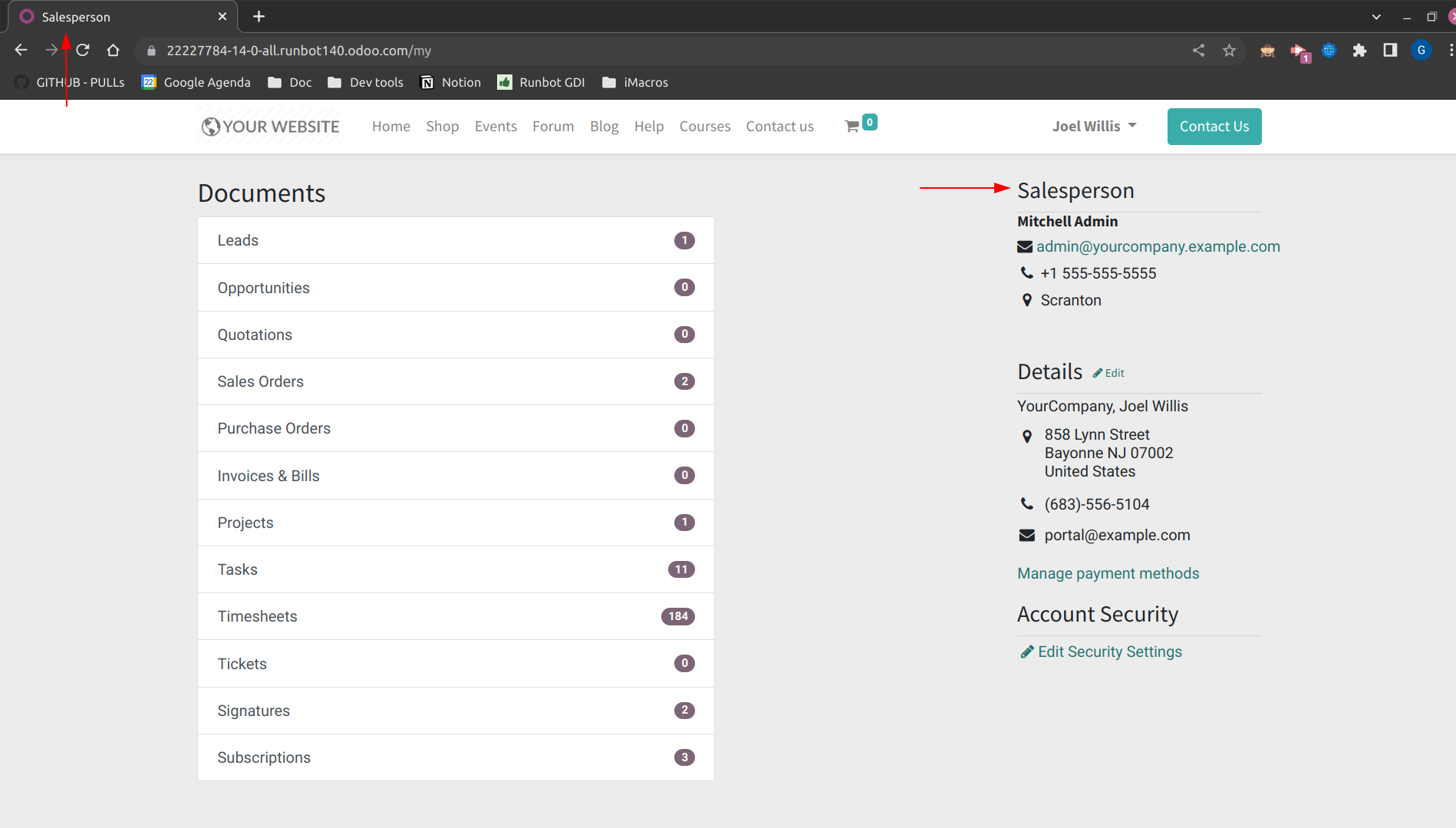 After: 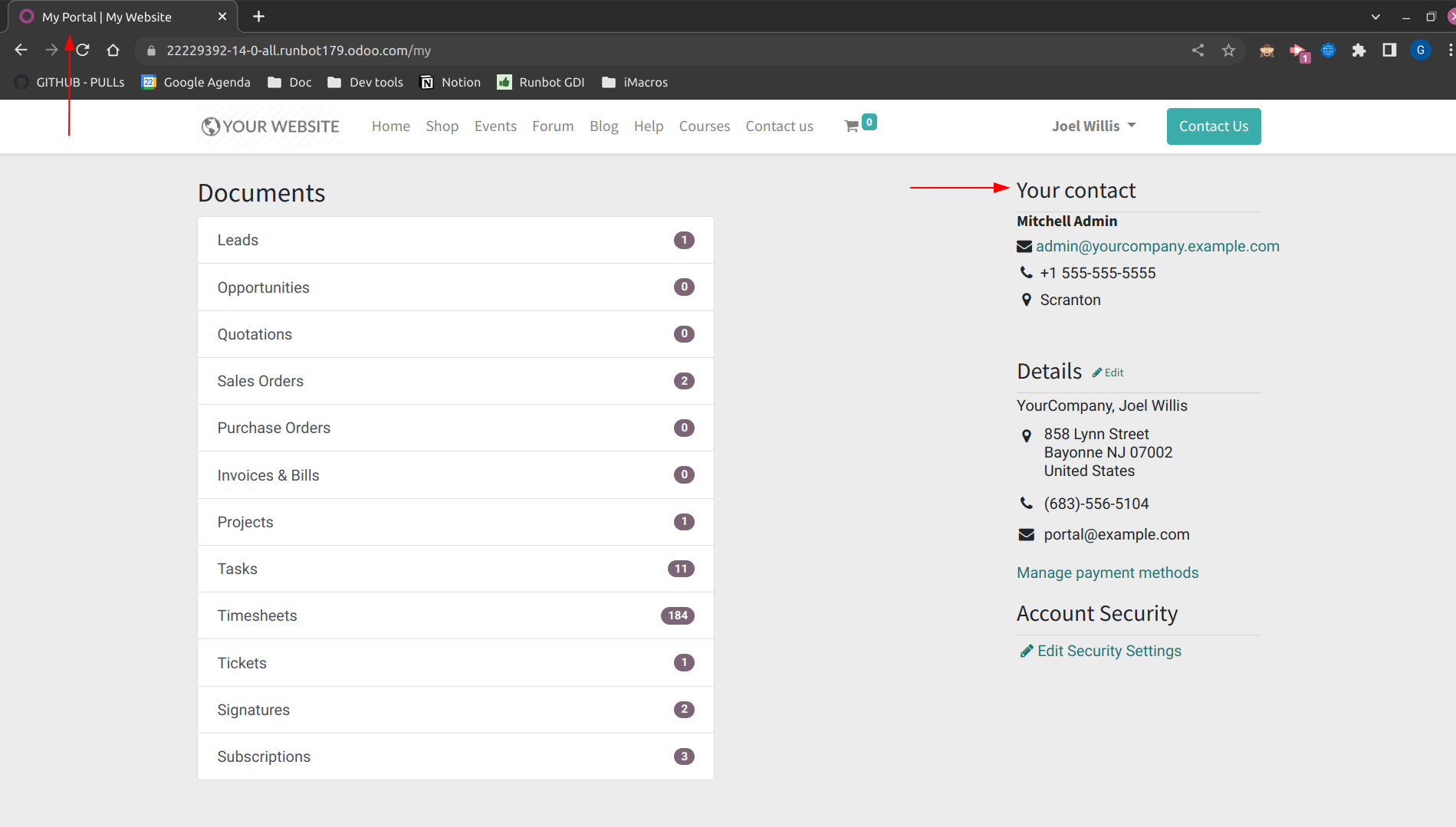 Forward-Port-Of: odoo/enterprise#35240
Steps to reproduce: - install "sale_management", "stock" and "timesheet_grid"; - go to "Decimal Accuracy" tab; - set "Product Unit of Measure" to 6 digits; - got to "UoM Categories" tab; - in "Working Time", set rounding precision for Hours to 0.00001; - got to Timesheets app. Issue: A traceback appears. Cause: The value of `company.timesheet_encode_uom_id.rounding` is `1e-05`. Solution: Take into account the scientific notations. opw-3114422 Forward-Port-Of: odoo/enterpris
Original PR description
Steps to reproduce:
- install "sale_management", "stock" and "timesheet_grid";
- go to "Decimal Accuracy" tab;
- set "Product Unit of Measure" to 6 digits;
- got to "UoM Categories" tab;
- in "Working Time", set rounding precision for Hours to 0.00001;
- got to Timesheets app.

Issue:
A traceback appears.

Cause:
The value of `company.timesheet_encode_uom_id.rounding` is `1e-05`.

Solution:
Take into account the scientific notations.

opw-3114422

Forward-Port-Of: odoo/enterprise#35450
## Current behaviour Clicking an on an line in the tree view of the closed ticket analysis doesn't do anything. ## Expected behaviour Should redirect to the form view of the ticket that was clicked. ## Steps to reproduce - Install Helpdesk - Go to Helpdesk > Closed Tickets > click on a ticket - Nothing happens ... ## Reason for the problem The action that loads the closed tickets is not sending the form view from the server. ## Fix Add the form view in the action definition.
Original PR description
## Current behaviour
Clicking an on an line in the tree view of the closed ticket analysis doesn't do anything.

## Expected behaviour
Should redirect to the form view of the ticket that was clicked.

## Steps to reproduce
- Install Helpdesk
- Go to Helpdesk > Closed Tickets > click on a ticket
- Nothing happens ...

## Reason for the problem
The action that loads the closed tickets is not sending the form view from the server.

## Fix
Add the form view in the action definition.

## Affected versions
- saas-15.2
- saas-15.3
- 16.0
- master
---
opw-3112442

Forward-Port-Of: odoo/enterprise#35339
This commit allow user to use subscription as template. They can now copy subscription without keeping the link to the original sub.

If you want to copy a renewal with #34496

Task-id : 3080967

Forward-Port-Of: odoo/enterprise#34990
Original PR description
This commit allow user to use subscription as template. They can now copy subscription without keeping the link to the original sub. If you want to copy a renewal with #34496 Task-id : 3080967 Forward-Port-Of: odoo/enterprise#34990
currently on accessing the hr.referral.report model, the bread crump is shown as hr.referral.report,2 as no rec_name defined for the model.

Referrals -> Reporting -> Switch to graph view and click on any data in graph, and click and open record from list view.

Forward-Port-Of: odoo/enterprise#34624
Original PR description
currently on accessing the hr.referral.report model, the bread crump is shown as hr.referral.report,2 as no rec_name defined for the model. Referrals -> Reporting -> Switch to graph view and click on any data in graph, and click and open record from list view. Forward-Port-Of: odoo/enterprise#34624