Monday, January 9, 2023
56 changes · master
Enhancements to existing features
Accounting users can now display the total amount in the original transaction currency even when the company currently uses only one active currency. This helps businesses distinguish older invoices, bills, and payments that were made in currencies that are no longer active.
Original PR description
…a mono-currency DB

Description of the issue/feature this PR addresses: Currently, when a company is in a mono-currency environment, they can't display the total amount in currency when looking at invoices, payments, vendor bills...
This could be a problem in a situation where the company currency is, for example dollars; at one point in time, transactions were made in both dollars and euros and now only the dollar currency is activated. The user wouldn't be able to differentiate between those transactions anymore.

Current behavior before PR: The user can't show the total amount in currency or the currency on payments when in a mono-currency environment.

Desired behavior after PR is merged: The user is able to show the total amount in currency and the currency on payments even in a mono-currency environment.

task-3097112
---
I confirm I have signed the CLA and read the PR guidelines at www.odoo.com/submit-pr
This update removes a duplicate menu name definition in CRM because the same name is already provided by the Contacts area. This makes future menu name updates easier and reduces unnecessary configuration overlap without changing how users work.
Original PR description
before this commit the name assigned for the res_partner_menu_config menu from contacts and crm module is same, and thus removing the writing of same name again from crm module.

---
I confirm I have signed the CLA and read the PR guidelines at www.odoo.com/submit-pr
Autocomplete fields now automatically highlight their current text the first time a user focuses them. This makes it quicker to replace existing values in fields such as customer or product selectors, reducing small but repeated editing steps.
Original PR description
On first focus in an autocomplete field, the text content of the input element
is automatically highlighted.

TASK-ID: 3117420

---
I confirm I have signed the CLA and read the PR guidelines at www.odoo.com/submit-pr
The Slovak localization has been updated so its source terms are maintained in English and translated back into Slovak through the standard translation process. This improves consistency and maintainability of Slovak accounting localization content without changing core business workflows.
Original PR description
Before this PR, all this localisation was written in slovak, but all the localisation have to be written in english and then translated back in the native language. This PR correct that.

Task-id: 3119583


---
I confirm I have signed the CLA and read the PR guidelines at www.odoo.com/submit-pr
Point of Sale searches now always check the database for matching products and customers, even after the session has already loaded everything available. This means staff can find newly created items or customers without refreshing the POS session, improving day-to-day usability with only small extra search calls.
Original PR description
Since mid-15, when not all available-in-pos products are loaded in PoS, and they are being searched from the frontend, any matches are loaded. Currently, this feature is disabled when all such products are loaded in PoS, to avoid unnecessary call to the DB.
However, if a product got created after a session and its products are loaded, it can't be loaded but with a page refresh - which can be annoying and not that user-friendly.

This pr makes the load from search feature always enabled. The trade off between making a few unnecessary calls (short ones) and the inconvenience of refreshing the page once in a while, worth it.

Task-id: 3092473
---
I confirm I have signed the CLA and read the PR guidelines at www.odoo.com/submit-pr
The task form used in shared projects now more closely matches the standard task form used internally. This gives external project collaborators a more familiar, consistent view and adds task prioritization where relevant across project and timesheet workflows.
Original PR description
The form view of project.task in project sharing is modified to be similar to the classical form view of tasks (in backend). A prioritization is added to the views of project.task for project sharing used in the following modules:
- project
- sale_project
- project_enterprise
- hr_timesheet
- sale_timesheet

task-3119935
Project task sharing forms have been updated to look and work more like the standard task form used inside Odoo. This gives users a more consistent experience and adds task prioritization in shared project views across field service, timesheet, sales, and project apps.
Original PR description
The form view of project.task in project sharing is modified to be similar to the classical form view of tasks (in backend). A prioritization is added to the views of project.task for project sharing used in the following modules:
- project
- sale_project
- project_enterprise
- hr_timesheet
- sale_timesheet
- industry_fsm
- industry_fsm_sale

task-3119935
CE-https://github.com/odoo/odoo/pull/109067
The upsell screen no longer shows the New button, preventing users from accidentally starting a regular quote when they intend to create an upsell. This makes the subscription upsell flow clearer and reduces user confusion.
Original PR description
Purpose
======
The new button on the upsell screen is confusing for users as they think they are creating an upsell when, in fact, they are just creating a new quote.

In this Commit, We hide the new button in the upsell screen so the user can't create a manually.

task-3032430
Resolved issues and error corrections
This fixes an issue where page breadcrumb labels could appear missing or undefined after a screen name was updated. Users should see more reliable navigation context while moving through Odoo screens.
Original PR description
---
I confirm I have signed the CLA and read the PR guidelines at www.odoo.com/submit-pr
Miscellaneous changes
Steps to reproduce: - install "contacts" and "sale_management" module; - create a company contact with a value for "Industry" (Sales & Purchase tab); - create an employee who works in this company; - create two orders (one with the company and one with the employee); - go to sales reporting tab and select the pivot view; - filter by "Customer Industry" and then by "Customer"; Issue: The employee is not placed in the right category of industry. He should be in the s
Original PR description
Steps to reproduce:
   - install "contacts" and "sale_management" module;
   - create a company contact with a value for "Industry" (Sales & Purchase tab);
   - create an employee who works in this company;
   - create two orders (one with the company and one with the employee);
   - go to sales reporting tab and select the pivot view;
   - filter by "Customer Industry" and then by "Customer";

Issue:
   The employee is not placed in the right category of industry. He should be in the same category as the company he works in.

Cause:
   When creating a contact, the `industry_id` field is not passed from parent to children.
   (Moreover, this field being invisible for an "individual" contact, it is not possible to give it a value without using the studio application.)

Solution:
   Add `industry_id` to `_commercial_fields`.

opw-3085032

Forward-Port-Of: odoo/odoo#109282
Forward-Port-Of: odoo/odoo#107918
Embedded list views no longer download full binary file contents unless they are actually needed. This reduces unnecessary data transfer and can make affected pages load faster, especially where dashboards or related records include file fields.
Original PR description
Description of the issue/feature this PR addresses:

Current behavior before PR:

Desired behavior after PR is merged:


---
I confirm I have signed the CLA and read the PR guidelines at www.odoo.com/submit-pr
The Point of Sale quotations and orders button has been fixed so staff can open sales orders from the POS screen again. This restores access to quotations created in the Sales app, helping sales and checkout teams continue their normal workflow without browser errors.
Original PR description
The quotation/orders button in the POS application was not working anymore.

Current behavior before PR:
When pressing the button Quotations/Orders in the product screen of a POS config, the browser send an error saying that 'contexts' is undefined.
Desired behavior after PR is merged:
The Quotations/Orders button works again (the Quotation made in the Sales application are visible and usable from a POS config)
Change made:
The fix changes the import made to PosContext and the use of this import
in the SaleOrderManagementScreen.js file so that the press of the SO button works as it should.

---
I confirm I have signed the CLA and read the PR guidelines at www.odoo.com/submit-pr
This fixes a product pricing issue that could occur when no suitable pricing rule was found. The change prevents the system from treating a product record as a price, helping avoid incorrect pricing behavior or errors in affected product workflows.
Original PR description
unprotected variable:  price_type

`product[False] == product`
`price` should not be a product. It doesn't make any sense.

Got this bug when  suitable_rules is an empty record set.

The fallback when no rule is found has been dropped here: https://github.com/odoo/odoo/commit/a7f30ce91766da3b9a6c97180cf97803c9de0528#diff-21fdb0b99c09254c9445e27ceee2d2e27503e93d9dd99481c010d92226db6f75R159

@Feyensv

Description of the issue/feature this PR addresses:

Current behavior before PR:

Desired behavior after PR is merged:


---
I confirm I have signed the CLA and read the PR guidelines at www.odoo.com/submit-pr
This update helps Croatian accounting setups migrate cleanly from older versions by aligning the Euro-based localization with the main Croatia module. It also preserves the former Kuna-based setup under a clearer name so companies can keep historical accounting data accessible.
Original PR description
To allow people from v16.0 to have the new module in EURO, we added the module l10n_hr_euro in stable, this PR modify the l10n_hr module to allow people to migrate without problem since l10n_hr_euro become l10n_hr in master.

Also the old module l10n_hr of the stable version will be added so that they can keep an history. But like the other, we renamed the module to facilitate the comprehension. l10n_hr in stable become l10n_hr_kuna in master.

task-id: 3102242

---
I confirm I have signed the CLA and read the PR guidelines at www.odoo.com/submit-pr
This change brings back the price difference account for purchased products using standard cost and real-time valuation. It helps companies track differences between invoice prices and standard costs during the accounting period, improving cost reporting and reducing manual reconciliation work.
Original PR description
Version 16.0 removed the price different account following this pull request https://github.com/odoo/odoo/pull/99411 This decision has been made because it was only used anymore by standard cost…
Version 16.0 removed the price different account following this pull
request https://github.com/odoo/odoo/pull/99411

This decision has been made because it was only used anymore by
standard cost method and real time valuation. We thought that standard
was not a valid accounting method and we didn't want to maintain
code for it. But:
- Standard could be valid if you manualy complete the accounting entries
by yourself (e.g. employees/machines cost in mrp).
- It's also accepted as legal inventory valuation if you record the
  difference between invoice and standard price + regular update of
the standard price to match the reality
- If you want to have an estimation of your cogs (benefits and loss)
during an accounting period. People just do a manual correction at
the end but they have a real time reporting on the situation.

Since delivery/receipt interim accounts already exists we could say
that user could simply reconcile them by himself. It could be but
it would be a pain to know what part of the account is already invoiced
and need a correction vs the part not yet invoiced.

This commit remove the fix module added in 16.0 and put the fields back
in purchase
This fix resolves visual layout issues in the Employees app on mobile devices. Employee names and job details no longer overlap profile photos, and status/activity icons in employee cards are now aligned correctly, making mobile use clearer and more polished.
Original PR description
Before this commit, two visual errors were present on mobile:
- In the employee form view, the name and professions were overlapping with the profile picture;
- In the employee kanban view, the presence logo and the activity logo were misaligned

This commit also fixes some indentation errors.
Fixes an issue in Point of Sale where a temporary screen could cause a navigation-blocking overlay to cover the entire POS interface instead of only the navigation bar. This keeps protected flows safe while allowing the rest of the POS screen to remain usable as intended.
Original PR description
*: pos_hr_restaurant, pos_restaurant

In #108891 the navbar was extracted out of the Chrome and into its own components, but when a temp screen is shown, an overlay is placed over the navbar to prevent the user from using it to navigate away as this can break some flows, and the overlay was not moved inside the navbar. This caused the overlay to go over the entire Chrome which was not the goal.

This commit moves the block-header overlay into the navbar (and adapts some code to make the tempScreen state accessible inside the navbar).
This change prevents product pricing from using an invalid value when no suitable pricing rule is found. It helps avoid incorrect price calculations or errors in product-related workflows when pricing rules are missing or empty.
Original PR description
unprotected variable:  price_type

`product[False] == product`
`price` should not be a product. It doesn't make any sense.

Got this bug when  suitable_rules is an empty record set.

The fallback when no rule is found has been dropped here:
https://github.com/odoo/odoo/commit/a7f30ce91766da3b9a6c97180cf97803c9de0528#diff-21fdb0b99c09254c9445e27ceee2d2e27503e93d9dd99481c010d92226db6f75R159

@Feyensv

I have closed https://github.com/odoo/odoo/pull/109443 by error, can't re-open it.

---
I confirm I have signed the CLA and read the PR guidelines at www.odoo.com/submit-pr
The import screen now organizes field choices correctly when matching spreadsheet columns to Odoo fields. This makes imports easier and less error-prone by showing the right suggested, additional, and related fields without duplicate or confusing labels.
Original PR description
[FIX] base_import: Fix filtered fields shown in select menu

During the conversion to Owl of the base_import action, the fields
mapping for each column was made incorrect.

The fields are now properly sorted between the suggested, additional and
relational categories and the subfields are also correctly handled (no
more duplicates and correct labels).

(See legacy fields sorting: https://github.com/odoo/odoo/blob/16.0/addons/base_import/static/src/legacy/js/import_action.js#L759)

---
I confirm I have signed the CLA and read the PR guidelines at www.odoo.com/submit-pr
Salary simulation links now use the employee's actual contract instead of a separate default contract setting. This helps ensure generated salary links reflect the correct employment terms and reduces the risk of incorrect salary simulations.
Original PR description
Before this commit, the default contract for a generation link used to be the default_contract_id for the employee. After this commit, the contract of the employee is used instead.

task-3106778
When a project is shared as editable and the url keeps the access token, it causes a traceback when a task is open. This is due to owl trying to evaluate the access token value as a string. This commit fix it by wrapping the value so the owl component can evaluate it and get the access token value as a value task-3073965 Description of the issue/feature this PR addresses: Current behavior before PR: Desired behavior after PR is merged: --- I confirm I have signed the CLA a
Original PR description
When a project is shared as editable and the url keeps the access token, it causes a traceback when a task is open. This is due to owl trying to evaluate the access token value as a string.
This commit fix it by wrapping the value so the owl component can evaluate it and get the access token value as a value

task-3073965

Description of the issue/feature this PR addresses:

Current behavior before PR:

Desired behavior after PR is merged:


---
I confirm I have signed the CLA and read the PR guidelines at www.odoo.com/submit-pr

Forward-Port-Of: odoo/odoo#106308
## Current behaviour When sending an email with an inlined image to an alias of a project, the image is broken in the task description. ## Expected behaviour The image should be rendered correctly. ## Steps to reproduce - Install Project - In Settings add a custom email server and set a domain alias - Create a new Project and in it's settings create an email alias - Send an email with an *inlined* image. (not attachment)\ - Image is not rendered correctly in the newly created task.
Original PR description
## Current behaviour When sending an email with an inlined image to an alias of a project, the image is broken in the task description. ## Expected behaviour The image should be rendered correctly.…
## Current behaviour
When sending an email with an inlined image to an alias of a project, the image is broken in the task description.

## Expected behaviour
The image should be rendered correctly.

## Steps to reproduce
- Install Project
- In Settings add a custom email server and set a domain alias
- Create a new Project and in it's settings create an email alias
- Send an email with an *inlined* image. (not attachment)\
- Image is not rendered correctly in the newly created task.

## Reason for the problem
Email with an embedded/inlined images are multipart, one is containing the base64 encoded image and has a `content-id`, another one is the html body that has an `<img/>` which source is a `cid` that references the `content-id` of the encoded image. When parsing the email when creating the task, we only take into account the `html` part of the email, which becomes the `message.body` which is used to fill in the description. Therefor we have an `<img src="cid:..."/>` that references nothing.

## Fix
Use the already parsed and sanitized `message.body` from the message's thread, which converts the `content-ids` into relative links to web images. We fill with that the description's body.

## Affected versions
- saas-15.2
- saas-15.3
- 16.0
- master
---
opw-3062444

---
I confirm I have signed the CLA and read the PR guidelines at www.odoo.com/submit-pr

Forward-Port-Of: odoo/odoo#108360
Before this commit: If the PoS config have no "Barcode Nomenclature" set, the PoS session can't start and a cryptic JS traceback will be shown: ```js TypeError: Cannot read properties of undefined (reading 'message') at Chrome.start ``` This happen as the barcode rejected Promise request doesn't contains an error message. More details in: https://github.com/odoo/odoo/pull/108797 After this commit: A more user friendly error is displayed:  at Chrome.start ``` This happen as the barcode rejected Promise request doesn't contains an error message. More details in: https://github.com/odoo/odoo/pull/108797 After this commit: A more user friendly error is displayed: 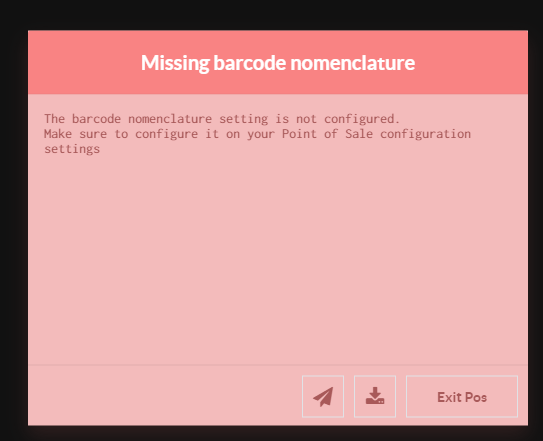 Note: the issue does not happen in previous Odoo's versions as the field was required before. opw-3110204 --- I confirm I have signed the CLA and read the PR guidelines at www.odoo.com/submit-pr Forward-Port-Of: odoo/odoo#108940
`super()._get_orderpoint_products()` returns more than 1 million products. Applying _bom_find to all of them is too much. https://github.com/odoo/odoo/blob/55e327705deed2aa31c1fc9eca49a8a66135c020/addons/stock/models/stock_orderpoint.py#L567-L568 Issue observer on menu Inventory > Operations > Replenishment during upgrades to 16.0 Description of the issue/feature this PR addresses: Current behavior before PR: Desired behavior after PR is merged: --- I confirm I have signed
Original PR description
`super()._get_orderpoint_products()` returns more than 1 million products. Applying _bom_find to all of them is too much. https://github.com/odoo/odoo/blob/55e327705deed2aa31c1fc9eca49a8a66135c020/addons/stock/models/stock_orderpoint.py#L567-L568

Issue observer on menu Inventory > Operations > Replenishment during upgrades to 16.0

Description of the issue/feature this PR addresses:

Current behavior before PR:

Desired behavior after PR is merged:


---
I confirm I have signed the CLA and read the PR guidelines at www.odoo.com/submit-pr

Forward-Port-Of: odoo/odoo#107619
When a new user (other then demo or admin), efaktur will crash when creating a new entry to e-Faktur.

This is due to a missing permission on the field "company". This fix to set "company" to invisible when the new user is not in the base.group_multi_company group

opw-3052775

The bug is not present in previous version (15.0 nor 14.0)

---
I confirm I have signed the CLA and read the PR guidelines at www.odoo.com/submit-pr

Forward-Port-Of: odoo/odoo#107210
Original PR description
When a new user (other then demo or admin), efaktur will crash when creating a new entry to e-Faktur. This is due to a missing permission on the field "company". This fix to set "company" to invisible when the new user is not in the base.group_multi_company group opw-3052775 The bug is not present in previous version (15.0 nor 14.0) --- I confirm I have signed the CLA and read the PR guidelines at www.odoo.com/submit-pr Forward-Port-Of: odoo/odoo#107210
Steps to reproduce:

- Go to the eCommerce app > eCommerce Categories.
- Select any category or try to create a new one.

Issue:

The box containing the fields it's not displayed properly.

Solution:

Added the class `clearfix` to the sheet component as it used to be in previous versions.

FW - port: master

opw-3080099

Forward-Port-Of: odoo/odoo#106778
Original PR description
Steps to reproduce: - Go to the eCommerce app > eCommerce Categories. - Select any category or try to create a new one. Issue: The box containing the fields it's not displayed properly. Solution: Added the class `clearfix` to the sheet component as it used to be in previous versions. FW - port: master opw-3080099 Forward-Port-Of: odoo/odoo#106778
CoA: account types, tags for Cash Flow, account groups, define better default accounts, ...
Tax Report: changed the order, created some lines,... based on the infos to be given for the JPK export
Taxes: some tax scope

task-2713260


---
I confirm I have signed the CLA and read the PR guidelines at www.odoo.com/submit-pr

Forward-Port-Of: odoo/odoo#108459
Original PR description
CoA: account types, tags for Cash Flow, account groups, define better default accounts, ... Tax Report: changed the order, created some lines,... based on the infos to be given for the JPK export Taxes: some tax scope task-2713260 --- I confirm I have signed the CLA and read the PR guidelines at www.odoo.com/submit-pr Forward-Port-Of: odoo/odoo#108459
Description of the issue/feature this PR addresses: when the vat is not configured in the company and on printing the invoice, the trace back is raised. this is due to the calling of method _format_dotted_vat_cl that excepts the vat value as input, when the method is called without a vat value, the traceback is thrown. add an if condition to check there is a vat configured in the company and then the _format_dotted_vat_cl method is called only when there is a value in vat. Versions: 14
Original PR description
Description of the issue/feature this PR addresses: when the vat is not configured in the company and on printing the invoice, the trace back is raised.

this is due to the calling of method _format_dotted_vat_cl that excepts the vat value as input, when the method is called without a vat value, the traceback is thrown.

add an if condition to check there is a vat configured in the company and then the  _format_dotted_vat_cl method is called only when there is a value in vat.

Versions: 14 and above

Reported issue:  https://github.com/odoo/odoo/issues/108492

---
I confirm I have signed the CLA and read the PR guidelines at www.odoo.com/submit-pr

Forward-Port-Of: odoo/odoo#108650
**Description of the issue/feature this PR addresses:**

- create a company A
- create a company B with french accounting
- in environment with company A and B, and B is the current company

During export an account of company A can be use.

@oco-odoo @alexis-via


---
I confirm I have signed the CLA and read the PR guidelines at www.odoo.com/submit-pr

Forward-Port-Of: odoo/odoo#108676
Forward-Port-Of: odoo/odoo#108012
Original PR description
**Description of the issue/feature this PR addresses:** - create a company A - create a company B with french accounting - in environment with company A and B, and B is the current company During export an account of company A can be use. @oco-odoo @alexis-via --- I confirm I have signed the CLA and read the PR guidelines at www.odoo.com/submit-pr Forward-Port-Of: odoo/odoo#108676 Forward-Port-Of: odoo/odoo#108012
Description of the issue/feature this PR addresses:

Current behavior before PR:

Desired behavior after PR is merged:


---
I confirm I have signed the CLA and read the PR guidelines at www.odoo.com/submit-pr

Forward-Port-Of: odoo/odoo#109051
Original PR description
Description of the issue/feature this PR addresses: Current behavior before PR: Desired behavior after PR is merged: --- I confirm I have signed the CLA and read the PR guidelines at www.odoo.com/submit-pr Forward-Port-Of: odoo/odoo#109051
This commit adds the translation terms .pot file for l10n_ke_edi_tremol

Forward-Port-Of: odoo/odoo#109348
Original PR description
This commit adds the translation terms .pot file for l10n_ke_edi_tremol Forward-Port-Of: odoo/odoo#109348
Steps to reproduce: - Install Expense module - Activate analytic accounting in settings - Create an analytic account X - Create an expense with X as analytic - Delete the analytic account X - Go back to the expense created Issue: Cannot access the expense (error message). Cause: The analytic account is deleted, but the analytics (Json field) on the expense are not updated. Solution: When deleting an analytic account, if used in an expense raise a
Original PR description
Steps to reproduce:

  - Install Expense module
  - Activate analytic accounting in settings
  - Create an analytic account X
  - Create an expense with X as analytic
  - Delete the analytic account X
  - Go back to the expense created

Issue:

  Cannot access the expense (error message).

Cause:

  The analytic account is deleted, but the analytics (Json field) on the
  expense are not updated.

Solution:

  When deleting an analytic account,
  if used in an expense raise an error.

opw-3059908

Forward-Port-Of: odoo/odoo#107789
The route was wrongly removed in da8def8e410

Description of the issue/feature this PR addresses:

Current behavior before PR:

Desired behavior after PR is merged:


---
I confirm I have signed the CLA and read the PR guidelines at www.odoo.com/submit-pr

Forward-Port-Of: odoo/odoo#109293
Original PR description
The route was wrongly removed in da8def8e410 Description of the issue/feature this PR addresses: Current behavior before PR: Desired behavior after PR is merged: --- I confirm I have signed the CLA and read the PR guidelines at www.odoo.com/submit-pr Forward-Port-Of: odoo/odoo#109293
Current behavior: When a refund order is created, the amount is not rounded the same way as the orginial order. Steps to reproduce: - Create a rouding method with 0.05 as rounding value, with the DOWN rounding method - Create an order with a product of price 1.98 - Validate the order, the price should be 1.95 - Create a refund order for the previous order - Validate the refund order, the price should be -1.95 but it's -2.00 Solution: Always act like the order has a positive amount,
Original PR description
Current behavior: When a refund order is created, the amount is not rounded the same way as the orginial order. Steps to reproduce: - Create a rouding method with 0.05 as rounding value, with the…
Current behavior:
When a refund order is created, the amount is not rounded the same way as the orginial order.

Steps to reproduce:
- Create a rouding method with 0.05 as rounding value, with the DOWN rounding method
- Create an order with a product of price 1.98
- Validate the order, the price should be 1.95
- Create a refund order for the previous order
- Validate the refund order, the price should be -1.95 but it's -2.00

Solution:
Always act like the order has a positive amount, and apply the rounding the normal way. Then apply the sign of the original order. If the remaining amount has a different sign than the original total, we should invert the rounding method to apply a rounding in the same "direction" as the original order.

For example :
- Original order is -1.98
- Rounding is applied and the total is -2.00
- After the payment, the remaining is -1.98 - -2.00 = 0.02
- Wich will be rounded to 0.05 wich is not correct, it should be rounded to 0.00. So we invert the rounding method to apply a rounding in the same "direction" as the original order. If we don't do this the total due would have been -1.95 instead of -2.00. And the change would have been 0.05 instead of 0.00.
https://github.com/odoo/odoo/blob/09cfde14bd086bd190a8c34a157557fa363d0438/addons/point_of_sale/static/src/js/Screens/PaymentScreen/PaymentScreenStatus.js#L11-L15

opw-3106656
---
I confirm I have signed the CLA and read the PR guidelines at www.odoo.com/submit-pr

Forward-Port-Of: odoo/odoo#108859
Steps to reproduce ================== - Install mrp_product_expiry - Go to Inventory > Products > Lots/Serial Numbers - Add the column "Expiration date" - Remove the groupby if any - Select 2 records, set an expiration date - Confirm - Select the same records, remove the expiration date -> TypeError: value.setZone is not a function Cause of the issue ================== When entering the readonly mode after changing the date, the function `formattedValue` is called. But `this.pro
Original PR description
Steps to reproduce
==================

- Install mrp_product_expiry
- Go to Inventory > Products > Lots/Serial Numbers
- Add the column "Expiration date"
- Remove the groupby if any
- Select 2 records, set an expiration date
- Confirm
- Select the same records, remove the expiration date -> TypeError: value.setZone is not a function

Cause of the issue
==================

When entering the readonly mode after changing the date, the function `formattedValue` is called. But `this.props.value` is equal to `""`. `formatDateTime` only handles `DateTime | false`

The field is rendered from this template https://github.com/odoo/odoo/blob/1d8f6359bbf55983a9582282d12a187c67cdf509/addons/web/static/src/views/list/list_renderer.xml#L233-L236

When `canUseFormatter` returns true, formatDateTime is called with
false, coming from `record.data[fieldName]`

opw-3111869

Forward-Port-Of: odoo/odoo#109188After 95b74f4 reworked the BE CoA, the accounts "140000-Bénéfice reporté" and "141000-Perte reportée" are missing in the chart of account. Tose accounts are part of the minimal legal accounts needed and are also used in the Belgian Balance sheet in the section "14 - Bénéfice (Perte) reporté(e)". opw-2871547 Description of the issue/feature this PR addresses: Current behavior before PR: Desired behavior after PR is merged: -- I confirm I have signed the CLA and read the P
Original PR description
After 95b74f4 reworked the BE CoA, the accounts "140000-Bénéfice
reporté" and "141000-Perte reportée" are missing in the chart of account.
Tose accounts are part of the minimal legal accounts needed and are also used
in the Belgian Balance sheet in the section "14 - Bénéfice (Perte) reporté(e)".

opw-2871547

Description of the issue/feature this PR addresses:

Current behavior before PR:

Desired behavior after PR is merged:


--
I confirm I have signed the CLA and read the PR guidelines at www.odoo.com/submit-pr

Forward-Port-Of: odoo/odoo#109372
Forward-Port-Of: odoo/odoo#93174
Before this commit: Outlook Plugin wasn't able to get the opportunities of contact. The problem was that the `crm_lead_get_by_partner_id` function calls `_fetch_partner_leads` from the `CrmClient` instance, while it doesn't have this function.

The solution is inherit the `MailPluginController` which contains this function.

opw-3092995

---
I confirm I have signed the CLA and read the PR guidelines at www.odoo.com/submit-pr

Forward-Port-Of: odoo/odoo#108944
Original PR description
Before this commit: Outlook Plugin wasn't able to get the opportunities of contact. The problem was that the `crm_lead_get_by_partner_id` function calls `_fetch_partner_leads` from the `CrmClient` instance, while it doesn't have this function. The solution is inherit the `MailPluginController` which contains this function. opw-3092995 --- I confirm I have signed the CLA and read the PR guidelines at www.odoo.com/submit-pr Forward-Port-Of: odoo/odoo#108944
Since d6a1aa63702132ffc59d2412c2a009912eba797a, a name get saved from the result of a pivot was stored with an incorrect `deferred`. The value stored was not the deferred, but the result of `new Deferred().resolve`, which is undefined.

This revision fixes this issue by storing the correct deferred.


---
I confirm I have signed the CLA and read the PR guidelines at www.odoo.com/submit-pr

Forward-Port-Of: odoo/odoo#109440
Original PR description
Since d6a1aa63702132ffc59d2412c2a009912eba797a, a name get saved from the result of a pivot was stored with an incorrect `deferred`. The value stored was not the deferred, but the result of `new Deferred().resolve`, which is undefined. This revision fixes this issue by storing the correct deferred. --- I confirm I have signed the CLA and read the PR guidelines at www.odoo.com/submit-pr Forward-Port-Of: odoo/odoo#109440
Since [1] adding a new tag on a blog does not refresh the tag list in the options tab. That commit sorts the `methodsNames` aplhabetically. Previously, the unspecified order of the methods just happened to make the add operation work. After this commit the tag list is refreshed when a new element is added to it, in order to not rely on the order of methods anymore. This PR also fixes three other issues: - create button now works after hovering suggested tags - a deleted custom tag ca
Original PR description
Since [1] adding a new tag on a blog does not refresh the tag list in
the options tab. That commit sorts the `methodsNames` aplhabetically.
Previously, the unspecified order of the methods just happened to make
the add operation work.

After this commit the tag list is refreshed when a new element is added
to it, in order to not rely on the order of methods anymore.

This PR also fixes three other issues:
- create button now works after hovering suggested tags
- a deleted custom tag can now be re-created
- a race condition during the refreshing of the list of suggested tags

[1]: https://github.com/odoo/odoo/commit/a48a30f954afcb6ff3a59c4f32b05fd0c2cfcd2b

task-2811746

Forward-Port-Of: odoo/odoo#109377
Forward-Port-Of: odoo/odoo#87695
Description of the issue/feature this PR addresses: Every 90 days the imap auth needs to be done again, because that is the only way the refresh token is updated. with this pull request, this happens when a new access token is called Current behavior before PR: Every 90 days the oauth procedure must be run again for every outlook imap address Desired behavior after PR is merged: Allow refresh key to be updated until the outlook secret token stops working --- I confirm I have
Original PR description
Description of the issue/feature this PR addresses:
Every 90 days the imap auth needs to be done again, because that is the only way the refresh token is updated.
with this pull request, this happens when a new access token is called

Current behavior before PR:
Every 90 days the oauth procedure must be run again for every outlook imap address

Desired behavior after PR is merged:
Allow refresh key to be updated until the outlook secret token stops working


---
I confirm I have signed the CLA and read the PR guidelines at www.odoo.com/submit-pr

Forward-Port-Of: odoo/odoo#108673
When clearing the youtube video it only cleared the youtube_video field but not the youtube_video_id and
youtube_video_category_id fields which led to keep the youtube link in the messages on other social media preview.
This PR fix this issue.

It also owlify a file we forgot during the social owlification.
The file is social_youtube_upload_field in social_demo module

Task-3072816

Forward-Port-Of: odoo/enterprise#34056
Original PR description
When clearing the youtube video it only cleared the youtube_video field but not the youtube_video_id and youtube_video_category_id fields which led to keep the youtube link in the messages on other social media preview. This PR fix this issue. It also owlify a file we forgot during the social owlification. The file is social_youtube_upload_field in social_demo module Task-3072816 Forward-Port-Of: odoo/enterprise#34056
The `_generate_tax_closing_entries()` method in `account.move` was being called on the wrong model.

It was being called on the report's custom handler, which was wrong since it is only defined once in
`account.generic.tax.report.handler`.

opw-3098760

Forward-Port-Of: odoo/enterprise#35571
Original PR description
The `_generate_tax_closing_entries()` method in `account.move` was being called on the wrong model. It was being called on the report's custom handler, which was wrong since it is only defined once in `account.generic.tax.report.handler`. opw-3098760 Forward-Port-Of: odoo/enterprise#35571
Add National Bank of Poland as currency rate provider and set it as default provider for PL companies.

Fwd port of https://github.com/odoo/enterprise/pull/34013

Task: 2928985

Forward-Port-Of: odoo/enterprise#34987
Original PR description
Add National Bank of Poland as currency rate provider and set it as default provider for PL companies. Fwd port of https://github.com/odoo/enterprise/pull/34013 Task: 2928985 Forward-Port-Of: odoo/enterprise#34987
Currently, only a user with the "Administration / Settings" group can insert a view in a spreadsheet.

Previously, a user with the "Documents / Administrator" group could insert a view.

This commit restore the behavior from 15.0 that was changed by mistake in 2cd6bd81051bb064a5f7d5f8d08bfdee4afce76d

opw-3106669

Forward-Port-Of: odoo/enterprise#35560
Original PR description
Currently, only a user with the "Administration / Settings" group can insert a view in a spreadsheet. Previously, a user with the "Documents / Administrator" group could insert a view. This commit restore the behavior from 15.0 that was changed by mistake in 2cd6bd81051bb064a5f7d5f8d08bfdee4afce76d opw-3106669 Forward-Port-Of: odoo/enterprise#35560
Previously, clicking on a supplier or VAT number box would only prefill the corresponding field in the partner creation modal.

Now, the VAT number will be prefilled with the currently selected box when clicking on a supplier name and vice versa for a click on a VAT number.

Forward-Port-Of: odoo/enterprise#35336
Original PR description
Previously, clicking on a supplier or VAT number box would only prefill the corresponding field in the partner creation modal. Now, the VAT number will be prefilled with the currently selected box when clicking on a supplier name and vice versa for a click on a VAT number. Forward-Port-Of: odoo/enterprise#35336
Steps to reproduce: - install "sale_subscription" module; - create a subscription; - try to delete it; Issue: We recommend to cancel the subscription before deleting it. But we only have the possibility of closing it. Cause: There is no method called to handle a `UserError` when unlinking the "`sale_subscription`" record. Solution: Add a method with @api.ondelete which overrides `_unlink_except_draft_or_cancel` method to show a consistent error message to the client when trying
Original PR description
Steps to reproduce:
- install "sale_subscription" module;
- create a subscription;
- try to delete it;

Issue:
We recommend to cancel the subscription before deleting it.
But we only have the possibility of closing it.

Cause:
There is no method called to handle a `UserError`
when unlinking the "`sale_subscription`" record.

Solution:
Add a method with @api.ondelete which overrides `_unlink_except_draft_or_cancel` method
to show a consistent error message to the client when trying to delete a subscription.
Add the possibility to cancel a subscription if it is closed.

opw-3087387

Forward-Port-Of: odoo/enterprise#35037
Forward-Port-Of: odoo/enterprise#35506
Original PR description
Forward-Port-Of: odoo/enterprise#35506
## Description
This is a follow up on #35412,
I had forgotten to add the minutes in the template name.

## Affected versions
- 15.0
- saas-15.2
- saas-15.3
- 16.0
- master
---
opw-3101105

Forward-Port-Of: odoo/enterprise#35557
Forward-Port-Of: odoo/enterprise#35530
Original PR description
## Description This is a follow up on #35412, I had forgotten to add the minutes in the template name. ## Affected versions - 15.0 - saas-15.2 - saas-15.3 - 16.0 - master --- opw-3101105 Forward-Port-Of: odoo/enterprise#35557 Forward-Port-Of: odoo/enterprise#35530
The tree view for `product.pricing` seems to be copy-pasted from `product.template` view (tree form for `product_pricing_ids` inside the `product.template` view), because it has reference to `parent` in domain attribute, which is not available in regular tree view. Fix it be replacing `parent.id` to `product_template_id`. Also, remove `column_invisible`, which doesn't make sense in this context (it's not a tree view inside form view) STEPS: 1) Go to Sales 2) Configuration-> Quotatio
Original PR description
The tree view for `product.pricing` seems to be copy-pasted from `product.template` view (tree form for `product_pricing_ids` inside the `product.template` view), because it has reference to `parent` in domain attribute, which is not available in regular tree view.

Fix it be replacing `parent.id` to `product_template_id`.

Also, remove `column_invisible`, which doesn't make sense in this context (it's not a tree view inside form view)

STEPS:

1) Go to Sales
2) Configuration-> Quotation templates
3) Click on "Monthly"
4) Click on "prices" button
5) Click on "Product Variants"

opw-3103960

Forward-Port-Of: odoo/enterprise#35246
Added Balance Sheet and P&L for SMEs in Poland, based on updated CoA

task-2713260

Forward-Port-Of: odoo/enterprise#35149
Original PR description
Added Balance Sheet and P&L for SMEs in Poland, based on updated CoA task-2713260 Forward-Port-Of: odoo/enterprise#35149
fix typo in deprecated in data file

Forward-Port-Of: odoo/enterprise#35314
Original PR description
fix typo in deprecated in data file Forward-Port-Of: odoo/enterprise#35314
In debug mode, add the System Parameter: - Key: l10n_mx_edi.manage_invoice_negative_lines - Value: True Create an invoice with MX partner and 2 lines: - Product P, Quantity 1, Price 300, Tax 0% - No product, Quantity 1, price -100, Tax 0% CFDI Validation will fail with error """ Code : CFDI40215 Message : El campo Importe correspondiente a Traslado no es igual al redondeo de la suma de los importes de las bases trasladados registrados en los conceptos donde el impuesto del concepto
Original PR description
In debug mode, add the System Parameter:
- Key: l10n_mx_edi.manage_invoice_negative_lines
- Value: True

Create an invoice with MX partner and 2 lines:
- Product P, Quantity 1, Price 300, Tax 0%
- No product, Quantity 1, price -100, Tax 0%

CFDI Validation will fail with error
"""
Code : CFDI40215
Message : El campo Importe correspondiente a Traslado no es igual al redondeo de la suma de los importes de las bases trasladados registrados en los conceptos donde el impuesto del concepto sea igual al campo impuesto de este elemento y la TasaOCuota del concepto sea igual al campo TasaOCuota de este elemento.
"""

This occurs because the 'Base' declared in
'Comprobante/Conceptos/Concepto/Impuestos/Traslados/Traslado' node is inconsistent with the one registered in
'Comprobante/Impuestos/Traslados/Traslado'

opw-3041121

Forward-Port-Of: odoo/enterprise#34770
In payroll running the test_dashboard_stats test in the first month of the year would cause the test to fail, as a contract would be created with a start date in the last year, while for other months, any contract in the past was guaranteed to be created in the current year. This commit fixes this by checking if the first contract was created last year and adapting the amount of employees the test expects for each year.

task-3116501

Forward-Port-Of: odoo/enterprise#35343
Original PR description
In payroll running the test_dashboard_stats test in the first month of the year would cause the test to fail, as a contract would be created with a start date in the last year, while for other months, any contract in the past was guaranteed to be created in the current year. This commit fixes this by checking if the first contract was created last year and adapting the amount of employees the test expects for each year. task-3116501 Forward-Port-Of: odoo/enterprise#35343
## Current behaviour When sending an email with an inlined image to an alias of a helpdesk, the image is broken in the task description. ## Expected behaviour The image should be rendered correctly. ## Steps to reproduce - Install Helpdesk - In Settings add a custom email server and set a domain alias - Create a new Helpdesk and in it's settings create an email alias - Send an email with an *inlined* image. (not attachment)\ - Image is not rendered correctly in the newly created tas
Original PR description
## Current behaviour When sending an email with an inlined image to an alias of a helpdesk, the image is broken in the task description. ## Expected behaviour The image should be rendered correctly.…
## Current behaviour
When sending an email with an inlined image to an alias of a helpdesk, the image is broken in the task description.

## Expected behaviour
The image should be rendered correctly.

## Steps to reproduce
- Install Helpdesk
- In Settings add a custom email server and set a domain alias
- Create a new Helpdesk and in it's settings create an email alias
- Send an email with an *inlined* image. (not attachment)\
- Image is not rendered correctly in the newly created task.

## Reason for the problem
Email with an embedded/inlined images are multipart, one is containing the base64 encoded image and has a `content-id`, another one is the html body that has an `<img/>` which source is a `cid` that references the `content-id` of the encoded image. When parsing the email when creating the ticket, we only take into account the `html` part of the email, which becomes the `message.body` which is used to fill in the description. Therefor we have an `<img src="cid:..."/>` that references nothing.

## Fix
Use the already parsed and sanitized `message.body` from the message's thread, which converts the `content-ids` into relative links to web images. We fill with that the description's body.

## Affected versions
- saas-15.2
- saas-15.3
- 16.0
- master
---
opw-3062444

Forward-Port-Of: odoo/enterprise#35119
This commit removes some residual mentions of the task_id field which was removed in task-2941828.
All mentions did not affect the functionality of any app thus were not immediately detected.

Task-3063418

Forward-Port-Of: odoo/enterprise#33900
Original PR description
This commit removes some residual mentions of the task_id field which was removed in task-2941828. All mentions did not affect the functionality of any app thus were not immediately detected. Task-3063418 Forward-Port-Of: odoo/enterprise#33900
Purpose
=======
Unversioned API will be depreciated and we need to specify the version of the API we want to use...

Note that the versioned API is supported for 12 months, and so we might need to re-update the version number...

Task-3054273

Forward-Port-Of: odoo/enterprise#35492
Forward-Port-Of: odoo/enterprise#33556
Original PR description
Purpose ======= Unversioned API will be depreciated and we need to specify the version of the API we want to use... Note that the versioned API is supported for 12 months, and so we might need to re-update the version number... Task-3054273 Forward-Port-Of: odoo/enterprise#35492 Forward-Port-Of: odoo/enterprise#33556