Thursday, February 9, 2023
45 changes · master
New functionality added to Odoo
Accounting journals can now support more than one check payment method instead of being limited to a single manual payment option. This makes check printing setups more flexible for businesses that need to manage multiple check payment workflows.
Original PR description
### latam task 954 / accountamatata task 3130305 Before this change 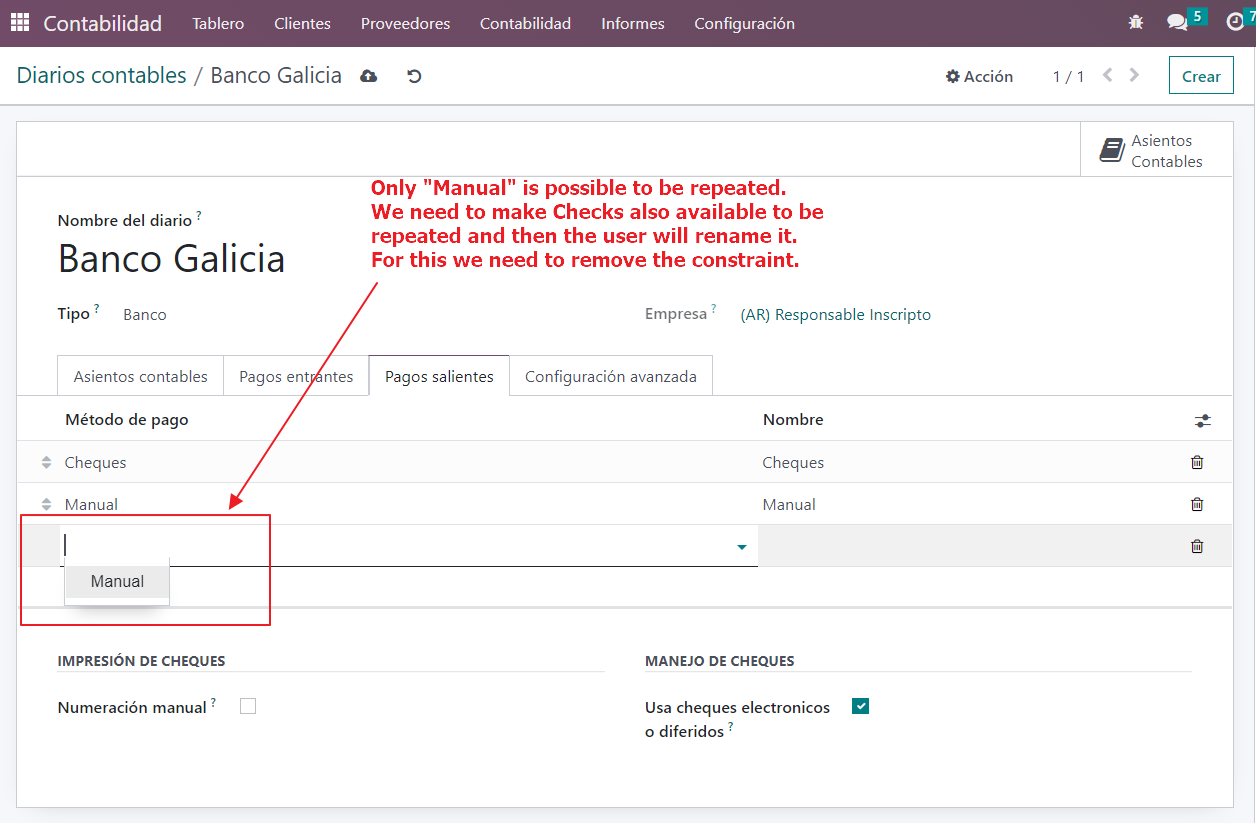 After this change 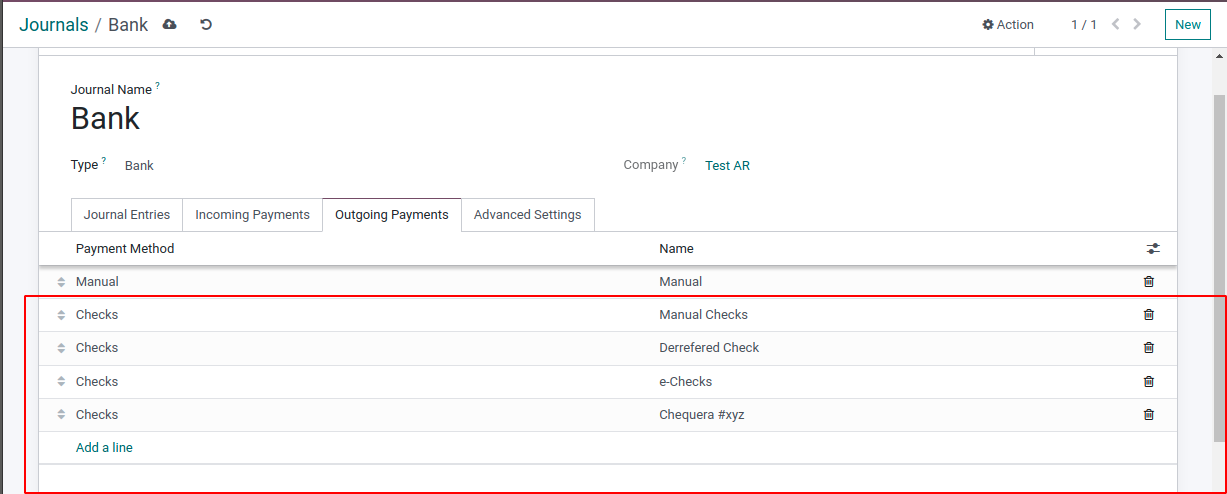 --- I confirm I have signed the CLA and read the PR guidelines at www.odoo.com/submit-pr
Enhancements to existing features
Invoices can now optionally display the total amount written out in full words, helping meet local legal or business requirements. The invoice layout was also improved to reduce unused white space, and this option is enabled by default for selected localizations including Algeria, India, Ukraine, and Morocco.
Original PR description
The layout of the invoice is improved to fill some white spaces that occured previously.
In addition, some localizations require to print the total amount of an invoice in full letters. This PR enables this functionality. As this is optional, a boolean field in the accounting settings enables to activate the feature. The total amount is displayed at the bottom of any invoice if the company has the boolean fields in the accounting settings set to True (set by default to False)


---
I confirm I have signed the CLA and read the PR guidelines at www.odoo.com/submit-pr
Resolved issues and error corrections
The French FEC export can now omit selected journals, such as IFRS adjustment journals, so companies can provide auditors or tax authorities with local accounting entries only. This helps businesses meet French reporting requirements while still maintaining separate IFRS records in Odoo.
Original PR description
In French accounting, they need to provide a FEC file to the auditors/tax authority to control their accounting. So far it's fine in Odoo.
While a company is managing IFRS accounting, the usual way to do it in Odoo is to use a specific journal "IFRS adjustments" for example. This way of working allows you to have a balance in local GAAP (excluding IFRS entries) and in IFRS GAAP (including the IFRS entries).  So far it's fine in Odoo.
The issue that we met is once a customer need to send his FEC file to the auditors/tax authority, he needs to send only local entries (then excluding IFRS entries). Therefore, it would be great to have an option to exclude some journals from the FEC export.

Task: 3133678
Code cleanup and technical improvements
This update simplifies the internal structure of Odoo's Point of Sale apps by removing an outdated shared component and moving responsibilities to clearer places. It should make future maintenance and improvements easier, with little to no direct change for daily users.
Original PR description
Miscellaneous changes
The problem happens when the company is Anglo Saxon, and `l10n_eg_edi_eta` is installed. Also, the product should have a cost and automatic inventory valuation. https://github.com/odoo/odoo/commit/4b430f8e30efb15f06982e4673cd73531a2119b3 The problem is that with this commit, after calling the `_set_next_sequence` function, it calls `flush_recordset`. It would cause a write to be triggered and add an Automatic Balancing Line. While in `_create_account_move` of PoS the stock output line will add
Original PR description
The problem happens when the company is Anglo Saxon, and `l10n_eg_edi_eta` is installed. Also, the product should have a cost and automatic inventory valuation.…
The problem happens when the company is Anglo Saxon, and `l10n_eg_edi_eta` is installed. Also, the product should have a cost and automatic inventory valuation.
https://github.com/odoo/odoo/commit/4b430f8e30efb15f06982e4673cd73531a2119b3 The problem is that with this commit, after calling the `_set_next_sequence` function, it calls `flush_recordset`. It would cause a write to be triggered and add an Automatic Balancing Line. While in `_create_account_move` of PoS the stock output line will add later to it, and make it unbalanced. The first Automatic Balancing Line is incorrect as it will call `_create_stock_output_lines` later and it adds a line which makes it balance. But with that Automatic Balancing Line as it's unbalanced at the end it will call `_close_session_action` in PoS and shows a pop-up to add another line to make it balance.

The solution is skip synchronize of journal entries.

opw-3137723

---
I confirm I have signed the CLA and read the PR guidelines at www.odoo.com/submit-pr

Forward-Port-Of: odoo/odoo#110956
This update makes form button definitions easier and more consistent for Odoo developers, reducing confusion when configuring actions in forms. It keeps existing behavior working while introducing clearer button options, which should lower maintenance effort and reduce future mistakes.
Original PR description
The current form buttons are pretty wonky with @type/@name (the latter changing semantics based on type) versus @special, which makes them unnecessarily challenging to learn.

Since there are 14 competing standards, develop a universal standard that covers all use cases! Lift `@type` to its own attributes matching `special`, and move `@name` to its value. Also remove support for action ids and thus (eventually) the need for interpolation altogether.

Currently this is implemented as sugar over the existing model as the client does not support the new protocol.

Possible alternative: move `special` over to `type="special"` and `name="$special-action`. Advantage is that reduces the number of attributes, drawback is that keeps the oddity of two linked attributes.
Live Chat channel setup text can now be translated, including the button label, default greeting, and input placeholder. This helps businesses provide a more localized chat experience for customers in different languages.
Original PR description
Description of the issue/feature this PR addresses: The following fields are used in the channel setting: 1. button_text 2. default_message 3. input_placeholder 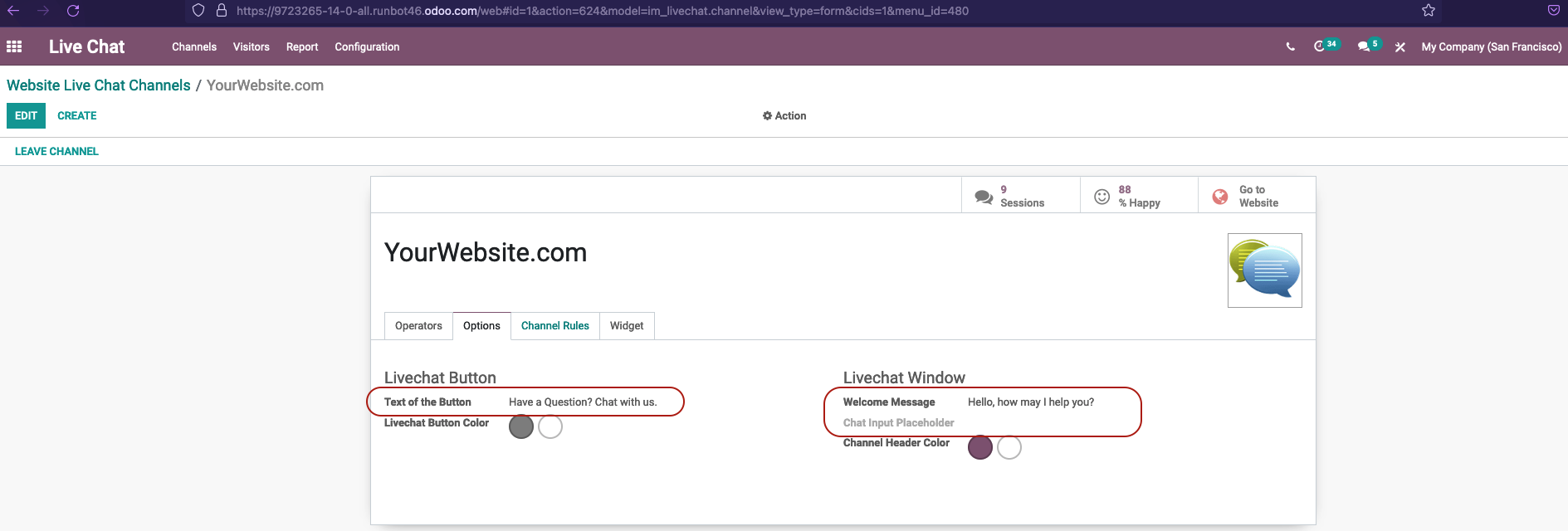 but cannot translate them because fields are not translatable. PR makes those fields translatable. Current behavior before PR: We are not able to make translations to the above fields. Desired behavior after PR is merged: We are able to make translations to the above fields. -- I confirm I have signed the CLA and read the PR guidelines at www.odoo.com/submit-pr
Saved payment methods are now shown separately from payment providers, making checkout and donation pages easier to understand. Customers can see when a saved payment method was created and which provider it belongs to, reducing confusion when multiple saved methods exist.
Original PR description
Currently there is no distinction between saved tokens and providers and there is no info on tokens under what provider they were created. When client has more than one token it looks messy and counters the point of token existance. Now tokens have their creation date,provider and are no longer in the same card as providers.

task-2510973

Description of the issue/feature this PR addresses:

Current behavior before PR:

Desired behavior after PR is merged:


---
I confirm I have signed the CLA and read the PR guidelines at www.odoo.com/submit-pr
The subscription order list now shows important details such as order number, order date, and recurrence, making it easier for users to identify and select the right records for bulk actions. Some less critical fields are now optional, helping teams tailor the list view to their needs.
Original PR description
Before this commit, when a user wanted to act on multiple SOs (through the action menu) in the subscription app, it wasn't intuitive to find those records in the list view because the 'order number' field wasn't being shown. Also, key information that gives subscription context such as 'order date', 'recurrence', etc weren't being shown either.

This commit adds new fields to the list view and change to 'optional' some previous inserted fields ('Customer Reference', 'To Renew').

Task id: 3128511Invoice terms and conditions are repositioned to use available space more effectively, making invoices easier to read when the text is long. Related invoice report layouts, including Intrastat and Mexican electronic invoicing, were adjusted to stay aligned with the updated design.
Original PR description
In the layout invoice, the terms and conditions are now placed on the left side of the invoice. If the text is too long, this commit enables the terms and conditions to be placed below the two columns where there is more space

task: 3097097
related PR (Community): 107714
Fixed an issue where sending several invoices at once could result in only one email being sent per company when the same email address appeared multiple times. Document-based mail batches, such as invoice sending, can now send each intended email even when recipients share an address.
Original PR description
Steps to repoduce:
- Accounting > Customers > Invoices:
	 select several invoices to send
- Action > Send & Print > (deselect Print) > Send & Print

Issue:
- It sends only one invoice per company

Cause:
- the mail_compose_message sets the status of an email as `cancel` when a mail has already been sent to a specific adress mail in the batch

Solution:
- If the use of mass mailing is not contact-based (e.g.: sending multiple invoices) it will allow to send multiple emails to the same adress

opw-2775121

--
I confirm I have signed the CLA and read the PR guidelines at www.odoo.com/submit-pr
Users could sometimes have trouble logging back in after signing out because the browser was still checking background app resources tied to the previous session. This fix makes those resources available during login and safely limits personalized shortcut data when the user is not yet authenticated.
Original PR description
Once the user access the backend (aka. `/web`), the browser loads the WebManifest and the ServieWorker is registered. After a logout, he's redirected to the login page (aka. `/web/login`). But this…
Once the user access the backend (aka. `/web`), the browser loads the
WebManifest and the ServieWorker is registered. After a logout, he's
redirected to the login page (aka. `/web/login`).

But this path being still under the ServiceWorker's scope (cf. `/web`),
the browser continues to try to check for an updated ServiceWorker.

If the user (same or another one) tries to log back in, a race condition
appears between the login request and the check for the ServiceWorker.
This issue is due to the ServiceWorker's route requiring an
authenticated user, which is not (yet) the case in this scenario,
conflicting with the login request.

This commit fixes it by reverting the `auth="public"` of the
ServiceWorker route. A similar issue, even if less likely to occur,
affects the WebManifest route for which the same change is applied.

Regarding the WebManifest route, shortcut's collection still requires an
authenticated user, but we fallback to an empty list if not authorized
(not authenticated, no access to apps, not enough rights...).

Note: the ServiceWorker, once registered, is entirely managed by the
browser ; we don't have the ability to control when the browser will
attempt to update it.

> Browsers will check for updates to a service worker when:

> * The user navigates to a page within the service worker's scope.
> * navigator.serviceWorker.register() is called with a URL different from
>   the currently installed service worker—but don't change a service
>   worker's URL!
> * navigator.serviceWorker.register() is called with the same
>   URL as the installed service worker, but with a different scope. Again,
>   avoid this by keeping the scope at the root of an origin if possible.
> * When events such as 'push' or 'sync' have been triggered within the
>   last 24 hours—but don't worry about these events yet.

Steps to reproduce:
- Login to an Odoo instance
- Logout
- Try to go to ´/web/login´ and login again.

References:
https://developer.chrome.com/docs/workbox/service-worker-lifecycle/#handling-service-worker-updates
https://web.dev/manifest-updates/
Creating a new Helpdesk team no longer triggers an access error when existing teams are archived. This prevents unnecessary setup blockers and lets businesses continue managing support teams normally.
Original PR description
Previous to this commit, there was an access error raised when trying to create a team when all the other teams were archived.
The error was raised because when teams are archived, the multi-company rule for stages is applied even thought it should not.

With out addition to the multi-company rule, we ensure that the rule is not applied when a stage has no related teams or when the related teams are archived.

Task-3177229
Subscription setup now hides billing periods that are not supported, such as hourly or daily recurrence options. This helps users choose valid subscription periods and prevents configuration mistakes.
Original PR description
Hide recurrence periode that are not compatible with subscriptions (hour & day units).

task-id : 3101590
This update fixes form buttons that had conflicting behavior settings, making them easier to read and less prone to unexpected actions. It improves consistency across several business workflows, including helpdesk, field service, payroll, manufacturing, rentals, and timesheets.
*: pos_discount, pos_hr, pos_loyalty, pos_restaurant, pos_sale, pos_six Previously, all components in the pos and related apps would inherit from the PosComponent base component, this component…
*: pos_discount, pos_hr, pos_loyalty, pos_restaurant, pos_sale, pos_six

Previously, all components in the pos and related apps would inherit from the PosComponent base component, this component contained a bunch of methods that were as such available on every component in the pos passively. In previous commits, a bunch of these methods have been moved either to the pos store or to their own services, so that component dependencies are explicit instead of every component having a clobbered namespace and having access to everything implictly.

This commit factors out the last method of the PosComponent, `setSyncStatus` and as such the PosComponent is now empty and can be removed completely, as can the Gui singleton utility which was used to access these methods from outside of components.

Components in the pos modules now inherit from LegacyComponent which PosComponent extended. The end goal is to remove the use of LegacyComponent as well, but currently it is still needed as components in the pos modules make extensive use of `useListener` which requires the shim for `this.el` provided by LegacyComponent. This is nonetheless a first step in that direction.

This commit also removes some components that were used in the navbar as they were very small and it made more sense to just have the behaviour they implement directly in the navbar component or elsewhere. Most of the CashMoveButton was moved to the CashMovePopup, the TicketButton has so little behaviour that moving that behaviour to the navbar itself makes sense.
This update aligns the IoT and Point of Sale IoT components with recent platform changes so they continue to work with the latest shared code. It also corrects a naming typo to keep the enterprise and community versions consistent.
Original PR description
The corresponding community commit removes PosComponent completely, this commit adapts the code to use LegacyComponent instead. It also fixes a typo: `servicesDependencies` => `serviceDependencies` to use the same spelling as in community.
The fix that introduced `this._shouldDelayBlur = true` in `openMediaDialog` was wrong as it was fixing a symptom rather than the source of the problem. Later fix probably fixed the source of the problem as the problem is not reproducible at the time of this commit. If the symptom comes back, it ought to be fixed at it's source.


---
I confirm I have signed the CLA and read the PR guidelines at www.odoo.com/submit-pr

Forward-Port-Of: odoo/odoo#112216
Original PR description
The fix that introduced `this._shouldDelayBlur = true` in `openMediaDialog` was wrong as it was fixing a symptom rather than the source of the problem. Later fix probably fixed the source of the problem as the problem is not reproducible at the time of this commit. If the symptom comes back, it ought to be fixed at it's source. --- I confirm I have signed the CLA and read the PR guidelines at www.odoo.com/submit-pr Forward-Port-Of: odoo/odoo#112216
This commit add a mechanism to ensure that someone could never save changes from an history that diverge (in case there is a partition in the RTC network or a person A was disconnected while another person B saved changes that were not transmitted to person A).

task-3002163


---
I confirm I have signed the CLA and read the PR guidelines at www.odoo.com/submit-pr

Forward-Port-Of: odoo/odoo#110241
Forward-Port-Of: odoo/odoo#106844
Original PR description
This commit add a mechanism to ensure that someone could never save changes from an history that diverge (in case there is a partition in the RTC network or a person A was disconnected while another person B saved changes that were not transmitted to person A). task-3002163 --- I confirm I have signed the CLA and read the PR guidelines at www.odoo.com/submit-pr Forward-Port-Of: odoo/odoo#110241 Forward-Port-Of: odoo/odoo#106844
In 15.0 this was supported. It may be also handy when editing views to
momentarily set the groups to `""`.

Steps to reproduce:
1. Install Odoo 15 locally
2. Edit or create a view with `groups=""` for some component
3. Upgrade to 16.
It fails.

---
I confirm I have signed the CLA and read the PR guidelines at www.odoo.com/submit-pr

Forward-Port-Of: odoo/odoo#112062
Original PR description
In 15.0 this was supported. It may be also handy when editing views to momentarily set the groups to `""`. Steps to reproduce: 1. Install Odoo 15 locally 2. Edit or create a view with `groups=""` for some component 3. Upgrade to 16. It fails. --- I confirm I have signed the CLA and read the PR guidelines at www.odoo.com/submit-pr Forward-Port-Of: odoo/odoo#112062
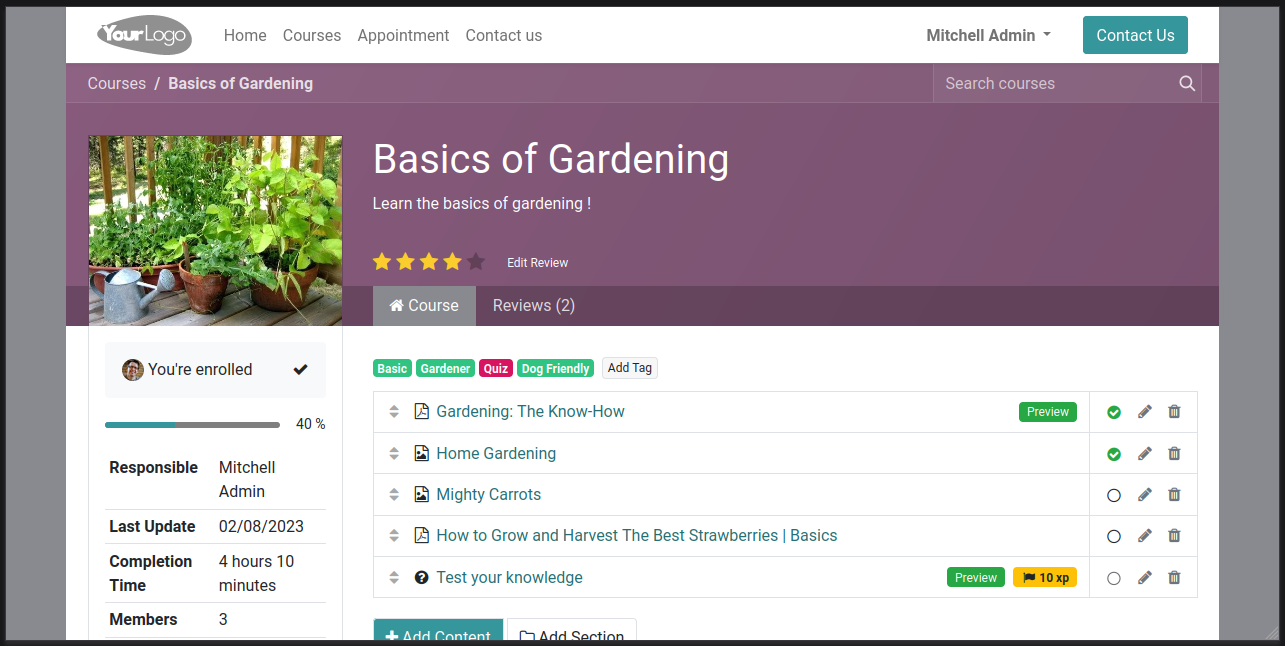
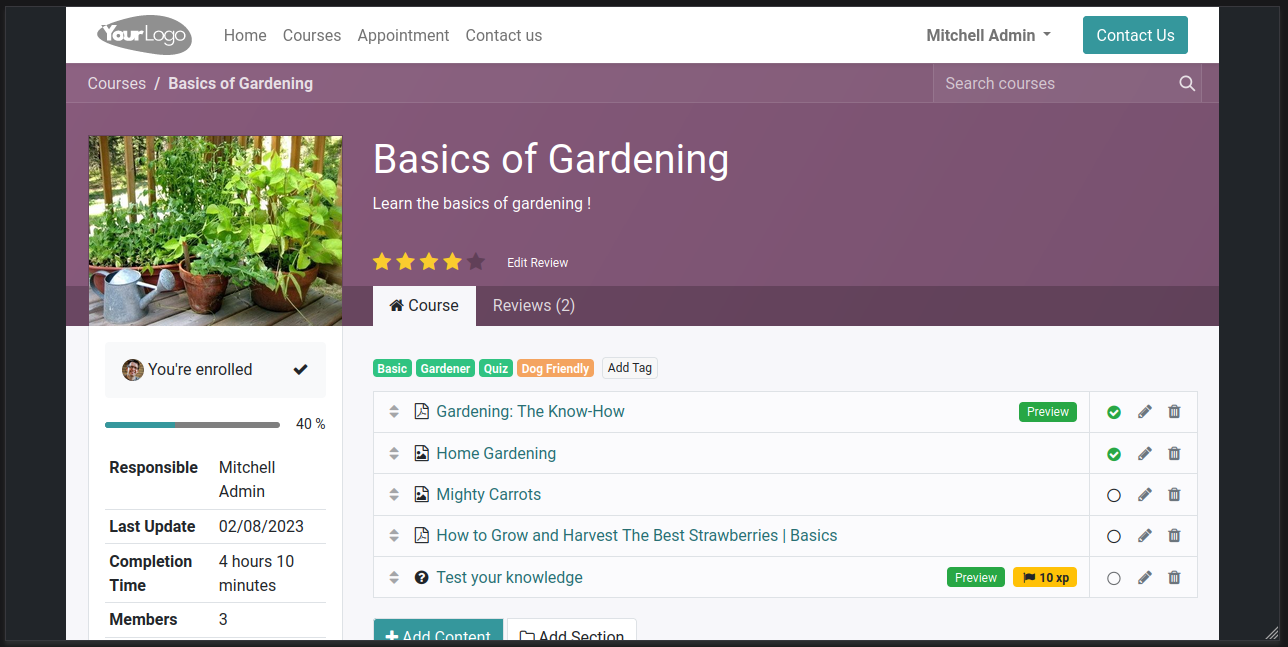
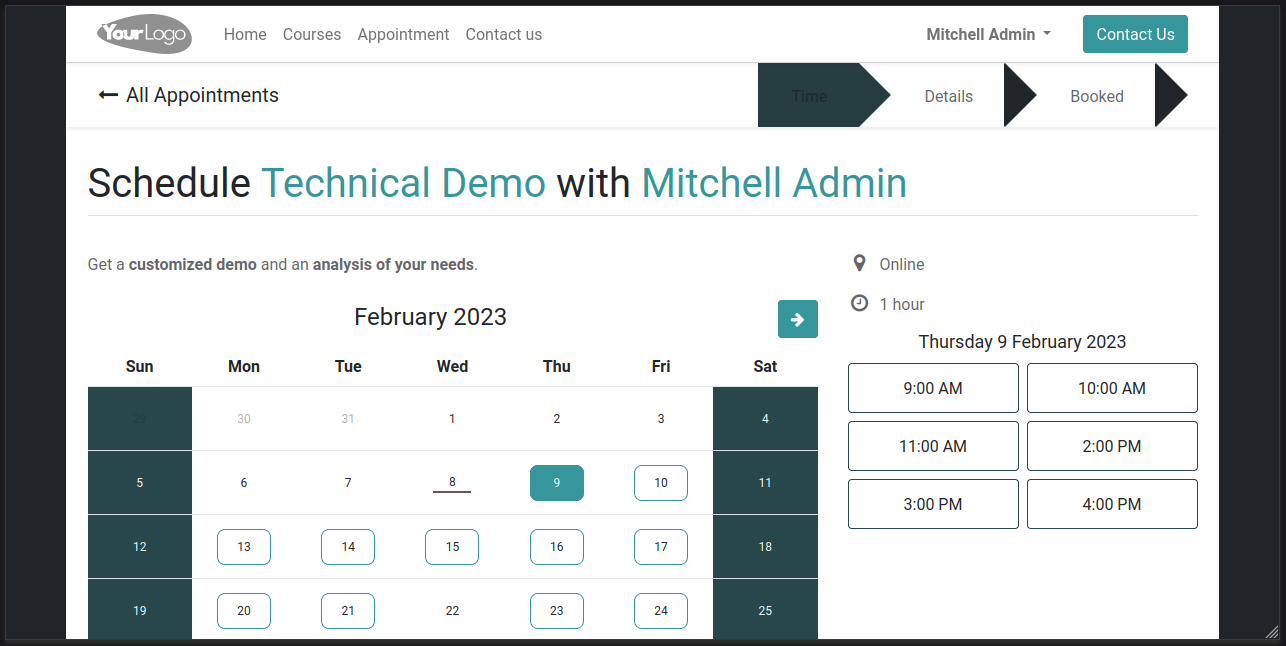
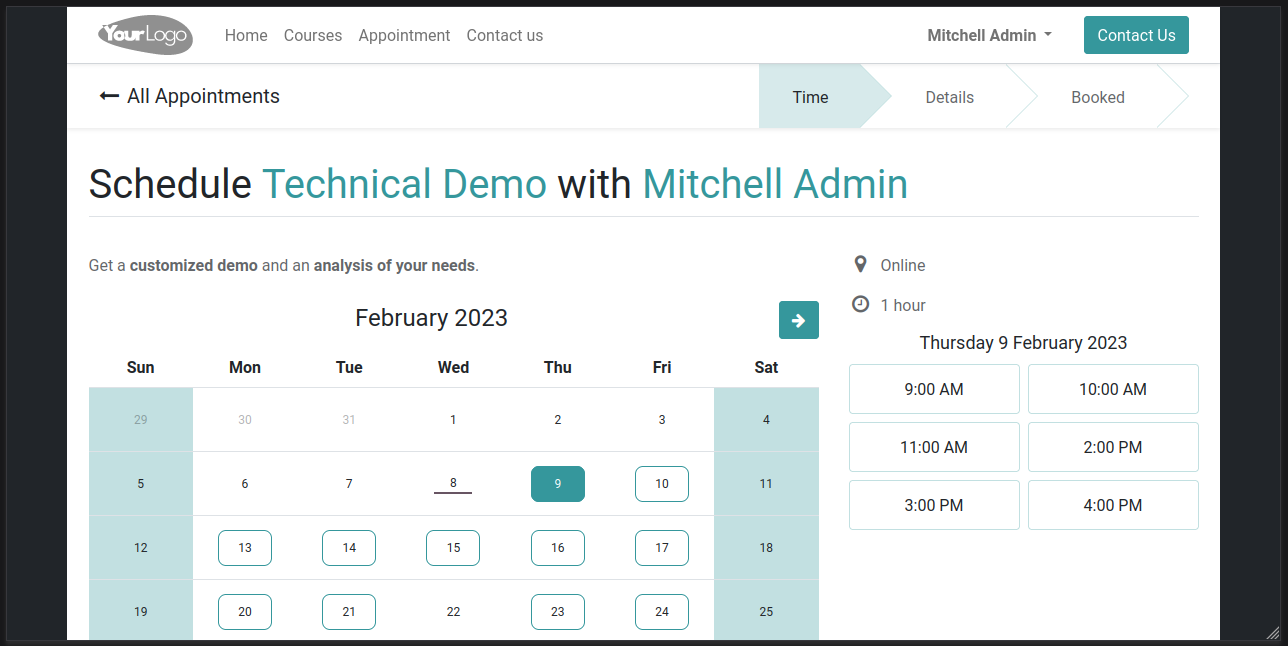
[FIX] website, *: fix some components in case of contrasted boxed layout *: website_slides In some cases, components had dark text over dark background (or light text over light background) by mistake. Example: - Enter edit mode. - In the theme tab, choose "boxed" as page layout. - A color picker appears below to control the color behind the box. - Set it to a dark color (if your box main color is light) - Go to a course page (install website_slides) - Check the mobile version =
Original PR description
[FIX] website, *: fix some components in case of contrasted boxed layout *: website_slides In some cases, components had dark text over dark background (or light text over light background) by…
[FIX] website, *: fix some components in case of contrasted boxed layout
*: website_slides
In some cases, components had dark text over dark background (or light
text over light background) by mistake.
Example:
- Enter edit mode.
- In the theme tab, choose "boxed" as page layout.
- A color picker appears below to control the color behind the box.
- Set it to a dark color (if your box main color is light)
- Go to a course page (install website_slides)
- Check the mobile version
=> The bootstrap tab and its section uses the dark color you set up as
body color instead of the expected boxed layout color.
Another example:
- Do the same thing (set up a dark color behind a boxed layout).
- Go to a shop / product page.
=> The inputs are dark with dark text.
This is because of bootstrap which uses `$body-bg` as default value for
other variables, such as `$nav-tabs-link-active-bg` in the first case
described above. It also uses the variable in the creation of CSS rules
not controlled by explicit variables.
In 16.0, bootstrap was updated to 5.1.3 with [1] and this actually
increased the problem: input backgrounds now default to `$body-bg`,
amongst other things. Since [2], `$body-bg` is also used as the default
color for range thumbs.
In previous versions, this fix focused on fixing a critical component:
nav-tabs, for which the fix was straightforward.
Starting from 16.0, this commit will fix everything at the small risk of
changing the `$body-bg` variable meaning in the case of boxed layouts.
Before this commit, its meaning was "the color used for the background
behind the boxed layout (the <body> background color)", so equal to the
Odoo value `o-color('body')`. After this commit, its meaning will be
"the color used for the background of the box itself", so equal to
`o-color('o-cc1-bg')`. The `<body>` background color will be forced by
using `o-color('body')` as the value for the related *CSS* variable
defined by bootstrap. This allows to have a correct CSS generation for
all components in case of boxed layouts: indeed, the components mix
their own color with `$body-bg` (or use it as it is) relying on the fact
this is the color which appears behind them... which was not right in
case of boxed layouts.
This commit actually fixes another bug that was found during adaptation.
It is 2-fold, and unfortunately, it does not make sense to fix one part
without the other as it would increase the problem without the other
part. The website_slides pages customize their default background color
to not be the one chosen by the user, but a mix of it with some
lightgray. Odoo default for the body being white, this makes it a
lightgray for website_slides pages. This is totally ok... but only in
"full" layout. In boxed layout, we have the 2-fold problem:
A. The mixed color is not applied to the boxed layout but on the
background behind the box. So if you have a white box above a black
background, in website_slides pages you won't have the black
background you expected to keep but a lighter version of it and the
website_slides box will not use the lightgray but stay white
(creating other inconsistencies as the lightgray would also be used
by other components like tabs, for that app only).
B. The mixed color is actually not mixing the right colors: it mixes
the hardcoded lightgray with the color of the background behind the
box, while it was intended to be the one of the content (the one of
the box), like in "full" layout.
The changes explained above about `$body-bg` naturally fixes (B). Not
fixing (A) at the same time would result in a big change for the color
which is behind the box. This commit fixes it at the same time by now
applying the color to the right element. In previous version, this could
be fixed as well but would require a different fix (not relying on
`$body-bg`). So it makes sense to merge this first and backport+adapt.
[1]: https://github.com/odoo/odoo/commit/971e5a91aab96d36129a823e03f1f9f1b1293968
[2]: https://github.com/odoo/odoo/commit/46e53879749be7ba3d30338d0f25c0a68a88eb3c
opw-3151962
| Before | After |
|-----------|---------|
|  |  |
| Before | After |
|-----------|---------|
|  |  |
| Before | After |
|-----------|---------|
|  |  |
| Before | After |
|-----------|---------|
|  |  |
Forward-Port-Of: odoo/odoo#112136
Forward-Port-Of: odoo/odoo#111780Follow-up reports were not going through due to the background clipping into the address area. Forward-Port-Of: odoo/odoo#109615
Original PR description
Follow-up reports were not going through due to the background clipping into the address area.

Forward-Port-Of: odoo/odoo#109615
Starting the Odoo server with more than one worker results in repeated "Bus unavailable" exceptions in the server log. This seems related to the change made at https://github.com/odoo/odoo/commit/a2ed3d3d5bdb6025a1ba14ad557a115a86413e65. Investigation shows the the bus model file is loaded before gevented mode is started, and thus the wroker won't have the ImDispach available. Port of https://github.com/odoo/odoo/pull/90030. --- I confirm I have signed the CLA and read the PR guidel
Original PR description
Starting the Odoo server with more than one worker results in repeated "Bus unavailable" exceptions in the server log.

This seems related to the change made at https://github.com/odoo/odoo/commit/a2ed3d3d5bdb6025a1ba14ad557a115a86413e65.

Investigation shows the the bus model file is loaded before gevented mode is started, and thus the wroker won't have the ImDispach available.

Port of https://github.com/odoo/odoo/pull/90030.

---
I confirm I have signed the CLA and read the PR guidelines at www.odoo.com/submit-pr

Forward-Port-Of: odoo/odoo#112068
Forward-Port-Of: odoo/odoo#111352
Description of the issue/feature this PR addresses: signed odoo agreement


---
I confirm I have signed the CLA and read the PR guidelines at www.odoo.com/submit-pr

Forward-Port-Of: odoo/odoo#112259
Original PR description
Description of the issue/feature this PR addresses: signed odoo agreement --- I confirm I have signed the CLA and read the PR guidelines at www.odoo.com/submit-pr Forward-Port-Of: odoo/odoo#112259
Current behavior:
When paying with a worldline terminal, the receipt is printed with <br/> tags at the end of the receipt.

Steps to reproduce:
- Setup the worldline terminal and the IoT Box
- Open a POS session
- Pay with the worldline terminal
- The receipt contains the `<br/>` tags

opw-3051722
---
I confirm I have signed the CLA and read the PR guidelines at www.odoo.com/submit-pr

Forward-Port-Of: odoo/odoo#111495
Forward-Port-Of: odoo/odoo#110845
Original PR description
Current behavior: When paying with a worldline terminal, the receipt is printed with <br/> tags at the end of the receipt. Steps to reproduce: - Setup the worldline terminal and the IoT Box - Open a POS session - Pay with the worldline terminal - The receipt contains the `<br/>` tags opw-3051722 --- I confirm I have signed the CLA and read the PR guidelines at www.odoo.com/submit-pr Forward-Port-Of: odoo/odoo#111495 Forward-Port-Of: odoo/odoo#110845
Steps to reproduce the bug: - Drop a block steps on a page - Change one of the icons - Change the color of the icon => The connectors are not correct anymore. This is due to [this commit] changing the tag `<i class="fa...` to a `<span class="fa...` when the user replaces an icon. The steps options assume that `<i/>` tags will remain `<i/>` tags (as it was before [this commit]). We should not change the tagName when changing the icon of an `<i/>` tag. This is likely to break (s)css,
Original PR description
Steps to reproduce the bug:
- Drop a block steps on a page
- Change one of the icons
- Change the color of the icon

=> The connectors are not correct anymore.

This is due to [this commit] changing the tag `<i class="fa...` to a
`<span class="fa...` when the user replaces an icon. The steps options
assume that `<i/>` tags will remain `<i/>` tags (as it was before
[this commit]). We should not change the tagName when changing the icon
of an `<i/>` tag. This is likely to break (s)css, options, public
widgets, ... This commit fixes this bug by ensuring that `<i/>` tags do
not become `<span>` tags when replacing the icon. Moreover it allows not
to recreate an editor when you change the icon.

[this commit]: https://github.com/odoo/odoo/commit/7fd0698cf765a79959566b51e33cb76bff83d344

task-3068834
opw-3123850

Additional info:
To have a look to how it was working before, grep `if (!this.$media.is('span, i')) {` before 16.0

Forward-Port-Of: odoo/odoo#106316Prior to these changes the shadow wasn't rendered on Safari. This commit introduces a pseudo-element that mimics the shadow effect. Since browsers behave differently when it comes about sticky table's elements, it's unfortunately not possible to use a simpler approach (eg. applying a shadow to the `<thead>` directly). The commit will also replace raw-CSS with the o-position-sticky() mixin and provides the CSS hook to handle dark-mode correctly. related: - https://github.com/odoo/enterp
Original PR description
Prior to these changes the shadow wasn't rendered on Safari. This commit introduces a pseudo-element that mimics the shadow effect.

Since browsers behave differently when it comes about sticky table's elements, it's unfortunately not possible to use a simpler approach (eg. applying a shadow to the `<thead>` directly).

The commit will also replace raw-CSS with the o-position-sticky() mixin and provides the CSS hook to handle dark-mode correctly.

related:
- https://github.com/odoo/enterprise/pull/35981

original task: task-3126127

task-3141304


---
I confirm I have signed the CLA and read the PR guidelines at www.odoo.com/submit-pr

Forward-Port-Of: odoo/odoo#110304
Before this commit, if a many2x fall the quickcreate, it will fall back correctly to the slow create, but it will also raise an error.

Now, the error is not raised anymore.

Forward-Port-Of: odoo/odoo#112201
Original PR description
Before this commit, if a many2x fall the quickcreate, it will fall back correctly to the slow create, but it will also raise an error. Now, the error is not raised anymore. Forward-Port-Of: odoo/odoo#112201
The access rights tests would fail on databases created on day 0 and test executed on day 1 because of the stress day demo data, they would overlap.

Testing for stress days' access rights are done in dedicated tests, thus it's ok to delete all the existing ones here.

Forward-Port-Of: odoo/odoo#112266
Original PR description
The access rights tests would fail on databases created on day 0 and test executed on day 1 because of the stress day demo data, they would overlap. Testing for stress days' access rights are done in dedicated tests, thus it's ok to delete all the existing ones here. Forward-Port-Of: odoo/odoo#112266
To reproduce the issue: (Use demo data) 1. In Settings, enable "Multi Locations" 2. Create a storable and tracked-by-lot product P 3. Create an immediate receipt R 4. Add a line for 1 x P and save 5. Open the wizard 'Detailed Operations' and add a line: - 1 x P, lot 123, to WH/Stock/Shelf 1 6. Save 7. Open the wizard again Error: The destination location of the line is now WH/Stock When creating the SML, because we write on its done quantity, we will automatically write the sa
Original PR description
To reproduce the issue: (Use demo data) 1. In Settings, enable "Multi Locations" 2. Create a storable and tracked-by-lot product P 3. Create an immediate receipt R 4. Add a line for 1 x P and save 5.…
To reproduce the issue:
(Use demo data)
1. In Settings, enable "Multi Locations"
2. Create a storable and tracked-by-lot product P
3. Create an immediate receipt R
4. Add a line for 1 x P and save
5. Open the wizard 'Detailed Operations' and add a line:
   - 1 x P, lot 123, to WH/Stock/Shelf 1
6. Save
7. Open the wizard again

Error: The destination location of the line is now WH/Stock

When creating the SML, because we write on its done quantity, we
will automatically write the same on the new done quantity of the SM
on the demand of that SM. Doing so, it will trigger the assign
process:
https://github.com/odoo/odoo/blob/57ac92fc4c14bf305ffd9ef98212cc80013345f5/addons/stock/models/stock_move.py#L599-L602
(And it will therefore lead to the putaway rules feature)

Once the above issue is fixed, there will be another one. When
marking the SML as done, if it's needed, we assign it a lot. However,
writing on such a field will trigger the reservation process:
https://github.com/odoo/odoo/blob/c9fdd4f2ac2d8afb18cb0dd126bb0b88c54f374e/addons/stock/models/stock_move_line.py#L330-L333
And it will lead, again, to the putaway rules feature

OPW-3086704

Forward-Port-Of: odoo/odoo#112267
Forward-Port-Of: odoo/odoo#111993
## Current behaviour If you export a view with a (some) filters and you set a custom layout in the dashboard, you will get a traceback, preventing you for accessing your newly exported dashboard. ## Expected behaviour Should not crash when trying to view your exported view, even with a custom domain. ## Steps to reproduce - Install Dashboard, Sales - Export from Sales > List View with a filter Creation Date before XX:XX (date is irrelevant) - Go to Dashboard > My Dashboard > Change La
Original PR description
## Current behaviour If you export a view with a (some) filters and you set a custom layout in the dashboard, you will get a traceback, preventing you for accessing your newly exported dashboard. ##…
## Current behaviour
If you export a view with a (some) filters and you set a custom layout in the dashboard, you will get a traceback, preventing you for accessing your newly exported dashboard.

## Expected behaviour
Should not crash when trying to view your exported view, even with a custom domain.

## Steps to reproduce
- Install Dashboard, Sales
- Export from Sales > List View with a filter Creation Date before XX:XX (date is irrelevant)
- Go to Dashboard > My Dashboard > Change Layout to something else
- Exit the page and retry to reopen it, a stacktrace is shown.

## Reason for the problem
When preprocessing the arch of the view in the dashboard, which is an xml string, there is the domain included, which contains symbols that are unparsable by `etree` unless escaped (like `<`).

## Fix
Escape the domain client side before being sent and saved in the database,
so when requesting it we don't have a parsing error. Then we unescape it when
the clients reads the domain from the server. The unescaping before
escaping is to avoid problem of double escaping when changing subsequently
the layout of the board view.

## Affected versions
- 16.0
- saas-16.1
- master
---
opw-3130117

---
I confirm I have signed the CLA and read the PR guidelines at www.odoo.com/submit-pr

Forward-Port-Of: odoo/odoo#110662
Usecase to reproduce: - Set the warehouse as 3 steps receipt - Put a security delay of 3 days for purchase - Set a product with a vendor and 1 days as LT - Replenish with the order-point You expect to have a schedule date for tomorrow that contains all the product needed in the incoming 4 days. Currently the internal transfer from QC -> Stock is for tomorrow (ok). The transfer from Input -> QC is plan for 2 days in the past. (not ok) The PO date is plan for 5 days in the past. (not
Original PR description
Usecase to reproduce: - Set the warehouse as 3 steps receipt - Put a security delay of 3 days for purchase - Set a product with a vendor and 1 days as LT - Replenish with the order-point You expect…
Usecase to reproduce:
- Set the warehouse as 3 steps receipt
- Put a security delay of 3 days for purchase
- Set a product with a vendor and 1 days as LT
- Replenish with the order-point

You expect to have a schedule date for tomorrow that contains all the
product needed in the incoming 4 days.

Currently the internal transfer from QC -> Stock is for tomorrow (ok).
The transfer from Input -> QC is plan for 2 days in the past. (not ok)
The PO date is plan for 5 days in the past. (not ok)

It happens because the system check at each `stock.rule` application if
purchase is part of the route. If it's then it applies the security lead
time. It's a mistake because we should apply it only the first time.

To fix it we directly set it when the orderpoint run and not during
`stock.move` creation.
However for MTO it's not that easy. We don't want to deliver too
early the customer. So we keep applying the delay during the
`stock.move` creation but only when it goes under the warehouse stock
location.

Forward-Port-Of: odoo/odoo#109640
Steps:
 - Create new rate in random currency (for example USD)
 - Try to put 0 in USD per Unit
 - Try to put 0 in Unit per USD

Two errors are raised: ZeroDivisionError and Expected singleton

sentry-3916858495
sentry-3767286632

Forward-Port-Of: odoo/odoo#112277
Original PR description
Steps: - Create new rate in random currency (for example USD) - Try to put 0 in USD per Unit - Try to put 0 in Unit per USD Two errors are raised: ZeroDivisionError and Expected singleton sentry-3916858495 sentry-3767286632 Forward-Port-Of: odoo/odoo#112277
### Steps to reproduce * Have Arabic language installed * Create an invoice * Register a partial payment (keep invoice open) * Switch to Arabic language * Click the register payment again => You should be met with a traceback ### Cause Currently, the `parseDate` function relies on `parseDateTime`. If no format is passed to `parseDateTime` (like in our case), the user's `localization.dateTimeFormat` is used. `parseDateTime` implements workarounds to allow parsing of dates (without a t
Original PR description
### Steps to reproduce
* Have Arabic language installed
* Create an invoice
* Register a partial payment (keep invoice open)
* Switch to Arabic language
* Click the register payment again

=> You should be met with a traceback

### Cause
Currently, the `parseDate` function relies on `parseDateTime`. If no format is passed to `parseDateTime` (like in our case), the user's `localization.dateTimeFormat` is used. `parseDateTime` implements workarounds to allow parsing of dates (without a time). However, those workarounds do not work with languages such as Arabic.

opw-3133992

Forward-Port-Of: odoo/odoo#111735
Setup MX Company with external trade partner
Create an invoice for the external trade partner
Add an invoice line with "Customs number"
Confirm

Invoice will be rejected by SAT with error:
"""
Code : CFDI40195
Message : El NumeroPedimento no debe existir si se incluye el complemento de comercio exterior.
"""

Customs numbers shall not be reported with comercio exterior

opw-3070322

Forward-Port-Of: odoo/enterprise#35942
Original PR description
Setup MX Company with external trade partner Create an invoice for the external trade partner Add an invoice line with "Customs number" Confirm Invoice will be rejected by SAT with error: """ Code : CFDI40195 Message : El NumeroPedimento no debe existir si se incluye el complemento de comercio exterior. """ Customs numbers shall not be reported with comercio exterior opw-3070322 Forward-Port-Of: odoo/enterprise#35942
On a MO, if a WO consumes several times the same tracked-by-sn component, and if the user consumes the SN in a different order than the default one, it will create an inconsistency on the SNs' reservation To reproduce the issue: 1. Create two storable products P_compo, P_finished - P_compo: - Tracking: Serial 2. Update on-hand qty of P_compo: - 1 x SN01 - 1 x SN02 3. Create a BoM: - Product: P_finished - Operations: - A new operation OP - Components:
Original PR description
On a MO, if a WO consumes several times the same tracked-by-sn component, and if the user consumes the SN in a different order than the default one, it will create an inconsistency on the SNs'…
On a MO, if a WO consumes several times the same tracked-by-sn
component, and if the user consumes the SN in a different order than
the default one, it will create an inconsistency on the SNs' reservation

To reproduce the issue:
1. Create two storable products P_compo, P_finished
   - P_compo:
     - Tracking: Serial
2. Update on-hand qty of P_compo:
   - 1 x SN01
   - 1 x SN02
3. Create a BoM:
   - Product: P_finished
   - Operations:
     - A new operation OP
   - Components:
     - 2 x P_compo, consumed in OP
4. Confirm a MO for 1 x P_finished
5. Open the tablet view of OP
   - SN01 should be the suggested
6. Set SN02
7. Continue consumption
   - Error01: SN02 is suggested but it has been used in the step
     before. Also, if the user opens the detailed operations of the
     raw move, he will see that the reservation of SN01 does not
     exist anymore
8. Set SN01
9. Validate
10. Check the detailed operations of the raw move

Error: The situation is not that consistent because there is now a
reservation for SN01 but not for SN02

Once the MO is confirmed, both SN are reserved. Step 6, we assign
SN02 on the first SML (i.e. the one that reserves SN01). As a result,
we unreserve SN01 and try to reserve SN02 (this reservation will not
work since SN02 is already reserved by the second SML)

Then, step 8: we change the lot of the second SML so we first
unreserve it (-> we unreserve SN02) then we try to reserve the new
SN (-> it reserves SN01)

When we assign a lot on a SML, we should check if there already
exists another SML that reserves the lot.

OPW-3104930

Forward-Port-Of: odoo/enterprise#36856
Forward-Port-Of: odoo/enterprise#36806when inserting an appointment link. This commit fixes an issue introduced by [1]: in a form view with chatter (e.g. crm.lead), click on Send message, open the full composer, in the dialog, type / in the message body and select Appointment in the dropdown (it should open a dialog), set a value in the record and click on Insert Link. Before this commit, the two dialogs was closed, so basically, it wasn't possible to add an appointment link in a message from the full composer. The reason it c
Original PR description
when inserting an appointment link. This commit fixes an issue introduced by [1]: in a form view with chatter (e.g. crm.lead), click on Send message, open the full composer, in the dialog, type / in…
when inserting an appointment link.

This commit fixes an issue introduced by [1]: in a form view with chatter (e.g. crm.lead), click on Send message, open the full composer, in the dialog, type / in the message body and select Appointment in the dropdown (it should open a dialog), set a value in the record and click on Insert Link. Before this commit, the two dialogs was closed, so basically, it wasn't possible to add an appointment link in a message from the full composer.

The reason it closes the full composer dialog is because the clicked button is 'special="save"', which means that the record will be saved, and an "ir.actions.act_window_close" will be executed, which closes the dialog.

This commit fixes the issue by bypassing the normal framework behavior for the two footer buttons of the appointment dialog, s.t. the record is saved and the link is added (if necessary), and the appointment dialog (and only that one) is closed.

[1] 121a7717e3e0b104ac6726681f1f009774e4f8c9

Forward-Port-Of: odoo/enterprise#36813
Selecting a number of kilometers for Private Bike had no impact on the simulation, the NET amount was not updated.

Now we consider cycling 4 days a month to work for the simulation.

Forward-Port-Of: odoo/enterprise#36803
Original PR description
Selecting a number of kilometers for Private Bike had no impact on the simulation, the NET amount was not updated. Now we consider cycling 4 days a month to work for the simulation. Forward-Port-Of: odoo/enterprise#36803
Accounting tests may not work during installation if some configuration hasn't been done yet. ERRORS ``` TestCommissions.test_refund: odoo.exceptions.UserError: You can't create a new payment without an outstanding payments/receipts account set either on the company or the Manual payment method in the ... journal. TestSaleOrder.test_so_referrer_id_to_invoice: psycopg2.errors.CheckViolation: new row for relation "account_move_line" violates check constraint "account_move_line_c
Original PR description
Accounting tests may not work during installation if some configuration hasn't been done yet.

ERRORS

```
TestCommissions.test_refund:

odoo.exceptions.UserError: You can't create a new payment without an outstanding
payments/receipts account set either on the company or the Manual payment method
in the ... journal.

TestSaleOrder.test_so_referrer_id_to_invoice:

psycopg2.errors.CheckViolation: new row for relation "account_move_line"
violates check constraint "account_move_line_check_accountable_required_fields"

```

STEPS: Create a dev build at odoo.sh that installs only `partner_commission`

opw-3119579

Forward-Port-Of: odoo/enterprise#36852
Steps to reproduce:
- Create an account group: Sales from 40 to 49
- In Account Reports/Profit and Loss, in options set it as optionnal
- In Reporting/Profit and Loss, in options set "Hierarchy and Subtotals"

Issue:
Traceback

Cause:
Indent error

opw-3165628

Forward-Port-Of: odoo/enterprise#36748
Original PR description
Steps to reproduce: - Create an account group: Sales from 40 to 49 - In Account Reports/Profit and Loss, in options set it as optionnal - In Reporting/Profit and Loss, in options set "Hierarchy and Subtotals" Issue: Traceback Cause: Indent error opw-3165628 Forward-Port-Of: odoo/enterprise#36748
depends on:
- https://github.com/odoo/odoo/pull/110304

task-3141304

Forward-Port-Of: odoo/enterprise#35981
Original PR description
depends on: - https://github.com/odoo/odoo/pull/110304 task-3141304 Forward-Port-Of: odoo/enterprise#35981
Current behavior:
When paying with a worldline terminal, the receipt is printed with tags at the end of the receipt.

Steps to reproduce:
-Setup the worldline terminal and the IoT Box
-Open a POS session
-Pay with the worldline terminal
-The receipt contains the `<br/>` tags

opw-3051722

Forward-Port-Of: odoo/enterprise#36546
Forward-Port-Of: odoo/enterprise#36455
Original PR description
Current behavior: When paying with a worldline terminal, the receipt is printed with tags at the end of the receipt. Steps to reproduce: -Setup the worldline terminal and the IoT Box -Open a POS session -Pay with the worldline terminal -The receipt contains the `<br/>` tags opw-3051722 Forward-Port-Of: odoo/enterprise#36546 Forward-Port-Of: odoo/enterprise#36455
Steps to reproduce:
- open IoT app
- click on Devices (i.e. open any iot.device view)
- open a iot.device record (i.e. try to open form view)

Expected result: record opens without issue
Actual result: OWL-related stacktrace

Issue was due to various js refactorings resulting in a missing required setup.super(), which caused the component extension to fail.

Forward-Port-Of: odoo/enterprise#36800
Original PR description
Steps to reproduce: - open IoT app - click on Devices (i.e. open any iot.device view) - open a iot.device record (i.e. try to open form view) Expected result: record opens without issue Actual result: OWL-related stacktrace Issue was due to various js refactorings resulting in a missing required setup.super(), which caused the component extension to fail. Forward-Port-Of: odoo/enterprise#36800
Before this PR, a published shared article was placed into "Public Articles". This is not correct as they are not public. If the article was not shared with you specifically, the article was still available in the public article section. In this case, articles should behave like published prvate article: They are available if you have the direct link but they are not displayed in the side panel. If the article is shared with you specifically, the article should be in "Shared with you"
Original PR description
Before this PR, a published shared article was placed into "Public Articles". This is not correct as they are not public. If the article was not shared with you specifically, the article was still…
Before this PR, a published shared article was placed into "Public
Articles". This is not correct as they are not public.

If the article was not shared with you specifically, the article was still
available in the public article section. In this case, articles should behave
like published prvate article: They are available if you have the direct link
but they are not displayed in the side panel.

If the article is shared with you specifically, the article should be in
"Shared with you" section, instead of "Public Articles" section.

After this PR, the articles are listed as the following:
'Public Article': Published workspace articles
'Shared with you':
	- non-Published Workspace article you are member of (r/w)
	- Shared article you are member of (r/w)
Thus, published shared articles (not shared with you) are not listed, the same
way published private articles are still not listed.

This PR also fixes the fact the show_sidebar was not properly evaluated under
default condition.

Task-3140578

Forward-Port-Of: odoo/enterprise#35967
[IMP] account_reports: allow rounding aggregation expressions with new subformula Ona aggrations, it is now possible to use a subformula in the form 'round(x)', where x is a number of decimal places to keep. This is required by current work on l10n_fr's tax report, where the carryover amount needs to be an integer. [FIX] account_reports: correct computation of cross_report expressions referring to the same line with different date_scope When using two cross_report expressions calling
Original PR description
[IMP] account_reports: allow rounding aggregation expressions with new subformula Ona aggrations, it is now possible to use a subformula in the form 'round(x)', where x is a number of decimal places…
[IMP] account_reports: allow rounding aggregation expressions with new subformula

Ona aggrations, it is now possible to use a subformula in the form 'round(x)', where x is a number of decimal places to keep. This is required by current work on l10n_fr's tax report, where the carryover amount needs to be an integer.


[FIX] account_reports: correct computation of cross_report expressions referring to the same line with different date_scope

When using two cross_report expressions calling the same expression from another report with different date_scope values (typically, a Balance Sheet calling the Profit and Loss from this year and the previous year), the computed amount was wrong: both lines always were evaluated to the same value. This was because the grouping made on aggregations to get their result was totally disregarding the date_scope, and stored the result of both expressions under the same key.


[IMP] account_reports: introduce if_other_expr_above/if_other_expr_above subformulas on aggregations

Some reports expression need conditional values depending on another expression. For example, report line A could be defined as the value of report line B if B > 0 else something else. Currently, there is not clean we of supporting this case. Therefore, we introduce two new subformulas on aggregation expressions: if_other_expr_above and if_other_expr_below.

Here is an example of how to use this new feature:

* label : result
* engine : aggregation
* formula : a_line.balance + another_line.balance
* subformula : if_other_expr_above(criterium_line.balance, EUR(25))

=> If criterium_line.balance > 25€, result will be evaluated as the sum of a_line.balance and another_line.balance

=> If criterium_line.balance <= 25€, result will be evaluated as 0

Doing and if/else condition with this can hence be done with two opposite if_other_expr_* expressions, and one more aggregation summing them both.

Example:
- expr 1: if_other_expr_above(EUR(25)) (IF part)
- expr 2: if_other_expr_below(EUR(25.01)) (ELSE part)
- expr 3: expr 1 + expr 2

Forward-Port-Of: odoo/enterprise#36670
…ence_uniq

Before this commit, when multiple transaction were done at the same time, inside the same freeze_time block, the transactions would get the same reference and trigger the constraint payment_transaction_reference_uniq.

Forward-Port-Of: odoo/enterprise#36795
Original PR description
…ence_uniq Before this commit, when multiple transaction were done at the same time, inside the same freeze_time block, the transactions would get the same reference and trigger the constraint payment_transaction_reference_uniq. Forward-Port-Of: odoo/enterprise#36795