Thursday, February 9, 2023
9 changes · master
New functionality added to Odoo
Accounting journals can now support more than one check payment method instead of being limited to a single manual payment option. This makes check printing setups more flexible for businesses that need to manage multiple check payment workflows.
Original PR description
### latam task 954 / accountamatata task 3130305 Before this change 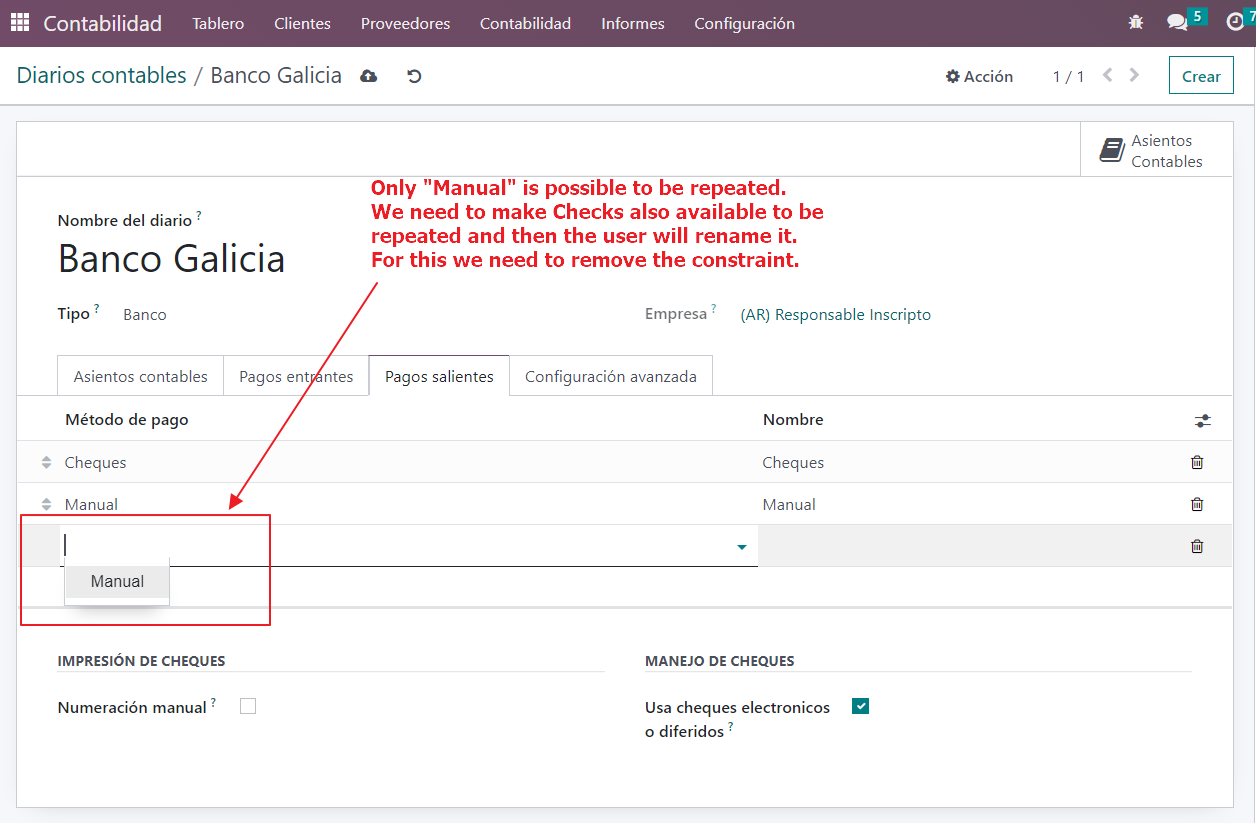 After this change 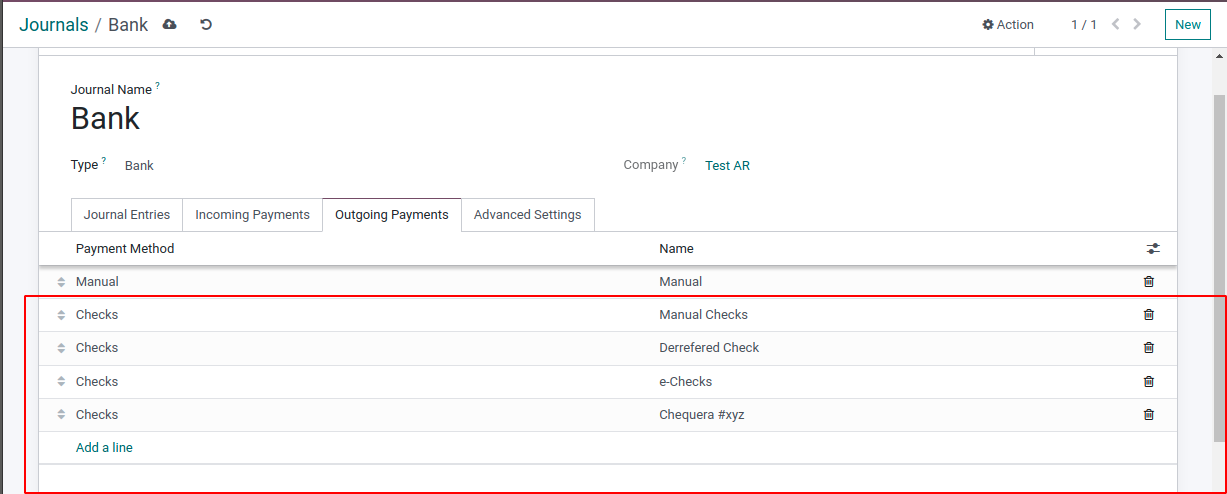 --- I confirm I have signed the CLA and read the PR guidelines at www.odoo.com/submit-pr
Enhancements to existing features
Invoices can now optionally display the total amount written out in full words, helping meet local legal or business requirements. The invoice layout was also improved to reduce unused white space, and this option is enabled by default for selected localizations including Algeria, India, Ukraine, and Morocco.
Original PR description
The layout of the invoice is improved to fill some white spaces that occured previously.
In addition, some localizations require to print the total amount of an invoice in full letters. This PR enables this functionality. As this is optional, a boolean field in the accounting settings enables to activate the feature. The total amount is displayed at the bottom of any invoice if the company has the boolean fields in the accounting settings set to True (set by default to False)


---
I confirm I have signed the CLA and read the PR guidelines at www.odoo.com/submit-pr
Resolved issues and error corrections
The French FEC export can now omit selected journals, such as IFRS adjustment journals, so companies can provide auditors or tax authorities with local accounting entries only. This helps businesses meet French reporting requirements while still maintaining separate IFRS records in Odoo.
Original PR description
In French accounting, they need to provide a FEC file to the auditors/tax authority to control their accounting. So far it's fine in Odoo.
While a company is managing IFRS accounting, the usual way to do it in Odoo is to use a specific journal "IFRS adjustments" for example. This way of working allows you to have a balance in local GAAP (excluding IFRS entries) and in IFRS GAAP (including the IFRS entries).  So far it's fine in Odoo.
The issue that we met is once a customer need to send his FEC file to the auditors/tax authority, he needs to send only local entries (then excluding IFRS entries). Therefore, it would be great to have an option to exclude some journals from the FEC export.

Task: 3133678
Saved payment methods are now shown separately from payment providers, making checkout and donation pages easier to understand. Customers can see when a saved payment method was created and which provider it belongs to, reducing confusion when multiple saved methods exist.
Original PR description
Currently there is no distinction between saved tokens and providers and there is no info on tokens under what provider they were created. When client has more than one token it looks messy and counters the point of token existance. Now tokens have their creation date,provider and are no longer in the same card as providers.

task-2510973

Description of the issue/feature this PR addresses:

Current behavior before PR:

Desired behavior after PR is merged:


---
I confirm I have signed the CLA and read the PR guidelines at www.odoo.com/submit-pr
The subscription order list now shows important details such as order number, order date, and recurrence, making it easier for users to identify and select the right records for bulk actions. Some less critical fields are now optional, helping teams tailor the list view to their needs.
Original PR description
Before this commit, when a user wanted to act on multiple SOs (through the action menu) in the subscription app, it wasn't intuitive to find those records in the list view because the 'order number' field wasn't being shown. Also, key information that gives subscription context such as 'order date', 'recurrence', etc weren't being shown either.

This commit adds new fields to the list view and change to 'optional' some previous inserted fields ('Customer Reference', 'To Renew').

Task id: 3128511Invoice terms and conditions are repositioned to use available space more effectively, making invoices easier to read when the text is long. Related invoice report layouts, including Intrastat and Mexican electronic invoicing, were adjusted to stay aligned with the updated design.
Original PR description
In the layout invoice, the terms and conditions are now placed on the left side of the invoice. If the text is too long, this commit enables the terms and conditions to be placed below the two columns where there is more space

task: 3097097
related PR (Community): 107714
Fixed an issue where sending several invoices at once could result in only one email being sent per company when the same email address appeared multiple times. Document-based mail batches, such as invoice sending, can now send each intended email even when recipients share an address.
Original PR description
Steps to repoduce:
- Accounting > Customers > Invoices:
	 select several invoices to send
- Action > Send & Print > (deselect Print) > Send & Print

Issue:
- It sends only one invoice per company

Cause:
- the mail_compose_message sets the status of an email as `cancel` when a mail has already been sent to a specific adress mail in the batch

Solution:
- If the use of mass mailing is not contact-based (e.g.: sending multiple invoices) it will allow to send multiple emails to the same adress

opw-2775121

--
I confirm I have signed the CLA and read the PR guidelines at www.odoo.com/submit-pr
Users could sometimes have trouble logging back in after signing out because the browser was still checking background app resources tied to the previous session. This fix makes those resources available during login and safely limits personalized shortcut data when the user is not yet authenticated.
Original PR description
Once the user access the backend (aka. `/web`), the browser loads the WebManifest and the ServieWorker is registered. After a logout, he's redirected to the login page (aka. `/web/login`). But this…
Once the user access the backend (aka. `/web`), the browser loads the
WebManifest and the ServieWorker is registered. After a logout, he's
redirected to the login page (aka. `/web/login`).

But this path being still under the ServiceWorker's scope (cf. `/web`),
the browser continues to try to check for an updated ServiceWorker.

If the user (same or another one) tries to log back in, a race condition
appears between the login request and the check for the ServiceWorker.
This issue is due to the ServiceWorker's route requiring an
authenticated user, which is not (yet) the case in this scenario,
conflicting with the login request.

This commit fixes it by reverting the `auth="public"` of the
ServiceWorker route. A similar issue, even if less likely to occur,
affects the WebManifest route for which the same change is applied.

Regarding the WebManifest route, shortcut's collection still requires an
authenticated user, but we fallback to an empty list if not authorized
(not authenticated, no access to apps, not enough rights...).

Note: the ServiceWorker, once registered, is entirely managed by the
browser ; we don't have the ability to control when the browser will
attempt to update it.

> Browsers will check for updates to a service worker when:

> * The user navigates to a page within the service worker's scope.
> * navigator.serviceWorker.register() is called with a URL different from
>   the currently installed service worker—but don't change a service
>   worker's URL!
> * navigator.serviceWorker.register() is called with the same
>   URL as the installed service worker, but with a different scope. Again,
>   avoid this by keeping the scope at the root of an origin if possible.
> * When events such as 'push' or 'sync' have been triggered within the
>   last 24 hours—but don't worry about these events yet.

Steps to reproduce:
- Login to an Odoo instance
- Logout
- Try to go to ´/web/login´ and login again.

References:
https://developer.chrome.com/docs/workbox/service-worker-lifecycle/#handling-service-worker-updates
https://web.dev/manifest-updates/
Creating a new Helpdesk team no longer triggers an access error when existing teams are archived. This prevents unnecessary setup blockers and lets businesses continue managing support teams normally.
Original PR description
Previous to this commit, there was an access error raised when trying to create a team when all the other teams were archived.
The error was raised because when teams are archived, the multi-company rule for stages is applied even thought it should not.

With out addition to the multi-company rule, we ensure that the rule is not applied when a stage has no related teams or when the related teams are archived.

Task-3177229