Friday, February 10, 2023
25 changes · master
New functionality added to Odoo
Website editors can now add a call-to-action button that links visitors to all appointment options or a selected set of appointment types. When promoting one appointment type, they can also guide visitors to specific staff members, making online booking easier and more targeted.
Original PR description
*: enterprise

This snippet allows to add a CTA button linking to all or a selection of
appointments, functionally similar to the "share appointment link" wizard.
If a single appointment type is selected, users can also specify appointment
staff users.

Task-2574175
See https://github.com/odoo/odoo/pull/90748
Enhancements to existing features
The data merge chatter now includes a “Read more” option to expand or collapse merge change details. This keeps conversations easier to scan while still letting users access the full merge information when needed.
Original PR description
Adds a link "Read more" to show/hide the display of the merge changes in the chatter.

task-3140992
Resolved issues and error corrections
This fixes an error that occurred when users tried to run the Verify on SII action for Chilean electronic invoicing. Correcting the parameter name helps ensure the verification process works as expected for affected accounting and stock documents.
Original PR description
Corrected the error when calling the action Verify on SII, the error is because one of the parameters was badly written. 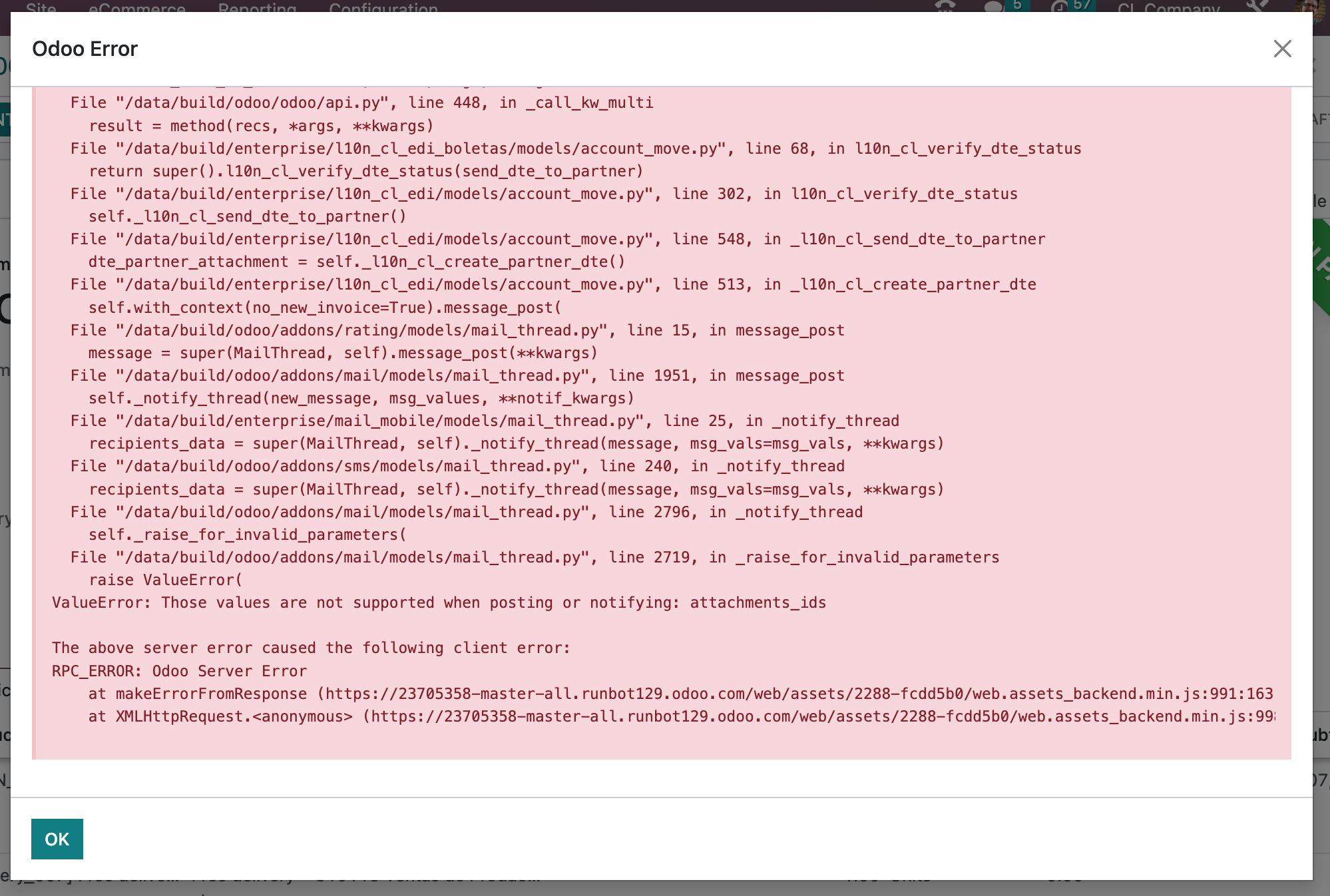 @ren-odoo @fvz-odoo
Code cleanup and technical improvements
The Mexican DIOT report has been reworked to use the standard tax report framework, supporting better integration with Odoo's tax tag engine. Businesses keep the Enterprise export capability while reporting behavior is aligned with the newer tax reporting process, including correct handling of reversed entries.
Original PR description
The mexican DIOT report is now a tax report and the account.report definition
has  been  moved to standard  (requirement for taxes integration with tax_tag
engine..)
The export functionality remains in Enterprise.

remark: opw-2950903 was removing reversed moves as they where going into
refund column, with the way the engine works now, it is correct
to have them included.
Miscellaneous changes
This commit's purpose is to update the description of the lock date setting of the timesheet in order for the description to be up to date with the changes made in 16.0.

task-3102699

Forward-Port-Of: odoo/enterprise#36825
Forward-Port-Of: odoo/enterprise#35034
Original PR description
This commit's purpose is to update the description of the lock date setting of the timesheet in order for the description to be up to date with the changes made in 16.0. task-3102699 Forward-Port-Of: odoo/enterprise#36825 Forward-Port-Of: odoo/enterprise#35034
Subscription retention messages, button text, and button links can now be translated by users. This helps businesses provide localized cancellation or retention experiences for customers in different languages.
Original PR description
Retention message, retention button text, and retention button link can now be translated by the user.

task-3112209
Several country-specific accounting features now rely on the shared accounting scheduler to download required XSD validation files instead of maintaining separate scheduled jobs. This reduces duplicated maintenance and helps keep electronic reporting and invoicing compliance files up to date more consistently.
Original PR description
Task: <a href="https://www.odoo.com/web#id=2230702&action=4043&model=project.task&view_type=form&cids=2&menu_id=4720">2230702</a>
Community PR: https://github.com/odoo/odoo/pull/62235
A Documents app test was updated to match a recent interface change in the underlying platform. This prevents automated test failures and helps keep the Documents mobile experience reliably validated.
Original PR description
The PR https://github.com/odoo/odoo/pull/110277
removes the ".o_discard_selection" selector and so makes a test of documents app fail

task: 3095775
Appraisals now appear in a clearer order in the kanban view, with open items prioritized by their appraisal dates and completed items showing the most recent first. Closing dates are no longer overwritten automatically, making it easier to reopen appraisals while preserving their original history.
Original PR description
task - 3147639
Fix the ordering of appraisals in the kanban view

Behavior before merge :

1) Appraisals were sorted by their closing date regardless of their status (open or done)
2) Date_close is automatically updated to current date when marked as done or canceled

Behavior after merge :

1) Appraisals will now appear in the kanban view in the following way :
     - Open appraisals (confirmed or to confirm) : from farthest in the past to furthest in the future
     - Done appraisals (closed or canceled) : from closest date to the farthest relatively to the current day (leading to the most recent ones being displayed first)

2) Date_close can now be edited in case someone wants to re-open an appraisal without modifying the old date_close (i.e. date_close is not automatically updated to current date anymore and is read-only only when the appraisal is done)The event barcode scanning screen has been modernized to use Odoo’s newer interface framework, improving maintainability and consistency. Mobile-specific barcode components were consolidated because the same logic is now needed across desktop and mobile, reducing duplication while preserving the scanning workflow.
Odoo Studio's action editor has been rebuilt on the newer web interface foundation, replacing older legacy code. This supports ongoing modernization, making the editor easier to maintain and improve without changing its core business purpose.
Create a partner with lang A and create an overdue invoice Set OdooBot lang to B
Set login user lang to C

Issues:
1) Go to followup report for partner and send manually followup Subject/Body of mail will be in lang C
Body of letter will be in lang C

2) If followup is executed automatically via cron
Subject/Body of mail will be in lang B
Body of letter will be in lang B

opw-3145497

Forward-Port-Of: odoo/enterprise#36632
Original PR description
Create a partner with lang A and create an overdue invoice Set OdooBot lang to B Set login user lang to C Issues: 1) Go to followup report for partner and send manually followup Subject/Body of mail will be in lang C Body of letter will be in lang C 2) If followup is executed automatically via cron Subject/Body of mail will be in lang B Body of letter will be in lang B opw-3145497 Forward-Port-Of: odoo/enterprise#36632
The tariff fraction catalog has been updated
on December 12th 2022:

http://omawww.sat.gob.mx/tramitesyservicios/Paginas/catalogos_emision_cfdi_complemento_ce.htm

opw-3133459

Forward-Port-Of: odoo/enterprise#35915
Original PR description
The tariff fraction catalog has been updated on December 12th 2022: http://omawww.sat.gob.mx/tramitesyservicios/Paginas/catalogos_emision_cfdi_complemento_ce.htm opw-3133459 Forward-Port-Of: odoo/enterprise#35915
Edit company contact address with Zip Code 31830 (CHH state) Issue an invoice PAC will fail to sign the CFDI with error """ Code : 401 Message : Fecha y hora de generación fuera de rango """ This occurs because PACs adjust the correct timezones according to the Zip Codes. In Nayarit (NAY) 12 zip code have UTC-6 (Standard time) / UTC-5 (Daylight Saving time) as timezone In Chihuahua (CHH) 251 Zip Codes have UTC-8 (Standard time) / UTC-7 (Daylight Saving time) as timezone opw-31585
Original PR description
Edit company contact address with Zip Code 31830 (CHH state) Issue an invoice

PAC will fail to sign the CFDI with error
"""
Code : 401
Message : Fecha y hora de generación fuera de rango """

This occurs because PACs adjust the correct timezones according to the Zip Codes.

In Nayarit (NAY) 12 zip code have UTC-6 (Standard time) / UTC-5 (Daylight Saving time) as timezone
In Chihuahua (CHH) 251 Zip Codes have UTC-8 (Standard time) / UTC-7 (Daylight Saving time) as timezone

opw-3158554

Forward-Port-Of: odoo/enterprise#36678
Tansifex is deprecating it's client and switches to a go-based solution in its API v3

The new client is still backward compatible with the old format but the v2 API is going to be phased out.
See https://github.com/transifex/cli to install the deplyments using the tx client

This PR is the result of the "tx migrate" command

Forward-Port-Of: odoo/enterprise#36934
Forward-Port-Of: odoo/enterprise#36784
Original PR description
Tansifex is deprecating it's client and switches to a go-based solution in its API v3 The new client is still backward compatible with the old format but the v2 API is going to be phased out. See https://github.com/transifex/cli to install the deplyments using the tx client This PR is the result of the "tx migrate" command Forward-Port-Of: odoo/enterprise#36934 Forward-Port-Of: odoo/enterprise#36784
Steps to reproduce ================== - Go to Manufacturing (with work orders enabled) - Go to the form view of a manufacturing order - Open studio - Click on work orders - Try to edit the list subview -> Single sub-view arch not found for xpath: `/form[1]/sheet[1]/notebook[1]/page[2]/field[1]/tree` Cause of the issue ================== In order to edit an inline view if it doesn't exist, studio creates one. The one created in this case has the following xpath `//field[@name='work
Original PR description
Steps to reproduce
==================

- Go to Manufacturing (with work orders enabled)
- Go to the form view of a manufacturing order
- Open studio
- Click on work orders
- Try to edit the list subview -> Single sub-view arch not found for xpath: `/form[1]/sheet[1]/notebook[1]/page[2]/field[1]/tree`

Cause of the issue
==================

In order to edit an inline view if it doesn't exist, studio creates one. The one created in this case has the following xpath `//field[@name='workorder_ids']` This isn't enough to uniquely identify the proper node, as in this case, there is another field with the same name before the one we want.

Solution
========

Send the full xpath to the backend. Also don't add the field as it is already present in the full xpath

opw-3115867

Forward-Port-Of: odoo/enterprise#36343
Issue: When we install the timesheet module, add fields to models `res.company` and `res.config.settings`. The fields that are used to trigger the sending of mail for timesheets reminder (via cron) are `timesheet_mail_employee_nextdate` and `timesheet_mail_manager_nextdate`. These fields need to be updated via a calculation (because they depend on a delay and an interval). Without the fix, these fields won't have any value as long as the user does not modify the record by changing the de
Original PR description
Issue: When we install the timesheet module, add fields to models `res.company` and `res.config.settings`. The fields that are used to trigger the sending of mail for timesheets reminder (via cron)…
Issue:
When we install the timesheet module,
add fields to models `res.company` and `res.config.settings`.

The fields that are used to trigger the sending of mail for timesheets reminder (via cron) are `timesheet_mail_employee_nextdate` and `timesheet_mail_manager_nextdate`. These fields need to be updated via a calculation (because they depend on a delay and an interval).

Without the fix, these fields won't have any value as long as the user does not modify the record by changing the delay or interval (via `res.config.settings`) in the Timesheets application settings (which trigger the `write` function and thus the `_timesheet_postprocess` function).

Therefore, if the user does not make any changes to the settings, no mail will be sent.

Solution:
Give a default value (via a post init function)
to the `timesheet_mail_employee_nextdate` and `timesheet_mail_manager_nextdate` fields when installing the `timesheet_grid` module.

opw-3114331

Forward-Port-Of: odoo/enterprise#36894
Forward-Port-Of: odoo/enterprise#36850
commit c7505f0b8cc65b4a920759e1cbb7ecc2860d752d introduce blabla in attachment name for return label. Remove it.

On top of that a lot of variables are define but not used. Remove them also

Forward-Port-Of: odoo/enterprise#36727
Original PR description
commit c7505f0b8cc65b4a920759e1cbb7ecc2860d752d introduce blabla in attachment name for return label. Remove it. On top of that a lot of variables are define but not used. Remove them also Forward-Port-Of: odoo/enterprise#36727
A product barcode and a lot name can have the same value. In such case, it will lead to issues when trying to scan it To reproduce the issue: 1. Create two products P01, P02 - P01: - Barcode: 123 - P02: - Tracking: By lots 2. Create a lot L for P02: - Name: 123 3. Operation Type > Delivery: - Can create lot: False - Use existing: True 4. Barcodes > Operations > Delivery, New 5. Scan 123 - A line appears for P01 and a warning is displayed as there is a
Original PR description
A product barcode and a lot name can have the same value. In such case, it will lead to issues when trying to scan it To reproduce the issue: 1. Create two products P01, P02 - P01: - Barcode: 123 -…
A product barcode and a lot name can have the same value. In such
case, it will lead to issues when trying to scan it

To reproduce the issue:
1. Create two products P01, P02
   - P01:
     - Barcode: 123
   - P02:
     - Tracking: By lots
2. Create a lot L for P02:
   - Name: 123
3. Operation Type > Delivery:
   - Can create lot: False
   - Use existing: True
4. Barcodes > Operations > Delivery, New
5. Scan 123
   - A line appears for P01 and a warning is displayed as there is a
     confusion between P01 and L
6. Click somewhere (to trigger a save)

Error: a validation error is raised because of the incompatibility
between L and P01. The user is stuck.

As said above, clicking anywhere will trigger a save of the SML, but
with P01 as product and L as lot. It will trigger a constraint:
https://github.com/odoo/odoo/blob/c9fdd4f2ac2d8afb18cb0dd126bb0b88c54f374e/addons/stock/models/stock_move_line.py#L109-L117

OPW-3100252

Forward-Port-Of: odoo/enterprise#36788
Forward-Port-Of: odoo/enterprise#36108remove unused pot file in snailmail_account_followup module Forward-Port-Of: odoo/enterprise#35216
Original PR description
remove unused pot file in snailmail_account_followup module

Forward-Port-Of: odoo/enterprise#35216
An AttributeError 'calendar.event' object has no attribute 'end' traceback that occurs in appointment/appointment_invite:_gc_appointment_invite was caught by Sentry. Because there is no "end" field in "calendar.event" model.

See https://drive.google.com/file/d/1iufsKuG3cylje8DEMrE7M5tfPZpjraCp/view?usp=share_link

So we use the 'stop' field instead of 'end' because it store stop date and time of the event

sentry-3891597633

Forward-Port-Of: odoo/enterprise#36877
Original PR description
An AttributeError 'calendar.event' object has no attribute 'end' traceback that occurs in appointment/appointment_invite:_gc_appointment_invite was caught by Sentry. Because there is no "end" field in "calendar.event" model. See https://drive.google.com/file/d/1iufsKuG3cylje8DEMrE7M5tfPZpjraCp/view?usp=share_link So we use the 'stop' field instead of 'end' because it store stop date and time of the event sentry-3891597633 Forward-Port-Of: odoo/enterprise#36877
Added the struct_id search field to be able to search by structures

Forward-Port-Of: odoo/enterprise#36211
Original PR description
Added the struct_id search field to be able to search by structures Forward-Port-Of: odoo/enterprise#36211
If, from a task, we add several tracked products, the reservation of the associated delivery will not work. To reproduce the issue: (Use demo data) 1. Create a product P: - Type: Storable - Tracking: USN 2. Update the on hand qty of P: - 1 x P with USN01 - 1 x P with USN02 3. Create and confirm a SO with - 1 x Field Service 4. Open the related task 5. Open the products 6. Add P: - 1 x USN01 - 1 x USN02 7. Back to the SO, open the delivery Error: Only US
Original PR description
If, from a task, we add several tracked products, the reservation of the associated delivery will not work. To reproduce the issue: (Use demo data) 1. Create a product P: - Type: Storable - Tracking:…
If, from a task, we add several tracked products, the reservation of
the associated delivery will not work.

To reproduce the issue:
(Use demo data)
1. Create a product P:
   - Type: Storable
   - Tracking: USN
2. Update the on hand qty of P:
   - 1 x P with USN01
   - 1 x P with USN02
3. Create and confirm a SO with
   - 1 x Field Service
4. Open the related task
5. Open the products
6. Add P:
   - 1 x USN01
   - 1 x USN02
7. Back to the SO, open the delivery

Error: Only USN01 has been reserved. If the user clicks on "Check
availability", nothing changes. Suppose the delivery also contains
some other tracked products (added at step 6), none will be reserved

When checking the availability, for each SM, we try to reserve a
quantity with a specific lot. To get this lot, we get the associated
procurement group (which is useful in case of multistep delivery),
its stock moves (still ok) and, among all the associated SOL, we
arbitrarily select the first one (not ok).

In the above case, it means that we always take the SOL with USN01,
even when trying to reserve the quantity of the second SM (i.e., the
one related to USN02). As a result, it will only works the first
time. Then, since USN01 is already assigned, the reservation will
not do anything (this is the reason why none of the others lines is
reserved)

OPW-3146832

Forward-Port-Of: odoo/enterprise#36869
Forward-Port-Of: odoo/enterprise#36676
Remove an unnecessary css rule, it was made
global for all x2many list fields.

Task-3151054

Forward-Port-Of: odoo/enterprise#36849
Original PR description
Remove an unnecessary css rule, it was made global for all x2many list fields. Task-3151054 Forward-Port-Of: odoo/enterprise#36849
# Current behaviour Clicking too rapidly on "Process Now" when creating an invoice can generate errors and block the invoice for further process by Carvajal (Columbian government tax agency) # Expected behaviour Invoice shouldn't be blocked when clicking too quickly after creation on "Process Now". # Steps to reproduce Check referenced ticket for setup # Reason for the problem Sometimes the `legalStatus` of the response is empty, because Carvajal is still processing the legality of
Original PR description
# Current behaviour Clicking too rapidly on "Process Now" when creating an invoice can generate errors and block the invoice for further process by Carvajal (Columbian government tax agency) #…
# Current behaviour
Clicking too rapidly on "Process Now" when creating an invoice can generate errors and block the invoice for further process by Carvajal (Columbian government tax agency)

# Expected behaviour
Invoice shouldn't be blocked when clicking too quickly after creation on "Process Now".

# Steps to reproduce
Check referenced ticket for setup

# Reason for the problem
Sometimes the `legalStatus` of the response is empty, because Carvajal is still processing the legality of the invoice, and we were flagging this response as a rejections. When we interpret a response as a rejection, we retry to generate a new XML for the invoice, but then Carvajal responds with a (real this time) error saying an entry in their system for this company + invoice number is already present.

# Fix
Modify the conditions so they more explicitly handle the different cases between
an invoice that is accepted/in progress/rejected.

# Affected versions
- 15.0
- saas-15.2
- saas-15.3
- 16.0
- master

opw-2851945

Forward-Port-Of: odoo/enterprise#33713