Friday, March 10, 2023
58 changes · master
Enhancements to existing features
Unit of Measure forms now show country-specific localization fields only for companies in the relevant countries. This reduces clutter and helps users avoid seeing fields that do not apply to their local accounting or tax requirements.
Original PR description
Currently, all localizations of UoM fields are visible in all countries.

So in this commit, I have added a new compute field in UoM models, the field contains comma-separated company's country codes, and I have used this field for the hide/unhide fields.

Enterprise PR: https://github.com/odoo/enterprise/pull/36572
Upgrade PR: https://github.com/odoo/upgrade/pull/4284

---
I confirm I have signed the CLA and read the PR guidelines at www.odoo.com/submit-pr
Sales dashboard amounts now display the company currency wherever they appear, making totals easier to interpret. This reduces confusion by ensuring monetary values in dashboards, lists, and forms are clearly labeled with the correct currency.
Original PR description
Amounts in the spreadsheet Sales dashboards are displayed without their currency
even though the amounts are all correctly converted to the current
company's currency.

With this commit, amounts are displayed with their currency in the
dashboard, list view and default form view.

The hardcoded number format is removed on the dashboard cells to let
the automatic format do the job

Task 3167343


---
I confirm I have signed the CLA and read the PR guidelines at www.odoo.com/submit-pr
Customer receivables now include confirmed sales orders that have not yet been invoiced, giving businesses a fuller picture of customer exposure. This supports more accurate credit limit checks by accounting for remaining amounts still to be invoiced, while keeping the related field less prominent in order lists.
Original PR description
The goal is to take into account the confirmed and un-invoiced sales orders in the total receivable of a client. It will be useful in the scope of the credit limit trigger.

This is broken down in 3 steps:
1. Add the Remaining Amount to Invoice (RAI) in the Invoice creation wizard of the Sales Order and store this data.
2. Add the RAI in the Total Receivable of the client.
3. The Remaining amount to invoice goes to optional="hide" in the "Orders to invoice" list view.

task-3122390

---
I confirm I have signed the CLA and read the PR guidelines at www.odoo.com/submit-pr
Point-of-sale orders can now be accessed across trusted cashier desks, making it easier to handle returns in different shops and manage restaurant orders with multiple checkout points. Restaurants can also share floor plans across several desks, supporting smoother waiter, cashier, and self-service workflows.
Original PR description
Currently the below use-cases are hardly supportable, though quite common:

    Retail: Sell product in one shop and return it in another one
    Restaurant: Managing payment when having multiple checkout desks, and multiple waiters (only taking orders)

This because currently:

PoS orders are only known by the cashier desk (pos.config) they were created from
One floor map can only be linked to one cashier desk at a time

More over, with the Self-Service coming along the way (where kiosk orders must be accessible from a cashier desk), this need must be supported.

For restaurant, floor plans can be linked to multiple cashier desks, ongoing orders are shared between trusted PoS config (through floors for restaurant and according to the setting "Trusted PoS config" for the retails), and past orders can be accessible from any desks within a same DB.

Task-id: 3090565
---
I confirm I have signed the CLA and read the PR guidelines at www.odoo.com/submit-prUsers can now assign or unassign people directly from kanban cards and similar board-style views, without opening the full record form. This makes pipeline, task, and activity management faster while keeping existing controls available when fields should remain read-only.
Original PR description
Purpose:

Allow quick assignation of records in the kanban views (and other places
by extension).
Currently, if you want to work in a board-like env (e.g. tasks in
kanban, crm in pipeline, that kind of thing), having the possibility to
quickly assign/unassign records without having to open them fullscreen
can be really useful => it should be possible to "quick edit" these
fields in kanban views easily, without switching to form views.

task-ID: 3121207
This update removes an obsolete cash discount field from payment terms that was left behind after a previous accounting update. It helps keep the payment terms setup cleaner and avoids confusion from unused information.
Original PR description
The last_day_for_discount field was forgotten in the payment term/cash discount update : https://github.com/odoo/odoo/pull/110274

Fixed by removing the forgotten crumb.
Subscription records now use one clear status field instead of several overlapping stage and renewal fields. This simplifies day-to-day subscription tracking, makes subscription screens more consistent with sales views, and removes the old renewal flag behavior ahead of a future replacement.
Original PR description
To simplify the subscription logic, this PR aims at removing the subscription's stage model and anything that depends on it to replace if by a simpler selection field called `subscription_state`.…
To simplify the subscription logic, this PR aims at removing the
subscription's stage model and anything that depends on it to replace
if by a simpler selection field called `subscription_state`.

This field will merge the usage of the follwing fields :
 -stage_id
 -stage_category
 -subscription_management
 -renew_state

For clarity sake's these fields are now represented by the 7
state of `subscription_state` :
 -'Quotation', Quotation for a new subscription
 -'Renewal Quotation', Renewal Quotation for existing subscription
 -'In Progress', Active Subscription or confirmed renewal for active subscription
 -'Paused', Active subscription with paused invoicing
 -'Renewed', Active or ended subscription that has been renewed
 -'Churned', Closed or ended subscription
 -'Upsell', Quotation or SO upselling a subscription,
    upsells are not subscriptions

Following theses changes, massive overhaul have been made
to the different subscription views to enhance the
usability as well as the onboarding of this app.
One of the main focus of these change was to make
the subscription view more closely act like the sale's
view.

Additionally, the old `to_renew` behaviour has been removed
as it wasn't fitting the new plan for subscription and will
be replaced in the future.

task-id : 3190077The German restaurant certification for Point of Sale was updated to stay compatible with the new cross-order flow. This helps ensure certified sales continue to work correctly after the broader Point of Sale change, and also fixes an issue in Mexican electronic invoicing test flows.
Original PR description
Related to https://github.com/odoo/odoo/pull/109216

This commit aims at adding the feature "cross-orders" of the PoS. This commit is related to a change made in community where the name of a function (_updateTableOrder) change into _updateOrder.
Localization-specific fields for units of measure now use the company’s country setting to decide when they should appear. This removes unused configuration and keeps Argentina, Colombia, Mexico, and Peru localization screens cleaner and more consistent.
Original PR description
In this commit, we remove the unused `l10n_co_edi_country_code` field,
because we remove from attrs in this commit -> dd43a37881365446a05f149e5b8aeb6296da824a
Also, remove the UoM form view from the Argentina Localization and used
the company country code for the hide/unhide fields.

Community PR: https://github.com/odoo/odoo/pull/112604
Upgrade PR: https://github.com/odoo/upgrade/pull/4284
Knowledge users can now choose whether articles appear in the main article tree for everyone or only for article members. This helps busy teams keep the Knowledge sidebar focused without changing who can still access articles through search or direct links.
Original PR description
Purpose ======= Articles that need to be shared with multiple persons will most probably quickly end up being set in the workspace so that no further member update is required. As a consequence, we…
Purpose
=======

Articles that need to be shared with multiple persons will most probably
quickly end up being set in the workspace so that no further member update
is required.

As a consequence, we need a way to allow users to pick what is displayed in
their rightbar so that it is not crammed with root articles they'll never
click on.

Especially needed on crowded databases where each departments has many root
articles one does not actually need.

Specs
=====

We introduce the notion of `Visibility` for articles. The visibility of an
article is the fact whether or not the article will be listed in the hierarchy
tree (in the left panel of the knowledge main view). This does not modify the
access rights on those articles!

An article can be configured to be visible for *Everyone* or *For members only*.
When the visibility is set to:
* *Everyone*, every internal user is able to see the article without
  doing anything.
* *Members*, the users cannot see the article if they're not a member of the
  article.

To minimise DB impact, a boolean field has been added to reflect this :
`is_article_visible_by_everyone`. (If not, the article is visible for members
only)

Also, a new user dependant computed field as been added: `is_article_visible`.
An article is visible for a user if:
The user has access to it
AND
    the visibility of the article is set to Everyone
    OR
    The user is member of this article (if article visibility = member Only)

A hidden article is still available for every user that can access it.
The 'standard' quick search does not display the hidden articles but
an hidden mode has been added to the palette to specifically search for them.
Hidden article can be accessible via the Search methods (quick search in hidden
mode / search in the tree view) or via direct links.

This feature is only meant for internal users, to trim their tree to what
is necessary to them. Share users already have a limited amount of
accessible articles. This visibility concept is then not necessary for them.

Performance notes:

We are also increasing the query counter of three performance tests because,
since we have two computed field, we have more queries to do when opening
a record and when moving an article.

Those increases in the number of queries comes from the fields: `user_can_see`
and `everyone_can_see`, plus the addition of a member when creating an article
triggers an additional query for the access.

Use Cases
=========

The usage of Visibility is quite complex and maybe better understood with
some 2 use cases, 1 simple and 1 more complex:

Use Case 1
==========
You hide articles that you can see inside of a hidden root to cleanup the
sidebar. This is useful for articles you do not want to see everyday such as
FAQs or less useful informations that could be interesting for a few selection
of people. (LAN Parties, Tennis Team, Band Practice, etc.)

Step 1
======

You create 3 Articles called *Root*, *Parent* and *Child* : when creating them,
their visibility is set to **Members**, they are thus only visible to members
of the articles including yourselves. (You are directly added as a Member of
the article when setting the Visibility to **Members**)

Step 2
======

You remove yourselves from *Root*, to hide it for you, and move the other 2
below it with the Move To option. This way all the articles are hidden for you
in the sidebar but you can easily search *Parent* and *Root* via the command
palette, since you can see them. (You are a member of these articles after all)

But you won't see *Root* using the classic search since you are not a member of
this article.

Use Case 2
==========

You create root articles corresponding to teams of people or departments.

Step 1
======

You create multiple articles for each of the teams in your enterprise: R&D,
Sales, Accounting, etc. and you create an article visible by all (e.g. HR FAQ).

Step 2
======

For each team you add children articles and adds all the corresponding members
for each department/team.

Step 3
======

When being connected as a user, member of the R&D team, you see that you don't
have the R&D root into the sidebar.
You can search for it using the advanced search either by typing **$** in the
classic search, or by using the button launching the search for hidden articles
and you open the R&D root.

Step 4
======

You can navigate inside of the hidden structure before joining the root as a
member in order for you to see it in your sidebar.

==

task-2900465Resolved issues and error corrections
The Sales Planning workflow now opens correctly when a sales order has no linked planning slot. Instead of failing, the system uses today's date as the starting point, allowing users to continue planning service hours without interruption.
Original PR description
Steps:
Create a plannable service.
Create a SO with this product, and confirm it.
Click on "Hours to Plan" stat button.

Issue:
Traceback.

Cause:
If there is no planning slot linked to the SO,
SaleOrder.planning_initial_date is set to False.
Then, it is put in the context of the action we call. Then JS tries to evaluate false as a date, and so it crashes.

Fix:
If there is no planning slot linked to the SO,
set SaleOrder.planning_initial_date to today.

task-3226804
Code cleanup and technical improvements
This update replaces older internal communication methods in the Point of Sale system with a newer service-based approach. It helps reduce reliance on legacy infrastructure, making future maintenance and improvements easier without changing day-to-day cashier workflows.
Original PR description
*: l10n_co_pos, l10n_fr_pos_cert, point_of_sale, pos_loyalty, pos_mercury, pos_restaurant, pos_sale, pos_sale_product_configurator

This is a step in the direction of making the pos no longer depend on the legacy environment.
Miscellaneous changes
# Current behaviour If you have a confirmed SO, with a `sale.order.line` that has a `product_packaging_id`, and you write a new `product_packaging_id`, the "Delivery Order" has 2 lines, 1 move with the old qty and the old packaging, and another line with the difference of qty and the new packaging. Same behaviour is present on purchase side. # Expected behaviour If you have multiple `stock.move.line` from the same `sale.order.line`, they should be able to merge, when you changed the `produ
Original PR description
# Current behaviour If you have a confirmed SO, with a `sale.order.line` that has a `product_packaging_id`, and you write a new `product_packaging_id`, the "Delivery Order" has 2 lines, 1 move with…
This update corrects several issues in online bank synchronization so users see clearer connection information and fewer unnecessary steps. It restores the consent date on dashboards, skips account selection when only one account is available, shows renewal emails in the activity history, and hides irrelevant connection fields when no account is linked.
Original PR description
- The consent date was not showing on dashboard
- When fetching only one account, skip the wizard to select account
- Display the renewal mail in the chatter
- Hide connection request field on journal if no account linked to it
This change updates how the web interface checks whether certain record fields should be hidden, making that logic more self-contained and consistent. It is an internal cleanup with no expected change to day-to-day user workflows.
Original PR description
This commit changes the function isInvisible visibility to private on
the record, this means that outside the record, the modifiers need to be
evaluated.

Part-of task-id 3179751
Co-authored-by: Aaron Bohy <aab@odoo.com>
Delivery features linked to inventory have been separated into their own stock delivery area, while the core delivery app remains focused on delivery setup. This makes the system easier to maintain and reduces overlap between sales, delivery, and inventory functionality without introducing a major user-facing change.
Odoo has removed older screen-view technology now that all views have moved to the newer OWL framework. This reduces outdated code and compatibility layers, making the web interface easier to maintain and evolve without changing day-to-day business workflows.
Original PR description
The last view in the odoo codebase has just been converted to owl, meaning that we no longer have legacy views. This allows us to remove a lot of legacy view related code: the abstract elements on which the legacy views were built, the compatibility layers that allowed to deal with both owl and legacy views uniformly, legacy widgets that were only used in those legacy views...

Description of the issue/feature this PR addresses:

Current behavior before PR:

Desired behavior after PR is merged:


---
I confirm I have signed the CLA and read the PR guidelines at www.odoo.com/submit-pr
This refactor modernizes the shared data model used by many Odoo screens, including CRM, Project, calendar, search, paging, and form fields. It should make these views more consistent and easier to maintain, reducing the risk and cost of future improvements without introducing a standalone business feature.
Original PR description
Description of the issue/feature this PR addresses:

Current behavior before PR:

Desired behavior after PR is merged:


---
I confirm I have signed the CLA and read the PR guidelines at www.odoo.com/submit-pr
This change restructures the web app's internal model communication so it can support a more reactive interface in future improvements. It preserves existing behavior while moving event handling to a dedicated mechanism, reducing technical constraints in core web views and related fields.
Original PR description
In order to make the model reactive, it must not be an EventBus. An EventBus cannot be reactive. So we will add a key bus to the model that will always trigger all events that were triggered on the model before.

Part of task 3179751

Description of the issue/feature this PR addresses:

Current behavior before PR:

Desired behavior after PR is merged:


---
I confirm I have signed the CLA and read the PR guidelines at www.odoo.com/submit-pr
This change restructures how internal screen data communicates updates so the application can become more responsive over time. It preserves existing behavior while preparing accounting and timesheet-related screens for future improvements.
Original PR description
In order to make the model reactive, it must not be an EventBus. An EventBus cannot be reactive. So we will add a key bus to the model that will always trigger all events that were triggered on the model before.

Part of task 3179751
This update removes outdated view support now that the remaining older grid view technology has already been retired. It simplifies the underlying platform and helps keep future interface development focused on the newer framework, with limited direct impact for most business users.
Original PR description
This commit is the counterpart of odoo/odoo#114893, where we remove the support of legacy views, following the removal of the grid view, the last non owl view, from the codebase [1].

[1] odoo/enterprise#35217
This update refactors how planning calendar popover visibility rules are handled behind the scenes. It keeps the same user experience while improving code organization and reducing reliance on internal record details.
Original PR description
…ecord

This commit changes the function isInvisible visibility to private on the record, this means that outside the record, the modifiers need to be evaluated.

Part-of task-id 3179751
Co-authored-by: Aaron Bohy <aab@odoo.com>
This update modernizes several Point of Sale components by replacing older internal communication methods with a newer service approach. It helps reduce reliance on outdated infrastructure, improving maintainability without changing day-to-day user workflows.
Original PR description
*: l10n_de_pos_cert,l10n_de_pos_res_cert, pos_l10n_se, pos_preparation_display

This is a step in the direction of making the pos no longer depend on the legacy environment.
# Current behaviour
If you have a confirmed SO, with a `sale.order.line` that has a `product_packaging_id`, and you write a new `product_packaging_id`, the "Delivery Order" has 2 lines, 1 move with the old qty and the old packaging, and another line with the difference of qty and the new packaging.
Same behaviour is present on purchase side.

# Expected behaviour
If you have multiple `stock.move.line` from the same `sale.order.line`, they should be able to merge, when you changed the `product_packaging_id`. Ex: If you edit an SOL from 1 pack of 10 to 1 pack of 20, we should have 1 move line with qty 20 in packs of 20, instead of 2 lines, one with qty 10 in packs of 10, and another line with qty 10 in packs of 20.
Same behaviour is present on purchase side.

# Steps to reproduce
- Install Sales and Inventory
- Activate "Product Packaging" in Settings
- Create a new product with 2 types of packaging
  - PackOf10 with quantity of 10
  - PackOf20 with quantity of 20
- Create a SO with a new line that product, quantity 10
- Confirm the SO
- Edit the SOL with 1 pack of 20 (`product_uom_qty`=20)
- The "Delivery Order" has 2 lines, instead of 1 with the new packaging

# Reason for the problem
When saving the SO, a new `procurement` is created which will create a new `stock.move.line` with the new packaging. This will prevent the lines to merge correctly, because they have different packaging.

# Fix
When writing the `product_packaging_id` on a `sale.order.line`/`purchase.order.line`, we directly write the package on the `stock.move.line`, before any `procurements` are created, so the generate move lines can correctly be merged.

# Affected versions
- 15.0
- saas-15.2
- saas-15.3
- 16.0
- master
---
opw-3002612

---
I confirm I have signed the CLA and read the PR guidelines at www.odoo.com/submit-pr

Forward-Port-Of: odoo/odoo#114769
Forward-Port-Of: odoo/odoo#107223
Fix a bug in the fwd-port of https://github.com/odoo/odoo/commit/26e25f186a3918499b55ce97f03b872b0be44e88

For expenses 'paid by the company', the user does not care about reconciliation mechanism.

Before this commit expenses 'paid by company' were marked as posted/partial/in payment instead of paid in the hr.expense form.

Task-id: 3162882


---
I confirm I have signed the CLA and read the PR guidelines at www.odoo.com/submit-pr

Forward-Port-Of: odoo/odoo#114815
Original PR description
Fix a bug in the fwd-port of https://github.com/odoo/odoo/commit/26e25f186a3918499b55ce97f03b872b0be44e88 For expenses 'paid by the company', the user does not care about reconciliation mechanism. Before this commit expenses 'paid by company' were marked as posted/partial/in payment instead of paid in the hr.expense form. Task-id: 3162882 --- I confirm I have signed the CLA and read the PR guidelines at www.odoo.com/submit-pr Forward-Port-Of: odoo/odoo#114815
Use case to reproduce: - Do a receipt of 10 units of Product A - Open the forecast report You will see the correct quantity on hand and forecast but there is a line showing quantity on hand with 0 unit It shouldn't be show since there is no interest at displaying it. It happens due to a wrong condition because empty obejct is not consider as falsy in javascript Description of the issue/feature this PR addresses: Current behavior before PR: Desired behavior after PR is merged:
Original PR description
Use case to reproduce:
- Do a receipt of 10 units of Product A
- Open the forecast report

You will see the correct quantity on hand and forecast but there is a line showing quantity on hand with 0 unit

It shouldn't be show since there is no interest at displaying it. It happens due to a wrong condition because empty obejct is not consider as falsy in javascript

Description of the issue/feature this PR addresses:

Current behavior before PR:

Desired behavior after PR is merged:


---
I confirm I have signed the CLA and read the PR guidelines at www.odoo.com/submit-pr

Forward-Port-Of: odoo/odoo#114806
Since #91640, the locations on stock picking are editable except in `done` state. This can leads to misunderstanding if some stock move lines are already created. The locations on stock picking act as default values for stock move/ stock move lines. Validating a picking will always use the location set on stock move lines even if those ones differ from the picking. This commit adds a simple error message in to address this situation. Close #113486 Description of the issue/feature this PR addre
Original PR description
Since #91640, the locations on stock picking are editable except in `done`
state. This can leads to misunderstanding if some stock move lines are already
created. The locations on stock picking act as default values for stock move/
stock move lines. Validating a picking will always use the location set on
stock move lines even if those ones differ from the picking. This commit adds a
simple error message in to address this situation.

Close #113486

Description of the issue/feature this PR addresses:

Current behavior before PR:

Desired behavior after PR is merged:


---
I confirm I have signed the CLA and read the PR guidelines at www.odoo.com/submit-pr

Forward-Port-Of: odoo/odoo#113962
Prior to this commit, if the window was big enough to not be in mobile, it could still be small enough so that the menu items overlap with the systray item when the website client action was first mounted. Steps to reproduce: - With the browser's dev tools set screen size to be responsive with a resolution of 847 x 867 - Start odoo and go in the website app - The menu items overlap with the systray items This commit fixes that by not only re-rendering the navbar when the website content
Original PR description
Prior to this commit, if the window was big enough to not be in mobile, it could still be small enough so that the menu items overlap with the systray item when the website client action was first mounted.

Steps to reproduce:
- With the browser's dev tools set screen size to be responsive with a resolution of 847 x 867
- Start odoo and go in the website app
- The menu items overlap with the systray items

This commit fixes that by not only re-rendering the navbar when the website content is properly loaded (which was already done before) but also by adapting it afterwards.

task-2687506

Forward-Port-Of: odoo/odoo#107406
Many of our users have a default Chrome zoom of 150% which is probably due to an automatic configuration of Chrome when using a 1920x1080 (Full HD) screen. Whatever the reason: many users have a 1920x1080 screen combined with a 150% browser zoom... and in that case, entering edit mode would display the website as it would be on "mobile" devices. This is because since [1], the website is actually reduced in size when entering edit mode since an iframe is used, whose size is reduced by the size
Original PR description
Many of our users have a default Chrome zoom of 150% which is probably due to an automatic configuration of Chrome when using a 1920x1080 (Full HD) screen. Whatever the reason: many users have a…
Many of our users have a default Chrome zoom of 150% which is probably due to an automatic configuration of Chrome when using a 1920x1080 (Full HD) screen. Whatever the reason: many users have a 1920x1080 screen combined with a 150% browser zoom... and in that case, entering edit mode would display the website as it would be on "mobile" devices. This is because since [1], the website is actually reduced in size when entering edit mode since an iframe is used, whose size is reduced by the size of the right panel. Before [1], the right panel would be *included* in the website which would appear reduced but using CSS rules according to the full screen width (which also led to other issues but this is in the past now). The sidebar was actually 3px too wide. Reducing it from 291px to 288px solves the issue (at least if the OS task bar is not anchored to the left/right). Indeed 288px is 1920px / 150% - 992px, where 992px is the current minimum width the screen must have for our websites to be in "desktop" mode (below, columns break over multiple lines). Notice that 1920px / 150% = 1280px which gives the minimum size of the screen that will display the website in "desktop" mode in the editor if no browser zoom is used, which seems like an acceptable value. Note: reducing the sidebar width even further to support more devices or more zoom / OS task bar configuration would be problematic as the sidebar would become too small. It is currently kinda at both its maximum and minimum authorized value. We tried solutions to virtually "de-zoom" the website iframe to display the website in "desktop" mode no matter what but this did not give great results. On problematic devices, the user still has the possibility to de-zoom its browser by himself. [1]: https://github.com/odoo/odoo/commit/31cc10b91dc7762e23b4bde9b945be0c4ce3fe3b ## On a Full HD + 150% zoom screen: | Before | After | |----------|---------| | 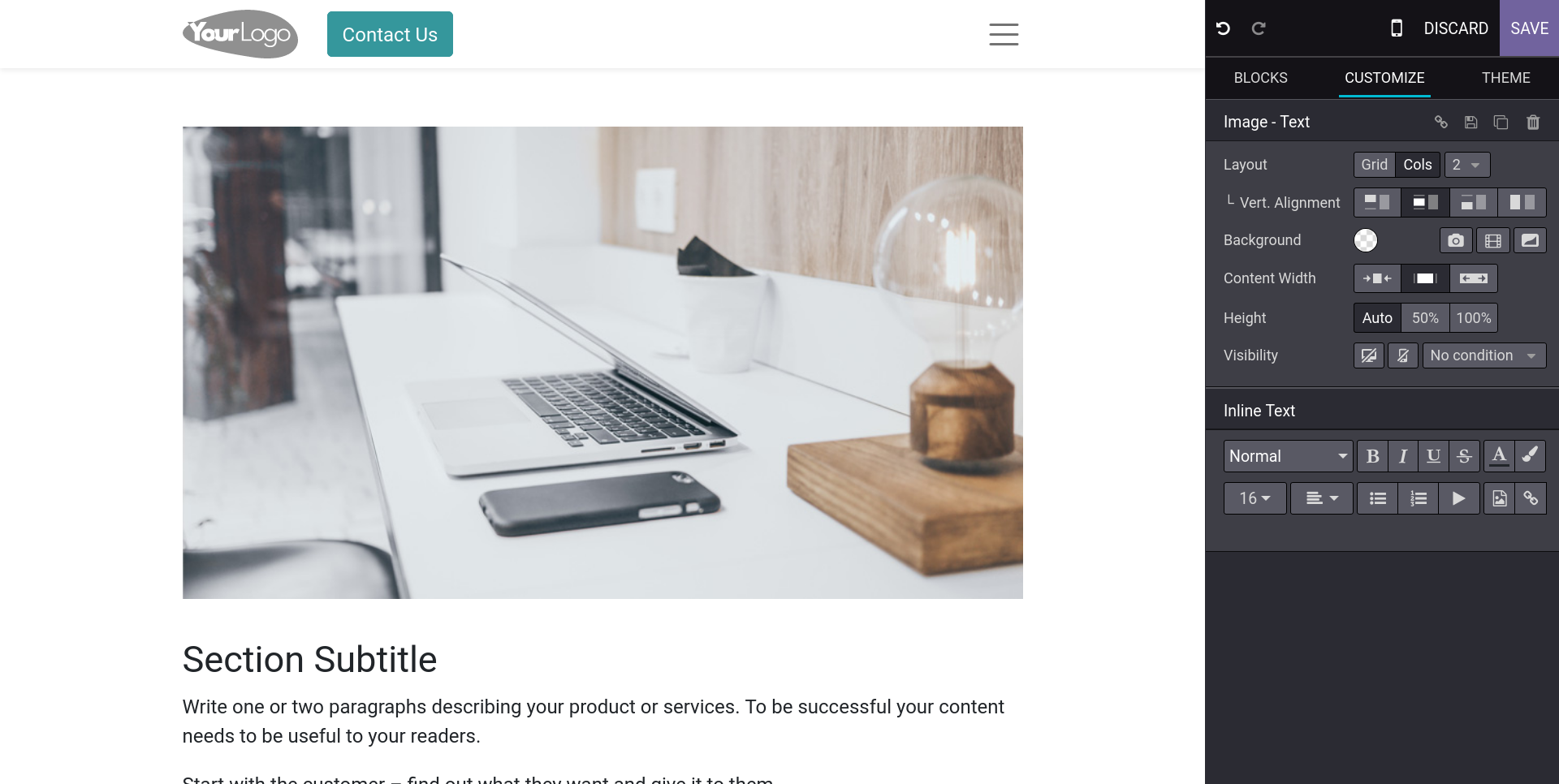 | 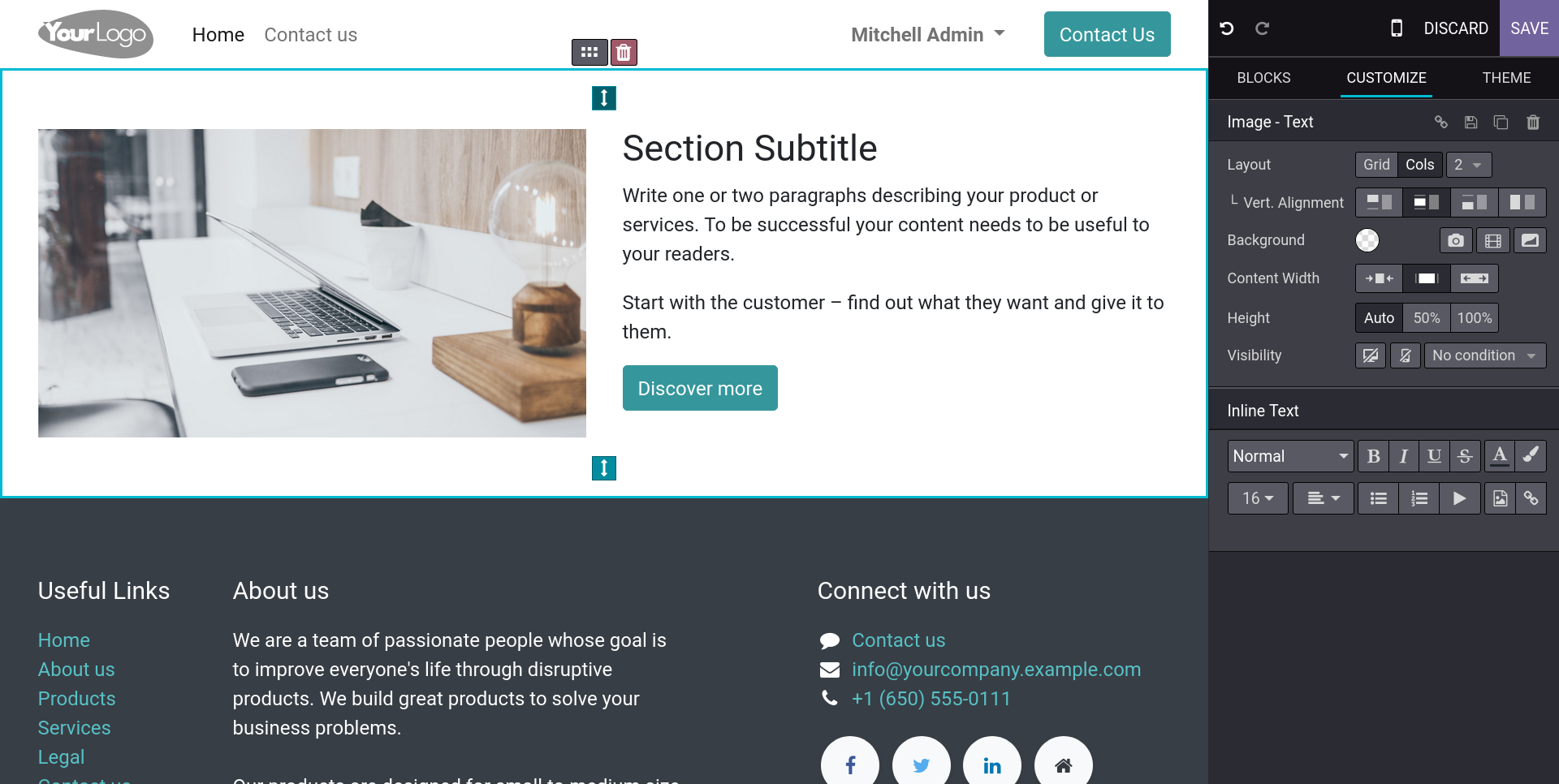 | ## On a Full HD + no-zoom screen (comparison for the new overflowing labels due to sidebar width downsizing). Before: 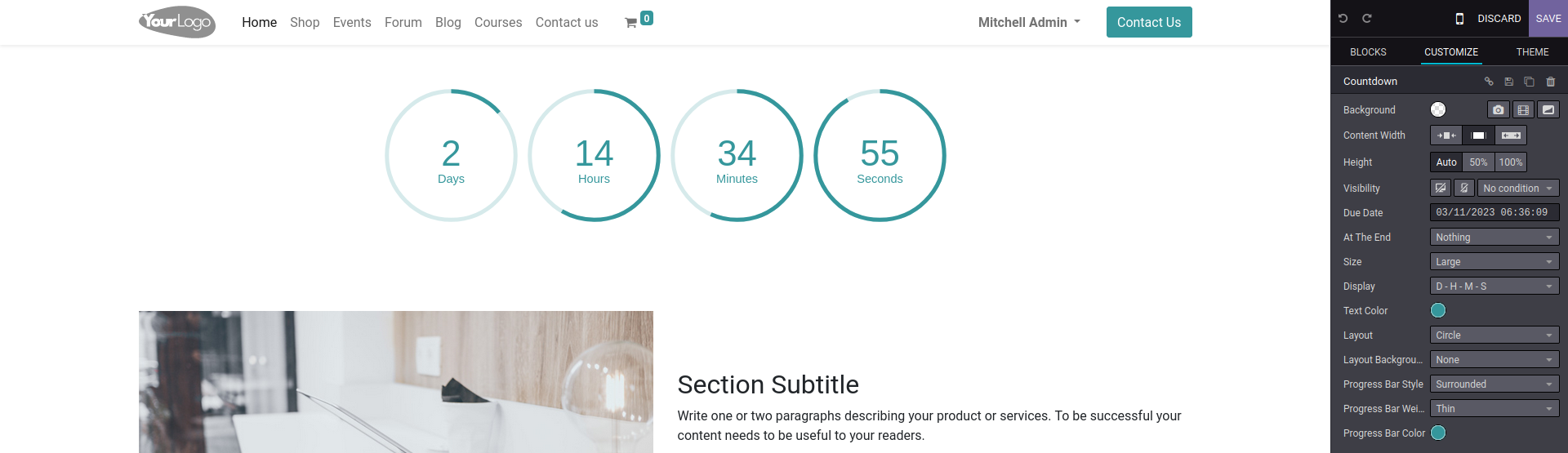 After: 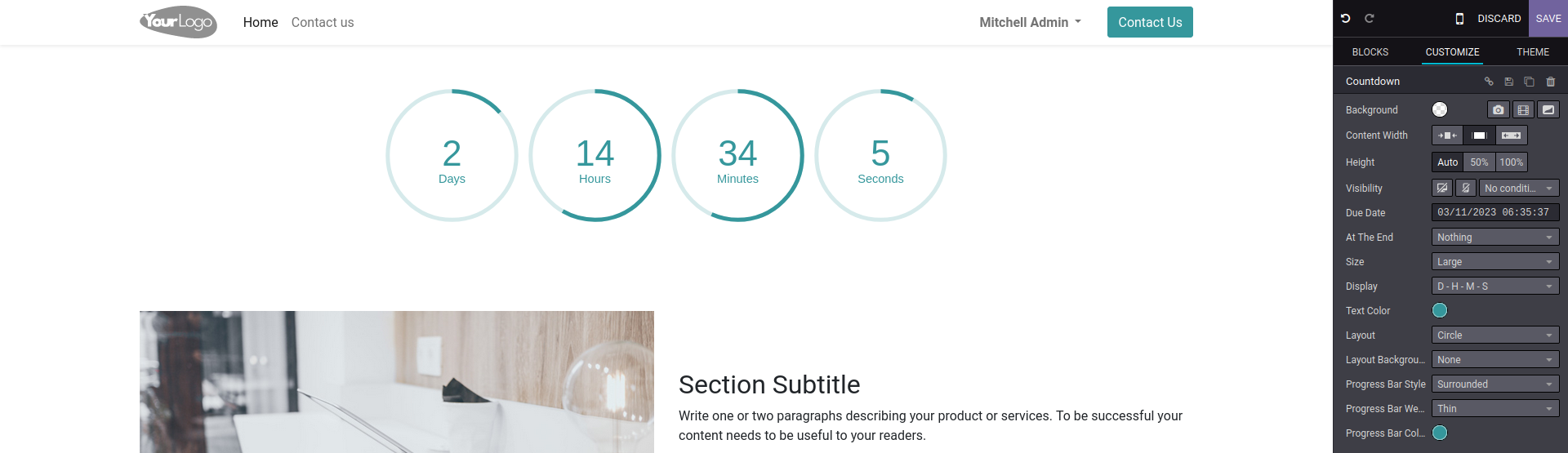 Forward-Port-Of: odoo/odoo#114702
The `t-cache` used on the `<head>` of website.layout was wrong: it depended on the use of debug=assets or not (added by [1]) while it should at least also depend on debug=tests. This commit chooses to fix the issue by not using the caching system in case any value of debug is used. This commit also comments this `t-cache` value. Steps to reproduce: - As a visitor, first visit the homepage without debug mode - Now reach the homepage with ?debug=tests => You still don't have the tests asse
Original PR description
The `t-cache` used on the `<head>` of website.layout was wrong: it depended on the use of debug=assets or not (added by [1]) while it should at least also depend on debug=tests. This commit chooses to fix the issue by not using the caching system in case any value of debug is used.

This commit also comments this `t-cache` value.

Steps to reproduce:
- As a visitor, first visit the homepage without debug mode
- Now reach the homepage with ?debug=tests => You still don't have the tests assets

Worse (but unlikely in production of course):
- Create a fresh DB and first reach the homepage with debug=tests
- => Now all your visitors are damned to load the tests tours for no reason (and you likely have lots of errors shown in your console).

[1]: https://github.com/odoo/odoo/commit/3061a484168ff21e3ae7e40ce691d299b63484a4

opw-3203912

Forward-Port-Of: odoo/odoo#114775
The main objective of this commit is to make checkboxes consistent and fix their spacing issues. Prior to these changes, the checkboxes on the `product_view` were too close to their neighboring option labels, making it difficult to know which checkbox to tick. The new changes fixes inconsistencies in general such as undesired hovering effects and the cursor behaviors on disabled inputs. This commit also removes the margin in the checkbox template since the padding from the chec
Original PR description
The main objective of this commit is to make checkboxes consistent and fix their spacing issues. Prior to these changes, the checkboxes on the `product_view` were too close to their neighboring…
The main objective of this commit is to make checkboxes consistent and fix their spacing issues. Prior to these changes, the checkboxes on the `product_view` were too close to their neighboring option labels, making it difficult to know which checkbox to tick. The new changes fixes inconsistencies in general such as undesired hovering effects and the cursor behaviors on disabled inputs. This commit also removes the margin in the checkbox template since the padding from the checkbox wrapper compensates for the spacing between the checkboxes and their respective labels. Tweaking the selector in `settings_form_view.scss` to ignore boolean field inputs allows us to get rid of max-width and margin overrides introduced in commit b90059e9366015d701a8157b944e127c1c083b77. Most checkboxes were already falling under their labels on mobile, but this change impacted those that were not. To address this issue, we decided to consistently change the position of the checkboxes left to their labels for small devices in form view. This required slight adjustments to the `form_group.xml` template. Still in form_view, for some of the specific checkboxes such as `o_checkbox_optional_field` the changes in `form_controller.scss` are made to mimic the new behavior for mobile sized screen. However, if they are using the form_group template, their behavior is unchanged at the moment. Finally, even if these changes makes it better for most of them, some checkboxes in `settings` still require some minor adjustments and will be addressed in task-3113372. task-3094083 Enterprise PR: https://github.com/odoo/enterprise/pull/37773 Non-optional checkbox current behavior on mobile: 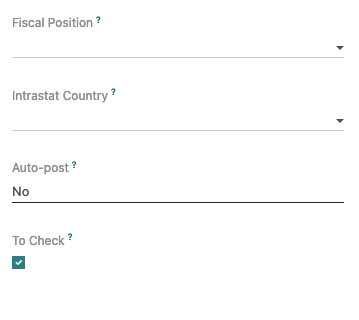 After this commit: 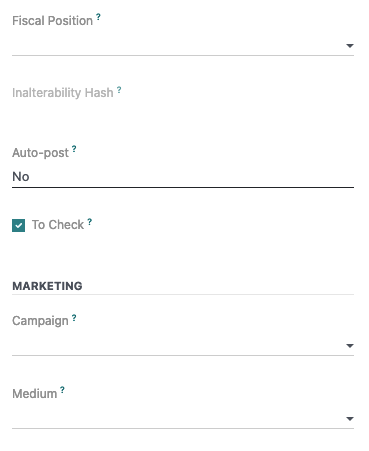 Non-optional multiple checkbox current behavior on mobile: 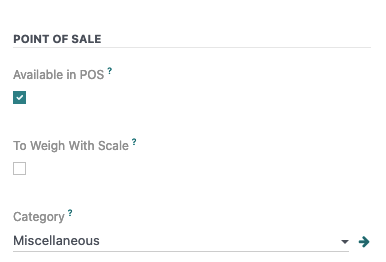 After fix: 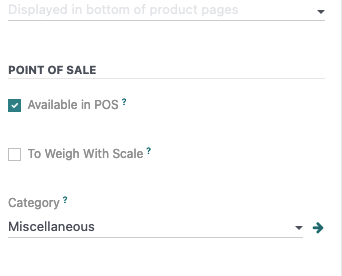 o_checkbox_optional (without template) before fix: 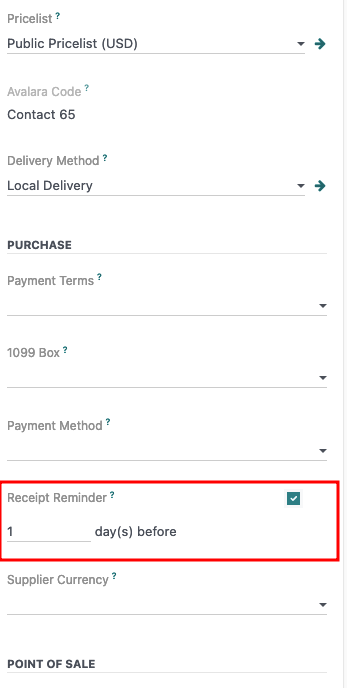 After fix: 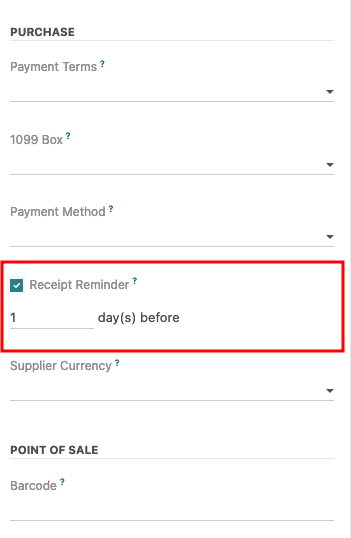 Survey form view before fix: 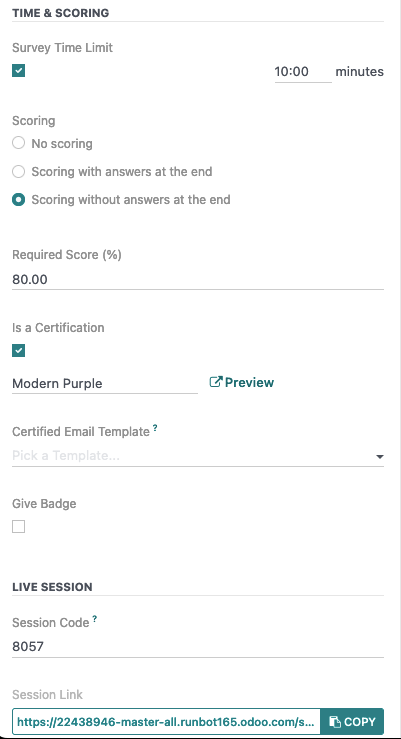 After fix (a bit more ugly but consistent with other o_checkbox_optional): 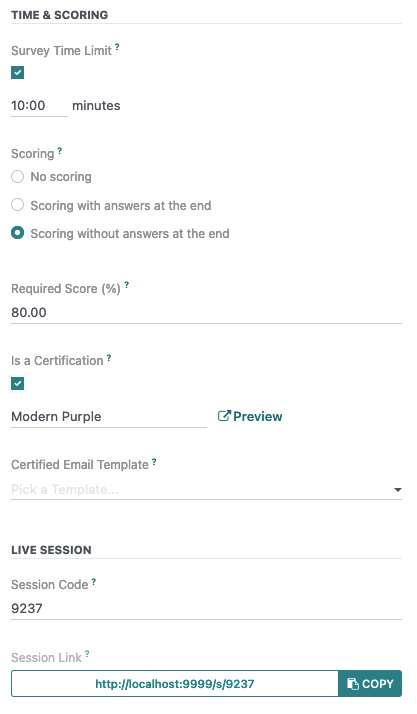 Product view checkboxes before fix:  After fix:  --- I confirm I have signed the CLA and read the PR guidelines at www.odoo.com/submit-pr Forward-Port-Of: odoo/odoo#107520
Before the fix, the compute function is set as a string in the `default` parameter. Meaning that it will always be True because a non empty string is truthy.
Fix by converting the field to be compute-editable, like the function was designed to be.

Forward-Port-Of: odoo/odoo#111671
Original PR description
Before the fix, the compute function is set as a string in the `default` parameter. Meaning that it will always be True because a non empty string is truthy. Fix by converting the field to be compute-editable, like the function was designed to be. Forward-Port-Of: odoo/odoo#111671
Backport of 0c7cbeab103 to speed up MOs confirmation when
producing lots of quantity and when at least one component
is tracked by Unique SN.

---
I confirm I have signed the CLA and read the PR guidelines at www.odoo.com/submit-pr

Forward-Port-Of: odoo/odoo#114884
Forward-Port-Of: odoo/odoo#112565
Original PR description
Backport of 0c7cbeab103 to speed up MOs confirmation when producing lots of quantity and when at least one component is tracked by Unique SN. --- I confirm I have signed the CLA and read the PR guidelines at www.odoo.com/submit-pr Forward-Port-Of: odoo/odoo#114884 Forward-Port-Of: odoo/odoo#112565
If applied, this commit will solve the KeyError of 'list_ids'. Before this commit ======================= When there are no Mailing Lists available and add the snippet 'Newsletter block' in the website with the template 'Form Subscription' and any user tries to Subscribe to that form. It will raise an error like KeyError: 'list_ids'. After this commit ======================== In this commit, checking keyword arguments which have list_ids in this or not if list_ids not in that returns t
Original PR description
If applied, this commit will solve the KeyError of 'list_ids'.

Before this commit
=======================
When there are no Mailing Lists available and add the snippet 'Newsletter block' in the website with the template 'Form Subscription' and any user tries to Subscribe to that form. It will raise an error like KeyError: 'list_ids'.

After this commit
========================
In this commit, checking keyword arguments which have list_ids in this or not if list_ids not in that returns the error like 'Mailing List(s) not found!'

see - https://tinyurl.com/2n3o7s58
sentry - 3949183926

Description of the issue/feature this PR addresses:

Current behavior before PR:

Desired behavior after PR is merged:


---
I confirm I have signed the CLA and read the PR guidelines at www.odoo.com/submit-pr

Forward-Port-Of: odoo/odoo#113378
This commit addresses a bug where the "description" field on the user screen was not displaying properly. This fixes the formatting issue, ensuring that the field is now properly displayed with appropriate line breaks and spacing. Users can now view their description information as intended.

Forward-Port-Of: odoo/odoo#114803
Original PR description
This commit addresses a bug where the "description" field on the user screen was not displaying properly. This fixes the formatting issue, ensuring that the field is now properly displayed with appropriate line breaks and spacing. Users can now view their description information as intended. Forward-Port-Of: odoo/odoo#114803
- Create a product with a very long product description - Add in a PO and print the RFQ The description overlaps with the table header on the second page. This is a known issue of wkhtmltopdf (see issues 1770 and 1524 for example), and there is no known workaround. It can be avoided by preventing the repetition of the header. opw: 3208347 Inspired by https://github.com/odoo/odoo/pull/53909 Description of the issue/feature this PR addresses: Current behavior before PR: Desired
Original PR description
- Create a product with a very long product description
- Add in a PO and print the RFQ

The description overlaps with the table header on the second page.

This is a known issue of wkhtmltopdf (see issues 1770 and 1524 for example), and there is no known workaround. It can be avoided by preventing the repetition of the header.

opw: 3208347

Inspired by https://github.com/odoo/odoo/pull/53909
Description of the issue/feature this PR addresses:

Current behavior before PR:

Desired behavior after PR is merged:


---
I confirm I have signed the CLA and read the PR guidelines at www.odoo.com/submit-pr

Forward-Port-Of: odoo/odoo#114833
When duplicating an analytic account, we want to make more explicit which account is the duplicate and which one existed before.

task-3202027

Description of the issue/feature this PR addresses:

Current behavior before PR:

Desired behavior after PR is merged:


---
I confirm I have signed the CLA and read the PR guidelines at www.odoo.com/submit-pr

Forward-Port-Of: odoo/odoo#114311
Original PR description
When duplicating an analytic account, we want to make more explicit which account is the duplicate and which one existed before. task-3202027 Description of the issue/feature this PR addresses: Current behavior before PR: Desired behavior after PR is merged: --- I confirm I have signed the CLA and read the PR guidelines at www.odoo.com/submit-pr Forward-Port-Of: odoo/odoo#114311
This commit will rename the font "Muli" to "Mulish" as it has been renamed in Google Fonts.

Forward-Port-Of: odoo/odoo#114810
Original PR description
This commit will rename the font "Muli" to "Mulish" as it has been renamed in Google Fonts. Forward-Port-Of: odoo/odoo#114810
This issue was caught in Sentry. The return type of the partner avatar for public users is `odoo.http.Stream`, but the `route_wrapper` expects it to be `Response streamed`. ``` TypeError: <function> returns an invalid value: <odoo.http.Stream object at 0x7f76a7e3c0a0> File "odoo/http.py", line 2095, in __call__ response = request._serve_db() File "odoo/http.py", line 1677, in _serve_db return service_model.retrying(self._serve_ir_http, self.env) File "odoo/service/model.
Original PR description
This issue was caught in Sentry. The return type of the partner avatar for public users is `odoo.http.Stream`, but the `route_wrapper` expects it to be `Response streamed`. ``` TypeError: <function>…
This issue was caught in Sentry.
The return type of the partner avatar for public users is `odoo.http.Stream`,
but the `route_wrapper` expects it to be `Response streamed`.

```
TypeError: <function> returns an invalid value: <odoo.http.Stream object at 0x7f76a7e3c0a0>
  File "odoo/http.py", line 2095, in __call__
    response = request._serve_db()
  File "odoo/http.py", line 1677, in _serve_db
    return service_model.retrying(self._serve_ir_http, self.env)
  File "odoo/service/model.py", line 134, in retrying
    result = func()
  File "odoo/http.py", line 1706, in _serve_ir_http
    response = self.dispatcher.dispatch(rule.endpoint, args)
  File "odoo/http.py", line 1819, in dispatch
    return self.request.registry['ir.http']._dispatch(endpoint)
  File "odoo/addons/base/models/ir_http.py", line 149, in _dispatch
    result = endpoint(**request.params)
  File "odoo/http.py", line 710, in route_wrapper
    return Response.load(result)
  File "odoo/http.py", line 1196, in load
    raise TypeError(f"{fname} returns an invalid value: {result}")
```

sentry-3929988311

---
I confirm I have signed the CLA and read the PR guidelines at www.odoo.com/submit-pr

Forward-Port-Of: odoo/odoo#114781Description of the issue/feature this PR addresses: Wrong key was used to display the unit of measure in the BoM Overview, leaving the cells empty. Current behavior before PR:  Desired behavior after PR is merged:  --- I confirm I have signed the CLA and read the P
Original PR description
Description of the issue/feature this PR addresses: Wrong key was used to display the unit of measure in the BoM Overview, leaving the cells empty. Current behavior before PR:  Desired behavior after PR is merged:  --- I confirm I have signed the CLA and read the PR guidelines at www.odoo.com/submit-pr Forward-Port-Of: odoo/odoo#114703
when plan workorder, cancelled/done workorders are taken in to account when they block current workorder. In this fix, we ignore then when plan workorder.

Task-3126569


---
I confirm I have signed the CLA and read the PR guidelines at www.odoo.com/submit-pr

Forward-Port-Of: odoo/odoo#112800
Original PR description
when plan workorder, cancelled/done workorders are taken in to account when they block current workorder. In this fix, we ignore then when plan workorder. Task-3126569 --- I confirm I have signed the CLA and read the PR guidelines at www.odoo.com/submit-pr Forward-Port-Of: odoo/odoo#112800
To reproduce the issue:
1. In settings, scroll to "Contacts"
2. Click on the "?" bubble next to "Send SMS"
3. The page that opens is 404

Error: In the url of the opened page, there is
"saas~16.1+e" instead of "saas-16.1"

Added parsing to the server version in url

OPW-3198672

---
I confirm I have signed the CLA and read the PR guidelines at www.odoo.com/submit-pr

Forward-Port-Of: odoo/odoo#114079
Original PR description
To reproduce the issue: 1. In settings, scroll to "Contacts" 2. Click on the "?" bubble next to "Send SMS" 3. The page that opens is 404 Error: In the url of the opened page, there is "saas~16.1+e" instead of "saas-16.1" Added parsing to the server version in url OPW-3198672 --- I confirm I have signed the CLA and read the PR guidelines at www.odoo.com/submit-pr Forward-Port-Of: odoo/odoo#114079
Steps to reproduce: - Create 2 accounts: 1) * Code: 1000 * Account Name: Test 2) * Code 1000A * Account Name: TestA - Create a journal item for each account - Go to Accounting / Accounting / Journal Items (list view) - Add custom filter: ("Account", "is equal to", "1000 Test") Journal items from both the created accounts are retrieved. As a strict equal is requested, it shouldn't find the journal item linked to account "1000A TestA". Cause: When searching on an acco
Original PR description
Steps to reproduce: - Create 2 accounts: 1) * Code: 1000 * Account Name: Test 2) * Code 1000A * Account Name: TestA - Create a journal item for each account - Go to Accounting / Accounting / Journal…
Steps to reproduce:
- Create 2 accounts:

  1)
  * Code: 1000
  * Account Name: Test
  2)
  * Code 1000A
  * Account Name: TestA
- Create a journal item for each account
- Go to Accounting / Accounting / Journal Items (list view)
- Add custom filter: ("Account", "is equal to", "1000 Test")
Journal items from both the created accounts are retrieved.
As a strict equal is requested, it shouldn't find the journal item linked to account "1000A TestA".

Cause:
When searching on an account, the first part of the search is used to find a code that begins with that part (ilike operation), regardless of the actual operator (i.e. "=" in this case).
It has been done that way because we suppose that most of the times customer is starting his search with the beginning of the code of the account he is searching, which is not incorrect.
But the case of the "=" operator has not been handled.

opw-3179681


---
I confirm I have signed the CLA and read the PR guidelines at www.odoo.com/submit-pr

Forward-Port-Of: odoo/odoo#113860Some Luxembourg public institution do not have a VAT number but have been assigned an arbitrary number (see: https://pch.gouvernement.lu/fr/peppol.html). This requires a new field: `l10n_lu_peppol_identifier`. For Luxembourg, the flow is then as follows: when exporting an electronic invoice, if the field exists and is set, we read it. Otherwise, we read the VAT. opw-3186147 Forward-Port-Of: odoo/odoo#114822
Original PR description
Some Luxembourg public institution do not have a VAT number but have been assigned an arbitrary number (see:
https://pch.gouvernement.lu/fr/peppol.html).

This requires a new field: `l10n_lu_peppol_identifier`. For Luxembourg, the flow is then as follows: when exporting an electronic invoice, if the field exists and is set, we read it. Otherwise, we read the VAT.

opw-3186147

Forward-Port-Of: odoo/odoo#114822
Since [1], some mass_mailing snippet templates now have images with shapes by default. However, the shapes were not added correctly: - for the Blockquote snippet, the files specified are not correct (wrong names and wrong extensions). - for the Team snippet, the shapes are not present when dropping it. This commit fixes that by properly adding the shape images as defined in the commit [2]. It also removes the "circle images" files as they are not necessary anymore. The basic shapes were a
Original PR description
Since [1], some mass_mailing snippet templates now have images with shapes by default. However, the shapes were not added correctly:

- for the Blockquote snippet, the files specified are not correct (wrong names and wrong extensions).
- for the Team snippet, the shapes are not present when dropping it.

This commit fixes that by properly adding the shape images as defined in the commit [2]. It also removes the "circle images" files as they are not necessary anymore. The basic shapes were also fixed by removing their width and height, since the dropped snippets looked weird because their images have a default width smaller than the shapes.

[1]: https://github.com/odoo/odoo/commit/f4995f560003c2180ad3cef50e1b172a151e50c8
[2]: https://github.com/odoo/odoo/commit/eb1262960f54fd81424a86ef4d6693a950e76cb4

opw-3137732

Forward-Port-Of: odoo/odoo#114842
Before this commit, attachment preview could be displayed in x2m dialogs. Now, the compiler removes the attachment preview from the arch so it is never displayed in renderer.

Forward-Port-Of: odoo/odoo#114918
Forward-Port-Of: odoo/odoo#109874
Original PR description
Before this commit, attachment preview could be displayed in x2m dialogs. Now, the compiler removes the attachment preview from the arch so it is never displayed in renderer. Forward-Port-Of: odoo/odoo#114918 Forward-Port-Of: odoo/odoo#109874
State `done` means *Locked*, which means that most of the fields should not be editable. However, the behavior for the field `warehouse_id` was changed during refactoring in https://github.com/odoo/odoo/commit/f9f68adb2cdfdfd16bc24c82acae015ddfb9b83a This commit restores Odoo 15 behavior in Odoo 16+ opw-3204896 Description of the issue/feature this PR addresses: Current behavior before PR: Desired behavior after PR is merged: --- I confirm I have signed the CLA and re
Original PR description
State `done` means *Locked*, which means that most of the fields should not be editable.

However, the behavior for the field `warehouse_id` was changed during refactoring in https://github.com/odoo/odoo/commit/f9f68adb2cdfdfd16bc24c82acae015ddfb9b83a

This commit restores Odoo 15 behavior in Odoo 16+

opw-3204896

Description of the issue/feature this PR addresses:

Current behavior before PR:

Desired behavior after PR is merged:


---
I confirm I have signed the CLA and read the PR guidelines at www.odoo.com/submit-pr

Forward-Port-Of: odoo/odoo#113835
Steps to reproduce: - Install stock - Config > Shipping > enable Signature on delivery orders - Create delivery order > Validate - Switch to mobile view - Action > Sign Issue: We get a traceback: `Uncaught Promise > Component is destroyed`. This happens because the signature widget is destroyed when the Action dropdown is folded. Solution: Use the orm service in `this.env.services` to perform the `write`. We have to also update the view in order to see the new delivery slip
Original PR description
Steps to reproduce:

- Install stock
- Config > Shipping > enable Signature on delivery orders
- Create delivery order > Validate
- Switch to mobile view
- Action > Sign

Issue:

We get a traceback: `Uncaught Promise > Component is destroyed`.

This happens because the signature widget is destroyed when the Action dropdown is folded.

Solution:

Use the orm service in `this.env.services` to perform the `write`. We have to also update the view in order to see the new delivery slip.

opw-3133731

Forward-Port-Of: odoo/odoo#114263
When using the 'toggleDeviceVisibility' option, we can see that there is a mismatch between the screen breakpoint at which the elements are displayed like in mobile view (=> under 992px or `lg`) and the one that is impacted by the 'Hide/Show' option (=> at 768px or `md`). This is a problem because between these two breakpoints, the display is like in mobile view but is not considered as such and so, hiding/showing an element in the mobile/desktop view (for example, if it does not look goo
Original PR description
When using the 'toggleDeviceVisibility' option, we can see that there is
a mismatch between the screen breakpoint at which the elements are
displayed like in mobile view (=> under 992px or `lg`) and the one that
is impacted by the 'Hide/Show' option (=> at 768px or `md`). This is
a problem because between these two breakpoints, the display is like in
mobile view but is not considered as such and so, hiding/showing an
element in the mobile/desktop view (for example, if it does not look
good in one of them) has no effect until the screen reaches 768px.

This commit increases the screen breakpoint at which the 'toggleDevice-
Visibility' option is applied, that is, at 992px instead of 768px, in
order to be consistent with the display.

task-3110770

Forward-Port-Of: odoo/odoo#114921
Forward-Port-Of: odoo/odoo#109053
This commit fixes the behavior of the FileInput component. Since the html element of type input doesn't trigger its onChange when a file with the same name is given twice to the input, we must first clear the input value, which will cause the input to handle the file even if the input already contains this file. Even if that seems unnecessary, this is an easy way to fix issues in the base_import action were data are not send back to the server when re-uploading the same file to let the server
Original PR description
This commit fixes the behavior of the FileInput component. Since the html element of type input doesn't trigger its onChange when a file with the same name is given twice to the input, we must first clear the input value, which will cause the input to handle the file even if the input already contains this file.

Even if that seems unnecessary, this is an easy way to fix issues in the base_import action were data are not send back to the server when re-uploading the same file to let the server process the data.

A test has been added to assert that the onUpload is effectively called twice when uploading a file, even if it's the same exact file.

Forward-Port-Of: odoo/odoo#114936
Issue: when use t-if to display text and use mutli line, the white-space are removed.
```
<div>
    <t t-out="nb"/>
    <t t-if="nb == 0 or nb == 1">product</t>
    <t t-else="">products</t>
</div>
```
is rendered:
```
<div>
    3products
</div>
```

Forward-Port-Of: odoo/odoo#114475
Original PR description
Issue: when use t-if to display text and use mutli line, the white-space are removed.
```
<div>
<t t-out="nb"/>
<t t-if="nb == 0 or nb == 1">product</t>
<t t-else="">products</t>
</div>
```
is rendered:
```
<div>
3products
</div>
```
Forward-Port-Of: odoo/odoo#114475Steps to reproduce issue: - Go to helpdesk > Tickets > all tickets(kanban view) - Create ticket with long name without spaces. - Check the ticket name in kanban view opw-3203687 Forward-Port-Of: odoo/enterprise#38013
Original PR description
Steps to reproduce issue:
    - Go to helpdesk > Tickets > all tickets(kanban view)
    - Create ticket with long name without spaces.
    - Check the ticket name in  kanban view

opw-3203687

Forward-Port-Of: odoo/enterprise#38013Quality checks of type "register consumed material" are created automatically to register lot of track raw materials. If a pdf has been set on the operation it won't be displayed on them and thus may be lost if this is the only quality check compare to a bom without tracked product. This commit adds the operation worksheet document in the tablet for those quality checks. opw: 3179472 Forward-Port-Of: odoo/enterprise#37996
Original PR description
Quality checks of type "register consumed material" are created automatically to register lot of track raw materials.

If a pdf has been set on the operation it won't be displayed on them and thus may be lost if this is the only quality check compare to a bom without tracked product.

This commit adds the operation worksheet document in the tablet for those quality checks.

opw: 3179472

Forward-Port-Of: odoo/enterprise#37996
Add link to EC Sales report in message added in https://github.com/odoo/enterprise/commit/be435b8515a6b71d56f02d79b9de65177108e505

Task: 3159976

Forward-Port-Of: odoo/enterprise#37921
Original PR description
Add link to EC Sales report in message added in https://github.com/odoo/enterprise/commit/be435b8515a6b71d56f02d79b9de65177108e505 Task: 3159976 Forward-Port-Of: odoo/enterprise#37921
When we are done with/back from a workorder tablet view:
1. if we came from MO, then return to a workorder kanban filtered by the MO
2. if we came from the workorder list view, then return back to it
3. if we come from the workorder kanban view, then return back to it

Task-3126569

Forward-Port-Of: odoo/enterprise#37124
Original PR description
When we are done with/back from a workorder tablet view: 1. if we came from MO, then return to a workorder kanban filtered by the MO 2. if we came from the workorder list view, then return back to it 3. if we come from the workorder kanban view, then return back to it Task-3126569 Forward-Port-Of: odoo/enterprise#37124
Current behaviour: Selecting either arrival or dispatch from the type filter on the intrastat report results in a traceback when there are any lines on the report. This is because the totals that are passed to the total line, which is generated when only one of these filters is selected, are structured differently to the way in which it is referenced. Traceback screenshot: 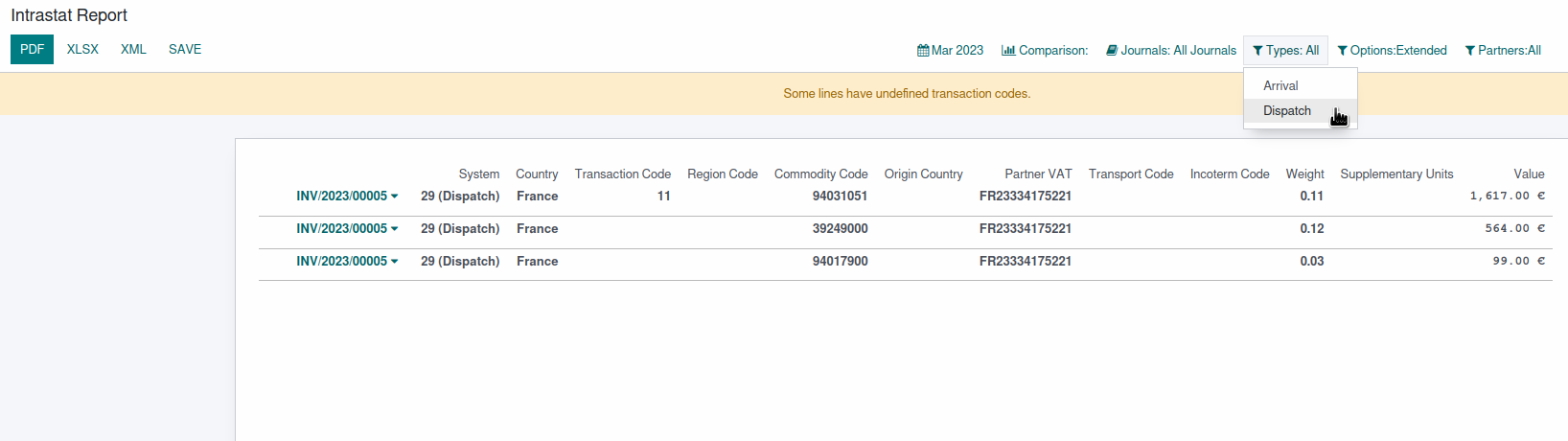  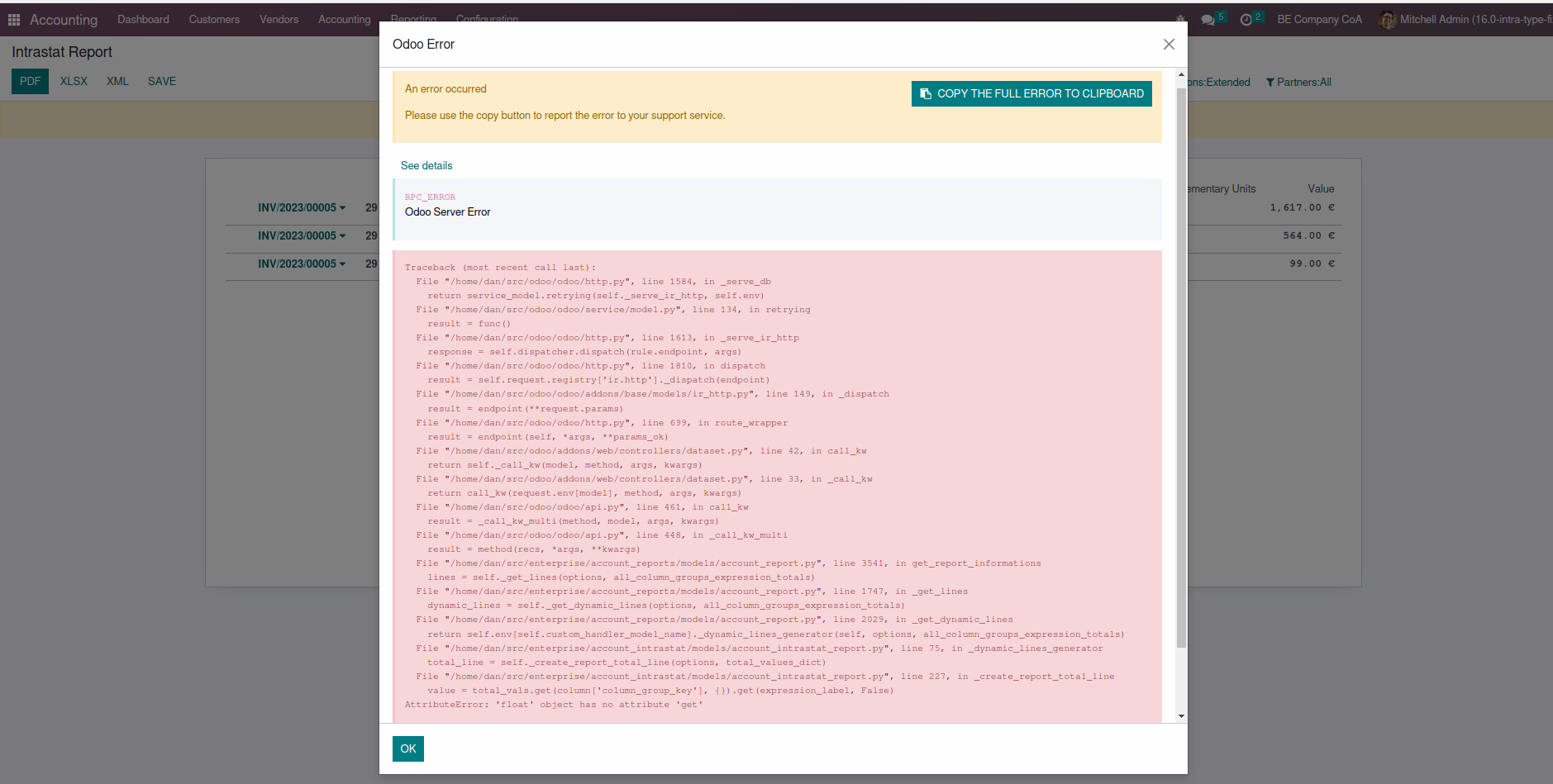 This commit adapts the 'total_values_dict' that is passed to the function that generates the totals line to match the structure that is expected. In doing this, only the 'Value' column is initialised, which means that only the total value will be displayed on the totals line, which is fine because it's the only column that makes sense to total on this report (total weight, supplementary units, etc are irrelevant) Screenshot with this fix: 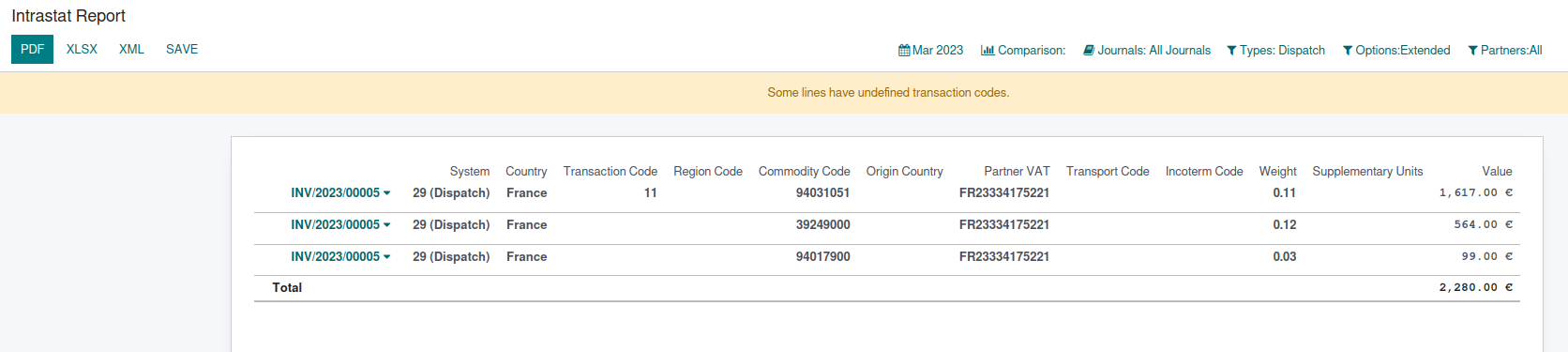 Forward-Port-Of: odoo/enterprise#37830
Steps to reproduce:
- create a task in On-Site Services (with Field Service);
- assign a person to the task;
- go to the map view

Issue:
The numbering of the elements on the map is not correct. The first task will have the number 0 instead of 1.

Solution:
Increment the number by 1 when the data is grouped.

opw-3171505

Forward-Port-Of: odoo/enterprise#37624
Original PR description
Steps to reproduce: - create a task in On-Site Services (with Field Service); - assign a person to the task; - go to the map view Issue: The numbering of the elements on the map is not correct. The first task will have the number 0 instead of 1. Solution: Increment the number by 1 when the data is grouped. opw-3171505 Forward-Port-Of: odoo/enterprise#37624
The main objective of this commit is to make checkboxes consistent and fix their spacing issues. Prior to these changes, the checkboxes on the `product_view` were too close to their neighboring option labels, making it difficult to know which checkbox to tick. The new changes fixes inconsistencies in general such as undesired hovering effects and the cursor behaviors on disabled inputs. This commit also removes the margin in the checkbox template since the padding from the checkbox wrap
Original PR description
The main objective of this commit is to make checkboxes consistent and fix their spacing issues. Prior to these changes, the checkboxes on the `product_view` were too close to their neighboring…
The main objective of this commit is to make checkboxes consistent and fix their spacing issues.

Prior to these changes, the checkboxes on the `product_view` were too close to their neighboring option labels, making it difficult to know which checkbox to tick.

The new changes fixes inconsistencies in general such as undesired hovering effects and the cursor behaviors on disabled inputs.

This commit also removes the margin in the checkbox template since the padding from the checkbox wrapper compensates for the spacing between the checkboxes and their respective labels.

Tweaking the selector in `settings_form_view.scss` to ignore boolean field inputs allows us to get rid of max-width and margin overrides introduced in commit b90059e9366015d701a8157b944e127c1c083b77.

Most checkboxes were already falling under their labels on mobile, but this change impacted those that were not. To address this issue, we decided to consistently change the position of the checkboxes left to their labels for small devices in form view.
This required slight adjustments to the `form_group.xml` template.

Still in form_view, for some of the specific checkboxes such as `o_checkbox_optional_field` the changes in `form_controller.scss` are made to mimic the new behavior for mobile sized screen.

However, if they are using the form_group template, their behavior is unchanged at the moment.

Finally, even if these changes makes it better for most of them, some checkboxes in `settings` still require some minor adjustments and will be addressed in task-3113372.

task-3094083
Community: https://github.com/odoo/odoo/pull/107520

Forward-Port-Of: odoo/enterprise#37773
In the form view of a deferred expense/revenue, when quick creating a model_id, it will actually create another deferred asset.
It also set the new deferred asset as model_id, which is totally wrong.

By adding the default_state to the context of the field, we can ensure that it is a model that is going to be created.

Task id #3221592

Forward-Port-Of: odoo/enterprise#37893
Original PR description
In the form view of a deferred expense/revenue, when quick creating a model_id, it will actually create another deferred asset. It also set the new deferred asset as model_id, which is totally wrong. By adding the default_state to the context of the field, we can ensure that it is a model that is going to be created. Task id #3221592 Forward-Port-Of: odoo/enterprise#37893