Daily updates from Odoo
Navigate
Branch
Friday, May 12, 2023
13 changes
New functionality added to Odoo
Rental products will no longer appear in the new sales catalog view. This keeps the catalog focused on products that can be sold directly, reducing confusion for sales teams when preparing orders.
Original PR description
This commit is part the task that aims to add a catalog view to the
sales app.
Modules touched: sale_subscription, sale_renting.
Because of the catalog objective subscription products are not to be
shown, it is the same for rental products.

See odoo/odoo#106382

Task - 306208
This adds support for selling storable products through subscriptions, so recurring subscription orders can automatically create delivery orders and invoice delivered items at the end of each billing period. It also improves invoice follow-up processing so subscription invoicing works consistently whether triggered automatically or manually.
Original PR description
Sale Subscriptions Stock
======================================
Sale Subscription Stock is a bridge module between sale_subscription and
sale_stock. The purpose of this module is to allow the user to create
subscription sale order with storable product which will result in
recurring delivery order and invoicing of those products.
Features:
    - Allow the creation of recurring storable product
    - Automaticaly create delivery order for the recurring storable product
    - Invoice delivered recurring product at the end of invoicing period
- Report planned delivery for active subscriptionsAdds a template gallery to Knowledge so users can start new articles from ready-made examples. This improves onboarding by showing practical use cases and helping teams create structured content faster.
Original PR description
# Knowledge: Template Gallery This PR will add article templates that the user can use to quickly create new articles in Knowledge. This new feature will greatly improve the onboarding experience of…
# Knowledge: Template Gallery

This PR will add article templates that the user can use to quickly create new articles in Knowledge. This new feature will greatly improve the onboarding experience of the users on Knowledge: It will showcase what the user can do with the app and it will help people writing their first articles by providing pre-configured articles.

The templates can contain all kinds of blocks and can be specific to some use cases and industries. We can for instance have a template to create a todo list, a template to do project management, a template to create a small CRM, a template to load a dashboard, etc.

## Functional

The user can load a template in two ways:

1. When the article is empty, the interface will show a contextual menu in the editor allowing the user to load a template or insert a kanban or list view. The contextual menu will disappear as soon as the user starts typing something in the editor. When the user clicks on the button "Load a Template", a new modal listing all available templates will appear. The user can preview the templates and load one inside the current article.
2. The Knowledge interface will display a "Browse Templates" button in the bottom left corner of the main view. Unlike the "Load a Template" button, this button will create a brand new article and load the template in it.

## Technical

This PR will introduce two new models: `knowledge.article.template` and `knowledge.article.template.category`. The first model will be used to store the article templates and the configuration that should be applied to the article (i.e: the property field definition, the icon, etc). The second model will be used to create categories for the templates. Those categories will help the users organize their templates.

The templates will have the same hierarchy system as the articles: A template can have child templates and can not contain cycles. When the user loads a template, the system will recursively create child articles from the child templates respecting the same hierarchy.

The templates will currently be stored in the database. By doing that, people will be able to create their own templates or tweak the default ones to make sure that they fit their needs. They can for instance edit the body of the template, add/remove property fields, add/remove children, etc.

To create a new template:

1. The administrators can go in the "Settings" > "Technical" > "Knowledge" > "Templates" and create a new record. The administrators can edit the body of the template using a textarea.
2. As the templates are simple records, the templates can be loaded from a module using the `data` folder. Those data will be loaded in the database when installing the module. People could ship their templates in a module and share them with the community.

## Further work

In the future, we would like to improve the integration of Knowledge with the Odoo Store to let people install additional article templates in one click. People could then create modules containing article templates and sell them online.

We also may want to load a template from an external server to quickly deliver new templates or update the existing ones without having to update the Odoo instance of the clients.

task-2796157
Enhancements to existing features
Appointments can now reserve either staff members or physical resources such as restaurant tables, equipment, or shared capacity. Businesses can offer booking flows that account for group size, combined resources, shared availability, and manual confirmation when capacity thresholds are reached.
Original PR description
Take appointment with users and resources. This allow to take an appointment with users like before. But also to book a table in a restaurant or other type of material for yourself or multiple…
Take appointment with users and resources.
This allow to take an appointment with users like before.
But also to book a table in a restaurant or other type of material for yourself or multiple people.

Changes and improvements:
* An appointment can now be based on two things:
	- users (like the previous appointment type)
	- resources

* The assign_method field is common for the two and has three mode:
	- resource_time: which let you select the resource/user before
selecting a slot
	- time_resource: which let you select the slot before the resource
or user
	- time_auto_assign: which correspond to the old random

* A new model manage the appointment resources which inherits from
resource.mixin

* A resource is defined by multiple values:
	- capacity: the maximum capacity for a resource for a time slot
	- shareable: allows to share the resource with different attendees
for a time slot
	- linked_resource_ids: the resources that can be combine with the
actual resource to allow a bigger capacity (e.g. restaurant tables)

* When based on resources, some options change for the appointment type:
	- An option is available (resource_manage_capacity) to display a
capacity picker on the frontend to let the user select the number of persons,
he want to booked for.
	- You can enable a manual confirmation for the appointment booked when
a certain threshold is reached. When reached, the status of the attendee is set
as 'needsAction' instead of 'accepted'

* A new model is created to manage the appointment where multiple resources are
used for a single event (appointment.booking.line). This one is used when the
appointment type is based on resources to compute the availabilities for the slot
based on the resource's info and the appointment already booked. The info taking into
account are the capacity, the linked resources and the shareability of each resource.
For example:
	- If we have a bar counter for 10 persons and is shareable. There is already a
booking for 2 persons. So the remaining capacity for these case is 8 people.
	- If we have a restaurant with 3 tables for 4 persons and 1 table for 2 persons.
And we have the 3 tables for 4 that can be linked to the table for 2. The maximum capacity
that can be booked will be for 6 persons in this case.

task-2453291
The payroll dashboard now stores its to-do notes in a dedicated payroll note model instead of the generic notes system. This keeps payroll reminders stable as the broader notes feature changes, reducing future disruption for payroll users.
Original PR description
The payroll dashboard was relying on note.note for the dashboard's todo, but as this model will soon be merged into project.task it was decided to use a dedicated and simpler model for the payroll notes.

task-3142411
The point of sale IoT customer display option has been moved into the customer settings area, making it more intuitive for users to configure. The display selection now appears only when the relevant IoT box, display screen, and connected display options are enabled, reducing clutter and confusion.
Original PR description
Before this commit
==================
The customer display with the IoT device is at the
Connected Device > IoT box (ticked) > Selection field "Customer Display"

After this commit
=================
This field has been moved to Connected Device > Customer Settings > Use
a display connected to the IoT box (ticked)> Selection field "Display"
this field will be shown when IoT Box, Display screen and Use a display
connected to the IoT box will be ticked.

TaskID: 2952034
Code cleanup and technical improvements
This update applies Odoo's new Milk visual redesign across Enterprise apps, aligning the look and feel with the community edition. Users will see refreshed colors, buttons, badges, menus, dropdowns, lists, forms, and app icons across many business workflows.
Original PR description
Mirror change in community. Apply enterprise design. --- Co-authored-by: Aaron Bohy <aab@odoo.com> Co-authored-by: Antoine (anso) <anso@odoo.com> Co-authored-by: Brieuc-brd <brd@odoo.com>…
Mirror change in community.
Apply enterprise design.

---

Co-authored-by: Aaron Bohy <aab@odoo.com>
Co-authored-by: Antoine (anso) <anso@odoo.com>
Co-authored-by: Brieuc-brd <brd@odoo.com>
Co-authored-by: Damien Bouvy <dbo@odoo.com>
Co-authored-by: Dardenne Florent (dafl) <dafl@odoo.com>
Co-authored-by: Elisabeth Dickinson <edi@odoo.com>
Co-authored-by: Florian Charlier <flch@odoo.com>
Co-authored-by: Julien Carion (juca) <juca@odoo.com>
Co-authored-by: Mathieu (mano) <mano@odoo.com>
Co-authored-by: Pierre Paridans <app@odoo.com>
Co-authored-by: Romain Estievenart <res@odoo.com>
Co-authored-by: Romeo Fragomeli <rfr@odoo.com>
Co-authored-by: chrysanthe(chgo) <chgo@odoo.com>
Co-authored-by: luvi <luvi@odoo.com>
Co-authored-by: stefanorigano (SRI) <sri@odoo.com>
Co-authored-by: xlu-odoo <xlu@odoo.com>

---

Community:
- https://github.com/odoo/odoo/pull/116641

---

task-2818586 (rd-design)
task-3179344 (rd-framework-js)
task-3276542 (rd-framework-js, fixes)
The point-of-sale interface now updates only the screen elements affected by a change, instead of redrawing the whole interface each time. This makes the system easier to maintain and can improve responsiveness in areas with large product lists or active payment workflows.
Original PR description
*: l10n_mx_edi_pos, pos_l10n_se, pos_settle_due The code of the pos was one of the first adopters of owl 1, as such, the code was not initially written to take full advantage of the owl reactivity…
*: l10n_mx_edi_pos, pos_l10n_se, pos_settle_due

The code of the pos was one of the first adopters of owl 1, as such, the code was not initially written to take full advantage of the owl reactivity system that would eventually make its way into owl 2. In order to convert the code quickly when migrating to owl 2, a big shortcut was taken: whenever something in the state of the pos changed, the entire UI would be rerendered. While this works decently well in practice, it can create confusing situations because the mental model needed to understand how components work in the pos is different from the rest of the code base.

This commit changes the existing code to use the typical fine-grained reactivity model used everywhere else: components individually subscribe to the pieces of state that they use and will rerender on their own when this state changes. In order to achieve this, the pos global state has been removed from the environment and should now be access through the use of the custom hook `usePos` which will subscribe the component to the state that it reads. This also has some minor performance benefits as we only render the parts of the UI that actually need to update whenever there is a state mutation, instead of the entire UI which can be expensive in some cases (eg, the product screen will filter all products during rendering to find only the products that match the search, which is expensive when there are a lot of loaded products)

Linked to: https://github.com/odoo/odoo/pull/120992
Miscellaneous changes
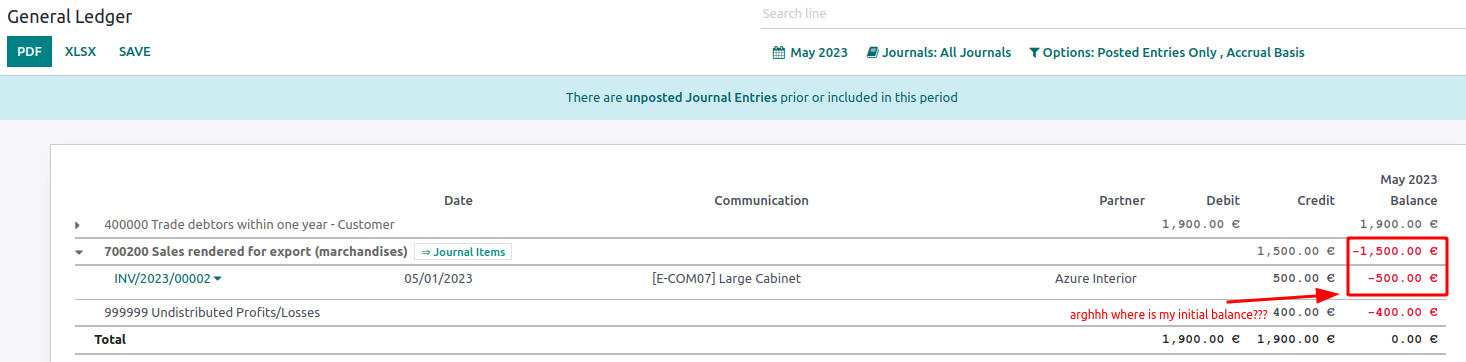
Currently in the General Ledger, when unfolding an Income or Expense account, no Initial Balance gets displayed. As such, if the report period starts in the middle of the fiscal year, any AMLs between the start of the fiscal year and the report start date are unaccounted for: - they don't appear in the unfolded account - they're not in the Unaffected Earnings either. This causes a discrepancy between the total of the AMLs shown in the unfolded account and the account total. We
Original PR description
Currently in the General Ledger, when unfolding an Income or Expense account, no Initial Balance gets displayed. As such, if the report period starts in the middle of the fiscal year, any AMLs…
Currently in the General Ledger, when unfolding an Income or Expense account, no Initial Balance gets displayed.
As such, if the report period starts in the middle of the fiscal year, any AMLs between the start of the fiscal year and the report start date are unaccounted for:
- they don't appear in the unfolded account
- they're not in the Unaffected Earnings either.
This causes a discrepancy between the total of the AMLs shown in the unfolded account and the account total.
We fix this by ensuring that the initial balance is displayed, unless we are at the beginning of a fiscal year, in which case it should not be displayed.
In my fix I have adopted the same behaviour as in https://github.com/odoo/enterprise/blob/b54a971d50c136a24bb65fc956cada5869075fbf/account_reports/models/account_general_ledger.py#L236-L237
Before fix:
After fix:
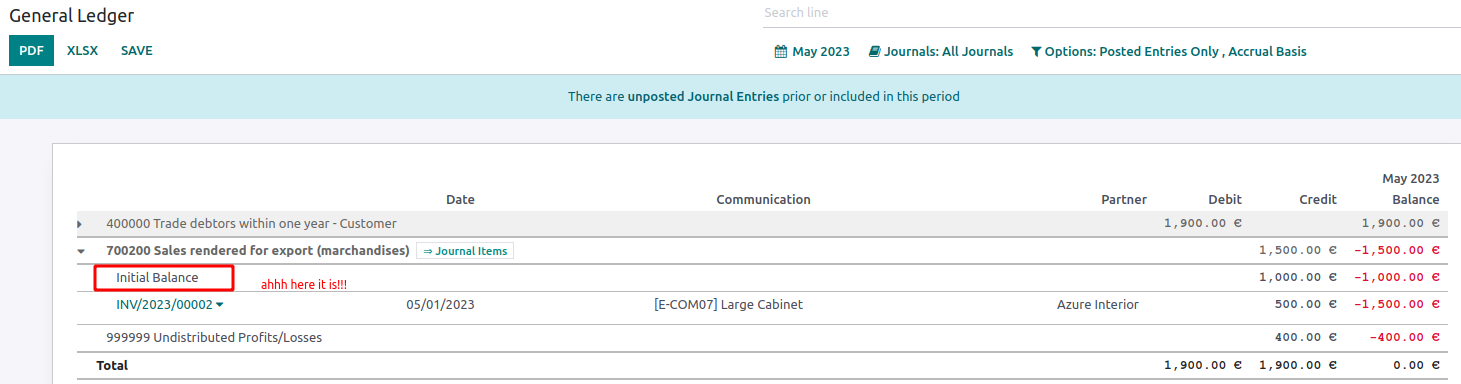
opw-3171566
Forward-Port-Of: odoo/enterprise#40776Now that taxes are always recomputed on SOlines when modifying the SO company, there is no need anymore to manually trigger the recomputation in sale_subscription for recurring orders. Also adapt the existing test accordingly. Community PR: https://github.com/odoo/odoo/pull/120774 Forward-Port-Of: odoo/enterprise#40973 Forward-Port-Of: odoo/enterprise#40844
Original PR description
Now that taxes are always recomputed on SOlines when modifying the SO company, there is no need anymore to manually trigger the recomputation in sale_subscription for recurring orders.

Also adapt the existing test accordingly.

Community PR: https://github.com/odoo/odoo/pull/120774

Forward-Port-Of: odoo/enterprise#40973
Forward-Port-Of: odoo/enterprise#40844
If the sign terms page is not enabled, it will return an "error" page: while it will return a 200 HTTP code, it will display a message like `Oops: The requested page is invalid` which doesn't bring much value in your sitemap/indexed pages. To be enabled, those two settings should be checked: - `Sign Default Terms & Conditions` in sign settings - `Terms as Web Page` as sub option This commit is simply conditionning the presence of this page in the sitemap so it's only shown when the terms
Original PR description
If the sign terms page is not enabled, it will return an "error" page: while it will return a 200 HTTP code, it will display a message like `Oops: The requested page is invalid` which doesn't bring much value in your sitemap/indexed pages.

To be enabled, those two settings should be checked:
- `Sign Default Terms & Conditions` in sign settings
- `Terms as Web Page` as sub option

This commit is simply conditionning the presence of this page in the sitemap so it's only shown when the terms page is actually enabled.

Note that when enabled, it's important to have it in the sitemap for SEO as people might want to find your terms through google etc.

opw-3255831

Forward-Port-Of: odoo/enterprise#40620
task - 3278996

Forward-Port-Of: odoo/enterprise#40731
Original PR description
task - 3278996 Forward-Port-Of: odoo/enterprise#40731
We used an old odoo.sh server for the test env
of the IAP part of l10n_pe_edi, but that subscription always expires and it would be better to use
the regular odoo.sh test env.

For that, we just need to change the URL in the code and in the meantime, we also change the production url for consistency.

Forward-Port-Of: odoo/enterprise#40267
Original PR description
We used an old odoo.sh server for the test env of the IAP part of l10n_pe_edi, but that subscription always expires and it would be better to use the regular odoo.sh test env. For that, we just need to change the URL in the code and in the meantime, we also change the production url for consistency. Forward-Port-Of: odoo/enterprise#40267