Daily updates from Odoo
Thursday, April 18, 2024
117 changes
2 changes
Resolved issues and error corrections
This fixes an issue in Discuss calls where the call options menu could close unexpectedly when users moved the cursor over it. It also ensures the menu remains visible when a call is in fullscreen mode, making call controls more reliable during meetings.
Original PR description
The change that made the dropdown now part of the main component
container caused some issues with the fullscreen feature:

* Hovering the dropdown menu of the call would close it as the
condition was based on the DOM tree relations between the dropdown
and the call view.

This commit fixes the issue by checking whether the entered area is
that dropdown container.

* Opening the dropdown in `fullScreen` mode wouldn't show it, as
being part of the main component container put it outside of the top
layer element.

This commit fixes this issue by making so that the whole body is the
`fullScreen` element.

This commit brings a small regression on a bug that was fixed in https://github.com/odoo/odoo/pull/138900

opw-3833572
This update prevents an error when users interact with the employee list view by removing an unsupported sorting option from the Next Activity Deadline column. HR users can continue viewing employee records without triggering a crash from that column.
Original PR description
Currently, an exception is generated when the user tries to sort employees by "Next Activity Deadline" in the list view. Stack Trace: ``` ValueError: Cannot convert field…
Currently, an exception is generated when the user tries to sort employees by "Next Activity Deadline" in the list view.

Stack Trace:
```
ValueError: Cannot convert field hr.employee.activity_date_deadline to SQL
  File "odoo/http.py", line 2251, in __call__
    response = request._serve_db()
  File "odoo/http.py", line 1827, in _serve_db
    return self._transactioning(_serve_ir_http, readonly=ro)
  File "odoo/http.py", line 1847, in _transactioning
    return service_model.retrying(func, env=self.env)
  File "odoo/service/model.py", line 134, in retrying
    result = func()
  File "odoo/http.py", line 1825, in _serve_ir_http
    return self._serve_ir_http(rule, args)
  File "odoo/http.py", line 1832, in _serve_ir_http
    response = self.dispatcher.dispatch(rule.endpoint, args)
  File "odoo/http.py", line 2057, in dispatch
    result = self.request.registry['ir.http']._dispatch(endpoint)
  File "odoo/addons/base/models/ir_http.py", line 220, in _dispatch
    result = endpoint(**request.params)
  File "odoo/http.py", line 739, in route_wrapper
    result = endpoint(self, *args, **params_ok)
  File "addons/web/controllers/dataset.py", line 38, in call_kw
    return self._call_kw(model, method, args, kwargs)
  File "addons/web/controllers/dataset.py", line 34, in _call_kw
    return call_kw(request.env[model], method, args, kwargs)
  File "odoo/api.py", line 458, in call_kw
    result = getattr(recs, name)(*args, **kwargs)
  File "addons/web/models/models.py", line 46, in web_search_read
    records = self.search_fetch(domain, specification.keys(), offset=offset, limit=limit, order=order)
  File "addons/hr/models/hr_employee.py", line 246, in search_fetch
    return super().search_fetch(domain, field_names, offset, limit, order)
  File "odoo/models.py", line 1619, in search_fetch
    query = self._search(domain, offset=offset, limit=limit, order=order or self._order)
  File "addons/hr/models/hr_employee.py", line 334, in _search
    return super()._search(domain, offset, limit, order, access_rights_uid)
  File "odoo/models.py", line 5413, in _search
    query.order = self._order_to_sql(order, query)
  File "odoo/models.py", line 5225, in _order_to_sql
    term = self._order_field_to_sql(alias, field_name, sql_direction, sql_nulls, query)
  File "odoo/models.py", line 5283, in _order_field_to_sql
    sql_field = self._field_to_sql(alias, field_name, query)
  File "odoo/models.py", line 2812, in _field_to_sql
    raise ValueError(f"Cannot convert field {field} to SQL")
```

This is because the 'activity_date_deadline' field is a non-storable field, so the value error is raised from Line [1] as the field is non storable.

Before saas-17.2, when we tried to sort records with this type field, it did not sort records; instead, it wrote a logger warning with Line [2], but after the code refactor with commit  https://github.com/odoo/odoo/commit/b177b058be1531c3d2af2b591c22591c19240d33, Line [2] was removed, and now Line [1] throws an error when the sorting field is non-storable.

This PR fixes the above issue by removing the `{'allow_order': '1'}` option from the list  view of the field 'activity_date_deadline'.

[1] - https://github.com/odoo/odoo/blob/b4db0e2cb4e45830662cbb57559c6350ac621806/odoo/models.py#L2811-L2812
[2] - https://github.com/odoo/odoo/blob/5c5b4d991423e0282d06a98e5677977d53dc0817/odoo/models.py#L5318-L5320

sentry-515211190057 changes
Resolved issues and error corrections
Australian payroll settings can now be updated by HR managers without requiring contact editing permissions. The change prevents access errors while limiting the sensitive setting to the appropriate user group.
Original PR description
The inverse `_set_super_payable_account` raises an access error if the user does not have write access on contacts. Since the HR manager does not require access rights for contacts, we set this field with a sudo and add a group to restrict access to specific users.

https://runbot.odoo.com/runbot/build/61307134
Fixed an error that could occur in Point of Sale when settling a customer's dues from an empty order. This prevents an unexpected crash and lets staff continue the dues settlement flow reliably.
Original PR description
Steps:
=========
- Install point_of_sale and pos_settle_due.
- Open pos and don't add any items to the order.
- Click on "settle dues" options on a partner
- Observe traceback.

Issue:
=========
- Error Occurs while settle due account.

Cause:
=========
- There is no field of "paymentlines".

Fix:
=========
- Change "paymentlines" to "payment_ids".

task-3859454
This fix prevents kit products from being handled like regular manufactured items in production-related reporting tests. It helps keep inventory quantities accurate and avoids misleading manufacturing accounting results.
Original PR description
community PR: https://github.com/odoo/odoo/pull/161020
fix test that were trying to use Kit BOMs for production

opw-3681703
This fix updates the appointment feature to use the shared link-handling helper from the correct core location. It helps appointment pages preserve relevant page details in URLs, avoiding broken or inconsistent navigation after a related platform change.
Original PR description
The method keep_query was moved from base to http_routing at
odoo/odoo@880954ebfc110 but it should have stayed in base as it is
used by some module like auth_signup.

Enterprise part of odoo/odoo#87489
This update removes a duplicate check in the spreadsheet bundle's currency loading test. It helps keep automated testing accurate and reduces the chance of false test failures, with no expected change for end users.
Original PR description
Remove the double assert
The “View on Google Maps” button now opens results that match the current map search instead of ignoring it. It also avoids showing duplicate map points when multiple records share the same location, making map results cleaner and more accurate.
Original PR description
The button "View on Google Maps" now care about the search

If we have multiple records with the same latitude/longitude, we do not duplicate the points on Google Maps

Task #2072186
The German profit and loss report now calculates interim operating results using the correct formula. This helps businesses relying on German financial reports see accurate subtotal figures for review and compliance.
Original PR description
Fixed formula to compute correct results,
document referred: https://de.wikipedia.org/wiki/Betriebsergebnis

task- 2072849
The Mexican electronic invoicing flow now handles the Draft action correctly when several invoice records are selected at once. This prevents errors or inconsistent behavior during bulk invoice updates, helping finance users work more reliably.
Original PR description
Button Cancel Takes Several Recordsets so it has be properly fixed
This fixes a Helpdesk test setup issue that could cause failures when demo data is not installed. The test now sets the company calendar timezone consistently, helping ensure reliable validation across environments.
Original PR description
Task: https://www.odoo.com/web#id=2075719&action=333&active_id=965&model=project.task&view_type=form&menu_id=4720
PAD: https://pad.odoo.com/p/r.3a73dd45c487a31123fef6a3e689c991
This fixes how Mexican e-invoicing identifies journal entries that come from invoices after an underlying accounting field changed. It helps ensure invoice-related entries are included or excluded correctly, reducing errors in localization-specific electronic invoicing processes.
Original PR description
`invoice_id` is no longer a valid field in `account.move.line` object
we have to use the new elements to identify a Journal Entry as coming from an Invoice.
Asset sale and disposal entries now derecognize fixed assets in line with IFRS/IAS 16 instead of posting remaining value incorrectly to depreciation expense. This improves financial statement accuracy and helps businesses stay compliant when removing assets from their books.
Original PR description
(master) account_asset: Sell or Disposal adheres to IFRS/IAS 16 - Derecognition of Assets = Impacted versions: - master Current behavior: - - Configure an Asset Model like the following <img…
(master) account_asset: Sell or Disposal adheres to IFRS/IAS 16 - Derecognition of Assets = Impacted versions: - master Current behavior: - - Configure an Asset Model like the following <img width="1043" alt="Screen Shot 2019-08-14 at 5 55 22 AM" src="https://user-images.githubusercontent.com/7598010/63016041-38bfbc80-be58-11e9-9c3d-532892f500e9.png"> - Configure Account for Fixed Asset as the following <img width="1043" alt="Screen Shot 2019-08-14 at 5 57 13 AM" src="https://user-images.githubusercontent.com/7598010/63016168-8b997400-be58-11e9-9fd0-25c7339f7bed.png"> - Create a new Vendor Bill and Validate it. <img width="1073" alt="Screen Shot 2019-08-14 at 5 59 39 AM" src="https://user-images.githubusercontent.com/7598010/63016237-c6031100-be58-11e9-8c73-c389ca1b1ae8.png"> - Let us check on the newly created Asset in the button upper right. <img width="1073" alt="Screen Shot 2019-08-14 at 6 01 15 AM" src="https://user-images.githubusercontent.com/7598010/63016314-f64aaf80-be58-11e9-9b83-b7ef10cb3f19.png"> - Confirm it and the run depreciation for the already past depreciations. <img width="1073" alt="Screen Shot 2019-08-14 at 6 03 15 AM" src="https://user-images.githubusercontent.com/7598010/63016450-50e40b80-be59-11e9-926d-b0f1df4812d7.png"> - Hit Sell or Dispose button and set a date on the wizard. <img width="975" alt="Screen Shot 2019-08-14 at 6 05 05 AM" src="https://user-images.githubusercontent.com/7598010/63016517-8557c780-be59-11e9-8d75-82829aec0904.png"> - Let us check on the newlyJournal Entry created for the disposal of this asset. <img width="1068" alt="Screen Shot 2019-08-14 at 6 05 52 AM" src="https://user-images.githubusercontent.com/7598010/63016594-b59f6600-be59-11e9-8c9f-7f6c959f2924.png"> Issue - **Here is the actual issue**. Sell or Dispose button creates a Journal Entry where the remaining value of the asset is sent to Depreciation Expense versus Cumulated Depreciation Regarding [IFRS/IAS 16](http://eifrs.ifrs.org/eifrs//bnstandards/en//2019/IAS16.pdf) -Derecognition - Paragraph 68 & 71 <img width="771" alt="Screen Shot 2019-08-14 at 6 15 39 AM" src="https://user-images.githubusercontent.com/7598010/63017096-006dad80-be5b-11e9-8542-d053d4adc976.png"> <img width="771" alt="Screen Shot 2019-08-14 at 6 16 00 AM" src="https://user-images.githubusercontent.com/7598010/63017101-04013480-be5b-11e9-82a9-5ec5e2a5a130.png"> This supported by the fact that for [IFRS® Taxonomy Illustrated](https://www.ifrs.org/issued-standards/ifrs-taxonomy/ifrs-taxonomy-illustrated/#illustrated2019) For `[822100] Notes - Property, plant and equipment` report it must properly identify the parties where impairment, retirement or sell of assets have occurred 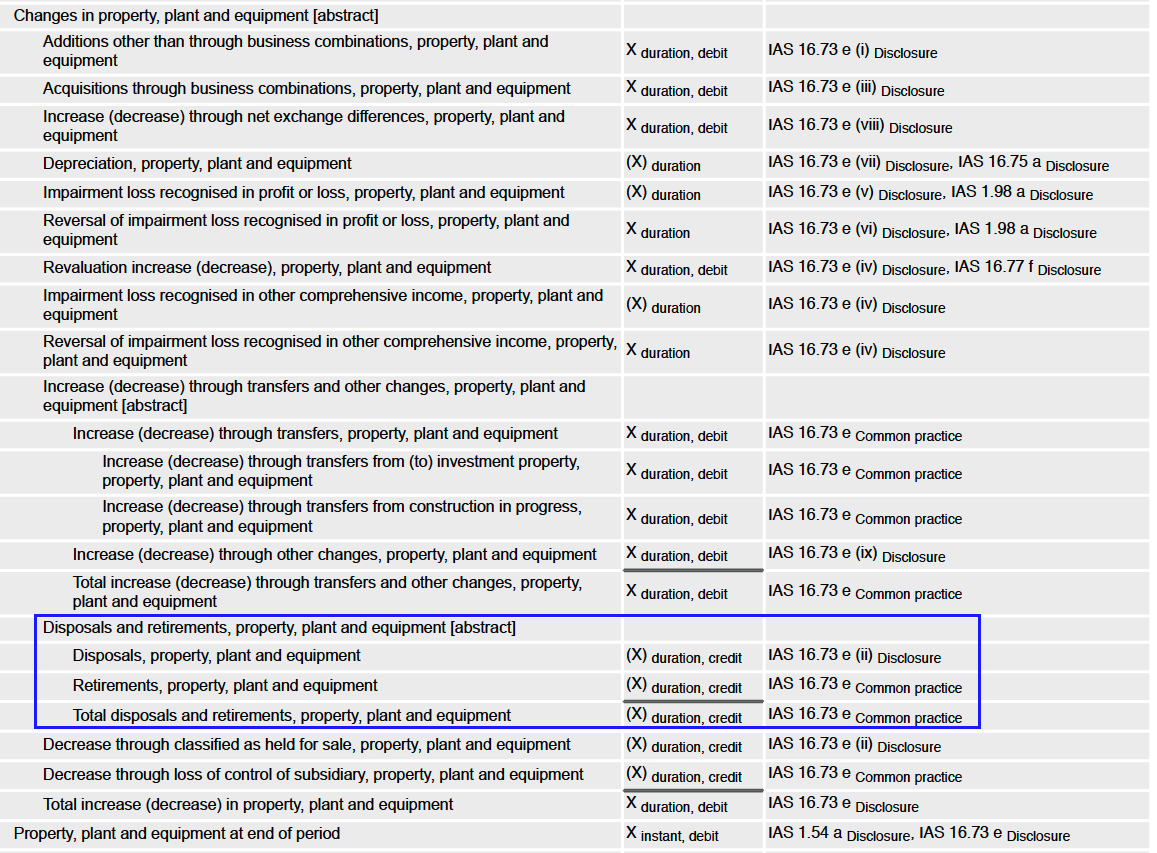 Furthermore in `[520000] Statement of cash flows, indirect method` report it must be properly identified in the regarding adjustment other than the Depreciations. 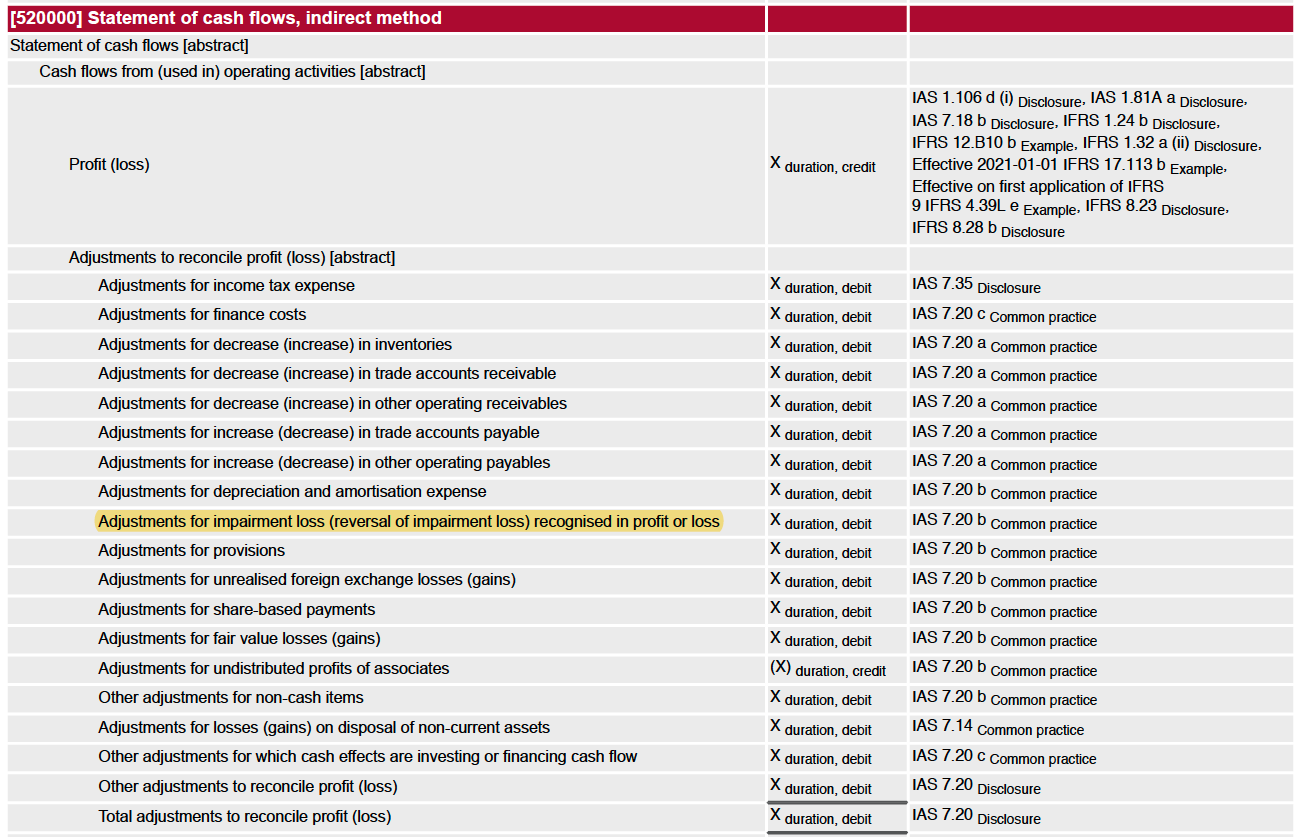 Expected behavior: - With the new approach we should have some settings like this one. <img width="1072" alt="Screen Shot 2019-08-14 at 6 34 03 AM" src="https://user-images.githubusercontent.com/7598010/63018067-9571a600-be5d-11e9-8010-b6a81fd9af0f.png"> Notice there is a new field for the Disposal of the Asset. - Execute all the previous step to accomplish a new Asset until the step where you can sell or dispose it. <img width="1072" alt="Screen Shot 2019-08-14 at 6 40 24 AM" src="https://user-images.githubusercontent.com/7598010/63018438-745d8500-be5e-11e9-807c-a159e6b5653a.png"> - Hit the Sell or Dispose button. We can see that -- The whole value of the asset has been derecognized -- The Cumulated Depreciation has been reverted. -- The Remaining Value of the asset has been recorded as Impairment Expense <img width="1072" alt="Screen Shot 2019-08-14 at 6 41 11 AM" src="https://user-images.githubusercontent.com/7598010/63018459-86d7be80-be5e-11e9-9919-7bb2d14370f5.png"> In this way we could afford to properly: - Have Adjusted Assets for Balance Sheet report. - Have a PP&E report. - Have a Cash Flow Indirect method the right way. - Have an Income Statement where the Impairment is set aside from the Depreciation Expenses.
When an invoice or journal item is cancelled, any linked asset that is still in draft is now deleted instead of remaining as an inactive or confusing record. Assets already in progress or completed are archived, keeping asset records aligned with invoice changes and reducing cleanup work.
Original PR description
(master) account_asset: When Cancelling an invoice with Draft assets. Assets standstill = [FIX] account_asset: Delete draft assets if originating journal items get cancelled. Archive the ones that…
(master) account_asset: When Cancelling an invoice with Draft assets. Assets standstill
=
[FIX] account_asset: Delete draft assets if originating journal items get cancelled. Archive the ones that are running or done.


Impacted versions:
-

master

Current behavior:
-

- Configure an Asset Model like the following
<img width="1060" alt="Screen Shot 2019-08-15 at 10 45 59 PM" src="https://user-images.githubusercontent.com/7598010/63142201-7fbfc600-bfae-11e9-8246-96516c0971ad.png">


- Configure Account for Fixed Asset as the following
<img width="1043" alt="Screen Shot 2019-08-14 at 5 57 13 AM" src="https://user-images.githubusercontent.com/7598010/63016168-8b997400-be58-11e9-9fd0-25c7339f7bed.png">

- Create a new Vendor Bill and Validate it.
<img width="1073" alt="Screen Shot 2019-08-14 at 5 59 39 AM" src="https://user-images.githubusercontent.com/7598010/63016237-c6031100-be58-11e9-8c73-c389ca1b1ae8.png">

- We can inspect that a new asset in draft state is created in the upper right button in the invoice.
<img width="833" alt="Screen Shot 2019-08-15 at 10 50 41 PM" src="https://user-images.githubusercontent.com/7598010/63142386-3754d800-bfaf-11e9-8556-f810df18225a.png">

- No depreciation board is yet set on the asset.
<img width="1086" alt="Screen Shot 2019-08-15 at 10 51 02 PM" src="https://user-images.githubusercontent.com/7598010/63142392-420f6d00-bfaf-11e9-9267-fe4658accb66.png">

- For whatever the reason. You have to amend the invoice so you cancel it to amend it. In cancel state we are able to see that my invoice is still linked to an asset.
<img width="1086" alt="Screen Shot 2019-08-15 at 10 54 05 PM" src="https://user-images.githubusercontent.com/7598010/63142484-9f0b2300-bfaf-11e9-993e-84f55bc3bc36.png">

- Though when checking on the linked asset there is none. It have been deactivated.

<img width="1086" alt="Screen Shot 2019-08-15 at 10 57 19 PM" src="https://user-images.githubusercontent.com/7598010/63142617-18a31100-bfb0-11e9-99da-3189a3fdde3a.png">

<img width="1086" alt="Screen Shot 2019-08-15 at 10 56 12 PM" src="https://user-images.githubusercontent.com/7598010/63142584-fa3d1580-bfaf-11e9-9d4c-163ff8a1eb57.png">

- So far so good. Let us know `Reset to Draft` our cancelled invoice and reuse. Make some changes. Let it be that Price of the asset was wrong. and try to validate our fixed invoice.
<img width="1086" alt="Screen Shot 2019-08-15 at 11 00 48 PM" src="https://user-images.githubusercontent.com/7598010/63142717-8c451e00-bfb0-11e9-8772-3dc371e14a0d.png">

- In trying to do something on the Archived Asset we are now greeted with this Warning.
<img width="1086" alt="Screen Shot 2019-08-15 at 11 02 12 PM" src="https://user-images.githubusercontent.com/7598010/63142796-e1812f80-bfb0-11e9-8046-9585f7ab5a14.png">

Now we are locked with a draft invoice linked to an archived asset with no way to make something on the archived asset.

Expected Behavior
=
At invoice cancelation, get rid of the Draft Assets.

Actions Performed
=

- Drafts assets are now Deleted
- Other assets just get Archived just the way it was before but using existing method `action_archive()` (more on this activity in coming issues)
- `sudo()` method on `search()` for assets has been left to allow actually searching if user has no read privileges.
- `sudo()` method on `unlink()` & `action_archive()` methods is not deployed because user entitled to do should be granted such as privileges and not the superuser.
The optional column icon in list views is now positioned correctly in the header. This small visual fix makes the list view cleaner and easier to use when managing visible columns.
Original PR description
Task: https://www.odoo.com/web?#id=2032196&action=333&active_id=1251&model=project.task&view_type=form&menu_id=4720

Pad: https://pad.odoo.com/p/r.6c35636a1ef5ed06abd0cec54262621f
Portal users can now add attachments when posting messages in the subscription portal. This fixes an access problem that previously blocked customers from sharing files through subscription chatter.
Original PR description
Before this -
Was unable to attach the attachments in subscription portal chatter.
Access was denied for ir.attachment when logged in by - portal user.

In method _message_post_after_hook of mail, ir.attachments are accessed, but for subcription as token was not passed in mail.thread
record was coming without sudo().

In this -
Account uuid is passed as access token and in uuid is set as mail _mail_post_token_field.

task-37264
Subscriptions using the "Invoice & try to charge" option will now still create an invoice even when the automatic payment attempt fails. This ensures customers are billed correctly and keeps this option distinct from only invoicing after successful payment.
Original PR description
When creating a subscription and selecting a subscription template on which
the payment mode is set to "Invoice & try to charge", there is no invoice
created if the automatic payment failed. However, an invoice should be
created despite the failed payment as there is another option for the
payment mode which is "Invoice only on successful payment".

opw:2007288
Social post cards now show their small statistics labels with the correct spacing. This makes engagement and campaign information easier to read in Social Marketing, CRM, and Sales views.
Original PR description
Since the whitespace is removed by the compiler, we have to put the small tags on the same line separated by a white space. Usually a padding is sufficient but not always.

Task-3047477
This fix ensures delivery order locations are handled correctly for field service project tasks. It helps prevent inventory or delivery records from using the wrong location, reducing operational errors when products are delivered for on-site work.
Deleting document workspaces has been corrected so users no longer encounter unexpected validation errors. This helps keep document management workflows smooth when teams reorganize or remove unused workspaces.
The payroll dashboard now keeps large panels from taking over the page by capping their size and allowing scrolling. It also improves batch status visibility, prevents long batch names from breaking the layout, and limits bank account warnings to employees with active contracts.
Original PR description
When you have a lot of payslip batches for example, each panel in the payroll dashboard will occupy a lot of space. After this commit, a maximal space is
defined and information will still be accessible through scrolling in the panel

task-2985067
The Sign Now wizard now displays signer entries without extra table borders or outlines. This restores the intended appearance after a styling change caused the signer list to look misaligned, making the signing setup screen clearer for users.
Original PR description
After some changes in the list renderer css, the one2many field signer_ids layout started having wrong layout. This commit removes the unwanted outlines and borders from the table generated by that field.

task-2979060
Employee settings now show all time off types that require allocations when configuring extra time off on contract signature, rather than only those with currently valid allocations. This makes the setting clearer and usable across more company setups, including outside Belgian localizations.
Original PR description
Before: From employee settings, on 'Extra Time Off Allocation on contract signature' only those Time Off Types
will show for which the valid allocations exist.

Instead, show all the Time Off Types that requires allocations.

task - 2658250
This fix ensures the project forecast view file is included when the timesheet forecast sales module is installed or updated. It prevents missing screen elements or configuration caused by the file being omitted from the module setup.
Original PR description
project_forecast_views.xml has not been added to __manifest__.py in this commit-
https://github.com/odoo/enterprise/commit/dcb0127aecb5aefeb3d9e7deef2805c19986b2cd

closes odoo/enterprise#22924
This fix ensures package dimensions are converted to the measurement unit expected by each shipping carrier connector before rates or shipments are sent. It helps avoid incorrect shipping calculations and reduces the need for users to manually enter dimensions in a different unit than shown.
Original PR description
Description of the issue/feature this PR addresses:

Current behavior before PR:

There is no conversion of the size between the package type for the connector and the shipping method.
So the user need to put the size in the uom chosen in the connector in the package type even its write its mm.

Desired behavior after PR is merged:

We need to convert the dimensions of the package type according to what the user has chosen in the connector.

--
I confirm I have signed the CLA and read the PR guidelines at www.odoo.com/submit-pr
This fix ensures the 'Extra Time Off' salary benefit is visible on employee contract salary information. It helps HR teams and employees see the complete compensation package without missing time-off benefits.
Original PR description
task - 2687999
Subscription invoices now correctly adjust prices when a customer's fiscal position replaces an included tax with a different tax. This prevents customers from being charged an amount that still contains the original tax, improving invoice accuracy.
Original PR description
…ed from sub

Steps to reproduce the bug:

1. Create a tax included in price T1
2. Create a customer with a fiscal position that should replace the current tax T1 by a 0% tax T2
3. Create a subscription product with this tax
4. Create a subscription and invoice it

Bug:

The invoice generated from a subscription has the T2 on its line but it did not deduct the included tax T1 from the unit price

opw:2637567

X-original-commit: 163f9009d2eacfd8968d4565c2f026f3ff813ae6
Barcode-related reports for locations and operation types are now printed separately from barcode commands. This fixes confusion in the printing flow and makes it easier for users to get the correct report when managing warehouse barcode operations.
Original PR description
…plit from the barcode commands

We split both the operation from barcode commands and now we are print report separately.

opw-2579195
This fix ensures salary package fields for fixed values and benefit values only accept numbers. It helps prevent invalid salary configuration data, reducing errors when preparing or reviewing employee contract offers.
Original PR description
make sure fixed value and advantage value fields are numbers

Task id: 2339760
This fix reduces the amount of historical work entry data created when generating entries for older contracts, helping avoid timeouts on real databases. It also prevents empty work entries from being created when leave falls outside scheduled working time, avoiding related errors.
Original PR description
…neration Purpose ======= When generating the work entries the first time for older contracts, we try to generate the work entries for several months/years, instead of only the current month for…
…neration

Purpose
=======

When generating the work entries the first time for older contracts,
we try to generate the work entries for several months/years, instead of
only the current month for example.

The reason if that the date_generated_from and date_generated_to fields
are there to avoid having gap on the generated work entries.

If they were generated from January to March, and we try to generate
them in July, then we generate the work entries for April, Mai, June,
and July, so that if we remove work entries on a given day, we don't
try to re-generate them afterward.

If we move the cursors to the start date when they are equal, instead of
generating 138300 records for 100 employees who have a contract starting
on the 1rst of January 2018, to generate work entries till the 31nd of
August 2020, then generate 7900 records.

This represents 17.5 times less records to create, and it allows to use
generate the records on real database for the first time without risking
to face a timeout.

TaskID: 2321853
Recurring planning shifts now generate correctly when they have an end date, and users can turn off repetition when needed. Updates to recurring slots now apply consistently across the whole series, making schedule management more reliable.
This fixes an issue in the website visitor view after a referenced field was removed. Push notification data now attaches to an existing part of the view, helping avoid display or setup errors for users managing visitor notifications.
Original PR description
Since page_ids have been deleted from visitor kanban view, all the xpath
targeting this field must be modified to target another existing field in the
view.

Task ID: 2428362
This update corrects outdated or invalid configuration values across accounting, delivery, manufacturing, marketing, documents, and field service areas. It helps prevent setup errors and inconsistencies when records use values that are no longer supported or have moved to localization-specific modules.
Original PR description
See https://github.com/odoo/odoo/pull/54276
This fixes a display issue where overlapping items in the Gantt view could extend beyond the final day shown. The schedule view now keeps items within the expected date range, making planning timelines clearer and less confusing for users.
Original PR description
Overlapping pills could go past the last day of the gantt view (e.g.
considering 8 days in a week).
This update fixes intermittent failures in point of sale hardware-related test flows for payments and weighing scales. It helps keep automated quality checks stable, reducing false alarms during development without changing normal user workflows.
This update corrects how NCM codes are shown for products in the Argentine electronic invoicing module. The code is now handled at the product variant level and displayed more consistently, helping users see the right classification information when managing products and invoices.
Original PR description
* move logic of ncm code from product.template to product.product
* add ncm compute field in product.template just to show it when len(variants) == 1 (this compute is similar of how it works for default_code field)
* ncm code it was showed lonely before the product category now is shown after the default_code field.
The search panel now only remembers a user's last selected item when that behavior is explicitly enabled. This keeps Documents able to reopen the last workspace or folder while avoiding confusing saved selections in other areas such as rentals or employees.
Original PR description
PURPOSE
Currently in searchpanel, everytime when we clicked on the select="one" field,
it will store the current clicked searchpanel key to the local storage with
value. so every next time user will see the last visited and clicked environment
of that view.
It is feasible for Documents to remember the last visited workspace/folder of
each user. That allowed us to preset this last visited workspace the next time
the user opens the kanban of Documents. But it is sometimes confusing for the
user in the case of Rental orders or Employees or many other kanban views.

SPEC
for that reason, we have provided on boolean attribute "store_last_active" for
select="one" fields. if any of the users willing to visit the last visited
selection environment then set "store_last_active" attribute value to true.
if the attribute is true then only the selected value of the searchpanel key would
be store in the local_storage.

Task : 2264358
Creating a payslip from the Payroll app no longer triggers an error when no default employee contract is available. This prevents interruptions for payroll users and lets the process handle missing contract information more safely.
Original PR description
during creation of payslip from payroll app, traceback is there
for singleton(to have minimum one record must be there or not more then one).
but as we have no record to select, traceback is occured.

after this commit isssue will be solved.

task-2226403
Odoo Studio now prevents users from dragging a notebook section into another notebook, avoiding broken or confusing form layouts. The change also improves how view edits are saved when changes affect different parts of a form, making customizations more reliable.
Original PR description
PURPOSE

previously, We can drag the notebook inside the notebook

The purpose of this commit is to restrict notebook to be drag and drop inside a notebook

Task 2199980
This fixes broken invoice screens in the Argentinian and Colombian electronic invoicing modules after an accounting field was renamed. It helps ensure users can continue viewing and processing electronic invoices without errors.
Original PR description
move field of account.move renamed to move_type, hence adapting here as well
Signed documents now preserve foreign-language characters correctly when exported or printed. Text entered during signing is converted into an image so characters display as intended instead of appearing as black squares.
Original PR description
Task: https://www.odoo.com/web?#id=2031628&action=327&model=project.task&view_type=form&menu_id=4720
Fixed an issue where renewing a fixed-term subscription could set the wrong end date after the renewal quote was confirmed. This helps ensure subscription periods remain accurate for billing, service delivery, and customer records.
Original PR description
Task:https://www.odoo.com/web#id=2168496&action=327&model=project.task&view_type=form&menu_id=4720
Barcode scans of packages now carry the package owner into the resulting stock move lines. This prevents ownership information from being lost during delivery orders and inventory adjustments, improving traceability and reducing manual corrections.
Original PR description
**Task**
https://www.odoo.com/web#id=2093527&action=327&model=project.task&view_type=form&menu_id=4720
**Pad**
https://pad.odoo.com/p/r.b40a8db685597150634a1567320a03e3
**Description**
previouly while scanning a package via barcode, owner_id wasn't
being included in the move lines. fixed that in both delivery
orders and inventory adjustments.
This fixes an issue in Studio where removing the last item from a form could accidentally move the chatter area into the form layout. Users can now edit forms without the communication panel being inserted in the wrong place.
Original PR description
task : https://www.odoo.com/web#id=2172297&action=327&model=project.task&view_type=form&menu_id=4720

pad : https://pad.odoo.com/p/r.179553b62760fecc5637449a822b0e7c

before this commit,
After removing the last element from the form view, chatter is appended into the
view.
after this commit:
Chatter is prevented from getting into the form.
task - 2172297
A small typo was removed from the Belgian payroll settings screen. This restores access to the general settings area, helping administrators configure payroll options without being blocked.
The Cost Analysis button in manufacturing now opens correctly instead of causing an internal server error. This helps users access production cost information reliably when reviewing manufacturing orders.
Original PR description
Purpose of this task is,
It generates internal server error when state button Cost Analysis is clicked

So, I fixed the path and now it's working.

Task ID: 1970083
Pad link: https://pad.odoo.com/p/r.b0056af8be53da2eb024bf04c5433bb8
Payroll calculations now use the full unrounded amount when calculating payslip line totals. This prevents small rounding differences from becoming significant when multiplied by large quantities, such as overtime minutes, improving pay accuracy.
Original PR description
When a payslip line is computed, the amount is rounded
to two digits.
It might lead to a non negligable difference if multiplied
by a large quantity.
e.g. consider the following python salary rule which pays
overtime for 3453 minutes:
```
result_qty = 3453
result_rate=100
result= contract.wage / 30 / 8 / 60
```
The resulting amount is 0.347777 for a wage of 5000.
But it's rounded to 0.35 when the payslip line is created.
The total line amount computed to be 1510.69 instead of
1498.70.

Note that the non rounded number is used to compute other
salary rules.

With this commit the total amount is computed without the rounding.
The paylsip line amount is still rounded, but the total
is be correct. The "wrong" number is no longer the total, but
the amount. This is less confusing.

See odoo/odoo#32192 for the original feedback.
The promo code confirmation message on the online shop checkout is now centered after a coupon is applied. This improves the visual presentation and makes the feedback clearer for shoppers.
Original PR description
Task: https://www.odoo.com/web#id=1850446&action=333&active_id=131&model=project.task&view_type=form&menu_id=4720

Pad: https://pad.odoo.com/p/r.da98be6386ef94463c5ec05f17d2753a
Gantt view rows that are marked as read-only can no longer be extended by users. This keeps grouped or non-editable tasks from being changed indirectly and makes the schedule view behave consistently with editing permissions.
Original PR description
Task :
https://www.odoo.com/web?debug=assets#id=36732&view_type=form&model=project.task&action=327&menu_id=4720

Pad :
https://pad.odoo.com/p/r.7e161c9900670f4208775f09adfdab59

Description of the issue/feature this PR addresses:
In gantt view if a line is not editable, it should not be extendable.

Current behavior before PR:
In gantt view if a line is not editable,although it is extendable.

Desired behavior after PR is merged:
In gantt view if a line is not editable, it should not be extendable After PR is merged.
The website form editor dialog layout has been corrected so it displays properly for users editing forms on a website. This reduces confusion and helps users configure website forms without visual glitches interrupting their workflow.
Original PR description
UI issue
- https://drive.google.com/file/d/1whzey6boSJz3-yMtHlANF_uJt9rBrCpK/view?usp=drivesdk
- https://drive.google.com/file/d/1p9PDTa2K4Ma7GXxCSkg9jmq16I8Y2hST/view
This update ensures salary package configuration uses the right reference information and default cost frequency. It helps avoid incorrect setup values when managing employee contract salary details.
Original PR description
Issue : https://www.odoo.com/web#id=1876764&action=333&active_id=1278&model=project.task&view_type=form&menu_id=4720
This fixes a display issue where table headers could overlap content in PDF financial reports. Business users get cleaner, easier-to-read exported reports with no change to report data or workflows.
Original PR description
task link -
https://www.odoo.com/web#id=1865558&action=327&model=project.task&view_type=form&menu_id=4720
The home menu background gradient has been corrected to display as intended. This is a small visual fix that improves the consistency and polish of the web client experience.
Original PR description
background gradient fix bug
This fix restores the correct layout for color picker options in kanban view dropdown menus. It improves usability in Helpdesk, PLM, and Quality Control by preventing broken menu displays when users manage kanban items.
Original PR description
BS4 Issue: https://drive.google.com/file/d/1d25XRcEkxoWVDiPTs6M5JAd-JuvarmtZ/view?usp=drivesdk
This fix ensures inventory users can open delivery orders from the barcode workflow when product lifecycle management is involved. It removes an access-related blocker so warehouse staff can continue their delivery operations without unnecessary interruption.
This update corrects demo data for manufacturing maintenance by removing a duplicate alias assignment on equipment categories. The system will now generate the alias automatically from the category name, preventing naming conflicts during setup or demo data loading.
Original PR description
Description of the issue/feature this PR addresses:
Issue-ID: https://www.odoo.com/web#id=53978&view_type=form&model=project.task&action=333&active_id=131&menu_id=4720
Pad-ID: https://pad.odoo.com/p/r.8e416698b4ced1615e953ac50bfb30c2

Current behavior before PR:

Desired behavior after PR is merged:

Issue-ID: 53978

--
I confirm I have signed the CLA and read the PR guidelines at www.odoo.com/submit-pr
Portal pages in Helpdesk and Subscriptions now show navigation consistently in the page title area. This keeps customer-facing portal pages aligned with the updated layout, reducing confusion and improving usability.
Original PR description
Adapt modules' portal navbars according to #bba6c04
This fix adds the missing unit-of-measure information needed by the Belgian POS fiscal data setup. It helps ensure products sold by weight, such as kilograms, are handled correctly in Point of Sale and related stock flows.
Original PR description
…ch it is used. for kgm, add data in pos and stock

Description of the issue/feature this PR addresses:
https://www.odoo.com/web#id=21184&view_type=form&model=project.task&action=327&menu_id=4720
Current behavior before PR:

Desired behavior after PR is merged:


--
I confirm I have signed the CLA and read the PR guidelines at www.odoo.com/submit-pr
This update removes or corrects unused configuration and view data across several Odoo apps. It helps keep the system cleaner and reduces the chance of maintenance issues without changing day-to-day business workflows.
Original PR description
see companion pr odoo/odoo#106418
41 changes
Resolved issues and error corrections
This update fixes two issues with the comments panel in the Knowledge module. First, it prevents an unnecessary popover from appearing when replying to comments in small windows. Second, it corrects a styling problem that was causing comments to display as empty boxes in the panel on smaller screens. These fixes ensure the comments panel works properly regardless of window size.
Original PR description
# FIX] knowledge: remove useless popover

This commit fixes an issue where the popover would open inside the comments
panel when replying to a comment with a small enough window, even though in
this situation it's not useful at all.

Now when the panel is open and we have a small window, the popover will not
open when replying to a comment.

# [FIX] knowledge: show panel's comments in small windows

This commit fixes an issue with the comments panel when using it with a small
window.

Before, when you opened the panel when in a small enough window, the comments
aren't properly displayed meaning that you only have empty boxes inside the
panel. This was caused by a styling issue inside of the template that applied
a wrong style to the comment boxes inside panel, which is not necessary inside
it.

Now, we modified the inline style in the template so that it is not applied
inside the panel, showing back those comments in all circumstances.

task-3786282
The subscription tour feature in Odoo was broken due to recent technical updates. This fix restores the guided tour functionality by updating it to work with the latest system changes, ensuring users can properly navigate the subscription setup process.
Original PR description
Before this commit, subscription tour didn't work due to technical changes. This commit aims to fix the tour, by adapting to the new changes.

Task: 3679337
This fix resolves installation and upgrade failures in the accounting module that occurred when certain required data identifiers were missing from the database. The issue prevented users from installing localization modules or upgrading to version 17.0 in some cases. By adding the missing data identifiers during module initialization, the installation process now completes successfully.
Original PR description
The post-init hook of this module runs `ChartTemplate._load_data` and that might reference the xmlid of a general journal from the company. If that xmlid is missing, it will fail with the error:
```
KeyError: ('ir.model.data', <function IrModelData._xmlid_lookup at 0x7f9ff24b1240>, 'account.1_general')
```

Steps to reproduce on a fresh 17.0 database:
- Install a localization module, eg `l10n_be`.
- This will create the necessary xmlids. Delete the `X_general` xmlids from the dabase.
- Install `account_accountant`. Installation will fail with the aforementioned error.

This also happens during upgrades:
- On a fresh 16.0 database, install module `l10n_uk`.
- The `X_general` xmlids are not created as they don't exist in this version.
- Upgrade to 17.0
- `l10n_uk` doesn't load data from its template, so the xmlids still don't exist.
- Module `account_accountant` is automatically installed, triggering the error.A bug in the subscription invoicing automation was preventing the system from properly batching subscriptions for processing. The fix corrects how batch sizes are calculated, ensuring that subscriptions are now properly grouped together during automated invoice generation. This improves the efficiency and reliability of recurring subscription billing.
Original PR description
Within #45236 the sale subscription batching method was rewritten to allow invoices to be consolidated during the cron.

However, batch_size was adjusted that caused the code to never actually batch. Because `batch_size` was reassigned to `batch_size + 1` before the search call, the batch check:
`need_cron_trigger = len(all_subscriptions) > batch_size`

Will always fail as `all_subscription` will never be a larger recordset than `batch_size`.

Solution:
 Don't re-write batch_size and instead do `batch_size and batch_size + 1`
 in the search directly.

opw-3846540
This fix resolves a technical error that occurred when completing field service projects involving serial-numbered items with multi-step delivery routes. The issue happened when marking a project as done after creating multiple shipments for the same product, and has been corrected to ensure smooth project completion in these scenarios.
Original PR description
Steps to reproduce:
In field service, have a project on which you have to sell 3 of item A. Item a is tracked by serial number and the delivery route is in 2 steps. From stock
 to output and from output to customer.

On the sale order make sure you have 3 separate lines of 1 quantity of product A separated or not by sections.
Confirm this one. This will create two pickings.
One picking linked to a global stock move for 3 units from stock to output. A second picking linked to 3 stock moves each linked to a sale line id. Prioritise the first one by starring it.

Now go back to the project and mark is as done.

OPW-3792527

Forward-Port-Of: odoo/enterprise#59163
This fix corrects two issues in the Spanish Model 347 tax report. First, customer receipts are now properly included in the report when they exceed the €3,005.06 threshold. Second, the report now correctly counts invoices even after payments have been registered against them, preventing transactions from being incorrectly excluded due to payment cancellations.
Original PR description
Currently, receipts are not accounted for in the model 347 report (issue 1). The same happens for invoices for which a payment has been registered (issue 2). ### Setup * install `l10n_es_reports` *…
Currently, receipts are not accounted for in the model 347 report (issue 1). The same happens for invoices for which a payment has been registered (issue 2).

### Setup

* install `l10n_es_reports`
* switch to a Spanish company

### Steps to reproduce issue 1

* with a new partner, create and confirm a customer receipt for more than €3005.06 (threshold for appearing in the report)
* open the model 347 tax report

We would expect the new partner to be listed in the report, but they aren't.

### Steps to reproduce issue 2

* with a new partner, create and confirm an invoice for more than €3005.06
* if you open the model 347 report, you will see the new partner listed there
* go back to that invoice and register a payment for it.
* open the model 347 report again

We expect the new partner to still be listed, but they are not.

### Cause

issue 1: receipts are missing in the corresponding domains.
issue 2: all account moves are used to calculate the threshold. This means that, for example, invoices and payments can cancel each other out in the calculation.

opw-3816370

Forward-Port-Of: odoo/enterprise#60353
Forward-Port-Of: odoo/enterprise#59343
This fix resolves an error that occurred when generating Mexican tax documents (CFDI) for invoices where the delivery address differs from the customer address. The issue was caused by a missing method that was renamed during a previous update. The fix restores the proper handling of delivery address information in external trade invoices.
Original PR description
**Steps to reproduce:** - Install Contacts, Accounting and l10n_mx_edi_extended - Switch to a Mexican company (e.g. ESCUELA KEMPER URGATE) - Go to company form and configure its address (*) - Create…
**Steps to reproduce:**
- Install Contacts, Accounting and l10n_mx_edi_extended
- Switch to a Mexican company (e.g. ESCUELA KEMPER URGATE)
- Go to company form and configure its address (*)
- Create a US customer (e.g. Foreign Customer) (*)
- In Accounting settings:
  * activate "Customer Addresses"
  * use Mexican Bank for automatic currency rates (*)
- Configure a product for external trade (e.g. Office Chair) (*)
- Create an invoice: (*)
  * Customer: Foreign Customer
  * Delivery Address: [different than customer] (e.g. Deco Addict)
  * Product: Office Chair
  * Incoterm: EX WORKS
  * External Trade: Definitive
- Confirm the invoice
- Generate CFDI via "Send & Print" button

(*) https://www.odoo.com/documentation/17.0/applications/finance/fiscal_localizations/mexico.html#external-trade

**Issue:**
A traceback is raised because an inexisting method (i.e. `_get_customer_cfdi_values`) is called.

**Cause:**
The missing method has been renamed from "_l10n_mx_edi_get_customer_cfdi_values" to "_get_customer_cfdi_values" during a refactoring, but the original method has been deleted without implementing the new one.

**Solution:**
"_l10n_mx_edi_get_customer_cfdi_values" method was used to generate the data for the delivery address without altering the existing CFDI values.
These data were used to populate the external trade data of the CFDI.
"_add_customer_cfdi_values" method is similar to removed "_l10n_mx_edi_get_customer_cfdi_values" method, except that it also updates "receptor" in the CFDI.
It is used with a copy of the cfdi values to compute the values for the delivery address.

opw-3849153
This fix resolves an issue where users couldn't create website forms in Studio when a route with the same URL already existed (such as /event). The system now properly checks for existing routes before creating new forms, allowing users to successfully add forms to their websites without conflicts.
Original PR description
Currently, it's not possible to create a form on
`event.event` because website_studio
doesn't check whether `/event` already exists.

Steps:
	- Install `website_studio` and `website_event`
	- Open `Events`
	- Open `Studio`
	- Click on `Website` tab
	- Try to add a new form by clicking on `New Form`
	- Studio doesn't create a new form because it points to /event which already exists (created by `website_event`).

This commit verifies that the route doesn't exist before creating it.

Pages are served as a fallback when Python routing (`@route`) doesn't
match and there is no attachment matching that url. For simplicity and
performance, we only check that our new page doesn't collide with an
`@route` controller, because we assume that attachments url won't
collide.

see `website/models/ir_http.py` `Http::_serve_fallback`

opw-3778543

Forward-Port-Of: odoo/enterprise#60226
Forward-Port-Of: odoo/enterprise#58504
This update fixes failing automated tests in the mail and WhatsApp modules by correcting test dependencies and ensuring proper data cleanup before tests run. The changes resolve build failures in the testing system and improve test reliability without affecting end-user functionality.
This fix resolves an error that occurred when validating point-of-sale orders in Chile when the associated account document didn't have a barcode. The system now properly handles cases where barcodes are missing, allowing orders to be validated successfully without interruption.
Original PR description
Prior to this commit, an error would occur when validating an order if the account move associated with a journal (where
'l10n_latam_use_documents' is set to false) did not have the 'l10n_cl_sii_barcode'.

This commit prevents this error by adding appropriate handling for cases where the barcode is missing.

opw-3870174
Fixed a bug where automatic payment reminders were using the wrong email template. When processing automatic follow-ups for overdue invoices, the system was incorrectly selecting the template from a later follow-up level instead of the appropriate one. This fix ensures customers receive the correct reminder message based on their invoice's age.
Original PR description
When sending an automatic followup, the wrong template is set.
This is because of a typo when getting the followup line
from the options.

Steps:

- Have 2 followup levels, 15 and 30 days with 2 different templates
  and automatic reminder
- Have a customer with an invoice overdue by +15 days, and go to his followup report
- In the action menu, select "Process Automatic Follow-ups"
-> The template used is the one from the 2nd followup level instead
   of the one from the 1st level.

opw-3858013
This update improves security and user experience in the Appointment module by hiding buttons that users don't have permission to access. Managers can now see the "Add a Leave" button while other users see a simplified "Share Appointment Link" button instead of the previous dropdown menu. This prevents system crashes and provides a cleaner interface based on user permissions.
Original PR description
- Ensure that only managers can see the "Add a Leave" button to prevent crashes
  caused by unauthorized user groups attempting to access it.

- Replace the "Share Availability" and dropdown button with "Share Appointment Link"
  which will work the same as the dropdown was working but will not contain the
  "Select Dates" and "Any time" options for user groups without permission
  to access the "appointment.type" record.

- Now the buttons creating the custom appointment and the any-time appointment are
  hidden for the user who lacks access so we can clean some access checks and sudo
  from the controller as "group_appointment_user" already have rights to create
  the appointment types.

Forward-Port-Of: odoo/enterprise#57794
Portal users can now create recurring tasks when confirming subscription orders, just like regular users. Previously, the system incorrectly required portal users to have special permissions they don't have, preventing recurring tasks from being created. Now the system checks if recurring tasks are enabled in settings instead, ensuring consistent task behavior regardless of who confirms the order.
Original PR description
Steps to reproduce:
-------------------
- create a product with: - recurring - prepaid - create task on order
- in the settings, enable "Recurring Tasks"
- add "Use Recurring Tasks" to the current user
- create a sale order with a recurring plan and the recurring product
- confirm the sale order --> the created task is recurring
- duplicate the sale order
- validate it with a portal user

Issue:
------
The task created is not recurring.
The two tasks should be recurrent because the sale order is the same. The user who confirms the sale order must not affect the status of the task.

Cause:
------
We check that the user belongs to the `group_project_recurring_tasks` group, which will never be the case for a portal user.

Solution:
---------
Authorise the creation of the recurring task if the setting is activated.

opw-3823250
This fix improves how Web Studio stores references to action buttons in form views. Previously, buttons used database-specific IDs that could change when exporting configurations between systems. Now they use permanent identifiers (xml_id) that remain consistent across different databases, making it safer to share and export form customizations.
Original PR description
In a form view, add a stat button in the button box.

Before this commit, the button contained the action's id. It worked on a single DB but when exporting, the id might have changed.

After this commit, we put the xml_id of the action instead, which is set when studio=1 is in the context.

opw-3824053

Forward-Port-Of: odoo/enterprise#60730
Forward-Port-Of: odoo/enterprise#60298
This update improves the reliability of appointment scheduling tests by making them less dependent on timing issues and interference from other system components. The changes include resetting test data before running tests, updating test performance metrics, and fixing naming conflicts that were causing test failures. This helps ensure the appointment feature works consistently across different environments.
Users encountered an error when trying to uninstall the IoT feature for Point of Sale. This fix corrects a technical compatibility issue that was introduced during a code update, ensuring the uninstall process now works smoothly without errors.
Original PR description
Currently, an exception is generated when the user tries to uninstall IoT for PoS.

Error:
`TypeError: uninstall_hook() missing 1 required positional argument: 'registry'`

This is because the commit https://github.com/odoo/enterprise/commit/6b10cc80ea2441b5b2ab86aab52abbf7084d4319 added the uninstall hook at 15, and the uninstall hook requires two arguments in 15.0. But from saas-16.3 uninstall hook require only one argument as 'env'; it is not changed with commit [1]'s forwarded port.

This commit will fix this issue by providing the argumnet 'env' that is required in the uninstall hook.


sentry-5167509820

Forward-Port-Of: odoo/enterprise#60392
This fix resolves a memory issue that occurred when exporting XAF reports for companies with partners having thousands of bank account numbers. The previous query was duplicating data for each bank account, causing excessive memory usage. The update optimizes the database query to prevent this duplication and improve system performance.
Original PR description
…tprint

With this [commit](https://github.com/odoo/enterprise/commit/8638ccc9cc26b997caee852e266b7ecc6f7c632a), we introduced a performance issue for databases with partners having lots (several thousands) bank account numbers.

Due to the GROUP BY clause, the query was duplicating each move line for each partner's bank account number, which quickly saturated the server's memory.

We eliminated the problem by selecting from `res_partner` instead of `account_move_line`.

Forward-Port-Of: odoo/enterprise#60875
Forward-Port-Of: odoo/enterprise#60851
This fix resolves a crash that occurred in the Timesheets app when a user's employee link was removed. The app now handles this scenario gracefully by loading the timesheet grid normally and hiding the performance leaderboard when no billable target data is available for the user.
Original PR description
Before this commit, when the user goes to Timesheets app, he could get a traceback because the JS code does manage the case `get_billable_time_target` method could return an empty when no employee is…
Before this commit, when the user goes to Timesheets app, he could get a traceback because the JS code does manage the case `get_billable_time_target` method could return an empty when no employee is linked to the current user.

This commit fixes the issue by managing that case and hide the leaderboard as we should expect since the billable target is not found for that current user.

Steps to reproduce the issue
============================
1. Create a new employee
2. Link that employee to a new user
3. Remove the user to the employee (unset Linked user field)
4. Log in as that new user
5. Go to timesheets app

Current Behavior
================
A traceback is occured because the rpc called returned an empty list instead of a list containing at least one object to get the billable target for the current user.

Expected Behavior
=================
The grid view of Timesheets app should be loaded as expected and the leaderboard should not be displayed since no data is found to get the billable target for that current user.

opw-3862635
opw-3866805
opw-3864353
Fixed a bug in the Partner Ledger report that caused the application to crash when users clicked "Unfold All" if some partners were archived. The issue occurred when the groupby_prefix feature was enabled. This fix ensures the report correctly handles both active and archived partners, preventing errors and improving the user experience.
Original PR description
When activating the groupby_prefix parameter for the Partner Ledger, a Traceback can happen if clicking on Unfold All and some of the partners are archived. That's because the search on res.partner in `_custom_unfold_all_batch_data_generator` injects the active ir.rule whereas the search in `_query_partners` does not. To fix that, pass `active_test=False` to the context.

To reproduce:

 - Install `account_reports` and `contacts` with demo data
 - Archive Azure Interior
 - Set the parameter `account_reports.partner_ledger. groupby_prefix_groups_threshold` to 2
 - Go to Partner Ledger
 - Click on Unfold All
 - A Traceback is raised

Also changes the search domain operator from `ilike` to `=ilike`.


Ticket link: [odoo/task#3703069](https://www.odoo.com/web#model=project.task&id=3703069)
opw-3703069

Forward-Port-Of: odoo/enterprise#57727
The Sign module was experiencing a crash during asset compilation due to a missing stylesheet dependency. This fix updates the module configuration to properly include the required stylesheet file, resolving the asset computation failure and ensuring the Sign module loads correctly.
Original PR description
This commit addresses a computed asset failure caused by the inclusion of 'web.editor.frontend.scss' in the 'sign' module manifest since [1] (OWL conversion). A scss variable added in 'fontawesome_overriden.scss' by a related community PR is used in 'web.editor.frontend.scss', leading to a crash during asset computation.
This file is now added in the manifest.

Related community PR:
- https://github.com/odoo/odoo/pull/161770

opw-3747848

[1]:https://github.com/odoo/enterprise/commit/5fa63a2f284fe93acc0c4d8dc12ee47646703247

Forward-Port-Of: odoo/enterprise#60894
This fix resolves an issue where canceling a confirmed subscription order would incorrectly set the subscription to a draft state, causing system errors. The update now properly cleans up the subscription state when orders are canceled and correctly restores it if the canceled order is moved back to quotation status.
Original PR description
Before this commit, when a confirmed order was canceled, a draft quote subscription_state was set. It would trigger the constraint `sale_subscription_state_coherence` or _constraint_canceled_subscription depnding the version.

THis commits ensure to clean the subscription_state of canceled subscription and it set it back to the correct value if the canceled order is set back to quotation.
This update fixes how notes are formatted in Peru electronic invoicing documents to comply with official UBL standards. Notes are now automatically cleaned to contain only letters, numbers, and spaces, and limited to 200 characters maximum. This ensures Peru invoices are properly validated by tax authorities.
Original PR description
This commit fixes the note handling in the UBL tags for the l10n_pe_edi module by ensuring notes contain only alphanumeric characters and spaces, conforming to UBL specifications. This change: - Removes all non-alphanumeric characters except spaces. - Ensures notes are truncated to a maximum of 200 characters. Legal Reference: https://cpe.sunat.gob.pe/sites/default/files/inline-files/AjustesValidacionesCPEv20240205_.xlsx 
This fix resolves a problem where article blocks in the Knowledge module were being incorrectly marked as modified and triggering unnecessary database saves. The issue was caused by improper encoding of special characters in article properties, which led to mismatches between the displayed content and the stored value. The fix ensures proper encoding of article block properties to prevent false dirty state detection.
Original PR description
# Introduction: `JSON.stringify` was used to serialize the properties for the `/article` command instead of the classical `encodeDataBehaviorProps` which also uses `encodeURIComponent` above the…
# Introduction:

`JSON.stringify` was used to serialize the properties for the `/article`
command instead of the classical `encodeDataBehaviorProps` which also uses
`encodeURIComponent` above the `JSON.stringify`, to avoid having some special
characters as an attribute value.

# The issue:

`html_field.js:getEditingValue` is recovering the current value in the DOM using
`innerHTML` which converts some characters from tag attributes to HTML entities,
i.e.: `"` for `"`.

`mail.py:html_normalize` is using `lxml.html.tostring` is receiving such a
string with HTML entities, and is returning a string without HTML entities.

The database value (without HTML entities) is later given to the `html_field` as
a prop and is used as a comparison reference (`updateValue`) with the current
value in edition (that is still being converted to have HTML entities). Since
both values are different, the field is considered as dirty and in need of being
saved, which will trigger a write, even though the normalized value is the
same.

# Fix:

Using `encodeDataBehaviorProps` to serialize props as the Behavior anchor
attribute (like for any other Behavior) will prevent the use of characters that
are being converted to HTML entities.

In order to update existing `/article` blocks, the behavior will overwrite its
`data-behavior-props` attribute when it is mounted in edit mode.

task-3853291

Forward-Port-Of: odoo/enterprise#60775
Forward-Port-Of: odoo/enterprise#60177
A bug in the account reports module was causing warning messages to be ignored when processing custom engine reports. The system was always using empty warnings instead of the actual warnings provided. This fix ensures that warning information is properly passed through and displayed to users, improving the accuracy of report feedback.
Original PR description
For the custom engine report, _compute_formula_batch_with_engine_custom always uses None for the warnings in the function custom_engine_function, even if a good warnings argument is sent.

Now it correctly use the warnings instead of None

Forward-Port-Of: odoo/enterprise#60929
This update fixes an issue where uploaded PDF header and footer files were not being properly saved with their correct file names in the sales settings. The fix allows the header and footer file name fields to be editable, ensuring that when users upload new PDF files for quotes, the system correctly records and uses the updated file names.
Original PR description
Steps:
- Install sale apps.
- Upload a header file from settings with xyz.pdf for
example.

Issue:
- Header/Footer file is not updated according to uploaded
file name.

Cause:
- Header/Footer file name in setting is related and
readonly is should not be readonly in order to update
header file name.

Fix:
- Make settings header/footer file not readonly to
set proper updated file names.

task-3620555
This fix removes a duplicate "Skills" title that was appearing on the resume page in employee profiles. The issue was caused by an ineffective label setting that still displayed the label despite being configured to hide it. Users will now see the Skills section with only one title instead of two.
Original PR description
Steps to reproduice:
-go to myprofile with hr installed
-go to resume page
-> skills title is duplicated

Reason:
The no_label attribute is set to True but the widget will still display a label.

Expected behavior:
The label should only be displayed once

Fix:
Remove the effectless no_label attribute and remove the separator

task: 3815381

---
I confirm I have signed the CLA and read the PR guidelines at www.odoo.com/submit-pr
This fix ensures that packaging information is now properly displayed on delivery slips for products tracked by lot or serial number when the "Display Lots & Serial Numbers on Delivery Slips" feature is enabled. The packaging quantity is also correctly rounded up to reflect the actual number of packages needed (for example, 2.3 packages becomes 3).
Original PR description
Issue
-----
The packing is not displayed on the delivery slip when:
- the product is tracked by lot/SN
- the stock.move state = "Done"
- "Display Lots & Serial Numbers on Delivery Slips" is activated
According to https://github.com/odoo/odoo/commit/c07258c3f27790eea424cee745b2036a3ef0e8c2, packaging information
should always be present.

Fix
-----
We add packaging information to the delivery slip. Also, packaging
quantity needs to be rounded up, for example if we have 2.3 packagings,
it will in reality be 3 packagings.

opw-3820304
This fix corrects an issue where the wrong time off allocation was displayed when selecting a date in the Time off module. When employees had multiple allocations with different validity periods and selected a date in a later allocation, the system was incorrectly showing the first allocation instead. The fix ensures the correct allocation is displayed by properly preserving date information during the display calculation process.
Original PR description
**Steps to reproduce:** 1- Create an allocation with validity date (e.g. 01-01-2024 -> 30-06-2024) and another one starts after the first one (e.g. 01-07-2024 -> 31-12-2024) 2- Go to Time off module…
**Steps to reproduce:**
	1- Create an allocation with validity date (e.g. 01-01-2024 -> 30-06-2024)
	 and another one starts after the first one (e.g. 01-07-2024 -> 31-12-2024)
	2- Go to Time off module and select a date in the second allocation's period
	3- Click on the Time off type dropdown menu
	4- You will see the first allocation displayed not the second one

**Current behavior before PR:**
The display name of some leaves gets computed in a wrong way.
This is happening because after fetching the right allocation
we compute the display name but this time we don't have
the 'default_date_from' in context so since
it became one of the fields that triggers '_compute_leaves'
https://github.com/odoo/odoo/blob/17.0/addons/hr_holidays/models/hr_leave_type.py#L218:L219
we compute the leaves once again but the target_date will be none
and it will get assigned with today's date in 'get_allocation_data'
https://github.com/odoo/odoo/blob/17.0/addons/hr_holidays/models/hr_leave_type.py#L380:L381

**Desired behavior after PR is merged:**
This has been solved by saving the date attribute in the context
with another name as when computing the display_name we call sudo so clean_context()
removes the 'default_' context keys. Now when it gets removed we are
going to have the same value but with another name.

opw-3797696
The currency exchange rates displayed in the currencies list view were showing inverted values. This fix corrects the display to show the proper "Unit per Company Currency" rate, matching what was shown before version 17.0 and ensuring consistency with the form view.
Original PR description
In the currencies list view, the current rate and inverse rate were swapped.

Currency rates were inversed in the currencies list view. The list should display the rate "Unit per <company currency>" by default, and it is displaying the inverse. The currency rate was right before 17.0.

task-3856386


---
I confirm I have signed the CLA and read the PR guidelines at www.odoo.com/submit-pr
The product variant form view was incorrectly counting archived pricelists in the "Extra Price" smart button. This fix ensures that only active pricelists are counted and displayed, giving users an accurate view of available pricing options for each product variant.
Original PR description
Problem:
When we are in the form view of a product variant, the smart button "Extra Price" shows the number of pricelists for this variant including the archived ones

Steps to reproduce:
- Install "Sales" app and activate the pricelists
- Create a product and some variants
- Create at least one pricelist for a variant
- Archive at least one of these pricelist
- Go on the form view of the variant and take a look at the smart button which shows the number of pricelists including the archived ones

Cause:
The domain that filters the pricelists doesn't take in consideration whether the pricelist is active

opw-3836973
---
I confirm I have signed the CLA and read the PR guidelines at www.odoo.com/submit-pr
This fix resolves an issue where users couldn't add color dropdown controls to kanban cards through the Studio customization tool. The problem was that the system wasn't properly recognizing where the color picker was located in the card layout and wasn't applying color changes correctly. Now users can successfully add and use color dropdowns on kanban cards when customizing views in Studio.
Original PR description
## Problem Before this commit, adding a dropdown to a kanban view via `web_studio` didn't work. Steps: - Install `web_studio` - Install a module containing no dropdown on the kanban view (e.g.…
## Problem
Before this commit, adding a dropdown to a kanban view via `web_studio` didn't work.
Steps:
- Install `web_studio`
- Install a module containing no dropdown on the kanban view (e.g. `sale_management`)
- Modify the kanban view of this module on studio
- Click on the 3 small dots on the kanban-card and add the dropdown
- Confirm
- Exit studio
- Try changing the color of one of the kanban-cards via the newly added dropdown
- Traceback

## Explanation
Here's how adding a dropdown to the kanban view normally works in studio:
Python:
- Create a new `x_color` field in the model
- Add this new field to the view in question
- Add a dropdown containing `.oe_kanban_colorpicker` and a `data-field` containing `x_color`.
- Change the attributes of the first element in the kanban-card to add a color="x_color".

Javascript:
If the color is changed, this code is triggered

https://github.com/odoo/odoo/blob/0fcb34dd3ba3bbd7f422c627e27c96089b29b044/addons/web/static/src/views/kanban/kanban_record.js#L302-L306

which dynamically updates the `colorpicker` field with the new value via the value of arch `colorField`.
Except that in our case `colorField` is `color` and not `x_color`.

Then, as the `web_studio` python code adds a `color="x_color"` attribute, instead of `colorField` it's `cardColorField`.

https://github.com/odoo/odoo/blob/3c356a40f7d6da5aff8a8e7f6ebb9ea8cc9b3861/addons/web/static/src/views/kanban/kanban_record.js#L266-L269

This code is obsolete because it adds `oe_kanban_color_X` to `o_kanban_record ` instead of adding it to its first child `oe_kanban_card`.

So we have several problems:
- Use of `cardColorField` instead of `colorField`.
- Color style added to wrong HTML element
- KanbanArchParser searches for the colorpicker's `data-field` only in `kanban-box`, whereas it is often (including in studio) put in `kanban-menu`.

## Commits
### Commit 1: [[FIX] web: Use kanban-menu template in arch kanban_arch_parser](https://github.com/odoo/odoo/pull/160483/commits/bb0cf9ef09ac29233b99b64077c9b31bcd4a04a0)

This commit modifies the way kanban_arch_parser retrieves `colorField`.

Previously, the parser tried to retrieve only `colorField`
(the `data-field` attribute of `.oe_kanban_colorpicker`) from `kanban-box`.
Except that in most cases `.oe_kanban_colorpicker` is defined in
`kanban-menu` and not `kanban-box`.

for example:

https://github.com/odoo/odoo/blob/31107fb4cc9cf5dc2da21cbfef58dae722c73922/addons/crm/views/crm_lead_views.xml#L554-L559
https://github.com/odoo/odoo/blob/c6978c3fc4f828d970d45ebdaa4a35b44f3d09ce/addons/project/views/project_task_views.xml#L544-L550
https://github.com/odoo/odoo/blob/c6978c3fc4f828d970d45ebdaa4a35b44f3d09ce/addons/project_todo/views/project_task_views.xml#L28-L31
etc.

As a result, this code was always ignored and we always fallback on `||"color"`.
```js
 const colorField = (colorEl && colorEl.getAttribute("data-field")) || "color";
```

Now `KanbanArchParser` checks both `kanban-box` and `kanban-menu` and
finally fallbacks to `color`.


### Commit 2: [Put kanban color classes in the right place](https://github.com/odoo/odoo/pull/160483/commits/73844cd42a389020bd4a7bd47ed48c4652fa7e4d)

After this commit, `colorField` is used instead of `cardColorField` to
handle color change from the dropdown of cards in the kanban view.

The value of `colorField` is observed in order to adapt the HTML classes
of `oe_kanban_card` (first `DIV` of `o_kanban_record`) by
adding/removing `oe_kanban_color_X` (where X is an index representing a color).


A commit has also been made in the enterprise section to remove unnecessary code from the `web_studio` controller, which before this pull request was used to add a color="x_color" attribute that we no longer use.

https://github.com/odoo/enterprise/pull/60072


opw-3823860

Forward-Port-Of: odoo/odoo#160483This update fixes issues with the SEPA Direct Debit payment method in Stripe and Buckaroo integrations. The system now correctly validates payment currencies based on what each payment method supports (for example, SEPA only works with EUR), and properly identifies payment methods using provider-specific codes instead of generic ones. These fixes ensure smoother payment processing for businesses using these payment methods.
Original PR description
**[FIX] payment(_stripe): adapt validation currency to payment method** When payment details are tokenized through a validation operation, the currency to use was usually (except overrides) chosen as…
**[FIX] payment(_stripe): adapt validation currency to payment method**

When payment details are tokenized through a validation operation, the currency to use was usually (except overrides) chosen as that of the payment provider's company. This sometimes caused compatibility issues if the selected payment method did not support the company's main currency. For example, the SEPA Direct Debit payment method only supports the EUR currency.

This commit allows passing a payment method when getting the validation currency so that only supported currencies can be returned.

---

**[FIX] payment_(buckaroo, stripe): updated the PM based on provider codes**

When processing a transaction, the payment method was searched based on the received code (e.g., 'sepa_debit') that was compared with the `payment` module's generic codes (e.g., 'sepa_direct_debit'). This commit ensures that we now compare with provider-specific codes for Buckaroo and Stripe.

In practice, this mistake had little to no impact as most provider codes match the generic ones, and we fall back onto the payment method selected by the user if we can not find a more accurate one based on the code.
This update reverts a previous change to how the Sales Management module handles temporary records in sales order options. The revert restores the original behavior to fix an issue that was causing problems with order processing.
Original PR description
This PR reverts the commit
https://github.com/odoo/odoo/commit/c6842f1

opw-3754297
This update fixes automated tests in the portal module that were failing when the system runs without demo data. The tests have been made independent from demo data requirements, and additional tour tests have been updated to handle scenarios where portal users have limited address information. This ensures the portal functionality works reliably in all configurations.
Original PR description
Followup of odoo/odoo@d6d6bee087fe2d3dc17974054353430c2662aecf : test was not written to be independent
from demo data.

Also update other tour that fails in no-demo mode as portal user has not enough
address value set to continue the tour, compared to demo mode.

Task-3871642
Runbot-56554
Runbot-56553
Runbot-61488
This fix ensures that the main company's country is properly configured in mail module tests to prevent issues when running tests without demo data. This improves test reliability and prevents failures in non-demo mode environments.
Original PR description
Just to avoid some issues in no demo mode.

Task-3871781
This update converts inline templates containing text into standard templates across the web and website modules. This change enables proper translation of user-facing text strings that were previously not translatable. The fix ensures that all customer-visible content can be accurately translated into different languages.
Original PR description
Strings within inline templates are not translatable, so we convert these templates into standard templates so that they can be.

Task-3761551

Forward-Port-Of: odoo/odoo#161986
Forward-Port-Of: odoo/odoo#160238
This update fixes issues with test performance counters and automated build processes in the mail and messaging modules. The changes ensure tests properly flush data before running and update counter expectations, which improves the reliability of automated testing and prevents build failures.
Original PR description
Description of the issue/feature this PR addresses:

Current behavior before PR:

Desired behavior after PR is merged:


---
I confirm I have signed the CLA and read the PR guidelines at www.odoo.com/submit-pr
This update adds the missing translation file for the sales async emails module that was previously added to the system. By including the translation template file, the module can now be properly translated into different languages, ensuring a consistent user experience across all supported locales.
Original PR description
Commit f0016849 added the module `sale_async_emails` but not the .pot file.
This fix corrects an issue where creating a new time off request from the calendar would default to the wrong date when users are in certain time zones (like America/Los_Angeles). The problem occurred because the system was incorrectly converting date values, causing the selected date to shift backward by a day. The fix ensures dates are properly handled regardless of the user's time zone.
Original PR description
Versions -------- - saas-16.3+ Steps ----- 1. Set timezone of User and browser to America/Los_Angeles; 2. go to Time Off; 3. click on calendar to create a new leave. Issue ----- Date defaults to the…
Versions
--------
- saas-16.3+

Steps
-----
1. Set timezone of User and browser to America/Los_Angeles;
2. go to Time Off;
3. click on calendar to create a new leave.

Issue
-----
Date defaults to the day before the selected date.

Cause
-----
Commit 0a0c6917b5e21e829e14ad271de6e2117e4a7126 added a TZ conversion in JS to add default start & end times for leaves. The issue is that it assumes the context values are always datetime strings, therefore always using `deserializeDateTime`, which does a timezone conversion from UTC to local time, which is incorrect when the context values are date strings.

For a UTC-7 zone like America/Los_Angeles, it deserializes a date string like `'2024-01-01'` to `'2023-12-12 17:00:00'` (7 hours before midnight). It then sets the start hour to 7, and serializes it back to UTC, adding 7 hours, resulting in `'2023-12-12 14:00:00'`. Instead, Jan 1, 7 AM in America/Los_Angeles should convert to `'2024-01-01 14:00:00'` UTC.

Solution
--------
Use `deserializeDate` instead of `deserializeDateTime` when the `default_date_{from,to}` in the context is a date rather than a datetime. This way, `'2024-01-01'` gets deserialized into `'2024-01-01 00:00:00'` local time. When this value gets used for the default hours, `'2024-01-01 07:00:00'` local time will get serialized to `'2024-01-01 14:00:00'` UTC as expected.

opw-3757712

Forward-Port-Of: odoo/odoo#161838This update fixes a bug where carousel image galleries were not navigating correctly when using right-to-left languages like Arabic. Previously, clicking the left arrow would show the wrong image. The fix also ensures that directional icons display properly in right-to-left mode on mobile devices. This improves the user experience for customers in regions that use right-to-left languages.
Original PR description
Given the changes in [1] and subsequently in [2], which in some way counteract the RTL adjustment, it is necessary to eliminate the rtlcss directive from the carousel CSS to ensure the correct…
Given the changes in [1] and subsequently in [2], which in some way
counteract the RTL adjustment, it is necessary to eliminate the rtlcss
directive from the carousel CSS to ensure the correct behavior.

Steps to reproduce:

- Enter in edit mode.
- Drag and drop an image gallery and a carousel snippet.
- Navigate to the theme tab.
- Add an RTL language (Arabic, for instance).

Bug :

- The images slide in incorrectly during transitions. In RTL mode, when
  clicking on the left chevron, the next image should appear, not the
  previous one.

If we have three slides numbered 1, 2, and 3
- In RTL mode: Clicking left should navigate from 1 to 2 to 3 and then
  back to 1.
- In non-RTL mode: Clicking left should navigate from 1 to 3 to 2 and
  then back to 1.

The directional Font Awesome icons (classes starting with `fa-` and
ending with `-right` or `-left`) are not flipped in the mobile viewport
as a result of [3]. Necessary adjustments have been implemented
to prevent this behavior.

Upon investigation, a more significant bug was discovered regarding the
'oi-...-[right/left]' icons. These icons were not flipped appropriately
in the frontend when the webpage context was set to an RTL language. A
pull request has been created and merged to address this issue [4].

More info on rtlcss [here]

[1]: https://github.com/odoo/odoo/commit/ebb61753bf3d3dd8d3f53db088112b9e4beb813d
[2]: https://github.com/odoo/odoo/commit/c48f57ea2538ad51e00ac27d58f8e191781444f3
[3]: https://github.com/odoo/odoo/commit/be375bb2a886edd002f042355455a71fcac4daf5
[4]: https://github.com/odoo/odoo/pull/157214
[here]: https://rtlcss.com/learn/usage-guide/value-directives/#tip

opw-3747848

Forward-Port-Of: odoo/odoo#161770
Forward-Port-Of: odoo/odoo#154734
This fix resolves an issue that prevented users from creating new companies when multi-step routes were configured as company-specific. Previously, the system would fail with a validation error when trying to link warehouse rules to routes belonging to different companies. The fix ensures that routes are properly matched to the correct company during the company creation process.
Original PR description
If the "generic" routes (i.e., the ones created from the master data) are company-specific, the user won't be able to create a new comapny anymore. To reproduce the issue: 1. In Settings, enable…
If the "generic" routes (i.e., the ones created from the master data)
are company-specific, the user won't be able to create a new comapny
anymore.

To reproduce the issue:
1. In Settings, enable "Multi-Step Routes"
2. Enable all companies
3. Inventory > Configuration > Rules:
   - For each Manufacture rule:
     - If its route does not have any company:
       - Set the route's company equal to the one of the rule
4. Create a new company

Error: a Validation Error is raised: "Rule [...] (Production) belongs
to \<new company\> while the route belongs to \<an existing company\>."

Creating a company leads to the creation of the WH and its rules. At
some point, we create/update the global rules. Let's look at the
Manufacture one. We will provide all the required values for its
creation:
https://github.com/odoo/odoo/blob/270d8aa06bb37b4a01f01a7274062e3f88ca2a1c/addons/mrp/models/stock_warehouse.py#L112-L128
As you can see, for the `route_id` field, we try to find a global
route. But here is the issue: in this `_find_global_route`, we will
find the "generic" one thanks to the provided XML_ID. But, step 3,
we set a company on that route. As a result, here, we try to create
a rule for a company X linked to a route that belongs to a company Y,
hence the validation error:
https://github.com/odoo/odoo/blob/dc58d7913131f1f4dbeb0e3337e61e0b21f6f0d9/addons/stock/models/stock_rule.py#L107-L108

OPW-3790512

Forward-Port-Of: odoo/odoo#161888
Forward-Port-Of: odoo/odoo#161820