Daily updates from Odoo
Friday, November 8, 2024
14 changes · 17.0
Enhancements to existing features
This update enables the invoicing of free items in Peru, aligning with local regulations. It modifies the invoice XML structure to exclude dummy tax groups, ensuring compliance with SUNAT requirements. This simplifies the invoicing process for Peruvian businesses.
Original PR description
We need to be able to invoice free items. How it works in Peru is that the item is "sold" with the original price. Still, we should be able to mark the transaction as a free transaction (this is done…
We need to be able to invoice free items. How it works in Peru is that the item is "sold" with the original price. Still, we should be able to mark the transaction as a free transaction (this is done with the field l10n_pe_edi_legend that is in the Peru EDI tab). This tag should change the XML to the correct format for a free transaction.

An enhancement is introduced to exclude the 'l10n_pe.tax_group_dummy' tax group from tax details processing.
This improvement is aimed at facilitating free billing in Peru by ensuring dummy tax groups are not included in tax calculations.

task latam: https://latam-localizations.odoo.com/web#id=974&menu_id=88&cids=1&action=188&model=project.task&view_type=form

Legal Reference: https://cpe.sunat.gob.pe/sites/default/files/inline-files/guia%2Bxml%2Bfactura%2Bversion%202-1%2B1%2B0%20%282%29_0.pdf (page 97)

https://booksdigital.jimdofree.com/2014/10/15/tratamiento-contable-de-la-entrega-de-obsequios-vales-y-celebraciones-a-favor-de-los-trabajadores/

Related: https://github.com/odoo/odoo/pull/174131
Resolved issues and error corrections
This update resolves an issue where users could accidentally book appointments for dates in the past or different months due to how the system displayed available slots. Now, the system correctly shows only previously selected dates within the current month, ensuring accurate appointment booking and a consistent user experience. This prevents confusion and improves the reliability of the appointment scheduling process.
Original PR description
TO REPRODUCE =========== 1. Create an appointment with users A and B 2. ...using 'no picture' and 'user then time' 3. go to front end 4. pick a date D both users have slots in 5. go to next month 6.…
TO REPRODUCE
===========
1. Create an appointment with users A and B
2. ...using 'no picture' and 'user then time'
3. go to front end
4. pick a date D both users have slots in
5. go to next month
6. change user in the dropdown (or change TZ)
7. slots appear for day D in previous month

ISSUE
=====

When selecting an other resource or user in the dropdown in resource_time mode, even if the selected one has no available slot for the current month, slots will appear in the slot list, corresponding to the first availability overall.

This leads to a very strange mismatch between the calendar dates and the slots. The user may select a slot and book for a month they do not currently see on the calendar.

SOLUTION
========

Now, we will select the previously selected date if it is in the current month and has slots. Otherwise we select the first day with slots in the currently displayed month (NOT overall). This way, the day is selected and displayed as so in the calendar. The slots match that day. If no availability exist for the current month, we do not click on any day, and show no slots.

Task-4169513
This update resolves an issue where electronic debit notes for Chilean customers were being rejected due to a missing 'SII Reference Code'. The code has been updated to make this field mandatory, ensuring compliance with Chilean tax regulations and preventing invoice processing errors. This improves the reliability of electronic invoicing for Chilean businesses.
Original PR description
**Steps to reproduce:** (production credentials required)
- Install l10n_cl_edi
- Switch to a Chilean company (e.g. CL Company)
- Create an invoice for a Chilean customer
- Confirm the invoice and process the electronic invoice
- Create a credit note and process the electronic credit note
- Create a debit note from the credit note (Do not set "SII Reference Code")
- Process the electronic debit note

**Issue:**
The debit note will be rejected because "SII Reference Code" is not set.

**Solution:**
Set "SII Reference Code" field as required.

opw-4182451

Forward-Port-Of: odoo/enterprise#72679
This update resolves an issue where users were receiving an error when modifying the unit amount field on non-timesheet analytic account lines with large numbers (over 6 digits). The change now correctly validates the unit amount field only for timesheet lines, preventing this error and improving data entry reliability.
Original PR description
Before this commit, when the user alters the unit_amount field of an analytic account line which is not a timesheet and the amount has more than 6 digits then the user will get a user error saying he cannot encode a number with more than 6 digits for the unit amount field.

This commit makes sure the check made on the unit amount is only made when the analytic line altered is a timesheet.

closes odoo/odoo#174964
This update ensures that the 'Extra Quotations' setting in the project management interface takes up the full screen width, regardless of the screen size. Previously, this setting was limited in its display space, which has now been corrected for a more consistent and user-friendly experience.
Original PR description
Before this commit, the `Extra Quotations` setting displayed in the form view of `project.project` model does not take the maximal width available on larger screen.

This commit makes sure the width of that setting takes all available space as the other settings.

task-4294845
This update fixes an issue where changing the quantity of a shopfloor component registration incorrectly updated the MO's raw move quantity. The change ensures that the MO's reservation state remains accurate after adjustments to the component quantity, preventing unexpected state changes and ensuring proper production tracking.
Original PR description
### Steps to reproduce: - Create 2 storable products: Final product (FP) and Component (COMP) - Put 10 units of COMP in stock - Create a Bill of Material for FP: - raw move: 10 x COMP - 1 operation:…
### Steps to reproduce:

- Create 2 storable products: Final product (FP) and Component (COMP)
- Put 10 units of COMP in stock
- Create a Bill of Material for FP:
  - raw move: 10 x COMP
  - 1 operation: "Register COMP"
  - Add an instruction on your operation:
    - type: "Register consumed component"
    - Product To Register: COMP
- Create and confirm an MO for 1 Unit of FP
- Go to the shopfloor > "Register COMP"
- Change the quantity to 3 > Validate
#### > Go back to the MO the quantity of the raw move is still 10

### Cause of the issue:

Clicking on "Validate" as well as on "Continue consumption" will trigger a call of the `_next` method with `continue_production=False` and `True` respectively:
https://github.com/odoo/enterprise/blob/e86b97f57e2388b3b65326cecedd3c14ca02ddb1/mrp_workorder/models/quality.py#L346-L352 However, if you underconsume, a new move ine will be created for the remaining quantity in both cases and it should only when you `Continue consumption`.

### Note:

If you underconsume, and change the quantity of the raw move without changing its original demand. As such, its state will itself change. Hence, if you come back to the MO, the reservation sate of the MO will be recomputed and be updated from assigned to confirmed. However, as the raw move is picked it should not alter the reservation state of the MO anymore:
https://github.com/odoo/odoo/blob/9918e8f3d627f3c52238d6b04bcd15c05d34e40c/addons/mrp/models/mrp_production.py#L613 This is the purpose of the community PR.

opw-4216910This update resolves an issue preventing users from applying sign actions to documents. The fix ensures that users with appropriate access to both the document and the sign process can successfully initiate the signing workflow. Additionally, new testing has been added to prevent duplicate attachment creation.
Original PR description
[FIX] documents{_sign}: fix access error applying sign action How to reproduce: - Install documents_sign and log as admin - In documents, create an action (Workspace: Finance, Create: PDF to Sign) -…
[FIX] documents{_sign}: fix access error applying sign action

How to reproduce:
- Install documents_sign and log as admin
- In documents, create an action (Workspace: Finance, Create: PDF to Sign)
- Then upload a pdf in the workspace Finance
- Log as Marc Demo
- In documents, select the PDF uploaded as admin
- Click on the action created

You get the error: "Sorry, you are not allowed to access this document." while the expected behavior is that users who have access to the document and to Sign should be able to use the action. We solve that in this commit.

We also add a test checking that applying an action to sign a pdf document not owned by the user that perform the action, doesn't duplicate the attachment if the attachment is owned by the document (res_id and res_model pointing to the document; the ownership is transferred to the sign.template created) and duplicate it otherwise.

Technical note: the error was caused by the trick used in the override of sign_template.create in documents_sign which was setting the res_model to False and res_id to 0 for attachment linked to document to allow the super method to link that attachment to the created sign_template (by releasing the ownership of the attachment from the document). But as ir_attachment prevents to link an attachment with res_id = 0 to a record if it is not done by the owner of that
attachment, there was an error. We remove that tricks by defining a method that determine if sign_template can take the ownership of the attachment or not which we override in document_sign and make it return True when the attachment is owned by a document.

Task-4000988

Forward-Port-Of: odoo/enterprise#65206This update fixes an issue where subscription billing wasn't correctly generating subsequent delivery periods. The change ensures that delivery periods are accurately linked to their scheduled dates, resolving a problem caused by using the validation date instead of the scheduled date for stock movements. This prevents missed invoices and deliveries for subscription customers.
Original PR description
StockMove.date does not represent the Scheduled date when the move is Done, but the date it was validated. Hence, if the move was validated outside the period it was made for, it will be accounted…
StockMove.date does not represent the Scheduled date when the move is Done, but the date it was validated. Hence, if the move was validated outside the period it was made for, it will be accounted for in the future period.

To reproduce, you can:
- Create a subscription with a start_date in the past, so that today's date is in the SECOND period: Ex: Today = "2024-11-01"
    * Recurring plan: Monthly
    * Start Date: "2024-10-01"
- Trigger the cron to invoice & deliver the FIRST period ("2024-10-01" -> "2024-10-31").
- Validate the first period picking => "Scheduled Date" becomes the done date: "2024-11-01"
- Trigger the cron to invoice & deliver the SECOND period ("2024-11-01" -> "2024-11-30"). => Second period picking is NOT generated, because the first period picking was interpreted as belonging to the second period.

---

Test result before fix:
```
2024-11-07 13:44:54,695 34298 ERROR oes_17_test_sss odoo.addons.sale_subscription_stock.tests.test_sale_subscription_stock_order: FAIL: TestSubscriptionStockOnOrder.test_picking_done_in_another_period
Traceback (most recent call last):
  File "/home/odoo/projects/odoo-src/multiverse/src/17.0/enterprise/sale_subscription_stock/tests/test_sale_subscription_stock_order.py", line 543, in test_picking_done_in_another_period
    self.assertTrue(bool(second_picking))
AssertionError: False is not true
```

OPW-4280155This update resolves an issue where completion certificate reports displayed dates based on the user's local timezone, leading to potential inconsistencies. The fix ensures all dates are recorded in UTC, guaranteeing accurate and reliable reporting regardless of user location. This improves data integrity and simplifies certificate generation.
Original PR description
**Version:**
- 17.0

**Steps to reproduce:**
1. In the Sign app, send a request for a signature.
2. Complete the signature and submit the request.
3. Observe the completion certificate that is generated.


**Issue:**
The log_date in the completion certificate report is displayed based on the user's timezone, causing inconsistencies.


**Solution:**
replaced `t-field` with `t-out` to retain the log_date in UTC, ensuring consistency regardless of the user's time zone.

task-4014378

---
I confirm I have signed the CLA and read the PR guidelines at www.odoo.com/submit-pr
This update corrects a bug in the account reports module where zero values were incorrectly interpreted as True, leading to inaccurate data when performing group-by operations. The fix ensures that zero values are handled correctly, preventing unexpected behavior and improving the reliability of report data. This resolves a potential issue with data discrepancies.
Original PR description
When the value to store into a generic id was zero (which can typically happen when doing a non-relational groupby), None was stored into the generic id instead. On groupby lines, this lead the unfold of that line to behave weirdly and not show the proper results.

The reason was that, in Python, doing 0 == False gives True. So, when doing 0 in (False, None), we ended up with a True result.

Forward-Port-Of: odoo/enterprise#72808
This update fixes an issue where the font in the sign request process was changed to Times New Roman after an app upgrade, and where sign elements were rendering slowly. The changes restore the original font and reduce the rendering time, resulting in a smoother and more professional user experience for sign requests.
Original PR description
After the sign's app OWL upgrade, the guidance dialog's ('Click to start', 'Fill in', etc...) font got unformatted from Helvetica to Times New Roman. Additionally, the sign elements were tooking too long to render, making the user experience also slow.

This commits restores the original font for the guidance dialogs and also decrease the rendering refresh from 2s to 500ms for providing a smoother user experience.

task-4147887This update corrects a bug where commission calculations were failing for subscription invoices due to missing subscription dates. The fix adjusts the commission description to accurately reflect the subscription amount when subscription dates aren't present, preventing purchase order creation errors. This ensures accurate commission tracking for subscription sales.
Original PR description
Version: 16.0+ Issue: When we make commission on a subscription sale order, the subscription end and start dates are not passed through the order lines -> invoice lines and we run into an error when…
Version: 16.0+

Issue:
When we make commission on a subscription sale order,
the subscription end and start dates are not passed through the order lines -> invoice lines and
we run into an error when trying to create the corresponding purchase order.

Purpose of this PR:
If there are no subscription dates on the invoice lines
then we do not calculate the length of the subscription in months and
instead create the purchase order line description just as the commission for the corresponding subscription.

Steps to reproduce on runbot:
install partner_commission
set up a subscription with a referrer and a commission plan create invoice for the subscription
try to register the payment for the invoice
error raised regarding a max function with no args

Notes:
looking to investigate further why the subscription dates are not passed from
the subscription to the order lines to the invoice lines

in 17.0+ field name is changed from `subscription_end_date` to `deferred_end_date` (same for `start` date),
will have to adjust in fw ports

opw-4240937

Forward-Port-Of: odoo/enterprise#73428
This update corrects a bug in the bank statement import process. The issue occurred when the CSV file didn't include the required 'debit' and 'credit' columns, leading to an error. This fix ensures the import function now handles CSV files with the correct format, preventing import failures.
Original PR description
This issue is coming from importing a CSV File in the 'account.bank.statement.line' model was caught by a sentry. Because if the CSV file does not have two columns, which are 'debit' and 'credit', that time getting error is 'amount' is not in the list. step to reproduce- - Install the Accounting. - Go to Dashboard > click on import statement button of Bank card - Upload the statement ([bank statement](https://drive.google.com/file/d/1s_a3Ym27QKRDh63BwPb-3P4g4kjmbH2l/view?usp=drive_link)) - After, click on Test button - Error will be generated. 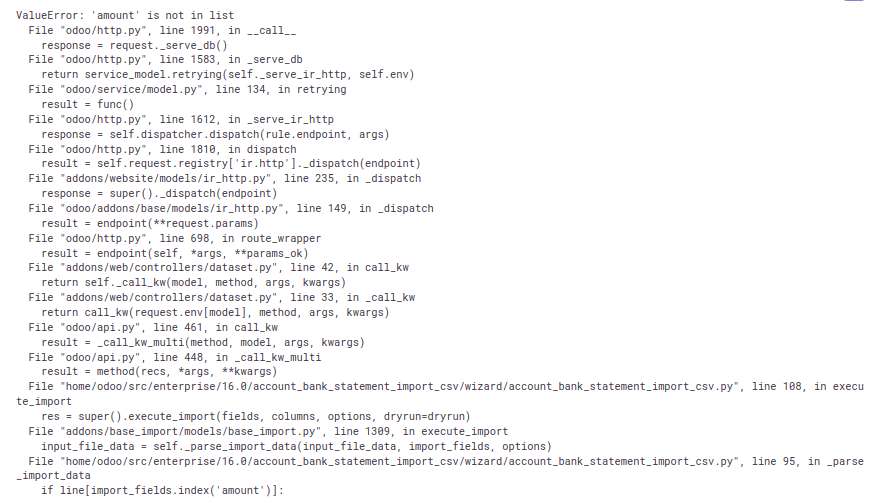 Sentry: -3931578971 Forward-Port-Of: odoo/enterprise#37315
This pull request reverts a previous change that was causing issues with the mail-chatter dropzone feature in the documents module. The change was rolled back to restore the previous, stable behavior. This ensures consistent functionality for users.
Original PR description
This reverts commit fd46e62809544702193e636ec388103eea11f788.

Task-4314619