Friday, November 8, 2024
20 changes · 17.0
Resolved issues and error corrections
The customer contact list can now be ordered alphabetically by name, making it easier for users to find and review customer records. This fixes a limitation where the displayed name could not be used for sorting in the Customers list.
Original PR description
Steps to reproduce:
Go to Accounting > Customers > Customers.

Current behavior:
The contact list cannot be ordered alphabetically by name.

The `Name` field is `display_name`, a computed field in `res.partner` that is not stored, preventing alphabetical sorting.

In future versions (starting from saas-17.2), `display_name` will be replaced by `complete_name`, a stored field containing the full name of the customer, which supports alphabetical ordering.

opw-4262464

Description of the issue/feature this PR addresses:

Current behavior before PR:

Desired behavior after PR is merged:


---
I confirm I have signed the CLA and read the PR guidelines at www.odoo.com/submit-pr
Point of Sale now loads the product tag information needed by some customized loyalty program rules. This helps prevent loyalty promotions from failing or being unavailable when a business uses product tags in its reward conditions.
Original PR description
Some users are using custom domains in their loyalty programs. This include using fields that are not loaded in the PoS. This will fix the specific usecase of one client.

But this could be improved and fields should be loaded dynamically based on the needed fields.

opw-4262960
TDS entries from customer invoices will no longer be incorrectly included in TDS reports. This prevents over-reporting and helps keep Indian withholding tax reports focused on the entries that actually need to be reported.
Original PR description
This PR removes the tags added to the TDS sales taxes. Due to tags on sales taxes, all the TDS entries from customer invoices are reported in TDS reports which does not need to be reported.

task-4314045
This fixes an issue where drag-and-drop actions could be missed in the Documents app because another part of the page stopped the event first. The change ensures upload drop areas respond consistently, reducing user frustration when adding files.
Original PR description
This commit adds the capture parameter to events listeners in useDropzone utility function to make it work correctly in Documents App where the events weren't intercepted because of `stopPropagation()` call in others listeners.

Task-4314619


---
I confirm I have signed the CLA and read the PR guidelines at www.odoo.com/submit-pr
Manufacturing orders now show large or highly precise quantities without overlapping on the completed order screen. This improves readability for users working with products that require many decimal places or very large production quantities.
Original PR description
The issue: When a manufacturing order has a quantity to produce whose decimal accuracy has several digits, in Done status, the fields qty_producing and product_qty overlap.

How to reproduce the issue:
-Enable debug mode
-navigate to Settings > Technical > Database Structure > Decimal Accuracy: Select Stock Weight and set '8' to Digits
-Create a product whose UOM is g, add a weight in Logistics and select manufacturing in Routes -Create a Manufacturing Order, select the product, confirm the Mo, and click on Produce all

opw-4237620

---
I confirm I have signed the CLA and read the PR guidelines at www.odoo.com/submit-pr
Payment receipts created without a customer will no longer incorrectly display the demo customer “Marc Demo.” This prevents misleading customer information on printed receipts and keeps payment records accurate.
Original PR description
Steps to reproduce:
1. Invoicing -> Customers -> Payments
2. Create new entry with no customer
3. Post the entry
4. Print the receipt

`Marc Demo` Appears as customer

task-4182618

Description of the issue/feature this PR addresses:

Current behavior before PR:

Desired behavior after PR is merged:


---
I confirm I have signed the CLA and read the PR guidelines at www.odoo.com/submit-pr
This fix corrects how breadcrumbs are displayed on mobile screens so they align properly depending on whether a back arrow is shown. It improves navigation readability and avoids awkward layout issues for users on smaller devices.
Original PR description
This commit fixes an issue about the breadcrumb having the wrong `flex-direction:` property on mobile devices. This change seems to be linked to the fact that we have different breadcrumbs behaviour…
This commit fixes an issue about the breadcrumb having the wrong `flex-direction:` property on mobile devices. This change seems to be linked to the fact that we have different breadcrumbs behaviour on smaller devices. If there is a possibility to go back, an arrow is displayed. When this arrow is existing, the flex direction should indeed be `row`, but if it doesn't exists, it should remains `column`. This commit addresses this issue by setting a conditional class on the breadcrumb. task-4016743 | 17.0 and higher | This PR | |--------|--------| |  |  | |  |  | --- I confirm I have signed the CLA and read the PR guidelines at www.odoo.com/submit-pr
This update resolves an issue where users were receiving an error when modifying the unit amount field on non-timesheet analytic account lines with large numbers (over 6 digits). The change now correctly validates the unit amount field only for timesheet lines, preventing this error and improving data entry reliability.
Original PR description
Before this commit, when the user alters the unit_amount field of an analytic account line which is not a timesheet and the amount has more than 6 digits then the user will get a user error saying he cannot encode a number with more than 6 digits for the unit amount field.

This commit makes sure the check made on the unit amount is only made when the analytic line altered is a timesheet.

closes odoo/odoo#174964
This update ensures that the 'Extra Quotations' setting in the project management interface takes up the full screen width, regardless of the screen size. Previously, this setting was limited in its display space, which has now been corrected for a more consistent and user-friendly experience.
Original PR description
Before this commit, the `Extra Quotations` setting displayed in the form view of `project.project` model does not take the maximal width available on larger screen.

This commit makes sure the width of that setting takes all available space as the other settings.

task-4294845
This update resolves an issue preventing users from applying sign actions to documents. The fix ensures that users with appropriate access to both the document and the sign process can successfully initiate the signing workflow. Additionally, new testing has been added to prevent duplicate attachment creation.
Original PR description
[FIX] documents{_sign}: fix access error applying sign action How to reproduce: - Install documents_sign and log as admin - In documents, create an action (Workspace: Finance, Create: PDF to Sign) -…
[FIX] documents{_sign}: fix access error applying sign action

How to reproduce:
- Install documents_sign and log as admin
- In documents, create an action (Workspace: Finance, Create: PDF to Sign)
- Then upload a pdf in the workspace Finance
- Log as Marc Demo
- In documents, select the PDF uploaded as admin
- Click on the action created

You get the error: "Sorry, you are not allowed to access this document." while the expected behavior is that users who have access to the document and to Sign should be able to use the action. We solve that in this commit.

We also add a test checking that applying an action to sign a pdf document not owned by the user that perform the action, doesn't duplicate the attachment if the attachment is owned by the document (res_id and res_model pointing to the document; the ownership is transferred to the sign.template created) and duplicate it otherwise.

Technical note: the error was caused by the trick used in the override of sign_template.create in documents_sign which was setting the res_model to False and res_id to 0 for attachment linked to document to allow the super method to link that attachment to the created sign_template (by releasing the ownership of the attachment from the document). But as ir_attachment prevents to link an attachment with res_id = 0 to a record if it is not done by the owner of that
attachment, there was an error. We remove that tricks by defining a method that determine if sign_template can take the ownership of the attachment or not which we override in document_sign and make it return True when the attachment is owned by a document.

Task-4000988

Forward-Port-Of: odoo/enterprise#65206This update resolves an issue where completion certificate reports displayed dates based on the user's local timezone, leading to potential inconsistencies. The fix ensures all dates are recorded in UTC, guaranteeing accurate and reliable reporting regardless of user location. This improves data integrity and simplifies certificate generation.
Original PR description
**Version:**
- 17.0

**Steps to reproduce:**
1. In the Sign app, send a request for a signature.
2. Complete the signature and submit the request.
3. Observe the completion certificate that is generated.


**Issue:**
The log_date in the completion certificate report is displayed based on the user's timezone, causing inconsistencies.


**Solution:**
replaced `t-field` with `t-out` to retain the log_date in UTC, ensuring consistency regardless of the user's time zone.

task-4014378

---
I confirm I have signed the CLA and read the PR guidelines at www.odoo.com/submit-pr
This update corrects a bug in the account reports module where zero values were incorrectly interpreted as True, leading to inaccurate data when performing group-by operations. The fix ensures that zero values are handled correctly, preventing unexpected behavior and improving the reliability of report data. This resolves a potential issue with data discrepancies.
Original PR description
When the value to store into a generic id was zero (which can typically happen when doing a non-relational groupby), None was stored into the generic id instead. On groupby lines, this lead the unfold of that line to behave weirdly and not show the proper results.

The reason was that, in Python, doing 0 == False gives True. So, when doing 0 in (False, None), we ended up with a True result.

Forward-Port-Of: odoo/enterprise#72808
This update corrects a bug in the bank statement import process. The issue occurred when the CSV file didn't include the required 'debit' and 'credit' columns, leading to an error. This fix ensures the import function now handles CSV files with the correct format, preventing import failures.
Original PR description
This issue is coming from importing a CSV File in the 'account.bank.statement.line' model was caught by a sentry. Because if the CSV file does not have two columns, which are 'debit' and 'credit', that time getting error is 'amount' is not in the list. step to reproduce- - Install the Accounting. - Go to Dashboard > click on import statement button of Bank card - Upload the statement ([bank statement](https://drive.google.com/file/d/1s_a3Ym27QKRDh63BwPb-3P4g4kjmbH2l/view?usp=drive_link)) - After, click on Test button - Error will be generated. 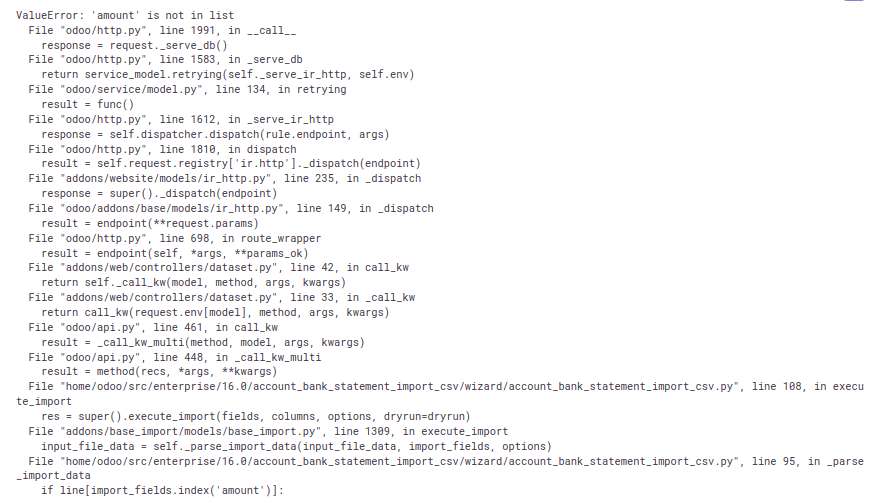 Sentry: -3931578971 Forward-Port-Of: odoo/enterprise#37315
This pull request reverts a previous change that was causing issues with the mail-chatter dropzone feature in the documents module. The change was rolled back to restore the previous, stable behavior. This ensures consistent functionality for users.
Original PR description
This reverts commit fd46e62809544702193e636ec388103eea11f788.

Task-4314619
Documentation and clarification updates
This pull request records a signed contributor agreement for BHanq and clarifies documentation about how individual agreement files should be named. It supports Odoo's contribution compliance process and helps future contributors follow the required file naming convention.
Original PR description
Description of the issue/feature this PR addresses:

Current behavior before PR:

Desired behavior after PR is merged:


---
I confirm I have signed the CLA and read the PR guidelines at www.odoo.com/submit-pr
Miscellaneous changes
Before this commit:
When a user creates multiple scheduled activities and clicks the "Close" button the newly created activities are not updated in the activity view.

After this commit:
When a user creates multiple scheduled activities and clicks the "Close" button, the newly created activities should update and visible in the activity view.

Task-4057815

Forward-Port-Of: odoo/odoo#180304
Original PR description
Before this commit: When a user creates multiple scheduled activities and clicks the "Close" button the newly created activities are not updated in the activity view. After this commit: When a user creates multiple scheduled activities and clicks the "Close" button, the newly created activities should update and visible in the activity view. Task-4057815 Forward-Port-Of: odoo/odoo#180304
Inside `_stock_account_get_anglo_saxon_price_unit` we are retrieving the posted cogs linked to the account.moves. To do that, currently we are retrieving every cogs and then calling `filtered` on the result. This can lead to a huge number of cogs to fetch in large databases. As this filtered call can easily be turned into a search_domain, we replace it by a search call. That way the number of cogs retrieved is way smaller. This has the effect of greatly reducing the memory footprint of the me
Original PR description
Inside `_stock_account_get_anglo_saxon_price_unit` we are retrieving the posted cogs linked to the account.moves. To do that, currently we are retrieving every cogs and then calling `filtered` on the result.

This can lead to a huge number of cogs to fetch in large databases. As this filtered call can easily be turned into a search_domain, we replace it by a search call. That way the number of cogs retrieved is way smaller. This has the effect of greatly reducing the memory footprint of the method, as fetching all the fields on a large number of cogs quickly filled up the memory prior to this commit.

#### Benchmark

In a customer database with 5M account.move.lines, the peak memory consumption of the method when posting
an invoice of 5 000 lines goes `1.5 GB -> 250 MB` according to memray

---
I confirm I have signed the CLA and read the PR guidelines at www.odoo.com/submit-pr

Forward-Port-Of: odoo/odoo#186443
test_duration_expected_when_done was undeterministically failing, if the test ran at specific times, the difference in minutes between button_start and button_finish functions was rounded incorrectly. having time frozen should solve this behavior. build error in question: [Runbot error](https://runbot.odoo.com/web#id=76232&menu_id=424&cids=1&action=573&model=runbot.build.error&view_type=form) --- I confirm I have signed the CLA and read the PR guidelines at www.odoo.com/submit-pr F
Original PR description
test_duration_expected_when_done was undeterministically failing, if the test ran at specific times, the difference in minutes between button_start and button_finish functions was rounded incorrectly. having time frozen should solve this behavior.

build error in question: [Runbot error](https://runbot.odoo.com/web#id=76232&menu_id=424&cids=1&action=573&model=runbot.build.error&view_type=form)


---
I confirm I have signed the CLA and read the PR guidelines at www.odoo.com/submit-pr

Forward-Port-Of: odoo/odoo#185026
Issue: When multiple companies are set up, if you are working in a company with a different l10n_sa configuration and attempt to send an EDI document for another company, the retrieved API URL may be incorrect depending on the other company's configuration. Steps to reproduce: 1. Create Company A and set `l10n_sa_api_mode` to production. 2. Create Company B and set `l10n_sa_api_mode` to sandbox. 3. Navigate to Company B (keeping Company A selected). 4. Create an invoice for Company A or
Original PR description
Issue:
When multiple companies are set up, if you are working in a company with a different l10n_sa configuration and attempt to send an EDI document for another company, the retrieved API URL may be incorrect depending on the other company's configuration.

Steps to reproduce:
1. Create Company A and set `l10n_sa_api_mode` to production.
2. Create Company B and set `l10n_sa_api_mode` to sandbox.
3. Navigate to Company B (keeping Company A selected).
4. Create an invoice for Company A or attempt to send the EDI.

The API URL retrieved will be for Company B, while it should be for Company A.

New behavior:
The API URL is now correctly retrieved using the company linked to the journal. Additionally, we now follow the same access as in lines 440 and 539 to fetch the SA environment.

opw-4253449

Forward-Port-Of: odoo/odoo#186266
In [1], the gauge widget was converted to OWL, but the option to use the widget with a fixed `max_value` was removed. This commit restores that functionality in the OWL framework.

[1]: https://github.com/odoo/odoo/commit/e857e8d7
---
I confirm I have signed the CLA and read the PR guidelines at www.odoo.com/submit-pr

Forward-Port-Of: odoo/odoo#185620
Original PR description
In [1], the gauge widget was converted to OWL, but the option to use the widget with a fixed `max_value` was removed. This commit restores that functionality in the OWL framework. [1]: https://github.com/odoo/odoo/commit/e857e8d7 --- I confirm I have signed the CLA and read the PR guidelines at www.odoo.com/submit-pr Forward-Port-Of: odoo/odoo#185620