Daily updates from Odoo
Wednesday, August 28, 2019
7 changes
Enhancements to existing features
This update improves Mexican accounting setup by adding missing account tags, supporting memorandum accounts, and restoring tax tags for 0% taxes. These changes help produce more accurate chart of account group reports, cash flow reporting, and consistent Mexican tax handling.
Original PR description
### [IMP] l10n_mx: completed tags for the second level in CoA When is used the option to get the CoA reports based on groups, is necessary set the tag in each group, then, is necessary to load the…
### [IMP] l10n_mx: completed tags for the second level in CoA When is used the option to get the CoA reports based on groups, is necessary set the tag in each group, then, is necessary to load the tags for the second level in the SAT catalog for accounts. ### [IMP] l10n_mx: Adding the concept of Memo Account to l10n_mx Adding the concept of Memorandum Account to l10n_mx. So far there are Journal Items that need to created using memo accounts they are be label as Income or Expenses though they neither one or the other. ### [IMP] account: Adding Accounting Tags for Indirect Method Cash Flow By Adding this Tags in the account core module then it could be easier to create reports that render a Cash Flow with Indirect Method. The following set of Tags tries to convey the structure of a report as the one that could be generated by using the guidelines provided in the IFRS Taxonomy Ilustrated for a Cash Flow - Indirect Method 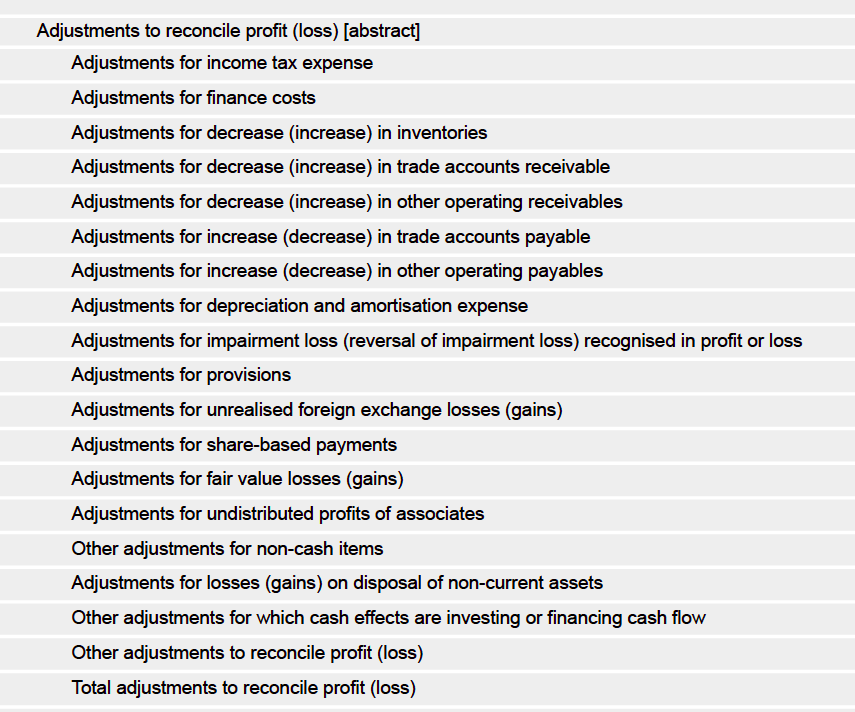 ### [FIX] l10n_mx: Revert change that remove tax data The tags in the tax are created for the Mexican taxes (IVA, ISR & IEPS) This was assigned in the taxes on 3efefd2, but in the commit 333c22e was removed from the tax 0%. Now was returned that data, to be consistent with the tax for 16%
The sample contact records now use more varied addresses so the map view displays spread-out pins instead of a tight cluster. This helps users better understand and demonstrate the map feature with clearer demo data.
Original PR description
**Task-**
https://www.odoo.com/web#id=2041896&action=327&model=project.task&view_type=form&menu_id=4720
**Pad-**
https://pad.odoo.com/p/r.dd968bcb5c093681e3466cfb03078d46

**Description:**
updated demo data


--
I confirm I have signed the CLA and read the PR guidelines at www.odoo.com/submit-pr
Employees entering expenses can still select the relevant sales order, but they will no longer see a “search more” option that could lead to an access error. This makes the expense workflow smoother while keeping sales order details appropriately limited for users without sales access.
Original PR description
Description of the issue/feature this PR addresses:

Task: https://www.odoo.com/web?#id=2057714&action=327&model=project.task&view_type=form&menu_id=4720
Pad: https://pad.odoo.com/p/r.9310a183a0eee9e7c8156bd635d9f2d0

Current behavior before PR:

Desired behavior after PR is merged:


--
I confirm I have signed the CLA and read the PR guidelines at www.odoo.com/submit-pr
The grid view now works better on mobile by supporting a single-day view and making today the default. This makes timesheet entry and review easier on smaller screens while preserving the existing week and month experience on desktop.
Original PR description
In mobile, grid view is not responsive because of the "week/month" range.

This task change some :
* Adapt the view to be more responsive in mobile
* Show today as default day
* Add a day range
* Added test cases for grid view in day range format

Task ID: 4720
Grid views now work better on mobile by showing one day at a time, starting with today, and adding a Today filter for easier navigation. This makes timesheet and grid data easier to read and use on smaller screens while hiding controls that do not fit mobile workflows.
Original PR description
The grid view is unusable in mobile because of the "week" format.
The purpose of this task is to:
  - To make GridView mobile friendly
  - Show today as default day
  - Add today filter in the control panel
  - Shows days wise data on mobile view
  - Hide range buttons in mobile view
  - Added test cases for grid mobile view

Task https://www.odoo.com/web#id=32285&action=333&active_id=131&model=project.task&view_type=form&menu_id=4720
Pad: https://pad.odoo.com/p/r.2a5bd6ff6ded7d8803afb3fcc3936ed1
Field Service demo data now includes a ready-to-use default worksheet template, making it easier to demonstrate and evaluate worksheet workflows without starting from scratch. Demo map data was also adjusted so the map view better showcases real location distribution instead of clustered pins.
Original PR description
Task : https://www.odoo.com/web#id=2041896&action=327&model=project.task&view_type=form&menu_id=4720
Pad : https://pad.odoo.com/p/openerp-project.task-56WF3WR9AI
Sales teams can again update quotation taxes directly with TaxCloud before sending documents to customers. The restored button appears near the shipping action, making it easier to ensure quotations include accurate taxes.
Original PR description
The action "Update taxes with Taxcloud" has been removed from master by
https://github.com/odoo/enterprise/commit/97ffa06a7d97dc7c7bf3cb1fb81f281e849804d8

Need to restore this action as the Quotations commonly require taxes to
be included when sent to Customers.

Thus, add button 'Update taxes with Taxcloud' nearer to 'Add Shipping'.

Task: https://www.odoo.com/web?#id=2056980&action=327&model=project.task&view_type=form&menu_id=4720
Pad: https://pad.odoo.com/p/r.0748fc795812e94ffb8e05c87034b277